Runtime: Issue with .NET Standard 2.0 and .NET Framework 4.6.1 for System.Net.Http assembly
Project targeting: .NET Framework 4.6.1.
Required assembly: System.Net.Http 4.0.0.0
But always when I build solution there is reference on System.Net.Http 4.2.0.0 assembly.
As I can understand, default location of such assemblies like System.Net.Http 4.2.0.0 is MSBuild tools folders. MSBuild looks in theese folders and get required assemblies from there. It's ok...
BUT
I also have nuget package which targeted on .NET Standart (2.0) library. And project with .NET Framework 4.6.1 version depends on .NET Standart nuget package. We know that .NET Standart includes System.Net.Http 4.0.0.0.
So finally i've got two System.Net.Http assemblies in my output: 4.0.0.0 and 4.2.0.0 (definately, one of them, the second (Why??)). This causes unexpected behaviour and errors in some cases (in runtime).
Now... I tried to solve that problem.
Try 1: First of all - use binding redirect:
  <dependentAssembly>
    <assemblyIdentity name="System.Net.Http" publicKeyToken="b03f5f7f11d50a3a" culture="neutral" />
    <bindingRedirect oldVersion="0.0.0.0-4.2.0.0" newVersion="4.0.0.0" />
  </dependentAssembly>
Didn't help. Build just ignored binding redirect and placed System.Net.Http 4.2.0.0 version in output.
Try 2: Next step: hardcode reference on System.Net.Http 4.0.0.0 version here: C:\Program Files (x86)\Reference Assemblies\Microsoft\Framework\.NETFramework\v4.6.1\System.Net.Http.dll
Wait... What? In-code errors???:

Ok... Let's try to delete "default" library from visual studio/msbuild "GAC": C:\Program Files (x86)\Microsoft Visual Studio\2017\Enterprise\MSBuild\Microsoft\Microsoft.NET.Build.Extensions\net461\lib\System.Net.Http.dll
Wow! It works! Now lets look in build output... Wow! Correct 4.0.0.0 version instead 4.2.0.0.
BUT x2
Whad does this means? I need to remove that file on EVERY machine for build project correctly?
Nowadays our company's test environment includes 4 machines for building... And I can't be sure that another visual studio update won't add removed file again...
_Originally posted by @PicOLinO in https://github.com/dotnet/corefx/issues/22781#issuecomment-484530862_
 picolino
All 23 comments
@ericstj @karelz @joperezr
 davidsh
on 19 Apr 2019
davidsh
on 19 Apr 2019
Hello @PicOLinO .
First of all, let me try to explain a bit what should happen behind the scenes here. Your 4.6.1 project does have a reference to System.Net.Http 4.0.0.0, but when you also added a dependency on a NuGet package that is .NET Standard-based, our MSBuild logic 'upgraded' your dependency of System.Net.Http to 4.2.0.0. This is by design, since we know that very likely this NuGet package or its dependencies will need to load higher version of System.Net.Http which would result in runtime failures. For that reason, we will bump up the dependency of System.Net.Http to ensure you will be able to work fine at runtime, and we also copy this new version of System.Net.Http to your bin folder so that it ships with your app. More importantly, we do one more thing behind the scenes, which is we add a binding redirect that forces this new version of System.Net.Http to always be loaded by your app. This last piece, will only happen if you have AutoBindingRedirects turned on in your project, which is the default for most projects. By taking these 3 steps, we ensure that your app will work just fine at runtime when it tries to load the .NET Standard dependency.
Now, about the things you tried, on your first try you added a binding redirect that would force a downgrade from 4.2.0.0 version back down to 4.0.0.0. Even though you saw that we still copy the new version into your bin folder, at runtime, your app was actually not loading this new version and instead working with the old 4.0.0.0 version. This might be fine if, and only if, the .NET Standard-based assembly won't ever use any features that are present in System.Net.Http 4.2.0.0 but not in 4.0.0.0 which is unlikely. For this reason, it is not something we recommend, as it may or may not work, whereas if we add the binding redirect to force 4.2.0.0 version, then we will ensure that it will always work. And about your try number 2, this should really NEVER BE DONE. You should really never modify, delete or add any assemblies located inside that MSSBuild directory in Program files. We added all of these files for a very specific reason which is ensure that your app will build and run in any machine that has 4.6.1 or higher, and by removing files from there you are setting yourself up for problems. As you realized correctly, the workaround that "seems" to be working will not be repeatable on other machines unless you also go and delete files on their msbuild installation.
As a conclusion, it may very well seem that after your second try things are working fine, but that is only because you haven't hit any codepath yet that requires the new System.Net.Http version, so I would strongly recommend that you: 1) repair your Visual Studio installation in order to re-add that file back. 2) Remove all manual binding redirects that were added to your app.config. 3) Update your VS to the latest version released which will have the latest logic in order to perform those 3 steps I mentioned at the beginning. 4) If you don't have auto binding redirects enabled, make sure to turn that on. (More info on how to do that here)
After doing those steps, your app should be working correctly, and you can be sure that it will work on any machine that has 4.6.1 or higher installed. If you hit any issues when trying to build after following those steps, please don't hesitate to ping us on this issue and we will gladly help you make your project build successfully and produce the right output.
 joperezr
on 19 Apr 2019
joperezr
on 19 Apr 2019
I'm closing this issue as I flagged it as a question and I believe that is answered with my reply, but @PicOLinO feel free to reopen if you think necessary or if you need any additional assistance on this.
joperezr
on 19 Apr 2019
@joperezr thank you very much for that detailed and clear answer!
But problem is little bit complex than I described above.
Let me explain full context of that issue:
When I remove all mentions of System.Net.Http 4.2.0.0 in my base project and force reference on 4.0.0.0 version it works correctly on all machines. But if I use 4.2.0.0 version there is strange behaviour detected on some of machines.
One of common issues with that is "Method not found" exception. For example:
Our base application consists of several projects. One of them depends on our NuGet-package targeted on .NET Standard 2.0.3. This NuGet-package has only two dependencies: netstandard.dll and Microsoft.NETCore.Platforms (1.1.0). This NuGet-package has HttpClientExtensions class that consists of one extension-method on HttpClient class (from System.Net.Http).
Base project use this NuGet package with this extension-method for authorization.
If base project has hardcoded reference (try 2 described above) on 4.0.0.0 all works correctly.
If base project has default 4.2.0.0 reference or binding redirects - "Method not found" exception throws on first "using -NuGet-package name-".
Let's look in netstandart.dll and it's references:
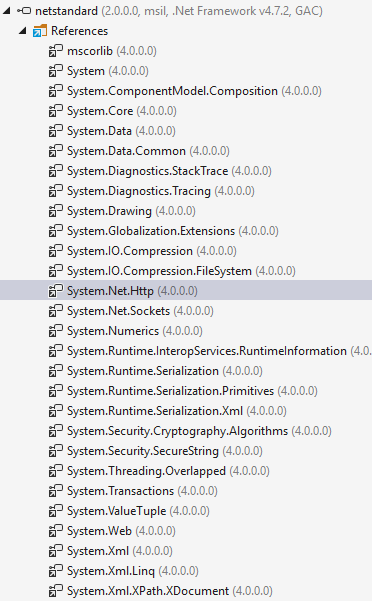
Here we see that netstandard.dll required System.Net.Http 4.0.0.0 version.
That's different with that you said above. Maybe targeted .NET Framework 4.7.2 is reason but netstandart 2.0 is only one in GAC. In this version within.
So I think that is the root of my problem. It seems like conflict between "default" 4.2.0.0 version and built-in in netstandart.dll 4.0.0.0 version.
Note that: This error dissapearing when .NET Framework version 4.6.2 or higher install manually on problem machine.
I guess this fixing automatically in 4.6.2+ versions of .NET Framework according this link

But I want to handle this errors by code/project configurations.
_P.S. Sorry for my bad english_
picolino
on 22 Apr 2019
That's different with that you said above. Maybe targeted .NET Framework 4.7.2 is reason but netstandart 2.0 is only one in GAC. In this version within.
Yes, this is true for libraries targeting netstandard 2.0, but its not the case for libraries targeting netstandard1.6 which are more common. Netstandard1.6 depends on higher versions of the assemblies because netstandard.dll doesn't exist in that world. The reason why that is the case is a bit complex, but the thing to keep in mind is that when we inject these new versions to your project, we are doing it in order to make sure that we prepare for the worst case scenario and make sure that your app runs even in those cases.
If base project has default 4.2.0.0 reference or binding redirects - "Method not found" exception throws on first "using -NuGet-package name-".
That is odd. Do you see a System.Net.Http.dll 4.2.0.0 version in your bin folder? If so, how are you deploying the app to wherever you are seeing this issue? Do you see a binding redirect forcing version 4.2.0.0 on the bin folder apps config?
But I want to handle this errors by code/project configurations.
That is exactly our intention as well. Do you mind sharing a binlog of your solution so I can get more info on how are you building your projects? In order to produce a msbuild.binlog, simply run msbuild yourSolution.sln /t:rebuild /bl
joperezr
on 22 Apr 2019
Thank youy @joperezr for interest shown about my problem.
Do you see a System.Net.Http.dll 4.2.0.0 version in your bin folder?
Yes I see it.
how are you deploying the app to wherever you are seeing this issue?
For testing purposes - ctrl+c and ctrl+v bin folder content (Standard debug configuration)
Do you see a binding redirect forcing version 4.2.0.0 on the bin folder apps config?
No. Binding redirects stays unchanged.
A little bit additional information:
I decided to check fuslog on "good" machine and "bad" machine.
On "good" machines, where problem "method not found" is not appears, fuslog has just one request for System.Net.Http assembly 4.0.0.0 version from GAC. (Calling assembly: (Unknown), maybe this is important)
On "bad" machines, where problem is appears, fuslog has two requests for System.Net.Http assemblies 4.0.0.0 version from GAC and 4.2.0.0 version from my base application folder (Calling assembly 4.0.0.0: (Unknown), 4.2.0.0: .exe of my base application).
So I can't understand why second call is appears on "bad" machines...
Unfortunately, I can't attach binlog file as attachment because it's size more than 10MB. So I uploaded this file to GoogleDrive. You can download it by this link
It's not small, so if you need for more information for accurate problem detection, ping me
Hope, this will help for solving this odd behaviour.
picolino
on 24 Apr 2019
Ok, so not having the binding redirect generated seems to be the problem. You seem to have a lot of executable projects in your solution, do you mind telling me exactly which one are you getting this error with? That way we can fix that one and then do the same fix for the rest of your executables. In General, from what I can see, It may help if in the projects that are executable you add:
<PropertyGroup>
  <DependsOnNETStandard>true</DependsOnNETStandard>
  <AutoGenerateBindingRedirects>true</AutoGenerateBindingRedirects>
</PropertyGroup>
And also to make sure that your App.config for that project doesn't have a binding redirect. These changes will force the build to generate a new binding redirect to 4.2.0 version of System.Net.Http on the config file that gets dropped into your bin output folder, which should fix the issue.
joperezr
on 24 Apr 2019
Problem appears in Avicom.Adf assembly. That assembly runs by Avicom.ProjectMate assembly (it is executable WPF project).
Ok, i'll try your advise soon and ping you about results.
picolino
on 24 Apr 2019
Unfortunately, @joperezr, your solution doesn't helped. Rebuilding project after adding new config sections not affected on calling System.Net.Http assembly version 4.0.0.0.
picolino
on 25 Apr 2019
Mmm that is wierd, one other thing you could try is to manually add the binding redirect in your app.config like:
  <dependentAssembly>
    <assemblyIdentity name="System.Net.Http" publicKeyToken="b03f5f7f11d50a3a" culture="neutral" />
    <bindingRedirect oldVersion="0.0.0.0-4.2.0.0" newVersion="4.2.0.0" />
  </dependentAssembly>
If that doesn't work, the next step for debugging this would be to start fuslogvw in the machines where it doesn't work, and try to see if you find who is trying to load the 4.0.0 version and why is it not respecting the app.config.
joperezr
on 25 Apr 2019
@joperezr got it!
Manually adding binding redirect to only executable project on 4.2.0.0 version of System.Net.Http assembly removes the problem.
And fuslogvw now writes normal logs. I've got that System.Net.Http 4.0.0.0 version is calling by Microsoft.ApplicationInsights assembly. But because binding redirect this assembly now redirecting to 4.2.0.0 version of System.Net.Http.
So, solution is founded. But there are few problems come out.
Firstly let's imagine that I want to cleanup my binding redirects in all projects in solution. My actions will be like:
- Cleaning all binding redirects in all *.config files
- Using command "Get-Project -All | Add-BindingRedirect" or "update-package -reinstall" for automaticly re-add required binding redirects.
- Expecting that now my project is cleaned by unused dependencies and all solution is works properly.
With manually added binding redirect I can't do such things without getting weird errors in the end application.
Secondly, this solution works great with one WPF application. But what about web-applications?
I have 10+ web projects so do I need to add this binding redirect manually in each of all executable web applications?
picolino
on 26 Apr 2019
In theory, if you migrate your projects to PackageReference and remove all binding redirects from your config files, the binding redirects should be automatically generated for you for library and executable projects. The only types of projects where we don't generate the redirects automatically is for web projects, where we just throw a warning that you have to double click in order for us to add them for you.
joperezr
on 27 Apr 2019
Thank you, @joperezr, for your help.
Following your recommendation i'll try to migrate to PackageReference in my solution but this process is long-time so I'll post comment here if this process will be succeeded or failed.
picolino
on 29 Apr 2019
@joperezr When you say statements like this:
This is by design, since we know that _very likely_ this NuGet package or its dependencies will need to load higher version of System.Net.Http which would result in runtime failures.
Can you point me to the algorithm that does this _probabilistic inference_? Also, as a broader question, why is my build engine doing any sort of _probabilistic inference_? I really don't want the word "likely" in my code or build tools.
 jzabroski
on 6 Nov 2019
jzabroski
on 6 Nov 2019
@picolino Why the thumbs down?
jzabroski
on 6 Nov 2019
@jzabroski Because out of topic discussion, understanding of _probabilistic inference_ doesn't helps with solving core problem.
Also, @joperezr mention that:
This is by design
So we need to find out any 100% working workarounds with this, not investigate the consequences of "by design" decisions.
picolino
on 6 Nov 2019
How do you _know_ what a workaround that works 100% of the time is, without understanding what the algorithm is?
I'm a great engineer, and I have this deep, sinking feeling things have been made complex to cover up other complex, bad design decisions.
Look, I can go buy a book on Amazon.com to teach me _any programming language on the planet_ and I can learn that language in a week. I _cannot for the life of me tell you how the hell .NET Package inferencing and assembly binding and framework targeting works_. I've tried. I bet if you tried to interview engineers based on this, you couldn't hire a single one. It's worse than programming in JavaScript.
jzabroski
on 6 Nov 2019
Here is why I think we are where we are.
In order to have a .NET Core Common Project System csproj file buildable by either the .NET Framework MSBuild or the .NET Core MSBuild, you can't resort to making the _entire_ dependency inference algorithm be written in C#. Instead, you write it in MSBuild targets, because by introducing XML you give yourself a level of indirection tha allows both tools to speak the same language.
_This is a complete mistake we will live with for the next 8 years_.
What you really want is not a probabilistic inference engine that "very likely" picks the best version, but a Recommender system that tells you things like "System.ComponentModel.Annotations lied to you about its version number and they packaged it wrong, so we're going to tell you to do a bindingRedirect to fix this mess." Except succinctly. The succinct part is what java programmers do all day every day with OSGi bundles. And it works.
Just my 2 cents.
jzabroski
on 6 Nov 2019
How do you know what a workaround that works 100% of the time is, without understanding what the algorithm is?
If this statistically worked in 99.9% of cases.
I fully share your pain about solutions in contemporary programs (not only .NET framework/Core, honestly), but I think this decisions was created many-many years ago and so our attempts to change this _algorithms_ right now is not realistic idea.
As evidence, nowadays we have so many bug-reports in MSBuild/TFS (AzureDevOps)/Powershell with 5+ years history. And here is no guarantee that situation will change in the future.
So... Let's just solve this minor problem
picolino
on 6 Nov 2019
How about this thought process:
Rather than coming to Microsoft and begging for help fixing assembly loading issues, we come up with a reasonable approach to loading assemblies going forward?
I don't think this is rocket science. And I feel quite confident the wisdom of the masses can build "IntelliCode for redirects" better than any inference engine written in MSBuild.
There are a few basic principles you just have to gaurantee:
- Confluent
- Terminating
- Bottom values (undefined statements) bubble up as errors
jzabroski
on 6 Nov 2019
I just want to inject my inferences. I don't want to tool them using service locators.
It's a giant design mistake. The service locator is the last step.
jzabroski
on 6 Nov 2019
Hi,
We are having the same issue and went through the overall discussion...
here is how we have -
Project A(Web API) target framework is .net 4.6.1 and uses System.Net.Http dll which is 4.1.1.3(nuget package - version="4.3.4"). It refers another project B which also has reference to System.Net.Http dll - 4.2.0.0 , comes from C:Program Files (x86)Microsoft Visual Studio2017ProfessionalMSBuildMicrosoftMicrosoft.NET.Build.Extensionsnet461libSystem.Net.Http.dll
We have the below entry in web.config for project A-
 <dependentAssembly>
      <assemblyIdentity name="System.Net.Http" publicKeyToken="b03f5f7f11d50a3a"
             culture="neutral" />
       <bindingRedirect oldVersion="0.0.0.0-4.1.1.3" newVersion="4.1.1.3" />
 </dependentAssembly>
Project A uses custom built .netstandard 2.0 library and we get the same error "Missing Method" while executing API.
I have resolved this issue by having ref to System.Net.Http for Project A from MSBuild and removing dependent assembly section from web.config.
I was expecting that it should have solved using web.config. FYI I have also verified that bin folder of project A contains System.Net.Http - 4.1.1.3.
 punitsinghi
on 9 Jan 2020
punitsinghi
on 9 Jan 2020
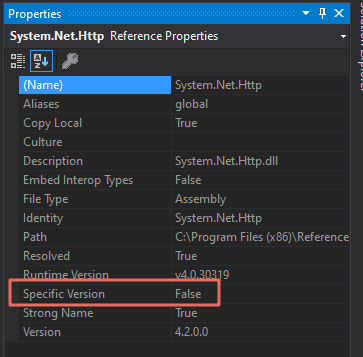
I tried out various solutions (removing the dependentAssembly OR specifying the binding redirect as well). None of them worked.
However, the only solution which worked for me was to explicitly set Specific Version for System.Net.Http (or whatever DLL giving you version issues) to False from Visual Studio.
 umartopia
on 27 Oct 2020
umartopia
on 27 Oct 2020
Related issues
 omajid
·
3Comments
omajid
·
3Comments
 nalywa
·
3Comments
nalywa
·
3Comments
 jkotas
·
3Comments
jkotas
·
3Comments
 aggieben
·
3Comments
aggieben
·
3Comments
 bencz
·
3Comments
bencz
·
3Comments