Runtime: X509Certificate2 with RSA private key is stored without its private key on Windows
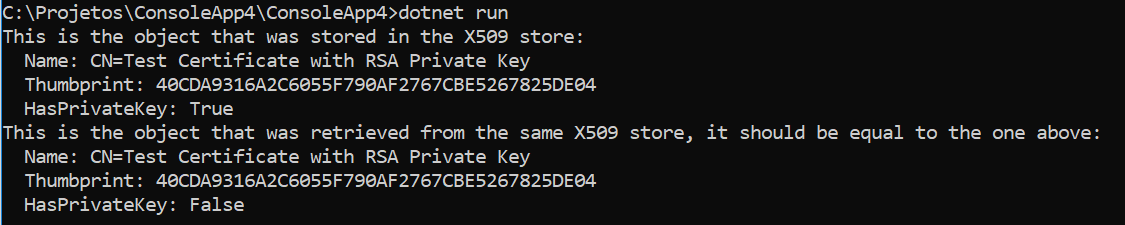
When we associate a private key of type RSA to a X509Certificate2, by using X509Certificate2.CopyWithPrivateKey(RSA rsa), the returned certificate has a private key, but when added in a X509Store, it is stored without its private key.
This behavior only happens when the private key is of type RSA and not one of its derived types such as RSACng or RSACryptoServiceProvider. By using one of those two, the certificate is stored with its private key and you can normally retrieve it.
This also only happens on Windows, working with the RSA base class does not cause this problem under Unix.
Steps to reproduce:
Associate a RSA private key to an existing X509Certificate2 certificate and store it using X509Store. Open the Certificate Manager and check that the certificate was stored without a private key.
You can also simply programatically retrieve the certificate and see that it does not have a private key.
Project ready to reproduce:
https://github.com/mikaelmello/test-certificate-pk
Clone the repository and run the project under Windows and Linux and you will see different behaviors:
- Windows: The retrieved certificate will not have a private key
- Linux: The retrieved certificate will have a private key
Screenshots from Windows:

Correct behavior on Linux:

 mikaelmello
All 8 comments
After doing CopyWithPrivateKey you need to do something like
C#
using (X509Certificate2 persistable = new X509Certificate2(certWithKey.Export(X509ContentType.Pfx), "", X509KeyStorageFlags.PersistKeySet))
{
    // add persistable to the desired store
}
CopyWithPrivateKey definitely doesn't promote ephemeral keys to persisted, otherwise it would permanently leak keys.
This is really just a function of how the Windows cert store and key store function, and adding things to persisted stores is (unfortunately) one of the places where you need to know some details about the underlying platform.
 bartonjs
on 2 Apr 2019
bartonjs
on 2 Apr 2019
Hm. The issue is because I believe in this case, the underlying copied key is an ephemeral CNG key, and ephemeral keys don't get persisted. Since the key isn't persisted to a KSP, the private key doesn't make it in and the store can't find it.
I'm not sure if this is a bug or just unintuitive behavior.
From your sample repo (which was great BTW) this can be reproduced a little bit differently:
public static X509Certificate2 CreateSelfSignedCertificate(string commonName = "localhost") {
var cngParams = new CngKeyCreationParameters { ExportPolicy = CngExportPolicies.AllowPlaintextExport };
using var cngKey = CngKey.Create(CngAlgorithm.Rsa, null, cngParams);
using var key = new RSACng(cngKey);
var cert = IssueSelfSignedCertificate(key, commonName);
var certWithKey = StoreCertificate(cert, key);
return certWithKey;
}
Give the CNG key a name however, thus making it not ephemeral anymore, and then it starts working:
using var cngKey = CngKey.Create(CngAlgorithm.Rsa, Guid.NewGuid().ToString(), cngParams);
It seems like there should be a CopyPrivateKeyAndPersist.
/cc @bartonjs
 vcsjones
on 2 Apr 2019
vcsjones
on 2 Apr 2019
It seems like there should be a CopyPrivateKeyAndPersist.
It's really only applicable to Windows, and there's a question of whether you want the persisted key exportable or not; or to persist it to the machine store or user store. And what to do if it's given an already persisted key.
So it feels to me like it's better that the caller understand what's going on, since this doesn't seem like something that a lot of callers would ever use.
bartonjs
on 2 Apr 2019
Thank you all for the explanations, everything is much clearer now.
So there isn't a way to associate and persist a RSA private key with a X509Certificate2 on Windows? I accidentally skimmed through the first reply while on mobile
My current workaround is to check the platform on runtime and use a named Cng if it's Windows.
Edit: Would it be a better practice to persist keys and certificates separately?
mikaelmello
on 2 Apr 2019
So there isn't a way to associate and persist a RSA private key with a X509Certificate2 on Windows?
Jeremy's first post has a suitable work around - just roundtrip the certificate through a PFX by re-importing the PFX with a persisted key set. You would change StoreCertificate to something like this:
private static X509Certificate2 StoreCertificate(X509Certificate2 cert, RSA rsa)
{
using (var certWithKey = cert.CopyWithPrivateKey(rsa))
{
var persistable = new X509Certificate2(certWithKey.Export(X509ContentType.Pfx), "", X509KeyStorageFlags.PersistKeySet);
// Add the certificate with associated key to the operating system key store
var store = new X509Store(DefaultStoreName, DefaultStoreLocation, OpenFlags.ReadWrite);
try
{
store.Add(persistable);
}
finally
{
store.Close();
}
return persistable;
}
}
@vcsjones Thanks! I hadn't noticed the first reply, my bad.
Should I close the issue then? Everything seems to be expected behavior.
mikaelmello
on 2 Apr 2019
Well, you want
```C#
X509KeyStorageFlags flags = X509KeyStorageFlags.PersistKeySet;
if (DefaultStoreLocation == StoreLocation.LocalMachine)
{
flags |= X509KeyStorageFlags.MachineKeySet;
}
else
{
// Required if your input key was already a persisted machine key
flags |= X509KeyStorageFlags.UserKeySet;
}
var persistable = new X509Certificate2(certWithKey.Export(X509ContentType.Pfx), "", flags);
...
```
bartonjs
on 2 Apr 2019
Should I close the issue then? Everything seems to be expected behavior.
Sounds good. (Or I'll just hit the button :smile:)
bartonjs
on 2 Apr 2019
Related issues
 matty-hall
·
3Comments
matty-hall
·
3Comments
 jchannon
·
3Comments
jchannon
·
3Comments
 yahorsi
·
3Comments
yahorsi
·
3Comments
 aggieben
·
3Comments
aggieben
·
3Comments
 iCodeWebApps
·
3Comments
iCodeWebApps
·
3Comments
Most helpful comment
After doing CopyWithPrivateKey you need to do something like
C#
using (X509Certificate2 persistable = new X509Certificate2(certWithKey.Export(X509ContentType.Pfx), "", X509KeyStorageFlags.PersistKeySet))
{
    // add persistable to the desired store
}
CopyWithPrivateKey definitely doesn't promote ephemeral keys to persisted, otherwise it would permanently leak keys.
This is really just a function of how the Windows cert store and key store function, and adding things to persisted stores is (unfortunately) one of the places where you need to know some details about the underlying platform.