Runtime: Build: System.Net.Http uap build missing S.S.C.OpenSsl
From the build log,
E:\Programming\csharp7\corefx\.dotnet\sdk\2.1.401\Microsoft.Common.CurrentVersion.targets(2110,5):
warning MSB3245: Could not resolve this reference. Could not locate the assembly "System.Security.Cryptography.OpenSsl".
Check to make sure the assembly exists on disk. If this reference is required by your code, you may get compilation errors. [E:\Programming\csharp7\corefx\src\System.Net.Http\src\System.Net.Http.csproj]
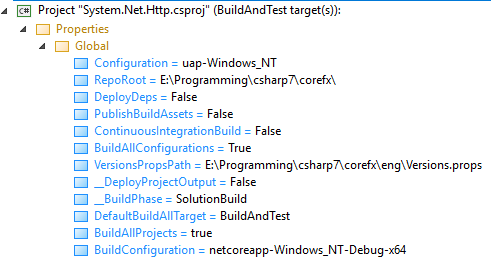
The build config looks ok, it's trying to include this for uap netcoreapp and netcoreappaot so it's likely that the OpenSSL binary isn't being produced for uap.
 Wraith2
All 20 comments
@bartonjs
 davidsh
on 23 Oct 2018
davidsh
on 23 Oct 2018
Why would we use OpenSSL on non-Linux/Mac?
 karelz
on 23 Oct 2018
karelz
on 23 Oct 2018
What command was used to build, from what part of the tree?
 bartonjs
on 23 Oct 2018
bartonjs
on 23 Oct 2018
build from the root of corefx, config is -allconfigurations
Wraith2
on 23 Oct 2018
config options from the build log:
Wraith2
on 24 Oct 2018
Weird. build.cmd -allConfigurations succeeded for me just now with a clean build as of commit 27db480b1d57f05fde422d3208d7351f3e6af369. The S.S.C.OpenSsl package is referenced during the UWP build (but would fall out due to not being utilized), but it's no different than any other ref/ project.
Are you getting this build error deterministically?
bartonjs
on 24 Oct 2018
I jut ran a clean -all, synced to master and build -allconfigurations, same error. So yes, deterministic.
I can send you the binlog file if that will help.
Wraith2
on 24 Oct 2018
@Wraith2 can you try it on a new clean VM? I wonder if it is related to your specific machine setup/configuration.
karelz
on 24 Oct 2018
Sure, i'm not busy..
Replicated on a VM built from scratch. Binlog
Wraith2
on 24 Oct 2018
Thanks! Just for completeness, did you do any configuration on the machine?
Or was literally just these 3 steps?
- Install git
- Clone CoreFX
- build
karelz
on 24 Oct 2018
created new windows 10 pro build from an 1803 iso. installed git for windows, installed visual studio 2017 community (per minimum requirements). installed 3.0 preview tooling form the nightlies installer, cloned my master (which I keep clean and synced to dotnet/master). ran build -allconfigurations waited a long time and checked the output.
Wraith2
on 24 Oct 2018
Thanks, that's helpful context! @bartonjs will you have time to take a look at the log?
karelz
on 24 Oct 2018
I don't even know what to do with a binlog file. Since this is just reference resolution it seems like a more general build/build-ordering problem, so maybe @safern would be better at tracking it down than I would.
bartonjs
on 24 Oct 2018
@joperezr
davidsh
on 24 Oct 2018
Taking a look at the binlog.
 safern
on 24 Oct 2018
safern
on 24 Oct 2018
You use Msbuild Log Viewer to open it and then you can search around the tree. It's a bit slow since it's a large file but the search function and tree display are more helpful than the flat log file. This isn't my choice of logging btw, this is how it's configured by default.
Wraith2
on 24 Oct 2018
Thanks, Santi
bartonjs
on 24 Oct 2018
The warning is mainly because in this change: https://github.com/dotnet/corefx/commit/c4d179a9cb721973ebe1d11f2d253f606ef4b4d5#diff-a20718ea48d37317df38c7aa94656489L5 we stopped building OpenSsl reference assembly for netstandard (which includes uap) which is correct because we're now flowing that ref assembly into the package through harvesting (from the previous stable package in nuget) because that API is already frozen. However in the search paths that we give to ResolveAssemblyReferences we only give it the built uap refs from the current build. With that said, System.Net.Http reference to OpenSsl is incorrect and should only be included for netcoreapp https://github.com/dotnet/corefx/blob/a29543930f33168c28039ee82190de07c9cffb6d/src/System.Net.Http/src/System.Net.Http.csproj#L628 since it doesn't even uses anything OpenSsl related in uap.
safern
on 24 Oct 2018
BTW @Wraith2 if you want to have a faster, lighter binlog, in the all configurations leg, once you have a repro you can build an individual project for all configurations and produce a binlog file -- something like:
dotnet msbuild src\System.Net.Http\src\System.Net.Http.csproj /t:RebuildAll /p:BuildAllConfigurations=true /bl
/bl is the magic trick to produce a binlog, the default name will be msbuild.binlog and will be created in the folder where you ran the command from.
safern
on 24 Oct 2018
Thanks @safern for your help here!
karelz
on 25 Oct 2018
Related issues
 chunseoklee
·
3Comments
chunseoklee
·
3Comments
 omariom
·
3Comments
omariom
·
3Comments
 omajid
·
3Comments
omajid
·
3Comments
 Timovzl
·
3Comments
Timovzl
·
3Comments
 v0l
·
3Comments
v0l
·
3Comments
Most helpful comment
BTW @Wraith2 if you want to have a faster, lighter binlog, in the all configurations leg, once you have a repro you can build an individual project for all configurations and produce a binlog file -- something like:
dotnet msbuild src\System.Net.Http\src\System.Net.Http.csproj /t:RebuildAll /p:BuildAllConfigurations=true /bl/bl is the magic trick to produce a binlog, the default name will be
msbuild.binlogand will be created in the folder where you ran the command from.