Runtime: Color should implement FromHsl methods
System.Drawing.Color currently has FromArgb, FromKnownColor, and FromName but lacks a way to Create a new color with only a changed Hue, Saturation, or Lumosity.
Rationale and Usage
This is certainly a nice-to-have, but users have made some classes to try to bypass this limitation from here, here, and possibly lots of other places I currently have not found yet. Most if not all of them containing really bad bugs and possible loss of color from the hsl values being wrong on the input. My implementation for this will ensure this will not happen as I tested it locally myself with satisfaction.
For example, without these changes, the above would be the only way to do this and can lead to many problems as people can find the wrong implementation design for something like this because it is very buggy. Because of this the Color class should learn this conversion so it would become the better and standard way of converting these values to a Color. Plus it does not require casting that can get people into trouble if not careful.
With these changes you'd no longer have to do that, just simply do stuff like this to recolor a whole image:
var targethue = System.Drawing.Color.Purple.GetHue();
// original image is a bitmap but keep it unchanged for "undo all" reasons.
var image = new System.Drawing.Bitmap(origImage.Width, origImage.Height);
for (var y = 0; y < image.Height; y++)
{
    for (var x = 0; x < image.Width; x++)
    {
        var pixelCol = origImage.GetPixel(x, y);
        // keep the alpha component, just recolor everything on the hue.
        image.SetPixel(x, y, System.Drawing.Color.FromHsl(
            targethue, pixelCol.GetSaturation(), pixelCol.GetBrightness(), pixelCol.A));
    }
}
Proposed API
https://github.com/AraHaan/corefx/commit/67a6c2c02b2317372c890a0ace8bb6718952f6e9
https://github.com/AraHaan/corefx/commit/b09cc8436b0a1d6e44b6f9eccb7c5390f537bb4d
changes (if above link stops working or changes):
public readonly struct Color : IEquatable<Color>
{
        /// <summary>
        /// Creates a new <see cref="Color"/> from the input HSL values.
        /// </summary>
        /// <param name="hue">The hue to use for the new color.</param>
        /// <param name="saturation">The Saturation to use for the new color.</param>
        /// <param name="lumosity">The Lumosity to use for the new color.</param>
        /// <returns>A new <see cref="Color"/> with the Color that the HSL values represent.</returns>
        public static Color FromHsl(float hue, float saturation, float lumosity);

        /// <summary>
        /// Creates a new <see cref="Color"/> from the input HSL values.
        /// </summary>
        /// <param name="hue">The hue to use for the new color.</param>
        /// <param name="saturation">The Saturation for the new color.</param>
        /// <param name="lumosity">The Lumosity of the new color.</param>
        /// <param name="alpha">The alpha  value of the new color between 0 and 255.</param>
        /// <returns>A new <see cref="Color"/> with the Color that the HSL values represent.</returns>
        public static Color FromHsl(float hue, float saturation, float lumosity, int alpha);

}
Edits:
- Fixed typo of
FromArgb. - Fixed off by one issue in the code from issues in the function's math.
- Remove use of
Vector3. - Add link to commit that fixes the first one.
- Safern: Remove implementation details, keep headers.
cc: @tannergooding
 AraHaan
All 25 comments
Cc. @safern
 tannergooding
on 17 Aug 2018
tannergooding
on 17 Aug 2018
A project of mine that can benefit from this being in the Color class: https://github.com/AraHaan/TestImageZooming
AraHaan
on 17 Aug 2018
Are the results of translation from HSL to RGB exactly defined? It is hard for me to tell whether the implementation above is equivalent to the various other implementations I see, Wikipedia, and the one in the CSS spec. In other words, would we need to make a choice about the details of the algorithm.
 danmosemsft
on 17 Aug 2018
danmosemsft
on 17 Aug 2018
According to my test Forms application above it changes the hues of the colors just fine, so it looks like it is exactly defined. One way to tell is try to take a Hue of 220, sat of 240, and lum of 169 and see if it is == to Color.HotPink for example. If it is it should be right. Can test it with all of the default predefined colors if needed locally. In fact let me test that now and return the results.
Edit:
In a Test netcoreapp2.1 I did this:
using System;
using System.Drawing;

namespace FromHslTest
{
    class Program
    {
        static void TestHsl()
        {
            var colorsArray = Enum.GetValues(typeof(KnownColor));
            var allColors = new KnownColor[colorsArray.Length];
            Array.Copy(colorsArray, allColors, colorsArray.Length);
            foreach (var knowncolor in allColors)
            {
                var testcol = Color.FromArgb(Color.FromKnownColor(knowncolor).ToArgb());
                var fromHslCol = FromHsl(testcol.GetHue(), testcol.GetSaturation(), testcol.GetBrightness());
                Console.WriteLine($"Debug: Original: {testcol.ToString()}");
                Console.WriteLine($"Debug: FromHsl: {fromHslCol.ToString()}");
                if (!testcol.ToString().Equals(fromHslCol.ToString()))
                {
                    throw new Exception("FromHsl is not correct.");
                }
            }
        }

        static void Main(string[] args)
        {
            try
            {
                TestHsl();
                Console.WriteLine("FromHsl is correct.");
            }
            catch (Exception ex)
            {
                Console.WriteLine(ex.Message);
            }
        }
    }
}
And the Console output was:
Debug: Original: Color [A=255, R=180, G=180, B=180]
Debug: FromHsl: Color [A=255, R=180, G=180, B=180]
Debug: Original: Color [A=255, R=153, G=180, B=209]
Debug: FromHsl: Color [A=255, R=153, G=180, B=209]
Debug: Original: Color [A=255, R=0, G=0, B=0]
Debug: FromHsl: Color [A=255, R=0, G=0, B=0]
Debug: Original: Color [A=255, R=171, G=171, B=171]
Debug: FromHsl: Color [A=255, R=171, G=171, B=171]
Debug: Original: Color [A=255, R=240, G=240, B=240]
Debug: FromHsl: Color [A=255, R=240, G=240, B=240]
Debug: Original: Color [A=255, R=160, G=160, B=160]
Debug: FromHsl: Color [A=255, R=160, G=160, B=160]
Debug: Original: Color [A=255, R=105, G=105, B=105]
Debug: FromHsl: Color [A=255, R=105, G=105, B=105]
Debug: Original: Color [A=255, R=227, G=227, B=227]
Debug: FromHsl: Color [A=255, R=227, G=227, B=227]
Debug: Original: Color [A=255, R=255, G=255, B=255]
Debug: FromHsl: Color [A=255, R=255, G=255, B=255]
Debug: Original: Color [A=255, R=0, G=0, B=0]
Debug: FromHsl: Color [A=255, R=0, G=0, B=0]
Debug: Original: Color [A=255, R=0, G=0, B=0]
Debug: FromHsl: Color [A=255, R=0, G=0, B=0]
Debug: Original: Color [A=255, R=109, G=109, B=109]
Debug: FromHsl: Color [A=255, R=109, G=109, B=109]
Debug: Original: Color [A=255, R=0, G=120, B=215]
Debug: FromHsl: Color [A=255, R=0, G=120, B=215]
Debug: Original: Color [A=255, R=255, G=255, B=255]
Debug: FromHsl: Color [A=255, R=255, G=255, B=255]
Debug: Original: Color [A=255, R=0, G=102, B=204]
Debug: FromHsl: Color [A=255, R=0, G=102, B=204]
Debug: Original: Color [A=255, R=244, G=247, B=252]
Debug: FromHsl: Color [A=255, R=244, G=247, B=251]
FromHsl is not correct.
So it looks like there is a problem with the blue component sometimes. I am going to debug this difference on the blue component and find out why it is off by 1.
Edit: remove implementation.
AraHaan
on 17 Aug 2018
Alright fixed this, however this adds using System; and using System.Numerics; for Vector3 and MathF.
I looked up the actual equation as I realized what the method was doing was incorrect and so then when I linked it to someone who knows about reading the equations I tested code that did end up fixing this.
https://en.wikipedia.org/wiki/HSL_and_HSV#General_approach
Anyways edited the code above. Although the project needs to reference System.Numerics.Vectors.
Edit: It also seems my original code passes my tests if using Math.Round on the r, g, and b values.
Oh and Results of the Fixed method:
..............................................................................................................................................................................
The dots means pass.
AraHaan
on 18 Aug 2018
@safern I think the API is ready for review, all my tests pass and my test program works the same as it did before (after removing the hue divide on the call to FromHsl).
Also @danmosemsft after my changes, I did realized the math was correct, just on the end I forgot to round. Also if and when this is ported to the .NET Framework it seems both MathF in Core and Math works the same on this, so it is by preference between the frameworks to use one of them. I actually wonder why .NET Framework just does not have MathF at least be a alias for Math though.
So yeah with the round it should fit the specs.
AraHaan
on 19 Aug 2018
Just FYI, the kind of image transformation you do in your sample case can be done much, much more efficiently with a ColorMatrix in System.Drawing. Here's a guide for something similar: https://docs.microsoft.com/en-us/dotnet/framework/winforms/advanced/how-to-rotate-colors
That's not to say a FromHsl() function might not be useful anyway, but my understanding is the Color struct was brought into netcore solely for backwards compatibility and that there wouldn't be any additions to it. It's not well designed for a general purpose color representation as is, inlcuding the fact that GetBrightness() is misnamed: https://github.com/dotnet/corefx/issues/17976
 saucecontrol
on 20 Aug 2018
saucecontrol
on 20 Aug 2018
While ColorMatrix is a thing What about if you only want to recolor the image based upon the hue of a color selected by the ColorPicker dialog control in windows forms for example? Having a recolor based upon a fixed color the user wants is better than the stupid hue/saturation/lightness sliders in photoshop and many other tools for example as the user has no full control over the shade they get (a lot of colors look like the color they want but is not necessarily that color).
Also what if the user only has just hsl values or Cmyk values? Does that even support those too?
AraHaan
on 20 Aug 2018
Those are very different scenarios. For a ColorPicker, being able to round trip a color through HSL is certainly a common and useful task. That would be better done in a new, better-designed general purpose Color struct, though, as discussed here: https://github.com/dotnet/corefx/issues/2315
The same goes for CMYK, which can't be represented with System.Drawing.Color but might be able to be covered by a new Color implementation.
For bulk operations operating on every pixel of an image, GetPixel() and SetPixel() and their round trip through Color are exceedingly expensive. If you must use System.Drawing for such a thing (and I wouldn't), it would be more common to use LockBits() so that the operations can be optimized. In those cases, Color would never be used because it's inefficient.
As for your specific example of re-tinting an image, that can be done with ColorMatrix by starting with a neutral greyscale matrix and skewing in the direction of a certain color, as shown here. You might use HSL to select the color that you build your matrix from, but there's no reason to round trip through HSL for every pixel.
saucecontrol
on 20 Aug 2018
Why float instead of int, to match the existing convention?
HSL should be re presentable as 0-255 values as well.
tannergooding
on 22 Aug 2018
Well that was because of the fact that GetHue(), GetSaturation(), and GetBrightness() all return floats, if they returned ints they would probably just simply use int then.
 CatGirlsAreLife
on 22 Aug 2018
CatGirlsAreLife
on 22 Aug 2018
Also now that I realized it, on my function above, it seems I am not blending the source Lumosity image with the Lumosity of the selected color. I think I should do if selected color Lumosity is < source image Lumosity then subtract else add them so they would look right?
AraHaan
on 22 Aug 2018
Yeah, changing the hue without allowing the saturation and luminosity to change with it will result in some colors going out of gamut (not all HSL [0-1] combinations can be represented in RGB in the same range [0-1]), which will result in clipping to either black or white.
When tinting an image, most users would expect the brightness to stay the same, so if the hue is to be a fixed value, the saturation has to be able to move to compensate. Essentially, you'd take the luminosity from the original image, take the hue from the user's selected value, and then calculate the saturation of that hue that produces the correct luminosity for each pixel.
A ColorMatrix that starts from greyscale (luminosity) and shifts the channel weights to introduce the hue accomplishes the same thing much more easily and efficiently.
saucecontrol
on 22 Aug 2018
@safern thoughts on taking this to api review and shape?
danmosemsft
on 21 Sep 2018
I think is valuable to having this APIs, so I just edited the proposal to not have implementation details because that would be discussed in the PR if the API is approved. Marking as ready for review.
 safern
on 21 Sep 2018
safern
on 21 Sep 2018
So, is there an idea for a review date for this issue?
AraHaan
on 5 Dec 2018
How would these proposed methods handle out-of-gamut colors? All RGB colors can be expressed in HSL, but the inverse is not true. Would that result in clipping or an exception?
saucecontrol
on 5 Dec 2018
I am not sure.
AraHaan
on 5 Dec 2018
So, is there an idea for a review date for this issue?
It, like many other issues, are still on the backlog. Issues that are directly targeting 3.0 are generally prioritized above other features (which are just targeting some "future" release).
tannergooding
on 5 Dec 2018
- It sounds like HSL is different from HSB.
- Given that your sample code uses
GetBrightness()as the input toFromHsl, is it possible that you really meantFromHsb()?
 terrajobst
on 1 Oct 2019
terrajobst
on 1 Oct 2019
Yes, HSL and HSB/HSV are different.
I would suggest following the CSS standard on this for maximum compatibility with existing tools and experiences. CSS uses HSL, and the standard specifies hue as an integer angle in degrees (by default) with values in the range [0, 360] (although values outside that range can be just taken modulo 360). Saturation and lightness are percentages. The standard also defines a conversion algorithm which we could base our implementation on.
 poke
on 2 Oct 2019
poke
on 2 Oct 2019
@terrajobst You're correct, HSL and HSB (HSV) are different color models.
The interesting thing in System.Drawing (pointed out above) is that GetBrightness() is actually a misnomer and should be GetLightness() since within the method it uses the known conversion equation for the HSL "bi-hexcone" model, where lightness is defined as the average of the largest and smallest color components.
A FromHSL() method would not be advantageous by my reckoning since, as @saucecontrol rightly points out not all HSL values can be correctly mapped to RGB equivalents due to a loss of fraction. The HSL values determined from RGB via the existing methods also only represent that particular RGB space and no other.
I must note, brightness conversion using a ColorMatrix will also not yield the same result since the standard method simply adjusts the slope of the linear function across the three RGB color components.
Color conversion, in my humble opinion, should be left to dedicated libraries with colorspace structs specifically designed for conversion. I've done a lot of work in this area in recent years and it might be better using the implementation there or perhaps contributing to other colorspace conversion libraries.
 JimBobSquarePants
on 2 Oct 2019
JimBobSquarePants
on 2 Oct 2019
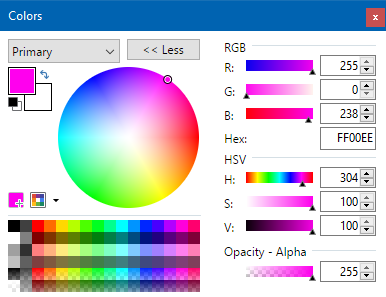
I second @JimBobSquarePants' comments. Paint.NET has had a LOT of issues over the years with its color picker due to its support for both RGB and HSV. If more of this is added to System.Drawing.Color there _will_ be a lot of tiny bugs that will trickle in over the years, and fixing many of them will break apps relying on whatever buggy behavior is already there. This should probably be a separate library with its own independent versioning, support, and testing. At least until it's battle-tested.
Also, don't take my statement of "there will be a lot of tiny bugs" as a statement of lack of faith. I honestly don't think it's even possible to do this "bug-free" due to the fact that RGB and HSV (or HSL or HSB or HS-whatever) are not 1:1 mappings against each other. An easy-to-use API doesn't really communicate that fact.
Paint.NET internally uses separate structs for RGB and HSV color spaces, with conversion functions to move between them. This is likely a better programming model than employing methods on the RGB struct that accept loose floats, and whose only output can be a valid color value (e.g. a struct can have a boolean property that specifies conversion to RGB will be unfaithful).
 rickbrew
on 2 Oct 2019
rickbrew
on 2 Oct 2019
I've also got a large amount of experience with color and generally agree with @JimBobSquarePants that dealing with colorspace conversion/transformation is something that should have a library built around it.
If we were designing the Color class today I might advocate to not have any HSL operations on it, especially as HSL's promise is a bit of a lie. However, the existing GetHue / etc. APIs are not going away, so I am not opposed (lets say "neutral") to having the reverse operation to transform back into sRGB. I can't speak to how common this method is needed, however anecdotally I can say I've wanted it at least a handful of times over the years in WinForms/WPF development.
 scalablecory
on 2 Oct 2019
scalablecory
on 2 Oct 2019
Alright, given that several experts have raised a lot of concerns I'm confident that we won't be adding these methods then.
terrajobst
on 2 Oct 2019
Related issues
 jamesqo
·
3Comments
jamesqo
·
3Comments
 sahithreddyk
·
3Comments
sahithreddyk
·
3Comments
 bencz
·
3Comments
bencz
·
3Comments
 Timovzl
·
3Comments
Timovzl
·
3Comments
 btecu
·
3Comments
btecu
·
3Comments
Most helpful comment
Alright, given that several experts have raised a lot of concerns I'm confident that we won't be adding these methods then.