Runtime: SSL connection could not be etablished
@RyanFarrah commented on Sat Jun 16 2018
System
OS : Ubuntu 16.04 x86_64
.Net Core : 2.1.3
Problem
I meet an error that says
SSL connection could not be etablished, see inner exception
Details
It occurs several times and in mulitple context in my project.
I follow this tutorial : https://docs.microsoft.com/fr-fr/dotnet/csharp/tutorials/console-webapiclient.
It occurs when i tried to put
   <ItemGroup>
      <PackageReference Include="System.Runtime.Serialization.Json" Version="4.3.0" />
   </ItemGroup>
in my csproj.
When I install certain packages with dotnet CLI.
When I write this code :
```c#
private static async Task ProcessRepositories()
{
client.DefaultRequestHeaders.Accept.Clear();
client.DefaultRequestHeaders.Accept.Add(
new MediaTypeWithQualityHeaderValue("application/vnd.github.v3+json"));
client.DefaultRequestHeaders.Add("User-Agent", ".NET Foundation Repository Reporter");
        var stringTask = client.GetStringAsync("https://api.github.com/orgs/dotnet/repos");
    }
No errors.
But
```c#
        private static async Task ProcessRepositories()
        {
            client.DefaultRequestHeaders.Accept.Clear();
            client.DefaultRequestHeaders.Accept.Add(
                new MediaTypeWithQualityHeaderValue("application/vnd.github.v3+json"));
            client.DefaultRequestHeaders.Add("User-Agent", ".NET Foundation Repository Reporter");

            var stringTask = client.GetStringAsync("https://api.github.com/orgs/dotnet/repos");

            var msg = await stringTask;
            Console.Write(msg);
        }
throws me the error.
Backup solution and related issues
The solution was to downgrade to .Net Core 2.0.0 for me.
I have not tested in different machines but the problem is the same with these issues :
- https://github.com/Tyrrrz/YoutubeExplode/issues?utf8=%E2%9C%93&q=is%3Aissue+is%3Aclosed+ssl
- https://github.com/dotnet/core/issues/1668
@leecow commented on Wed Jun 20 2018
cc @muratg
If it's the same problem, there may be an issue with the SocketsHttpsHandler in that sample. Have a look at the workarounds detailed in https://blogs.msdn.microsoft.com/dotnet/2018/04/11/announcing-net-core-2-1-preview-2/.
@leecow commented on Fri Jun 22 2018
@RyanFarrah - let me know if setting the environment variable resolves the error for you.
export DOTNET_SYSTEM_NET_HTTP_USESOCKETSHTTPHANDLER=0
@mattnewell commented on Sat Jun 23 2018
@leecow - I'm trying to work up a repro, but I thought I would share that we are also seeing a similar issue in the field that is resolved by setting DOTNET_SYSTEM_NET_HTTP_USESOCKETSHTTPHANDLER=false.
In our case we're on Windows 2016, and SDK 2.1.300. Exception snippet:
System.Net.Http.HttpRequestException: The SSL connection could not be established, see inner exception.
---> System.Security.Authentication.AuthenticationException: Authentication failed, see inner exception.
---> System.ComponentModel.Win32Exception: The client and server cannot communicate, because they do not possess a common algorithm
   --- End of inner exception stack trace ---
   at System.Net.Security.SslState.StartSendAuthResetSignal(ProtocolToken message, AsyncProtocolRequest asyncRequest, ExceptionDispatchInfo exception)
   at System.Net.Security.SslState.CheckCompletionBeforeNextReceive(ProtocolToken message, AsyncProtocolRequest asyncRequest)
   at System.Net.Security.SslState.StartSendBlob(Byte[] incoming, Int32 count, AsyncProtocolRequest asyncRequest)
   at System.Net.Security.SslState.ProcessReceivedBlob(Byte[] buffer, Int32 count, AsyncProtocolRequest asyncRequest)
   at System.Net.Security.SslState.StartReadFrame(Byte[] buffer, Int32 readBytes, AsyncProtocolRequest asyncRequest)
   at System.Net.Security.SslState.PartialFrameCallback(AsyncProtocolRequest asyncRequest)
In this case, we're trying to connect to a host with a very limited set of cipher suites. Maybe a factor? I'll dig in ...
@leecow commented on Mon Jun 25 2018
@muratg
@muratg commented on Mon Jun 25 2018
@Tratcher @halter73 could you guys take a look?
@mattnewell commented on Mon Jun 25 2018
FYI -- I did spend a number of hours tying to repro this. I can force the exception 100% of the time, but only in an expected scenario. Consider a host that supports only TLS 1.0. If I set the following registry value, the exception above is thrown. Duh.
[HKEY_LOCAL_MACHINE\SYSTEM\CurrentControlSet\Control\SecurityProviders\SCHANNEL\Protocols\TLS 1.0\Client]
"Enabled"=dword:00000000
If I then set DOTNET_SYSTEM_NET_HTTP_USESOCKETSHTTPHANDLER=false, I get a different inner exception, given the different underlying implementation, but again this is expected.
I'm not sure I'm getting full information from our customer in the field. I know that they are editing these types of registry keys, unfortunately. There may be something here, but I can't find the smoking gun. Apologies.
@halter73 commented on Mon Jun 25 2018
I don't think I've seen this particular issue before. @mattnewell what kind of server are you trying to connect to? Is it running ASP.NET Core 2.1.x?
@mattnewell commented on Mon Jun 25 2018
The _client_ is Core 2.1.300.
The server is some "random" host on the internet, for all intents. For my particular test I was using NGINX configured to only support TLS 1.0.
@Tratcher commented on Mon Jun 25 2018
The No Errors example never awaits stringTask, so it would never observe an error that was thrown asynchronously.
What's the full exception and stack trace?
If it's broken by adding a single dependency then it's likely that your dependency graph is trying to pull in two conflicting versions of something.
@mickaelistria commented on Tue Jul 10 2018
I get the same issue with dotnet core 2.1.300, extracted from the zip, on Fedora 28.
The issue manifests itself simply with a dotnet restore.
$ dotnet restore
  Restoring packages for /home/mistria/junit-workspace/csprojWithError_org.eclipse.acute.tests.TestLSPIntegration_1531236189153/ConsoleDotNet.csproj...
/home/mistria/apps/dotnet-sdk-2.1.300-linux-x64/sdk/2.1.300/NuGet.targets(114,5): error : Unable to load the service index for source https://api.nuget.org/v3/index.json. [/home/mistria/junit-workspace/csprojWithError_org.eclipse.acute.tests.TestLSPIntegration_1531236189153/ConsoleDotNet.csproj]
/home/mistria/apps/dotnet-sdk-2.1.300-linux-x64/sdk/2.1.300/NuGet.targets(114,5): error :   The SSL connection could not be established, see inner exception. [/home/mistria/junit-workspace/csprojWithError_org.eclipse.acute.tests.TestLSPIntegration_1531236189153/ConsoleDotNet.csproj]
/home/mistria/apps/dotnet-sdk-2.1.300-linux-x64/sdk/2.1.300/NuGet.targets(114,5): error :   error:2006D002:BIO routines:BIO_new_file:system lib [/home/mistria/junit-workspace/csprojWithError_org.eclipse.acute.tests.TestLSPIntegration_1531236189153/ConsoleDotNet.csproj]
If I set DOTNET_SYSTEM_NET_HTTP_USESOCKETSHTTPHANDLER=false, things work better
$ DOTNET_SYSTEM_NET_HTTP_USESOCKETSHTTPHANDLER=false dotnet restore
  Restoring packages for /home/mistria/junit-workspace/csprojWithError_org.eclipse.acute.tests.TestLSPIntegration_1531236189153/ConsoleDotNet.csproj...
  Installing Microsoft.NETCore.DotNetAppHost 2.0.0.
  Installing Microsoft.NETCore.DotNetHostResolver 2.0.0.
  Installing NETStandard.Library 2.0.0.
  Installing Microsoft.NETCore.DotNetHostPolicy 2.0.0.
  Installing Microsoft.NETCore.App 2.0.0.
  Generating MSBuild file /home/mistria/junit-workspace/csprojWithError_org.eclipse.acute.tests.TestLSPIntegration_1531236189153/obj/ConsoleDotNet.csproj.nuget.g.props.
  Generating MSBuild file /home/mistria/junit-workspace/csprojWithError_org.eclipse.acute.tests.TestLSPIntegration_1531236189153/obj/ConsoleDotNet.csproj.nuget.g.targets.
  Restore completed in 4.54 sec for /home/mistria/junit-workspace/csprojWithError_org.eclipse.acute.tests.TestLSPIntegration_1531236189153/ConsoleDotNet.csproj.
@Eilon commented on Wed Jul 11 2018
@Petermarcu this issue appears to be related to errors in the client, not the server (the server isn't ASP.NET Core).
 Petermarcu
All 25 comments
There seem to be 3 different reports mixed up here:
- @RyanFarrah had problem with sample app on .NET Core 2.1, but no response since 6/16 (4 weeks). If it still repros, I would be VERY interested in following up more.
- @mattnewell has similar symptoms in the field (with weird registry settings on client machine). No repro. It would be interesting to collect Fiddler/Wireshark traces - is that possible? The issue may be related to our problems with proxies.
- @mickaelistria seems to hit proxy problems - likely dupe of dotnet/runtime#26461 (can you please collect Fiddler/Wireshark traces to confirm? - see https://github.com/dotnet/corefx/issues/30354#issuecomment-401876757)
 karelz
on 13 Jul 2018
karelz
on 13 Jul 2018
Yes, I created the previous issue but don't found time (or too lazy) to reproduce the steps indicated. Though, i'm still here.
 RyanFarrah67
on 13 Jul 2018
RyanFarrah67
on 13 Jul 2018
Hey, @karelz, thanks for following up. Unfortunately, it's not possible to gather that info at this time. If I ever see an opportunity, I'll take it, but don't wait on me. At this point, I'm not 100% sure that my report is legit.
 mattnewell
on 13 Jul 2018
mattnewell
on 13 Jul 2018
@SlowLogicBoy, would you be able to help in regards to reproducing the issue @RyanFarrah described? I remember you were having it too.
Also relevant issues here: https://github.com/Tyrrrz/YoutubeExplode/issues/123 https://github.com/Tyrrrz/YoutubeExplode/issues/122 https://github.com/Tyrrrz/YoutubeExplode/issues/109
 Tyrrrz
on 17 Jul 2018
Tyrrrz
on 17 Jul 2018
It was on dotnet sdk 2.1 pre-release, I don't remember which version exactly, I no longer have that Linux install to reproduce this. It happens on our windows server 2012 build machines randomly too (TFS build agents), but it has outdated dotnet sdk version: 2.1.300 (latest at this point in time is 2.1.302 afaik), and I can't reproduce this regularly, unfortunately.
Edit:
this is as much as I can give you from our build machine logs:
Microsoft (R) Build Engine version 15.7.179.6572 for .NET Core
...
2018-07-11T06:26:21.9535981Z ##[error]Unhandled Exception: System.Net.WebException: The request was aborted: Could not create SSL/TLS secure channel.
   at System.Net.HttpWebRequest.GetResponse()
 SlowLogicBoy
on 18 Jul 2018
SlowLogicBoy
on 18 Jul 2018
I hit this error message (SSL connection could not be etablished, see inner exception) moving code from .net framework to .net core. For me, it was some test code that used the service point manager global to override the server certificate validation callback to return true. Since sockets http handler doesn't use that, the errors started popping up since the server cert doesn't match the endpoint in the URL. User error, but I suppose enabling the new sockets http handler by default breaks compatibility with how it worked previously.
 timmydo
on 23 Jul 2018
timmydo
on 23 Jul 2018
how is going on ?
 zaozaoniao
on 3 Sep 2018
zaozaoniao
on 3 Sep 2018
I'm also running into this. It randomly throws The SSL connection could not be established and can't reproduce it.
 btecu
on 19 Sep 2018
btecu
on 19 Sep 2018
@timmydo that does not seem to be caused by HttpSocketsHandler, but rather by general .NET Core implementation of HttpWebRequest - we do not fully implement the API surface, we expect developers to move to HttpClient.
@Julian89757 there is nothing actionable here unfortunately, so it is not going well.
I will close this issue as there is mix of reports, none of them lead to repro or collected traces which would help us with root-cause.
If someone has something actionable (ability to repro or collect packet capture traces), please file a new bug and tag me. Thanks!
karelz
on 19 Sep 2018
@btecu do you hit the problem with your app, or with nuget client?
@Julian89757 did you hit the same issue in your app or in nuget client?
We're seeing similar problems on .NET Core 2.1 with nuget client, so any leads are appreciated. Thanks!
karelz
on 3 Oct 2018
I saw it in our application. The application processes a high number of requests and a small number fail with that error. I wasn't sure where to even start looking.
btecu
on 3 Oct 2018
@btecu how often does it happen to your app? (ideally frequency of failure per number of requests or at least per time unit)
karelz
on 3 Oct 2018
The application handles 10000s of requests a day, yet only very few (less than five) a day fail.
I have this one that happens consistently between one and three times a day:
System.Net.Http.HttpRequestException: The SSL connection could not be established, see inner exception. ---> System.Security.Authentication.AuthenticationException: The remote certificate is invalid according to the validation procedure.
   at System.Runtime.ExceptionServices.ExceptionDispatchInfo.Throw()
   at System.Net.Security.SslState.StartSendAuthResetSignal(ProtocolToken message, AsyncProtocolRequest asyncRequest, ExceptionDispatchInfo exception)
   at System.Net.Security.SslState.CheckCompletionBeforeNextReceive(ProtocolToken message, AsyncProtocolRequest asyncRequest)
   at System.Net.Security.SslState.StartSendBlob(byte[] incoming, int count, AsyncProtocolRequest asyncRequest)
   at System.Net.Security.SslState.ProcessReceivedBlob(byte[] buffer, int count, AsyncProtocolRequest asyncRequest)
   at System.Net.Security.SslState.StartReadFrame(byte[] buffer, int readBytes, AsyncProtocolRequest asyncRequest)
   at System.Net.Security.SslState.StartReceiveBlob(byte[] buffer, AsyncProtocolRequest asyncRequest)
   at System.Net.Security.SslState.CheckCompletionBeforeNextReceive(ProtocolToken message, AsyncProtocolRequest asyncRequest)
   at System.Net.Security.SslState.StartSendBlob(byte[] incoming, int count, AsyncProtocolRequest asyncRequest)
   at System.Net.Security.SslState.ProcessReceivedBlob(byte[] buffer, int count, AsyncProtocolRequest asyncRequest)
   at System.Net.Security.SslState.StartReadFrame(byte[] buffer, int readBytes, AsyncProtocolRequest asyncRequest)
   at System.Net.Security.SslState.PartialFrameCallback(AsyncProtocolRequest asyncRequest)
   at System.Runtime.ExceptionServices.ExceptionDispatchInfo.Throw()
   at System.Net.Security.SslState.ThrowIfExceptional()
   at System.Net.Security.SslState.InternalEndProcessAuthentication(LazyAsyncResult lazyResult)
   at System.Net.Security.SslState.EndProcessAuthentication(IAsyncResult result)
   at System.Net.Security.SslStream.EndAuthenticateAsClient(IAsyncResult asyncResult)
   at System.Net.Security.SslStream+<>c.<AuthenticateAsClientAsync>b__47_1(IAsyncResult iar)
   at System.Threading.Tasks.TaskFactory<TResult>.FromAsyncCoreLogic(IAsyncResult iar, Func<T, TResult> endFunction, Action<T> endAction, Task<TResult> promise, bool requiresSynchronization)
   at System.Runtime.ExceptionServices.ExceptionDispatchInfo.Throw()
   at System.Runtime.CompilerServices.TaskAwaiter.HandleNonSuccessAndDebuggerNotification(Task task)
   at System.Net.Http.ConnectHelper+<EstablishSslConnectionAsyncCore>d__5.MoveNext()
I also have this one that happens a few times a day too so it might be related to the previous one:
System.Net.Http.HttpRequestException: A connection attempt failed because the connected party did not properly respond after a period of time, or established connection failed because connected host has failed to respond ---> System.Net.Sockets.SocketException: A connection attempt failed because the connected party did not properly respond after a period of time, or established connection failed because connected host has failed to respond
   at System.Runtime.ExceptionServices.ExceptionDispatchInfo.Throw()
   at System.Runtime.CompilerServices.TaskAwaiter.HandleNonSuccessAndDebuggerNotification(Task task)
   at System.Net.Http.ConnectHelper+<ConnectAsync>d__2.MoveNext()
   --- End of inner exception stack trace ---
   at System.Net.Http.ConnectHelper+<ConnectAsync>d__2.MoveNext()
   at System.Runtime.ExceptionServices.ExceptionDispatchInfo.Throw()
   at System.Runtime.CompilerServices.TaskAwaiter.HandleNonSuccessAndDebuggerNotification(Task task)
   at System.Threading.Tasks.ValueTask<TResult>.get_Result()
   at System.Net.Http.HttpConnectionPool+<CreateConnectionAsync>d__42.MoveNext()
   at System.Runtime.ExceptionServices.ExceptionDispatchInfo.Throw()
   at System.Runtime.CompilerServices.TaskAwaiter.HandleNonSuccessAndDebuggerNotification(Task task)
   at System.Threading.Tasks.ValueTask<TResult>.get_Result()
   at System.Net.Http.HttpConnectionPool+<WaitForCreatedConnectionAsync>d__47.MoveNext()
   at System.Runtime.ExceptionServices.ExceptionDispatchInfo.Throw()
   at System.Runtime.CompilerServices.TaskAwaiter.HandleNonSuccessAndDebuggerNotification(Task task)
   at System.Threading.Tasks.ValueTask<TResult>.get_Result()
   at System.Net.Http.HttpConnectionPool+<SendWithRetryAsync>d__39.MoveNext()
   at System.Runtime.ExceptionServices.ExceptionDispatchInfo.Throw()
   at System.Runtime.CompilerServices.TaskAwaiter.HandleNonSuccessAndDebuggerNotification(Task task)
   at System.Runtime.CompilerServices.ConfiguredTaskAwaitable<TResult>+ConfiguredTaskAwaiter.GetResult()
   at System.Net.Http.RedirectHandler+<SendAsync>d__4.MoveNext()
   at System.Runtime.ExceptionServices.ExceptionDispatchInfo.Throw()
   at System.Runtime.CompilerServices.TaskAwaiter.HandleNonSuccessAndDebuggerNotification(Task task)
   at System.Runtime.CompilerServices.ConfiguredTaskAwaitable<TResult>+ConfiguredTaskAwaiter.GetResult()
   at System.Net.Http.HttpClient+<FinishSendAsyncBuffered>d__62.MoveNext()
   at System.Runtime.ExceptionServices.ExceptionDispatchInfo.Throw()
   at System.Runtime.CompilerServices.TaskAwaiter.HandleNonSuccessAndDebuggerNotification(Task task)
@btecu Any solution to your problem? I have a simillar problem.
 caiogranero
on 12 Aug 2019
caiogranero
on 12 Aug 2019
@caiogranero No, I haven't been able to investigate more. At this point it seems that the issue is in .NET Core itself.
btecu
on 12 Aug 2019
@btecu and how do you handle this problem?
caiogranero
on 13 Aug 2019
We are facing exactly the same issue as described by @btecu on windows 2006 and dotnet core 2.2.402.
We are trying to communicate between different APIs through HttpClient & facing this error randomly (approx 2-5 every day with avg. 10000 calls).
Setting DOTNET_SYSTEM_NET_HTTP_USESOCKETSHTTPHANDLER=false doesn't solve the issue.
@karelz any help will be highly appreciated.
 vishal868
on 6 Oct 2019
vishal868
on 6 Oct 2019
@vishal868 please see the post above: https://github.com/dotnet/corefx/issues/31034#issuecomment-422905803
This is a mix of multiple similar-sounding reports and without a repro, or someone dedicated to trace it on their side it is not actionable for us.
As first step I recommend to upgrade to 3.0. If that does not help, then trying to isolate a repro is next best option. If that is difficult, then tracing/debugging in your production environment is next best thing.
Let me know which one you try and choose
karelz
on 7 Oct 2019
@karelz , thanks!!
We are keeping the option open to upgrading to 3.0 but it will take a while. We are using static HttpClient instance from netstandard, Version=2.0.0.0,
Here are some stack trace extracts from our error log, if that could be helpful.
We have some more information from the event log as well, let me know, if sharing that may also be useful.
at System.Net.Http.ConnectHelper.EstablishSslConnectionAsyncCore(Stream stream, SslClientAuthenticationOptions sslOptions, CancellationToken cancellationToken)
at System.Threading.Tasks.ValueTask`1.get_Result()
at System.Net.Http.HttpConnectionPool.CreateConnectionAsync(HttpRequestMessage request, CancellationToken cancellationToken)
at System.Threading.Tasks.ValueTask`1.get_Result()
at System.Net.Http.HttpConnectionPool.WaitForCreatedConnectionAsync(ValueTask`1 creationTask)
at System.Threading.Tasks.ValueTask`1.get_Result()
at System.Net.Http.HttpConnectionPool.SendWithRetryAsync(HttpRequestMessage request, Boolean doRequestAuth, CancellationToken cancellationToken)
at System.Net.Http.RedirectHandler.SendAsync(HttpRequestMessage request, CancellationToken cancellationToken)
at System.Net.Http.HttpClient.FinishSendAsyncBuffered(Task`1 sendTask, HttpRequestMessage request, CancellationTokenSource cts, Boolean disposeCts)
at Se.Scania.SECM.HttpClientExtension.HttpClientExtensions.ExecuteGetAsync[TResponse](HttpClient httpClient, String requestUri, Action`1 executeRequestAction, Action`1 executeResponseAction) in
The callstack does not look very actionable.
Are you able to gather some actionable info from existing traces? Are you in position to deploy custom tracing (custom build), etc.?
karelz
on 8 Oct 2019
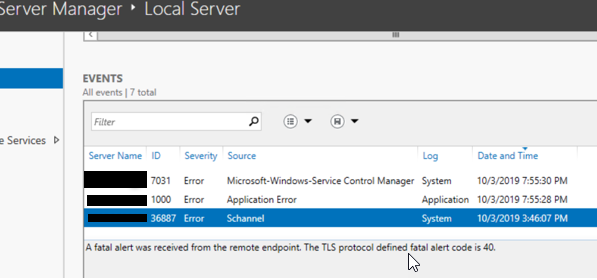
We don't have process dumps at the moment but sharing the screenshot from event log, if that could be useful.
vishal868
on 8 Oct 2019
handshake_failure(40). That's a very generic failure.
 Tratcher
on 8 Oct 2019
Tratcher
on 8 Oct 2019
@vishal868 even dump may not be enough. This might need Wireshark traces and/or custom build of CoreFX with additional logging.
karelz
on 8 Oct 2019
Sorry for the late response. We end up with our findings by fixing the things on the infrastructure side. For API to API communication, we were routing the traffic through the Load balancer where there was a drop in the handshaking (1 drop per ~10000 calls). We redirected the traffic to the same server now, in case of internal API to API communication. It ends up with less traffic on the load balancer & eventually no SSL error.
Thank you for looking into this @karelz .
vishal868
on 13 Nov 2019
Another thing for people to look at, especially if you're trying to connect to an API inside a firewall. Look at your proxy settings. I had code that worked under Core 2.1, but not 3.1. Explicitly setting proxy values resolved the issue for me.
var handler = new HttpClientHandler()
{
    UseDefaultCredentials = true,
    UseProxy = false,
    Proxy = null
};
 turp
on 3 Jun 2020
turp
on 3 Jun 2020
Related issues
 chunseoklee
·
3Comments
chunseoklee
·
3Comments
 jzabroski
·
3Comments
jzabroski
·
3Comments
 nalywa
·
3Comments
nalywa
·
3Comments
 jamesqo
·
3Comments
jamesqo
·
3Comments
 aggieben
·
3Comments
aggieben
·
3Comments