Runtime: Corrupted environment block causes GetEnvironmentVariables to throw ArgumentException: Item has already been added.
_From @livarcocc on June 12, 2018 21:11_
_From @shaunluttin on June 11, 2018 23:30_
Steps to reproduce
Install .NET Core SDK 2.1.300
Open a PowerShell session and run this:
$scope = [System.EnvironmentVariableTarget]::User;
[System.Environment]::SetEnvironmentVariable("TMP", "Foobarbaz", $scope);
[System.Environment]::SetEnvironmentVariable("TEMP", "Foobarbaz", $scope);
Open another PowerShell session and run dotnet new.
Expected behavior
The CLI will show the standard dotnet new output.
Actual behavior
PS C:\dev> dotnet new
System.ArgumentException: Item has already been added. Key in dictionary: 'Foobarbaz'  Key being added: 'Foobarbaz'
   at System.Collections.Hashtable.Insert(Object key, Object nvalue, Boolean add)
   at System.Environment.ToHashtable(IEnumerable`1 pairs)
   at System.Environment.GetEnvironmentVariables()
   at Microsoft.TemplateEngine.Utils.EngineEnvironmentSettings.DefaultEnvironment..ctor()
   at Microsoft.TemplateEngine.Utils.EngineEnvironmentSettings..ctor(ITemplateEngineHost host, Func`2 settingsLoaderFactory, String hiveLocation)
   at Microsoft.TemplateEngine.Cli.New3Command..ctor(String commandName, ITemplateEngineHost host, ITelemetryLogger telemetryLogger, Action`2 onFirstRun, INewCommandInput commandInput, String hivePath)
   at Microsoft.TemplateEngine.Cli.New3Command.ActualRun(String commandName, ITemplateEngineHost host, ITelemetryLogger telemetryLogger, Action`2 onFirstRun, String[] args, String hivePath)
   at Microsoft.TemplateEngine.Cli.New3Command.Run(String commandName, ITemplateEngineHost host, ITelemetryLogger telemetryLogger, Action`2 onFirstRun, String[] args, String hivePath)
   at Microsoft.TemplateEngine.Cli.New3Command.Run(String commandName, ITemplateEngineHost host, ITelemetryLogger telemetryLogger, Action`2 onFirstRun, String[] args)
   at Microsoft.DotNet.Tools.New.NewCommandShim.Run(String[] args)
   at Microsoft.DotNet.Cli.Program.ProcessArgs(String[] args, ITelemetry telemetryClient)
   at Microsoft.DotNet.Cli.Program.Main(String[] args)
Environment data
dotnet --info output:
.NET Core SDK (reflecting any global.json):
 Version:   2.1.300
 Commit:    adab45bf0c

Runtime Environment:
 OS Name:     Windows
 OS Version:  10.0.16299
 OS Platform: Windows
 RID:         win10-x64
 Base Path:   C:\Program Files\dotnet\sdk\2.1.300\

Host (useful for support):
  Version: 2.1.0
  Commit:  caa7b7e2ba

.NET Core SDKs installed:
  2.1.4 [C:\Program Files\dotnet\sdk]
  2.1.300 [C:\Program Files\dotnet\sdk]

.NET Core runtimes installed:
  Microsoft.AspNetCore.All 2.1.0 [C:\Program Files\dotnet\shared\Microsoft.AspNetCore.All]
  Microsoft.AspNetCore.App 2.1.0 [C:\Program Files\dotnet\shared\Microsoft.AspNetCore.App]
  Microsoft.NETCore.App 2.1.0 [C:\Program Files\dotnet\shared\Microsoft.NETCore.App]

To install additional .NET Core runtimes or SDKs:
  https://aka.ms/dotnet-download
Other Notes
The actual situation is that we had the following two environmental variables:
TMP                            C:\Users\bigfo\AppData\Local\Temp
TEMP                           C:\Users\bigfo\AppData\Local\Temp
Our fix was to remove the TMP variable.
[System.Environment]::SetEnvironmentVariable("TMP", "", [System.EnvironmentVariableTarget]::User)
_Copied from original issue: dotnet/cli#9461_
_Copied from original issue: dotnet/templating#1563_
 mlorbetske
All 38 comments
Looks like this is coming from here: System.Environment.ToHashtable(IEnumerable`1 pairs) called by
System.Environment.GetEnvironmentVariables()
mlorbetske
on 12 Jun 2018
I can't repro this using the specified steps. Are you able to do so on a clean machine?
The error message also suggests something else is going on. It says Key in dictionary: 'Foobarbaz' Key being added: 'Foobarbaz', which suggests the key is Foobarbaz whereas it should be TMP or TEMP. Any chance you actually have an environment variable named Foobarbaz?
 stephentoub
on 13 Jun 2018
stephentoub
on 13 Jun 2018
This issue (notwithstanding confusion about key/value) could occur if the process environment block was corrupted such that it had two entries with identical keys.
If you get back in the situation where it reproes, what happens if you directly do [System.Environment]::GetEnvironmentVariables()
 danmosemsft
on 13 Jun 2018
danmosemsft
on 13 Jun 2018
Any chance you actually have an environment variable named Foobarbaz?
Nope. Yup.
 shaunluttin
on 14 Jun 2018
shaunluttin
on 14 Jun 2018
The same error happens with these steps:
$scope = [System.EnvironmentVariableTarget]::User;
[System.Environment]::SetEnvironmentVariable("TMP", "Foobarbaz123456789", $scope);
[System.Environment]::SetEnvironmentVariable("TEMP", "Foobarbaz123456789", $scope);
Open another PowerShell session and run dotnet new.
System.ArgumentException: Item has already been added. Key in dictionary: 'Foobarbaz123456789'  Key being added: 'Foobarbaz123456789'
   at System.Collections.Hashtable.Insert(Object key, Object nvalue, Boolean add)
   at System.Environment.ToHashtable(IEnumerable`1 pairs)
   at System.Environment.GetEnvironmentVariables()
   at Microsoft.TemplateEngine.Utils.EngineEnvironmentSettings.DefaultEnvironment..ctor()
   at Microsoft.TemplateEngine.Utils.EngineEnvironmentSettings..ctor(ITemplateEngineHost host, Func`2 settingsLoaderFactory, String hiveLocation)
   at Microsoft.TemplateEngine.Cli.New3Command..ctor(String commandName, ITemplateEngineHost host, ITelemetryLogger telemetryLogger, Action`2 onFirstRun, INewCommandInput commandInput, String hivePath)
   at Microsoft.TemplateEngine.Cli.New3Command.ActualRun(String commandName, ITemplateEngineHost host, ITelemetryLogger telemetryLogger, Action`2 onFirstRun, String[] args, String hivePath)
   at Microsoft.TemplateEngine.Cli.New3Command.Run(String commandName, ITemplateEngineHost host, ITelemetryLogger telemetryLogger, Action`2 onFirstRun, String[] args, String hivePath)
   at Microsoft.TemplateEngine.Cli.New3Command.Run(String commandName, ITemplateEngineHost host, ITelemetryLogger telemetryLogger, Action`2 onFirstRun, String[] args)
   at Microsoft.DotNet.Tools.New.NewCommandShim.Run(String[] args)
   at Microsoft.DotNet.Cli.Program.ProcessArgs(String[] args, ITelemetry telemetryClient)
   at Microsoft.DotNet.Cli.Program.Main(String[] args)
If you get back in the situation where it reproes, what happens if you directly do [System.Environment]::GetEnvironmentVariables()
Name                           Value
----                           -----

TMP                            Foobarbaz123456789

TEMP                           Foobarbaz123456789

Foobarbaz123456789             C:\Temp
Other name/value pairs were omitted for clarity/security.
shaunluttin
on 14 Jun 2018
I am having trouble reproing this. Not using the exact same versions.
Is this Desktop Powershell (on .NET Framework) or "Core" Powershell (on .NET Core)?
Do you repro without Powershell involved?
Desktop Powershell:
PS C:\Users\danmose> $PSVersionTable.PSVersion

Major  Minor  Build  Revision
-----  -----  -----  --------
5      1      17134  112


PS C:\Users\danmose> gci env: | where { $_.Name -match 'Foo' -or $_.Value -match 'Foo' }

Name                           Value
----                           -----
Foobarbaz123456789             1
TEMP                           FOOBAR~1
TMP                            FOOBAR~1


PS C:\Users\danmose> dotnet new console
The template "Console Application" was created successfully.

...
PS C:\Users\danmose> dotnet --info
.NET Core SDK (reflecting any global.json):
 Version:   2.2.100-preview1-008630
 Commit:    20cd0f04b2

Runtime Environment:
 OS Name:     Windows
 OS Version:  10.0.17134
 OS Platform: Windows
 RID:         win10-x64
 Base Path:   C:\Program Files\dotnet\sdk\2.2.100-preview1-008630\

Host (useful for support):
  Version: 2.1.0-rtm-26515-03
  Commit:  caa7b7e2ba
Standalone .NET Core based Powershell
PS D:\powershell610p3> $PSVersionTable.PSVersion

Major  Minor  Patch  PreReleaseLabel BuildLabel
-----  -----  -----  --------------- ----------
6      1      0      preview.3

PS D:\powershell610p3> gci env: | where { $_.Name -match 'Foo' -or $_.Value -match 'Foo' }

Name                           Value
----                           -----
Foobarbaz123456789             1
TEMP                           FOOBAR~1
TMP                            FOOBAR~1


PS D:\powershell610p3\2> C:\dotnet21rtm\dotnet.exe new console
The template "Console Application" was created successfully.

PS D:\powershell610p3> C:\dotnet21rtm\dotnet.exe --info
.NET Core SDK (reflecting any global.json):
 Version:   2.1.400-preview-008942
 Commit:    de407deff0

Runtime Environment:
 OS Name:     Windows
 OS Version:  10.0.17134
 OS Platform: Windows
 RID:         win10-x86
 Base Path:   C:\dotnet21rtm\sdk\2.1.400-preview-008942\

Host (useful for support):
  Version: 2.1.0-rtm-26515-03
  Commit:  caa7b7e2ba

.NET Core SDKs installed:
  2.1.400-preview-008942 [C:\dotnet21rtm\sdk]

.NET Core runtimes installed:
  Microsoft.AspNetCore.All 2.1.0-rtm-30752 [C:\dotnet21rtm\shared\Microsoft.AspNetCore.All]
  Microsoft.AspNetCore.App 2.1.0-rtm-30752 [C:\dotnet21rtm\shared\Microsoft.AspNetCore.App]
  Microsoft.NETCore.App 2.1.0-rtm-26515-03 [C:\dotnet21rtm\shared\Microsoft.NETCore.App]

To install additional .NET Core runtimes or SDKs:
  https://aka.ms/dotnet-download
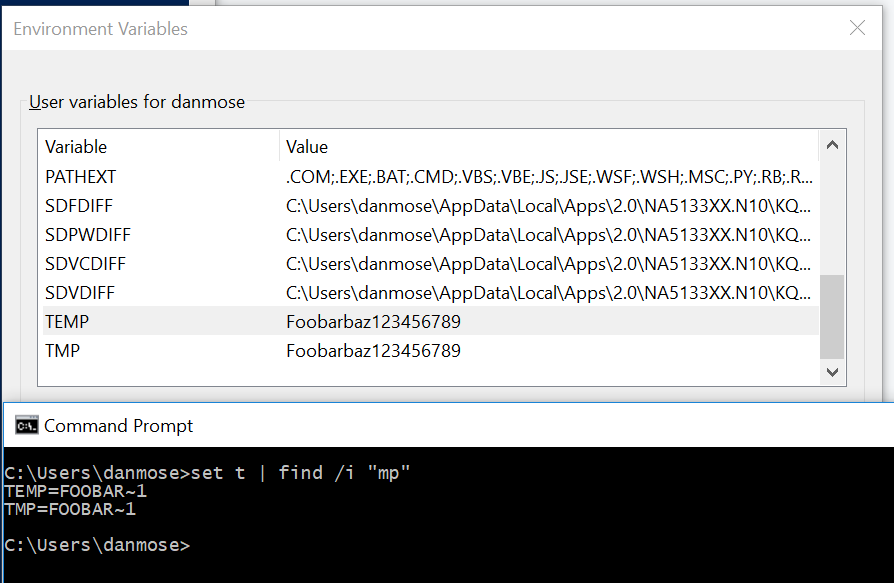
Possibly relevant - the values of TMP/TEMP get cropped when cmd.exe starts
However if I set the values explicitly in the same cmd.exe, it still does not repro:
PS C:\Users\danmose\4> $env:TEMP = "Foobarbaz123456789"
PS C:\Users\danmose\4> $env:TMP = "Foobarbaz123456789"
PS C:\Users\danmose\4> gci env: | where { $_.Name -match 'Foobarbaz123456789' -or $_.Value -match 'Foobarbaz123456789' }


Name                           Value
----                           -----
Foobarbaz123456789             1
TEMP                           Foobarbaz123456789
TMP                            Foobarbaz123456789

PS C:\Users\danmose\4> dotnet new console
The template "Console Application" was created successfully.
Is this Desktop Powershell (on .NET Framework) or "Core" Powershell (on .NET Core)?
This is Desktop PowerShell.
PS C:\dev> $PSVersionTable.PSVersion

Major  Minor  Build  Revision
-----  -----  -----  --------
5      1      16299  431
Aside: There might be something unusual going on with my machine. I have been doing Windows development, and the senior developers have some deep hooks in the operating system that are beyond me.
shaunluttin
on 14 Jun 2018
Also worth noting that if TMP/TEMP point to bogus paths, some other apps just crash.
danmosemsft
on 14 Jun 2018
In the reproing state, could you dump the process environment block? In Windbg, attach to the powershell proces, and do !peb. See whether you see Foobarbaz123456789 listed twice as an env var name.
danmosemsft
on 14 Jun 2018
Hello, I have same issue, but with IIS and web.config, and I think, trouble also with HashTable.
https://github.com/dotnet/corefx/blob/16f26ba855f5cc6d52a738e8bc3856c6f77cf761/src/System.Runtime.Extensions/src/System/Environment.cs#L33
- Create an
ASP net Core 2.1app and and place inProgram.cslineEnvironment.GetEnvironmentVariables().
```C#
public static void Main(string[] args)
{
var envs = Environment.GetEnvironmentVariables();
CreateWebHostBuilder(args).Build().Run();
}
2. In blank IIS site place in `web.config` some already declared in system environment variable.
```xml
    <aspNetCore processPath="dotnet" arguments=".\Api.dll" stdoutLogEnabled="false" stdoutLogFile=".\logs\stdout">
      <environmentVariables>
        <environmentVariable name="TMP" value="TmpEnvValue2" />
      </environmentVariables>
     </aspNetCore>
- Run site and try to open it. In My system I have:
HTTP Error 502.5 - Process Failurein web browser- Exception in EventLog
C#
Application: dotnet.exe
CoreCLR Version: 4.6.26515.7
Description: The process was terminated due to an unhandled exception.
Exception Info: System.ArgumentException: Item has already been added. Key in dictionary: 'TMP'  Key being added: 'TMP'
at System.Collections.Hashtable.Insert(Object key, Object nvalue, Boolean add)
at System.Environment.ToHashtable(IEnumerable`1 pairs)
at System.Environment.GetEnvironmentVariables()
at Api.Program.Main(String[] args) in D:\TeamCity\buildAgent2\work\cf6a22166f64204d\App\Api\Program.cs:line 12
Unfortunatly, I don't known how IIS pass Environment variables declared inweb.config, but, apparently,dotnetfindsTMPin system and in some place from IIS instead overriding that variable.
_Sorry for my English._
 Etrimus
on 21 Jun 2018
Etrimus
on 21 Jun 2018
@shaunluttin did you find out more?
@Etrimus what we would need is to get a dump of your process environment block when the app starts. If you can run it under a debugger like Windbg, you can use the !peb command. What I want to know is whether you see any duplicate names in the list that it shows under Environment:
danmosemsft
on 30 Jun 2018
@danmosemsft I haven't looked further. Let me know if it's an important one for the team. If it is, then I will prioritize looking into it.
shaunluttin
on 30 Jun 2018
@Etrimus I only see two reports here so not urgent. I would like to understand it and fix it though. So it would be great if you could gather that info before you lose the repro.
danmosemsft
on 2 Jul 2018
@danmosemsft I don't known how debug with WinDbg net Core app running under IIS. And i gets environment variables by another way - with Mark Russinovich's Process Explorer.
Under IIS I running this programm.cs
```C#
public static void Main(string[] args)
{
Thread.Sleep(TimeSpan.FromDays(1));// That's a trick :)
CreateWebHostBuilder(args).Build().Run();// This line will raise exception.
}
`web.config` from IIS:
```XML
<?xml version="1.0" encoding="UTF-8"?>
<configuration>
  <system.webServer>
    <handlers>
      <add name="aspNetCore" path="*" verb="*" modules="AspNetCoreModule" resourceType="Unspecified" />
    </handlers>
    <aspNetCore processPath="dotnet" arguments=".\App.dll" stdoutLogEnabled="false" stdoutLogFile=".\logs\stdout">
  <environmentVariables>
    <environmentVariable name="PATH" value="PppppPPP" />
    <environmentVariable name="ComSpec" value="CcccCCC" />
    <environmentVariable name="ETHEREUM_SOCKET" value="EEeeeeeEE" />
  </environmentVariables>
</aspNetCore>
  </system.webServer>
</configuration>
And screenshots from ProcessExplorer.
Process tree - screenshot
Environment variables of these processes - screenshot
dotnet --info
.NET Core SDK (reflecting any global.json):
 Version:   2.1.300
 Commit:    adab45bf0c

Runtime Environment:
 OS Name:     Windows
 OS Version:  6.2.9200
 OS Platform: Windows
 RID:         win8-x64
 Base Path:   C:\Program Files\dotnet\sdk\2.1.300\

Host (useful for support):
  Version: 2.1.0
  Commit:  caa7b7e2ba

.NET Core SDKs installed:
  1.0.0-preview2-003121 [C:\Program Files\dotnet\sdk]
  1.0.1 [C:\Program Files\dotnet\sdk]
  2.0.0 [C:\Program Files\dotnet\sdk]
  2.1.4 [C:\Program Files\dotnet\sdk]
  2.1.101 [C:\Program Files\dotnet\sdk]
  2.1.300 [C:\Program Files\dotnet\sdk]

.NET Core runtimes installed:
  Microsoft.AspNetCore.All 2.1.0 [C:\Program Files\dotnet\shared\Microsoft.AspNetCore.All]
  Microsoft.AspNetCore.App 2.1.0 [C:\Program Files\dotnet\shared\Microsoft.AspNetCore.App]
  Microsoft.NETCore.App 1.0.0 [C:\Program Files\dotnet\shared\Microsoft.NETCore.App]
  Microsoft.NETCore.App 1.0.1 [C:\Program Files\dotnet\shared\Microsoft.NETCore.App]
  Microsoft.NETCore.App 1.0.4 [C:\Program Files\dotnet\shared\Microsoft.NETCore.App]
  Microsoft.NETCore.App 1.1.1 [C:\Program Files\dotnet\shared\Microsoft.NETCore.App]
  Microsoft.NETCore.App 2.0.0 [C:\Program Files\dotnet\shared\Microsoft.NETCore.App]
  Microsoft.NETCore.App 2.0.5 [C:\Program Files\dotnet\shared\Microsoft.NETCore.App]
  Microsoft.NETCore.App 2.0.6 [C:\Program Files\dotnet\shared\Microsoft.NETCore.App]
  Microsoft.NETCore.App 2.1.0 [C:\Program Files\dotnet\shared\Microsoft.NETCore.App]

To install additional .NET Core runtimes or SDKs:
  https://aka.ms/dotnet-download
@etrimus it is necessary to see the actual environment block in memory, not what a tool like process explorer displays. Also your screenshot gives me 410 error.
Here's how
- Install Windbg from https://docs.microsoft.com/en-us/windows-hardware/drivers/debugger/debugger-download-tools
- Start your app with
<pathtowindbg>\windbg.exe dotnet.exe yourapp.dllor similar. It will break in immediately and take you to a prompt. - Type
!pebenter, and record the output. - Type
sxe clr, enter. This will break on .NET exceptions. - Type
genter to continue - Hopefully it will hit your exception (or hit
gagain) then do!pebagain
That's roughly what I would do.
danmosemsft
on 6 Jul 2018
@danmosemsft Right, that was an 401, I fixed screenshots.
Also I have got an info from windbg after attaching to the dotnet process.
In PowerShell - ./windbg.exe -p DOTNET_PID /g
And I see My variables in two places.
Here the complete windbg log - https://gist.github.com/Etrimus/5bec954d7e60d8ebc9ecdfddc0e32459#file-windbg-output-L159-L161
And the screenshot all-in-one - https://yadi.sk/i/GIKN8oRC3YzLBK
Etrimus
on 10 Jul 2018
@etrimus excellent this confirms the theory. Any idea what is leading to the duplicates? Meanwhile we need to protect our code against this case.
danmosemsft
on 10 Jul 2018
Oh I see they come from web.config. Does this repro with a minimal aspnet app, ie create a new app in VS then add an extra dupe environment variable in the web.config and see whether it crashes. I wonder whether some fox is needed at the point of setting it as well
danmosemsft
on 10 Jul 2018
@danmosemsft In My case this error raises with very simple app, but only on real IIS.
Visual Studion gets and replace correct variables from web.config - https://yadi.sk/i/u7vWW_tP3YzZbC
Also It works fine from dotnet cli - https://yadi.sk/i/UtoP2BAL3Yzafg
Meanwhile we need to protect our code against this case.
Drop any duplicates in variable list and return in list only last added variables, like last three variables in My Vindbg log?
Etrimus
on 10 Jul 2018
@Etrimus yes instead of .ToHashtable() here and here it should add each of the entries into the hashtable individually, overwriting any previous entries.
Do you have any interest in offering a PR? You can't use IIS with .NET Core as far as I know, so it's just precautionary to fix here. This would not fix .NET Framework. Those folks should just remove the duplicates.
danmosemsft
on 10 Jul 2018
@danmosemsft
Do you have any interest in offering a PR?
PR to dotnet/corefx repo? Yes I am.
You can't use IIS with .NET Core as far as I know
Yes, net core apps runs under its own server kestrel, in My case Microsoft IIS is just a web-server, and instead IIS it would might be an Nginx for example.
Etrimus
on 11 Jul 2018
I am thinking that we may want to fix this by adding try/catch around the Add method in https://github.com/dotnet/corefx/blob/master/src/System.Runtime.Extensions/src/System/Environment.cs#L47
The thrown & caught exception would provide non-fatal notification about corrupted environment block in case somebody tries to debug why they do not see the expected environment variable values.
Also, we should make sure that both GetEnvironmentVariable and GetEnvironmentVariables have same strategy on dealing with duplicates (first one wins vs. last one wins).
 jkotas
on 11 Jul 2018
jkotas
on 11 Jul 2018
@Etrimus do you expect to have time soon to put up such a PR as @jkotas suggests? I have gotten other reports of this now. It might possibly be a servicing candidate.
danmosemsft
on 27 Jul 2018
@danmosemsft yes, I have time to make PR, give me 2-3 days for this.
Etrimus
on 28 Jul 2018
Sure, sounds good.
danmosemsft
on 28 Jul 2018
As an aside I looked at the Windows code for CreateProcess and indeed it validates the structure of the supplied environment block but does not attempt to look for duplicate names (whether differing in case or not). Only SetEnvironmentVariable/GetEnvironmentVariable examine the names (and they do not error for duplicates either)
danmosemsft
on 28 Jul 2018
@Etrimus are you still planning to do this? The sooner we have a PR up the more likely it can get approved for next servicing. If not LMK and I will find someone.
danmosemsft
on 13 Aug 2018
@danmosemsft yes, I wiil do PR on this week. I had some illness, and fever, but now I feels normally.
Etrimus
on 14 Aug 2018
@etrimus if you need more rest that is ok just let me know
danmosemsft
on 14 Aug 2018
@danmosemsft, @jkotas
@jkotas The thrown & caught exception would provide non-fatal notification about corrupted environment block
For clarify - this quote is about Console.Writeline(...)?
@jkotas Also, we should make sure that both GetEnvironmentVariable and GetEnvironmentVariables have same strategy on dealing with duplicates (first one wins vs. last one wins).
But if we just use try/cath, we don't need this. We always have first added values in list, and if we trying to add duplicates, we catch an exception and we provides a non-fatal notification about corrupted environment block, right?
Etrimus
on 14 Aug 2018
For clarify - this quote is about
Console.Writeline(...)?
This is about exceptions seen in debugger. I do not think there should be any Console.WriteLine.
But if we just use try/cath, we don't need this.
GetEnvironmentVariable does not go through the path that builds the list. I think you are right that it may just work. We just need to check that it is really the case.
jkotas
on 14 Aug 2018
@Etrimus I sent you a collaborator invite, if you accept, I can assign this issue. Note this will initially subscribe you to everything happening in the repo, which you will probably want to switch off to avoid the mails.
danmosemsft
on 14 Aug 2018
I tried to use System.Diagnostics.Trace.TraceWarning(...), but there is no reference to System.Diagnostics.TraceSource in our System.Runtime.Extensions project (.csproj).
Also System.Diagnostics.TraceSource already includes reference to System.Runtime.Extensions (.csproj).
It using <Reference Include ... />. Is it "reference assemblies" (https://github.com/dotnet/corefx/issues/29037), right?
System.Diagnostics.Trace class, in my opinion, looks good for our goal. But we can't add System.Diagnostics.TraceSource reference to System.Runtime.Extensions, right?
Etrimus
on 15 Aug 2018
@etrimus no tracing is expected. @jkotas is suggesting that you should writd the fix such that when the code encounters this corruption, there is an exception thrown that is immediately caught. Because it is caught there is no user impact : the bug is fixed. However if you have a debugger attached, it will show you the exception occurred, which might be useful if you are tracking down why the corruption occurred.
danmosemsft
on 15 Aug 2018
@Etrimus are you still planning to take this one on?
danmosemsft
on 13 Sep 2018
@maryamariyan when you have cycles, could you please take this.
danmosemsft
on 24 Sep 2018
Related issues
 EgorBo
·
3Comments
EgorBo
·
3Comments
 jchannon
·
3Comments
jchannon
·
3Comments
 sahithreddyk
·
3Comments
sahithreddyk
·
3Comments
 iCodeWebApps
·
3Comments
iCodeWebApps
·
3Comments
 chunseoklee
·
3Comments
chunseoklee
·
3Comments