Runtime: PerformanceData types are missing from System.Diagnostics.PerformanceCounters
I came across some desktop code that was using these old perf counter APIs. I was able to add it back rather simply. Any reason why we wouldn't want to do this?
https://devdiv.visualstudio.com/DevDiv/Default/_git/DotNet-CoreFX-Trusted/commit/58ff87066374ab65e556afa6194564722a69413e?refName=refs%2Fheads%2Fericstj%2Fadd.back.types.experiment
 ericstj
All 25 comments
@adiaaida
 brianrob
on 7 Jun 2018
brianrob
on 7 Jun 2018
I can't think of a reason not to. @danmosemsft?
 adiaaida
on 7 Jun 2018
adiaaida
on 7 Jun 2018
Fine by me, I don't recall any conscious decision in the past to not do this for some reason (unless it was because: we should not port obsolete technology, which is something we are much less concerned about now)
BTW your PR link is internal of course.
 danmosemsft
on 7 Jun 2018
danmosemsft
on 7 Jun 2018
@ericstj could you replace link with https://referencesource.microsoft.com/ reference if is possible?
 MarcoRossignoli
on 16 Jul 2018
MarcoRossignoli
on 16 Jul 2018
Sure, the types that were in that commit are all under PerformanceData here: https://referencesource.microsoft.com/#System.Core/System/Diagnostics/PerformanceData/CounterSet.cs
https://referencesource.microsoft.com/#System.Core/System/Diagnostics/PerformanceData/CounterSetInstance.cs
https://referencesource.microsoft.com/#System.Core/System/Diagnostics/PerformanceData/CounterSetInstanceCounterDataSet.cs
https://referencesource.microsoft.com/#System.Core/System/Diagnostics/PerformanceData/CounterSetInstanceType.cs
https://referencesource.microsoft.com/#System.Core/System/Diagnostics/PerformanceData/CounterType.cs
https://referencesource.microsoft.com/#System.Core/System/Diagnostics/PerformanceData/PerfProviderCollection.cs
I also needed https://referencesource.microsoft.com/#System.Core/Microsoft/Win32/SafeHandles/SafePerfProviderHandle.cs,836ab7386fbc0c99
And then subsetted some of the pinvokes:
https://gist.github.com/ericstj/f5c577651e5a5efd248bc191761ab3a2
Thanks for looking at this!
ericstj
on 16 Jul 2018
Plan:
Move SafePerfProviderHandle under common SafeHandles folder
Move all files under System.Diagnostic.PerformanceData to new PerformanceData folder
Move used pinvokes to common interop folder
Add some tests taking a cue from https://msdn.microsoft.com/en-us/library/system.diagnostics.performancedata(v=vs.110).aspx (is CTRPP available to CI workflow?)
Make sense?
Feel free to update the plan.
/cc @jkotas @brianrob @danmosemsft
MarcoRossignoli
on 17 Jul 2018
This should not touch CoreCLR in any way. None of this make sense to share with CoreCLR.
 jkotas
on 17 Jul 2018
jkotas
on 17 Jul 2018
Plan sounds good to me.
I think CTRPP is available to CI since its part of the Windows SDK though only on Windows, of course. If you run into any trouble you can always just check in the source files it generates next to a readme with how to update them.
LodCtr will require admin, so be sure that any tests which use it decorate themselves with XunitConstants.RequiresElevation.
ericstj
on 17 Jul 2018
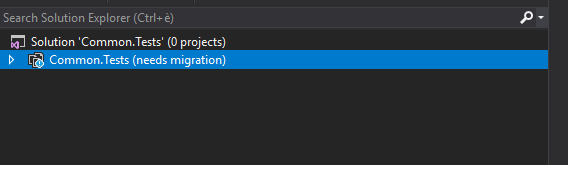
Visual Studio started to require "One-way upgrade" when open solutions on corefx(for instance Common.Tests.csproj)...what i'm missing?
My Vs ver:
Microsoft Visual Studio Enterprise 2017
Version 15.7.5
VisualStudio.15.Release/15.7.5+27703.2042
Microsoft .NET Framework
Version 4.7.03056
Installed Version: Enterprise
MarcoRossignoli
on 19 Jul 2018
/cc @eerhardt @weshaggard
Haven't seen that. What did VS change once you allowed it to upgrade?
ericstj
on 19 Jul 2018
added this to Common.Tests.csproj
<Project Sdk="Microsoft.NET.Sdk" ToolsVersion="15.0">
  <PropertyGroup>
    <ProjectGuid>{C72FD34C-539A-4447-9796-62A229571199}</ProjectGuid>
    <TestCategories>InnerLoop;OuterLoop</TestCategories>
    <AllowUnsafeBlocks>true</AllowUnsafeBlocks>
    <Configurations>netcoreapp-Unix-Debug;netcoreapp-Unix-Release;netcoreapp-Windows_NT-Debug;netcoreapp-Windows_NT-Release</Configurations>
    <FileUpgradeFlags>
    </FileUpgradeFlags>
    <UpgradeBackupLocation>
    </UpgradeBackupLocation>
    <OldToolsVersion>2.0</OldToolsVersion>
  </PropertyGroup>
  .....
Hey @MarcoRossignoli - which .sln are you opening that is causing VS to say that? Do you have any local changes to it? or is it exactly what is checked into 'master'?
 eerhardt
on 19 Jul 2018
eerhardt
on 19 Jul 2018
@eerhardt i'm opening https://github.com/MarcoRossignoli/corefx/blob/performancedata/src/Common/Common.Tests.sln from my clean branch...i'm starting to work on this issue adding SafePerfProviderHandle to it.
MarcoRossignoli
on 19 Jul 2018
Thanks @MarcoRossignoli. I just submitted https://github.com/dotnet/corefx/pull/31205 which will fix the problem.
eerhardt
on 19 Jul 2018
@eerhardt you've requested my review...i don't know if your amend is correct...but if for you it's ok i'm onorated to approve a PR on corefx repo :sweat_smile: , do you need my approve or it's a mistake?
MarcoRossignoli
on 19 Jul 2018
do you need my approve or it's a mistake?
I don't necessarily need your approval, but it wasn't a mistake. It was more of a notification and I wanted to include you since you found the issue.
eerhardt
on 19 Jul 2018
It was more of a notification and I wanted to include you since you found the issue.
Ok thank's for fix!
MarcoRossignoli
on 19 Jul 2018
@ericstj where i can found all resource strings?I downloaded source for .net 4.7.2(DotNet472RS4) and try to find some string findstr /n /s /c:"Perflib_PlatformNotSupported" *.* but i didn't find anything.
MarcoRossignoli
on 25 Jul 2018
Those get code-gen'ed during the build from a text file. Looks like reference source doesn't include the text file. You can always disassemble the resources from the dll to see this sort of thing, but I'll save you the effort. Here's what you need: https://gist.github.com/ericstj/bab31d1c3cc23743f959d4122fdc1d35
ericstj
on 25 Jul 2018
but I'll save you the effort
Great thank's!
MarcoRossignoli
on 25 Jul 2018
@jkotas @ericstj i've got a question...when we port code from netfx we should remove CAS code because is not supported, on this namespace we have attributes like [SecuritySafeCritical] and [SecurityCritical] that i think i have to remove(on docs these are related to CAS), but on other namespace i found it. Maybe i missing something...but i don't understand if i have to remove or not or what does it depend on?
MarcoRossignoli
on 26 Jul 2018
attributes like
[SecuritySafeCritical]and[SecurityCritical]that i think i have to remove
These attributes are dead code in .NET Core. We have been removing them like all other kinds of dead code. Things are still going to work with these attributes, except that the binaries will be bigger necessary.
on other namespace i found it.
This is recently ported assembly where the dead attribute cleanup was missed. Feel free to remove the attributes in this assembly while you are on it.
jkotas
on 26 Jul 2018
@ericstj i think you can assign this issue to me if you want, i moved sources https://github.com/dotnet/corefx/compare/master...MarcoRossignoli:performancedata and did some tests offline https://github.com/MarcoRossignoli/marcorossignoli.github.io/blob/master/corefx/src/Lab/PerformanceData/Program.cs
I'm not so "expert" with this version of performance counter definitions, but seems to works!Take a look and if you think it's ok i'll add some tests and i'll do PR!
MarcoRossignoli
on 27 Jul 2018
Absolutely. Thanks for looking into this!
ericstj
on 27 Jul 2018
On these sample there are some errors https://msdn.microsoft.com/en-us/library/system.diagnostics.performancedata(v=vs.110).aspx
<string id="CS1.Counter1.Name" value="Total Words Typed"/> ->  typingCounterSet.AddCounter(1, CounterType.RawData32, "Total Word Count");
<string id="CS1.Counter3.Name" value="Letter A Pressed"/>  -> typingCounterSet.AddCounter(3, CounterType.RawData32, "A Key Pressed");
<string id="CS1.Counter5.Name" value="Percent of Words Containing A"/>  ->  typingCounterSet.AddCounter(5, CounterType.SampleFraction, "Percent of Words Containg A");
maybe need to be fixed.
MarcoRossignoli
on 28 Jul 2018
Related issues
 chunseoklee
·
3Comments
chunseoklee
·
3Comments
 nalywa
·
3Comments
nalywa
·
3Comments
 omariom
·
3Comments
omariom
·
3Comments
 noahfalk
·
3Comments
noahfalk
·
3Comments
 sahithreddyk
·
3Comments
sahithreddyk
·
3Comments