Runtime: Regression: HTTPS defaults to older TLS version for Win7
On Win7/2008R2 the new SocketsHttpHandler uses older defaults for TLS versions than the WinHttpHandler it's replacing. SocketsHttpHandler defaults to TLS 1.0 while WinHttpHandler supports TLS 1.2, 1.1, and 1.0. This is a regression for updating apps.
ASP.NET Core's Kestrel server defaults to TLS 1.1 and 1.2 so the new client can't connect to it using the default settings.
Example: Github.com as removed TLS 1.0 support
Environment.SetEnvironmentVariable("DOTNET_SYSTEM_NET_HTTP_USESOCKETSHTTPHANDLER", "true");
            var handler = new HttpClientHandler();
            // handler.SslProtocols = SslProtocols.Tls12; // Workaround
            var client = new HttpClient(handler);
            var response = await client.GetAsync("https://github.com/");
            Console.WriteLine(response);
Workaround: Override the protocol versions on the client.
Found in ASP.NET Core's WebSocket Autobahn tests
@geoffkizer @karelz
 Tratcher
All 8 comments
This is interesting. The default for any TLS/SSL protocol in .NET Core should be this SecurityProtocolType.SystemDefault
which means to use OS defaults. It shouldn't be hard-coding to use any list such as TLS 1.0, 1.1, 1.2.
And in terms of the default for properties like HttpClientHandler.SslProtocols, the default is SslProtocols.None which behaves the same as SecurityProtocolType.SystemDefault.
 davidsh
on 2 Apr 2018
davidsh
on 2 Apr 2018
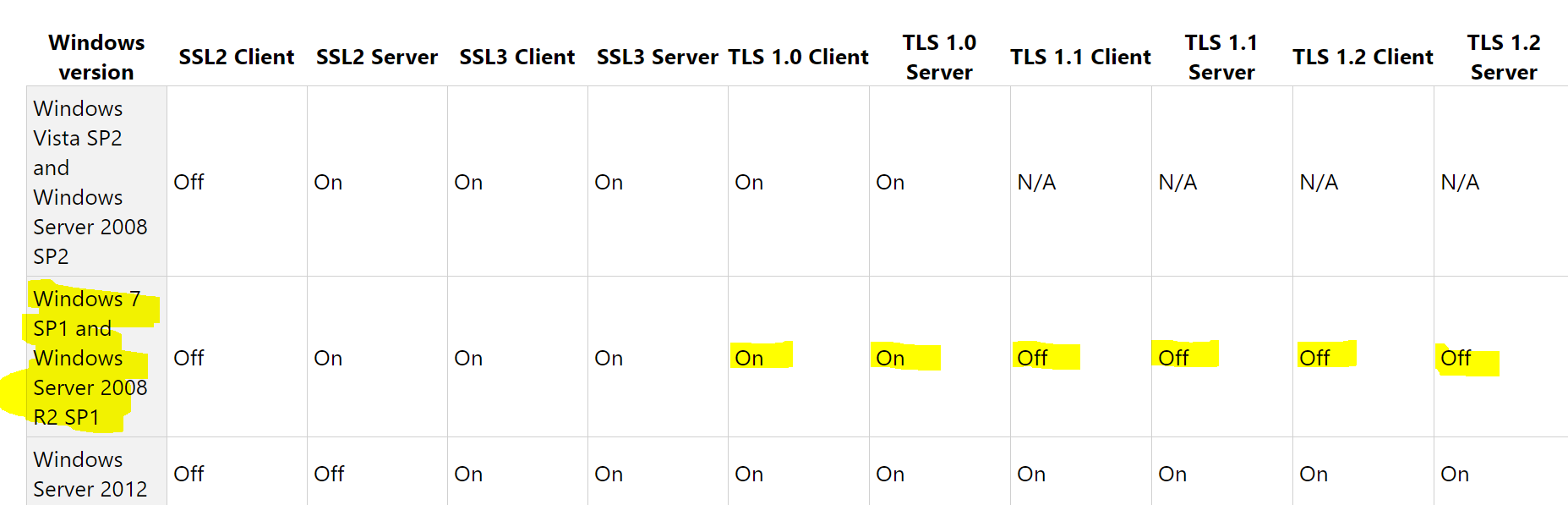
And according to this:
https://support.microsoft.com/en-us/help/3154520/support-for-tls-system-default-versions-included-in-the-net-framework
The OS default would not include TLS 1.1 nor TLS 1.2 for Windows 7 SP1 and Windows Server 2008 R2 SP1.
davidsh
on 2 Apr 2018
So, while our best-practice coding pattern is not to hard-code any TLS version, it seems like the use of 'SystemDefault' on Windows 7/Windows Server 2008 R2 is resulting in only TLS 1.0 being part of the set and excluding TLS 1.1, 1.2.
cc: @morganbr @blowdart
davidsh
on 2 Apr 2018
Hmm, does it mean that WinHttp on Win7 has different defaults than Schannel which we use? I assume we just tell OS APIs "use your default", right?
 karelz
on 3 Apr 2018
Tratcher
on 3 Apr 2018
karelz
on 3 Apr 2018
Tratcher
on 3 Apr 2018
@Tratcher correct. WinHTTP doesn't have any concept of using 'SystemDefault' TLS versions which is why it was done like this for WinHttpHandler.
@karelz and I discussed offline. We think the right fix for this app-compat regression in handler behavior is to do something like this in SocketsHttpHandler:
c#
if (RunningOnWindows7OrWindowsServer2008R2 && _sslProtocols == SslProtocols.None)
{
    _sslProtocols = SecurityProtocol.DefaultSecurityProtocols; // this is TLS1.0, 1.1, 1.2
}
davidsh
on 3 Apr 2018
Do we know why the default is Off for 1.1 and 1.2 on Win7/2008R2?
I'm wondering if rather than doing this in SocketsHttpHandler, we should do it in SslStream.
 stephentoub
on 3 Apr 2018
stephentoub
on 3 Apr 2018
Do we know why the default is Off for 1.1 and 1.2 on Win7/2008R2?
At the time of release of Win7/Win2K8R2, TLS 1.1 and 1.2 weren't supported. Servicing updates of these OS versions added the support. But the use of the 'SystemDefaultTlsVersions' setting didn't include them as default since many older apps might break if the defaults were changed like that. We can follow-up with the SCHANNEL team internally if you need more info.
I'm wondering if rather than doing this in SocketsHttpHandler, we should do it in SslStream.
That is another option. We could use the same logic and essentially "override" SystemDefaultTlsVersions setting for SslStream if SslProtocols.None is used on Win7/Win2K8R2.
But the key reason for doing it in the SocketsHttpHandler is due to app-compat regression from .NET Core 2.0 to 2.1 for HttpClientHandler. We might just want to keep SslStream as-is and only track SystemDefaultTlsVersions.
davidsh
on 3 Apr 2018
Related issues
 yahorsi
·
3Comments
yahorsi
·
3Comments
 Timovzl
·
3Comments
Timovzl
·
3Comments
 jamesqo
·
3Comments
jamesqo
·
3Comments
 jchannon
·
3Comments
jchannon
·
3Comments
 GitAntoinee
·
3Comments
GitAntoinee
·
3Comments
Most helpful comment
@Tratcher correct. WinHTTP doesn't have any concept of using 'SystemDefault' TLS versions which is why it was done like this for WinHttpHandler.
@karelz and I discussed offline. We think the right fix for this app-compat regression in handler behavior is to do something like this in SocketsHttpHandler:
c#
if (RunningOnWindows7OrWindowsServer2008R2 && _sslProtocols == SslProtocols.None)
{
    _sslProtocols = SecurityProtocol.DefaultSecurityProtocols; // this is TLS1.0, 1.1, 1.2
}