Runtime: Directory.CreateDirectory throwing wrong exception
Hi,
When trying to create a new directory (or file) from my ASP.NET Core app to a location I do not necessarily have access to, I get a FileNotFoundException with the following message:
Could not find file 'D:\Users\Shimmy\Documents\Visual Studio 2017\Projects\MyProject\Api\FilesVault\1afb42e2-f160-4f6d-9eab-a82ca3cbf076'.
Here's my code:
if (!Directory.Exists(path))
{
  try
  {
    Directory.CreateDirectory(path);
  }
  catch (FileNotFoundException)
  {//breakpoint - debugger breaks here
    //No documentation of FileNotFoundException to be thrown from that method.
  }
}
In addition, the following message pops up in the Windows 10 notification center:
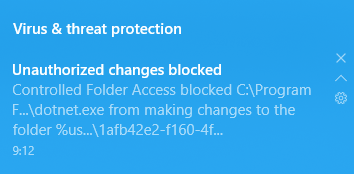
I understand I don't have proper access to that folder, I'm just here to wonder out why it's FileNotFoundException rather than one of the documented types.
 weitzhandler
All 21 comments
A guess only, but throwing access denied error to your code might disclose things like the existence of files that you are not allowed to see (or know exists)?
 ayende
on 24 Jan 2018
ayende
on 24 Jan 2018
According to the docs, it should throw an UnauthorizedAccessException. It doesn't have to come with all the info it doesn't want me to know.
weitzhandler
on 24 Jan 2018
This is wrong. In general the code tries to convert ERROR_FILE_NOT_FOUND to ERROR_PATH_NOT_FOUND etc. @Anipik can you see where this is getting thrown from.
 danmosemsft
on 29 Jan 2018
danmosemsft
on 29 Jan 2018
@JeremyKuhne @danmosemsft I tried to repro the bug, but for me it is throwing UnauthorizedAccessException. any idea what could be happening and how to repro the bug ?
 Anipik
on 8 Feb 2018
Anipik
on 8 Feb 2018
@weitzhandler what version of .NET core are you using? What build of Windows?
danmosemsft
on 8 Feb 2018
Win 10 Pro x64 ver. 1709 (build 16299.192).
.NET Core ver. 2.1.4.
weitzhandler
on 8 Feb 2018
Can you please include a call stack? That might help narrow it down.
 JeremyKuhne
on 8 Feb 2018
JeremyKuhne
on 8 Feb 2018
Ping @weitzhandler we would like to fix this if it is a bug.
danmosemsft
on 21 Feb 2018
OK, running this program:
```c#
using System;
using System.IO;
using static System.Console;
class Program
{
static void Main(string[] args)
{
var path = Environment.GetFolderPath(Environment.SpecialFolder.MyDocuments);
path += @"\Visual Studio 2017Settings\hw.txt";
try
{
  File.WriteAllText(path, "Hello world");
}
catch (IOException e)
when (e is FileNotFoundException fEx)
{
  WriteLine(e.GetType());
  WriteLine(e.Message);
  WriteLine(e.StackTrace);
}
Read();
}
}
Emits the following output:
System.IO.FileNotFoundException
Could not find file 'D:\UsersShimmy\Documents\Visual Studio 2017Settings\hw.txt'.
at System.IO.__Error.WinIOError(Int32 errorCode, String maybeFullPath)
at System.IO.FileStream.Init(String path, FileMode mode, FileAccess access, Int32 rights, Boolean useRights, FileShare share, Int32 bufferSize, FileOptions options, SECURITY_ATTRIBUTES secAttrs, String msgPath, Boolean bFromProxy, Boolean useLongPath, Boolean checkHost)
at System.IO.FileStream..ctor(String path, FileMode mode, FileAccess access, FileShare share, Int32 bufferSize, FileOptions options, String msgPath, Boolean bFromProxy, Boolean useLongPath, Boolean checkHost)
at System.IO.StreamWriter.CreateFile(String path, Boolean append, Boolean checkHost)
at System.IO.StreamWriter..ctor(String path, Boolean append, Encoding encoding, Int32 bufferSize, Boolean checkHost)
at System.IO.File.InternalWriteAllText(String path, String contents, Encoding encoding, Boolean checkHost)
at System.IO.File.WriteAllText(String path, String contents)
at Program.Main(String[] args) in C:\UsersShimmy\AppData\LocalTemporary Projects\ConsoleApp1\Program.cs:line 14
```
Here's what the permission folder looks like.
I already got the issue fixed long ago by fixing the permission (same permission was on the _Project_ folder as well, luckily the settings folder still has this issue so I'm able to repro.
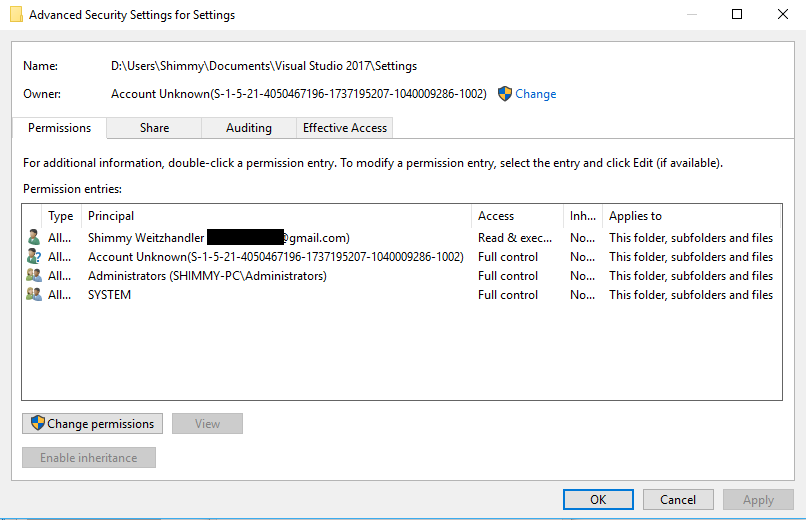
weitzhandler
on 22 Feb 2018
@weitzhandler does "dir D:\UsersShimmy\Documents\Visual Studio 2017Settings\hw.txt" work fine? In a non elevated prompt?
danmosemsft
on 22 Feb 2018
I get The system cannot find the path specified. even in an elevated prompt.
Note that cd D:\Users\Shimmy\Documents\Visual Studio 2017\Settings does work.
weitzhandler
on 22 Feb 2018
OK, so it's not a .NET issue. In the security settings dialog above, try the Effective Access tab. Plug your identity in and see if it says you have access.
Make sure you open the dialog against the file, not the folder it's in.
danmosemsft
on 22 Feb 2018
BTW, the original bug was about Directory.CreateDirectory, where FileNotFoundException would certainly be wrong, but we don't haev a repro for that. In your subsequent code, writing to a file, FileNotFoundException is not necessarily wrong, although I agree UnauthorizedAccessExceptoin might possibly be expected. We are just translating the code returning from the OS. This may be an intentional choice on their part.
danmosemsft
on 22 Feb 2018
I'll try that, but just so you know, this is a new issue that was introduced in the recent Windows build.
The issue throws either FileNotFoundException or DirectoryNotFoundException accordingly.
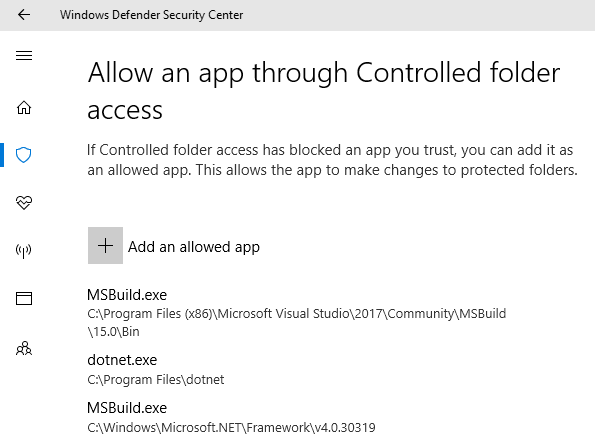
It's caused because _dotnet.exe_ and some other .NET programs (such as MSBuild) are not having the proper access to the appropriate folders.
As you can see in the unreadable message Windows provides (from above):
The wrong exception is caused whenever I see this blue message, so they're definitely related.
weitzhandler
on 22 Feb 2018
Gotcha. OK, I repro. I had controlled folders off, and dotnet.exe excluded also. I enabled controlled folders, removed dotnet.exe exclusion, and added a controlled folder c:\controlled and ran
```c#
using System;
using System.IO;
using static System.Console;
using System.Runtime.InteropServices;
class Program
{
[StructLayout(LayoutKind.Sequential)]
internal struct SECURITY_ATTRIBUTES
{
internal uint nLength;
internal IntPtr lpSecurityDescriptor;
internal int bInheritHandle;
}
[DllImport("kernel32", EntryPoint = "CreateDirectoryW", SetLastError = true, CharSet = CharSet.Unicode, BestFitMapping = false)]
private static extern bool CreateDirectory(string path, ref SECURITY_ATTRIBUTES lpSecurityAttributes);

static void Main(string[] args)
{
    //var path = Environment.GetFolderPath(Environment.SpecialFolder.MyDocuments);
    //path += @"\Visual Studio 2017\Settings\" + Guid.NewGuid().ToString("N");
    var path = "c:\\protected\\foo";

    WriteLine($"Creating {path} directory");
    SECURITY_ATTRIBUTES foo = new SECURITY_ATTRIBUTES();
    bool result = CreateDirectory(path, ref foo);

    if (!result)
    {
        WriteLine(Marshal.GetLastWin32Error());
    }
}
}
```
I get 2 (ERROR_FILE_NOT_FOUND)
I'll see where to report this.
danmosemsft
on 22 Feb 2018
The Windows bug database is internal only currently, but I opened 16055443 there. Hopefully they will change to something ERROR_ACCESS_DENIED or possibly ERROR_PATH_NOT_FOUND, or something new like ERROR_PROTECTED_FOLDER that gives a nice message from FormatMessage either way yo'ull get a better exception.
You can workaround by disabling protected folders or removing documents folder from protected folders list (not recommending either) or by excluding your app by name. See Defender settings>Virus Protection settings.
Thansk for the report.
danmosemsft
on 22 Feb 2018
cc @Anipik fyi
danmosemsft
on 22 Feb 2018
I had worked around it by simply promoting _dotnet.exe_ and _msbuild.exe_ as allowed apps.
I'm glad you found the source.
weitzhandler
on 23 Feb 2018
I am similarly running into this issue. Resurrecting a program I wrote back in March (which worked fine at the time), I'm unable to create a directory on my system's desktop, on which I'm an administrator.
const string outputDir = "C:\Users\whit_\Desktop\MyDirectory";
var dirPath = Path.Combine(outputDir, $"{DateTime.Now:yyMMdd_hhmm}");
if (!Directory.Exists(dirPath)) {
Directory.CreateDirectory(dirPath); //System.IO.FileNotFoundException throwing on this line with "Could not find file ''
}
Swapping to output to another path works fine.
Running .NET Core 2.2 on Windows 10 Pro (version 1803 build 17134.706)
Having eventually found the protected folders list myself, I do see the desktop listed in there and no means of removing it. Given that this is a build from VS that'll frequently change locations, simply whitelisting it won't do the trick. Good to know about this list going forward though.
 WhitWaldo
on 25 Jun 2019
WhitWaldo
on 25 Jun 2019
I was still running in to issues so i disabled the ransomeware protection feature in my windows defender and that solved the problem. do it at your own risk though.
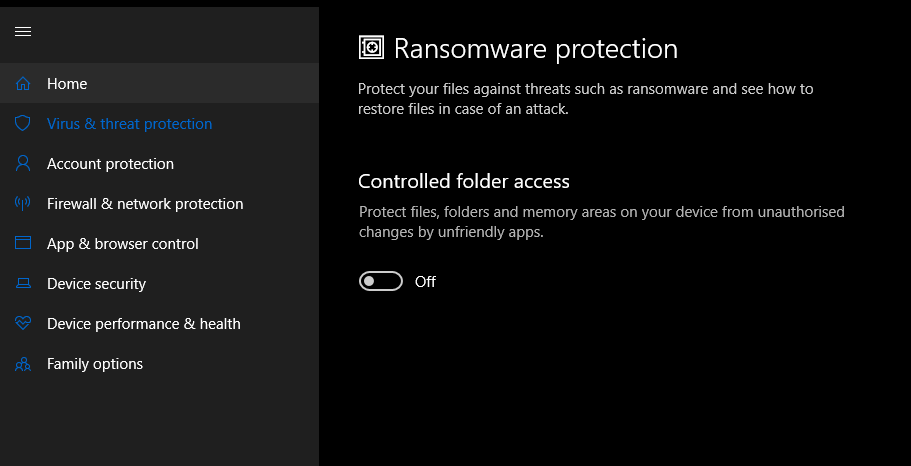
 Abdul-waseem123
on 15 Aug 2019
Abdul-waseem123
on 15 Aug 2019
Disabling ransomware protection is obviously highly discouraged. I've pinged the internal OS issue on this (link is only accessible to MS employees).
JeremyKuhne
on 15 Aug 2019
Related issues
 chunseoklee
·
3Comments
chunseoklee
·
3Comments
 jchannon
·
3Comments
jchannon
·
3Comments
 matty-hall
·
3Comments
matty-hall
·
3Comments
 sahithreddyk
·
3Comments
sahithreddyk
·
3Comments
 bencz
·
3Comments
bencz
·
3Comments