Runtime: .NET Core 2.0: ResourceManager ignores Culture, always reads neutral RESX file
@hardcodet commented on Fri Oct 20 2017
VS2017, 15.3.5
I have an ASP.NET Core 2.0 app to which I added two resource files - the neutral one and one for German:
SiteResources.resx(English strings)SiteResources.de.resx(German strings)
Both have their Build Action set to EmbeddedResource and the ResxFileGenerator as the Custom Tool. So far so good.
The problem is: The following code returns always the English value from the neutral RESX file:
SiteResources.Culture = new CultureInfo("de");
string s1 = SiteResources.SomeTestString;
Same would go for this, which is equivalent
string s1 = SiteResources.ResourceManager.GetString("SomeTestString", new CultureInfo("de"));
This somewhat defeats the whole purpose of having RESX files and the ResourceManager. Any idea how to work around this?
Some additional infos
- My main DLL is called
TaxiLink.Site.dll - The compiler creates the following resource file that is put into a culture-specific folder:
\bin\Debug\netcoreapp2.0\de\TaxiLink.Site.resources.dll - I had my resources in a dedicated folder, and also tried a pair of resource files at the root of the application - both didn't work.
 Petermarcu
All 9 comments
@krwq
 danmosemsft
on 23 Oct 2017
danmosemsft
on 23 Oct 2017
Some updates: I tried reproducing the issue on a vanilla project, and there, the correct resource value was returned. Since I was already refactoring my original controller at that point, I started there from scratch and noticed that moving the snippet above to the top of my controller method also got me the correct value.
Unfortunately, SourceTree was broken for me all weekend (I only just found a link to an upgrade), and I don't have the original state from before my refactoring - something must have messed up those lookups. If I'm getting successful in reproducing the bug again, I'll post back here.
 hardcodet
on 23 Oct 2017
hardcodet
on 23 Oct 2017
@hardcodet OK, I'm going to close this then, please reactivate if you can repro.
danmosemsft
on 23 Oct 2017
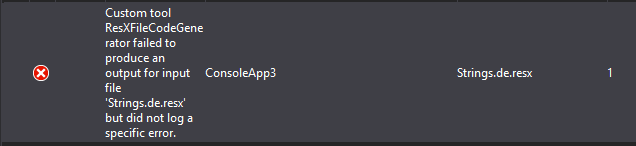
I am facing the same issue, see ConsoleApp3 for a reproduction
Additional Info: VS 2017 15.5.2 seems to have a problem, but reflecting the satellite assemblies everything seems to be there as @hardcodet stated

 marcwittke
on 24 Dec 2017
marcwittke
on 24 Dec 2017
Okay, it's definitely a problem with Visual Studio:
C:\Users\MarcWittke\source\scratchpad\ConsoleApp3\ConsoleApp3>dotnet build
Microsoft (R) Build Engine version 15.5.179.9764 for .NET Core
Copyright (C) Microsoft Corporation. All rights reserved.

  Restore completed in 20,23 ms for C:\Users\MarcWittke\source\scratchpad\ConsoleApp3\ConsoleApp3\ConsoleApp3.csproj.
  ConsoleApp3 -> C:\Users\MarcWittke\source\scratchpad\ConsoleApp3\ConsoleApp3\bin\Debug\netcoreapp2.0\ConsoleApp3.dll

Build succeeded.
    0 Warning(s)
    0 Error(s)

Time Elapsed 00:00:01.32

C:\Users\MarcWittke\source\scratchpad\ConsoleApp3\ConsoleApp3>dotnet run
Hallo Welt!
Hallo Welt!

C:\Users\MarcWittke\source\scratchpad\ConsoleApp3\ConsoleApp3>
I also encountered this problem when adding localization to an existing application. However, when I tried to test it in a new project, everything worked as expected.
Eventually, I was able to fix the problem in the original project. All I had to do was to remove an arbitrary PackageReference from the csproj file, build the app, and then add the reference back. (The motivation behing doing that was to check if it is possible that one of the referenced packages causes the problem.)
That means that no change in code was needed to fix the problem. After adding and removing the package reference, the project was in the same state as before.
 OndrejNepozitek
on 5 Oct 2018
OndrejNepozitek
on 5 Oct 2018
I also had this problem. After reading the comments above, I cleaned and build my solution and this fixed the problem.
 apspestana
on 27 Mar 2019
apspestana
on 27 Mar 2019
@danmosemsft Maybe this is worth reopening and having a look?
hardcodet
on 27 Mar 2019
@hardcodet if there is a minimal repro we can look at, sure. It would be best to open a new issue. If the satellite assemblies are not going in the right place, the issue should go in Microsoft/msbuild. If they seem right but ResourceManager does not seem to be loading the right ones, then dotnet/corefx is the place for the issue.
danmosemsft
on 28 Mar 2019
Related issues
 jzabroski
·
3Comments
jzabroski
·
3Comments
 bencz
·
3Comments
bencz
·
3Comments
 sahithreddyk
·
3Comments
sahithreddyk
·
3Comments
 jchannon
·
3Comments
jchannon
·
3Comments
 chunseoklee
·
3Comments
chunseoklee
·
3Comments
Most helpful comment
I also had this problem. After reading the comments above, I cleaned and build my solution and this fixed the problem.