Runtime: http request in docker container fails with curl error
Near the end of converting a webapi 2 service to aspcore I've run up against a problem hosting the aspcore service in docker. The problem is that no HttpRequest are working anymore in the project. They throw the follow exception:
System.Net.Http.HttpRequestException: An error occurred while sending the request. ---> System.Net.Http.CurlException: Couldn't connect to server
   at System.Net.Http.CurlHandler.ThrowIfCURLEError(CURLcode error)
   at System.Net.Http.CurlHandler.MultiAgent.FinishRequest(StrongToWeakReference`1 easyWrapper, CURLcode messageResult)
   --- End of inner exception stack trace ---
   at System.Runtime.ExceptionServices.ExceptionDispatchInfo.Throw()
   at System.Runtime.CompilerServices.TaskAwaiter.HandleNonSuccessAndDebuggerNotification(Task task)
   at System.Runtime.CompilerServices.ConfiguredTaskAwaitable`1.ConfiguredTaskAwaiter.GetResult()
   at System.Net.Http.HttpClient.<FinishSendAsync>d__58.MoveNext()
   --- End of inner exception stack trace ---
   at System.Threading.Tasks.Task.ThrowIfExceptional(Boolean includeTaskCanceledExceptions)
   at System.Threading.Tasks.Task.Wait(Int32 millisecondsTimeout, CancellationToken cancellationToken)
And they only throw this exception when running inside the docker container FROM microsoft/dotnet:1.0-runtime and FROM microsoft/dotnet:1.1.1-runtime This exception doesn't occur on the host machine running docker and has been no problem so far as I rebuild the project piece by in a new solution. I believe this issue might have started after migrating to csproj from project.json.
 JefStat
All 33 comments
Are you able to use curl to access the same url from inside the docker container?
 stephentoub
on 18 Mar 2017
stephentoub
on 18 Mar 2017
Yes I can access the url using curl from inside the container.
JefStat
on 19 Mar 2017
Can you share a small app demonstrating the problem, something that we could run to try to repro it?
What OS are you on? What version of curl is installed? Any other details?
The error "Couldn't connect to server" coming from libcurl suggests there's not much here specific to .NET.
stephentoub
on 19 Mar 2017
I've been trying to create a demo app to no avail so far but I'll work on it today again.
JefStat
on 19 Mar 2017
Thanks.
stephentoub
on 19 Mar 2017
Sadly I've not been able to reproduce this in the end I manually recreated all my projects in VS2017 and copied in the .cs files to fix the issue.
JefStat
on 20 Mar 2017
I'm getting the same issue.
I have created an API and a web client which calls api both are hosted in docker
when i try to call api from controller using HttpClient().GetAsync() i get "An error occurred while sending the request. ---> System.Net.Http.CurlException: Couldn't connect to server"
below is code in controller (web client)
```c#
public IActionResult Save(Incident model)
{
var client = new HttpClient();
client.BaseAddress = new Uri("http://localhost:5000/");
client.DefaultRequestHeaders.Accept.Add(new MediaTypeWithQualityHeaderValue("application/json"));
var hh = JsonConvert.SerializeObject(model);
StringContent content = new StringContent(JsonConvert.SerializeObject(model), Encoding.UTF8, "application/json");
        try
        {
            var response = client.GetAsync("api/incident").Result;

            //HttpResponseMessage response = client.PostAsync("/api/incident", content).Result;
            //if (response.IsSuccessStatusCode)
            //{
            //    var data = response.Content.ReadAsStringAsync().Result;
            //}
        }
        catch (Exception ex)
        {
            throw ex;
        }

        return Ok();
    }
[HttpGet]
[Produces(typeof(IEnumerable
[SwaggerResponse(200, Type = typeof(IEnumerable
public async Task
{
return await _incidentService.GetAllIncidents();
}
```
Docker compose
api:
image: api
build:
context: ./Api
dockerfile: Dockerfile
depends_on:
- db
ports:
- "5000:80"
db:
container_name: mongodb
image: mongo
ports:
- "32773:27017"
apitestwebclient:
image: apitestwebclient
build:
context: ./ApiTestWebClient
dockerfile: Dockerfile
ports:
- "5001:80"
I did tried creating new project but still getting the same erro. I am running on Win 10 linux container.
Interestingly when i try to access api from another app (not in same solution) i am able to call api function, just not able to call from webclient(same solution)
 nitinjain
on 7 Apr 2017
nitinjain
on 7 Apr 2017
@stephentoub any idea?
@nitinjain did you try latest-ish bits? Any chance to get a full repro source code of minimal repro? Thanks!
 karelz
on 28 Apr 2017
karelz
on 28 Apr 2017
any idea?
Doesn't seem like a bug in .NET. Looks like some kind of configuration issue with the machine / docker / etc. The client is getting an error back from libcurl saying it can't connect to the server, which basically means it tried to connect a socket to that address/port and failed.
stephentoub
on 28 Apr 2017
OK, closing. @nitinjain if you disagree, please let us know. We can reopen if there is evidence this is indeed .NET problem. Thanks!
karelz
on 28 Apr 2017
Hi When I am trying to access my application in Container and while I login it threw this error "One or more errors occurred while sending request" although this application works fine on Windows.
Please help me to resolve this issue.
 MonikaMalik123
on 3 Apr 2018
MonikaMalik123
on 3 Apr 2018
@MonikaMalik123 try to debug it in the container / remotely, get exception call stack, check container settings, make sure you use latest .NET Core etc. That will hint you what to look at next.
Or try to create minimal repro which works on Windows and fails on Linux.
karelz
on 3 Apr 2018
Hi @karelz Thanks for the reply,, I don't have idea how to debug .NetCore 2.0 application inside Container. If you could suggest any example. Would be great
Thanks
MonikaMalik123
on 10 Apr 2018
Running into the same problem, curl from within the container works but not HttpClient which produces
System.Net.Http.HttpRequestException: An error occurred while sending the request. ---> System.Net.Http.CurlException: Couldn't connect to server
   at System.Net.Http.CurlHandler.ThrowIfCURLEError(CURLcode error)
   at System.Net.Http.CurlHandler.MultiAgent.FinishRequest(StrongToWeakReference`1 easyWrapper, CURLcode messageResult)
``` c#
var _httpClient = new HttpClient
{
BaseAddress = new Uri("http://api")
// api is the name of the service in docker-compose, which should resolve by the container automatically
};
var response = await _httpClient.PostAsJsonAsync(
"api/v1/log", logList);
// effectively posting to http://api/api/v1/logList
``` yml
services:
  api:
    image: loggingapi
    build:
      context: .
      dockerfile: LoggingAPI/Dockerfile
    ports:
      - "3002:80"

  client:
    image: clientsite
    build:
      context: .
      dockerfile: ClientSite/Dockerfile
    ports:
      - "3001:80"
The port 80 shouldn't matter but posting to both http://api and http://api:80 didn't work. The exposed port 3002 is intended for external access not for inter-container communications.
 HenryQW
on 17 May 2018
HenryQW
on 17 May 2018
@HenryQW can isolate a repro we can try in-house?
Also, I would recommend to try .NET Core 2.1 RC (it is go-live license).
karelz
on 17 May 2018
@karelz Thanks for the prompt reply!
I will look into the possibility of adopting .NET Core 2.1 and also try to come up with a testing stack tomorrow.
HenryQW
on 17 May 2018
@karelz I did test a solution but with no corporate proxy implemented, and it works fine. Makes me wonder, is HttpClient respecting default proxy settings or the proxy has to be set specifically?
HenryQW
on 18 May 2018
is HttpClient respecting default proxy settings
This is on a Linux container? So, how are the "default proxy settings" configured exactly? Environment variables? Can you let us know what settings are present on this container for the corporate network?
 davidsh
on 18 May 2018
davidsh
on 18 May 2018
Yes it's a Linux container.
The proxy is set via environment variables. Local build (on a windows machine with the same proxy configured) is working fine.
https://github.com/HenryQW/httpclientTest/blob/master/docker-compose.yml
HenryQW
on 18 May 2018
Yes it's a Linux container. The proxy is set via environment variables.
What environment variables are you using? Can you send a sample of that?
Local build (on a windows machine with the same proxy configured) is working fine.
For the WIndows machine, I assume you don't use environment variables. But rather IE config settings, i.e.:
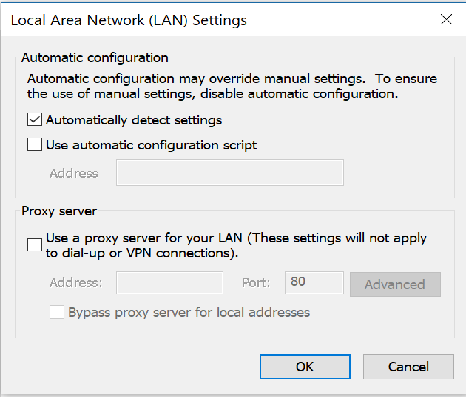
I think .NET Core 2.0 did not handle Linux environment variables for proxy settings. But this was fixed for .NET Core 2.1. @wfurt can you comment on this?
davidsh
on 18 May 2018
>
What environment variables are you using? Can you send a sample of that?
Looks like you're using these evironment variables on Linux:
http_proxy=http://proxy:1080
https_proxy=http://proxy:1080
no_proxy=localhost
@wfurt Does CurlHandler use those variables for proxy? Also, does .NET Core 2.1 SocketsHttpHandler use those variables for proxy?
davidsh
on 18 May 2018
libcurl used also env vars - that's how we modeled 2.1 env vars detection.
@HenryQW please try your repro on 2.1. Let's first find out if it fails there, then we can go deeper.
karelz
on 18 May 2018
Does CurlHandler use those variables for proxy? Also, does .NET Core 2.1 SocketsHttpHandler use those variables for proxy
Yes and yes (on Unix).
stephentoub
on 18 May 2018
Just a note, that the 1080 port is default for Socks. SocketsHttpHandler does not support Socks proxy.
I think best way how to troubleshoot this is packet capture with tcpdump or tshark.
It may be worth of trying with IP address/port to eliminate issues with name lookup.
Next step I would suggest is try something like:
strace -f -e connect -t dotnet run 2>&1 | grep AF_INET
you will need to run container in privileged mode or fix tracing capability.
 wfurt
on 18 May 2018
wfurt
on 18 May 2018
@wfurt http proxy(via port 8080) doesn’t work too.
HenryQW
on 18 May 2018
Hi guys,
I can confirm this is a proxy-related issue. Thanks for all the help!
HenryQW
on 21 May 2018
I'm facing same issue. Does anyone have solution?
    [ERROR]An error occurred while sending the request.
System.Net.Http.HttpRequestException: An error occurred while sending the request. ---> System.Net.Http.CurlException: Couldn't connect to server
   at System.Net.Http.CurlHandler.ThrowIfCURLEError(CURLcode error)
   at System.Net.Http.CurlHandler.MultiAgent.FinishRequest(StrongToWeakReference`1 easyWrapper, CURLcode messageResult)
   --- End of inner exception stack trace ---
   at System.Runtime.ExceptionServices.ExceptionDispatchInfo.Throw()
   at System.Runtime.CompilerServices.TaskAwaiter.HandleNonSuccessAndDebuggerNotification(Task task)
   at System.Runtime.CompilerServices.ConfiguredTaskAwaitable`1.ConfiguredTaskAwaiter.GetResult()
   at System.Net.Http.HttpClient.<FinishSendAsyncUnbuffered>d__59.MoveNext()
 Ramnath24
on 7 Jun 2018
Ramnath24
on 7 Jun 2018
@Ramnath24 make sure your docker containers are on the same network.
HenryQW
on 7 Jun 2018
@Ramnath24 can you try .NET Core 2.1? curl is not use there at all.
To troubleshoot, you can use Fiddler/Wireshark to check what is happening on the network.
karelz
on 7 Jun 2018
I am also running into this issue. Does someone have a solution or something I can look into other than making sure my containers are on the same network?
 roblapp
on 1 Nov 2018
roblapp
on 1 Nov 2018
I am also running into this issue. Does someone have a solution or something I can look into other than making sure my containers are on the same network?
Not sure what situation you are in, but if you have a proxy, it's likely to be proxy-related.
HenryQW
on 1 Nov 2018
Struggling with similar issue my app makes requests via HttpClient, it works well on dev server, but when it's running inside Docker container I am getting 400 Bad Reguest. And curl inside container also works well
 mironych
on 20 Nov 2018
mironych
on 20 Nov 2018
@mironych can you try .NET Core 2.1? curl is not use there at all.
To troubleshoot, you can use Fiddler/Wireshark to check what is happening on the network.
karelz
on 26 Nov 2018
Related issues
 EgorBo
·
3Comments
EgorBo
·
3Comments
 noahfalk
·
3Comments
noahfalk
·
3Comments
 Timovzl
·
3Comments
Timovzl
·
3Comments
 yahorsi
·
3Comments
yahorsi
·
3Comments
 bencz
·
3Comments
bencz
·
3Comments