Runtime: Crash when stepping into stackalloc with debugger on Linux
When debugging an application, stepping into a line of code containing stackalloc causes the CLR(?) to crash. It is fairly easy to reproduce:
using System;

namespace dotnet_debugger_crash
{
    class Program
    {
        static void Main(string[] args)
        {
            Console.WriteLine("Hello, world!");

            Span<byte> data = stackalloc byte[10];

            Console.WriteLine("Goodbye, world!");
        }
    }
}
Using VS Code, I get this output:
You may only use the Microsoft .NET Core Debugger (vsdbg) with
Visual Studio Code, Visual Studio or Visual Studio for Mac software
to help you develop and test your applications.
-------------------------------------------------------------------
Loaded '/usr/share/dotnet/shared/Microsoft.NETCore.App/3.0.0/System.Private.CoreLib.dll'. Skipped loading symbols. Module is optimized and the debugger option 'Just My Code' is enabled.
Loaded '/home/dev/Development/dotnet-debugger-crash/bin/Debug/netcoreapp3.0/dotnet-debugger-crash.dll'. Symbols loaded.
Loaded '/usr/share/dotnet/shared/Microsoft.NETCore.App/3.0.0/System.Runtime.dll'. Skipped loading symbols. Module is optimized and the debugger option 'Just My Code' is enabled.
Loaded '/usr/share/dotnet/shared/Microsoft.NETCore.App/3.0.0/System.Console.dll'. Skipped loading symbols. Module is optimized and the debugger option 'Just My Code' is enabled.
Loaded '/usr/share/dotnet/shared/Microsoft.NETCore.App/3.0.0/System.Threading.dll'. Skipped loading symbols. Module is optimized and the debugger option 'Just My Code' is enabled.
Loaded '/usr/share/dotnet/shared/Microsoft.NETCore.App/3.0.0/System.Runtime.Extensions.dll'. Skipped loading symbols. Module is optimized and the debugger option 'Just My Code' is enabled.
Loaded '/usr/share/dotnet/shared/Microsoft.NETCore.App/3.0.0/System.Text.Encoding.Extensions.dll'. Skipped loading symbols. Module is optimized and the debugger option 'Just My Code' is enabled.
Hello, world!
The target process exited with code 0 while evaluating the function 'System.Span<T>.ToString'.The program '[19546] dotnet-debugger-crash.dll' has exited with code 0 (0x0).
Here's my system info, including the output of dotnet --info:
dev@Monica:~/Development/dotnet-debugger-crash $ dotnet --info
.NET Core SDK (reflecting any global.json):
 Version:   3.0.100
 Commit:    04339c3a26

Runtime Environment:
 OS Name:     debian
 OS Version:
 OS Platform: Linux
 RID:         debian-x64
 Base Path:   /usr/share/dotnet/sdk/3.0.100/

Host (useful for support):
  Version: 3.0.0
  Commit:  95a0a61858

.NET Core SDKs installed:
  2.1.802 [/usr/share/dotnet/sdk]
  3.0.100-preview9-014004 [/usr/share/dotnet/sdk]
  3.0.100 [/usr/share/dotnet/sdk]

.NET Core runtimes installed:
  Microsoft.AspNetCore.All 2.1.13 [/usr/share/dotnet/shared/Microsoft.AspNetCore.All]
  Microsoft.AspNetCore.App 2.1.13 [/usr/share/dotnet/shared/Microsoft.AspNetCore.App]
  Microsoft.AspNetCore.App 3.0.0-preview9.19424.4 [/usr/share/dotnet/shared/Microsoft.AspNetCore.App]
  Microsoft.AspNetCore.App 3.0.0 [/usr/share/dotnet/shared/Microsoft.AspNetCore.App]
  Microsoft.NETCore.App 2.1.13 [/usr/share/dotnet/shared/Microsoft.NETCore.App]
  Microsoft.NETCore.App 3.0.0-preview9-19423-09 [/usr/share/dotnet/shared/Microsoft.NETCore.App]
  Microsoft.NETCore.App 3.0.0 [/usr/share/dotnet/shared/Microsoft.NETCore.App]

To install additional .NET Core runtimes or SDKs:
  https://aka.ms/dotnet-download
dev@Monica:~/Development/dotnet-debugger-crash $ lsb_release -a
No LSB modules are available.
Distributor ID: Debian
Description:    Debian GNU/Linux bullseye/sid
Release:        testing
Codename:       bullseye
dev@Monica:~/Development/dotnet-debugger-crash $ uname -a
Linux Monica 5.2.0-3-amd64 dotnet/coreclr#1 SMP Debian 5.2.17-1 (2019-09-26) x86_64 GNU/Linux
EDIT: As a workaround, placing a breakpoint directly after the stackalloc (so, on the second Console.WriteLine) and resuming appears to work. Though this isn't ideal for multi-threaded code.
 FiniteReality
All 7 comments
I've also noticed what may be the same issue.
- Windows 10 1903
- Visual Studio Community 2019 16.3.5
- .NET Core 3.0.100
- .NET Core console app
internal static class Program
{
    private static void Main()
    {
        Span<char> chars = stackalloc char[10];
    }
}
Stepping over the stackalloc line causes this:
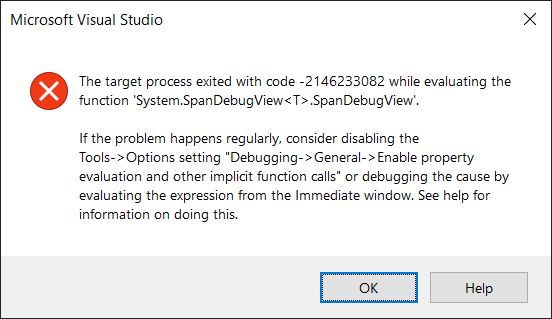
 nathan-alden-sr
on 15 Oct 2019
nathan-alden-sr
on 15 Oct 2019
@sdmaclea Is this fixed on dotnet/coreclr#26607?
 tommcdon
on 16 Oct 2019
tommcdon
on 16 Oct 2019
Yes this is fixed in 3.1 by dotnet/coreclr#26607.
 sdmaclea
on 16 Oct 2019
sdmaclea
on 16 Oct 2019
@FiniteReality @nathan-alden-sr Would you mind trying our fix by installing the .NET Core 3.1 daily build?
To do this, please obtain the latest dotnet install script following the instructions on https://github.com/dotnet/core-sdk or https://docs.microsoft.com/en-us/dotnet/core/tools/dotnet-install-script, then install from the release/3.1.1xx channel.
For example:
Linux:
wget https://dot.net/v1/dotnet-install.sh
-OR
curl -sSL https://dot.net/v1/dotnet-install.sh > ./dotnet-install.sh

chmod 755 ./dotnet-install.sh
sudo ./dotnet-install.sh -Channel release/3.1.1xx -Version "3.1.100-preview1-014461"  --install-dir /usr/share/dotnet
dotnet --info
Mac:
curl -sSL https://dot.net/v1/dotnet-install.sh > ./dotnet-install.sh
chmod 755 ./dotnet-install.sh
sudo ./dotnet-install.sh -Channel release/3.1.1xx -Version "3.1.100-preview1-014461"  --install-dir /usr/local/share/dotnet
dotnet --info
Windows (admin Powershell prompt):
Invoke-WebRequest 'https://dot.net/v1/dotnet-install.ps1' -OutFile 'dotnet-install.ps1'
.\dotnet-install.ps1 -Channel release/3.1.1xx -Version "3.1.100-preview1-014461" -InstallDir "C:\Program Files\dotnet"
dotnet --info
Confirm that 3.1.100-preview1-014461 or later was installed:
- SDK: 3.1.100-preview1-014461
- Microsoft.NETCore.App: 3.1.0-preview1.19506.1
tommcdon
on 16 Oct 2019
Now when I use Step Over, the currently executing line stays on the stackalloc statement for several attempts before finally continuing past it. Also note the changes in the Locals window. See attached video.
nathan-alden-sr
on 16 Oct 2019
@nathan-alden-sr thanks for confirming the crash is fixed. The multiple step through a stackalloc statement issue is tracked on dotnet/runtime#9245.
tommcdon
on 16 Oct 2019
Fix for the crash is on 3.1 LTS branch. It is not being ported to 3.0 servicing.
The dotnet/runtime#9245 issue is fixed on the 5.0 branch.
sdmaclea
on 18 Oct 2019
Related issues
 yahorsi
·
3Comments
yahorsi
·
3Comments
 sahithreddyk
·
3Comments
sahithreddyk
·
3Comments
 omariom
·
3Comments
omariom
·
3Comments
 jzabroski
·
3Comments
jzabroski
·
3Comments
 jamesqo
·
3Comments
jamesqo
·
3Comments