Runtime: How do I unload the code for MySqlConnection in ALC?
```C#
// test.dll
public void Test(){
MySqlConnection connection = new MySqlConnection("");
connection.Open(); <----- If run this code, ALC will not be recycled by GC.
}
```
 NMSAzulX
All 37 comments
I think it's the same issue as this, https://github.com/dotnet/corefx/issues/40500 . Could you see if you can identify the GC roots keeping the library referenced using dotMemory (or another tool if preferred) if it's type descriptors then that'd be addressed if it's something else it may need additional work.
 Wraith2
on 27 Aug 2019
Wraith2
on 27 Aug 2019
@NMSAzulX have you seen the doc https://docs.microsoft.com/en-us/dotnet/standard/assembly/unloadability-howto? It describes how to debug issues with unloading.
 janvorli
on 27 Aug 2019
janvorli
on 27 Aug 2019
@Wraith2 @janvorli Thank you. I'm learning how to install SOS on Windbg Preview.It's too hard to learn SOS, for the first time. :)
NMSAzulX
on 30 Aug 2019
@janvorli @Wraith2 Hello, I'm just starting to learn to use it. Here is result:
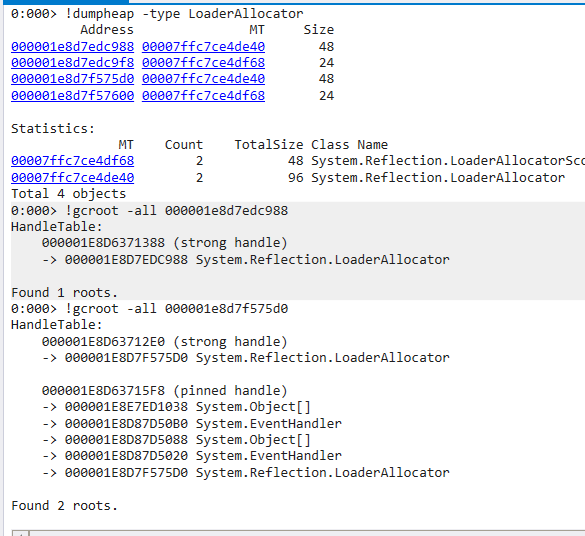
I don't know what this result means. It looks like Event referenced metadata?
NMSAzulX
on 13 Sep 2019
@NMSAzulX I am sorry for missing your question. This looks like an event handler set to something in one of the assemblies you load into the unloadable context. I have seen a similar case recently with AppDomain.ProcessExit handler.
Can you please run the !dumpobj command on the addresses of objects with System.EventHandler types listed in the !gcroot command output? For the case above, it would be:
!dumpobj 000001E8D87D50B0
!dumpobj 000001E8D87D5020
Obviously, the addresses will be different each time you run your application.
janvorli
on 27 Sep 2019
@janvorli OK, No problem! I'll print out as much information as I can when I get home from work. About two hours later.
NMSAzulX
on 27 Sep 2019
@janvorli
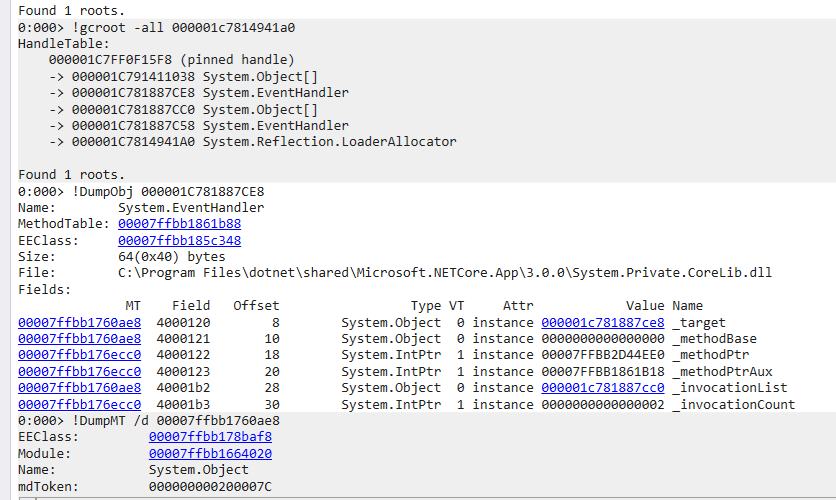
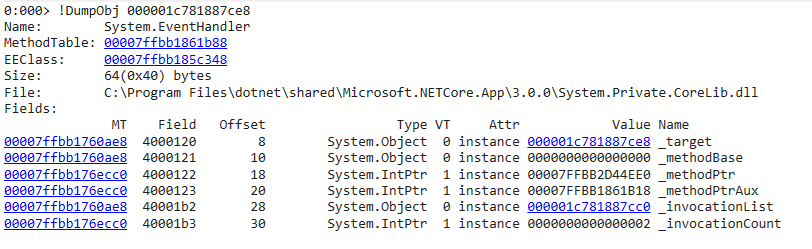
Here are the result;
NMSAzulX
on 27 Sep 2019
Thank you. You've accidentally dumped the same object twice instead of the two different ones.
Anyways, the next step is to click on the address before the _invocationList field name - it will run !dumpobj on that automatically.
Also, can you please run the !u command on the address before the _methodPtr and also on the address before the _methodPtrAux field?
janvorli
on 27 Sep 2019
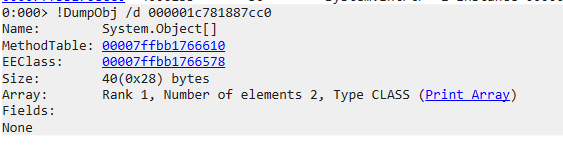
Here is the invocationList.
NMSAzulX
on 27 Sep 2019

NMSAzulX
on 27 Sep 2019

NMSAzulX
on 27 Sep 2019
Normal JIT generated code
ILStubClass.IL_STUB_MulticastDelegate_Invoke(System.Object, System.EventArgs)
Begin 00007FFBB2D44EE0, size 5e
00007ffb`b2d44ee0 4156            push    r14
00007ffb`b2d44ee2 57              push    rdi
00007ffb`b2d44ee3 56              push    rsi
00007ffb`b2d44ee4 55              push    rbp
00007ffb`b2d44ee5 53              push    rbx
00007ffb`b2d44ee6 4883ec20        sub     rsp,20h
00007ffb`b2d44eea 488bf1          mov     rsi,rcx
00007ffb`b2d44eed 488bfa          mov     rdi,rdx
00007ffb`b2d44ef0 498bd8          mov     rbx,r8
00007ffb`b2d44ef3 8b6e30          mov     ebp,dword ptr [rsi+30h]
00007ffb`b2d44ef6 4533f6          xor     r14d,r14d
00007ffb`b2d44ef9 488bce          mov     rcx,rsi
00007ffb`b2d44efc 418bd6          mov     edx,r14d
00007ffb`b2d44eff e8ecdf535e      call    coreclr!StubHelpers::MulticastDebuggerTraceHelper (00007ffc`11282ef0)
00007ffb`b2d44f04 443bf5          cmp     r14d,ebp
00007ffb`b2d44f07 7424            je      00007ffb`b2d44f2d
00007ffb`b2d44f09 488b4e28        mov     rcx,qword ptr [rsi+28h]
00007ffb`b2d44f0d 443b7108        cmp     r14d,dword ptr [rcx+8]
00007ffb`b2d44f11 7325            jae     00007ffb`b2d44f38
00007ffb`b2d44f13 4963d6          movsxd  rdx,r14d
00007ffb`b2d44f16 488b44d110      mov     rax,qword ptr [rcx+rdx*8+10h]
00007ffb`b2d44f1b 488b4808        mov     rcx,qword ptr [rax+8]
00007ffb`b2d44f1f 488bd7          mov     rdx,rdi
00007ffb`b2d44f22 4c8bc3          mov     r8,rbx
00007ffb`b2d44f25 ff5018          call    qword ptr [rax+18h]
00007ffb`b2d44f28 41ffc6          inc     r14d
00007ffb`b2d44f2b ebcc            jmp     00007ffb`b2d44ef9
00007ffb`b2d44f2d 4883c420        add     rsp,20h
00007ffb`b2d44f31 5b              pop     rbx
00007ffb`b2d44f32 5d              pop     rbp
00007ffb`b2d44f33 5e              pop     rsi
00007ffb`b2d44f34 5f              pop     rdi
00007ffb`b2d44f35 415e            pop     r14
00007ffb`b2d44f37 c3              ret
00007ffb`b2d44f38 e8c39f685e      call    coreclr!JIT_RngChkFail (00007ffc`113cef00)
00007ffb`b2d44f3d cc              int     3
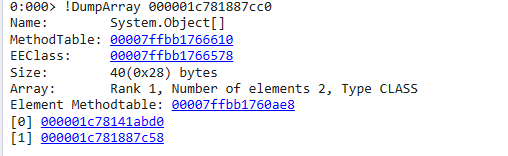
ok, can you please click on the "Print array" in the !dumpobj result above and also run !ip2md 0x7ffbb1861b18?
janvorli
on 27 Sep 2019
OK

NMSAzulX
on 27 Sep 2019
ok, so now please click on each of the addresses after [0] and [1]
janvorli
on 27 Sep 2019
[0]:

_methodPtr
0:000> !u 00007FFBB166D030
Unmanaged code
00007ffb`b166d030 488bc4          mov     rax,rsp
00007ffb`b166d033 4989cb          mov     r11,rcx
00007ffb`b166d036 4889d1          mov     rcx,rdx
00007ffb`b166d039 4c89c2          mov     rdx,r8
00007ffb`b166d03c 4d8b5320        mov     r10,qword ptr [r11+20h]
00007ffb`b166d040 4983c320        add     r11,20h
00007ffb`b166d044 49ffe2          jmp     r10
00007ffb`b166d047 1200            adc     al,byte ptr [rax]
00007ffb`b166d049 0000            add     byte ptr [rax],al
00007ffb`b166d04b 1200            adc     al,byte ptr [rax]
_methodPtrAux:
0:000> !u 00007FFBB179F458
Unmanaged code
00007ffb`b179f458 e983230c31      jmp     System_Private_CoreLib+0x3a17e0 (00007ffb`e28617e0)
00007ffb`b179f45d 5f              pop     rdi
00007ffb`b179f45e 2803            sub     byte ptr [rbx],al
00007ffb`b179f460 e8db39b05f      call    coreclr!PrecodeFixupThunk (00007ffc`112a2e40)
00007ffb`b179f465 5e              pop     rsi
00007ffb`b179f466 2b02            sub     eax,dword ptr [rdx]
00007ffb`b179f468 e963540c31      jmp     System_Private_CoreLib+0x3a48d0 (00007ffb`e28648d0)
00007ffb`b179f46d 5f              pop     rdi
00007ffb`b179f46e 2e01e8          add     eax,ebp
00007ffb`b179f471 cb              retf
[1]:
0:000> !DumpObj /d 000001c781887c58
Name:        System.EventHandler
MethodTable: 00007ffbb1861b88
EEClass:     00007ffbb185c348
Size:        64(0x40) bytes
File:        C:\Program Files\dotnet\shared\Microsoft.NETCore.App\3.0.0\System.Private.CoreLib.dll
Fields:
              MT    Field   Offset                 Type VT     Attr            Value Name
00007ffbb1760ae8  4000120        8        System.Object  0 instance 000001c781887c58 _target
00007ffbb1760ae8  4000121       10        System.Object  0 instance 000001c7814941a0 _methodBase
00007ffbb176ecc0  4000122       18        System.IntPtr  1 instance 00007FFBB166D030 _methodPtr
00007ffbb176ecc0  4000123       20        System.IntPtr  1 instance 00007FFBB31B5530 _methodPtrAux
00007ffbb1760ae8  40001b2       28        System.Object  0 instance 0000000000000000 _invocationList
00007ffbb176ecc0  40001b3       30        System.IntPtr  1 instance 0000000000000000 _invocationCount
_methodPtr:
0:000> !u 00007FFBB166D030
Unmanaged code
00007ffb`b166d030 488bc4          mov     rax,rsp
00007ffb`b166d033 4989cb          mov     r11,rcx
00007ffb`b166d036 4889d1          mov     rcx,rdx
00007ffb`b166d039 4c89c2          mov     rdx,r8
00007ffb`b166d03c 4d8b5320        mov     r10,qword ptr [r11+20h]
00007ffb`b166d040 4983c320        add     r11,20h
00007ffb`b166d044 49ffe2          jmp     r10
00007ffb`b166d047 1200            adc     al,byte ptr [rax]
00007ffb`b166d049 0000            add     byte ptr [rax],al
00007ffb`b166d04b 1200            adc     al,byte ptr [rax]
_methodPtrAux:
0:000> !u 00007FFBB31B5530
Unmanaged code
00007ffb`b31b5530 e80bd90e5e      call    coreclr!PrecodeFixupThunk (00007ffc`112a2e40)
00007ffb`b31b5535 5e              pop     rsi
00007ffb`b31b5536 020a            add     cl,byte ptr [rdx]
00007ffb`b31b5538 e803d90e5e      call    coreclr!PrecodeFixupThunk (00007ffc`112a2e40)
00007ffb`b31b553d 5e              pop     rsi
00007ffb`b31b553e 0509e8fbd8      add     eax,0D8FBE809h
00007ffb`b31b5543 0e              ???
00007ffb`b31b5544 5e              pop     rsi
00007ffb`b31b5545 5e              pop     rsi
00007ffb`b31b5546 0808            or      byte ptr [rax],cl
THank you. It seems the evidence would be in the second EventHandler object in the gcroots results. Could you please dump this one with !objdump, then again click on the address before the _invocationList and then click on the "Print Array"?
janvorli
on 27 Sep 2019
gcroot:
0:000> !gcroot -all 000001c7814941a0
HandleTable:
    000001C7FF0F15F8 (pinned handle)
    -> 000001C791411038 System.Object[]
    -> 000001C781887CE8 System.EventHandler
    -> 000001C781887CC0 System.Object[]
    -> 000001C781887C58 System.EventHandler
    -> 000001C7814941A0 System.Reflection.LoaderAllocator
Seconde:
0:000> !dumpobj 000001C781887C58
Name:        System.EventHandler
MethodTable: 00007ffbb1861b88
EEClass:     00007ffbb185c348
Size:        64(0x40) bytes
File:        C:\Program Files\dotnet\shared\Microsoft.NETCore.App\3.0.0\System.Private.CoreLib.dll
Fields:
              MT    Field   Offset                 Type VT     Attr            Value Name
00007ffbb1760ae8  4000120        8        System.Object  0 instance 000001c781887c58 _target
00007ffbb1760ae8  4000121       10        System.Object  0 instance 000001c7814941a0 _methodBase
00007ffbb176ecc0  4000122       18        System.IntPtr  1 instance 00007FFBB166D030 _methodPtr
00007ffbb176ecc0  4000123       20        System.IntPtr  1 instance 00007FFBB31B5530 _methodPtrAux
00007ffbb1760ae8  40001b2       28        System.Object  0 instance 0000000000000000 _invocationList
00007ffbb176ecc0  40001b3       30        System.IntPtr  1 instance 0000000000000000 _invocationCount
_methodPtr:
0:000> !u 00007FFBB166D030
Unmanaged code
00007ffb`b166d030 488bc4          mov     rax,rsp
00007ffb`b166d033 4989cb          mov     r11,rcx
00007ffb`b166d036 4889d1          mov     rcx,rdx
00007ffb`b166d039 4c89c2          mov     rdx,r8
00007ffb`b166d03c 4d8b5320        mov     r10,qword ptr [r11+20h]
00007ffb`b166d040 4983c320        add     r11,20h
00007ffb`b166d044 49ffe2          jmp     r10
00007ffb`b166d047 1200            adc     al,byte ptr [rax]
00007ffb`b166d049 0000            add     byte ptr [rax],al
00007ffb`b166d04b 1200            adc     al,byte ptr [rax]
_methodPtrAux:
0:000> !u 00007FFBB31B5530
Unmanaged code
00007ffb`b31b5530 e80bd90e5e      call    coreclr!PrecodeFixupThunk (00007ffc`112a2e40)
00007ffb`b31b5535 5e              pop     rsi
00007ffb`b31b5536 020a            add     cl,byte ptr [rdx]
00007ffb`b31b5538 e803d90e5e      call    coreclr!PrecodeFixupThunk (00007ffc`112a2e40)
00007ffb`b31b553d 5e              pop     rsi
00007ffb`b31b553e 0509e8fbd8      add     eax,0D8FBE809h
00007ffb`b31b5543 0e              ???
00007ffb`b31b5544 5e              pop     rsi
00007ffb`b31b5545 5e              pop     rsi
00007ffb`b31b5546 0808            or      byte ptr [rax],cl
Ok, could you please run
!ip2md 00007FFBB31B5530
and
!ip2md 00007FFBB166D030
janvorli
on 27 Sep 2019
0:000> !ip2md 00007FFBB31B5530
Failed to request MethodData, not in JIT code range


0:000> !ip2md 00007FFBB166D030
Failed to request MethodData, not in JIT code range
I saw it with no results.
I used dynamic code to call sqlconnection.open.
C#
CSharpCompilation compilation = CSharpCompilation.Create(xxx);
compilation.Emit(stream);
NMSAzulX
on 27 Sep 2019
The problem is that the target method of the EventHandler was not jitted yet. Let me try to figure out what method it is.
Can you please run
dq 0x0007ffbb31b5535+0x0A*8+3
After I get the result, we'd dump one more memory location.
janvorli
on 27 Sep 2019
0:000> dq 0x0007ffbb31b5535+0x0A*8+3
00007ffb`b31b5588  00007ffb`b3350fc8 19005e5e`0ed8abe8
00007ffb`b31b5598  18035e5e`0ed8a3e8 17065e5e`0ed89be8
00007ffb`b31b55a8  16095e5e`0ed893e8 150c5e5e`0ed88be8
00007ffb`b31b55b8  140f5e5e`0ed883e8 13125e5e`0ed87be8
00007ffb`b31b55c8  12145e5e`0ed873e8 11175e5e`0ed86be8
00007ffb`b31b55d8  101a5e5e`0ed863e8 0f1d5e5e`0ed85be8
00007ffb`b31b55e8  0e205e5e`0ed853e8 0d235e5e`0ed84be8
00007ffb`b31b55f8  0c265e5e`0ed843e8 0b295e5e`0ed83be8
ok, so now please run !dumpmd 0x7ffbb3350fc8+0x02*8?
janvorli
on 27 Sep 2019
0:000> !dumpmd 0x7ffbb3350fc8+0x02*8
Method Name:          MySql.Data.MySqlClient.MySqlPoolManager.EnsureClearingPools(System.Object, System.EventArgs)
Class:                00007ffbb3350ef0
MethodTable:          00007ffbb33510f0
mdToken:              0000000006000E75
Module:               00007ffbb1a7ebd0
IsJitted:             yes
Current CodeAddr:     00007ffbb31d83b0
Code Version History:
  CodeAddr:           00007ffbb31d83b0  (Optimized)
  NativeCodeVersion:  0000000000000000
0:000> !U /d 00007ffbb31d83b0
Normal JIT generated code
MySql.Data.MySqlClient.MySqlPoolManager.EnsureClearingPools(System.Object, System.EventArgs)
Begin 00007FFBB31D83B0, size d
>>> 00007ffb`b31d83b0 48b868551bb3fb7f0000 mov rax,7FFBB31B5568h
00007ffb`b31d83ba 48ffe0          jmp     rax
Ah, great, finally something! So, there is an event handler (I am almost sure it is AppDomain.ProcessExit) registered to point to MySql.Data.MySqlClient.MySqlPoolManager.EnsureClearingPools by the DataMySqlPoolManager or some other part of MySql. That's holding your context alive forever.
janvorli
on 27 Sep 2019
And here we go, it is as I've thought:
https://github.com/pdonald/mysql-connector-net/blob/d120f56b0094a0f0721539e9b6e731697e917026/Source/MySql.Data/MySqlPoolManager.cs#L48
janvorli
on 27 Sep 2019
@janvorli Cheers! There's no accident. It's just that problem. Is this the same as Json.net?
NMSAzulX
on 27 Sep 2019
That unfortunately means that anything that uses the MySql.Data.MySqlClient cannot be unloaded.
But if you can compile your own version of this client, removing the two event handler registrations would fix the problem.
janvorli
on 27 Sep 2019
This would be just a hot fix though. A proper fix would be to check if the assembly is loaded in a collectible context and then instead of those two events register the same handler to the AssemblyLoadContext.Unload event of the related AssemblyLoadContext instance.
janvorli
on 27 Sep 2019
It would be ideal to ask the MySqlEvent developers to make such a fix if you need to use it in an unloadable context.
janvorli
on 27 Sep 2019
Okay, I'll give them a issue if I need to. Thank you very much for your guidance. It's a pleasure to complete this Debug with you.
NMSAzulX
on 27 Sep 2019
You're welcome!
Is this the same as Json.net?
I am not really sure what you are asking about. But I don't see the json.net registering a ProcessExit or DomainUnload handler.
janvorli
on 27 Sep 2019
I remember that Json.net could not be unload too?
NMSAzulX
on 27 Sep 2019
I'm going to shut down this issue. Thank you.
NMSAzulX
on 27 Sep 2019
Related issues
 bencz
·
3Comments
bencz
·
3Comments
 Timovzl
·
3Comments
Timovzl
·
3Comments
 sahithreddyk
·
3Comments
sahithreddyk
·
3Comments
 jamesqo
·
3Comments
jamesqo
·
3Comments
 omariom
·
3Comments
omariom
·
3Comments
Most helpful comment
Ah, great, finally something! So, there is an event handler (I am almost sure it is AppDomain.ProcessExit) registered to point to MySql.Data.MySqlClient.MySqlPoolManager.EnsureClearingPools by the DataMySqlPoolManager or some other part of MySql. That's holding your context alive forever.