Runtime: Longer Generation 0/1 Garbage Collection - Analyzing and understanding GC/Join ETW Events
_Disclaimer: We are very new to the whole analyzing GC issues with PerfView and ETW events._
Hi everyone,
we are currently having some performance issues with one of our commercial products and are trying to analyze the reasons for it.
It appears to be coming from Generation 0 or 1 Garbage collections which are rather long (compared to other collections around the same time)
We are talking about a collection time like about 100ms for a Generation 0 for example.
When looking at the ETW Events (Microsoft-Windows-DotNETRuntime/GC/*) we are seeing a gap between some GC/Join Events which we do not know how to interpret at this point.
To us it looks like the process is idle/dead/blocked for the duration between these two seperate events and nothing else (appears to be) happening on the machine that would explain the idleness of our process.
Allow me to show you an example of what we are seeing:

As you can see there is a gap of about 97ms between these two related GC/Joins.
Other ETW events collected machine wide in this period do not show any kind of action and CPU samples show basically an idle system.
This is the time period displayed in Windows Performance Analyzer (WPA):

The application is running some hours before the issue usually arises and during that time it is doing the same thing over and over again.
Application is a Windows Forms (x64) Application targetting .NET Framework 4.7.2
and the OS used to take this specific example is Windows 10 Enterprise (x64 - 17763.1.x86fre.rs5_release.180914-1434)
Can someone point us to resources, or explain how to analyze what the reason for the rather long period of "nothing" could come from?
We are at a loss why it takes this exceptionally (in relation) long between those GC events to continue.
Any help on analyzing this issue further, would be greatly appreciated.
 octum-mf
All 36 comments
cc: @maoni0
 stephentoub
on 13 Jun 2019
stephentoub
on 13 Jun 2019
@andy-ms would you please take a look?
 Maoni0
on 13 Jun 2019
Maoni0
on 13 Jun 2019
Based on what I see there -- the time gap is between a Join and the LastJoin. This implies that all threads but one finished by .327, and the last one didn't finish until .424. (After that it quickly restarted the others.) In the time between Join and LastJoin all threads but one would naturally be idle and waiting in the join, so the only question is what that one thread (ThreadId 5224) was doing. Possibly its CPU time was stolen by a different process.
I have been working on some performance analysis that might be able to shed light on this -- it should be available publicly in a few weeks, or if you're able to share the trace I could take a look now.
 andy-ms
on 14 Jun 2019
andy-ms
on 14 Jun 2019
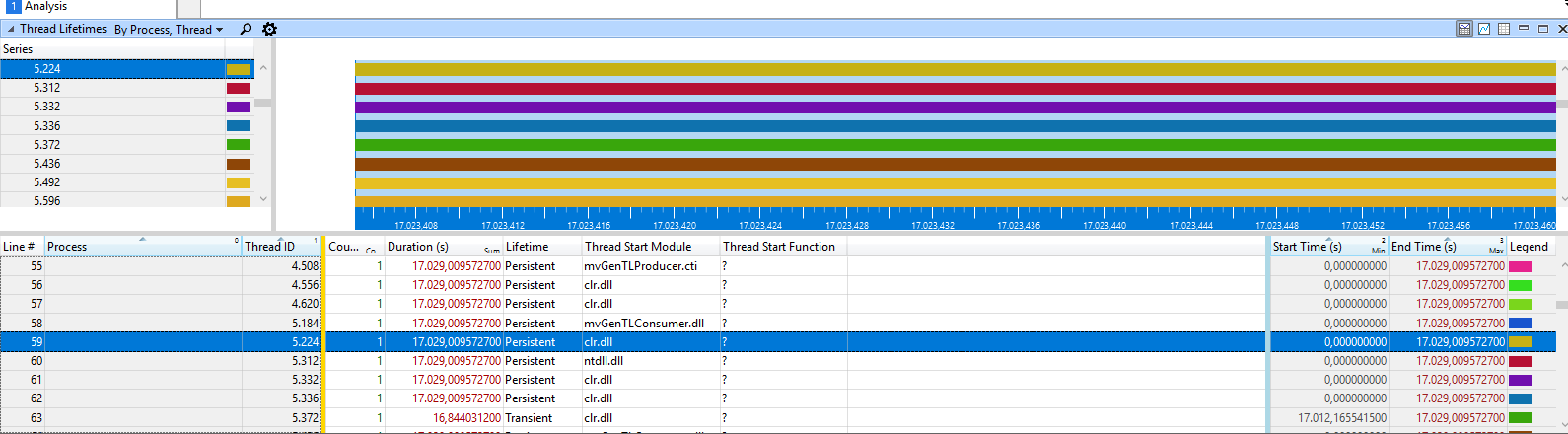
As far as I can extract from the data we have gathered the thread with id 5224 appears to be none that we have started (or at least none from which we write any kind of own ETW events that would tell us what this thread does)
I would love to provide you with the data but the zipped ETL file is approx 860MB in file which I can not upload to Github. (Update: I am currently uploading the file to OneDrive and will share the link once it's ready ...)
Any suggestion on how I can extract the relevant time slot from this big package to get a smaller more manageable size or how to provide you with this huge file?
In Perfview I can see that is assigned to the GC Server Thread:

octum-mf
on 14 Jun 2019
Maybe this helps as well: A screenshot of the Thread time Stacks of the given time frame and this specific thread 5224
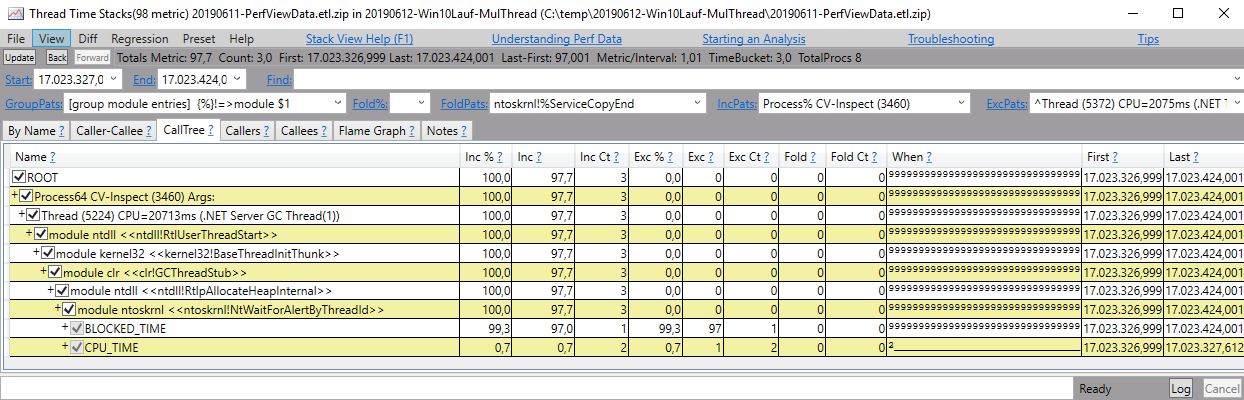
Unfortunately this tells me nothing, but maybe you can see something in it.
octum-mf
on 14 Jun 2019
if you could get rid of that GroupPats part (ie, just delete what's in that textbox) it would be more informative. but it looks like it's actually blocked on allocating native on the nt heap and we don't do that often at all from the GC. perhaps something else is allocating and GC is just waiting for a long time to get the lock.
Maoni0
on 14 Jun 2019
@andy-ms
I was able to upload the ETL trace to OneDrive:
ETL Trace ZIP (appprox: 855 MB)
Thank you for looking into it!
@Maoni0
Did you mean like that?
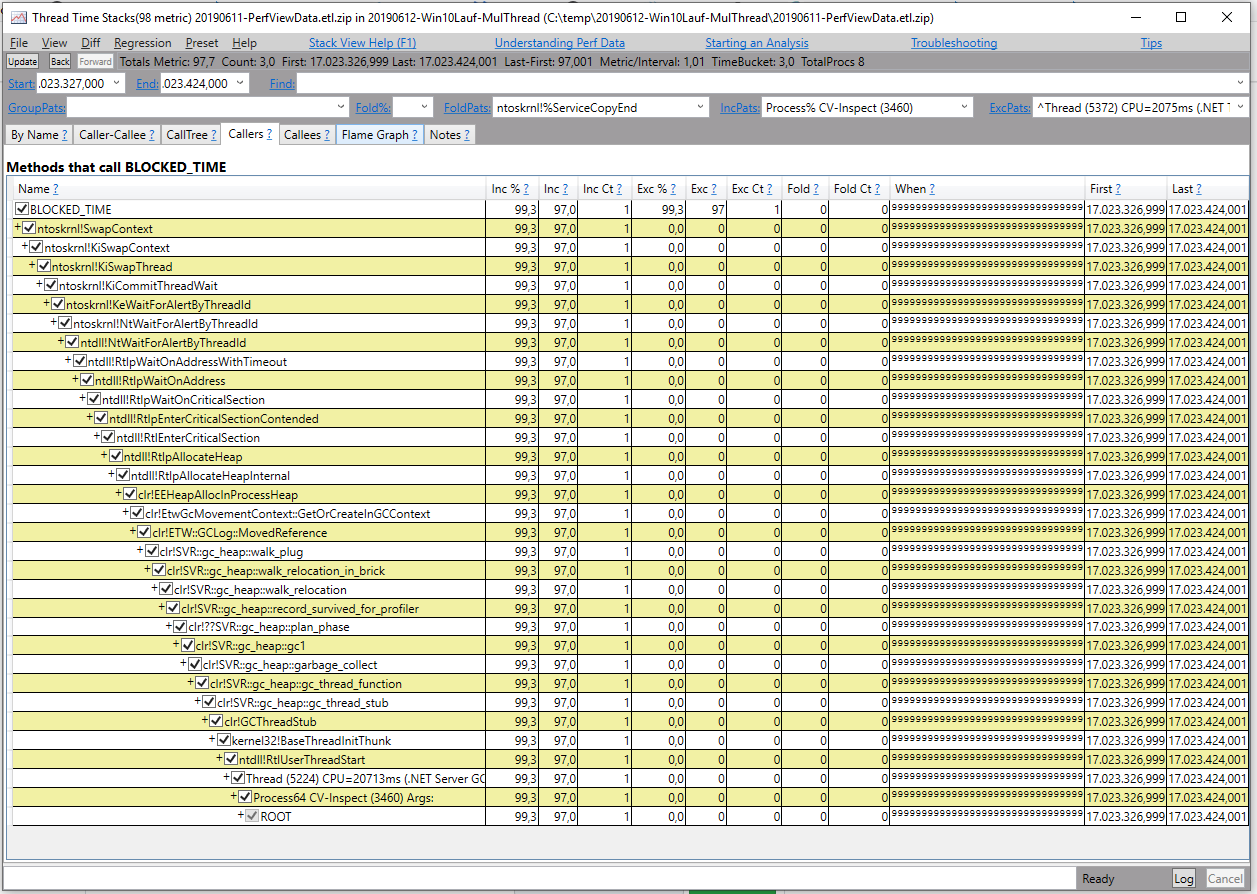
Unfortunately I don't quite understand what to make of what you are saying. (Very new to the gritty details of the GC depths we are in)
Is there any way we can find out more about the reasons behind it and or the duration it takes?
octum-mf
on 14 Jun 2019
you should not be executing this code on production, at all. this is only for diagnostics purpose. if you check the events you are collecting they should not include events like GCHeapSurvivalAndMovement or GCBulk*.
Maoni0
on 14 Jun 2019
I am sorry, I am at loss. What code do you mean?
We have collected every ETW event we saw a chance of giving us any kind of information.
Was that wrong?
What exactly did we do wrong?
octum-mf
on 14 Jun 2019
sorry. I should've been more clear. you should never, ever see gc_heap::record_survived_for_profiler running in production normally. this is only executed if you've asked for the survival info via profiling or ETW. this incurs a lot of overhead and you should ask for it if you actually use this info (eg, you could have it on for a short period of time if you want to see how the survived memory getting compacted). this means when you collected the ETW traces you enabled events that asked for this info. @andy-ms can help you with the correct commandline usage.
Maoni0
on 14 Jun 2019
Ah I see. You are suggesting that we are actually now seeing this issue because we have asked for too much information, which comes with a added price tag of additional loss of performance.
Which probably now hides the actual issue we were encountering and trying to analyze in the first place.
Indeed then, a correct commandline would be a of great help to us and would be greatly appreciated.
octum-mf
on 14 Jun 2019
Here's a command we use that collects join events and cpu samples:
PerfView.exe -LogFile:C:\path\to\output.txt -OnlyProviders:ClrPrivate:1:5,Clr:1:5 -ClrEvents:GC+Stack -ClrEventLevel:Verbose -KernelEvents:Default -NoV2Rundown -NoNGENRundown -NoRundown -AcceptEULA -NoGUI -Merge:true -SessionName:CoreGCBench -zip:false -CircularMB:301 -BufferSizeMB:301 -DataFile:C:\path\to\output.etl run C:\path\to\program.exe
Thank you very much! Come Monday we will use this to collect new data.
In the meanwhile, since we are trying to gain some knowledge, a question about this commandline:
What does the
ClrPrivate:1:5
and
Clr:1:5 Part
resolve to? Is there some Documentation what those exactly are or mean?
(BTW: I find the page GC ETW Events somehow not matching the event names to what I see in PerfView yet this seems to be the only page mentioning GC ETW events at all. Am I missing some vital documentation somewhere?)
Also I find the Buffersize of 301 very peculiar ... is there a reason for this specific size or is this simply experience and best practice?
octum-mf
on 15 Jun 2019
I believe 1 is the code for GC and 5 means verbose.
PerfView's own documentation has info about more arguments: Open PerfView, go to Help -> Command Line Help.
Passing -BufferSize is probably unnecessary as the default is 256. The command I posted above was from our infra which calculates it based on how large we think a test run can get.
The event names in the documentation you linked to should be showing up (though without e.g. _V1 suffixes) -- at the very least GC/Start and GC/End events. They may be drowned out by 'Join' events which are verbose-only and occur many times per GC (more if you have more heaps).
andy-ms
on 15 Jun 2019
Sorry it took quite a while to get back to you, but the problem happens less frequently so far.
But even with the new trace settings we had one Gen 0 GC that took about 60ms again.
Yet again with a Join taking the bulk of the time with approx. 58ms duration.
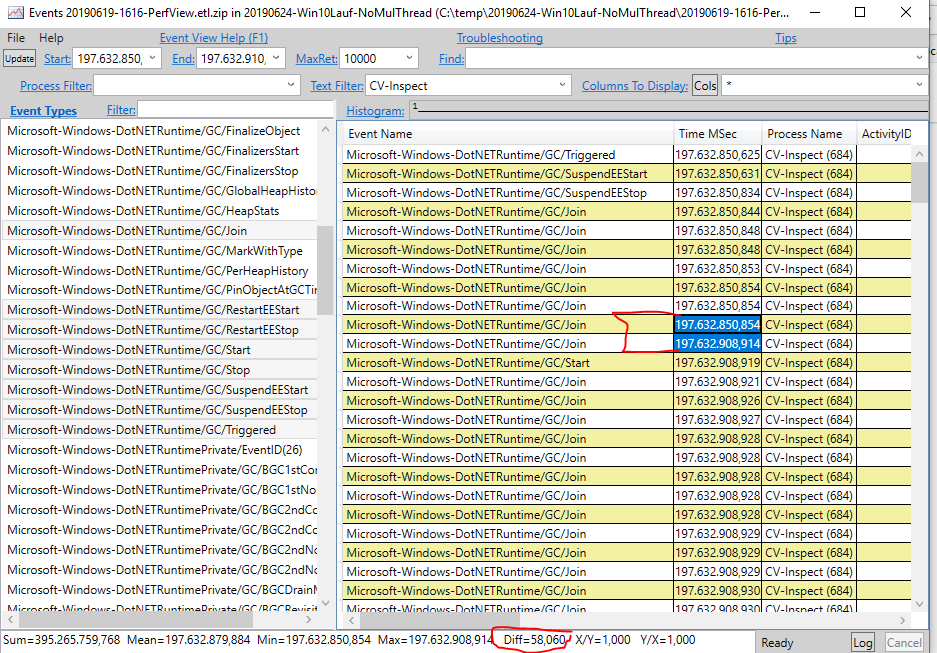
The ETL Trace File (Onedrive approx. 1 GB)
If you would be so kind as to look into this trace again and let us know why the Join was blocked for so long.
octum-mf
on 26 Jun 2019
Hi everyone, I don't mean to seem pushy but I would like to ask if anyone (@andy-ms or @Maoni0 maybe) get a chance to look into this again anytime soon?
octum-mf
on 8 Jul 2019
Hi, I've been looking at this today. I can confirm what you're seeing -- all heaps but heap 2 are quickly done with gc_join_generation_determined quickly and heap 2 is holding them all up. The join events alone don't tell us what's going on with heap 2 -- I suspect it's not doing work and is suspended somehow.
One thing you could do is change -KernelEvents:Default in your collection command to -KernelEvents:Default,ContextSwitch. This will increase the amount of data you collect so you'll likely want to collect for less time overall. This would allow us to see if heap 2 there is doing work or if its time is being used by some other process.
You're probably running on an 8-core machine? (I see 8 heaps and the default is 1 heap per core.) You might try setting COMPlus_GCHeapCount=7 -- this will give you an "extra" core so it's less likely for one heap to be delayed.
andy-ms
on 9 Jul 2019
you should also increase the buffer sizes
-CircularMB:301 -BufferSizeMB:301
to something like
-CircularMB:4000 -BufferSizeMB:4000
Maoni0
on 9 Jul 2019
Thank you for your responses!
We are scheduling a new test run within the next few days.
Just to be sure I understand that correctly:
@andy-ms The additional ContextSwitch events might help understand why the heap is suspended?
Modifying the GC Heap count is a possibly way to circumvent the issue, correct?
Not a additional setting to analyze the issue further, correct?
I have read that the GCHeapCount can also be modified in the Application configuration via
<configuration><runtime><GCHeapCount ...>
is that still true? (Since it is not documented here )
In short:
We should either try to reproduce the issue with ContextSwitch enabled OR see if it still occurs by reducing the Heap count?
@Maoni0 We will do this with our next test run.
But would you mind elaborating why we should do this?
I mean did you notice in the traces we sent that there is too little data?
Can we ourselves determine if the buffer size was too low?
octum-mf
on 10 Jul 2019
COMPlus_GCHeapCount would be an environment variable. I don't think this can be configured in any other way (#25469 is working on that). Setting this wouldn't help with analysis but would potentially make the issue go away. Adding ContextSwitch events would help analyze the issue since we'd see what other processes are running and stealing time from GC..
andy-ms
on 10 Jul 2019
@andy-ms Thanks!
Is there any way to quickly verify how many heaps are being used (check the the Env.-Var has been properly set and recognized?)
octum-mf
on 10 Jul 2019
Not programatically but you could take a quick trace and as long is it has at least one GC, you could open that in PerfView and look for a GC/GlobalHeapHistory event which should contain NumHeaps.
andy-ms
on 10 Jul 2019
A quick question about specifying Trace Providers:
We are trying to add our own ETW Events into the collected traces but seem to fail at it.
The Perfview parameter we are using is: -OnlyProviders:ClrPrivate:1:5,Clr:1:5,*CVInspectEventSource
where "CVInspectEventSource" is our own .NET ETW Event class.
However this seems to yield no events of our own in the collected trace.
The collection of our events previously worked when we did specify the parameter in the GUI.
What are we doing wrong? Is the commandline not correct?
octum-mf
on 16 Jul 2019
not sure if that cmd line arg works; looping in @brianrob
Maoni0
on 16 Jul 2019
When you put this into the UI, it's the same as specifying -Providers. I suspect what you want is to specify the config you want for the CLR provider using -ClrEvents, and then specify your EventSource via -Providers.
 brianrob
on 17 Jul 2019
brianrob
on 17 Jul 2019
Hi @brianrob ... unfortunately I didn't quite udnerstand what you were trying to say.
Can you provide an example how the commandline would be correct?
Hey @andy-ms /cc @Maoni0
We had another "lucky" run ...
We would greatly appreciate it if you could take a look at it ...
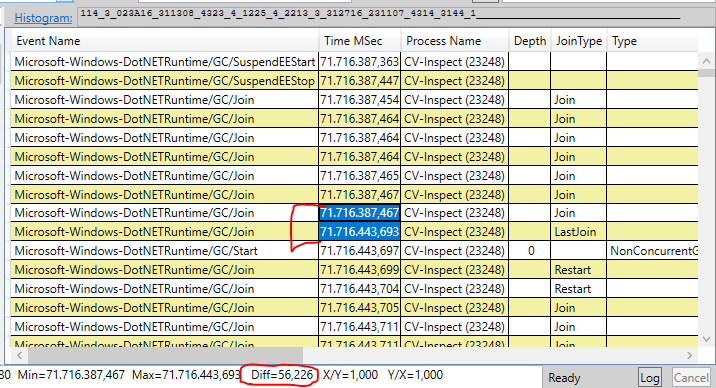
Yet another block of >55ms in joins ...
ETL Trace
We enabled the ContextSwitch in the trace as per your suggestion.
Are you enable to tell us what we need to look for or what we can determine now?
Is it possible to see (where?) the join time (block) was spend?
octum-mf
on 23 Jul 2019
I'll investigate this.
andy-ms
on 27 Jul 2019
I'll investigate this.
... Thought I inquire about the result of your investigation ;)
Any insights gained?
octum-mf
on 5 Aug 2019
Haven't forgotten about this, I'll keep you posted.
andy-ms
on 12 Aug 2019
@andy-ms
I would like to inquire if there are any updates you could give on your research?
octum-mf
on 3 Sep 2019
The longest GC pause by far was for gc 1718508.
> py . analyze-single $fulltrace --sort-gcs-descending PauseDurationMSec --process id:23248

                                                              ┌───────────────────────┐
                                                              │ Single gcs (first 10) │
                                                              └───────────────────────┘


  gc number │ PauseDurationMSec │ Generation │ AllocRateMBSec │ AllocedSinceLastGCMB │ PromotedMB │ HeapSizeBeforeMB │ HeapSizeAfterMB │ UsesCompaction
  ──────────┼───────────────────┼────────────┼────────────────┼──────────────────────┼────────────┼──────────────────┼─────────────────┼───────────────
    1718508 │              57.3 │          0 │            133 │                0.897 │      0.206 │              394 │             393 │           True
  ──────────┼───────────────────┼────────────┼────────────────┼──────────────────────┼────────────┼──────────────────┼─────────────────┼───────────────
    1717894 │              14.9 │          1 │           36.2 │                 4.27 │      0.933 │              398 │             394 │           True
  ──────────┼───────────────────┼────────────┼────────────────┼──────────────────────┼────────────┼──────────────────┼─────────────────┼───────────────
    1717984 │              14.0 │          0 │           21.4 │                 1.95 │      0.152 │              397 │             396 │           True
(Commands here are from the GC infra which will be open-sourced soon.)
98% of that GC was spent before 'generation_determined' -- before the GC had actually started. One of the heaps had its CPU stolen from it.
> py . analyze-joins-single-gc $fulltrace --process id:23248 --gc-number 1718508 --kind both

begin to generation_determined (2) -- 56.3ms (5876%) (span 71716387.36 71716443.71) (EE suspended)

                     heap │     0 │     1 │     2 │     3 │     4 │     5 │     6 │     7
  ────────────────────────┼───────┼───────┼───────┼───────┼───────┼───────┼───────┼──────
                    total │ 56.35 │ 56.34 │ 56.35 │ 56.35 │ 56.35 │ 56.35 │ 56.35 │ 56.35
  ────────────────────────┼───────┼───────┼───────┼───────┼───────┼───────┼───────┼──────
                  working │  0.06 │  0.27 │  0.10 │  0.04 │  0.10 │  0.10 │  0.10 │  0.10
  ────────────────────────┼───────┼───────┼───────┼───────┼───────┼───────┼───────┼──────
          single_threaded │  0.00 │  0.01 │  0.00 │  0.00 │  0.00 │  0.00 │  0.00 │  0.00
  ────────────────────────┼───────┼───────┼───────┼───────┼───────┼───────┼───────┼──────
               restarting │  0.00 │  0.00 │  0.00 │  0.00 │  0.00 │  0.00 │  0.00 │  0.00
  ────────────────────────┼───────┼───────┼───────┼───────┼───────┼───────┼───────┼──────
          waiting_in_join │ 56.26 │  0.00 │ 56.25 │ 56.25 │ 56.25 │ 56.24 │ 56.25 │ 56.25
  ────────────────────────┼───────┼───────┼───────┼───────┼───────┼───────┼───────┼──────
                   stolen │  0.00 │ 56.06 │  0.00 │  0.00 │  0.00 │  0.00 │  0.00 │  0.00

...


Top 3 worst stolen time instances:

   start (ms) │ duration (ms) │ old TID │ new TID │ old priority │ new priority │ new PID │ new process name │ heap │ prior state │                  stage │ processor
  ────────────┼───────────────┼─────────┼─────────┼──────────────┼──────────────┼─────────┼──────────────────┼──────┼─────────────┼────────────────────────┼──────────
  71716387.62 │          56.1 │     712 │     528 │           10 │           12 │   23248 │                  │    1 │     working │  generation_determined │         1
  ────────────┼───────────────┼─────────┼─────────┼──────────────┼──────────────┼─────────┼──────────────────┼──────┼─────────────┼────────────────────────┼──────────
  71716443.79 │        0.0453 │     712 │    8536 │           10 │           15 │       4 │           System │    1 │     working │ scan_dependent_handles │         1
  ────────────┼───────────────┼─────────┼─────────┼──────────────┼──────────────┼─────────┼──────────────────┼──────┼─────────────┼────────────────────────┼──────────
  71716443.98 │       0.00970 │     712 │    8536 │           10 │           15 │       4 │           System │    1 │     working │ scan_dependent_handles │         1
The cause of the problem was thread 528 stealing time from a GC thread, causing all the other threads to wait too.
I'm not sure how to find out what thread 528 is though, other than it doesn't appear to be a GC thread. But it is in the same process.
andy-ms
on 6 Sep 2019
thread 528 belongs to the same process 23248, the CV-Inspect process. it simply runs at higher priority:
Windows Kernel/Thread/CSwitch | 71,716,368.532 | CV-Inspect (23248) | HasStack="True" HasBlockingStack="True" ThreadID="528" ProcessorNumber="1" OldThreadID="712" OldProcessID="23,248" OldProcessName="CV-Inspect" NewThreadID="528" NewProcessID="23,248" NewProcessName="CV-Inspect" ProcessorNumber="1" NewThreadPriority="11" OldThreadPriority="10" NewThreadQuantum="0" OldThreadQuantum="0" OldThreadWaitReason="33" OldThreadWaitMode="Swappable" OldThreadState="Ready" OldThreadWaitIdealProcessor="1" NewThreadWaitTime="0"
you can see from the CPU stack view that it just runs some managed user code. should figure out why this thread is run as such high priority and if that's intentional.
Maoni0
on 6 Sep 2019
Thank you very much for the analysis! Your help is much appreciated!
Indeed we used various threads with higher than normal priority.
Since we take it now that this was causing the issue we have removed all thread priorities higher than normal.
We have made another test run with our modified (all normal and below thread priorities) but yet again
we seem to have still the same issue.
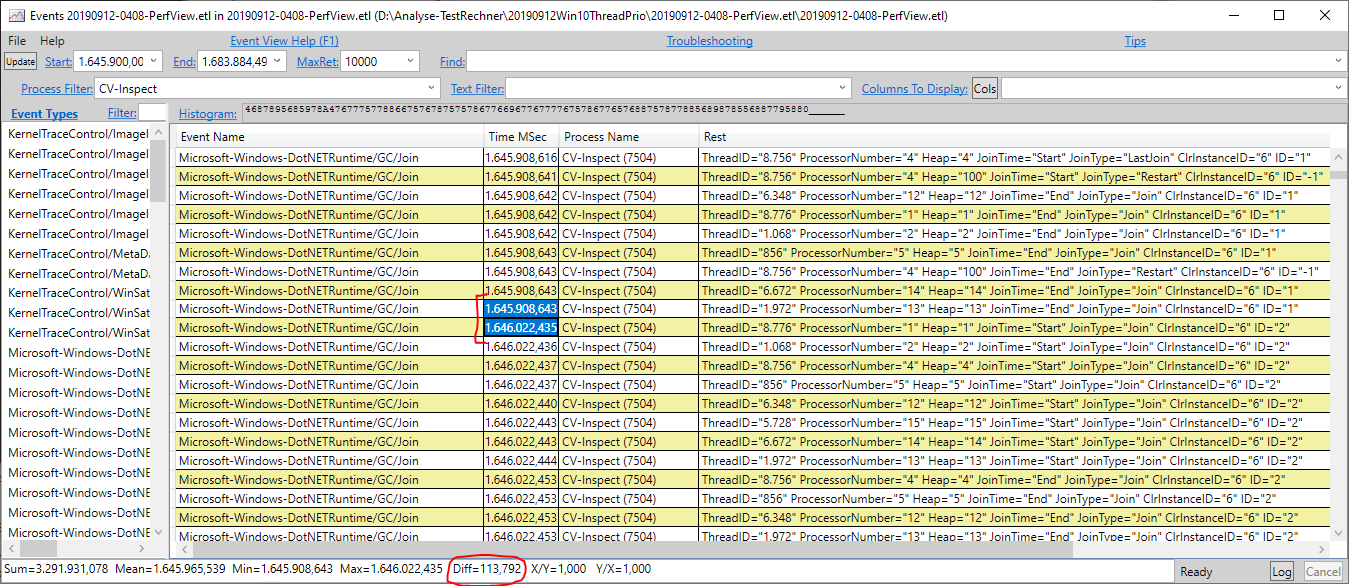
Unfortunately, we use various external libraries where we can not be certain that those not also spin off threads with higher than normal priority.
So I again, would like to ask you to take a look at the current ETL file located -> here
And let us know if it's still the case that the GC was taking so long due to a higher prioritized thread or not.
And if it is the same case as before, maybe you can help us by explaining how to identify the thread and (ideally the stacktrace) so we might be able to see
where this thread is coming from.
octum-mf
on 13 Sep 2019
OK, I've analyzed that trace and this time it is not due to stolen time. Unfortunately I'm still running into the same issue trying to view CPU stacks -- the trace is large and PerfView won't show me CPU stacks after a certain point, and unfortunately that worst GC is near the end of the trace. Trying to slice the trace file doesn't work either. I've contacted @brianrob to help.
andy-ms
on 17 Sep 2019
Another look at the first trace I analyzed
I figured out how to get CPU stacks so these comments are for the trace I analyzed before:
To recap, the stolen time started at 71716387.62 and continued for 56ms, and thread 528 was doing the stealing. Thread 528 is in the same process.
So I ran PerfView -SkipMSec:71716300 "C:\Users\anhans\Desktop\LONGPAUSES\20190722-0046-PerfView.etl\20190722-0046-PerfView.etl"
(-SkipMSec prevents the PerfView from cutting off later CPU samples due to lack of space.)
I then looked at just the CPU stacks in the time range 71716387 to 71716444 (which encompasses the join).
In this case I know the stealing thread: 528. So the first thing I do is click on the entry Thread (528) CPU=34482ms and look at its callees. This thread has 79% inclusive cost anyway.
It's spending most of its time in system.core.ni!System.Linq.Enumerable.FirstOrDefault[System.__Canon](System.Collections.Generic.IEnumerable1, System.Func2) (which probably isn't interesting, it's just a function that happens to allocate), which eventually calls clr!JIT_New, which calls kernelbase!WaitForSingleObjectEx which alone is responsible for 72% of inclusive time.
I presume this is waiting on the GC to unlock, which it of course won't because we're in the middle of a GC. So ideally it would yield the thread immediately, but instead it seems to spend a long time in WaitForSingleObject, as indicated by the when column showing that there are samples in this function over a long range.
Looking at the latest trace
I see that the worst join by far was at the beginning of GC 1424248.
The join time span was 1675975.02 to 1676056.32 . Heap 11 (thread 5492) spent 81.20ms "working".
Looking at that time span manually shows no work being done though. This is probably because if we don't see a switch away from the thread we assume it was working at the beginning. More likely it took a while to get started.
Confirming this, I don't see any CPU samples for thread 5492 until time 1,676,056.24, near the end of the join.
Looking at the CPU stacks in that join for just cv-inspect, I see that there was basically no CPU time spent on the cv-inspect process.
Looking at all processes, I see mscorlib.ni and system.ni in a lot of stacks. These seem to be coming from thread 8168. That is from the process IAStorDataMgrSvc.exe.
That process is spending a lot of time in a function system.data.ni!DataSet.Merge which spends almost all of its time in system.data.ni!Index.InitRecords.
andy-ms
on 17 Sep 2019
Sorry for the very late response!
So far it sounds like there is not much we can do about the situation and there might not really be an issue that we can fix in any way.
Also due to internal priority changes this problem has become less of an pressing issue currently.
Due to this reasoning I would close the issue for now but would like to reserve the privilege to reopen it if the need arises at a later time.
I would like to thank everyone for the help they have been providing! It is greatly appreciated.
octum-mf
on 17 Oct 2019
Related issues
 noahfalk
·
3Comments
noahfalk
·
3Comments
 jzabroski
·
3Comments
jzabroski
·
3Comments
 jamesqo
·
3Comments
jamesqo
·
3Comments
 jkotas
·
3Comments
jkotas
·
3Comments
 omajid
·
3Comments
omajid
·
3Comments