Runtime: PublishSingleFile for Linux-Exe is way better compressable than Windows-Exe
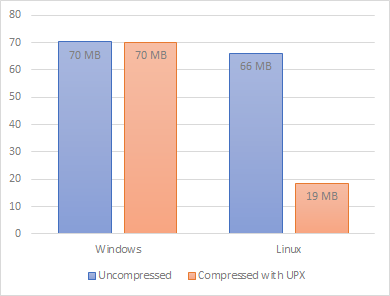
When I used the flag p:PublishSingleFile I tried to reduce the file size with UPX. It came to my attention that the executable for linux is way better compressable than the executable for windows. The ratio is 28% vs. 99%
Build with 3.0.100-preview5-011568
I small size of the single file is preferred so it would be obvious to enable a good compress ratio.
Code
static void Main(string[] args)
{
    Console.WriteLine("Hello World!");
}
Windows Executable
Created with: dotnet publish -r win-x64 /p:PublishSingleFile=true
                      Ultimate Packer for eXecutables
                          Copyright (C) 1996 - 2018
UPX 3.95w       Markus Oberhumer, Laszlo Molnar & John Reiser   Aug 26th 2018

        File size         Ratio      Format      Name
   --------------------   ------   -----------   -----------
  70272298 ->  70062378   99.70%    win64/pe     ConsoleApp1.exe
Linux Executable
Created with: dotnet publish -r linux-x64 /p:PublishSingleFile=true
                       Ultimate Packer for eXecutables
                          Copyright (C) 1996 - 2018
UPX 3.95w       Markus Oberhumer, Laszlo Molnar & John Reiser   Aug 26th 2018

        File size         Ratio      Format      Name
   --------------------   ------   -----------   -----------
  66027848 ->  18527640   28.06%   linux/amd64   ConsoleApp1
Compare
 dhcgn
dhcgn
All 13 comments
Thanks @dhcgn. These are good details. I am going to close this issue in lieu of https://github.com/dotnet/coreclr/issues/24397. Any concerns?
cc @swaroop-sridhar @sbomer @jeffschwMSFT
 AaronRobinsonMSFT
on 13 May 2019
AaronRobinsonMSFT
on 13 May 2019
@AaronRobinsonMSFT is that the same issue? dotnet/runtime#12629 is pointing out that some of the embedded libraries are not required. That would not explain why the binary is more compressible (unless perhaps the same files are embedded repeatedly, which isn't claimed in dotnet/runtime#12629)
I think it would be interesting to extract the streams out of the linux binary to see what is in there and whether in fact there is duplication. I am not sure how to do that on Linux.
 danmosemsft
on 13 May 2019
danmosemsft
on 13 May 2019
@danmosemsft I am looking at this and dotnet/runtime#12629 as being two areas of investigation addressing the same underlying issue. The general issue is that the result of dotnet publish -r <rid> /p:PublishSingleFile=true produces a binary that is too large. Specific data like the streams in this issue and the number of files in dotnet/runtime#12629 that call out why are merely different potential avenues for addressing the underlying issue of final binaries that are too large in the single file scenario. I was trying to have a single issue with lots of data about a problem instead of having a proliferation of issues with different aspects of the same underlying complaint.
AaronRobinsonMSFT
on 13 May 2019
I have no objection - whatever you think is best
danmosemsft
on 14 May 2019
I guess on further reflection I should probably let @swaroop-sridhar or @sbomer make this call. I believe one of them is going to actually be doing the work.
cc @jeffschwMSFT
AaronRobinsonMSFT
on 14 May 2019
I think this issue and dotnet/runtime#12629 are related but different issues.
There are two things we need to check:
- Generating fewer files:
- What are the files generated for a self-contained HelloWorld on Windows vs Linux?
- How many of them survive trimming? @sbomer can you please check post-trim behavior for Windows vs Linux?
- Compressing files:
- Are the files generated on Linux more compressible than Windows?
@dhcgn: Can you please check if the individual files in the publish directory also exhibit the difference in compression ratio? Or if this only manifests on the built single-file?
- In the former case, I'm not sure if much can be done. The issue could be (a) that the native files in the publish directory are very in the two OSes, or (b) a bug in the compression library.
- Are the files generated on Linux more compressible than Windows?
 swaroop-sridhar
on 15 May 2019
swaroop-sridhar
on 15 May 2019
Sorry to all involed, the UPX compressed file is not running so I close this issue and move it to UPX.
 ./PublishSingleFileExample
The application to execute does not exist: '/tmp/PublishSingleFileExample.dll'.
The Windows file doesn't compress much because the project files are appended as an overlay to the executable (the actual exe size is 330K), which cannot be compressed by upx (it is copied by default). Maybe it would be a good idea to use compression for the added files. For example, the exe that is generated by wrap, which uses gzip, is 30MB. Even smaller sizes could be achived with a better codec, like LZMA or LZMS.
 bitraid
on 20 May 2019
bitraid
on 20 May 2019
appended as an overlay to the executable
You mean, embedded as resources into the PE file? And UPX does not even attempt to compress resources, eg., with a generic compression algorithm? That's good to know.
(I'm not working on this feature, just curious what is meant)
danmosemsft
on 20 May 2019
You mean, embedded as resources into the PE file?
No, the overlay is appended data at the end of the executable file and it's not a PE section. UPX can compress PE resources.
bitraid
on 20 May 2019
Ah, I see. That is a useful observation.
danmosemsft
on 20 May 2019
Did the UPX packed executable actually work for you? -- I tried it on a PublishSingleFile build of a console app, and while it produced at ~1% smaller executable; that executable did not function. It just spat out the following error to the console The system cannot execute the specified program..
Edit: nevermind, I see your post above about it not working. Though it's odd that we compiled the exact same program but the error message we get is different...
 BrainSlugs83
on 11 Jul 2019
BrainSlugs83
on 11 Jul 2019
The UPX packed executable didn't work, I think I got the same error.
Mikey notifications@github.com schrieb am Do., 11. Juli 2019, 01:08:
Did the UPX packed executable actually work for you? -- I tried it on a
PublishSingleFile build of a console app, and while it produced at ~1%
smaller executable; that executable did not function. It just spat out the
following error to the console The system cannot execute the specified
program..—
You are receiving this because you modified the open/close state.
Reply to this email directly, view it on GitHub
https://github.com/dotnet/coreclr/issues/24543?email_source=notifications&email_token=ABSDCP3ERE3EMLNWUYMXLO3P6ZTV7A5CNFSM4HMKJW42YY3PNVWWK3TUL52HS4DFVREXG43VMVBW63LNMVXHJKTDN5WW2ZLOORPWSZGODZVACMQ#issuecomment-510263602,
or mute the thread
https://github.com/notifications/unsubscribe-auth/ABSDCPYAI4VGFUYXISDICOTP6ZTV7ANCNFSM4HMKJW4Q
.
dhcgn
on 11 Jul 2019
Related issues
 jzabroski
·
3Comments
jzabroski
·
3Comments
 noahfalk
·
3Comments
noahfalk
·
3Comments
 Timovzl
·
3Comments
Timovzl
·
3Comments
 omajid
·
3Comments
omajid
·
3Comments
 nalywa
·
3Comments
nalywa
·
3Comments
Most helpful comment
The Windows file doesn't compress much because the project files are appended as an overlay to the executable (the actual exe size is 330K), which cannot be compressed by upx (it is copied by default). Maybe it would be a good idea to use compression for the added files. For example, the exe that is generated by wrap, which uses gzip, is 30MB. Even smaller sizes could be achived with a better codec, like LZMA or LZMS.