Runtime: Local benchmark instructions are out of date
I'm trying to benchmark some changes to attribute handling, but I'm struggling to get any tests running.
The current guidance (as far as I can tell) is located here: https://github.com/dotnet/coreclr/blob/master/Documentation/project-docs/performance-guidelines.md#running-the-coreclr-performance-tests-on-windows
It references: tests\scripts\run-xunit-perf.cmd -arch x64 -configuration Release -testBinLoc <path>
However, the tests\scripts\run-xunit-perf.cmd script was eliminated in dotnet/coreclr#15568, during a conversion to python. So...how do we run benchmarks these days? And can we please update the guidance for everyone to benefit?
 NickCraver
All 19 comments
cc @benaadams @stephentoub @noahfalk
NickCraver
on 2 Nov 2018
cc @adamsitnik
 benaadams
on 2 Nov 2018
benaadams
on 2 Nov 2018
cc @jorive
 noahfalk
on 2 Nov 2018
noahfalk
on 2 Nov 2018
Hi @NickCraver
We are very soon going to release brand new repo with all of the benchmarks ported to BenchmarkDotNet (matter of weeks) and up to date docs.
For now you can write a benchmark using BenchmarkDotNet 0.11.2, and pass the path to corerun.exe using --coreRun command line argument.
Copy paste from the docs that are going to be released soon:
Against private runtime build
Pass the path to CoreRun using --coreRun argument. In both CoreCLR and CoreFX you are going to find few CoreRun.exe files. Use the one that has framework assemblies in the same folder. Examples:
- "C:\Projects\coreclr\bin\tests\Windows_NT.x64.Release\TestsCore_Root\CoreRun.exe"
- "C:\Projects\corefx\bin\runtime\netcoreapp-Windows_NT-Release-x64\CoreRun.exe"
Example: Run all benchmarks using "C:\Projects\corefx\bin\runtime\netcoreapp-Windows_NT-Release-x64\CoreRun.exe"
dotnet run -c Release -f netcoreapp3.0 -- --filter * --coreRun "C:\Projects\corefx\bin\runtime\netcoreapp-Windows_NT-Release-x64\CoreRun.exe"
If you want to use some non-default dotnet cli to build the benchmarks pass the path to cli via --cli.
If you want restore the packages to selected folder, pass it via --packages.
Example: Run all benchmarks using "C:\Projects\coreclr\bin\tests\Windows_NT.x64.Release\TestsCore_Root\CoreRun.exe", restore the packages to C:\Projects\coreclr\packages and use "C:\Projects\coreclr\Tools\dotnetcli\dotnet.exe" for building the benchmarks.
dotnet run -c Release -f netcoreapp3.0 -- --filter * --coreRun "C:\Projects\coreclr\bin\tests\Windows_NT.x64.Release\Tests\Core_Root\CoreRun.exe --cli "C:\Projects\coreclr\Tools\dotnetcli\dotnet.exe" --packages "C:\Projects\coreclr\packages"
VERY IMPORTANT: CoreRun is a simple host that does NOT take any dependency on NuGet. BenchmarkDotNet just generates some boilerplate code, builds it and tells CoreRun.exe to run the benchmarks from the auto-generated library. CoreRun runs the benchmarks using the libraries that are placed in it's folder. When benchmarked code has a dependency to System.ABC.dll version 4.5 and CoreRun has System.ABC.dll version 4.5.1 in it's folder, then CoreRun is going to load and use System.ABC.dll version 4.5.1. This is why having a single clone of .NET Performance repository allows you to run benchmarks against private builds of CoreCLR/FX from many different locations.
 adamsitnik
on 2 Nov 2018
adamsitnik
on 2 Nov 2018
As soon as we open source dotnet/performance I am going to update the CoreCLR docs so I am not closing this issue until then.
@NickCraver please let me know if you face any issues
adamsitnik
on 2 Nov 2018
@adamsitnik Logging as I go here in case it helps:
I tried for a while to get this going, but it seemed to basically ignore the --coreRun argument for netcoreapp2.1 (silently). This ate a lot of time in retrospect and could be improved.
Once I figured out you have to have netcoreapp3.0+, I hit at non-3.0 SDK issue:
C:\Program Files\dotnet\sdk\2.1.500-preview-009335\Sdks\Microsoft.NET.Sdk\targets\Microsoft.NET.TargetFrameworkInference.targets(137,5): error NETSDK1045: The current .NET SDK does not support targeting .NET Core 3.0. Either target .NET Core 2.1 or lower, or use a version of the .NET SDK that supports .NET Core 3.0. [C:\Users\nrcra\source\repos\ConsoleApp2293\ConsoleApp2293\ConsoleApp2293.csproj]
Then I installed the 3.0.100-preview-009722 SDK, which got me up and running. Things to note:
build X64 Release is quite slow, especially since I don't want to run the tests. But build X64 Release -skiptests doesn't regenerate the <repo>\bin\tests\Windows_NT.x64.Release\Tests\Core_Root\ folder. Re-generating this for benchmark runs seems to be a package deal with running all the tests (or I suppose you could kill the build in the middle and take your chances?). More googling and I found build-test.cmd, but that seems to do just as much work.
It's easy to argue all code iteration wants a fast compile and test cycle, but I'd say this is even more true for benchmarks, so the more we can reasonably tighten that loop, the better. On a last-year XPS 9560 (maxed out) the difference between running tests is approximately a 5-10 minute build vs. a 20 minute build.
I'm currently trying to access my changes, but with 20+ minutes per code change...it's a bit brutal.
NickCraver
on 2 Nov 2018
I'm currently trying to access my changes, but with 20+ minutes per code change...it's a bit brutal.
Once you've done the full build cycle; you should just be able to build System.Private.CoreLib.dll from VS (likely it will put it in coreclr\bin\Product\Windows_NT.x64.Debug regardless of building it in release mode)
Then I make copies of the Core_Root folder (naming them appropriately, to distinguish them), copying the new VS compiled System.Private.CoreLib.dll over which is very fast (though a bit manual). Might be a better way...
Also do a no changes build for System.Private.CoreLib.dll so you are comparing like for like (e.g. not crossgen'd, PGO optimized etc)
benaadams
on 2 Nov 2018
I'm in System.Private.CoreLib.sln (which only contains the single .csproj), a build yields only:
1>------ Skipped Build: Project: System.Private.CoreLib, Configuration: Debug x86 ------
1>Project not selected to build for this solution configuration
========== Build: 0 succeeded or up-to-date, 0 failed, 1 skipped ==========
And if I build the project itself directly:
1>------ Build started: Project: System.Private.CoreLib, Configuration: Debug x86 ------
1> System.Private.CoreLib -> C:\git\NickCraver\coreclr\bin\Product\Windows_NT.x64.Debug\System.Private.CoreLib.dll
1> '""' is not recognized as an internal or external command,
1> operable program or batch file.
1>C:\git\NickCraver\coreclr\src\System.Private.CoreLib\System.Private.CoreLib.csproj(539,5): error MSB3073: The command """ C:\git\NickCraver\coreclr\src\System.Private.CoreLib\..\scripts\check-definitions.py "C:\git\NickCraver\coreclr\bin\obj\Windows_NT.x64.Debug\System.Private.CoreLib\..\cmake.definitions" "CODE_ANALYSIS;_LOGGING;DEBUG;TRACE;BIT32;;CORECLR;_USE_NLS_PLUS_TABLE;CODE_ANALYSIS_BASELINE;netcoreapp;FEATURE_APPX;FEATURE_CLASSIC_COMINTEROP;FEATURE_COLLECTIBLE_ALC;FEATURE_COMINTEROP;FEATURE_COMINTEROP_APARTMENT_SUPPORT;FEATURE_COMINTEROP_UNMANAGED_ACTIVATION;FEATURE_COMINTEROP_WINRT_MANAGED_ACTIVATION;FEATURE_MANAGED_ETW;FEATURE_MANAGED_ETW_CHANNELS;FEATURE_PERFTRACING;FEATURE_USE_LCID;FEATURE_WIN32_REGISTRY;FEATURE_DEFAULT_INTERFACES;PROFILING_SUPPORTED;FEATURE_PROFAPI_ATTACH_DETACH;PLATFORM_WINDOWS;SIGNED" "" " exited with code 9009.
========== Build: 0 succeeded, 1 failed, 0 up-to-date, 0 skipped ==========
VS cannot edit the project file, etc. It seems to not really understand what it has loaded - I'm on 15.9 Preview 4. I just kind of assumed this was some semi-broken state with latest coreclr bits and latest public VS not quite being in sync. ...am I doing something wrong here and this is supposed to work?
NickCraver
on 2 Nov 2018
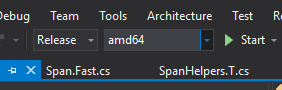
Build the "Release" "amd64" version
benaadams
on 2 Nov 2018
@NickCraver You could follow the steps below to get the binaries needed to run benchmarks:
.\build.cmd x64 release skiptests skipbuildpackages
.\run.cmd build -Project="tests\build.proj" -BuildOS=Windows_NT -BuildType=Release -BuildArch=x64 -BatchRestorePackages
.\tests\runtest.cmd x64 release generatelayoutonly
 jorive
on 2 Nov 2018
jorive
on 2 Nov 2018
I tried for a while to get this going, but it seemed to basically ignore the --coreRun argument for netcoreapp2.1
@NickCraver You are most probably not passing args to the BenchmarkSwitcher.
Once I figured out you have to have netcoreapp3.0
You have to if you want to test some API available only in .NET Core 3.0 Otherwise, you can use 2.1.
Minimum working app:
<Project Sdk="Microsoft.NET.Sdk">
  <PropertyGroup>
    <OutputType>Exe</OutputType>
    <TargetFramework>netcoreapp2.1</TargetFramework>
  </PropertyGroup>
  <ItemGroup>
    <PackageReference Include="BenchmarkDotNet" Version="0.11.2" />
  </ItemGroup>
</Project>
using BenchmarkDotNet.Attributes;
using BenchmarkDotNet.Running;
using System;

namespace ConsoleApp13
{
    class Program
    {
        static void Main(string[] args) => BenchmarkSwitcher.FromAssembly(typeof(Program).Assembly).Run(args);
    }

    public class Simple
    {
        [GlobalSetup]
        public void PrintInfo() => Console.WriteLine($"System.Object is defined in {typeof(object).Assembly.Location}");

        [Benchmark]
        public object[] GetCustomAttributes() => typeof(Simple).GetCustomAttributes(inherit: true);
    }
}
dotnet run -c Release -- --filter * --job short --coreRun C:\Projects\coreclr_upstream\bin\tests\Windows_NT.x64.Release\Tests\Core_Root\CoreRun.exe
````

``` ini

BenchmarkDotNet=v0.11.2, OS=Windows 10.0.17134.345 (1803/April2018Update/Redstone4)
Intel Xeon CPU E5-1650 v4 3.60GHz, 1 CPU, 12 logical and 6 physical cores
Frequency=3507496 Hz, Resolution=285.1037 ns, Timer=TSC
.NET Core SDK=3.0.100-alpha1-009697
  [Host]     : .NET Core 2.1.5 (CoreCLR 4.6.26919.02, CoreFX 4.6.26919.02), 64bit RyuJIT
  Job-ECBTFR : .NET Core ? (CoreCLR 4.6.27121.0, CoreFX 4.6.27018.01), 64bit RyuJIT

Runtime=Core  Toolchain=CoreRun  IterationCount=3
LaunchCount=1  WarmupCount=3
| Method | Mean | Error | StdDev |
|-------------------- |---------:|---------:|---------:|
| GetCustomAttributes | 406.1 ns | 104.5 ns | 5.729 ns |
adamsitnik
on 2 Nov 2018
@benaadams Still no joy - same error in Release/amd64
@jorive That works and tremendously reduces turnaround time, thank you!
NickCraver
on 3 Nov 2018
@adamsitnik well crap - indeed I wasn't passing the args in. That was very helpful - I hope a complete example and what I tripped on here will be helpful in the upcoming docs at least. The scary thing is I was silently running the on-machine version of .NET rather than what we built. That's a pretty frustrating story that I'm not sure how to better given the constraints, just relaying that it's a thing.
NickCraver
on 3 Nov 2018
Thanks a ton for the help all - now we can test some fixes and get somewhere fast. PR from the first bits is up at: dotnet/coreclr#20779
NickCraver
on 3 Nov 2018
@jorive alas the last step don't work for me
C:\GitHub\coreclr>.\tests\runtest.cmd x64 release generatelayoutonly
RUNTEST: Detected Visual Studio 15.0 developer command prompt environment
The system cannot find the batch label specified - SetupMSBuildAndCallRuntestProj
@benaadams sorry, I'm not sure what's the story with VS2015. Maybe @weshaggard or @MattGal know about this error.
jorive
on 4 Nov 2018
Maybe I need to tweak my path :)
benaadams
on 4 Nov 2018
I don't have any context here, but that error is just the batch file saying that runtest.cmd lacks this line:
https://github.com/dotnet/coreclr/blob/master/tests/runtest.cmd#L218
 MattGal
on 5 Nov 2018
MattGal
on 5 Nov 2018
It has been solved quite a while ago.
https://github.com/dotnet/performance/blob/master/docs/benchmarking-workflow-dotnet-runtime.md
https://github.com/dotnet/performance/blob/master/docs/profiling-workflow-dotnet-runtime.md
adamsitnik
on 11 Aug 2020
Related issues
 iCodeWebApps
·
3Comments
iCodeWebApps
·
3Comments
 sahithreddyk
·
3Comments
sahithreddyk
·
3Comments
 yahorsi
·
3Comments
yahorsi
·
3Comments
 chunseoklee
·
3Comments
chunseoklee
·
3Comments
 matty-hall
·
3Comments
matty-hall
·
3Comments
Most helpful comment
@NickCraver You could follow the steps below to get the binaries needed to run benchmarks: