Runtime: Fire a runtime event when ThreadPool is being starved
Thread pool starvation is a pretty common problem when working with code that uses the thread pool extensively. When exhaustion happens, the application falls apart at the hinges because the scheduled work items just don't fire:
- Timer callbacks don't run
- Task continuations may not complete
etc.
There are a couple of situations where I think a diagnostic event can help:
- New work items are being enqueued at a rate faster than work items are being completed
- All threads are blocked but there's more work to be done (you've hit the max configured threads)
There's more scenarios but I don't precisely know enough about how the thread pool metrics and thread injection works to articulate it. Any other ideas would be welcome.
cc @brianrob @vancem @stephentoub @kouvel @geoffkizer
 davidfowl
All 8 comments
Doesn't it already, raising an event when starvation is detected / a thread is injected due to that starvation?
https://docs.microsoft.com/en-us/dotnet/framework/performance/thread-pool-etw-events
Reason | win:UInt32 | Reason for the adjustment.
…
0x06 - Starvation
…
 stephentoub
on 30 Aug 2018
stephentoub
on 30 Aug 2018
WOW! How did nobody know about these (and they are in the docs). I need to see if this works cross platform now that we have the RuntimeEventSource in 2.2.
cc @shirhatti @anurse
davidfowl
on 30 Aug 2018
This is the problem when the implementers move on (in this case Eric). I knew about the ThreadPoolWorkerThreadAdjustmentAdjustment event, and that it had a 'Reason' field but did not really know about the 'Starvation' value.
Note that I strongly suspect that this is only telling you about the QueueUserWorkItem threads. Thus if the problem is in the I/O threadpool it won't tell you what you want.
This is why I am a big fan of having runnable scenarios for various conditions we want to diagnose/improve.
 vancem
on 30 Aug 2018
vancem
on 30 Aug 2018
Note that I strongly suspect that this is only telling you about the QueueUserWorkItem threads. Thus if the problem is in the I/O threadpool it won't tell you want.
The IO pool fires a different event, the IOThreadCreate event outlined at https://docs.microsoft.com/en-us/dotnet/framework/performance/thread-pool-etw-events#io. It doesn't include a reason of "starvation" or not, but the only reason the IO pool injects additional threads is either due to being under the initial target limit (whatever the min defaulted to or was set to by SetMinThreads) or to starvation, and the event includes the IO thread count, so waving your hands a little bit, you can tell whether threads are being created due to starvation by comparing that logged count to the expected min, and regardless, you can tell how many threads there are and get a sense for whether it's running away. We could look at extending these events further if that's insufficient.
Regardless, you can see this in effect with a little repro like:
```C#
using System;
using System.Diagnostics;
using System.Threading;
class Program
{
static unsafe void Main()
{
const int WorkItems = 50;
    using (Process p = Process.GetCurrentProcess())
    using (var b = new Barrier(WorkItems + 1))
    {
        p.Refresh();
        Console.WriteLine(p.Threads.Count);

        for (int i = 0; i < WorkItems; i++)
        {
            var o = new Overlapped();
            NativeOverlapped* no = o.Pack((_, __, localNo) =>
            {
                Overlapped.Free(localNo);
                b.SignalAndWait();
            }, null);

            ThreadPool.UnsafeQueueNativeOverlapped(no);
        }

        b.SignalAndWait();

        p.Refresh();
        Console.WriteLine(p.Threads.Count);

        Thread.Sleep(20_000);

        p.Refresh();
        Console.WriteLine(p.Threads.Count);
    }
}
}
```
This queues a bunch of work items, all of which block until they've all been queued, and since there are many more work items than the min thread count, we first see a handful of threads get created immediately (I'm running this on an 8 core), and then the gate thread kicks in additional threads (the starvation mechanism) every 500 milliseconds, until all work items can be processed:
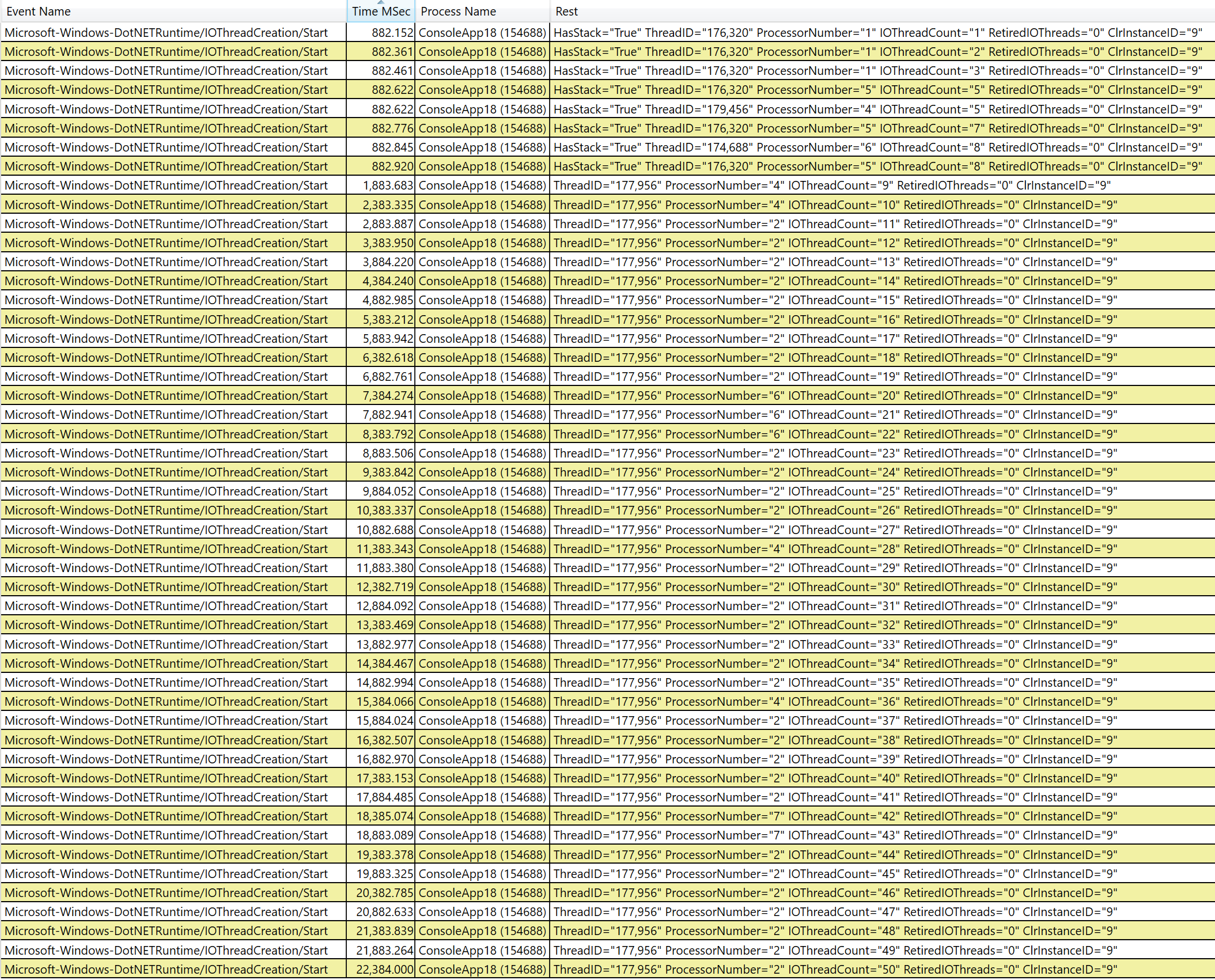
Then eventually the work finishes, the threads sit idle, and eventually it removes the threads:
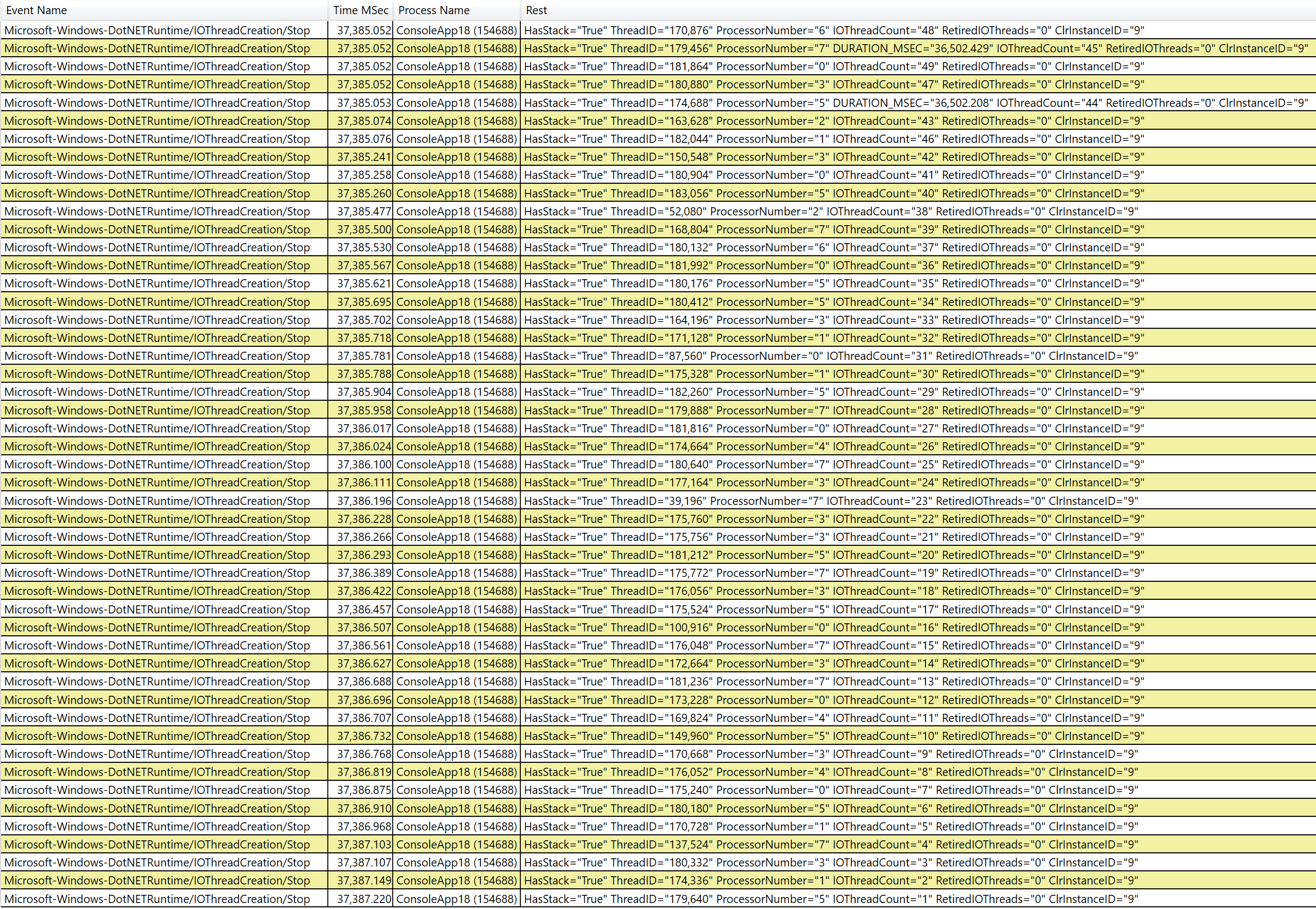
stephentoub
on 2 Oct 2018
Nice! I still think we should add the event to the IO thread pool. Then the tooling doesn’t need to do too much to figure out the exact patterns here.
We also need an item for thread pool queue length/depth. I filed another issue for that
davidfowl
on 3 Oct 2018
WOW! How did nobody know about these (and they are in the docs). I need to see if this works cross platform now that we have the RuntimeEventSource in 2.2.
cc @shirhatti @anurse
Unless I'm missing something, the ThreadPoolWorkerThreadAdjustmentAdjustment cannot be retrieved through the RuntimeEventSource :/
I'm guessing it has the same root cause as https://github.com/dotnet/coreclr/issues/21380
 kevingosse
on 6 Dec 2018
kevingosse
on 6 Dec 2018
@kevingosse - do you have an example of the failure? Are you interested in the EventListener case or the EventPipe case?
Adding @tommcdon @jorive from the diagnostics team,
vancem
on 6 Dec 2018
@vancem I'm trying to retrieve the events through the EventListener.
Sample code:
public class ThreadPoolListener : EventListener
{
    protected override void OnEventSourceCreated(EventSource eventSource)
    {
        if (eventSource.Name == "Microsoft-Windows-DotNETRuntime")
        {
            EnableEvents(eventSource, EventLevel.Verbose, EventKeywords.All);
        }
    }

    protected override void OnEventWritten(EventWrittenEventArgs eventData)
    {
        if (eventData.EventName.Contains("ThreadPool", StringComparison.OrdinalIgnoreCase))
        {
            Console.WriteLine(eventData.EventName);
        }
    }
}

class Program
{
    static void Main(string[] args)
    {
        Console.WriteLine($"PID: {Process.GetCurrentProcess().Id}");
        Console.WriteLine("Press return to start");
        Console.ReadLine();

        using (var listener = new ThreadPoolListener())
        {
            // Force the threadpool to grow

            for (int i = 0; i < 100; i++)
            {
                Task.Run(() => Thread.Sleep(-1));
            }

            Console.ReadLine();
        }
   }
}
The only threadpool events I capture are: ThreadPoolWorkerThreadAdjustmentSample, ThreadPoolWorkerThreadAdjustmentStats, and ThreadPoolWorkerThreadWait. A capture with PerfView shows that the ThreadPoolWorkerThreadAdjustmentAdjustment events were emitted as expected.
I tried debugging as far as EventPipeInternal.GetNextEvent but that specific event is never returned. I haven't tried digging into the native part yet.
kevingosse
on 6 Dec 2018
Related issues
 v0l
·
3Comments
v0l
·
3Comments
 omajid
·
3Comments
omajid
·
3Comments
 EgorBo
·
3Comments
EgorBo
·
3Comments
 chunseoklee
·
3Comments
chunseoklee
·
3Comments
 noahfalk
·
3Comments
noahfalk
·
3Comments
Most helpful comment
Doesn't it already, raising an event when starvation is detected / a thread is injected due to that starvation?
https://docs.microsoft.com/en-us/dotnet/framework/performance/thread-pool-etw-events