Runtime: Unable to find package runtime.win-x86.Microsoft.WindowsDesktop.App when publishing Blazor self hosted
Steps to reproduce
1) Delete the .nugetpackages dir (dotnet nuget locals --clear all)
1) Clone https://github.com/pranavkm/BlazorPublishRepro
1) Open in VS
1) Publish WebApplication1.Server to a folder as a self-contained (win-x86) application
Expected behavior
Things work
Actual behavior
Restore fails:
4>------ Publish started: Project: WebApplication1.Server, Configuration: Release Any CPU ------
Connecting to C:\Users\prkrishn\source\repos\WebApplication1\WebApplication1.Server\bin\Debug\netcoreapp3.0\publish\...
Restore completed in 583.26 ms for C:\Users\prkrishn\source\repos\WebApplication1\WebApplication1.Client\WebApplication1.Client.csproj.
Restore completed in 583.11 ms for C:\Users\prkrishn\source\repos\WebApplication1\WebApplication1.Shared\WebApplication1.Shared.csproj.
C:\Users\prkrishn\source\repos\WebApplication1\WebApplication1.Server\WebApplication1.Server.csproj(0,0): Error NU1102: Unable to find package runtime.win-x86.Microsoft.WindowsDesktop.App with version (>= 3.0.0-preview4-27611-18)
  - Found 43 version(s) in DotNetCore [ Nearest version: 3.0.0-alpha-27309-3 ]
  - Found 2 version(s) in nuget.org [ Nearest version: 3.0.0-preview3-27504-2 ]
  - Found 0 version(s) in Microsoft Visual Studio Offline Packages
  - Found 0 version(s) in https://dotnet.myget.org/F/aspnetcore-dev/api/v3/index.json
  - Found 0 version(s) in https://dotnet.myget.org/F/blazor-dev/api/v3/index.json
  - Found 0 version(s) in AspNetCore
Restore failed in 1.31 sec for C:\Users\prkrishn\source\repos\WebApplication1\WebApplication1.Server\WebApplication1.Server.csproj.
C:\Users\prkrishn\source\repos\WebApplication1\WebApplication1.Server\WebApplication1.Server.csproj(0,0): Error NU1102: Unable to find package runtime.win-x86.Microsoft.WindowsDesktop.App with version (>= 3.0.0-preview4-27611-18)
  - Found 43 version(s) in DotNetCore [ Nearest version: 3.0.0-alpha-27309-3 ]
  - Found 2 version(s) in nuget.org [ Nearest version: 3.0.0-preview3-27504-2 ]
  - Found 0 version(s) in Microsoft Visual Studio Offline Packages
  - Found 0 version(s) in https://dotnet.myget.org/F/aspnetcore-dev/api/v3/index.json
  - Found 0 version(s) in https://dotnet.myget.org/F/blazor-dev/api/v3/index.json
Environment data
.NET Core SDK (reflecting any global.json):
 Version:   3.0.100-preview4-011192
 Commit:    4145635c07

Runtime Environment:
 OS Name:     Windows
 OS Version:  10.0.17763
 OS Platform: Windows
 RID:         win10-x64
 Base Path:   C:\Program Files\dotnet\sdk\3.0.100-preview4-011192\

Host (useful for support):
  Version: 3.0.0-preview4-27610-12
  Commit:  d5a76cb8c0

.NET Core SDKs installed:
  2.1.700-preview-009597 [C:\Program Files\dotnet\sdk]
  3.0.100-preview4-011192 [C:\Program Files\dotnet\sdk]

.NET Core runtimes installed:
  Microsoft.AspNetCore.All 2.1.9 [C:\Program Files\dotnet\shared\Microsoft.AspNetCore.All]
  Microsoft.AspNetCore.App 2.1.9 [C:\Program Files\dotnet\shared\Microsoft.AspNetCore.App]
  Microsoft.AspNetCore.App 3.0.0-preview4-19210-17 [C:\Program Files\dotnet\shared\Microsoft.AspNetCore.App]
  Microsoft.NETCore.App 2.1.9 [C:\Program Files\dotnet\shared\Microsoft.NETCore.App]
  Microsoft.NETCore.App 3.0.0-preview4-27610-12 [C:\Program Files\dotnet\shared\Microsoft.NETCore.App]
  Microsoft.WindowsDesktop.App 3.0.0-preview4-27611-18 [C:\Program Files\dotnet\shared\Microsoft.WindowsDesktop.App]
 pranavkm
All 16 comments
pranavkm
on 11 Apr 2019
Publishing an Empty Web application causes the package to be restored correctly and everything works fine after. cc @danroth27
pranavkm
on 11 Apr 2019
The detailed build binlog has this line in the failing restore's log:
CACHE https://dotnetfeed.blob.core.windows.net/dotnet-core/flatcontainer/runtime.win-x86.microsoft.windowsdesktop.app/index.json
Searching for https://dotnetfeed.blob.core.windows.net/dotnet-core doesn't show me any GETs, are you sure dotnet nuget locals --clear all gets rid of the http cache? Tooling issue there?
(I don't have a VS install configured to try it on right now.)
If the package is able to restore some other way, I don't see how anything could have gone wrong during the build of the package in DotNet-Trusted. (Which I assume is why this is being filed in Core-Setup?)
It also seems weird that the WindowsDesktop packages are needed to publish these web projects self-contained, but I'm not really familiar with how that works.
/cc @nguerrera @vatsan-madhavan @zsd4yr
 dagood
on 11 Apr 2019
dagood
on 11 Apr 2019
@dagood I did cheat and just delete the .nuget/packages dir prior to running this specific publish. But afaik, dotnet nuget locals --clear all should wipe out the HTTP cache.
pranavkm
on 11 Apr 2019
@nguerrera resolved a very similar issue fairly recently - https://github.com/dotnet/core-setup/issues/5511, I came across it when I searched for the error message and assumed this was the correct place to file this issue.
pranavkm
on 11 Apr 2019
I suppose it looks pretty similar at surface level, and I don't mind routing it too much, but it's pretty different under the surface.
Actually... looks like you're just missing https://dotnetfeed.blob.core.windows.net/dotnet-windowsdesktop/index.json ? WindowsDesktop doesn't publish to dotnet-core because of the feed lock issues.
dagood
on 11 Apr 2019
Oh... stranger than that--it is included in the "Feeds used" section, but it isn't listed in the error with any versions:
C:\Users\prkrishn\source\repos\WebApplication1\WebApplication1.Server\WebApplication1.Server.csproj error NU1102: Unable to find package runtime.win-x86.Microsoft.WindowsDesktop.App with version (>= 3.0.0-preview4-27611-18)
  - Found 43 version(s) in DotNetCore [ Nearest version: 3.0.0-alpha-27309-3 ]
  - Found 2 version(s) in nuget.org [ Nearest version: 3.0.0-preview3-27504-2 ]
  - Found 0 version(s) in Microsoft Visual Studio Offline Packages
  - Found 0 version(s) in https://dotnet.myget.org/F/aspnetcore-dev/api/v3/index.json
  - Found 0 version(s) in https://dotnet.myget.org/F/blazor-dev/api/v3/index.json
  - Found 0 version(s) in AspNetCore [C:\Users\prkrishn\source\repos\WebApplication1\WebApplication1.Server\WebApplication1.Server.csproj]
Your repro doesn't include a nuget.config, can you add one?
One thing I've noticed caused some strange behavior is when mutliple feeds shared the same name--I remember in some situation it would just pick one that matches and leave out the other. Maybe depending on how you restore, that behavior changes?
dagood
on 11 Apr 2019
@dagood adding the dotnet-windowsdesktop feed does fix the issue. Presumably this package would be published to NuGet.org as part of the preview4 release. That said, would you know why publishing a self-contained WebApplication results in a reference to the WindowsDesktop framework?
pranavkm
on 11 Apr 2019
Presumably this package would be published to NuGet.org as part of the preview4 release.
@vivmishra
 zsd4yr
on 11 Apr 2019
zsd4yr
on 11 Apr 2019
Yes, that should publish as part of Preview 4 -- not aware of any reason why not.
@leecow
 vivmishra
on 11 Apr 2019
vivmishra
on 11 Apr 2019
Presumably this package would be published to NuGet.org as part of the preview4 release.
Yep, I took some steps to make sure that happens. (The release staging tool that makes that decision happens to be mine.)
That said, would you know why publishing a self-contained WebApplication results in a reference to the WindowsDesktop framework?
No idea. When I publish your repo locally (just with a Core-SDK build, not VS), in the server project's project.assets.json I see this:
          "runtime.win-x86.Microsoft.WindowsDesktop.App": {
            "include": "None",
            "suppressParent": "All",
            "target": "Package",
            "version": "[3.0.0-preview4-27611-23, )",
            "autoReferenced": true
          }
autoReferenced, so the SDK did something... then I see this task which maybe I'm misunderstanding but seems to be adding runtime packs/packagereferences that it shouldn't be:
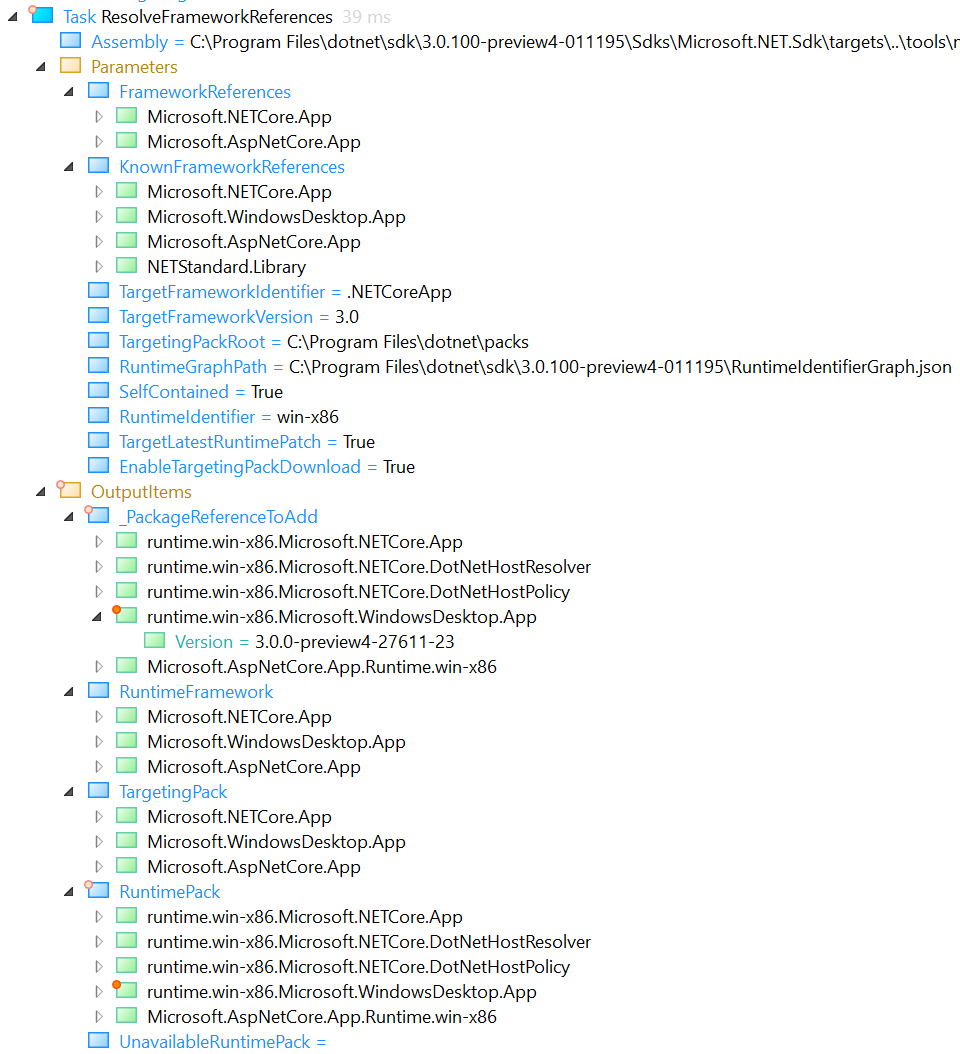
@nguerrera any idea?
dagood
on 12 Apr 2019
@dsplaisted
We've been encountering issues with packages not restoring randomly from blob feeds.
 nguerrera
on 12 Apr 2019
nguerrera
on 12 Apr 2019
But this looks a little different, or maybe there's the key to what's really going on in the repro.
nguerrera
on 12 Apr 2019
Hmm, no I think this is different
The project has:
    <RestoreAdditionalProjectSources>
      https://dotnet.myget.org/F/aspnetcore-dev/api/v3/index.json;
      https://dotnet.myget.org/F/blazor-dev/api/v3/index.json;
    </RestoreAdditionalProjectSources>
If you change that to
    <RestoreAdditionalProjectSources>
      $(RestoreAdditionalSources);
      https://dotnet.myget.org/F/aspnetcore-dev/api/v3/index.json;
      https://dotnet.myget.org/F/blazor-dev/api/v3/index.json;
    </RestoreAdditionalProjectSources>
Does it work?
There are some implicit additional sources (which will be gone in Preview 5 --hopefully)
nguerrera
on 12 Apr 2019
It also seems weird that the WindowsDesktop packages are needed to publish these web projects self-contained, but I'm not really familiar with how that works.
It is weird but by design. We have to download all runtime packs due to having to pick pre-restore before we can apply transitive framework references. Well, what's weird is that right now, we still haven't finished transitive framework references, but the part that is picking the runtime packs to download is already being greedy in anticipation.
nguerrera
on 12 Apr 2019
We've been encountering issues with packages not restoring randomly from blob feeds.
A shot in the dark, and I guess unrelated, but here in Core-Setup this was caused by the NuGet http cache in our non-hosted legs (NuGet retains the list of package versions for 30 minutes): https://github.com/dotnet/core-setup/pull/5343.
dagood
on 12 Apr 2019
Related issues
 omariom
·
3Comments
omariom
·
3Comments
 EgorBo
·
3Comments
EgorBo
·
3Comments
 jzabroski
·
3Comments
jzabroski
·
3Comments
 matty-hall
·
3Comments
matty-hall
·
3Comments
 GitAntoinee
·
3Comments
GitAntoinee
·
3Comments