Runtime: Please stop asking whether I want to cancel when clicking "Close"
Back in the 1990s and 2000s, when I click cancel in a setup executable, it asked me whether I want to cancel.
Luckily, this annoying behavior is mostly gone.
Unfortunately, not in the Microsoft .NET Core 2.2.2 Windows Server Hosting setup.
Steps
Start the setup, let it run completely until finished.
Optionally, reboot.
Start the setup again, to see this screen:
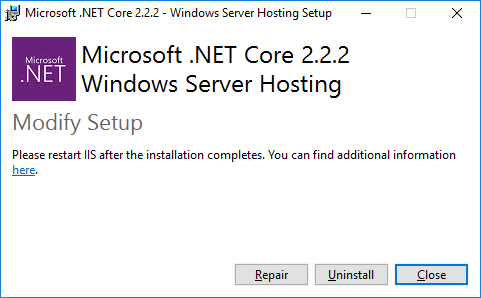
Click the Close button.
See this message box:
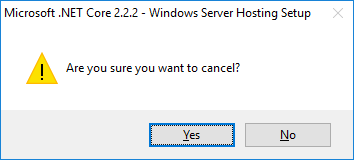
Expected behavior
The setup should simply close, without asking. I. e. Step 6 should not occur.
Beside the message box when closing, in my opinion it also should be removed everywhere else, i. e. when the button reads Cancel, too.
 UweKeim
All 5 comments
This is the wrong repo for the hosting bundle (aspnet/AspNetCore), but this happens with the runtime install bundle too. You don't even need to install it first, pressing Close on the first page does this.
@johnbeisner, @joeloff, do you know how to get rid of the close/cancel confirmation dialogs?
 dagood
on 4 Mar 2019
dagood
on 4 Mar 2019
It's part of the standard bootstrapper in WiX. We can do it with a custom bootstrapper.
 joeloff
on 4 Mar 2019
joeloff
on 4 Mar 2019
Yikes. From what I find online, making a custom bootstrapper is a lot of work and reimplementation. I don't think removing a confirm button alone justifies it. If we end up with a custom bootstrapper we should keep this issue in mind, though.
dagood
on 5 Mar 2019
Thanks a lot to all of you for your feedback.
Personally, I do think this MSI thing and WiX in special is the most unintuitive, over-engineered piece of software/library I ever came accross. If I'll ever meet the designers of MSI or WiX, I will personally slap them and put them into a room together with the designers of PHP.
UweKeim
on 6 Mar 2019
Cost prohibitive - closing.
 NikolaMilosavljevic
on 7 Dec 2020
NikolaMilosavljevic
on 7 Dec 2020
Related issues
 noahfalk
·
3Comments
noahfalk
·
3Comments
 aggieben
·
3Comments
aggieben
·
3Comments
 GitAntoinee
·
3Comments
GitAntoinee
·
3Comments
 v0l
·
3Comments
v0l
·
3Comments
 jchannon
·
3Comments
jchannon
·
3Comments