Runner: pipenv install fails on windows-latest unless it's in its own step
Describe the bug
When using windows-latest OS, pipenv fails to create a virtual environment, unless the pipenv install command is in it's own step.
- build passed https://github.com/ConorSheehan1/caesar_cipher/commit/821eaaf55f3cf347b521d3080a777fbb552f5d93
https://github.com/ConorSheehan1/caesar_cipher/runs/376217672 - build failed in the next commit after merging the
pipenv installcommand back into the step above https://github.com/ConorSheehan1/caesar_cipher/commit/49dd788225ecf5ef8faf6b2a8e419027e54d7dbb https://github.com/ConorSheehan1/caesar_cipher/runs/376229880
Steps to reproduce
- Create an action using windows-latest OS.
- Create a single step to install pipenv and run pipenv install e.g.
yaml <ul> <li>name: Install Pipenv<br /> run: |<br /> python -m pip install --upgrade pip<br /> pip install pipenv<br /> pipenv install --verbose --dev --skip-lock --python=${{ matrix.python }}<br /> - The snippet above will fail, but the snippet below succeeds.
yaml
<ul>
<li>name: Install Pipenv<br />
run: |<br />
python -m pip install --upgrade pip<br />
pip install pipenv</li>
<li>name: Install python packages<br />
run: |<br />
pipenv install --verbose --dev --skip-lock --python=${{ matrix.python }}<br />
Basically this diff went from a successful build to a failing build, which seems very strange to me.
--- a/.github/workflows/ci.yml
+++ b/.github/workflows/ci.yml
@@ -9,8 +9,7 @@ jobs:
     strategy:
       matrix:
         # ubuntu-18.04 currently same as ubuntu-latest
-        # TODO: windows-latest (windows server 2019) fails at pipenv install when creating virtual env
-        os: [ubuntu-16.04, ubuntu-18.04, macos-latest, windows-latest]
+        os: [ubuntu-16.04, ubuntu-latest, macos-latest, windows-latest]
         # black doesn't seem to work with python-3.5 on ubuntu-18.04
         python: [3.6, 3.7]

@@ -24,8 +23,6 @@ jobs:
       run: |
         python -m pip install --upgrade pip
         pip install pipenv
-    - name: pipenv
-      run: |
         pipenv install --verbose --dev --skip-lock --python=${{ matrix.python }}
     - name: Run tests
       run: |
Expected behavior
I'd expect the steps to behave the same way, regardless of what way the commands are grouped.
Runner Version and Platform
- Github actions Current runner version: '2.163.1'
- windows-latest
What's not working?
pipenv fails to create a virtual env, unless the command is in it's own step.

Job Log Output
Collecting virtualenv
  Downloading https://files.pythonhosted.org/packages/05/f1/2e07e8ca50e047b9cc9ad56cf4291f4e041fa73207d000a095fe478abf84/virtualenv-16.7.9-py2.py3-none-any.whl (3.4MB)
Installing collected packages: certifi, virtualenv-clone, virtualenv, pipenv
Successfully installed certifi-2019.11.28 pipenv-2018.11.26 virtualenv-16.7.9 virtualenv-clone-0.5.3
Creating a virtualenv for this project�
##[error]Process completed with exit code 1.
Comments
I'm not sure if this issue should go here or in another actions repo. I had a look around, but thought https://github.com/actions/virtual-environments wasn't right, since the command does work in some cases, but not in others. Feel free to close here and move to the appropriate repo, and sorry if I got it wrong!
 ConorSheehan1
All 8 comments
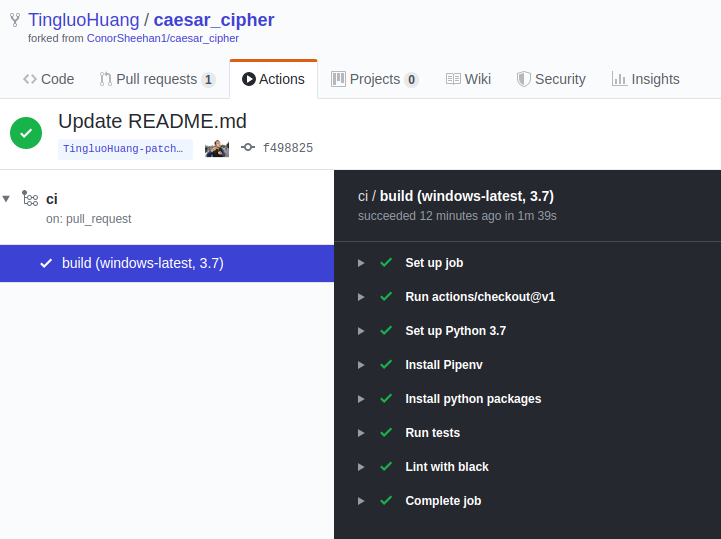
@ConorSheehan1 I didn't fully dig in the problem but switch to use cmd shell on windows do fix the problem. (the default shell on windows is powershell)
- name: Install Pipenv
  shell: cmd
  run: |
    python -m pip install --upgrade pip
    pip install pipenv
    pipenv install --verbose --dev --skip-lock --python=${{ matrix.python }}
 TingluoHuang
on 6 Jan 2020
TingluoHuang
on 6 Jan 2020
Hey @TingluoHuang, thanks for looking into it!
The action you linked to seems to still have the pipenv install command as it's own step called Install python packages. Am I missing something?
ConorSheehan1
on 6 Jan 2020
@ConorSheehan1 check the install pipenv step, it actually runner pipenv install as well, i run it twice.
TingluoHuang
on 7 Jan 2020
@TingluoHuang Ah sorry, didn't see that! Any idea why shell: cmd fixes it?
ConorSheehan1
on 7 Jan 2020
I had the same error. Moving pipenv install to it's own step avoided the problem. Can't use shell: cmd because the same step is also used for Linux and macOS.
 gregersrygg
on 7 Jan 2020
gregersrygg
on 7 Jan 2020
might be a bug in PowerShell, see https://github.com/actions/runner/issues/169
@gregersrygg you can use condition on the step, but due to the powershell bug, the yaml might looks ugly..
steps:
- name: Install Pipenv (Windows)
   if: runner.os == 'windows'
   shell: cmd
   run: |
     python -m pip install --upgrade pip
     pip install pipenv
     pipenv install --verbose --dev --skip-lock --python=${{ matrix.python }}
- name: Install Pipenv (Non-Windows)
   if: runner.os != 'windows'
   run: |
     python -m pip install --upgrade pip
     pip install pipenv
     pipenv install --verbose --dev --skip-lock --python=${{ matrix.python }}
It looks like PowerShell 7 release and has fixed the problem on the Hosted runner. I am going to close this issue, please reopen if this still happens. 😄
TingluoHuang
on 14 Apr 2020
@TingluoHuang it worked! Thanks for your help :)
Do you have a link to the fix from PowerShell?
ConorSheehan1
on 19 Apr 2020
Related issues
 airtower-luna
·
5Comments
airtower-luna
·
5Comments
 nicolas-marcq
·
3Comments
TingluoHuang
·
3Comments
nicolas-marcq
·
3Comments
TingluoHuang
·
3Comments
 joequincy
·
4Comments
joequincy
·
4Comments
 Yanjingzhu
·
6Comments
Yanjingzhu
·
6Comments