Runelite: GPU Render Causes The Game to Flicker
Describe the bug
When I have the GPU setting turned on, it creates a screen flicker that seems random and unpredicatble. It is a white flicker. Almost like the screen is cracked.
To Reproduce
Steps to reproduce the behavior:
- Turn on GPU at any setting of length
GPU is the only time this happens.
Expected behavior
Honestly, I expected to not have a white flicker along my screen.
Screenshots
I wish I could capture one...
Environment (please complete the following information):
- OS: Windows
- RuneLite version: 1.5.3
 DoctaDread
All 29 comments
I'm getting this on linux as well, I tried to record it and funnily enough, once I started the window capture in OBS it shows the flicker in the capture but the actual game window stops flickering. Regardless I do still have the recording.
flickering.zip
 raku-cat
on 7 Dec 2018
raku-cat
on 7 Dec 2018
Have you tried this? https://github.com/runelite/runelite/wiki/Disable-Hardware-Acceleration
 MagicfTail
on 7 Dec 2018
MagicfTail
on 7 Dec 2018
Have you tried this? https://github.com/runelite/runelite/wiki/Disable-Hardware-Acceleration
I did and it looks like it has gotten worse :o
DoctaDread
on 7 Dec 2018
@MagicfTail FOr me disabling HW accel did appear to solve it. I would assume doctadread must be having a different issue because their screen is flashing white(mine flashes black) and that solution doesn't work for them.
raku-cat
on 7 Dec 2018
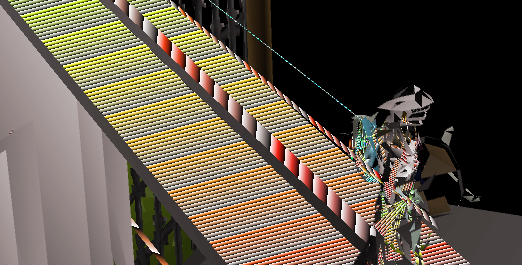
At least it doesn't look like this 😃
 killersloth
on 7 Dec 2018
killersloth
on 7 Dec 2018
That's what my game looks like with the x16 anti-aliasing on :D
DoctaDread
on 7 Dec 2018
I only have 1gb of vram with my old hd5450.I can enable it but hopefully it gets optimized a bit to be less memory hungry.
killersloth
on 7 Dec 2018
Have you tried this? https://github.com/runelite/runelite/wiki/Disable-Hardware-Acceleration
This worked for me, thank you.
 Ashe
on 16 Dec 2018
Ashe
on 16 Dec 2018
suffering from a flickering issue when enabling GPU on Runelite; however my flicker is only with overlay and hud elements.
OS: Ubuntu 19.04
GPU: GTX 1080
GPU driver: nVidia Proprietary driver-418
 SirFancyBacon
on 27 May 2019
SirFancyBacon
on 27 May 2019
suffering from a flickering issue when enabling GPU on Runelite; however my flicker is only with overlay and hud elements.
OS: Ubuntu 19.04
GPU: GTX 1080
GPU driver: nVidia Proprietary driver-418
Yep, also having the same issue.
Ended up disabling Hardware Acceleration to make it work.
If you downloaded the .jar version of the launcher, run this:
java -jar Location-of-RuneLite.jar --mode=OFF
OS: Pop!_OS 18.04 (Basically Ubuntu)
GPU: GTX 1080Ti
GPU driver: nVidia Proprietary driver-418.56
 0fif
on 6 Jun 2019
0fif
on 6 Jun 2019
I just wanted to note that this seems to be a refresh-rate issue. The flickering UI almost completely disappears after enabling "FPS Control" and setting the target to 30. Also, I only have the issue when playing the game in close to full-screen (1920x1080).
OS: Xubuntu 18.04.2
GPU GTX 970
GPU driver: Proprietary Nvidia driver version 430.14
 Voxed
on 9 Jun 2019
Voxed
on 9 Jun 2019
Can confirm limiting the FPS to 30 fixes the UI flickering for me. GTX 2080, 144hz monitors, was seeing a lot of flickering.
EDIT: Can also confirm --mode=OFF works.
Running Ubuntu 18.04
 DarkArc
on 29 Jul 2019
DarkArc
on 29 Jul 2019
Bringing this problem back in 2020, every solution listed on this thread does not work for me. Even putting them all together and separate. Currently running 144hz on 2080ti. Any additional help would be greatly appreciated.
EDIT: Solution was turning on GSYNC.
 hisaobush
on 20 Feb 2020
hisaobush
on 20 Feb 2020
Just an update, still an issue with Ubuntu 19.10
Driver version: 440.59
GPU: GTX 1080 ti
Im noticing based on comments 100% of the issues are nVidia based gpus..
Can anyone with an AMD GPU and Linux test hardware acceleration?
SirFancyBacon
on 20 Feb 2020
OS: Arch Linux with i3 and picom
GPU: AMD Radeon RX Vega 64
GPU driver: Mesa 20.0
No flickering with the GPU plugin. Likely related to the proprietary nVidia drivers.
Maybe try with Mesa?
Voxed
on 20 Feb 2020
Also ran into this issue now when switching over to a 155Hz G-sync monitor and a 2070 Super.
Have tried disabling hardware acceleration, made sure G-sync was enabled but no dice. Running without the gpu plugin enabled right now but missing the draw distance. Any further suggestions?
 F-Tahir
on 10 May 2020
F-Tahir
on 10 May 2020
The only way I could resolve this on Windows was to disable G-Sync. When running on Linux I have no issues though.
RTX 2070, 165 Hz monitor
 fontivan
on 17 May 2020
fontivan
on 17 May 2020
GPU: GTX 1070 Strix
Driver: 442.59
Windows 10
144hz Dell 2716DG
UI flickers, specifically left side of inventory. --mode=OFF does nothing. Disabling G-sync works, but I'm not going to use that. In runelite options gpu/anti aliasing - disabling it makes the flicker much less noticeable. It doesn't "move" as much.
 Grimweird
on 24 May 2020
Grimweird
on 24 May 2020
GPU: GTX 1070 Strix
Driver: 442.59
Windows 10
144hz Dell 2716DG
UI flickers, specifically left side of inventory. --mode=OFF does nothing. Disabling G-sync works, but I'm not going to use that. In runelite options gpu/anti aliasing - disabling it makes the flicker much less noticeable. It doesn't "move" as much.
in gsync settings changing gsync to fullscreen only should fix
 Dyldozer
on 24 May 2020
Dyldozer
on 24 May 2020
GPU: GTX 1070 Strix
Driver: 442.59
Windows 10
144hz Dell 2716DG
UI flickers, specifically left side of inventory. --mode=OFF does nothing. Disabling G-sync works, but I'm not going to use that. In runelite options gpu/anti aliasing - disabling it makes the flicker much less noticeable. It doesn't "move" as much.
My gsync isn't active at all with runelite even though I have gsync set to fullscreen and windowed. Perhaps try adding runelite/javaw.exe to your nvidia control panel program settings, and setting it to fixed refresh rate so you don't have to disable gsync globally?
 emiljensen2
on 24 May 2020
emiljensen2
on 24 May 2020
GPU: GTX 1070 Strix
Driver: 442.59
Windows 10
144hz Dell 2716DG
UI flickers, specifically left side of inventory. --mode=OFF does nothing. Disabling G-sync works, but I'm not going to use that. In runelite options gpu/anti aliasing - disabling it makes the flicker much less noticeable. It doesn't "move" as much.in gsync settings changing gsync to fullscreen only should fix
Yes it should, but I play most of other games in borderless window.
GPU: GTX 1070 Strix
Driver: 442.59
Windows 10
144hz Dell 2716DG
UI flickers, specifically left side of inventory. --mode=OFF does nothing. Disabling G-sync works, but I'm not going to use that. In runelite options gpu/anti aliasing - disabling it makes the flicker much less noticeable. It doesn't "move" as much.My gsync isn't active at all with runelite even though I have gsync set to fullscreen and windowed. Perhaps try adding runelite/javaw.exe to your nvidia control panel program settings, and setting it to fixed refresh rate so you don't have to disable gsync globally?
Good point, setting framerate cap on runelite.exe seems to do the job. Thanks!
Grimweird
on 24 May 2020
nvidia 980ti here.
gsync off, fixed refresh set at 60, 90, 120, 144 hz all have this issue. Latest drivers and client on windows 10 64bit exe
 Motophan
on 3 Sep 2020
Motophan
on 3 Sep 2020
Hey all, I believe I have fixed this. Just bought an RTX 3070 and this began happening ironically. This is how I fixed it.
- Open Nvidia Control Panel
- Open Manage 3D Settings Under the 3D Settings Group
- Select Program Settings
- Add RuneLite - Look at recently opened programs to find it easily
- Adjust the following settings
- Monitor Technology (Set to Fixed Refresh Rate)
- OpenGL Rendering GPU (Set to your graphics card)
- Vertical Sync (Turn Off)
- Click Apply at the bottom
- Exit and relaunch RuneLite
YMMV, but this worked for me.
 EddBerkel
on 11 Nov 2020
EddBerkel
on 11 Nov 2020
Hey all, I believe I have fixed this. Just bought an RTX 3070 and this began happening ironically. This is how I fixed it.
- Open Nvidia Control Panel
- Open Manage 3D Settings Under the 3D Settings Group
- Select Program Settings
- Add RuneLite - Look at recently opened programs to find it easily
- Adjust the following settings
- Monitor Technology (Set to Fixed Refresh Rate)
- OpenGL Rendering GPU (Set to your graphics card)
- Vertical Sync (Turn Off)
- Click Apply at the bottom
- Exit and relaunch RuneLite
YMMV, but this worked for me.
same gpu I did all these steps but I don't have a monitor technology option anywhere and im still having this problem
 konkero869
on 18 Nov 2020
konkero869
on 18 Nov 2020
This is happening for me on my RTX 2070S, the graphics setting is turned off.
EDIT:
Following EddBerkel advice worked and for other things that were causing my computer issues
 Parrryy
on 15 Dec 2020
Parrryy
on 15 Dec 2020
Join us at https://runelite.net/discord in the #support channel so we can fix this issue for you.
 MESLewis
on 13 Jan 2021
MESLewis
on 13 Jan 2021
This is happening for me on my RTX 2070S, the graphics setting is turned off.
EDIT:
Following EddBerkel advice worked and for other things that were causing my computer issues
Worked for me too with a 2070s paired with a Lenovo Y27Q20 and LG 27GL83A-B. Only the Lenovo was flickering. It started happening out of nowhere too. Turning off Gsync fixed it, but I wanted gsync on for other games without having to always turn it on and off. Somehow changing those 3 settings exactly as described fixed my flickering on the Lenovo while having Gsync activated. Guess it doesn't turn Gsync on with Runelite. Or whatever lol.
Runelite has also caused me a lot of problems. It's why I upgraded from a Ryzen 5 3600 to a 10700k. I was either not going to upgrade at all, or to the 5600X, but my pc had some serious issues, and it was made worse by Runelite. But now it works acsolutely fine with the 10700k, and I am at least on par with the 5600X for gaming when overclocked to 5.2ghz, and better for multi-core, most likely more stable system (have not crashed once since I've had it, even while testing my overclocks on OCCT), and only paid 320$ :)
 SuperD00D1988
on 25 Jan 2021
SuperD00D1988
on 25 Jan 2021
Hey all, I believe I have fixed this. Just bought an RTX 3070 and this began happening ironically. This is how I fixed it.
- Open Nvidia Control Panel
- Open Manage 3D Settings Under the 3D Settings Group
- Select Program Settings
- Add RuneLite - Look at recently opened programs to find it easily
- Adjust the following settings
- Monitor Technology (Set to Fixed Refresh Rate)
- OpenGL Rendering GPU (Set to your graphics card)
- Vertical Sync (Turn Off)
- Click Apply at the bottom
- Exit and relaunch RuneLite
YMMV, but this worked for me.
Bro you're insanely amazing! Thank you!!! Wow! First thing I've found online that actually worked for me in quite some time! :D
Worked for me with a 2070s paired with a Lenovo Y27Q20 and LG 27GL83A-B. Only the Lenovo was flickering. It started happening out of nowhere too. Turning off Gsync fixed it, but I wanted gsync on for other games without having to always turn it on and off. Changing those 3 settings exactly as you described fixed my flickering on the Lenovo while having Gsync activated and using Runelite. Guess it doesn't turn Gsync on with Runelite, or whatever, lol.
SuperD00D1988
on 25 Jan 2021
I'm glad it worked for you guys!
EddBerkel
on 25 Jan 2021
Related issues
 deathbeam
·
3Comments
deathbeam
·
3Comments
 Kamielvf
·
3Comments
Kamielvf
·
3Comments
 Exstatic
·
3Comments
Exstatic
·
3Comments
 Jamser20
·
3Comments
Jamser20
·
3Comments
 korolex1
·
3Comments
korolex1
·
3Comments
Most helpful comment
Have you tried this? https://github.com/runelite/runelite/wiki/Disable-Hardware-Acceleration