Runelite: Add support for macOS-based systems to GPU plugin [cash bounty available]
What needs to be done
- [x] GPU plugin support for mac (done by @Adam-) - This was done by omitting support for compute shaders to go around the issue of requiring OpenGL 4.3+ (as macOS do not supports anything above OpenGL 3.1)
- [ ] Compute shaders support - This needs to be done either by using OpenCL or with Vulkan/MetalVK. Compute shaders are requiring for extending draw distance what is one of the main features of GPU plugin (as doing this on CPU is very very slow and so its preemptively disabled)
There is an open bounty for implementing this feature: https://www.bountysource.com/issues/66216378-add-support-for-macos-based-systems-to-gpu-plugin
Original description:
Currently the GPU plugin do not runs on macOS, even after adding JOGL natives for macOS the plugin still do not works because the minimum required GL version is 4.3+ because we use compute shaders. Even after this would be solved, it do not works because of JOGL (the screen just freezes/GL context fails to create). Solutions are - move compute shaders to OpenCL and switch to different library (tested with LWJGL2, works well, but same issue as with Linux, input needs to be proxied, do not tested with LWJGL3 but with their JAWT it might work) or move everything to Vulkan (with LWJGL3 again) and MetalVK (what runs vulkan on top of metal, works out of the box with LWJGL3).
 deathbeam
All 177 comments
Now that linux support has been implemented, what remains to have this work on macOS as well?
 c-bandy
on 19 Nov 2018
c-bandy
on 19 Nov 2018
Well, the issue body still applies, mac do not supports anything over 4.1 GL, so we need to downgrade, and only reasonable way I know of is converting our compute shaders to OpenCL. So, if anyone has any experience with OpenCL, it would be very nice to get some help :d
I mostly know how to properly implement working window for Mac with JOGL, so the GL version issue is only thing left.
deathbeam
on 19 Nov 2018
Isn't OpenCL being deprecated by Apple?
I don't know too much about the domain but a quick search of the MoltenVK repository found some conversion tools - is this anything we could use? https://github.com/KhronosGroup/MoltenVK/blob/5943aae1ea5695918dce659d69f6f9d382c81b4c/MoltenVKShaderConverter/MoltenVKGLSLToSPIRVConverter/GLSLToSPIRVConverter.h
 ollieatkinson
on 22 Nov 2018
ollieatkinson
on 22 Nov 2018
Both OpenCL and OpenGL are, but, they did not said when they are completely removing the support and I dont think they already did. We cant really use MoltenVK/Vulkan because the API for Java and Mac is basically non-existent
deathbeam
on 22 Nov 2018
It seems like this should be possible.
I found a java game development framework with a JNI wrapper and java implementation for GL ES 2.0 - instead of calling the GL functions in the cpp code we would call MoltenVK.
ollieatkinson
on 22 Nov 2018
Calling the GL functions is not the problem, the problem is getting AWT window handle and using that to create GL context, what I have no clue how to do. And also I dont think we really want to write our own GL library just for mac (unless someone is very bored and knowledgeable enough)
deathbeam
on 22 Nov 2018
I'll just dump some information here, as quite a lot of this is over my head at the moment and if I don't write it down I'll probably forget it.
We can use LWJGL3 to render using Vulkan (Metal on macOS). Since version 3 its implementation uses GLFW - which we cant use because it does not work with AWT.
There is however an implementation to make it work with JAWT. This implementation works fine using both OpenGL and Vulkan on Windows and using OpenGL on Windows _and_ Linux.
We would need to write an implementation for macOS here. We should use JAWT_VERSION_1_7 since anything lower would not be able to get a valid drawing surface, not without passing JAWT_MACOSX_USE_CALAYER and implementing both variants in the native bridge.
    @Override
    public long create(Canvas canvas, VKData data) throws AWTException {

        MemoryStack stack = MemoryStack.stackGet();
        int ptr = stack.getPointer();

        JAWTDrawingSurface ds = JAWT_GetDrawingSurface(awt.GetDrawingSurface(), canvas);

        try {
            int lock = JAWT_DrawingSurface_Lock(ds.Lock(), ds);

            if ((lock & JAWT_LOCK_ERROR) != 0) {
                throw new AWTException("JAWT_DrawingSurface_Lock() failed");
            }

            try {
                JAWTDrawingSurfaceInfo dsi = JAWT_DrawingSurface_GetDrawingSurfaceInfo(ds.GetDrawingSurfaceInfo(), ds);

                try {
                    return 0L;
//                    JAWTMacOSDrawingSurfaceInfo dsiWin = JAWTMacOSDrawingSurfaceInfo.create(dsi.platformInfo());
//                    VkMacOSSurfaceCreateInfoMVK sci = VkMacOSSurfaceCreateInfoMVK.callocStack(stack)
//                            .sType(VK_STRUCTURE_TYPE_MACOS_SURFACE_CREATE_INFO_MVK)
//                            .pView(dsiWin.viewPtr);
//
//                    long surfaceAddress = stack.nmalloc(8, 8);
//                    int err = nvkCreateMacOSSurfaceMVK(data.instance, sci.address(), 0L, surfaceAddress);
//
//                    long surface = MemoryUtil.memGetLong(surfaceAddress);
//                    stack.setPointer(ptr);
//
//                    if (err != VK_SUCCESS) {
//                        throw new AWTException("Calling vkCreateMacOSSurfaceMVK failed with error: " + err);
//                    }
//
//                    return surface;

                } finally {
                    JAWT_DrawingSurface_FreeDrawingSurfaceInfo(ds.FreeDrawingSurfaceInfo(), dsi);
                }

            } finally {
                JAWT_DrawingSurface_Unlock(ds.Unlock(), ds);
            }

        } finally {
            JAWT_FreeDrawingSurface(awt.FreeDrawingSurface(), ds);
        }
    }
JAWTMacOSDrawingSurfaceInfo does not exist, this is what needs creating. This would need to create the window and provide a hook into a NSView backed by CAMetalLayer.
I believe JOGL has already solved this:
OSXmisc.m - Objective-C implementation (We would need a small addition to back the NSView with CAMetalLayer as mentioned before)
OSXUtil.java - Java implementation
JAWTWindow
I am unsure where this native code should live. If anyone has any ideas or is able to expand on what I have any further, it would be appreciated.
ollieatkinson
on 23 Nov 2018
Is this still the case for macs or has there been any optimistic update? Really hoping we can eventually use these amazing gpu features
 0hi
on 10 Jan 2019
0hi
on 10 Jan 2019
Still an issue, if there will be any update it will be posted here
deathbeam
on 10 Jan 2019
Looking at how things are currently implemented, it seems that JogAmp includes support for OpenCL, as well as shared OpenGL/CL contexts to allow for memory to be shared between the two (discussed here).
Although OpenCL IS deprecated, I could see a few advantages for using OpenCL to solve this over Vulkan/Metal:
- Vulkan/Metal requires newer machines
- Using OpenCL here would lower the version of OpenGL required from 4.3, supporting older GPUs
- Using OpenCL through JOCL / JogAmp would allow us to keep the existing setup and not have to move to LWJGL
- Using MoltenVK seems a bit complex, and I'm not sure how to use it with a Java based project
- No easy way to use Metal directly from Java that I'm aware of
While I'd love to use a more modern graphics API, it seems that OpenCL would be significantly easier in terms of ease of implementation, with the added bonus of supporting some older hardware (though that's a more minor thing).
Tentatively I'd imagine that using JOCL here wouldn't be too terribly difficult, as as far as I know, doing so would require 1) converting 7 .glsl files to .cl files and 2) modifying GPUPlugin.java to use OpenCL (adding in the shared context, some alterations to loading the shaders/kernels, alterations in how they're run).
I'm by no means an expert on any of this, so I'm interested to hear what anyone else thinks.
Edit: Turns out I was wrong about MoltenVK + Java, it seems that it's actually not terrible to use with LWJGL/GLFW. The rest still stands though
 TylerADavis
on 21 Jan 2019
TylerADavis
on 21 Jan 2019
I'm willing to look into this more, though I don't necessarily have a timeline for it. Before I get going though, I do see two initial sets of obstacles where I would appreciate some guidance.
1) I haven't worked with maven previously, and I'm not sure how to add the JOGL natives for mac to the project. My understanding though is that with the fixes for Linux already implemented, no work should be required on this front other than adding the JOGL natives.
2) In order to convert the openGL compute shaders to openCL, I'll have to first understand in depth what the current rendering pipeline is actually doing, namely in Draw()in GPUClient.java as well as the specific tasks of the compute shaders. My understanding is that Adam wrote the GPU plugin himself, would he be the best person to reach out to?
TylerADavis
on 23 Jan 2019
1) It is basically this but change linux to osx.
2) Yes. Ask questions here or ping me on discord in #development
 Adam-
on 23 Jan 2019
Adam-
on 23 Jan 2019
At the moment I've done some initial exploring and have accomplished three things:
- Commented out what I believe is all compute shader related code
- Added mac natives
- Set glcaps to use FrameBuffer Objects on Mac as there is a crash otherwise
My goal through these stages was to have a blank runnable slate that I could use as a starting point for moving the compute shaders to openCL. However, I have run into two potential issues.
- Toggling the gpu plugin on results in the game window (including the RS UI) freezing. Calls to draw are made and it sounds as if I can still click buttons, so I do not believe the game is frozen. While this behavior is different than the behavior I expected, which was for the UI to remain responsive while the play area was a mess, I wanted to ask if this is how forcefully yanking all of the compute shader code would be expected to affect things. Alternatively, I could see it being the case that the game is rendering a mess offscreen.
- Toggling the GPU plugin off results in the following error, which causes a JVM crash. I'm not sure if this error is Mac specific, if it is the result of enabling use of a FrameBuffer Object, or if it is the result of my commenting code out. It seems to be thrown somewhere inside of
NewtFactoryAWT.destroyNativeWindow(jawtWindow);from inside ofshutDown(), though I'm not sure exactly where. I've found some people reporting similar sounding issues, but I've not seen any resolutions.
# A fatal error has been detected by the Java Runtime Environment:
#
#  SIGSEGV (0xb) at pc=0x0000000134e10f4e, pid=44188, tid=775
#
# JRE version: Java(TM) SE Runtime Environment (10.0.1+10) (build 10.0.1+10)
# Java VM: Java HotSpot(TM) 64-Bit Server VM (10.0.1+10, mixed mode, tiered, compressed oops, g1 gc, bsd-amd64)
# Problematic frame:
# C  [libosxapp.dylib+0x2f4e]  -[NSApplicationAWT sendEvent:]+0x179
My branch is available here https://github.com/TylerADavis/runelite/tree/mac-gpu
TylerADavis
on 5 Feb 2019
When you use FBO or PBuffer, you are using off-screen drawable, so, game is rendering, but not to canvas. You can get pixels out of FBO and draw them to canvas to at least see what is happening in game (its slow solution, but it works).
deathbeam
on 5 Feb 2019
Ah, yeah I just checked and my call that turns on the FBO in glCaps also sets onscreen to false. I'll poke around a bit more and try to see why it is that it wants to use an FBO even when onscreen defaults to true. If that fails I'll give copying the pixels a shot.
TylerADavis
on 5 Feb 2019
I managed to get this to render the UI layer to the screen. Basically you'll need to comment out everything that used the main glProgram. Then we need to lock the jawtWindow before creating the context, else you'll get that crash. Finally everything needs to be performed on the mac main thread, because if the clientThread owns some of the gl internal locks then you'll never be able to attach the OpenGLLayer to the native screen (this needs to be done by the mac main thread).
One limitation I've found so far is that the jawtWindow has a screen scale set to 1, so for most new macs it will look blury. I spent a little time investigating updating the screen scale, but haven't had any real success so far. Got the window to be tiny one time, other times just black.
Simplified POC startUp:
    protected void startUp()
    {
        clientThread.invoke(() ->
        {
            try
            {
                vertexBuffer = new GpuIntBuffer();

                canvas = client.getCanvas();
                canvas.setIgnoreRepaint(true);

                GLProfile.initSingleton();

                GLProfile glProfile = GLProfile.get(GLProfile.GL4);
                GLCapabilities glCaps = new GLCapabilities(glProfile);

                AWTGraphicsConfiguration config = AWTGraphicsConfiguration.create(canvas.getGraphicsConfiguration(), glCaps, glCaps);

                jawtWindow = NewtFactoryAWT.getNativeWindow(canvas, config);
                canvas.setFocusable(true);

                AtomicReference<Throwable> fromMacMainThread = new AtomicReference<>(null);

                OSXUtil.RunOnMainThread(true, false, () ->
                {
                    try
                    {
                        jawtWindow.lockSurface();
                        try
                        {
                            GLDrawableFactory glDrawableFactory = GLDrawableFactory.getFactory(glProfile);
                            glDrawable = glDrawableFactory.createGLDrawable(jawtWindow);
                            glContext = glDrawable.createContext(null);
                        }
                        finally
                        {
                            jawtWindow.unlockSurface();
                        }
                        glDrawable.setRealized(true);

                        int res = glContext.makeCurrent();
                        if (res == GLContext.CONTEXT_NOT_CURRENT)
                        {
                            throw new GLException("Unable to make context current");
                        }

                        gl = glContext.getGL().getGL4();
                        gl.setSwapInterval(0);

                        initVao();
                        initProgram();
                        initInterfaceTexture();
                        initUniformBuffer();
                    }
                    catch (Throwable t)
                    {
                        fromMacMainThread.set(t);
                    }
                });

                Throwable throwableFromMacMainThread = fromMacMainThread.get();
                if (throwableFromMacMainThread != null)
                {
                    throw throwableFromMacMainThread;
                }

                client.setDrawCallbacks(this);
                client.setGpu(true);

                // force rebuild of main buffer provider to enable alpha channel
                client.resizeCanvas();

                lastViewportWidth = lastViewportHeight = lastCanvasWidth = lastCanvasHeight = -1;

            }
            catch (Throwable e)
            {
                log.error("Error starting GPU plugin", e);

                try
                {
                    pluginManager.setPluginEnabled(this, false);
                    pluginManager.stopPlugin(this);
                }
                catch (PluginInstantiationException ex)
                {
                    log.error("error stopping plugin", ex);
                }

                shutDown();
            }

        });
    }
Simplified POC draw:
    public void draw()
    {
        OSXUtil.RunOnMainThread(true, false, () ->
        {
            if (client.getGameState() == GameState.LOADING || client.getGameState() == GameState.HOPPING)
            {
                // While the client is loading it doesn't draw
                return;
            }

            final int canvasHeight = client.getCanvasHeight();
            final int canvasWidth = client.getCanvasWidth();

            int sky = client.getSkyboxColor();
            gl.glClearColor((sky >> 16 & 0xFF) / 255f, (sky >> 8 & 0xFF) / 255f, (sky & 0xFF) / 255f, 1f);
            gl.glClear(gl.GL_COLOR_BUFFER_BIT);

            drawUi(canvasHeight, canvasWidth);

            glDrawable.swapBuffers();
        });
    }
 cltnschlosser
on 14 Feb 2019
cltnschlosser
on 14 Feb 2019
I think you can just set viewport * scale to fit whole area, not sure
deathbeam
on 15 Feb 2019
@deathbeam That's not all that is needed, but that is the basic idea. I've run into a problem though. In addition to the setting the surface scale, gl calls like glViewport and glTexImage2D that are dependent on a height and width also need to be scaled. The problem is that this causes a crash when scaling glTexImage2D because client.getBufferProvider() doesn't provide a big enough buffer, it doesn't consider scaling. Pretty sure that's necessary for supporting display scaling. The buffer provider comes from obfuscated code :(, but before investigating further I'm wondering if linux or windows users end up having a blury display when using the current GPU plugin on HiDPI displays while using Java 9 or greater. Java 9 added HiDPI support for windows and linux. It was already supported for Mac in earlier versions. So I'm guessing they have the same problem. Previous to java 9, AWT/Swing wouldn't scale on windows and linux and so you would see the actual pixel counts.
cltnschlosser
on 15 Feb 2019
I dont think scaling works at all with GPU plugin atm, I think we even have bug open for that (well, DPI scaling without stretched mode plugin).
deathbeam
on 15 Feb 2019
https://imgur.com/a/AyPviDH Comparison of scaling blurriness.
cltnschlosser
on 16 Feb 2019
@cltnschlosser can you see if #8059 fixes the scaling issue for you?
Adam-
on 2 Mar 2019
Made an account here just to give my support to you guys !
adding macOS support for the Runelite GPU plugin would benefit so many people. This is a noble cause. We are all cheering for you nerds to figure it out soon, GL !
 JoeBob50
on 12 Mar 2019
JoeBob50
on 12 Mar 2019
Also really looking forward to this update - hope you guys get it done. Cheers
 jamesmanesh
on 21 Mar 2019
jamesmanesh
on 21 Mar 2019
Sorry for my disappearance, got busy and then distracted with other things. Here is the mess I had, didn't do any cleanup before commiting: https://github.com/cltnschlosser/runelite/tree/cs_macGPU. I also didn't check if the scaling issues were fixed with #8059.
So next step, aside from taking the above and making it sane, is converting the compute shaders to openCL kernels and using openCL to write to the openGL buffers. I'd start with just getting the CL/GL inter-op working with something simple before jumping right into the kernels. https://github.com/JogAmp/jocl-demos/blob/master/src/com/jogamp/opencl/demos/joglinterop/GLCLInteroperabilityDemo.java shows how buffers can be shared using jocl.
If anyone decides to play around with this, feel free to reach out. If not here than on discord, if you @ me in the development room, I should respond now. I did the ghauth thing so I can chat there again.
cltnschlosser
on 23 Mar 2019
I tried #8059 but found that it was still blurry.
Digging into things more, I found that adding the following seems to address the issues with the blurriness of the UI by telling OpenGL to scale the small UI texture in a different manner than the default. Documentation on the function is here.
if (canvasWidth != lastCanvasWidth || canvasHeight != lastCanvasHeight)
{
    gl.glTexImage2D(gl.GL_TEXTURE_2D, 0, gl.GL_RGBA, width, height, 0, gl.GL_BGRA, gl.GL_UNSIGNED_INT_8_8_8_8_REV, interfaceBuffer);
    lastCanvasWidth = canvasWidth;
    lastCanvasHeight = canvasHeight;
}
else
{
    gl.glTexSubImage2D(gl.GL_TEXTURE_2D, 0, 0, 0, width, height, gl.GL_BGRA, gl.GL_UNSIGNED_INT_8_8_8_8_REV, interfaceBuffer);
}

gl.glBindTexture(gl.GL_TEXTURE_2D, interfaceTexture);

// The line below is the one that I added
gl.glTexParameteri(gl.GL_TEXTURE_2D, gl.GL_TEXTURE_MAG_FILTER, gl.GL_NEAREST);
Setting the upscaling strategy in this method does conflict with the use of the linear filter in stretched mode, though I'm not sure of the reasoning behind the choices made for stretched mode.
So, at this point the UI blurriness seems to be resolved. However, when checking to make sure that the blurriness was fixed, I found that there were some issues when switching between fixed and resizable mode, as well as when launching the game with the GPU plugin active. In these cases, the UI would grow in weird ways, the viewable portion of the game would shift offscreen, and I also saw issues with the fishing spot indicator fish separating from their highlighted tile. There also seemed to be a crash when toggling the GPU plugin on and back off a few times.
But hey, it's not blurry anymore, so that's something. Next steps are to either start getting something basic going with the GLCL interoperability, or with fixing these weird UI things + crashes

TylerADavis
on 23 Mar 2019
Hey dudes, I noticed this has gone quiet for about a month now? Any updates on this project? Warm regards and much respect to your hard work.
 tbone49445
on 21 Apr 2019
tbone49445
on 21 Apr 2019
@tbone49445 people work on runelite for free, in their spare time - remember that.
Feel free to pick up the work and give it a go if you're interested / want it doing. If you have any questions ask them here or on discord
ollieatkinson
on 21 Apr 2019
@ollieatkinson . I know. Hence the warm regards and much respect to the hard work for them. Unfortunately, I'm completely clueless when it comes to coding and don't know where to begin.
tbone49445
on 26 Apr 2019
@ollieatkinson I agree man, he didn't say anything wrong. I would love to help but I am borderline... not smart. I'm here to cheerlead! Other than that I can provide "beta testing" by running whatever you want on my early 2018 A1708 MacBook Pro
JoeBob50
on 27 Apr 2019
I made a little bit more progress back in late march, and I managed to get OpenCL to (kind of) exist in the GPU plugin by running a simple kernel on data in a dummy shared buffer, but there's still a lot of work to be done on it, namely
1) changing the necessary buffers so that they can be shared between openCL and openGL
2) writing the kernels
3) actually using the kernels (running them, getting info into and out of them)
There were some other issues too, like the intel iGPU being selected over the AMD GPU when requesting to use the device with most FLOPS.
I pushed what I have on this branch https://github.com/TylerADavis/runelite/tree/mac_gpu_wip , though I've not touched it in a bit so there's a pretty good chance that it won't compile, depending on what state I left it in.
I won't be able to work on this much for a while, but hopefully this can set anyone that comes along in the meantime on the right path.
TylerADavis
on 28 Apr 2019
Looks like Tyler's repo was updated recently. Wonder if there are any updates...
 connor3485
on 29 May 2019
connor3485
on 29 May 2019
It seems like a little bit. I'm looking at it now and just trying to figure out what's been added and subtracted and get a feel for what's going on.
tbone49445
on 3 Jun 2019
No major updates I don't think, mostly just (messily) rebasing so that the game could actually launch.
If you've got any questions about anything I was trying to do in the code, let me know and I'll try and explain it.
TylerADavis
on 5 Jun 2019
Would it help if we started a little GoFundMe or something like that to help move this project along faster? I wouldn't mind giving a little money for the time the devs would have take to complete this plugin.
tbone49445
on 11 Jun 2019
@tbone49445 You can set a bounty on this issue at Bountysource, although we do not officially support it. Nonetheless it will be more trustworthy than GoFundMe etc.
 Unmoon
on 11 Jun 2019
Unmoon
on 11 Jun 2019
Thanks. I just did.
tbone49445
on 11 Jun 2019
tbone49445
on 11 Jun 2019
I helped out a bit with the bounty. I hope this is encouraging. Happy coding!
 Specced
on 11 Jun 2019
Specced
on 11 Jun 2019
I too added to the bounty. My amount is little, but my support is strong. I will spread the word in hopes others will increase the bounty amount.
JoeBob50
on 12 Jun 2019
Thanks guys for your contributions. If you could share this with some folks that'd be great to help get more people motivated to finish this project :)
tbone49445
on 15 Jun 2019
More money = more motivation
 gwam21
on 17 Jun 2019
gwam21
on 17 Jun 2019
Anything new guys ?
 Trabando
on 25 Jun 2019
Trabando
on 25 Jun 2019
The current bounty is now 240USD. Hopefully that will be a bit more encouraging. With the new MacOS release coming in the fall, a implementation can be sorted out in the near future(in my dreams). Otherwise i hope everyone has a great summer :)
Specced
on 13 Jul 2019
The bounty is now up to 340 USD. Please help if you can. Thanks everyone who has :-)
https://www.bountysource.com/issues/66216378-add-support-for-macos-based-systems-to-gpu-plugin
tbone49445
on 20 Aug 2019
Seems like a metal api is coming though
https://openjdk.java.net/projects/lanai/
 ankarhem
on 1 Sep 2019
ankarhem
on 1 Sep 2019
I think this would be doable using the limited set of OpenGL that OSX provides if we ditch the compute shaders (and thus do not extend the draw distance). Not sure if people would be interested in that or not, but it would probably increase the client performance a bit. I don't particularly want to learn metal.
Adam-
on 2 Sep 2019
@Adam,
I would be disappointed if users couldn't adjust the draw distance as that's arguably the best aspect of using a GPU plug in. If it's worth doing, it's worth doing right. Unfortunate that Metal proficient dev's are hard to come by
JoeBob50
on 2 Sep 2019
I would be disappointed if users couldn't adjust the draw distance as that's arguably the best aspect of using a GPU plug in. If it's worth doing, it's worth doing right.
Even if the extended draw distance is the best part of the GPU plugin (a claim I personally disagree with - I'm much more interested in the performance improvements), the extended draw distance not being feasible isn't a good reason not to implement or to delay the other parts.
Besides, even if extended draw distance weren't part of an initial release, it could always be added later. Delaying the whole plugin, which people have wanted for so long and have even put money toward, for one more feature would be silly.
 makingcomment
on 2 Sep 2019
makingcomment
on 2 Sep 2019
I've got this to somewhat run, but I've found some things:
1) the internal GPU stuff is supposed to prevent the client from doing canvas replacement, however due to a race it can cause it to be replaced anyway.
2) The branch from Tyler appears to rely on this since it disables the canvas replace check. With the plugin using a different canvas from the client, it seems to work okay. When using the real client canvas it just crashes whenever the plugin restarts.
3) the whole thing regularly fails to start for some reason similarly to #9681 - slightly confused as to why this is since nothing is new, though we did change around some of the early client init order so maybe that has uncovered some race somewhere
4) resizing the client fails completely due to the native window not being the client canvas, it doesn't actually get resized. I haven't yet figured out how to resize the native window.
Adam-
on 3 Sep 2019
Thank you for trying @Adam-
Specced
on 3 Sep 2019
I've pushed my work to this branch: https://github.com/Adam-/runelite/tree/macgpu3-master if someone wants to work on it some more. The current issues are:
1) the scaling differs when running outside of intellij than inside. No idea why, but it seems to work only when run inside for me
2) resizing the canvas breaks the scaling. Also no idea why, I am mostly out of ideas on this. It might be a jog bug.
Adam-
on 3 Sep 2019
If the view distance rendering has to be potentially postponed of course that is absolutely understandable. Will the fog render be possible however?
 oogaboogadoogydoogy
on 8 Sep 2019
oogaboogadoogydoogy
on 8 Sep 2019
Hello everyone, from reading this thread it seems the main issue we are having is the GLShader pipelines not wanting to play right due to the code having our hands tied.
A few ideas that popped into my head that might help (I could possibly code them, but I haven’t coded java in about 3 years; very rusty).
Instead of OpenCL computes, can we instead use Metal’s Native Compute Pipeline? If I remember correctly, Metals Compute framework doesn’t require kernels, but Compute Objects made with pipelines. Luckily, (I think) it should take OpenCL Shader code ALMOST natively.
LLVM should be able to convert the OpenGL Compute Shaders to SPIR-V to be used in Vulcan. In theory, we could use MoltenVK to do the majority of the conversion to Metal without dealing with the framework.
If we there truly isn’t a viable way to use the GPU, can we use Vector Instructions on the computers? Any Mac from 2011+ would support AVX, and a lot of Macs AVX2. Could we possibly shift the compute shaders away from the GPU, and have the CPU use them instead using vector instructions?
Thanks!
 IComplainInComments
on 28 Sep 2019
IComplainInComments
on 28 Sep 2019
We also need to set a goal of what support target we would like to implement for to select features we would like to use.
@Adam- I would like to suggest doing a full Metal implementation to remove the issue of backwards compatibility. Most Macs do support Metal (an Intel HD 4000 is the minimal) which is a 2012 Macbook Air, Literally from 7 years ago. Being able to do a full Metal implementation will remove any deprecation and code rot; keeping the code sane an stable for the future.
If this is okay, I can dedicate a lot of time to working on this as I've been wanting to learn Metal and OpenGL and I'm waiting till spring semester to start university.
I can't promise anything, but I know Java well enough that I could at LEAST set up a pseudo-implimentation for someone to finish, if I cannot.
IComplainInComments
on 29 Sep 2019
I don't know metal at all. Feel free to try and port the shaders to it if you want. It might be easier said than done. The branch that I mentioned in https://github.com/runelite/runelite/issues/6482#issuecomment-527502426 actually works decently well (sans the compute shaders) and has other mac specific issues mostly related to scaling and resizing that I don't understand, which we might have to solve anyway, so maybe I would start with that regardless.
Adam-
on 29 Sep 2019
Hey there! Just some thoughts on this discussion.
Concerning OpenCL / OpenGL, I don't think it's a viable option since the sharing between OpenCL and OpenGL since the interoperability is meh. It relies on the vendor extension cl_khr_gl_sharing which is not supported by mesa for example. Although it works for NVIDIA, AMDGPU (the proprietary driver for AMD Linux GPUs) and OSX, it would require platform specific support.
My question here is what are those compute shaders used for? Having a quick look at them tells me that they are used to sort and filter the geometry based on their distance to the camera, am I right? I guess this is used for alpha blending later when rendering. This raises the question: why not filtering them on the CPU in the SceneUploader.java? It could be done efficiently and it would, if I'm right, remove all the compute shader part of the rendering.
Also, if we have some kind of way to tell if a set of geometry will require alpha blending, the render can be done in this order:
- draw opaque objects
- draw transparent object
which would again reduce the pre-ordering of those objects on the CPU.
If someone has some thoughts on that :)
 cgurps
on 12 Jan 2020
cgurps
on 12 Jan 2020
The faces of each model needs to be sorted, based on the distance from the camera and also according to priority. I've tried doing the sorting on CPU, however when you extend the draw distance like we do (where you can see the full 104x104 scene) it quickly becomes a bottleneck.
Adam-
on 12 Jan 2020
I've gotten a somewhat-functioning OSX rasterizer using lwjgl2 working, if people here using OSX could test it that would be helpful: https://sigterm.info/runelite/client-1.6.11-SNAPSHOT-lwjgl-shaded.jar
Adam-
on 14 Apr 2020
I'm on OSX, should I be able to turn the GPU plugin on running that build? I can test it for sure.
 alfred
on 14 Apr 2020
alfred
on 14 Apr 2020
Thanks for the update! I can test too if you let us know what. The GPU plugin still doesn't turn on on that build if that's what we were supposed to test.
Trabando
on 14 Apr 2020
If it doesn't turn on, then get error logs and attach them here.
Adam-
on 14 Apr 2020
Please see log
Trabando
on 14 Apr 2020
Can you run the client with --debug? it should be placing the natives in a temp folder somewhere and will log a message log.debug("Copying natives to {}", runeliteLwjgl);, and then it sets org.lwjgl.librarypath to that.
Adam-
on 14 Apr 2020
I tested it out with
java -jar client*.jar --debug
Turning on GPU results in this view:
image
Here is the log
ankarhem
on 14 Apr 2020
Trabando
on 14 Apr 2020
Okay it seems I typod something, can you redownload? new md5sum
e6c2bc11d1275f049d78d31519faf698 *client-1.6.11-SNAPSHOT-lwjgl-shaded.jar
Running macOS Catalina v 10.15.4 on a MacBook Pro (16-in, 2019)
GPU plugin turned itself off immediately after turning it on
logs
 rmaes4
on 14 Apr 2020
rmaes4
on 14 Apr 2020
Running macOS Catalina v 10.15.4 on a MacBook Pro (16-in, 2019)
GPU plugin turned itself off immediately after turning it on
logs
This is due to some api incompatibilities with java 8 and 11, try running it with 11.
Adam-
on 14 Apr 2020
testing again with openjdk version "11.0.6"
It's working! kind of.
It allows me to turn on the GPU plugin and it stays on.
For some reason though my character renders in the top right of the screen. Whether I zoom in/out or move around he stays in the top right.
The minimap and inventory menus are also missing. It's almost as if I'm basically seeing 1/4 of the actual "screen" if you will.
Screenshots
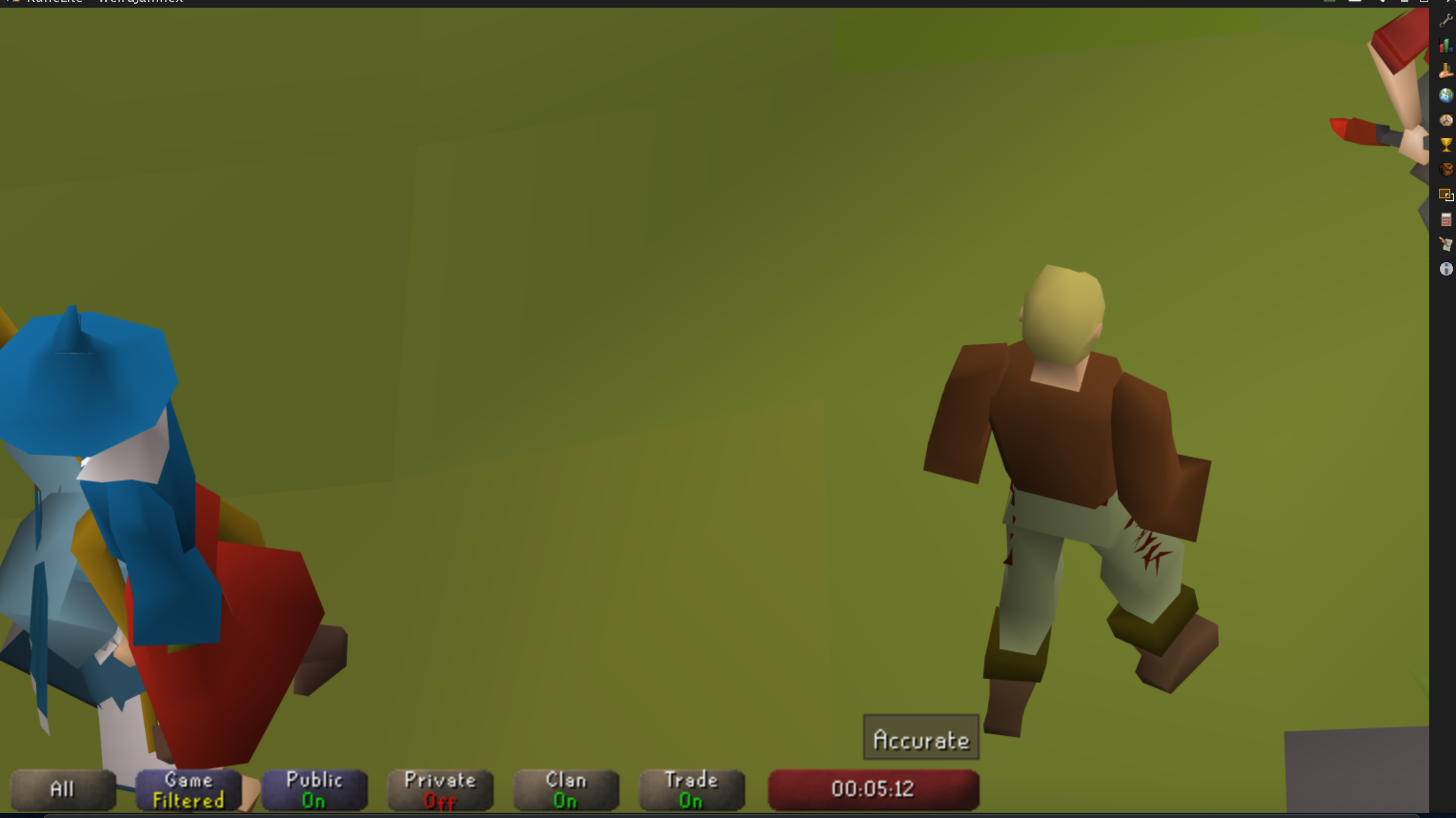
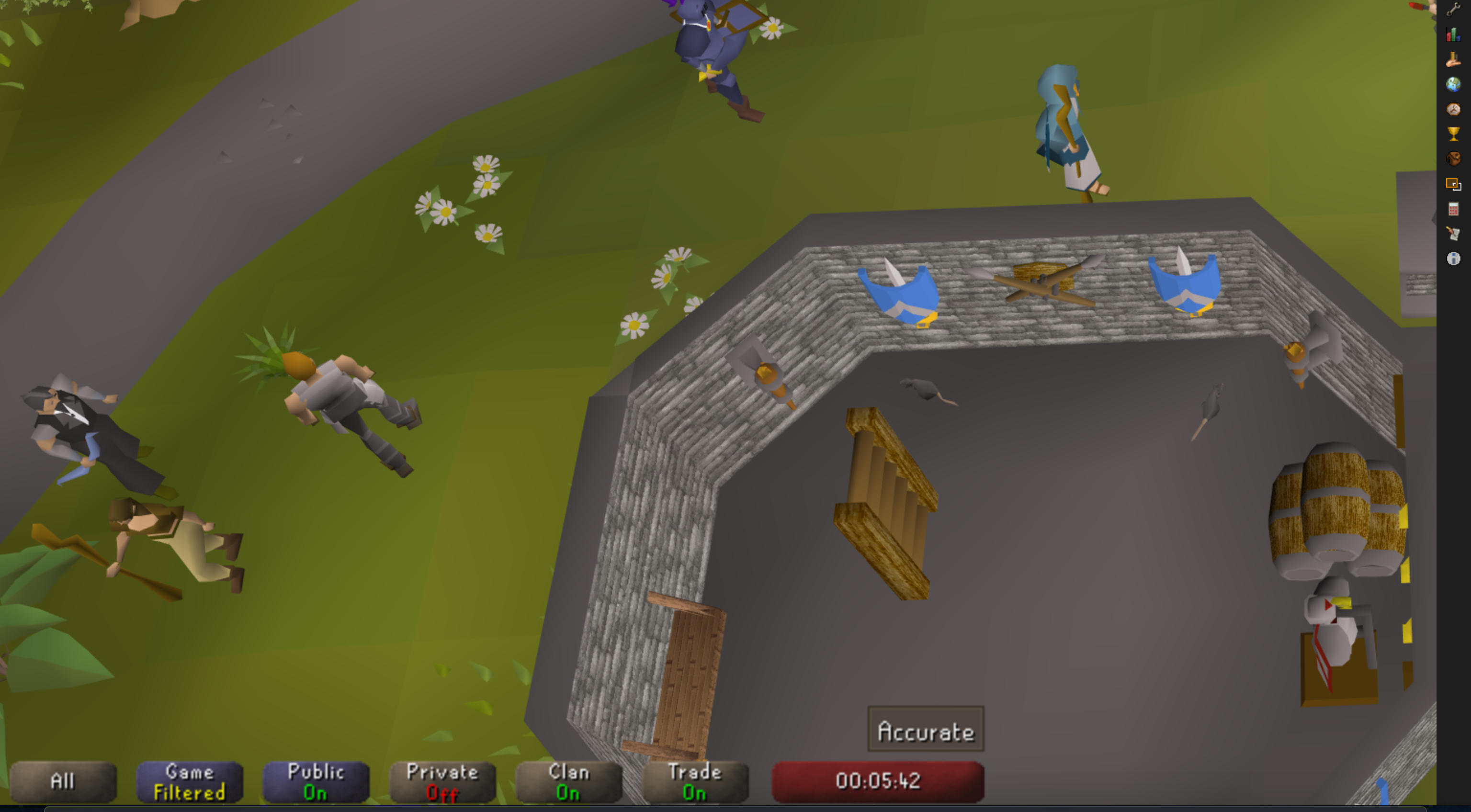
(that's me in the very top right)
rmaes4
on 14 Apr 2020
Does this work better? https://cdn.discordapp.com/attachments/419891709883973642/699655296057868328/client-1.6.11-SNAPSHOT-shaded.jar
Adam-
on 14 Apr 2020
I'm now able to see the entire screen properly. Is there anything in particular you'd like me to test?
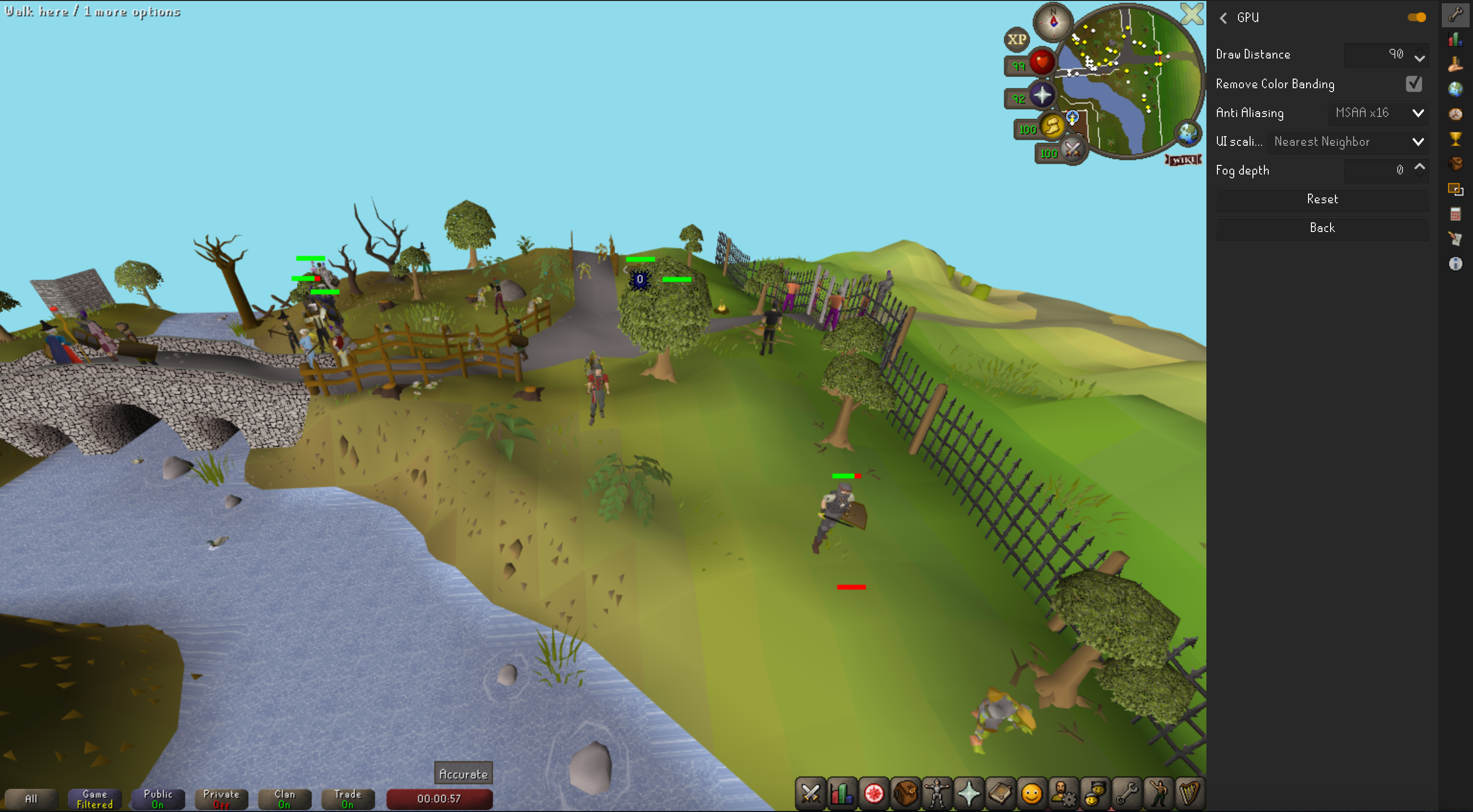
rmaes4
on 14 Apr 2020
It seems that the draw distance won't exceed 25
rmaes4
on 14 Apr 2020
It isn't able to extend the draw distance. It is a separate set of problems.
Adam-
on 14 Apr 2020
Understood. I am willing to communicate via Discord and or allow you to remotely control my computer if I can be of any further use. Thanks for the great work. This is very exciting.
rmaes4
on 14 Apr 2020
How do i run the file you just posted @Adam- ? Great work on helping out with this feature!
Specced
on 14 Apr 2020
MacBook Pro (13-inch, 2017, Four Thunderbolt 3 Ports) macOS Catalina 10.15.4 (19E266)
java 9.0.4
Seems to work with no issues (as draw distance was another issue). The performance increase is immense. Going from 7 fps 100C cpu max rpm ~ 5600rpm (probably throttled), to stable 30fps 80C cpu 5000rpm, using almost default graphics settings.
Stretched mode: OK
FPS Control: OK
GPU Plugin:
- Draw distance: NOT OK
- Remove Color Banding: OK
- Anti Aliasing: OK
- UI Scaling Mode: OK
- Fog depth: OK
Anything else I can try?
ankarhem
on 14 Apr 2020
Do screenshots work?
Adam-
on 14 Apr 2020
I ran it and screenshots worked.
MacBook Pro (Retina, 13-inch, Early 2015)
Catalina 10.15.4
Intel Iris Graphics 6100 1536 MB
java 11.0.4 2019-07-16 LTS
RuneLite still using a lot from CPU but its down from like ~110 to ~80 and in return I'm getting 40+ FPS.
I got a level-up screenshot and it looked fine. I think turning up anti-aliasing lowers the frame rate but that's too be expected.
alfred
on 14 Apr 2020
Looks like the GPU plugin makes text a bit blurry (on retina display). I'd previously seen this with the JOGL version, and it was just a one line fix
GPU on:
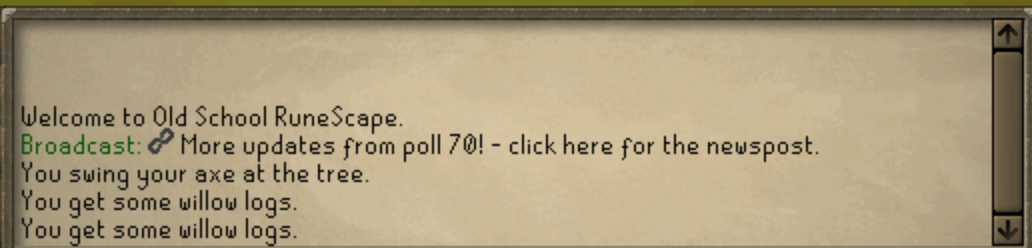

GPU off:

TylerADavis
on 14 Apr 2020
I ran it and screenshots worked.
MacBook Pro (Retina, 13-inch, Early 2015)
Catalina 10.15.4
Intel Iris Graphics 6100 1536 MB
java 11.0.4 2019-07-16 LTSRuneLite still using a lot from CPU but its down from like ~110 to ~80 and in return I'm getting 40+ FPS.
I got a level-up screenshot and it looked fine. I think turning up anti-aliasing lowers the frame rate but that's too be expected.
As long as 40+ FPS is not worse than it was before this is probably fine. Thanks.
Adam-
on 14 Apr 2020
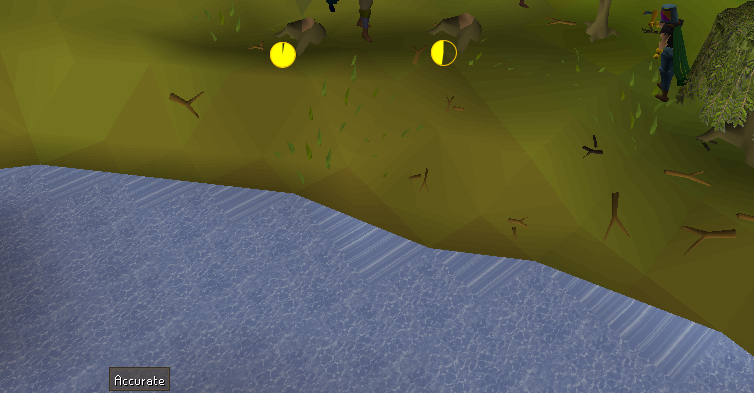
Is water tiles on the shoreline looking wrong a known issue with the GPU plugin for all platforms?
TylerADavis
on 14 Apr 2020
Where is that at?
Adam-
on 14 Apr 2020
Draynor willows, next to the bank
TylerADavis
on 14 Apr 2020
From what I can gather the main issues are:
1) flipping plugin on and off can have it freeze (looks locked in getShaderiv?)
2) display is blurry
3) when turned on, sometimes display is slightly-off until resized
These may not really fixable not sure, might look into it more tomorrow.
Adam-
on 15 Apr 2020
Added today's logs from logging in to teleporting around. I kept getting some weird stutters. CPU usage wasn't spiking or anything.
Then realized some of my plugin hub plugins weren't showing so tried to find them and that became impossible. When I entered into the pluginhub search, the entire client would stutter then all my key presses would come appear... backwards. I figure this is only tangentially related but wanted to add my logs in case anything is helpful. I just see a bunch of NPEs.
alfred
on 15 Apr 2020
@Adam- Would you mind posting your source somewhere? I might be able to help with some of the coding. Finally had an Advanced Java Class at Uni, so I might be able to start helping coding this; especially since I said I would try, and ultimately failed being so rusty...
IComplainInComments
on 16 Apr 2020
I've also started porting the shaders to SPIR-V for Metal/Vulkan use
IComplainInComments
on 17 Apr 2020
I'm not the author, but can you please refrain from demanding schedules about when this work will be finished? It's not helpful and is just adding noise
ollieatkinson
on 17 Apr 2020
How likely do you guys feel that we will get a fully functional gpu plugin for mac soon? Not long ago it was zero probability.
Draw distance makes so much a difference to Runescape
For a basic version using OpenGL, we are already pretty close (At least from my brief look at the new code, fairly sure we are still using OpenGL as we are still using GLSL shaders).
To a native Vulkan/Metal implementation? Few months at least, for a working Beta. For it to be merged into the client? That I don't know, I've barely worked with OpenGL let alone using Shaders for the new APIs, so probably when their is a consensus that it runs well.
Also, anyone with OpenGL/Graphics shaders experience, if you would reach out to me I would appreciate it. I need some help moving some uniform variables into code blocks, and binding them to the buffers.
IComplainInComments
on 17 Apr 2020
If you need help with OpenGL I'd be glad to give you hints!
What's your specific problem?
cgurps
on 17 Apr 2020
If you need help with OpenGL I'd be glad to give you hints!
What's your specific problem?
Sent you an Email so we can set up contact!
IComplainInComments
on 17 Apr 2020
The changes to the actual opengl code for this are minimal; almost all of the changes are related to embedding into AWT correctly.
Using metal is a bad idea because I can't test it before I make a release, and I dislike releasing things that I can't verify if they work.
Using vulkan (or metal) is also a bad idea because I don't think there is a library that can embed into AWT at all. In addition vulkan has a significantly higher amount of code required to function at all, and likely has many more driver oddities related to its relative newness. I also would like to maintain as few graphics backends as possible because tracking down bugs in them is hard, and they tend to contain a significant amount of code that is difficult to verify the correctness of.
 abextm
on 18 Apr 2020
abextm
on 18 Apr 2020
The changes to the actual opengl code for this are minimal; almost all of the changes are related to embedding into AWT correctly.
Using metal is a bad idea because I can't test it before I make a release, and I dislike releasing things that I can't verify if they work.
Using vulkan (or metal) is also a bad idea because I don't think there is a library that can embed into AWT at all. In addition vulkan has a significantly higher amount of code required to function at all, and likely has many more driver oddities related to its relative newness. I also would like to maintain as few graphics back-ends as possible because tracking down bugs in them is hard, and they tend to contain a significant amount of code that is difficult to verify the correctness of.
Thats why im focusing on SPIR-V for now. SPIR-V is an IR code for shaders, so in the future the shaders can be used on new systems/platforms when SPIR-V has a back-end for generating the newer code.
Now from my understanding, Java2D is being reworked on by Oracle, to support the newer graphics systems natively. A June 2020 release is looking like the date their shooting for (might be why Java 8 is being removed from support soonish (been getting complaints to update to Java 11 by VSCode a lot lately)). So because Swing using AWT, and swing uses AWT for its back-end, and swing/AWT uses Java2D for its back-end, the new code should be updated so the JVM will handle the calls, only thing being from what im seeing, is any shaders need to be reworked.
Because once we have a SPIR-V, we officially has a unified back-end, as SPIR-V can be remade into any High level shading language, and Java2D handling the API. Its already Pseudo- Unified.
Eitherway, OpenGL is being removed. Khronos is focusing on Vulkan, so either way for the plugin we gotta be ready for the future.
IComplainInComments
on 18 Apr 2020
There has been work to port java2d to many different rendering backends and they have all failed sofar, so I wouldn't wait for it. In addition it would also need all of our users to manually update their launcher for a new jvm, and that will take many many months after its ga, if it ever gets to that point. That also doesn't mean there will be a library to to get a accelerated context from that, as that has absolutely nothing to do with java2d.
I know how spir-v works, you still write glsl so idk what you are doing "porting" it, you just run the compiler on what we have already and its magically spirv. Infact we have a test that does this already via glslang.
Also OpenGL is probably never going to be removed, its not even deprecated yet (unless you are apple). Too many things rely on it to work, and even if/when vendors drop support there will be things like ANGLE to make things continue to work. There is just too much software consuming it for it to go away for atleast 20 years
abextm
on 18 Apr 2020
There has been work to port java2d to many different rendering backends and they have all failed sofar, so I wouldn't wait for it. In addition it would also need all of our users to manually update their launcher for a new jvm, and that will take many many months after its ga, if it ever gets to that point. That also doesn't mean there will be a library to to get a accelerated context from that, as that has absolutely nothing to do with java2d.
I know how spir-v works, you still write glsl so idk what you are doing "porting" it, you just run the compiler on what we have already and its magically spirv. Infact we have a test that does this already via
glslang.Also OpenGL is probably never going to be removed, its not even deprecated yet (unless you are apple). Too many things rely on it to work, and even if/when vendors drop support there will be things like ANGLE to make things continue to work. There is just too much software consuming it for it to go away for atleast 20 years
Listen, if you're just gonna be defeatist fine. People can just fork the code and make custom launchers per OS. Hence the beauty of open source software.
The "porting" im doing is restructuring the code, as im using glslang and its complaining to the fact the code is unorganized, and doesnt fit the spec for use in Vulkan. What im doing is retrofitting the code (Which btw is a complete disaster and is as well documented as the Jurassic period.)
So you dont want it? Fine, im still going to work on it. If I get it working, even better. I'm not here to argue 'why' im here to argue 'how'. So as a member of this project you should know to contribute, instead of flame.
IComplainInComments
on 18 Apr 2020
I'm not trying to flame you, and I'm sorry if it sounds like I am. I am trying to tell you that what you are working on has several dependencies that are very difficult to sort out, and that are probably better things that you can tackle that require significantly less effort and that can actually be merged.
abextm
on 18 Apr 2020
I would be definitely willing to take a look at and maybe merge the compute shaders being ported to something else. Especially so if it does work on OSX. I've read the above conversation a few times and mostly do not follow it though.
This has ~nothing to do with java2d's rendering system. RuneLite itself uses it certainly but the game Client uses nothing more than one awt paint() call (which we could replace, certainly if we wanted). Currently the way that this works is, we use native libraries (jogl, maybe soon lwjgl if I can get it to work?) to grab native handles to the awt canvas and draw directly to that while simultaneously preventing the client from drawing to it.
However this current discussion of porting the compute shaders is not something I am currently focused on. Before that happens, we first need to be able to get a simple macos rasterizer working, which is what I have been working on this last week or so, and it basically its own independent set of problems. I don't really want to focus onto this until after I get that working.
I do not know enough about vulkan or metal to be able to give good direction to someone wanting to look at it. Ideally the best solution would be something which could share shader storage buffer objects with OpenGL, so that we could use the existing OpenGL code and (non-compute) shaders, which we know mostly work. Maybe OpenCL can do this as we've discussed before, but I don't really know.
I'd argue the code really isn't a disaster, it is just full of many subtle and not-so-subtle nuances due to it being for a browser-based game from the early 2000s. You are certainly welcome to send PRs to improve it.
Adam-
on 18 Apr 2020
I'm not trying to flame you, and I'm sorry if it sounds like I am. I am trying to tell you that what you are working on has several dependencies that are very difficult to sort out, and that are probably better things that you can tackle that require significantly less effort and that can actually be merged.
I'm doing this to occupy my time. I don't mind waiting, nor do I mind how difficult it will be. The fact of the matter is eventually this has to happen. I would love to enjoy playing runescape without my CPU wanting to turbo boost the whole time due to the software render (especially when it doesn't need to turbo boost in the first place).
A lot of other people want the same thing, and my goal is to do an implementation that will benefit every OS. Software rots, it gets old, and causes performance regressions in the end. Having some work now will ease the burden in the future (if I or no one else cannot do the undertaking to get it to work) to get this old code to work, before its too ancient to even try.
I understand you're just giving your two cents on why this is pointless, and how I can better help, but my focus is attempting to do something that everyone will benefit from; especially if the community and I can do it.
I would be definitely willing to take a look at and maybe merge the compute shaders being ported to something else. Especially so if it does work on OSX. I've read the above conversation a few times and mostly do not follow it though.
This has ~nothing to do with java2d's rendering system. RuneLite _itself_ uses it certainly but the game Client uses nothing more than one awt paint() call (which we could replace, certainly if we wanted). Currently the way that this works is, we use native libraries (jogl, maybe soon lwjgl if I can get it to work?) to grab native handles to the awt canvas and draw directly to that while simultaneously preventing the client from drawing to it.
However this current discussion of porting the compute shaders is not something I am currently focused on. Before that happens, we first need to be able to get a simple macos rasterizer working, which is what I have been working on this last week or so, and it basically its own independent set of problems. I don't really want to focus onto this until after I get that working.
I do not know enough about vulkan or metal to be able to give good direction to someone wanting to look at it. Ideally the best solution would be something which could share shader storage buffer objects with OpenGL, so that we could use the existing OpenGL code and (non-compute) shaders, which we know mostly work. Maybe OpenCL can do this as we've discussed before, but I don't really know.
I'd argue the code really isn't a disaster, it is just full of many subtle and not-so-subtle nuances due to it being for a browser-based game from the early 2000s. You are certainly welcome to send PRs to improve it.
And this is what im trying to Achieve. I just want to update the shaders so the community has something new to work with. The hardest part about updating software is implementing new Frameworks/Features/APIs on aging software systems. Look at the digital filing of unemployment fiasco, the systems are literally not able to keep up due to aging software. Having code that is kept clean is a goal im trying to do.
The reason im preaching SPIR-V so much is because its a format that LLVM can use. Because LLVM can use it, runelite can simply convert SPIR-V into any graphics shading system it likes during build. Thus giving the whole projects a lot more flexibility for its graphics stack, and removing the problems we are having now. My main goal RIGHT NOW, is not a full Metal/Vulkan implementation (as the JDK/JVM are still awaiting patches from what im reading), but to have them ready for a quick PR to enable them. So we dont need to wait months, and from different teams for different OS targets, when we can unify them into one, and have the code ready with some build-time rules attached to the pre-compiled binaries. Simplifying is the goal of the project im doing.
IComplainInComments
on 18 Apr 2020
MacOS Catalina 10.15.4
MacBook Pro (13-inch, 2017, Four Thunderbolt 3 Ports)
Graphics Intel Iris Plus Graphics 650 1536 MB
Java(TM) SE Runtime Environment 18.9 (build 11.0.7+8-LTS)
Can't seem to toggle on the gpu plugin, let me know if i can lend a hand.
 Bautista-Baiocchi-lora
on 18 Apr 2020
Bautista-Baiocchi-lora
on 18 Apr 2020
Just tried this on my mac:
MacOS Catalina 10.15.4
MacBook Pro (13-inch, 2019, Four Thunderbolt 3 ports)
Processor 2.4 GHz Quad-Core Intel Core i5
Memory 16 GB 2133 MHz LPDDR3
Graphics Intel Iris Plus Graphics 655 1536 MB
java version "11.0.7" 2020-04-14 LTS
Works pretty well! Getting a pretty solid 50fps in resizable now, so very happy 👍 I do get the same water rendering oddity that @TylerADavis gets:
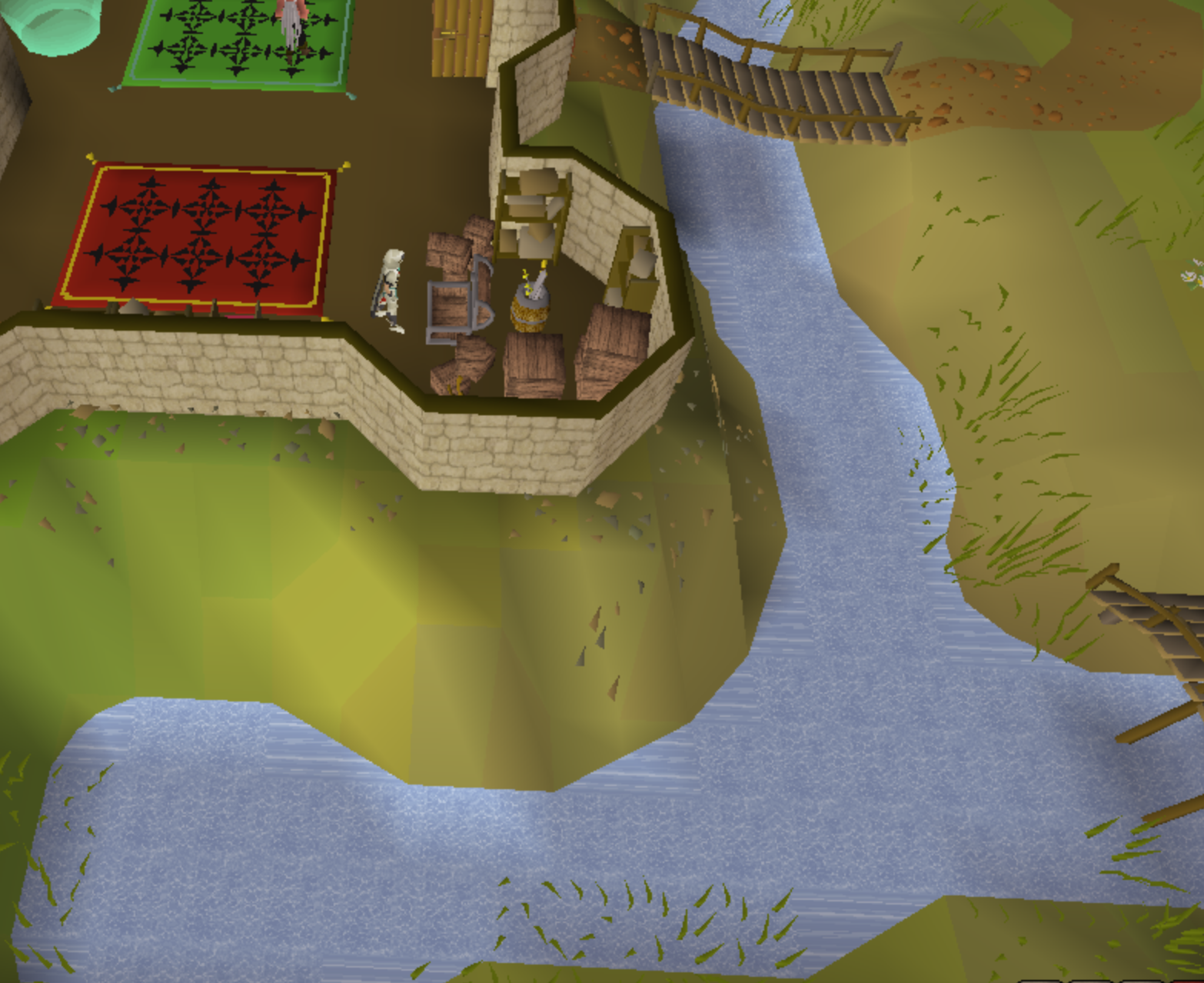
This is such a minor thing though, the improved experience is so worth it.
 tomb1n0
on 18 Apr 2020
tomb1n0
on 18 Apr 2020
sorry for the noob question but what are the benefits of using Vulcan instead of OpenGL performance wise? I don't understand all the terms. I just want the gpu plugin to work whether that is with OpenGL or metal/vulkan..
All I do know that no computers these days should struggle with RuneLite however all my Macs get super hot and loud from the fans. Would that happen with OpenGL or metal/vulkan???? What about the battery life issues?
anyone that wants to use my Mac for testing let me know. I can setup a TeamViewer.
 stoddy15
on 18 Apr 2020
stoddy15
on 18 Apr 2020
This is honestly amazing people. Kudos to all of you. I just tested this on MacBook Pro 16" and my laptop remains quiet with 50 fps. It could barely handle 25 fps without going figher jet mode.
I have no useful experience or knowledge to help with this code-wise but if I can assist in any other way, I will gladly do so.
Config:
MacBook Pro (16-inch 2019)
2,6 GHz 6Core Intel Core i7
32 GB 2667 MHz DDR4
AMD Radeon Pro 5500M 8GB
Catalina 10.15.4
 woutderooms
on 18 Apr 2020
woutderooms
on 18 Apr 2020
I went back to trying to get jogl to work instead of lwjgl2 because I pretty much hit a wall with some of the issues I was having with lwjgl2. I've now got https://sigterm.info/runelite/jogl/client-1-85c6cb229754a08829e81a511bc41b09.jar this build I would like for people to test. I am pretty sure it leaks native window references whenever resized or toggled off, but I spent most of today trying to make it not do that and I can't really get it to just not crash immediately when trying to properly free the newt awt windows. Maybe we can just overlook this since most people don't resize the game too often and take it as a bug to fix later.
EDIT: try to specifically use adoptopenjdk version 11.0.4 or maybe newer. You may also have to set -Dsun.java2d.uiScale=1 depending.
Adam-
on 19 Apr 2020
I went back to trying to get jogl to work instead of lwjgl2 because I pretty much hit a wall with some of the issues I was having with lwjgl2. I've now got https://sigterm.info/runelite/jogl/client-1-85c6cb229754a08829e81a511bc41b09.jar this build I would like for people to test. I am pretty sure it leaks native window references whenever resized or toggled off, but I spent most of today trying to make it not do that and I can't really get it to just not crash immediately when trying to properly free the newt awt windows. Maybe we can just overlook this since most people don't resize the game too often and take it as a bug to fix later.
EDIT: try to specifically use adoptopenjdk version 11.0.4 or maybe newer. You may also have to set
-Dsun.java2d.uiScale=1depending.
Tested on:
MacOS Catalina 10.15.4
MacBook Pro (13-inch, 2017, Four Thunderbolt 3 Ports)
Graphics Intel Iris Plus Graphics 650 1536 MB
Java(TM) SE Runtime Environment 18.9 (build 11.0.7+8-LTS)
Greatly improved my fps from 15-20 to 30-45! Thank you!! The only problem I found was that collapsing the side bar made my screen go irreversibly black. The only fix was turning the plugin off and on. This didn't fix the bug permanently. I cannot close the side bar without black screening. I assume this because of the canvas being resized when the side bar closes.
Let me know if you need any further testing,
kind regards.
Bautista-Baiocchi-lora
on 19 Apr 2020
I went back to trying to get jogl to work instead of lwjgl2 because I pretty much hit a wall with some of the issues I was having with lwjgl2. I've now got https://sigterm.info/runelite/jogl/client-1-85c6cb229754a08829e81a511bc41b09.jar this build I would like for people to test. I am pretty sure it leaks native window references whenever resized or toggled off, but I spent most of today trying to make it not do that and I can't really get it to just not crash immediately when trying to properly free the newt awt windows. Maybe we can just overlook this since most people don't resize the game too often and take it as a bug to fix later.
EDIT: try to specifically use adoptopenjdk version 11.0.4 or maybe newer. You may also have to set-Dsun.java2d.uiScale=1depending.Tested on:
MacOS Catalina 10.15.4
MacBook Pro (13-inch, 2017, Four Thunderbolt 3 Ports)
Graphics Intel Iris Plus Graphics 650 1536 MB
Java(TM) SE Runtime Environment 18.9 (build 11.0.7+8-LTS)Greatly improved my fps from 15-20 to 30-45! Thank you!! The only problem I found was that collapsing the side bar made my screen go irreversibly black. The only fix was turning the plugin off and on. This didn't fix the bug permanently. I cannot close the side bar without black screening. I assume this because of the canvas being resized when the side bar closes.
Let me know if you need any further testing,
kind regards.
Does turning off AA in the gpu plugin change this at all? Or is it already off?
Adam-
on 19 Apr 2020
I went back to trying to get jogl to work instead of lwjgl2 because I pretty much hit a wall with some of the issues I was having with lwjgl2. I've now got https://sigterm.info/runelite/jogl/client-1-85c6cb229754a08829e81a511bc41b09.jar this build I would like for people to test. I am pretty sure it leaks native window references whenever resized or toggled off, but I spent most of today trying to make it not do that and I can't really get it to just not crash immediately when trying to properly free the newt awt windows. Maybe we can just overlook this since most people don't resize the game too often and take it as a bug to fix later.
EDIT: try to specifically use adoptopenjdk version 11.0.4 or maybe newer. You may also have to set-Dsun.java2d.uiScale=1depending.Tested on:
MacOS Catalina 10.15.4
MacBook Pro (13-inch, 2017, Four Thunderbolt 3 Ports)
Graphics Intel Iris Plus Graphics 650 1536 MB
Java(TM) SE Runtime Environment 18.9 (build 11.0.7+8-LTS)
Greatly improved my fps from 15-20 to 30-45! Thank you!! The only problem I found was that collapsing the side bar made my screen go irreversibly black. The only fix was turning the plugin off and on. This didn't fix the bug permanently. I cannot close the side bar without black screening. I assume this because of the canvas being resized when the side bar closes.
Let me know if you need any further testing,
kind regards.Does turning off AA in the gpu plugin change this at all? Or is it already off?
Yes it does. I previously had MSAA x16 enabled. Another thing, text(Grand Exchange interface) seems a bit blurry ?
Bautista-Baiocchi-lora
on 19 Apr 2020
Actually, everything seems a bit blurry and washed out.
Bautista-Baiocchi-lora
on 19 Apr 2020
I have unfocesed fps limiting set to 20 in the fps plugin. Whenever I refocused my client it froze the whole screen until I opened and closed the side bar.
Bautista-Baiocchi-lora
on 19 Apr 2020
Client crashes when flipping on GPU
log
ankarhem
on 19 Apr 2020
MacBook Pro (16-inch, 2019)
AMD Radeon Pro 5500M 8 GB; Intel UHD Graphics 630 1536 MB
2.4 GHz 8-Core Intel Core i9
java --version --> 11.0.6
Another data point here for this JAR https://sigterm.info/runelite/jogl/client-1-85c6cb229754a08829e81a511bc41b09.jar:
- Turning on GPU doesn't crash
- Activity monitor shoes only CPU usage, 0.0% GPU usage
- Anti-aliasing basically freezes the UI. Disabling is returns to normal.
- Removing Color Banding works
- Changing draw distance doesn't work in the Morytania slayer tower at least
 quinnturner
on 19 Apr 2020
quinnturner
on 19 Apr 2020
@JAnken123 you must use Java 11.
@quinnturner If remove color banding works, then the GPU plugin is definitely on. I've had a few people say AA freezes it for them, however it works perfectly fine for me. May just live with it and tell people to turn it off...
Adam-
on 19 Apr 2020
@Bautista-Baiocchi-lora can you verify https://sigterm.info/runelite/jogl/client-2-b9ba8e3401b602ff3a46c078c2117fc3.jar fixes the blurryness?
Adam-
on 19 Apr 2020
@JAnken123 you must use Java 11.
I am. I used the openjdk@11 brew package. I also tried the adoptopenjdk 11.0.7 lts, and I still have the same issue.
ankarhem
on 19 Apr 2020
@Bautista-Baiocchi-lora can you verify https://sigterm.info/runelite/jogl/client-2-b9ba8e3401b602ff3a46c078c2117fc3.jar fixes the blurryness?
Seems to have fixed the blurryness. Fps seems a bit better now too, used to be 30-40 and now im 40-50. Anti-aliasing continues to black screen.
Bautista-Baiocchi-lora
on 19 Apr 2020
Java: 11.0.7 Adoptopenjdk
Client: b9ba8e3401b602ff3a46c078c2117fc3
There seems to be some issue with the inital enabling of the plugin.
Steps to reproduce black screen:
Disable gpu plugin and restart client
Enable the gpu _with_ AA already enabled
Steps to reproduce freeze:
Disable gpu plugin and restart client
Enable the gpu _without_ AA enabled
Enable AA
Both of these issues are however permanently resolved for the session by toggling the gpu plugin off and on again.
ankarhem
on 19 Apr 2020
Java: 11.0.7 Adoptopenjdk
Client: b9ba8e3401b602ff3a46c078c2117fc3There seems to be some issue with the inital enabling of the plugin.
Steps to reproduce black screen:
Disable gpu plugin and restart client
Enable the gpu _with_ AA already enabledSteps to reproduce freeze:
Disable gpu plugin and restart client
Enable the gpu _without_ AA enabled
Enable AABoth of these issues are however permanently resolved for the session by toggling the gpu plugin off and on again.
AA doesn't work rn. Causes black screen.
Bautista-Baiocchi-lora
on 19 Apr 2020
Java: 11.0.7 Adoptopenjdk
Client: b9ba8e3401b602ff3a46c078c2117fc3
There seems to be some issue with the inital enabling of the plugin.
Steps to reproduce black screen:
Disable gpu plugin and restart client
Enable the gpu _with_ AA already enabled
Steps to reproduce freeze:
Disable gpu plugin and restart client
Enable the gpu _without_ AA enabled
Enable AA
Both of these issues are however permanently resolved for the session by toggling the gpu plugin off and on again.AA doesn't work rn. Causes black screen.
As I said I can reproduce AA working in these scenarios by toggling the plugin off and on again. Are you saying that this "fix" isn't working for you? I think this would suggest it doesn't have anything to do with AA, but rather the initialization of it.
ankarhem
on 19 Apr 2020
Testing more around the world. The fps is extremely choppy. Seeing 10-20 fps spike/drops.
Bautista-Baiocchi-lora
on 19 Apr 2020
Updating plugin settings while it is enabled seems to flash old canvas instances. Example: I was just at the GE, now I am walking through fally. If I update a plugin settings (change the draw distance) I will see a screen of me at the GE for a milisecond before it corrects.
Bautista-Baiocchi-lora
on 19 Apr 2020
Toggling between these two modes I can also reproduce the freeze/blackscreen (if AA is enabled):
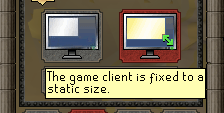
But is again resolved like before, by reenabling the plugin.
ankarhem
on 19 Apr 2020
GPU plugin being enabled makes it take 5+ attempts to reload dwarf cannon.
Bautista-Baiocchi-lora
on 19 Apr 2020
AA wasn't causing a black screen for me, however, it was causing the client to freeze. Disabling the AA fixed the issue.
client: client-2-b9ba8e3401b602ff3a46c078c2117fc3.jar
openjdk version "1.8.0_242"
OpenJDK Runtime Environment (AdoptOpenJDK)(build 1.8.0_242-b08)
OpenJDK 64-Bit Server VM (AdoptOpenJDK)(build 25.242-b08, mixed mode)
Using macOS Catalina 10.15.5 Beta (19F62f)
MacBook Pro (Retina, 15-inch, mid 2015)
2.5GHz quad-core intel core i7
16gb 1600 MHz DDR3
AMD Radeon R9 M370x 2 GB Intel Iris Pro 1536MB
 Hc747
on 22 Apr 2020
Hc747
on 22 Apr 2020
Works nicely (AA included) using:
openjdk 14.0.1 2020-04-14
OpenJDK Runtime Environment AdoptOpenJDK (build 14.0.1+7)
OpenJDK 64-Bit Server VM AdoptOpenJDK (build 14.0.1+7, mixed mode, sharing)
Hc747
on 22 Apr 2020
First of all, thank you Adam and all of the other developers who have taken their time to contribute to this and for improving the graphics backend. Also it´s nice to see that so many have taken some time to test these new experimental builds and working together to iron out any issues.
Secondly: Can someone please walk me through how i can install these test builds so i can try them out for myself? I added a little to the bounty as a small token of my appreciation. Maybe this will be the summer i can play Runescape without my processor trying to kill itself ;)
Specced
on 25 Apr 2020
Assuming you've got everything set up right, you should just run the following commands in your terminal
cd ~/Downloads # Assuming the file is in your Downloads folder
java -jar ./client-2-b9ba8e3401b602ff3a46c078c2117fc3.jar
TylerADavis
on 25 Apr 2020
I have java on my Mac and Runelite installed. Where do I get the experimental builds from and what else do I need to set up?
Specced
on 25 Apr 2020
@Adam- Toggling either the GPU plugin or color banding causes the game area to "lose focus", requiring that it be clicked again before it takes any inputs via the keyboard (typing, camera movement).
TylerADavis
on 25 Apr 2020
@Specced Current build seems to be https://sigterm.info/runelite/jogl/client-2-b9ba8e3401b602ff3a46c078c2117fc3.jar
If you can type java --version into terminal and get a version higher than 11, you should be okay. If it doesn't work / is lower than 11, you'll need to install java, either of the two below should work I think
https://www.oracle.com/java/technologies/javase-downloads.html (I don't know if Java 14 will work, try sticking to 11)
TylerADavis
on 25 Apr 2020
Thanks for the guidance @TylerADavis ! I managed to run the build with the commands and i notice a dramatic improvement in performance. Also i have no issues other than with the plugin for item prices not showing GE prices.
How can i check for new builds? Or will they be announced here for now?
Specced
on 25 Apr 2020
I understand. Thanks for the clarification. BTW: Java 14 seems to be working fine.
Specced
on 27 Apr 2020
So, I just wanted to add an extra data point (though it may be unwanted being a Hackintosh setup).
CLIENT:client-2-b9ba8e3401b602ff3a46c078c2117fc3.jar
Bootloader: OpenCore (Version 0.5.7 Latest)
macOS: Catalina 10.15.4 (19E287 Latest)
MOBO: Gigabyte Z370P D3 (latest revision firmware: 15a)
CPU: i5 8400
GPU: Intel UHD 630
SMBIOS: iMac19,1
SSD: WD Blue 3D NAND 250GB Internal SSD (M.2)
RAM: 32GB DDR4 SDRAM DDR4 2400 (originally was running KVM with GPU passthrough, Linux Host)
JAVA: java 14.0.1 2020-04-14 (Oracle SE Latest)
GPU plugin mostly completely works, no crash, color banding enabled, anti aliasing working (aside from reported bugs such as resizing game window). The only thing that isn't working from what I can tell is the Draw distance (increased values only, I can shorten it as wanted).
Good Job, and thank you for all the hard work on this specific issue. Runelite GPU plugin is the only thing keeping me from full-time Hackintosh boot.
 TrontheTechie
on 27 Apr 2020
TrontheTechie
on 27 Apr 2020
I assume the "Log into RuneLite" button isn't supposed to be working on these builds?
 robotimer
on 27 Apr 2020
robotimer
on 27 Apr 2020
I assume the "Log into RuneLite" button isn't supposed to be working on these builds?
It may not be working, but it is intended to be.
Hc747
on 28 Apr 2020
I assume the "Log into RuneLite" button isn't supposed to be working on these builds?
It may not be working, but it is intended to be.
It is not working, at least not for me.
robotimer
on 28 Apr 2020
I've got a new build now which is rebased and fixes the resizing issues. I am optimistic it may be good enough to release, please test: https://sigterm.info/runelite/jogl/client-3-6241c4aed9cf4f60d4eeaaf7861f756f.jar
Adam-
on 28 Apr 2020
@Adam-
You are the man! This is running pretty well for me. Text is a little blurry, but nothing too bad.
What is the reason draw distance doesn't work?
 Harrisonlift
on 29 Apr 2020
Harrisonlift
on 29 Apr 2020
@Adam- latest release working really nice w/ JRE 14! :)
Hc747
on 29 Apr 2020
@Adam- The latest build is running great!
I am running a Dell OPTIPLEX 9020, i7 4770 +16GB RAM + RX580 running Catalina
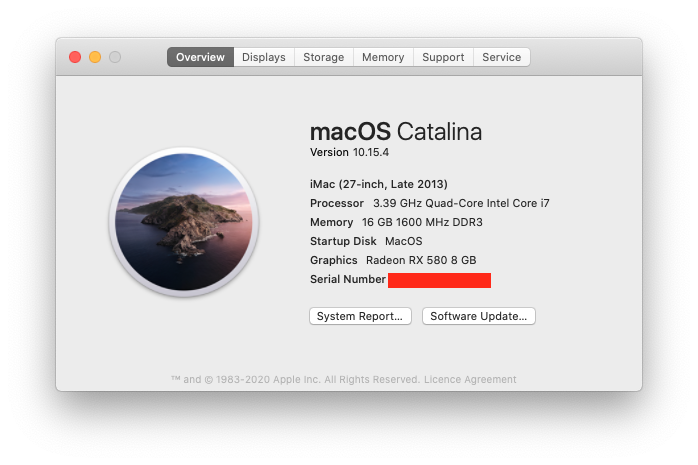
java --version
java 11.0.7 2020-04-14 LTS
Java(TM) SE Runtime Environment 18.9 (build 11.0.7+8-LTS)
Java HotSpot(TM) 64-Bit Server VM 18.9 (build 11.0.7+8-LTS, mixed mode)
I play on a 1080p display, Maximised (mac task bar top and dock bottom) Animation smoothing, and FPS control turned on. getting smooth 50fps gameplay, intensive areas dipping to 35-40fps, though no noticeable stuttering
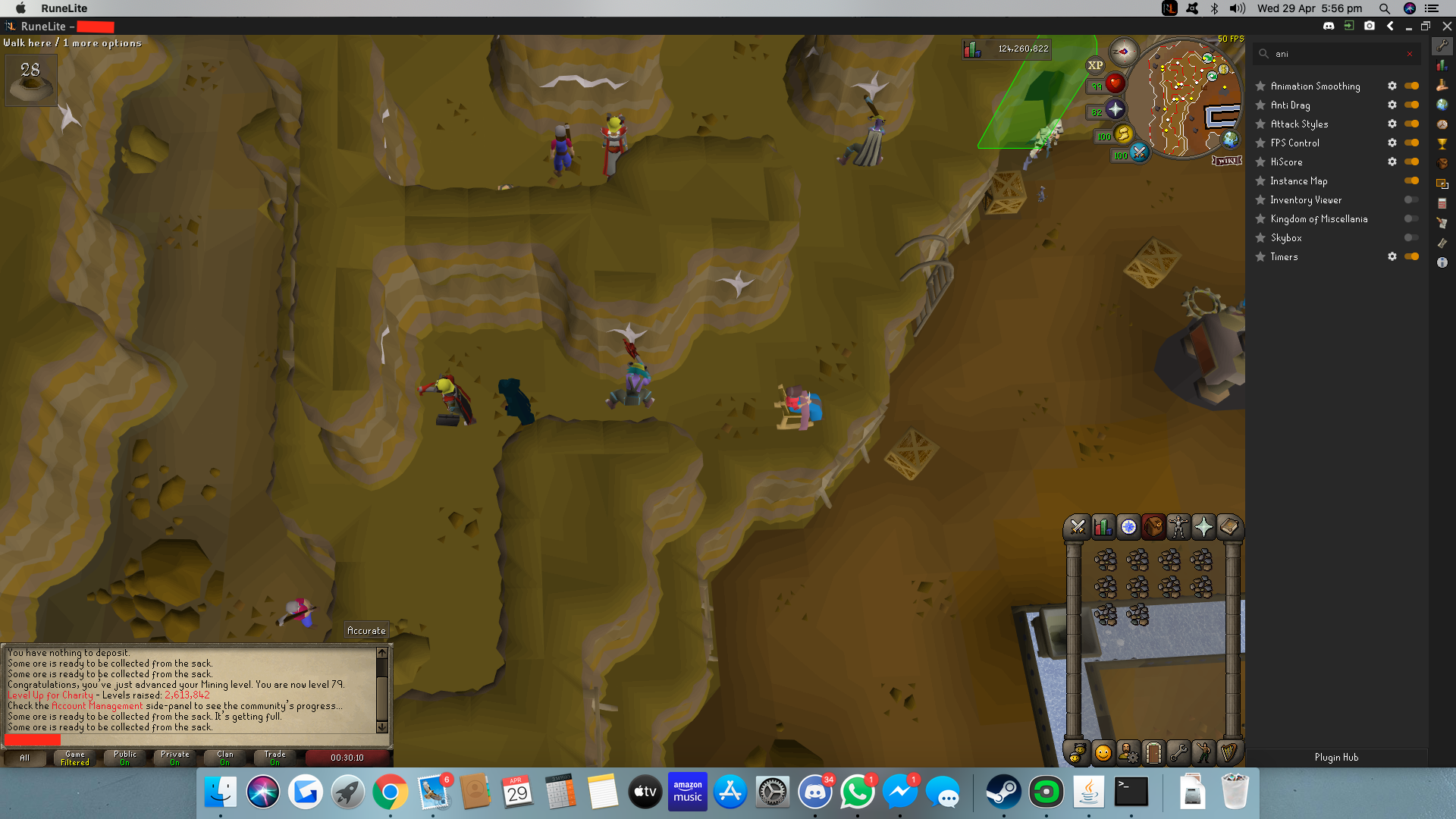
Resizing the game window no longer causes a black screen, Since "client-2-b9ba8e3401b602ff3a46c078c2117fc3" I've had no graphical glitches other than resizing black screen bug
However I have noticed a bug with both the official build and this when maximizing the client on secondary monitors, It will always maximize to the primary display. I.E. drag client to monitor two, press maximize and the client will maximize on monitor one, minimizing the client will ping it back to minimized state on monitor two, so it remembers the minimize perimeters however always maximizes to the primary display, not the display the window is currently on.
Thank you for all your hard work!
 bibo159
on 29 Apr 2020
bibo159
on 29 Apr 2020
One last test hopefully, not much has changed: https://sigterm.info/runelite/jogl/client-4-b6e23e197304fa2fe9906920c41bfa9b.jar. If nothing bad happens I should be ready to merge the code for this on Friday.
Adam-
on 30 Apr 2020
I've got a new build now which is rebased and fixes the resizing issues. I am optimistic it may be good enough to release, please test: https://sigterm.info/runelite/jogl/client-3-6241c4aed9cf4f60d4eeaaf7861f756f.jar
One last test hopefully, not much has changed: https://sigterm.info/runelite/jogl/client-4-b6e23e197304fa2fe9906920c41bfa9b.jar. If nothing bad happens I should be ready to merge the code for this on Friday.
Performs well. I don't see/feel any difference between builds.
1) Draw distance does not work.
2) Is vulkan/mental still a possibility or is there no point/benefit because Adam has fixed most issues?
 nlruk
on 30 Apr 2020
nlruk
on 30 Apr 2020
@Adam-
Runs great!!!!!! You just need to fix draw distance
stoddy15
on 30 Apr 2020
@ks0i it's an open source project, the source is available so feel free to submit a P/R - this is not Adams job so do not make demands
ollieatkinson
on 1 May 2020
As I said in my previous comment, feel free to submit a P/R for review.
ollieatkinson
on 1 May 2020
@ks0i You could always do it yourself if you feel so strongly.
Harrisonlift
on 1 May 2020
@ks0i it tells me Adam is a very busy man, and we are lucky to have him.
Can you please stop posting if you don't have anything useful to add
ollieatkinson
on 1 May 2020
@ks0i You could always do it yourself if you feel so strongly.
I may just do that -_-
I don't know anything about vulkan, but I would definitely be interested in a vulkan gpu plugin port if you can make one.
Adam-
on 1 May 2020
@ks0i A good Vulkan implementation is a LOT of work. It isn't as simple as replacing the API with Vulkan function. It involves good engineering of the application and careful design.
In the case of Runescape, there won't be any major improvement using Vulkan performance wise as there is no real complicated shading happening in the application (it's just some triangle colors with some transparency and texturing). The real advantage of using Vulkan would be its cross platform capabilities where we could have only one backen for the GPU rendering.
We already started working on the Vulkan port with @IComplainInComments if you are interested @Adam-
cgurps
on 1 May 2020
@IComplainInComments is the owner of this task, so maybe we should refer to him :)
cgurps
on 1 May 2020
GPU support for rasterization has been added in 0e6f9f9aeca8ebb46b40780dbfeca24a5682f457
Adam-
on 1 May 2020
GPU support for rasterization has been added in 0e6f9f9
Too bad draw distance will _never_ work with OpenGL. Nice efforts though.
I, and I am sure many other people, share the sentiment that draw distance is one of the best parts of the GPU plugin. If it is really that important to you, I am sure that you could easily find that draw distance is supported on OSBuddy Pro, which while not open source or free software in any means, does what you want.
Open source, no cost, and free(dom) software is supported and created by many people with no absolute direction, or end goal. If all someone wants to do is fix a problem they personally saw and call it good enough, that was more than they were obliged to do. No one in the Free(dom) software community owe you or anyone else anything, and given the fact they have volunteered anything,it is really tacky to insult them or berate them for "NoT CoMpLeTiNg ThE JoB".
As far as I can see everyone has tried to direct you where they could (especially considering the volunteer basis). I am equally disappointed with the lack of Draw Distance support, but I'll take the FPS and smoother image.
@Adam- The last build I downloaded was running very well. Thank you for all the hard work, I couldn't have done it!
TrontheTechie
on 2 May 2020
One minor bug I have noticed with the GPU plugin (b6e23e1) is that tooltips can't render over the game canvas.
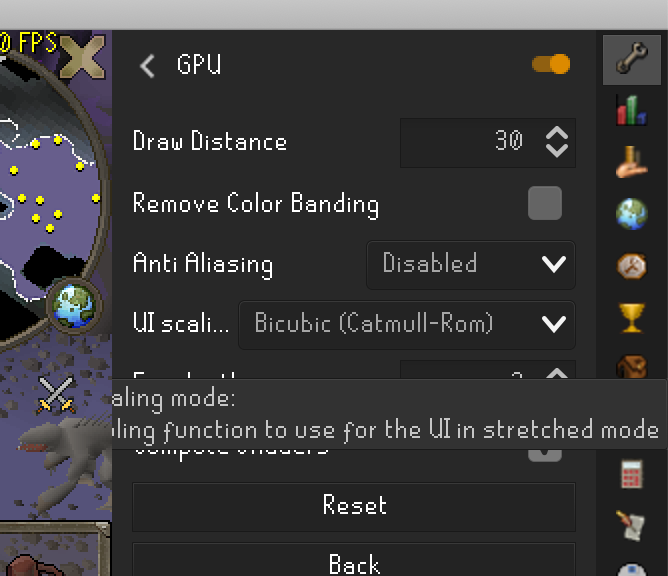
For me this happens when I place RuneLite right up against the right hand side of my screen. Not a big deal, but thought I'd mention it.
 gnawf
on 3 May 2020
gnawf
on 3 May 2020
@ks0i You really don’t want to add anything productive to this conversation, do you?
Harrisonlift
on 3 May 2020
@Eliofx92 The issue is not OpenGL, but a combination of Apple's lack of support of OpenGL and OSRS's weird rendering system that requires us to use Compute Shaders to emulate. The idea to use OpenCL has been around since as long as I can remember, but it's not easy to get it all to play nicely.
 Hydrox6
on 5 May 2020
Hydrox6
on 5 May 2020
@Eliofx92 The issue is not OpenGL, but a combination of Apple's lack of support of OpenGL and OSRS's weird rendering system that requires us to use Compute Shaders to emulate. The idea to use OpenCL has been around since as long as I can remember, but it's not easy to get it all to play nicely.
Would Vulkan solve that yes or no?
As I've already told you here https://github.com/runelite/runelite/issues/6482#issuecomment-622470075 I would be very interested in a vulkan gpu plugin port if you can make one. I don't know enough about vulkan to know if it will work or not, or how to port the plugin myself currently.
The reason your accounts have been banned is you keep spamming my issue tracker telling me to switch to vulkan, which is not productive. Please stop spamming.
Adam-
on 5 May 2020
@Eliofx92 The issue is not OpenGL, but a combination of Apple's lack of support of OpenGL and OSRS's weird rendering system that requires us to use Compute Shaders to emulate. The idea to use OpenCL has been around since as long as I can remember, but it's not easy to get it all to play nicely.
Yes and no. There is nothing weird in the OSRS rendering system as the compute shaders are here to sort the geometry on the fly to properly render transparency. The problem is that OSX doesn't support compute shaders as they were introduced in a later version than the one supported on this platform.
@Henrika1989 you clearly don't know what you are talking about. As said before, using Vulkan is not the magic solution. You wavering it like a flag clearly shows a lack of understanding of the graphic stack.
cgurps
on 5 May 2020
(Only a player here) Nice job on the GPU support! I have been waiting for this for so long and it couldn't be more perfect timing with the new MacBook Pro I just got. Very thankful for you nerds' effort and skills.
P.S. You guys are vicious in this forum... I love it! Please add Draw Distance support or at least come up with an answer as to if it is even possible or not. Still wonderful without it.
 Lamachick7
on 11 May 2020
Lamachick7
on 11 May 2020
Draw Distance support is not going to cut it. Jordan is going to have to brain storm ideas if he wants to WIN in this very competitive space.
 juglia02
on 11 May 2020
juglia02
on 11 May 2020
I would like to thank anyone contributing to this, the Runelite GPU plugin has drastically improved performance on my macbook 13". My computer doesn't even run hot anymore, barely get any fans and good temps. Also stable performance pretty much anywhere in the game. +- 50 fps.
Thank you for this update!
 landmins
on 20 May 2020
landmins
on 20 May 2020
I've noticed that the Stretched Mode plugin behaves oddly when the GPU plugin is enabled. The game stretches to be too large for the screen, the only fix seems to be turning off the GPU plugin.
robotimer
on 6 Aug 2020
Has the draw distance project for OSX been abandoned?
 Optumasfx
on 6 Jan 2021
Optumasfx
on 6 Jan 2021
@Optumasfx I looked into draw distance a bit more back in early May, and the challenge I encountered was that right now RuneLite is using a prerelease version of JOGL 2.4.0, and using OpenCL in place of OpenGL compute shaders would require a corresponding JOCL version 2.4.0. The catch is that JOGL 2.4.0 and JOCL 2.4.0 aren't officially released yet.
To get draw distance working, I believe the following would be required:
- Build our own JOCL 2.4.0 prerelease, or wait for JOCL 2.4.0 official release (which could take a while)
- Write OpenCL kernels that replace the OpenGL compute shaders (they just do some sorting if I remember correctly)
- Add a switch in the code to allow for OpenGL compute shaders on windows, or OpenCL on Mac, or default CPU based sorting
I'm not sure what the process of building our own JOCL would be (@Adam- knows a bit more about how JOGL 2.4.0 prerelease is currently being built/used), but I would expect the OpenCL portion would be relatively straightforward for someone with experience. I'd love to see extended draw distance on Mac, but I can't commit time to the project right now.
TylerADavis
on 6 Jan 2021
@Optumasfx I looked into draw distance a bit more back in early May, and the challenge I encountered was that right now RuneLite is using a prerelease version of JOGL 2.4.0, and using OpenCL in place of OpenGL compute shaders would require a corresponding JOCL version 2.4.0. The catch is that JOGL 2.4.0 and JOCL 2.4.0 aren't officially released yet.
To get draw distance working, I believe the following would be required:
1. Build our own JOCL 2.4.0 prerelease, or wait for JOCL 2.4.0 official release (which could take a while)

2. Write OpenCL kernels that replace the OpenGL compute shaders (they just do some sorting if I remember correctly)

3. Add a switch in the code to allow for OpenGL compute shaders on windows, or OpenCL on Mac, or default CPU based sorting
I'm not sure what the process of building our own JOCL would be (@Adam- knows a bit more about how JOGL 2.4.0 prerelease is currently being built/used), but I would expect the OpenCL portion would be relatively straightforward for someone with experience. I'd love to see extended draw distance on Mac, but I can't commit time to the project right now.
This is the version of JOGL we use - https://github.com/runelite/jogl - presumably you would just need to check out a version of JOCL from a similar timeframe that is compatible. I don't think that it is such a big deal.
Adam-
on 6 Jan 2021
I agree, getting JOCL 2.4.0 shouldn't be too much of a challenge. Extended draw distance on macOS is definitely doable.
TylerADavis
on 6 Jan 2021
I wasn't aware the bounty was still open, last I saw the bounty was for just getting the GPU plugin to work on Mac, but there should still be a bounty for the draw distance, as that's one of the major features of the GPU plugin on PC.
 evprkr
on 7 Jan 2021
evprkr
on 7 Jan 2021
lets include apple silicon support and maybe Vulkan into the bounty? we can see some ground breaking performance increases if this happens. Once Adam sets a price I am contributing!!!!! lets go brothers
Apple Silicon support would be great, but probably much harder. Not really sure though. The bounty isn't really up to Adam to post, but here's the existing one: https://www.bountysource.com/issues/66216378-add-support-for-macos-based-systems-to-gpu-plugin-cash-bounty-available
I think the current bounty should be claimed once Draw Distance is added. Apple Silicon might need it's own bounty, that seems like a totally different beast.
evprkr
on 7 Jan 2021
lets include apple silicon support and maybe Vulkan into the bounty? we can see some ground breaking performance increases if this happens. Once Adam sets a price I am contributing!!!!! lets go brothers
Apple Silicon support would be great, but probably much harder. Not really sure though. The bounty isn't really up to Adam to post, but here's the existing one: https://www.bountysource.com/issues/66216378-add-support-for-macos-based-systems-to-gpu-plugin-cash-bounty-available
I think the current bounty should be claimed once Draw Distance is added. Apple Silicon might need it's own bounty, that seems like a totally different beast.
Gotcha 👍
stoddy15
on 7 Jan 2021
Some good news for those following this thread:
Thank you everyone who is continuously adding to the bounty in 2021. Every little helps especially in these tough times :)
Optumasfx
on 8 Jan 2021
Updated the issue description. So what still needs to be done to close this issue (and claim the bounty i guess) is adding support for compute shaders in some way (or go around the OpenGL 4.3+ requirement by using Vulkan/MetalVK or whatever).
deathbeam
on 9 Jan 2021
Hey decided to leave a comment since this is becoming active again.
The Person working with me on the Issue basically ghosted (since June 2020). So I havent been able to fix the GLSL issues to convert to SPIR-V. If anyone have GLSL experience, we can continue working on it. Once they're converted its just a matter of bringing in the MetalAPI and converting the SPIR-V code to Metal (Which in theory should be as easy as a terminal command once in SPIR-V)
EDIT: If I qualify for the bounty, the person who ends up helping I pledge/promise/etc 50/50 split. Not so much in it for the money, just wanna see this working, and just earn some GitHub Clout lmao.
EDIT 2: Plus the splitting of the money means no taxes!! And I'd rather get no money than deal with the IRS for a bounty.
IComplainInComments
on 14 Jan 2021
Oh and Apple Silicon support will basically be guaranteed using the Vulkan/Metal/SPIR-V method ive been fighting/working for. So no worries about Apple Silicon.
IComplainInComments
on 14 Jan 2021
Hey decided to leave a comment since this is becoming active again.
The Person working with me on the Issue basically ghosted (since June 2020). So I havent been able to fix the GLSL issues to convert to SPIR-V. If anyone have GLSL experience, we can continue working on it. Once they're converted its just a matter of bringing in the MetalAPI and converting the SPIR-V code to Metal (Which in theory should be as easy as a terminal command once in SPIR-V)
EDIT: If I qualify for the bounty, the person who ends up helping I pledge/promise/etc 50/50 split. Not so much in it for the money, just wanna see this working, and just earn some GitHub Clout lmao.
EDIT 2: Plus the splitting of the money means no taxes!! And I'd rather get no money than deal with the IRS for a bounty.
Thanks for not giving up on this project.
nlruk
on 15 Jan 2021
Hey decided to leave a comment since this is becoming active again.
The Person working with me on the Issue basically ghosted (since June 2020). So I havent been able to fix the GLSL issues to convert to SPIR-V. If anyone have GLSL experience, we can continue working on it. Once they're converted its just a matter of bringing in the MetalAPI and converting the SPIR-V code to Metal (Which in theory should be as easy as a terminal command once in SPIR-V)
EDIT: If I qualify for the bounty, the person who ends up helping I pledge/promise/etc 50/50 split. Not so much in it for the money, just wanna see this working, and just earn some GitHub Clout lmao.
EDIT 2: Plus the splitting of the money means no taxes!! And I'd rather get no money than deal with the IRS for a bounty.Thanks for not giving up on this project.
Its absolutely no problem. I just wish my Uni would stop moving the availability for Computer Graphics class around so much so I can freaking take it, and finish this on my own!
IComplainInComments
on 21 Jan 2021
Thank you @IComplainInComments and @Adam-
Do you feel you will be able to complete this project before the pandemic is over? The deadline is coming up.
Unless someone can help me with the GLSL shaders, I'm dead in the water
IComplainInComments
on 25 Jan 2021
Oh and Apple Silicon support will basically be guaranteed using the Vulkan/Metal/SPIR-V method ive been fighting/working for. So no worries about Apple Silicon.
For what it’s worth, the currently x86 Runelite w/ GPU plugin works pretty seemlessly on Apple Silicon Macs. I tested it on the new M1 MacBook Pro and it runs at a locked 50 fps and the laptop runs wayyyyy cooler than the intel MacBook 13 & 16. Apple really killed it with Rosetta 2 recompiling apps.
Harrisonlift
on 25 Jan 2021
Unless someone can help me with the GLSL shaders, I'm dead in the water
@LlemonDuck has got your back
Optumasfx
on 25 Jan 2021
@LlemonDuck has got your back
He doesn't even have MacOS or Vulkan knowledge. This project is dead.
 stoddy500
on 27 Jan 2021
stoddy500
on 27 Jan 2021
Related issues
 Nightfirecat
·
3Comments
Nightfirecat
·
3Comments
 devLotto
·
3Comments
deathbeam
·
3Comments
devLotto
·
3Comments
deathbeam
·
3Comments
 Popedigoz
·
3Comments
Popedigoz
·
3Comments
 therealmattshady
·
3Comments
therealmattshady
·
3Comments
Most helpful comment
GPU support for rasterization has been added in 0e6f9f9aeca8ebb46b40780dbfeca24a5682f457