Rundeck: Prevent leaking encryption password to job step executions
Is your feature request related to a problem? Please describe.
I'm happy that Rundeck supports key and configuration encryption out of the box with the JasyptEncryptionConverterPlugin. However, I'm not able to configure the encryption passwords without leaking the passwords in one way or another.
According to the documentation, I can pass an encryption password to the plugin in three different ways:
- Specifying the password directly in the
rundeck-config.propertiesfile by settingpassword - Specifying the name of a system property in
rundeck-config.propertiesby settingpasswordSysPropName - Specifying the name of an environment variable in
rundeck-config.propertiesby settingpasswordEnvVarNam
In each case, the encryption password is leaked to any user who is able to configure jobs in Rundeck which run on localhost, e.g.
- Execute
cat /etc/rundeck/rundeck-config.properties: passwords are leaked as they are stored in clear-text - Run
service rundeckd status: passwords are leaked as they are available via the properties set as command-line parameters. If the system properties were be provided as a file, therundeckuser would require access to this file resulting in the leak described in 1. - Run
printenv: passwords are available in the environment variables printed byprintenv.
Thus, I'm not able to prevent a malicious user (or just a curious user) from reading the encryption password. This issue was already raised by another user at stackoverflow: https://stackoverflow.com/questions/52745602/rundeck-key-storage-passwords-saved-in-plain-text
Describe the solution you'd like
The passwords should only be available to the process running Rundeck (and none of its sub-processes) and the root user. I don't think this can be achieved via system properties, but it would be possible with environment variables.
Lets assume we have created the file /etc/default/rundeckd with owner root and mode 0400. The rundeck user won't be able to read this file. It will, however, be sourced by /etc/rundeck/profile while the service is started in the initd file (/etc/init.d/rundeckd).
Within /etc/default/rundeckd we define our encryption password by specifying
export ENC_PW=my-secret
To use this password, we have to configure in /etc/rundeck/rundeck-config.properties
rundeck.storage.converter.1.type=jasypt-encryption
rundeck.storage.converter.1.path=keys
rundeck.storage.converter.1.config.encryptorType=custom
rundeck.storage.converter.1.config.passwordEnvVarName=ENC_PW
rundeck.storage.converter.1.config.algorithm=PBEWITHSHA256AND128BITAES-CBC-BC
rundeck.storage.converter.1.config.provider=BC
This already works perfectly fine. The password specified in /etc/default/rundeckd is picked up by the converter plugin, but is not accessible via file reads by the rundeck user. Unfortunately, the environment variables are passed to the sub-processes of the Rundeck process, i.e. they can be seen by executing printenv, for instance.
Two possible solutions for this issue come to my mind:
- Don't pass any environment variables to sub-processes for executing a job's steps on localhost
- Allow to define a environment variable blacklist which is applied before creating a sub-process for executing a job's steps on localhost
The latter approach is preferable because it is backwards compatible and less invasive. It would allow to prevent leaking sensitive information to job step executions.
Describe alternatives you've considered
I thought about forcing the users to run jobs always via SSH (run on localhost by establishing an SSH connection to localhost), but apparently, a user can always choose to run a job locally.
 Thylossus
All 3 comments
Hi Thylossus,
I see dificult to secure the key from being read by rundeck user (like when running commands locally) if it's that exact user who needs to read it for booting the application to be honest.
About your alternative, that's what I do actually ;) .
I do not include rundeck server on nodes configuration (if not available, local execution will just fail)

and add a node with address = rundeckserverIp/localhost
Kind of this:
<project>
    <node name="Rundeck - Server"
          description="RundeckServer"
          tags="Server,Rundeck"
          hostname="127.0.0.1"
          osArch="amd64"
          osFamily="unix"
          osName="Ubuntu"
          username="MyLimitedOne"
          ssh-authentication="privateKey"
          ssh-password-storage-path="keys/Whatever"
and different user then, the operators can run comands on rundeck server wiith the limited user of your choice.
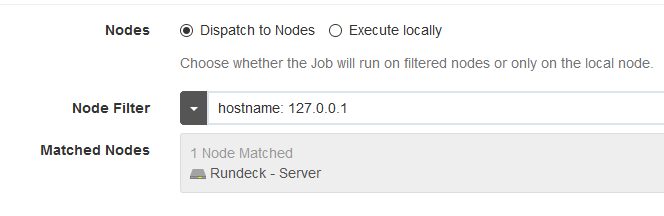
It may have some side effects on your custom plugins or something else but so far, works for me preatty well.
Give it a try.
 JesusRo
on 1 Mar 2019
JesusRo
on 1 Mar 2019
Thank you @JesusRo! I didn't know that I could remove the local server from the node sources of a project. This will work for me right now as I can control who can add projects and who is not allowed to do that. As our organization grows, this will be trickier, but for now the workaround should suffice.
Nonetheless, I think this issue should be fixed because a project administrator (someone who is allowed to create projects) may forget to exclude the local server from the node sources or his password may be leaked somehow (e.g. social engineering) and this leak may compromise the entire Rundeck server.
Thylossus
on 4 Mar 2019
In an effort to focus on bugs and issues that impact currently supported versions of Rundeck, we have elected to notify GitHub issue creators if their issue is classified as stale and close the issue. An issue is identified as stale when there have been no new comments, responses or other activity within the last 12 months. If a closed issue is still present please feel free to open a new Issue against the current version and we will review it. If you are an enterprise customer, please contact your Rundeck Support to assist in your request.
Thank you, The Rundeck Team
![stale[bot] picture](https://avatars3.githubusercontent.com/in/1724?v=4&s=40) stale[bot]
on 3 Apr 2020
stale[bot]
on 3 Apr 2020
Related issues
 MegaDrive68k
·
4Comments
MegaDrive68k
·
4Comments
 padraiglennon
·
3Comments
MegaDrive68k
·
3Comments
padraiglennon
·
3Comments
MegaDrive68k
·
3Comments
 dutchrapley
·
4Comments
dutchrapley
·
4Comments
 eblikstad
·
4Comments
eblikstad
·
4Comments