Checklist
- [x] I looked at https://github.com/pbatard/rufus/wiki/FAQ to see if my question has already been answered.
- [x] I performed a search in the issue tracker for similar issues, using keywords relevant to my problem.
[x] I clicked the
Logbutton in Rufus and copy/pasted the log into the line that says<FULL LOG>below.
NOT APPLICABLE![x] The log I am copying is the FULL log, starting with the line
Rufus version: x.y.z- I have NOT removed any part of it.
NOT APPLICABLE
Additionally (if applicable):
- [ ] I ran a bad blocks check, by clicking the "bad blocks" check box in Rufus, and confirmed that my USB is not defective
- [ ] I also tried one or more of the following:
- [ ] Using a different USB drive
- [ ] Plugging the USB into a different port
- [ ] Running Rufus on a different computer
- [ ] If using an ISO image, I clicked on the
#button (at the bottom of the Rufus interface), to compute the MD5, SHA1 and SHA256 checksums, which are therefore present in the log I copied. I confirmed, by performing an internet search, that these values match the ones from the official image.
Issue description
I am unable to find the dd mode on Rufus 3.0.1304? Is this function not available anymore? Thanks!
Log
<FULL LOG>
 wondering639
All 19 comments
Just click the SELECT button and select your DD Image. That's it.
Rufus has always been smart enough to detect whether you selected an ISO or a DD Image, if you enabled *.* when picking something in the previous versions. And many people have been asking us to remove the extra split between ISO and DD since it wasn't necessary, which we agree with.
So please try to select the image you want to select and see what happens. You'll find that Rufus will behave the same way as it was when you used to select _DD Image_.
 pbatard
on 7 Jun 2018
pbatard
on 7 Jun 2018
So no way to dd-copy an ISO file with Rufus 3?
 GigabyteProductions
on 8 Jun 2018
GigabyteProductions
on 8 Jun 2018
Not at all. If an ISO file has a DD-mode (in other words if your ISO is an ISOHybrid), you are __always__ prompted, as with the previous versions, whether you want to write that ISO in ISO mode or in DD mode.
At this stage, I would really appreciate if you tested selecting whatever image you were using as a DD-Image with the previous version, and only then report if you think you are unable to achieve something you could achieve with the previous version __after__ having gone through the process of starting the USB creation.
pbatard
on 8 Jun 2018
Since there has been no further update, and DD-mode is still very much present in Rufus 3.0, I'm going to consider this issue closed.
pbatard
on 9 Jun 2018
I tried with http://releases.ubuntu.com/bionic/ubuntu-18.04-desktop-amd64.iso which should be a hybrid image. When selecting it, I am not asked, whether I want to write it in DD or ISO mode. In the past I could manually select the DD mode for ubuntu images.
Update: Just transferred ubuntu-18.04-desktop-amd64.iso in DD mode to an USB stick using Rufus 2.16 - boots fine, so it's a hybrid image. Yet can't find a way to do the same using Rufus 3.

wondering639
on 11 Jun 2018
I'm seeing __no issue whatsoever__ with ubuntu-18.04-desktop-amd64.iso (SHA-1 f373c0aec6162cdba76ee9084e695866a15e441a) on my end. It is properly detected as an ISOHybrid and after pressing _Start_, Rufus 3.0 does ask whether to write it in ISO or DD mode:
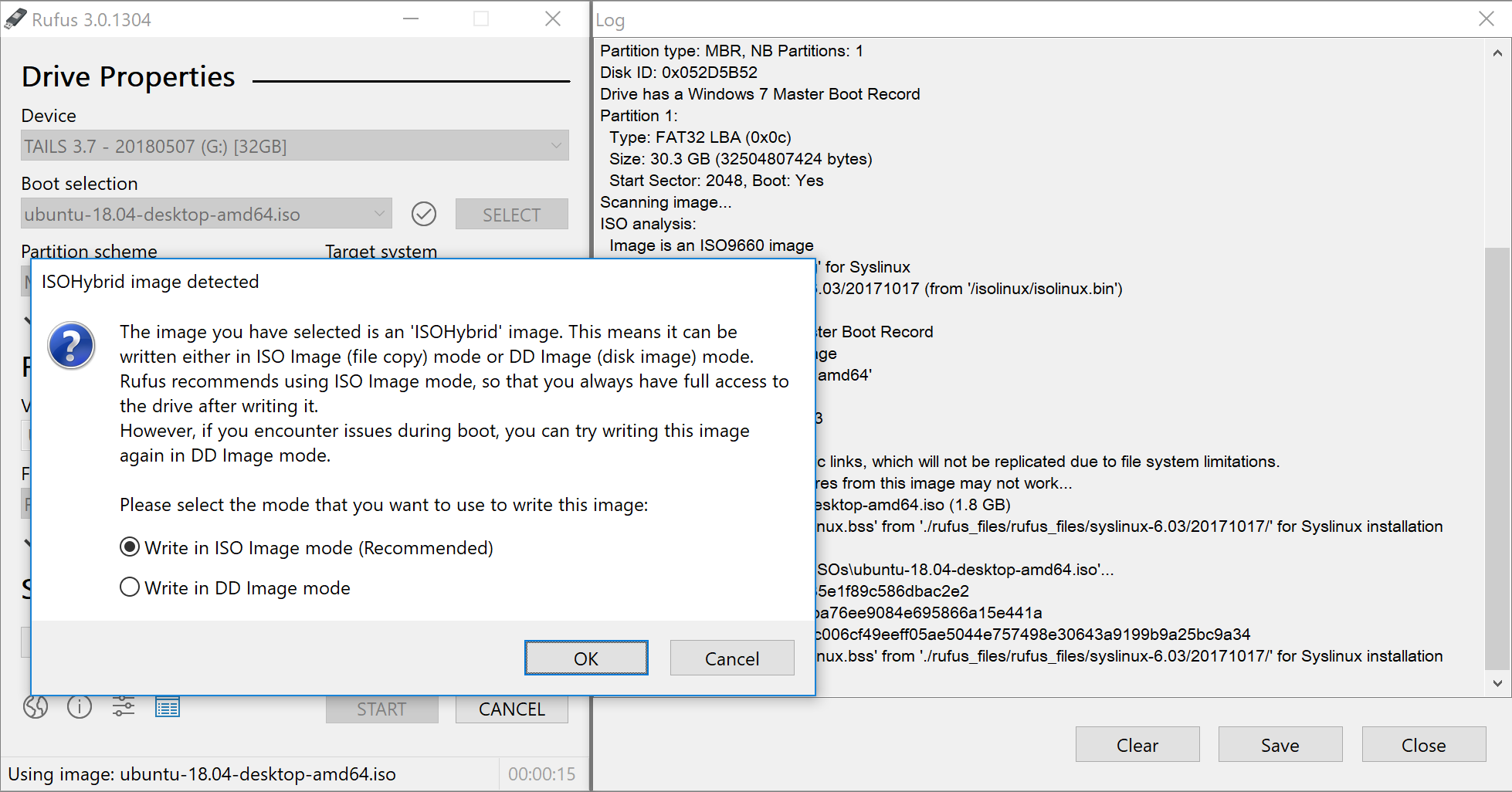
Please confirm the SHA-1 of the ISO you are using. If it is the same, then I can guarantee that Rufus 3.0 will ask you to choose between writing it ISO or DD mode.
And, once again, as I have written before, I have to ask you to only report after you have conducted a test that includes trying to actually write the ISO (rather than __assume__ that, if you don't see DD vs ISO during the selection of the image, it means that you won't be able to write in DD mode), as I am pretty sure, judging from what you wrote above, that you are erroneously expecting Rufus to prompt for the mode after selection, which is incorrect. The prompt occurs after you click _Start_.
pbatard
on 11 Jun 2018
oh, yeah, my fault! Indeed it asks after clicking start and I can also boot the DD written image. Maybe one could think about asking this question after selecting the image. It' s a little bit irritating that one (can) makes all the settings first and when you click "start" (one could also see this as a kind of confirmation, OK etc.) it suddenly offers new options. So "start" is actually more than "start".
Whether one wants to write as DD or ISO is a setting, "start" should only start a previously selected operation in my opinion.
wondering639
on 11 Jun 2018
What you are asking is actually going to be more confusing for users. Plus, what if they change their mind? Now they have to reselect the image to get prompted how to write? Sorry but I don't think your suggestion works.
pbatard
on 11 Jun 2018
Good point, though we don't know how often a user changes his mind on this. How about maybe integrating a option directly in the main screen / showing a hint in the main screen when the image was selected and is a hybrid image. No need to ask the user in a modal dialog, right?
wondering639
on 11 Jun 2018
Nope, not gonna happen. I understand that, because you are used to being able to select DD mode in the UI, getting some UI element that resembles what you were familiar with might be appealing __to you__. But this will not be the case for the vast majority of users. Suggestion rejected.
pbatard
on 11 Jun 2018
pbatard
on 11 Jun 2018
With systemrescuecd-x86-5.2.2.iso I don't get asked if I want to write the image in ISO or DD mode.
I know this particular image works well in ISO mode, but that is beside the point. You have removed a feature.
 wodim
on 26 Jul 2018
wodim
on 26 Jul 2018
With
systemrescuecd-x86-5.2.2.isoI don't get asked if I want to write the image in ISO or DD mode.
If you don't get asked, that is because that ISO is __NOT__ an ISOHybrid.
Feel free to dispute that statement if you want, but be mindful that I actually looked at that ISO with an hex editor, and can confirm that there is nothing in there that makes it compatible with DD as it is completely devoid of a partition table, be it a MBR or GPT one (which is a precondition to an image being able to work in DD mode)
There is also no mention on the SystmeRescueCd page that this image is an ISOHybrid (for good reason, since __it isn't__).
Oh, and the real kicker is, even if you open it in Rufus 2.x, it is still __not being handled as a DD image at all there but only as an ISO__...
You have removed a feature.
Before accusing someone of something, you may want to validate your facts first...
pbatard
on 26 Jul 2018
A media does not need a partition table to work. Easy to try. Just mkfs.vfat /dev/sdb or something. Will work in windows and Linux
 sological
on 28 Jul 2018
sological
on 28 Jul 2018
I know very well that since I implemented Super Floppy Disk mode in Rufus which is precisely what you are talking about:

Please bear in mind that, when discussing technical issues, one may tend to dumb things down, or generalize them, to avoid having to mention every minute details that would completely distract from the point they are making. So, __of course__, I was well aware that, to be technically exact, I should mention that indeed, a partition table is not always needed. But I __chose__ to withhold that information as it brought nothing to the point I was making, and would probably have made things more confusing.
The root of the matter is, the ISO in question is lacking any kind of partition/boot/file systems records (outside of the ISO9660 ones, which cannot be booted outside of El Torito, and therefore will not work from what a BIOS or UEFI firmware will identify as a HDD) that would make it compatible with DD mode, and, as I pointed out, and unlike what @wodim pointed out, there is no version of Rufus that allowed writing that image in DD mode in the first place (plus the creators of the ISO certainly do not mention that you can use as such), so his or her statement about having removed a feature is completely erroneous.
pbatard
on 28 Jul 2018
This issue mentioned above seems to be an issue for Manjaro Linux, either that or there is some cache of selection that I can't find. Burning their ISO to a USB using the latest version of Rufus (using 3.3p) results in the USB stick booting into the GRUB bootloader then saying it can't be read the filesystem. I moved over to Win32 Disk Imager and wrote the ISO via DD mode and it worked perfectly. FWIW the edition of Manjaro I downloaded direct was "manjaro-kde-17.1.12-stable-x86_64".
I could be missing something, just not sure what when I tried multiple times to get Rufus to prompt (deleting local config files it generates, moving to a new directory). I also get that its cleaner for users, but having it as an advanced option doesn't seem so bad - headaches like this where it comes off as removing functionality cause people to move to other products. Rufus has been a trusty tool for years for myself and many techs around me, just stinks that now if I want to create come bootable linux ISOs I have to go use a different utility, or so it seems :(
 pandoraslunchbox
on 10 Oct 2018
pandoraslunchbox
on 10 Oct 2018
Seriously though, I'd love to know if I'm missing something - would much prefer it be a PEBKAC error
pandoraslunchbox
on 10 Oct 2018
the USB stick booting into the GRUB bootloader
__PLEASE__ complain to Manjaro!
We logged this issue months ago here but they haven't even acknowledged it. The GRUB issue is something the Manjaro maintainers could easily fix, but if I am the __only__ one reporting it, it doesn't seem like it will be.
This is not something that can be fixed in Rufus, so make sure the Manjaro devs know that it impacts a lot more people than the person who reported the bug. Thank you.
pbatard
on 11 Oct 2018
This thread has been automatically locked since there has not been any recent activity after it was closed. Please open a new issue if you think you have a related problem or query.
![lock[bot] picture](https://avatars1.githubusercontent.com/in/6672?v=4&s=40) lock[bot]
on 6 Apr 2019
lock[bot]
on 6 Apr 2019
Related issues
 andriykrefer
·
6Comments
andriykrefer
·
6Comments
 chazste
·
4Comments
chazste
·
4Comments
 Lukaszwiatkowski
·
4Comments
Lukaszwiatkowski
·
4Comments
 k-su
·
4Comments
k-su
·
4Comments
 djoris
·
6Comments
djoris
·
6Comments
Most helpful comment
__PLEASE__ complain to Manjaro!
We logged this issue months ago here but they haven't even acknowledged it. The GRUB issue is something the Manjaro maintainers could easily fix, but if I am the __only__ one reporting it, it doesn't seem like it will be.
This is not something that can be fixed in Rufus, so make sure the Manjaro devs know that it impacts a lot more people than the person who reported the bug. Thank you.