Rufus: In Dutch systems, if you choose `English`, then the `Yes` and `No` buttons in dialogs are still in Dutch
Checklist
- [X] I looked at https://github.com/pbatard/rufus/wiki/FAQ to see if my question has already been answered.
- [X] I performed a search in the issue tracker for similar issues, using keywords relevant to my problem.
- [X] I clicked the
Logbutton in Rufus and copy/pasted the log into the line that says<FULL LOG>below. - [X] The log I am copying is the FULL log, starting with the line
Rufus version: x.y.z- I have NOT removed any part of it.
Issue description
In dialogs, the buttons stay Dutch on a Dutch system, even if you choose English inside Rufus.
In addition, you get an error message when downloading the menu (I'm not sure if this occurs on an English system as well): Unknown internet error 0x00002F0D.
Note that on localised Windows 7 versions, you can only install the English language pack on Windows 7 Ultimate and Enterprise, so for instance on Professional or Home Premium editions, you cannot install the English language pack to force all native controls to be English. This renders this log entry kind of "moot": No Windows Language Pack is installed for English (English) on this system.
This means that some controls may still be displayed using the system locale.
Localization set to 'en-US'
Let me know if you want the internet error in a different issue (if it's not related to localisation: It might be a certificate error as for me https://www.google.com/search?q=0x00002F0D%20site%3Amicrosoft.com returns https://support.microsoft.com/en-us/help/182888/how-to-handle-invalid-certificate-authority-error-with-wininet).
Steps to reproduce:
- Switch your computer system to the
Dutchlanguage - Download https://rufus.akeo.ie/downloads/rufus-2.16p.exe
- Run
rufus-2.16p.exe - Choose the
Englishlanguage inside Rufus - Select image type
ISO image - Select an image (in my case
VMware-VMvisor-Installer-201701001-4887370.x86_64.isofrom https://my.vmware.com/group/vmware/evalcenter?p=free-esxi6) - Press the
Startbutton You get a warning with English text, but Dutch buttons:

Replace menu.c32?
---------------------------
This ISO image seems to use an obsolete version of 'menu.c32'.
Boot menus may not display properly because of this.

A newer version can be downloaded by Rufus to fix this issue:
- Choose 'Yes' to connect to the internet and download the file
- Choose 'No' to leave the existing ISO file unmodified
If you don't know what to do, you should select 'Yes'.

Note: The new file will be downloaded in the current directory and once a 'menu.c32' exists there, it will be reused automatically.
---------------------------
Ja Nee
---------------------------
If you press
Ja(which corresponds toYes), you get this error:
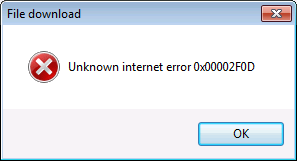
File download
---------------------------
Unknown internet error 0x00002F0D
---------------------------
OK
---------------------------
Press
OKon the error, thenStartin the menu andNeeat the menu file download.Now you get another dialog with one button in English (
OK)and one in Dutch (Annulerenwhich corresponds to EnglishCancel:Rufus --------------------------- WARNING: ALL DATA ON DEVICE 'NO_LABEL (F:) [4.1GB]' WILL BE DESTROYED. To continue with this operation, click OK. To quit click CANCEL. --------------------------- OK Annuleren ---------------------------Note this might have to do that in most Dutch software, English
OKstaysOKin Dutch.- Press
OKand the imaging is successful.
Log
Rufus version: 2.16.1170 (Portable)
Windows version: Windows 7 64-bit
Syslinux versions: 4.07/2013-07-25, 6.03/2014-10-06
Grub versions: 0.4.6a, 2.02
System locale ID: 0x0413
NOTE: No Windows Language Pack is installed for English (English) on this system.
This means that some controls may still be displayed using the system locale.
Localization set to 'en-US'
Found USB 2.0 device 'Generic Flash Disk USB Device' (058F:6387)
Found USB 2.0 device 'Generic- Compact Flash USB Device' (0BDA:0181)
Device eliminated because it appears to contain no media
Found USB 2.0 device 'Generic- MS/MS-Pro/HG USB Device' (0BDA:0181)
Device eliminated because it appears to contain no media
Found USB 2.0 device 'Generic- SD/MMC/MS/MSPRO USB Device' (0BDA:0181)
Device eliminated because it appears to contain no media
Found USB 2.0 device 'Generic- SD/MMC USB Device' (0BDA:0181)
Device eliminated because it appears to contain no media
Found USB 2.0 device 'Generic- SM/xD-Picture USB Device' (0BDA:0181)
Device eliminated because it appears to contain no media
1 device found
Disk type: Removable, Sector Size: 512 bytes
Cylinders: 497, TracksPerCylinder: 255, SectorsPerTrack: 63
Partition type: MBR, NB Partitions: 1
Disk ID: 0xE2046599
Drive has an unknown Master Boot Record
Partition 1:
  Type: FAT32 (0x0b)
  Size: 3.8 GB (4089069568 bytes)
  Start Sector: 736, Boot: No
Scanning image...
ISO analysis:
  Image is an ISO9660 image
  Will use '/isolinux.cfg' for Syslinux
  Detected Syslinux version: 3.86 (from '/isolinux.bin')
Disk image analysis:
  Image does not have an x86 Master Boot Record
ISO label: 'ESXI-6.5.0-20170104001-STANDARD'
  Size: 328.2 MB (Projected)
  Uses: Syslinux/Isolinux v3.86
    With an old menu.c32
  Uses: EFI
Using image: VMware-VMvisor-Installer-201701001-4887370.x86_64.iso
Downloading 'menu.c32' from https://rufus.akeo.ie/files/syslinux-4.07/menu.c32
Unable to send request: Unknown internet error 0x00002F0D
Could not download file - cancelling
Downloading 'menu.c32' from https://rufus.akeo.ie/files/syslinux-4.07/menu.c32
Unable to send request: Unknown internet error 0x00002F0D
Could not download file - cancelling
Downloading 'menu.c32' from https://rufus.akeo.ie/files/syslinux-4.07/menu.c32
Unable to send request: Unknown internet error 0x00002F0D
Could not download file - cancelling

Format operation started
Requesting disk access...
Opened \\.\PHYSICALDRIVE1 for exclusive write access
Requesting lock...
Will use 'F:' as volume mountpoint
I/O boundary checks disabled
Requesting lock...
Analyzing existing boot records...
Drive has an unknown Master Boot Record
Volume has an unknown Partition Boot Record
Clearing MBR/PBR/GPT structures...
Erasing 128 sectors
Deleting partitions...
Partitioning (MBR)...
Closing existing volume...
Waiting for logical drive to reappear...
Formatting (FAT32)...
Using cluster size: 4096 bytes
Quick format was selected
Creating file system...
Format completed.
Writing master boot record...
Drive has a Zeroed Master Boot Record
Set bootable USB partition as 0x80
Using Syslinux MBR
Found volume GUID \\?\Volume{e6dcb7be-866c-11e7-a0a7-806e6f6e6963}\
Installing Syslinux 3.86...
Opened \\?\Volume{e6dcb7be-866c-11e7-a0a7-806e6f6e6963} for shared write access
Successfully wrote 'ldlinux.sys'
Successfully wrote Syslinux boot record
Successfully remounted \\?\Volume{e6dcb7be-866c-11e7-a0a7-806e6f6e6963}\ on F:
Copying ISO files...
Extracting files...
Image is an ISO9660 image
This image will be extracted using Joliet extensions (if present)
Extracting: F:\.discinfo (32 bytes)
Extracting: F:\a.b00 (11.0 KB)
Extracting: F:\ata_liba.v00 (95.2 KB)
Extracting: F:\ata_pata.v00 (8.5 KB)
Extracting: F:\ata_pata.v01 (6.5 KB)
Extracting: F:\ata_pata.v02 (6.7 KB)
Extracting: F:\ata_pata.v03 (7.3 KB)
Extracting: F:\ata_pata.v04 (8.5 KB)
Extracting: F:\ata_pata.v05 (7.2 KB)
Extracting: F:\ata_pata.v06 (6.4 KB)
Extracting: F:\ata_pata.v07 (7.6 KB)
Extracting: F:\b.b00 (88.2 KB)
Extracting: F:\block_cc.v00 (24.2 KB)
Extracting: F:\boot.cat (512 bytes)
Extracting: F:\boot.cfg (2.4 KB)
Extracting: F:\chardevs.b00 (19.3 KB)
Extracting: F:\char_ran.v00 (14.1 KB)
Extracting: F:\efi\boot\boot.cfg (2.4 KB)
Extracting: F:\efi\boot\bootia32.efi (131.7 KB)
Extracting: F:\efi\boot\bootx64.efi (154.1 KB)
Extracting: F:\efiboot.img (1 MB)
Extracting: F:\ehci_ehc.v00 (33 KB)
Extracting: F:\elxnet.v00 (155.6 KB)
Extracting: F:\emulex_e.v00 (6.0 KB)
Extracting: F:\esx_dvfi.v00 (95.9 KB)
Extracting: F:\esx_ui.v00 (3.2 MB)
Extracting: F:\features.gz (20 bytes)
Extracting: F:\hid_hid.v00 (16.6 KB)
Extracting: F:\i40en.v00 (130.1 KB)
Extracting: F:\igbn.v00 (94.0 KB)
Extracting: F:\ima_qla4.v00 (324.4 KB)
Extracting: F:\imgdb.tgz (146.7 KB)
Extracting: F:\imgpayld.tgz (4.4 MB)
Extracting: F:\ipmi_ipm.v00 (9.7 KB)
Extracting: F:\ipmi_ipm.v01 (23.1 KB)
Extracting: F:\ipmi_ipm.v02 (28.2 KB)
Extracting: F:\isolinux.bin (14 KB)
Extracting: F:\isolinux.cfg (275 bytes)
Extracting: F:\ixgben.v00 (124.1 KB)
Extracting: F:\jumpstrt.gz (20 bytes)
Extracting: F:\k.b00 (3.7 MB)
Extracting: F:\lpfc.v00 (566.3 KB)
Extracting: F:\lsi_mr3.v00 (81.2 KB)
Extracting: F:\lsi_msgp.v00 (124.2 KB)
Extracting: F:\lsi_msgp.v01 (125.8 KB)
Extracting: F:\lsu_hp_h.v00 (37.3 KB)
Extracting: F:\lsu_lsi_.v00 (94.7 KB)
Extracting: F:\lsu_lsi_.v01 (179.1 KB)
Extracting: F:\lsu_lsi_.v02 (94.7 KB)
Extracting: F:\lsu_lsi_.v03 (203.9 KB)
Extracting: F:\mboot.c32 (86.3 KB)
Extracting: F:\menu.c32 (52.2 KB)
Extracting: F:\misc_cni.v00 (5.5 KB)
Extracting: F:\misc_dri.v00 (360.3 KB)
Extracting: F:\mtip32xx.v00 (69.2 KB)
Extracting: F:\native_m.v00 (182.5 KB)
Extracting: F:\ne1000.v00 (174.6 KB)
Extracting: F:\nenic.v00 (55.3 KB)
Extracting: F:\net_bnx2.v00 (168.3 KB)
Extracting: F:\net_bnx2.v01 (985.6 KB)
Extracting: F:\net_cdc_.v00 (6.8 KB)
Extracting: F:\net_cnic.v00 (46.2 KB)
Extracting: F:\net_e100.v00 (94.5 KB)
Extracting: F:\net_e100.v01 (108.2 KB)
Extracting: F:\net_enic.v00 (52.8 KB)
Extracting: F:\net_fcoe.v00 (23 KB)
Extracting: F:\net_forc.v00 (37.1 KB)
Extracting: F:\net_igb.v00 (103.6 KB)
Extracting: F:\net_ixgb.v00 (135.7 KB)
Extracting: F:\net_libf.v00 (24 KB)
Extracting: F:\net_mlx4.v00 (111.1 KB)
Extracting: F:\net_mlx4.v01 (66.8 KB)
Extracting: F:\net_nx_n.v00 (1.3 MB)
Extracting: F:\net_tg3.v00 (109.9 KB)
Extracting: F:\net_usbn.v00 (16.6 KB)
Extracting: F:\net_vmxn.v00 (30.6 KB)
Extracting: F:\nhpsa.v00 (137.2 KB)
Extracting: F:\nmlx4_co.v00 (139.6 KB)
Extracting: F:\nmlx4_en.v00 (141.7 KB)
Extracting: F:\nmlx4_rd.v00 (63.4 KB)
Extracting: F:\nmlx5_co.v00 (142.6 KB)
Extracting: F:\ntg3.v00 (30.6 KB)
Extracting: F:\nvme.v00 (70.9 KB)
Extracting: F:\nvmxnet3.v00 (43.2 KB)
Extracting: F:\ohci_usb.v00 (19.8 KB)
Extracting: F:\pvscsi.v00 (17.6 KB)
Extracting: F:\qedentv.v00 (1 MB)
Extracting: F:\qfle3.v00 (600.4 KB)
Extracting: F:\qflge.v00 (195.2 KB)
Extracting: F:\qlnative.v00 (745.9 KB)
Extracting: F:\rste.v00 (215.6 KB)
Extracting: F:\s.v00 (66.4 MB)
Extracting: F:\safeboot.c32 (58.2 KB)
Extracting: F:\sata_ahc.v00 (20.2 KB)
Extracting: F:\sata_ata.v00 (11.9 KB)
Extracting: F:\sata_sat.v00 (17.1 KB)
Extracting: F:\sata_sat.v01 (10.7 KB)
Extracting: F:\sata_sat.v02 (11.2 KB)
Extracting: F:\sata_sat.v03 (8.1 KB)
Extracting: F:\sata_sat.v04 (6.5 KB)
Extracting: F:\sb.v00 (41.2 MB)
Extracting: F:\scsi_aac.v00 (52.4 KB)
Extracting: F:\scsi_adp.v00 (148.6 KB)
Extracting: F:\scsi_aic.v00 (96.9 KB)
Extracting: F:\scsi_bnx.v00 (78.1 KB)
Extracting: F:\scsi_bnx.v01 (62.9 KB)
Extracting: F:\scsi_fni.v00 (66.0 KB)
Extracting: F:\scsi_hps.v00 (63.9 KB)
Extracting: F:\scsi_ips.v00 (32.3 KB)
Extracting: F:\scsi_isc.v00 (11.3 KB)
Extracting: F:\scsi_lib.v00 (63.6 KB)
Extracting: F:\scsi_meg.v00 (27.8 KB)
Extracting: F:\scsi_meg.v01 (54.4 KB)
Extracting: F:\scsi_meg.v02 (26.5 KB)
Extracting: F:\scsi_mpt.v00 (132.0 KB)
Extracting: F:\scsi_mpt.v01 (147.8 KB)
Extracting: F:\scsi_mpt.v02 (125 KB)
Extracting: F:\scsi_qla.v00 (76.0 KB)
Extracting: F:\shim_isc.v00 (2.5 KB)
Extracting: F:\shim_isc.v01 (2.5 KB)
Extracting: F:\shim_lib.v00 (6.7 KB)
Extracting: F:\shim_lib.v01 (6.7 KB)
Extracting: F:\shim_lib.v02 (3.4 KB)
Extracting: F:\shim_lib.v03 (3.4 KB)
Extracting: F:\shim_lib.v04 (1.6 KB)
Extracting: F:\shim_lib.v05 (1.6 KB)
Extracting: F:\shim_vmk.v00 (33.2 KB)
Extracting: F:\shim_vmk.v01 (34.9 KB)
Extracting: F:\shim_vmk.v02 (35.4 KB)
Extracting: F:\tboot.b00 (44 KB)
Extracting: F:\tools.t00 (175.3 MB)
Extracting: F:\uc_amd.b00 (3.4 KB)
Extracting: F:\uc_intel.b00 (135.8 KB)
Extracting: F:\uhci_usb.v00 (20.1 KB)
Extracting: F:\upgrade\esximage.zip (793.1 KB)
Extracting: F:\upgrade\extlinux (62.5 KB)
Extracting: F:\upgrade\isoinfo (233.6 KB)
Extracting: F:\upgrade\mbr.bin (440 bytes)
Extracting: F:\upgrade\mcopy (584.2 KB)
Extracting: F:\upgrade\metadata.xml (1.6 KB)
Extracting: F:\upgrade\metadata.zip (146.6 KB)
Extracting: F:\upgrade\precheck.py (91.7 KB)
Extracting: F:\upgrade\prep.py (42.9 KB)
Extracting: F:\upgrade\profile.xml (10.1 KB)
Extracting: F:\usbcore_.v00 (97.5 KB)
Extracting: F:\usb_stor.v00 (40 KB)
Extracting: F:\user.b00 (501.7 KB)
Extracting: F:\useropts.gz (20 bytes)
Extracting: F:\vmkata.v00 (220.1 KB)
Extracting: F:\vmkplexe.v00 (12.1 KB)
Extracting: F:\vmkusb.v00 (416 KB)
Extracting: F:\vmware-esx-base-osl.txt (1.3 MB)
Extracting: F:\vmware-esx-base-readme (2.2 KB)
Extracting: F:\vmware_e.v00 (23.1 KB)
Extracting: F:\vmw_ahci.v00 (72.2 KB)
Extracting: F:\vsan.v00 (10.3 MB)
Extracting: F:\vsanheal.v00 (204.4 KB)
Extracting: F:\vsanmgmt.v00 (1.6 MB)
Extracting: F:\weaselin.t00 (1.9 MB)
Extracting: F:\xhci_xhc.v00 (73.6 KB)
Extracting: F:\xorg.v00 (1.3 MB)
Created: F:\syslinux.cfg
Finalizing, please wait...
Created: F:autorun.inf
Created: F:autorun.ico

Found USB 2.0 device 'Generic Flash Disk USB Device' (058F:6387)
Using autorun.inf label for drive F: 'ESXI-6.5.0-20170104001-STANDARD'
Found USB 2.0 device 'Generic- Compact Flash USB Device' (0BDA:0181)
Device eliminated because it appears to contain no media
Found USB 2.0 device 'Generic- MS/MS-Pro/HG USB Device' (0BDA:0181)
Device eliminated because it appears to contain no media
Found USB 2.0 device 'Generic- SD/MMC/MS/MSPRO USB Device' (0BDA:0181)
Device eliminated because it appears to contain no media
Found USB 2.0 device 'Generic- SD/MMC USB Device' (0BDA:0181)
Device eliminated because it appears to contain no media
Found USB 2.0 device 'Generic- SM/xD-Picture USB Device' (0BDA:0181)
Device eliminated because it appears to contain no media
1 device found
Disk type: Removable, Sector Size: 512 bytes
Cylinders: 497, TracksPerCylinder: 255, SectorsPerTrack: 63
Partition type: MBR, NB Partitions: 1
Disk ID: 0x0063AD02
Drive has a Syslinux Master Boot Record
Partition 1:
  Type: FAT32 LBA (0x0c)
  Size: 3.8 GB (4088397824 bytes)
  Start Sector: 2048, Boot: Yes
 jpluimers
All 13 comments
The dialog buttons are intentional (or at least as intentional as it gets with Windows programming), as localizing everything would mean replacing the MessageBox API calls of Windows everywhere, which always display their buttons in the default locale.
Considering that doing this would be a lot of work for very little benefit, since the vast majority of Rufus is expected to use Rufus in the current Windows locale, and if people use Rufus on a system that uses locale XYZ, then they are expected to understand button labels displayed in XYZ, I am not planning to do anything about this.
Now, the error when downloading menu.c32, I need to test, which I will do as soon as I get a chance.
For the record, because I suspect this might have to do with the Windows 7 default libraries having some issue with modern versions of SSL, can you tell me if you can access https://rufus.akeo.ie/files when using __Internet Explorer__ (It has to be the native Internet Explorer, other browsers will not be using the native SSL DLLs)? If not, then you may have to wait for Rufus 2.17, which I already set to work around of the issue of some older Windows systems having issues with modern https protocols, by using http for downloads. Anyway, I should have more insight about this issue once I have tried to replicate your issue.
 pbatard
on 21 Aug 2017
pbatard
on 21 Aug 2017
You get the below Dutch error, which in Englis is this one: https://support.microsoft.com/en-us/help/931850/-there-is-a-problem-with-this-website-s-security-certificate-when-you
Er is een probleem met het beveiligingscertificaat van deze website.


 Het beveiligingscertificaat dat door deze website wordt gebruikt, is niet verleend door een vertrouwde certificeringsinstantie.
The problem is that Windows 7 thinks the certificate is self signed:
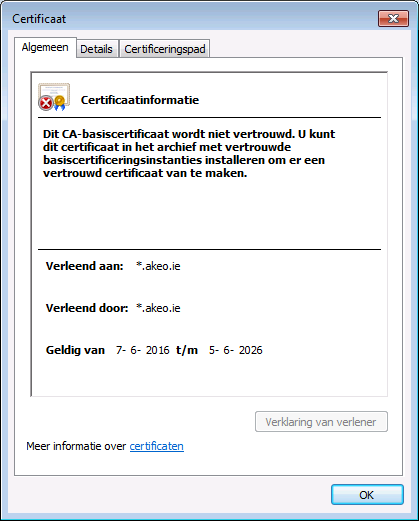
What API function do you use for download? Maybe I can reproduce with a small console app and help with a better workaround than plain http download (with all the man-in-the-middle hassle of contemporary providers).
jpluimers
on 21 Aug 2017
The problem is that Windows 7 thinks the certificate is self signed
Or, technically, the problem is that your copy of Windows 7 (for whatever reason) does not appear to have the "Globalsign Root CA" in your Trusted Certification Authorities. Could be because that certificate comes with a Windows Update, which you haven't applied (Trusted CA do evolve on a regular basis and must be kept up to date through OS updates, just like they are being kept up to date in Chrome or Firefox through browser updates), or maybe that's because your Sysadmin or yourself deleted that certificate from the Trusted CA store.
An up to date vanilla version of Windows 7 should trust "Globalsign Root CA", so it would look like your Windows 7 installation was made nonstandrad in one way or another.
What API function do you use for download?
The standard Win32 Microsoft APIs to access internet content: https://github.com/pbatard/rufus/blob/master/src/net.c#L261-L322
and help with a better workaround than plain http download (with all the man-in-the-middle hassle of contemporary providers).
Then you probably want to read this and the next paragraph to understand why it is possible to have complete confidence that the menu.c32 being downloaded by Rufus has not been tampered with in any way, even if this occurred through http rather than https, because the SHA-256 hash of the downloaded file will be calculated and validated against the application internal database (and because the application is signed, you can also trust that the DB has not been altered).
The thing is, it is actually a lot more likely that hackers will be able to compromise my download website and insert a malicious menu.c32, against which using https vs http won't give you any protection, than having a mitm attack being conducted to insert a malicious download. So be very weary to equate https with trust. All HTTPS ensures is that the transmission of data between the moment it leaves the server and the moment it reaches your computer is done in a secure manner. However it does not guarantee that the download source has not been compromised, and, without additional measures, such as the ones Rufus uses, there's actually no way to ensure that a download isn't malicious, regardless of whether it came from a reputable server (no matter your security measures, you should consider that a server can always be breached, be it through zero day, spear fishing, or even through the age old method of physically threatening one of its administrator until they grant you access), and that https alone does nothing to protect you from malicious content...
Besides the http workaround is mostly aimed at being temporary, while I release the last ever version of Rufus that'll be compatible with XP and Vista (since XP can't access the downloads through https at all, no matter what). After 2.17, I will switch back to using https.
pbatard
on 22 Aug 2017
Confirmed I had no issue in a vanilla (and up to date) install of Windows 7 SP1:
Rufus version: 2.16.1170
Windows version: Windows 7 SP1 32 bit
Syslinux versions: 4.07/2013-07-25, 6.03/2014-10-06
Grub versions: 0.4.6a, 2.02
System locale ID: 0x0409
Will use default UI locale 0x0409
SetLGP: Successfully set NoDriveTypeAutorun policy to 0x0000009E
Localization set to 'en-US'
Found non-USB removable device 'VMware, VMware Virtual S SCSI Disk Device' => Eliminated
Found non-USB removable device 'VMware, VMware Virtual S SCSI Disk Device' => Eliminated
Found USB 2.0 device 'SanDisk Extreme USB Device' (0781:5580)
Using autorun.inf label for drive F: 'd-live 9.1.0 xfce amd64'
1 device found
Disk type: Removable, Sector Size: 512 bytes
Cylinders: 3818, TracksPerCylinder: 255, SectorsPerTrack: 63
Partition type: MBR, NB Partitions: 1
Disk ID: 0x009D2E48
Drive has a Syslinux Master Boot Record
Partition 1:
  Type: FAT32 LBA (0x0c)
  Size: 29.2 GB (31405899776 bytes)
  Start Sector: 2048, Boot: Yes
Scanning image...
ISO analysis:
  Image is an ISO9660 image
  Will use '/isolinux.cfg' for Syslinux
  Detected Syslinux version: 3.86 (from '/isolinux.bin')
Disk image analysis:
  Image does not have an x86 Master Boot Record
ISO label: 'ESXI-6.5.0-20170104001-STANDARD'
  Size: 328.2 MB (Projected)
  Uses: Syslinux/Isolinux v3.86
    With an old menu.c32
  Uses: EFI
Using image: VMware-VMvisor-Installer-201701001-4887370.x86_64.iso
Downloading 'menu.c32' from https://rufus.akeo.ie/files/syslinux-4.07/menu.c32
File length: 55140 bytes
Successfully downloaded 'menu.c32'

Format operation started
Requesting disk access...
Opened \\.\PHYSICALDRIVE2 for exclusive write access
Requesting lock...
Will use 'F:' as volume mountpoint
I/O boundary checks disabled
Requesting lock...
Analyzing existing boot records...
Drive has a Syslinux Master Boot Record
Volume has an unknown Partition Boot Record
Clearing MBR/PBR/GPT structures...
Erasing 128 sectors
Deleting partitions...
Partitioning (MBR)...
Closing existing volume...
Waiting for logical drive to reappear...
Formatting (FAT32)...
Using cluster size: 16384 bytes
Quick format was selected
Creating file system...
Format completed.
Writing master boot record...
Drive has a Zeroed Master Boot Record
Partition is already FAT32 LBA...
Set bootable USB partition as 0x80
Using Syslinux MBR
Found volume GUID \\?\Volume{9c84f822-872c-11e7-b10c-000c29b29968}\
Installing Syslinux 3.86...
Opened \\?\Volume{9c84f822-872c-11e7-b10c-000c29b29968} for shared write access
Successfully wrote 'ldlinux.sys'
Successfully wrote Syslinux boot record
Successfully remounted \\?\Volume{9c84f822-872c-11e7-b10c-000c29b29968}\ on F:
Copying ISO files...
Extracting files...
Image is an ISO9660 image
This image will be extracted using Joliet extensions (if present)
Extracting: F:\.discinfo (32 bytes)
Extracting: F:\a.b00 (11.0 KB)
Extracting: F:\ata_liba.v00 (95.2 KB)
Extracting: F:\ata_pata.v00 (8.5 KB)
Extracting: F:\ata_pata.v01 (6.5 KB)
Extracting: F:\ata_pata.v02 (6.7 KB)
Extracting: F:\ata_pata.v03 (7.3 KB)
Extracting: F:\ata_pata.v04 (8.5 KB)
Extracting: F:\ata_pata.v05 (7.2 KB)
Extracting: F:\ata_pata.v06 (6.4 KB)
Extracting: F:\ata_pata.v07 (7.6 KB)
Extracting: F:\b.b00 (88.2 KB)
Extracting: F:\block_cc.v00 (24.2 KB)
Extracting: F:\boot.cat (512 bytes)
Extracting: F:\boot.cfg (2.4 KB)
Extracting: F:\chardevs.b00 (19.3 KB)
Extracting: F:\char_ran.v00 (14.1 KB)
Extracting: F:\efi\boot\boot.cfg (2.4 KB)
Extracting: F:\efi\boot\bootia32.efi (131.7 KB)
Extracting: F:\efi\boot\bootx64.efi (154.1 KB)
Extracting: F:\efiboot.img (1 MB)
Extracting: F:\ehci_ehc.v00 (33 KB)
Extracting: F:\elxnet.v00 (155.6 KB)
Extracting: F:\emulex_e.v00 (6.0 KB)
Extracting: F:\esx_dvfi.v00 (95.9 KB)
Extracting: F:\esx_ui.v00 (3.2 MB)
Extracting: F:\features.gz (20 bytes)
Extracting: F:\hid_hid.v00 (16.6 KB)
Extracting: F:\i40en.v00 (130.1 KB)
Extracting: F:\igbn.v00 (94.0 KB)
Extracting: F:\ima_qla4.v00 (324.4 KB)
Extracting: F:\imgdb.tgz (146.7 KB)
Extracting: F:\imgpayld.tgz (4.4 MB)
Extracting: F:\ipmi_ipm.v00 (9.7 KB)
Extracting: F:\ipmi_ipm.v01 (23.1 KB)
Extracting: F:\ipmi_ipm.v02 (28.2 KB)
Extracting: F:\isolinux.bin (14 KB)
Extracting: F:\isolinux.cfg (275 bytes)
Extracting: F:\ixgben.v00 (124.1 KB)
Extracting: F:\jumpstrt.gz (20 bytes)
Extracting: F:\k.b00 (3.7 MB)
Extracting: F:\lpfc.v00 (566.3 KB)
Extracting: F:\lsi_mr3.v00 (81.2 KB)
Extracting: F:\lsi_msgp.v00 (124.2 KB)
Extracting: F:\lsi_msgp.v01 (125.8 KB)
Extracting: F:\lsu_hp_h.v00 (37.3 KB)
Extracting: F:\lsu_lsi_.v00 (94.7 KB)
Extracting: F:\lsu_lsi_.v01 (179.1 KB)
Extracting: F:\lsu_lsi_.v02 (94.7 KB)
Extracting: F:\lsu_lsi_.v03 (203.9 KB)
Extracting: F:\mboot.c32 (86.3 KB)
Extracting: F:\menu.c32 (52.2 KB)
  Replaced with local version ✓
Extracting: F:\misc_cni.v00 (5.5 KB)
Extracting: F:\misc_dri.v00 (360.3 KB)
Extracting: F:\mtip32xx.v00 (69.2 KB)
Extracting: F:\native_m.v00 (182.5 KB)
Extracting: F:\ne1000.v00 (174.6 KB)
Extracting: F:\nenic.v00 (55.3 KB)
Extracting: F:\net_bnx2.v00 (168.3 KB)
Extracting: F:\net_bnx2.v01 (985.6 KB)
Extracting: F:\net_cdc_.v00 (6.8 KB)
Extracting: F:\net_cnic.v00 (46.2 KB)
Extracting: F:\net_e100.v00 (94.5 KB)
Extracting: F:\net_e100.v01 (108.2 KB)
Extracting: F:\net_enic.v00 (52.8 KB)
Extracting: F:\net_fcoe.v00 (23 KB)
Extracting: F:\net_forc.v00 (37.1 KB)
Extracting: F:\net_igb.v00 (103.6 KB)
Extracting: F:\net_ixgb.v00 (135.7 KB)
Extracting: F:\net_libf.v00 (24 KB)
Extracting: F:\net_mlx4.v00 (111.1 KB)
Extracting: F:\net_mlx4.v01 (66.8 KB)
Extracting: F:\net_nx_n.v00 (1.3 MB)
Extracting: F:\net_tg3.v00 (109.9 KB)
Extracting: F:\net_usbn.v00 (16.6 KB)
Extracting: F:\net_vmxn.v00 (30.6 KB)
Extracting: F:\nhpsa.v00 (137.2 KB)
Extracting: F:\nmlx4_co.v00 (139.6 KB)
Extracting: F:\nmlx4_en.v00 (141.7 KB)
Extracting: F:\nmlx4_rd.v00 (63.4 KB)
Extracting: F:\nmlx5_co.v00 (142.6 KB)
Extracting: F:\ntg3.v00 (30.6 KB)
Extracting: F:\nvme.v00 (70.9 KB)
Extracting: F:\nvmxnet3.v00 (43.2 KB)
Extracting: F:\ohci_usb.v00 (19.8 KB)
Extracting: F:\pvscsi.v00 (17.6 KB)
Extracting: F:\qedentv.v00 (1 MB)
Extracting: F:\qfle3.v00 (600.4 KB)
Extracting: F:\qflge.v00 (195.2 KB)
Extracting: F:\qlnative.v00 (745.9 KB)
Extracting: F:\rste.v00 (215.6 KB)
Extracting: F:\s.v00 (66.4 MB)
Extracting: F:\safeboot.c32 (58.2 KB)
Extracting: F:\sata_ahc.v00 (20.2 KB)
Extracting: F:\sata_ata.v00 (11.9 KB)
Extracting: F:\sata_sat.v00 (17.1 KB)
Extracting: F:\sata_sat.v01 (10.7 KB)
Extracting: F:\sata_sat.v02 (11.2 KB)
Extracting: F:\sata_sat.v03 (8.1 KB)
Extracting: F:\sata_sat.v04 (6.5 KB)
Extracting: F:\sb.v00 (41.2 MB)
Extracting: F:\scsi_aac.v00 (52.4 KB)
Extracting: F:\scsi_adp.v00 (148.6 KB)
Extracting: F:\scsi_aic.v00 (96.9 KB)
Extracting: F:\scsi_bnx.v00 (78.1 KB)
Extracting: F:\scsi_bnx.v01 (62.9 KB)
Extracting: F:\scsi_fni.v00 (66.0 KB)
Extracting: F:\scsi_hps.v00 (63.9 KB)
Extracting: F:\scsi_ips.v00 (32.3 KB)
Extracting: F:\scsi_isc.v00 (11.3 KB)
Extracting: F:\scsi_lib.v00 (63.6 KB)
Extracting: F:\scsi_meg.v00 (27.8 KB)
Extracting: F:\scsi_meg.v01 (54.4 KB)
Extracting: F:\scsi_meg.v02 (26.5 KB)
Extracting: F:\scsi_mpt.v00 (132.0 KB)
Extracting: F:\scsi_mpt.v01 (147.8 KB)
Extracting: F:\scsi_mpt.v02 (125 KB)
Extracting: F:\scsi_qla.v00 (76.0 KB)
Extracting: F:\shim_isc.v00 (2.5 KB)
Extracting: F:\shim_isc.v01 (2.5 KB)
Extracting: F:\shim_lib.v00 (6.7 KB)
Extracting: F:\shim_lib.v01 (6.7 KB)
Extracting: F:\shim_lib.v02 (3.4 KB)
Extracting: F:\shim_lib.v03 (3.4 KB)
Extracting: F:\shim_lib.v04 (1.6 KB)
Extracting: F:\shim_lib.v05 (1.6 KB)
Extracting: F:\shim_vmk.v00 (33.2 KB)
Extracting: F:\shim_vmk.v01 (34.9 KB)
Extracting: F:\shim_vmk.v02 (35.4 KB)
Extracting: F:\tboot.b00 (44 KB)
Extracting: F:\tools.t00 (175.3 MB)
Extracting: F:\uc_amd.b00 (3.4 KB)
Extracting: F:\uc_intel.b00 (135.8 KB)
Extracting: F:\uhci_usb.v00 (20.1 KB)
Extracting: F:\upgrade\esximage.zip (793.1 KB)
Extracting: F:\upgrade\extlinux (62.5 KB)
Extracting: F:\upgrade\isoinfo (233.6 KB)
Extracting: F:\upgrade\mbr.bin (440 bytes)
Extracting: F:\upgrade\mcopy (584.2 KB)
Extracting: F:\upgrade\metadata.xml (1.6 KB)
Extracting: F:\upgrade\metadata.zip (146.6 KB)
Extracting: F:\upgrade\precheck.py (91.7 KB)
Extracting: F:\upgrade\prep.py (42.9 KB)
Extracting: F:\upgrade\profile.xml (10.1 KB)
Extracting: F:\usbcore_.v00 (97.5 KB)
Extracting: F:\usb_stor.v00 (40 KB)
Extracting: F:\user.b00 (501.7 KB)
Extracting: F:\useropts.gz (20 bytes)
Extracting: F:\vmkata.v00 (220.1 KB)
Extracting: F:\vmkplexe.v00 (12.1 KB)
Extracting: F:\vmkusb.v00 (416 KB)
Extracting: F:\vmware-esx-base-osl.txt (1.3 MB)
Extracting: F:\vmware-esx-base-readme (2.2 KB)
Extracting: F:\vmware_e.v00 (23.1 KB)
Extracting: F:\vmw_ahci.v00 (72.2 KB)
Extracting: F:\vsan.v00 (10.3 MB)
Extracting: F:\vsanheal.v00 (204.4 KB)
Extracting: F:\vsanmgmt.v00 (1.6 MB)
Extracting: F:\weaselin.t00 (1.9 MB)
Extracting: F:\xhci_xhc.v00 (73.6 KB)
Extracting: F:\xorg.v00 (1.3 MB)
Created: F:\syslinux.cfg
Finalizing, please wait...
Created: F:autorun.inf
Created: F:autorun.ico

Found non-USB removable device 'VMware, VMware Virtual S SCSI Disk Device' => Eliminated
Found non-USB removable device 'VMware, VMware Virtual S SCSI Disk Device' => Eliminated
Found USB 2.0 device 'SanDisk Extreme USB Device' (0781:5580)
Using autorun.inf label for drive F: 'ESXI-6.5.0-20170104001-STANDARD'
1 device found
Disk type: Removable, Sector Size: 512 bytes
Cylinders: 3818, TracksPerCylinder: 255, SectorsPerTrack: 63
Partition type: MBR, NB Partitions: 1
Disk ID: 0x0004E417
Drive has a Syslinux Master Boot Record
Partition 1:
  Type: FAT32 LBA (0x0c)
  Size: 29.2 GB (31405899776 bytes)
  Start Sector: 2048, Boot: Yes
Can you confirm that your Windows 7 system is up to date?
pbatard
on 22 Aug 2017
Can this be related?
 marcosfrm
on 22 Aug 2017
marcosfrm
on 22 Aug 2017
Can this be related?
Possibly. Security applications do run elevated and have therefore the possibility to block connections that they don't like. However, I doubt that this is the case here, as the security solution would tell you more explicitly that access to the server was deliberately blocked, as opposed to a message indicating that Windows isn't trusting the GlobalSign Root CA. At any rate, if you have a security solution active, you may try to temporarily disable it to see what happens.
pbatard
on 22 Aug 2017
@pbatard: Thanks for the very elaborate explanation. The certificates are indeed wrong so I will re-install that machine as soon as I've a day or two to spare. Pending time to re-install Windows 7 Dutch, I'm closing this issue.
If a re-install causes the same failure, I will re-open the issue, but I'm pretty convinced you're right.
On a site note: why use the A variants of the API calls? I was expecting the W functions.
@marcosfrm: it's not related as the machine does only has Windows Defender installed, but thanks for the pointer as it's a very interesting question.
jpluimers
on 23 Aug 2017
If a re-install causes the same failure, I will re-open the issue, but I'm pretty convinced you're right.
Sounds good to me.
On a site note: why use the A variants of the API calls? I was expecting the W functions.
I'm using 'A' because Unicode is not used for any of the parameters that are being passed to these functions. These calls are only going to fill a buffer in memory from an URL as well as options that I can guarantee to always use plain ASCII. On the other hand, the function calls to create and save the file do handle Unicode for the requested path (except I'm using my own 'U' version for UTF-8 rather than the 'W' from Microsoft for UTF-16, as I consider that Microsoft completely dropped the ball by not providing UTF-8 APIs, and I am remedying this in my own msapi_utf8.h). UTF-8 FTW!
pbatard
on 23 Aug 2017
@pbatard I fully agree with going UTF-8. Too bad Windows-NT (and the win32s layer on Windows 3.x) started out in the UCS-2 era.
Do the ...A editions of the WinINET functions understand UTF_8 based URLs?
(It's been like 20 years ago that I did C/C++ development. After that, the only C/C++ work involved interfacing to C/C++ libraries from .NET and Delphi which are both UTF-16 based so mostly use the ...W editions of functions, hence my knowledge of what the ...A editions do is a bit rusty).
jpluimers
on 23 Aug 2017
Do the ...A editions of the WinINET functions understand UTF_8 based URLs?
You mean punycode? Of course they do, since it's ASCII.
Besides, in case you haven't noticed, none of the URLs being used in Rufus come from anything but hardcoded data, so of course I know that non-ASCII will never be needed. If were to write generic function calls for all the subroutines I code, I'd be writing an OS. Rufus is not an OS, so I only need subroutines that perform the task I need them for, nothing more. Being able to access Unicode URLs outside of Punycode, or even using Punycode is not one of these tasks, so I logically choose not to care one bit about this.
pbatard
on 24 Aug 2017
@pbatard I meant calls like HttpOpenRequestA so it's clear to me know that in order to use them with Unicode URLs, you need to use punycode encoding.
This was all out of curiosity, as I did understand the URLs were hard coded so can be guaranteed to not contain Unicode.
jpluimers
on 24 Aug 2017
I don't think there's anything that needs to be done on this issue, so I will close it.
pbatard
on 29 Aug 2017
This thread has been automatically locked since there has not been any recent activity after it was closed. Please open a new issue if you think you have a related problem or query.
![lock[bot] picture](https://avatars1.githubusercontent.com/in/6672?v=4&s=40) lock[bot]
on 6 Apr 2019
lock[bot]
on 6 Apr 2019
Related issues
pbatard
·
6Comments
 saschanaz
·
4Comments
saschanaz
·
4Comments
 jorjik
·
7Comments
jorjik
·
7Comments
 djoris
·
6Comments
djoris
·
6Comments
 skoushan
·
7Comments
skoushan
·
7Comments