I've tried different partition sizes (300Gb, 3Gb, 5Gb) and formats (NTFS, FAT, FAT32) of my usb-hdd.
Partitions were marked: Active, Primary (and without "active" too)
"My Computer" always displayed them.
Rufus log always contain:
Rufus version 1.3.2.232
Found drive 'StoreJet Transcend USB Device'
0 devices found.
And I can't choose any device from a listbox.
PS: Using Windows 7 x64. Also tried running Rufus as Administrator.
 pashinin
All 49 comments
Most likely this is because your drive is detected as a USB HDD, which Rufus does not list by default. If you want them listed in a recent version of Rufus, this is what you need to do:
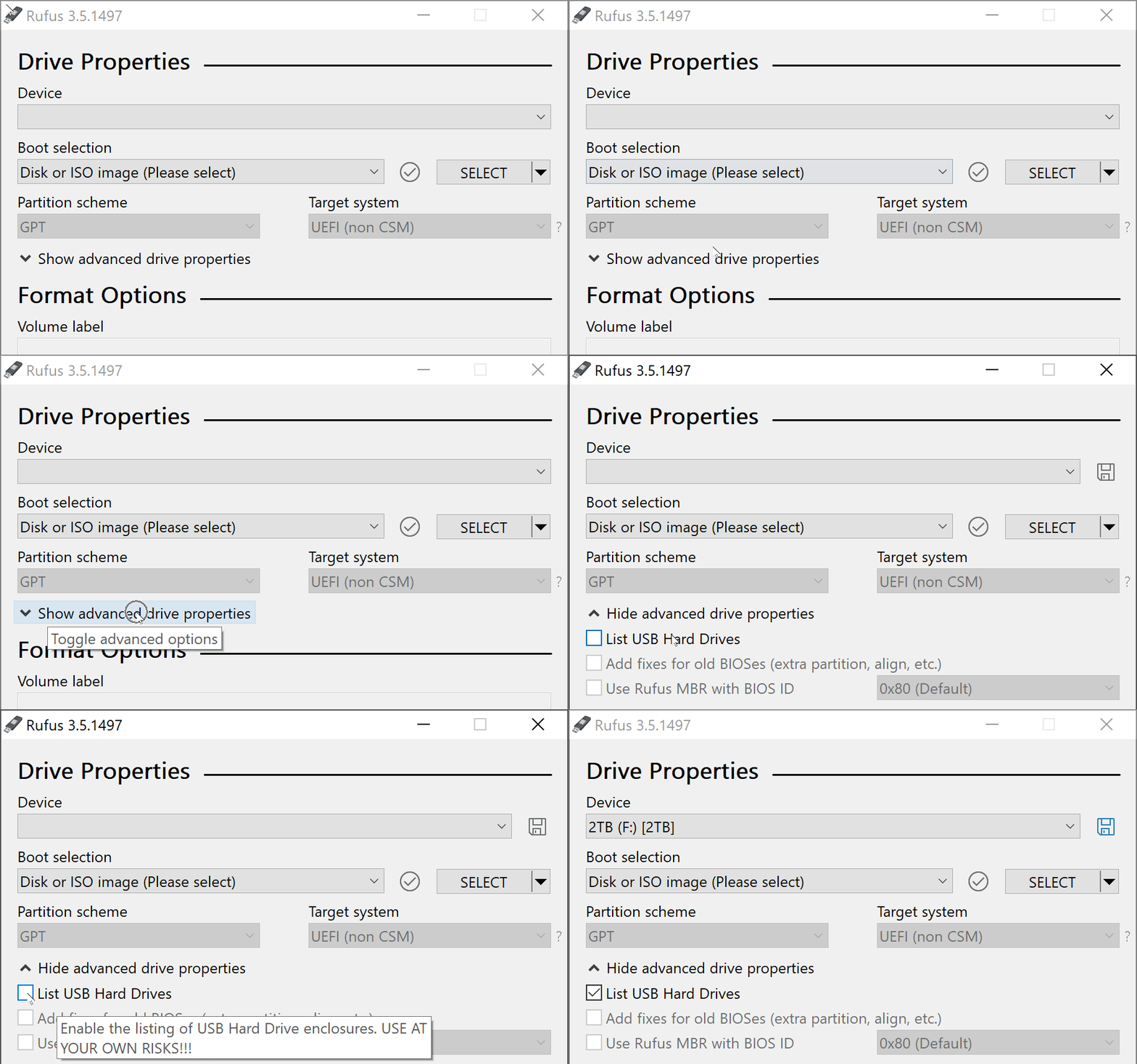
You can also try Alt-F in Rufus, which does the same to enable detection of fixed disks/hard drives. Also look at this entry from the FAQ.
Note that, if you are using a flash based device, and it isn't listed, it may be because some USB drives mistakenly report themselves DRIVE_FIXED rather than DRIVE_REMOVABLE (which they shouldn't do). Recent versions of Rufus have code to make sure these devices are properly listed though.
Also, if you tried a 300GB USB drive, you clearly didn't use an USB key, which Rufus doesn't support outside of Alt-F.
 pbatard
on 9 Mar 2013
pbatard
on 9 Mar 2013
Yes, I tried to use an external usb-disk (300Gb) and 1st partition on it (of course smaller). It seems Rufus can't handle such situations. Is it so?
With your advice I was able to write a bootable ISO to my usb-hdd.
But the problem is it removes all partitions!! (But tells that only data on a selected partition will be destroyed)
pashinin
on 9 Mar 2013
Rufus will use the full space of the drive as a single partition. I have no plans to allow multiple partitions at this stage, especially as Rufus was only designed to be used with USB flash drives, not USB HDDs.
Also I have to wonder what part of "WARNING ALL DATA ON DEVICE X WILL BE DESTROYED" makes you think that only one partition will be affected. The message talks about the device, and uses the partition name to identify the device, as the one to which the partition belong. But the message clearly mentions a device rather than a partition, so you shouldn't interpret the message to say that only the selected partition will be destroyed, as this is just wrong.
But I have added a more explicit warning about deleting multiple partitions on recent versions of Rufus, so I'm hoping this will remove any uncertainty about the fact that Rufus will destroy all partitions.
pbatard
on 10 Mar 2013
I'm having the same issue.
First i also tried with my 300GB external hard drive, but now I'm trying with a 8GB pendrive and the same thing's happening. There is no devices detected, and all the options are blank.
I also tried Alt + F. Nothing.
I also updated to version 2.2.668. No changes.
Am I doing something wrong?
Thanks for your help
 te0k
on 15 Jun 2015
te0k
on 15 Jun 2015
Am I doing something wrong?
Yes: You didn't provide a Log...
pbatard
on 15 Jun 2015
Ok, that was actually a better advise than it might seem.
The log gave me the answer.
Thanks for your time.
te0k
on 15 Jun 2015
Even if you deleted your original post, thanks to github notifications, I got a good idea of what your issue was:
Removing E: from the list: This is the disk from which Rufus is running!
Don't worry, you're not the only one who forgot that, since it's meant to completely erase all data, of course Rufus won't let you format an USB drive if you're running the application from it!
Always check the log! :smile:
pbatard
on 15 Jun 2015
Yeah, thanks for pointing out my stupidity in public :D
te0k
on 15 Jun 2015
I'm not trying to embarrass you (it's an honest mistake).
But I just think that it may be frustrating for other users experiencing the exact same issue, and ending up on this report, not to have the full story on what the issue really was. The whole point of an issue tracker is to help others facing the same problems.
pbatard
on 15 Jun 2015
you're totally right, i was kidding!
te0k
on 15 Jun 2015
my USB thumb drive isn't showing up for me. Tried alt+f. Log is not helpful. I tried v2.2, just went down to 1.4.8 trying older versions to see if that would help. It didn't. (logs always the same)
Rufus version: 1.4.8.505
Syslinux versions: 4.07, 5.10
Windows version: Windows 7 SP1 64-bit
Locale ID: 0x0409
0 devices found
0 devices found
 maquino1985
on 8 Jul 2015
maquino1985
on 8 Jul 2015
Can you see your thumb drive in Windows?
 Walkman100
on 8 Jul 2015
Walkman100
on 8 Jul 2015
Yes, also just tried it on another computer and have the same problem.
However, this time the log actually has useful (hopefully?) information:
Rufus version: 2.2.668
Windows version: Windows 7 SP1 64-bit
Syslinux versions: 4.07/2013-07-25, 6.03/2014-10-06
Grub versions: 0.4.6a, 2.02~beta2
Locale ID: 0x0409
Found USB 2.0 device 'Kingston DataTraveler 2.0 USB Device' (0930:6545)
Could not open
'\\?\usbstor#disk&ven_kingston&prod_datatraveler_2.0&rev_pmap#0014857749dced30d74800f0&0#{53f56307-b6bf-11d0-94f2-00a0c91efb8b}':
[0x00000005] Access is denied.
A device was eliminated because it didn't report itself as a disk
0 devices found
OK, can you try the latest ALPHA from here and see if it works better?
If you still don't see your device, then can you please try the Alt-. shortcut to enable USB debug (The second key is the "dot" key - you should see an USB Debug enabled message on the status bar if you press the right combination), then plug your device and copy the log?
pbatard
on 9 Jul 2015
Also, can you please tell us if your drive is encrypted by any chance? Some Kingston flash drives have hardware encryption, which of course makes them incompatible with software like Rufus, that needs low level access.
pbatard
on 9 Jul 2015
No luck with the alpha. Just FYI I also tried a different 16GB Kingston USB (different model, though) with same problem so it's not simply that mine has something wrong with it.
I don't believe it is encrypted. It's the data traveler SE9 in case you want to check for yourself, but I looked and saw no reason to believe so .
output from debug mode:
Found USB 2.0 device 'Kingston DataTraveler 2.0 USB Device' (0930:6545)
Could not open
'\\?\usbstor#disk&ven_kingston&prod_datatraveler_2.0&rev_pmap#0014857749dced30d74800f0&0#{53f56307-b6bf-11d0-94f2-00a0c91efb8b}':
[0x00000005] Access is denied.
A device was eliminated because it didn't report itself as a disk
0 devices found
Processing Hub 1:
  Found ID[219]: USB\VID_046D&PID_C077\5&10C0578A&0&3
Processing Hub 2:
  Found ID[207]: USB\VID_8087&PID_0024\5&281F40F9&0&1
Processing Hub 3:
  Found ID[124]: USB\VID_8087&PID_0024\5&1D2B1099&0&1
Processing Hub 4:
  Found ID[056]: USB\VID_413C&PID_2110\7&F802965&0&4
Processing Hub 5:
  Found ID[119]: USB\VID_413C&PID_1010\6&1D6C7400&0&5
Processing Hub 6:
  Found ID[202]: USB\VID_0930&PID_6545\0014857749DCED30D74800F0
Processing IDs belonging to USBSTOR:
  USB\VID_0930&PID_6545\0014857749DCED30D74800F0
Processing Device: 'USBSTOR\DiskKingstonDataTraveler_2.0PMAP'
  Matched with ID[202]: USB\VID_0930&PID_6545\0014857749DCED30D74800F0
  Props VID:PID = 0930:6545
Found USB 2.0 device 'Kingston DataTraveler 2.0 USB Device' (0930:6545)
Could not open
'\\?\usbstor#disk&ven_kingston&prod_datatraveler_2.0&rev_pmap#0014857749dced30d74800f0&0#{53f56307-b6bf-11d0-94f2-00a0c91efb8b}':
[0x00000005] Access is denied.
A device was eliminated because it didn't report itself as a disk
0 devices found
Then I'm afraid that there is something special on the machines you use that prevents the kind of low level access that Rufus needs, and since you're the only one to report something like this (in millions of downloads) you will have to indentify what it is. Short of sitting in front of your computer, the best I can do is take a wild guess, such as that you may have a security solution that prevents the required level of access (hence the Access is denied messages).
As much as I'd like to help you out, there's really not much I can do when it seems to be a very specific environmental issue that nobody else appears to be running into...
pbatard
on 9 Jul 2015
That's okay. I appreciate your help anyways. I have a similar job so I know what you mean.
maquino1985
on 10 Jul 2015
Hum.
I'm gonna piss @pbatard off now, but.
I got the same issue. I'm using a micro SD-card (through an adapter) and straight into my computer.
Rufus doesn't detect it at all.
However;
Windows detects it (8GB, fat32)
UNetBootIN detects it
LinuxLive USB Creator detects it
Rufus log:
Rufus version: 2.4.757
Windows version: Windows 7 SP1 64-bit
Syslinux versions: 4.07/2013-07-25, 6.03/2014-10-06
Grub versions: 0.4.6a, 2.02~beta2
Locale ID: 0x041D
0 devices found
0 devices found
Processing Hub 1:
  Hub[1] = '\\?\iusb3#root_hub30#4&2665c1f1&0#{f18a0e88-c30c-11d0-8815-00a0c906bed8}'
  Found ID[097]: USB\VID_0B0E&PID_1041\0280FFA3D806
  Found ID[107]: USB\VID_046D&PID_C52B\5&20CC128F&0&2
  Found ID[072]: USB\VID_413C&PID_81A3\5&20CC128F&0&10
Processing Hub 2:
  Hub[2] = '\\?\usb#root_hub20#4&4829041&0#{f18a0e88-c30c-11d0-8815-00a0c906bed8}'
  Found ID[181]: USB\VID_8087&PID_8008\5&38C275DE&0&1
Processing Hub 3:
  Hub[3] = '\\?\usb#root_hub20#4&805ca5d&0#{f18a0e88-c30c-11d0-8815-00a0c906bed8}'
  Found ID[089]: USB\VID_8087&PID_8000\5&3A264F61&0&1
Processing Hub 4:
Processing Hub 5:
  Hub[4] = '\\?\usb#vid_8087&pid_8000#5&3a264f61&0&1#{f18a0e88-c30c-11d0-8815-00a0c906bed8}'
  Found ID[160]: USB\VID_8087&PID_07DA\6&1E949607&0&5
Processing Hub 6:
  Hub[5] = '\\?\usb#vid_8087&pid_8008#5&38c275de&0&1#{f18a0e88-c30c-11d0-8815-00a0c906bed8}'
  Found ID[024]: USB\VID_0C45&PID_64D0\6&23E3D5EB&0&5
Processing IDs belonging to USBSTOR:
Processing Device: 'SCSI\Disk________SD______________0001'
  Non USB => Eliminated
Processing Device: 'SCSI\DiskST500LM0ST500LM000-1EJ16DEM9'
  Non USB => Eliminated
0 devices found
(Just incase anyone cares)
 antonlindgren
on 8 Oct 2015
antonlindgren
on 8 Oct 2015
Rufus doesn't detect it at all.
That's because it's not USB based (and it's not the same issue as the ones above at all!). As explained in the FAQ here, and unlike what other software chose to do, Rufus was designed not to list non USB drives, to prevent people reformatting them by mistake.
Different software use different approaches.
pbatard
on 8 Oct 2015
Oh, I see. That makes sense.
Very well then, next beer is on me.
Cheers!
antonlindgren
on 8 Oct 2015
what about this?
Found USB 2.0 device 'SanDisk Cruzer Glide USB Device' (0781:5575)
Could not open '?usbstor#disk&ven_sandisk&prod_cruzer_glide&rev_1.27#20042605620f1db27f96&0#{53f56307-b6bf-11d0-94f2-00a0c91efb8b}': [0x00000005] Access is denied.
A device was eliminated because it didn't report itself as a disk
0 devices found
 apachelvr
on 23 Jan 2016
apachelvr
on 23 Jan 2016
I might had found the solution for some not detected device problems: I had it at first then switched my lexar flash drive to another usb connector and voilà!! fixed and detected so you may put this as sticky as if I got that problem some may too.
 christf1982
on 16 Jul 2016
christf1982
on 16 Jul 2016
Alf+F combo worked for me. my 120GB USB hard drive was not detected by Rufus 2.10. Ran into this thread and tried the Alt+f combo and it worked. To write this comment i created the Gethub account. thanks for the help.
 pmdsp
on 12 Aug 2016
pmdsp
on 12 Aug 2016
Worked for me too, thanks.
 mayerwin
on 5 Apr 2017
mayerwin
on 5 Apr 2017
I'm loading from a 2TB external but I can't select the: Device, Partition scheme, File system or Cluster size. I tried 'alt + f' and that didn't work. I'm about to crack into reading the FAQ. Hopefully I get help before that.
Cheers
 ZaveThe
on 22 Jun 2017
ZaveThe
on 22 Jun 2017
Thanks @pbatard, works fine!
 Ferrmolina
on 17 Dec 2017
Ferrmolina
on 17 Dec 2017
Run Rufus program first, then plug the USB Flash Drive.
 romeoisla
on 4 Mar 2018
romeoisla
on 4 Mar 2018
I'm passing through my USB HDD to a windows VM from linux using kvm virtio scsi, so it shows up as a normal typical HDD. I still want to use rufus on it. I think I really need an "I really know what i'm doing, show me all the drives" option.
 RX14
on 24 Apr 2018
RX14
on 24 Apr 2018
Oh, Ctrl-Alt-F, from reading the sourcecode.
RX14
on 24 Apr 2018
Using a 16 GB SanDisk USB flash drive, and I don't see my device.
I tried Ctrl+Alt+F, I tried Alt+F and I tried the GUI checkbox. Nothing worked.
 martin-sweeny
on 31 May 2018
martin-sweeny
on 31 May 2018
Does Windows disk manager see your device?
Also, please try Alt-. to enable USB enumeration debug, and then post your log. Nobody can help you without the log.
pbatard
on 31 May 2018
It's actually a non-issue. I was using a USB dock, and that was the problem. Plugging directly the computer got it to work!
martin-sweeny
on 31 May 2018
Similar issue. Alt+f and ctrl+alt+f didn't help. All solutions above either didn't apply or didn't work.
Rufus logs:
Rufus version: 3.3.1400
Windows version: Windows 7 SP1 64-bit
Syslinux versions: 4.07/2013-07-25, 6.03/2014-10-06
Grub versions: 0.4.6a, 2.02
System locale ID: 0x1009
Will use default UI locale 0x1009
SetLGP: CoCreateInstance failed; hr = 80040154
Localization set to 'en-US'
 RightMakesMight
on 30 Sep 2018
RightMakesMight
on 30 Sep 2018
Well, that 80040154 error already indicates that there's something very unusual about how your system is set up. A standard Windows installation should not produce that error, so it looks like you have a customized installation of Windows which, of course, we can't guarantee Rufus will be able to properly work with.
Also, please repost a log with USB Debug enabled (Alt-.). It's the __only__ way we can hope to have data that could explain your issue.
Finally, is there a reason why your log doesn't display a # device(s) found line?
This is how a Rufus 3.3 log is expected to look, even if no devices are detected:
Rufus version: 3.3.1400
Windows version: Windows 10 64-bit (Build 17134)
Syslinux versions: 4.07/2013-07-25, 6.03/2014-10-06
Grub versions: 0.4.6a, 2.02
System locale ID: 0x0809
Will use default UI locale 0x0809
SetLGP: Successfully set NoDriveTypeAutorun policy to 0x0000009E
Localization set to 'en-US'
0 devices found
If you don't get to the # device(s) found line, then there definitely is something very wrong with your environment (and, as opposed to what you assert, your issue is not similar to the ones above, as all the logs have that line).
pbatard
on 30 Sep 2018
I'm running rufus from ubuntu 16.04 with WINE compatibility. Maybe that's what's causing the 80040154 error. I apoligise, the reason there was no 0 devices is because in the log there were many iterations of that line which I edited out so as not to include an extremely long log. No other detail of the log was altered. Here is another log, with debug enabled:
Rufus version: 3.3.1400
Windows version: Windows 7 SP1 64-bit
Syslinux versions: 4.07/2013-07-25, 6.03/2014-10-06
Grub versions: 0.4.6a, 2.02
System locale ID: 0x1009
Will use default UI locale 0x1009
SetLGP: CoCreateInstance failed; hr = 80040154
Localization set to 'en-US'
0 devices found
0 devices found
0 devices found
0 devices found
0 devices found
0 devices found
0 devices found
0 devices found
I'm running rufus (...) with WINE
__UNSUPPORTED__
If you have an issue running Rufus on WINE, then please log an issue with the WINE people. The only platforms supported are real Windows platforms as well as fully emulated Virtual Machines (like VMWare), which WINE isn't.
Next time, please don't withhold important details like this. If you're not using a __real__ Windows platform, disclose it.
pbatard
on 30 Sep 2018
Ok, thank you for the information, and for you time. Sorry for not disclosing my use of WINE in the initial post, I'm pretty new to a lot of this stuff.
For anyone else who experiences the same problem, follow the instruction on this website to create bootable windows media: https://www.linuxbabe.com/ubuntu/easily-create-windows-10-bootable-usb-ubuntu
RightMakesMight
on 1 Oct 2018
I have a similar issues here, rufus can't detect device, tried everything listed above!
Here's my log
Rufus version: 3.3.1400
Windows version: Windows 7 SP1 64-bit
Syslinux versions: 4.07/2013-07-25, 6.03/2014-10-06
Grub versions: 0.4.6a, 2.02
System locale ID: 0x0409
Will use default UI locale 0x0409
SetLGP: Successfully set NoDriveTypeAutorun policy to 0x0000009E
Localization set to 'en-US'
Found USB 2.0 device 'SanDisk Cruzer Blade USB Device' (0781:5567)
Removing E: from the list: This is the disk from which Rufus is running!
0 devices found
 Sammie456
on 17 Oct 2018
Sammie456
on 17 Oct 2018
See that line from the log?
Removing E: from the list: This is the disk from which Rufus is running!
It explains __exactly__ why your device isn't listed.
pbatard
on 17 Oct 2018
So what exactly do I need to get Rufus detect my device?
Sammie456
on 17 Oct 2018
You need to understand 3 things:
- Rufus is a tool that will __completely erase everything that resides on the drive you select__.
- So, __of course__, if you put the Rufus executable on a drive, Rufus will __NOT__ be able to work with that drive, because then __it would have to erase itself!__
- Because of that, Rufus does not list the drive on which it resides, because this is not a drive it will be able to work with since there is something there (itself) it definitely shouldn't erase.
By placing the Rufus executable on the drive you are trying to format, you are basically trying to saw the branch you are sitting on!
The solution: Move the Rufus executable away from the drive you are trying to format. And please try to understand the logical consequences of what you are attempting to do, before you try to do it...
pbatard
on 17 Oct 2018
In other words, I should get a new drive? If so then how do I know a drive
Rufus should work it?
Sammie456
on 17 Oct 2018
No, that's not at all what I say. If you aren't reading what I say, and are even less trying to understand it before replying, I'm going to stop trying to help you altogether. Re-read what I said. I told you exactly what you needed to do.
pbatard
on 17 Oct 2018
@Sammie456: Close rufus completely. Copy the program to your desktop. Delete everything from the USB drive. Run rufus from the desktop.
 JonnyTech
on 17 Oct 2018
JonnyTech
on 17 Oct 2018
Thank you so much Jonnytech
I just did and it worked out, but my laptop is unstable to boot from usb
device tho I am sure that the bios setting is okay, I use hp elitebook
8460p...
Sammie456
on 17 Oct 2018
@Sammie456 further support is out of the scope of this issue tracker (although, that laptop is old, ie bios last updated in 2011, no Windows 10 support, so when using rufus make sure that the partition scheme is MBR and the target system is set to BIOS)
JonnyTech
on 17 Oct 2018
Restarting my PC fixed it for me.
 ArakelTheDragon
on 27 Dec 2018
ArakelTheDragon
on 27 Dec 2018
This thread has been automatically locked since there has not been any recent activity after it was closed. Please open a new issue if you think you have a related problem or query.
![lock[bot] picture](https://avatars1.githubusercontent.com/in/6672?v=4&s=40) lock[bot]
on 6 Apr 2019
lock[bot]
on 6 Apr 2019
Related issues
pbatard
·
6Comments
 devilaltard
·
5Comments
devilaltard
·
5Comments
 chazste
·
4Comments
chazste
·
4Comments
 saschanaz
·
4Comments
saschanaz
·
4Comments
 timj3371
·
7Comments
timj3371
·
7Comments
Most helpful comment
Most likely this is because your drive is detected as a USB HDD, which Rufus does not list by default. If you want them listed in a recent version of Rufus, this is what you need to do:
You can also try Alt-F in Rufus, which does the same to enable detection of fixed disks/hard drives. Also look at this entry from the FAQ.
Note that, if you are using a flash based device, and it isn't listed, it may be because some USB drives mistakenly report themselves
DRIVE_FIXEDrather thanDRIVE_REMOVABLE(which they shouldn't do). Recent versions of Rufus have code to make sure these devices are properly listed though.Also, if you tried a 300GB USB drive, you clearly didn't use an USB key, which Rufus doesn't support outside of Alt-F.