Rubocop: GitLab CI gaves strange error.
Hello I'm trying to configurate CI for my application on the GitLab. The problem is a have this error:
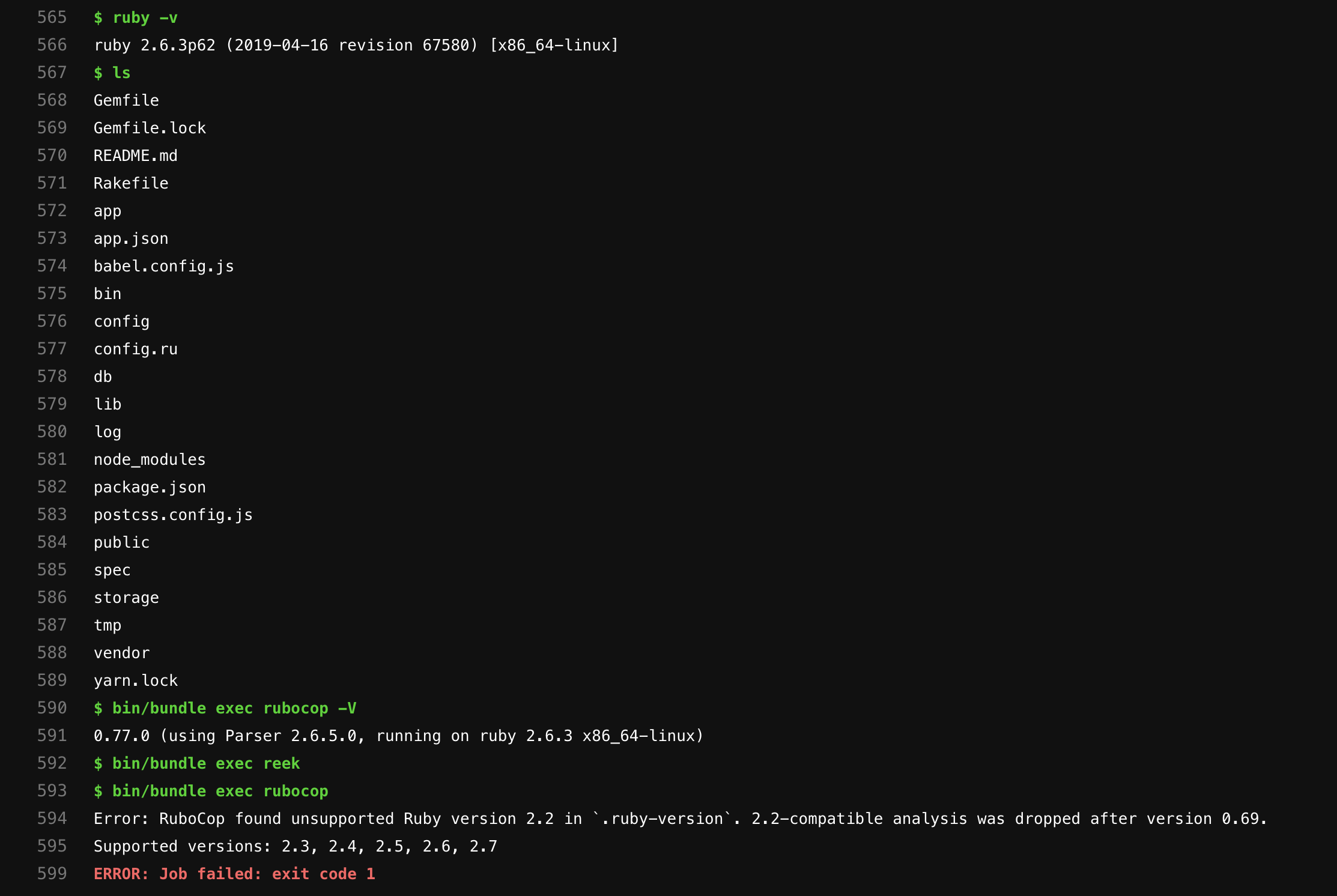
$ bin/bundle exec rubocop
589 Error: RuboCop found unsupported Ruby version 2.2 in `.ruby-version`. 2.2-compatible analysis was dropped after version 0.69/
Supported versions: 2.3, 2.4, 2.5, 2.6, 2.7
ERROR: Job failed: exit code 1
Expected behavior
I want to make Rubocop works in CI
Actual behavior
Rubocop fails on the CI
Steps to reproduce the problem
This is extremely important! Providing us with a reliable way to reproduce
a problem will expedite its solution.
RuboCop version
on local machine:
0.77.0(using Parser 2.6.5.0, running on ruby 2.6.3 x86_64-darwin18)
on the CI:
$ bin/bundle exec rubocop -V
0.77.0 (using Parser 2.6.5.0, running on ruby 2.6.3 x86_64-linux)
There is my .rubocop.yml
AllCops:
  TargetRubyVersion: 2.6
  Exclude:
    - spec/**/*
    - tmp/**/*
    - node_modules/**/*
    - vendor/bundle/**/*
    - lib/tasks/*
    - bin/**/*
    - config/**/*
    - db/schema.rb

Metrics/LineLength:
  Max: 90

Style/FrozenStringLiteralComment:
  Enabled: false

Style/Documentation:
  Enabled: false
And there is my .gitlab.ci.yml
image: ruby:2.6.3

variables:
  DB_PASSWORD: $DB_PASSWORD
  DB_USERNAME: $DB_USERNAME
  DB_HOST: $DB_HOST
  DISABLE_SPRING: 1

services:
  - postgres:latest

before_script:
  # System packages
  - apt-get update -qq && apt-get install -y -qq cmake
  - curl -sL https://deb.nodesource.com/setup_8.x | bash -
  - apt-get update -yq
  - apt-get install -y apt-transport-https build-essential cmake nodejs software-properties-common unzip

  # Yarn installation
  - wget -q -O - https://dl.yarnpkg.com/debian/pubkey.gpg | apt-key add -
  - echo "deb https://dl.yarnpkg.com/debian/ stable main" > /etc/apt/sources.list.d/yarn.list
  - apt-get update -yq
  - apt-get install -y yarn

  # Ruby packages
  - gem install bundler --no-document
  - bundle install --jobs $(nproc)  "${FLAGS[@]}" --path=vendor

  # JS packages
  - yarn install

.default-cache: &default-cache
  cache:
    untracked: true
    paths:
      - vendor/
      - public/
      - node_modules/

stages:
  - test
  - lint
  - deploy

Ruby Tests:
  <<: *default-cache
  stage: test
  script:
    - bin/bundle exec rails db:create RAILS_ENV=test
    - bin/bundle exec rails db:schema:load RAILS_ENV=test
    - bin/bundle exec rspec
  artifacts:
    paths:
      - coverage/

Code Style:
  <<: *default-cache
  stage: lint
  script:
    - ruby -v
    - bin/bundle exec rubocop -V
    - bin/bundle exec reek
    - bin/bundle exec rubocop
 wh1le
wh1le
All 8 comments
Looks like the .ruby-version file in your project is specifying ruby 2.2. Is that correct? By default we use the latest version of rubocop, you’ll just need to specify the rubocop version that ruby 2.2 supports which appears to be 0.69.
 andrewmcodes
on 3 Dec 2019
andrewmcodes
on 3 Dec 2019
Also this is a GitHub action, not GitLab. I’m not sure if they are compatible but I would guess not.
My apologies. I read this on my phone and I thought I was in a different repo 😅
andrewmcodes
on 3 Dec 2019
Hey, @andrewmcodes. Thanks for the reply.
Looks like the .ruby-version file in your project is specifying ruby 2.2. Is that correct?
No, there is the output of the .ruby-version
$ cat .ruby-version
> 2.6.3
By default we use the latest version of rubocop, you’ll just need to specify the rubocop version that ruby 2.2 supports which appears to be 0.69.
it might be a solution, but is it possible to run that baby on the current version?
Also this is a GitHub action, not GitLab.
What do ya mean by that?
Also, there is a log of failed build.
wh1le
on 3 Dec 2019
No, there is the output of the .ruby-version
$ cat .ruby-version
> 2.6.3
Is > actually part of the file?
 buehmann
on 3 Dec 2019
buehmann
on 3 Dec 2019
@buehmann no, just for clarification that this is the output of the cat command.
wh1le
on 3 Dec 2019
Thanks for everybody I solved the problem. The actual fix was to change in .rubocop.yml this line from:
  Exclude:
   ...
    - vendor/bundle/**/*
   ...
to:
  Exclude:
   ...
    - vendor/**/*
   ...
@wh1le Do you mind closing the issue?
 pirj
on 29 Dec 2019
pirj
on 29 Dec 2019
@pirj sure the problem is solved. Thanks!
wh1le
on 30 Dec 2019
Related issues
 herwinw
·
3Comments
herwinw
·
3Comments
 david942j
·
3Comments
david942j
·
3Comments
 millisami
·
3Comments
millisami
·
3Comments
 NobodysNightmare
·
3Comments
NobodysNightmare
·
3Comments
 Ana06
·
3Comments
Ana06
·
3Comments
Most helpful comment
@wh1le Do you mind closing the issue?