Rubberduck: CI False Positive: DefaultMemberRequired CI Error issue
Rubberduck version information
Rubberduck version 2.5.2.5927 loading:
Operating System: Microsoft Windows NT 6.2.9200.0 x64
Host Product: Visual Basic x86
Host Version: 6.00.9782
Host Executable: VB6.EXE;
Description
Perfectly legal use of a control array with a control that lacks a default member triggers an CI error issue of "DefaultMemberRequired - Indexed default member access without default member"
The code below triggers 3 such issues for txtLat(0).property,
If txtLat(0).DataChanged Then
    rsPlace("LatDeg") = Val(txtLat(0).Text)
    txtLat(0).DataChanged = False
End If
while this code, using the same control class
If txtPlace.DataChanged Then
    rsPlace("Place") = Trim$(txtPlace.Text)
    txtPlace.DataChanged = False
End If
doesn't trigger the issue.
As far as I know there is no requirement for a control to have a default member and a runtime error is only triggered if the control is used as if it had one.
To Reproduce
Steps to reproduce the behavior:
- create a control array of a control that lacks a default member
- refer to the control using one of its properties (read or write doesn't matter)
Expected behavior
The code is expected to pass the Code Inspection without issue.
Additional context
The control in question is a 'UniTextBox" from the UniSuitePlus control suite from CyberActiveX/Dana Seaman, who's website I just noticed no longer exists :-(
 AstrocalcVB
All 5 comments
Control arrays are likely under-represented in Rubberduck, as they're stripped of support in VBA.
Rubberduck iterates the controls of each form, and creates a Declaration for each one, without interacting with it much beyond getting its identifier name.
If the compiler didn't know of control arrays, the syntax textboxName(i).SomeProperty would indeed imply an indexed default member call, and in fact you would be getting a compile runtime error to that effect if the control array wasn't defined, so the inspection is legitimate and its implementation seems correct: if Rubberduck doesn't know about control arrays, it's in the same place the compiler would be in, so the warning is expected.
Clearly Rubberduck needs a way to know about control arrays... I'm thinking we should query controls for an Index property (but only when we're hosted in VB6, to avoid throwing/handling useless COM exceptions), if I recall correctly that's the property that makes or breaks a designer-defined control array... right?
 retailcoder
on 23 May 2021
retailcoder
on 23 May 2021
Yes, the Index property set to >= 0 indicates the control is part of a control array. Same goes for VB.Menu items btw, which also triggers the same Warning/Error (webpage docs says "Warning" while the RD CI list has it as an "Error").
As you said, apparently the VB6 compiler doesn't know about control arrays as a line like If Textbox1.Index <> 0 Then compiles fine, but trows a "Run-time error 343: Object not an array" at runtime in case the control isn't part of a control array. I don't know how it works "under the hood" here, neither with VB6 or RD but I guess there must be some way to figure out.
So control arrays are shunned in VBA, can't remember how it was last time I coded in MS Access (ver. 2000 I think), long time ago. They surely have their pros and bins, but obviously not part of modern programming :-).
I wonder if a few other CI issues I get might be VB6 specific, as my code seems perfectly legit to me, so I will probably be filing a few more issues, doing my best keeping you busy ;-) A rainy day here anyway...
AstrocalcVB
on 23 May 2021
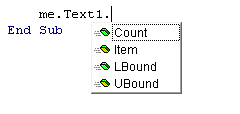
FWIW, it seems to me that VB6 does know the difference.
Here's what we get with intellisense:
Contrast with:
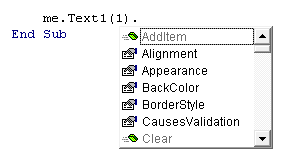
Though the property Index exists on the VB.TextBox, the Count, the LBound and the UBound do not exist on the VB.TextBox. The fact that we see it on intellisense tells me it's from another interface.
As additional detail, I ran this code:
Private Sub Form_Load()
    Debug.Print TypeName(Me.Text1), TypeName(Me.Text1(0)) 'Returns Object, TextBox

    Debug.Print TypeOf Me.Text1 Is VB.TextBox 'Returns False
    Debug.Print TypeOf Me.Text1(0) Is VB.TextBox 'Returns True
End Sub
Unfortunately, we don't know what type the Me.Text1 is and it's odd that we get back an Object even though we obviously have an intellisense menu which wouldn't be shown if it was just merely an Object.
From the raw .frm file we have:
VERSION 5.00
Begin VB.Form Form1
   Caption         =   "Form1"
   ClientHeight    =   3030
   ClientLeft      =   120
   ClientTop       =   450
   ClientWidth     =   4560
   LinkTopic       =   "Form1"
   ScaleHeight     =   3030
   ScaleWidth      =   4560
   StartUpPosition =   3  'Windows Default
   Begin VB.TextBox Text1
      Height          =   285
      Index           =   1
      Left            =   840
      TabIndex        =   1
      Text            =   "Text1"
      Top             =   720
      Width           =   1335
   End
   Begin VB.TextBox Text1
      Height          =   285
      Index           =   0
      Left            =   840
      TabIndex        =   0
      Text            =   "Text1"
   End
End
I looked at the VB and VBRUN libraries for any possible interfaces and don't see a good match that provides the 4 methods for a control array. I noticed in passing that a control array could be used to create controls dynamically at runtime, which may mean it has similar behavior to a MSForms classes --- they are created dynamically and directly embedded into the project.
I tried to expose the form so I could view it via the oleview.exe but VB6 would not let me expose a form nor could I find a obvious way to change the form's instancing property as I could a class module. Thus I cannot view the type library representation with oleview.exe. My VM with VB6 has VS2017 and thus I cannot use Rubberduck to see how it sees the form but I would hope that there is an additional interface that's being implemented. Otherwise, how would the VB6 know Me.Text1 is a control array and thus treat it differently in spite of it being an Object ? (We shouldn't rule out a special edge case hack but....)
 bclothier
on 23 May 2021
bclothier
on 23 May 2021
Looks like a possible hack would be to define a fake ControlArrayDeclaration if we can't find it anywhere, with Count, LBound, UBound methods and a default Item member (from the screenshot it appears to be a Function and not a Property, which makes sense as the array is only writable from the designer), and resolve the type of a TextBox1 control to that fake ControlArrayDeclaration when it has an Index property that holds a numeric value greater than or equal to zero (hopefully we're looking at a Variant/Empty otherwise and we're able to tell "no value here" from "0"), and then if we make the type of the Item function a ControlDeclaration then everything should just fall into place.
Thoughts?
retailcoder
on 23 May 2021
According to this post, we can determine whether a control has that interface and thus positively conclude if it's an array. No need for a fake declaration, hopefully.
bclothier
on 24 May 2021
Related issues
 ChrisBrackett
·
3Comments
ChrisBrackett
·
3Comments
 Inarion
·
3Comments
retailcoder
·
3Comments
Inarion
·
3Comments
retailcoder
·
3Comments
 connerk
·
3Comments
connerk
·
3Comments
 DecimalTurn
·
3Comments
DecimalTurn
·
3Comments