Rubberduck occupies/disables application shortcut keyboard shortcuts
Rubberduck version information
Version 2.5.1.5557
OS: Microsoft Windows NT 6.2.9200.0, x64
Host Product: Visual Basic x86
Host Version: 6.00.9782
Host Executable: VB6.EXE
Description
Windows allows you to assign keyboard shortcuts to, well, shortcuts on your desktop, e.g. I assigned CTRL+ALT+P to the Windows Terminal:
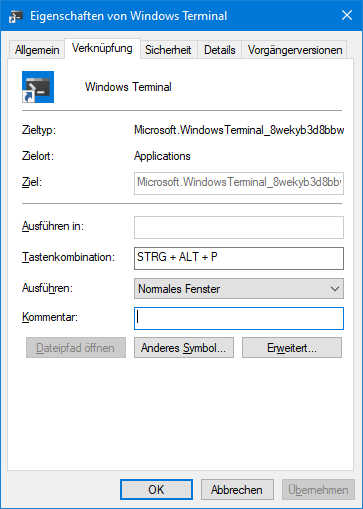
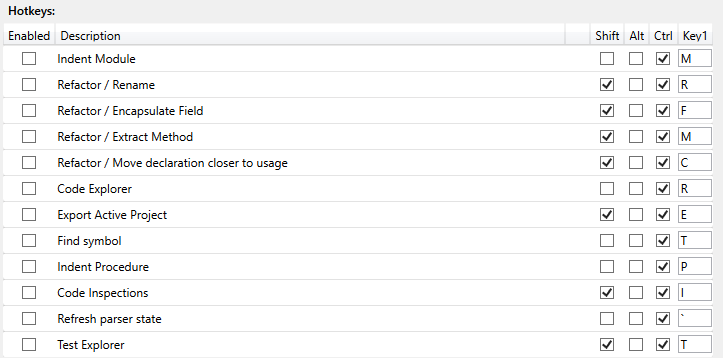
This is not the only shortcut I have assigned, just an example. All work as expected, i.e. when pressing CTRL+ALT+P the Windows Terminal opens. As soon as VB6 is started, with Rubberduck's addin loaded, all of these stop to work. I tried disabling all of RB's shortcuts in settings, but to no avail.
To Reproduce
Steps to reproduce the behavior:
- Assign a keyboard shortcut to a application shortcut as shown in the first screenshot
- Confirm that it works by starting the application with the newly assigned keyboard shortcut
- Close the application
- Start VB6, with RB loaded.
- Try to start the application via keyboard shortcut again. For me, nothing happens until I unload the RB addin.
Expected behavior
I expect Windows shortcuts to work as intended.
Logfile
RubberduckLog.txt
 HelOWeen
All 2 comments
I assume this is rooted in how we deal with keyboard shortcuts. If memory serves me right, we're not bubbling the keys we obtain from the window hook back to windows if we're not using them.
Could you try defocusing the application window and check whether the shortcut now works?
 Vogel612
on 16 Oct 2020
Vogel612
on 16 Oct 2020
Sorry that I didn't mention that in my initial report: I already tried it with all variations I could come up with _(VB6 has focus, other app has focus, every window minimized)_. The outcome is unfortunately the same.
Even unloading the RD addin doesn't restore the expected system behaviour.
HelOWeen
on 19 Oct 2020
Related issues
 philippetev
·
3Comments
philippetev
·
3Comments
 connerk
·
3Comments
connerk
·
3Comments
 ChrisBrackett
·
3Comments
ChrisBrackett
·
3Comments
 Hosch250
·
3Comments
Hosch250
·
3Comments
 bclothier
·
3Comments
bclothier
·
3Comments