Rubberduck: Should the "Indexed default member access" be triggered accessing the `.Cells()` Prop?
Rubberduck version information
Version 2.4.1.5081
OS: Microsoft Windows NT 10.0.18362.0, x64
Host Product: Microsoft Office x86
Host Version: 16.0.11328.20420
Host Executable: EXCEL.EXE
Description
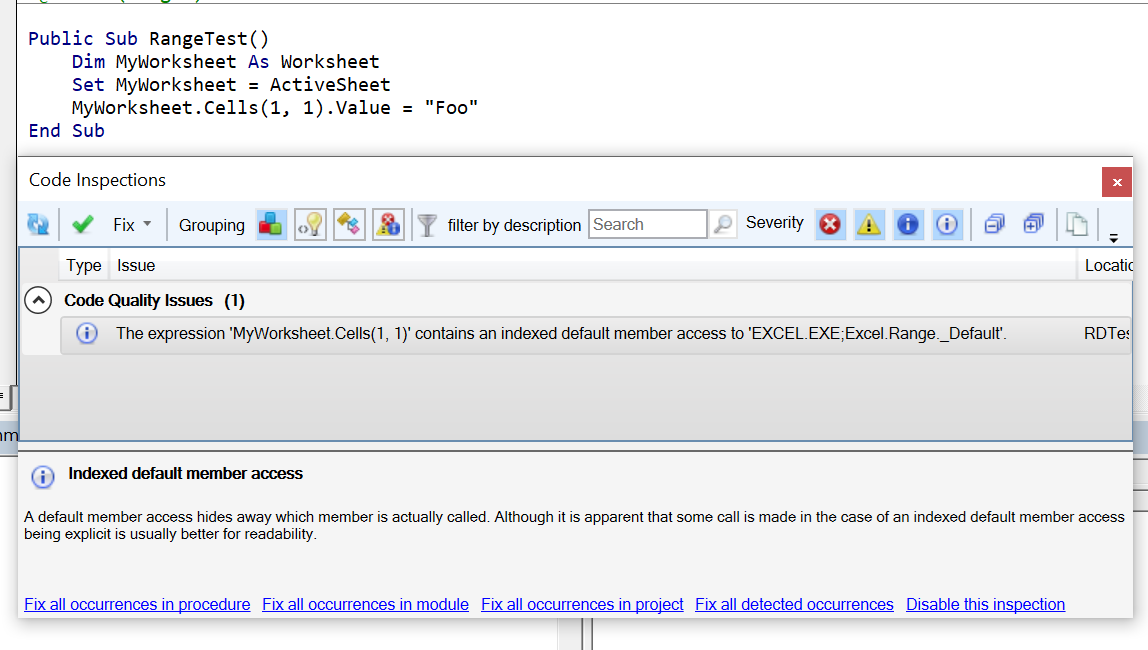
Accessing the value of a Cell using either MyWorksheet.Cells(1, 1).Value = "Foo" or MyWorksheet.Range.Cells(1, 1).Value = "Foo" triggers the below Code Quality Issue result (see screenshot).
Is this intended behaviour and if so, what is the best way to use Cells without triggering this inspection?
To Reproduce
Paste the below into a code module in the Excel applications and open "Code Inspections" to see the issue.
Public Sub RangeTest()
    Dim MyWorksheet As Worksheet
    Set MyWorksheet = ActiveSheet
    MyWorksheet.Range.Cells(1, 1).Value = "Foo"
End Sub
Expected behavior
I don't reckon this should trigger the warning.
Screenshots
 Senipah
All 7 comments
This result is legitimate. Cells is not a parameterized member of Excel.Range. Instead rng.Cells(1,1) expands to rng.Cells.[_Default](1,1), which is basically rng.Cells.Item(1,1).
In worksheet.Range.Cells(1,1) the call to Cells is acually superfluous.
The intended function of Cells is to turn the enumeration behaviour, e.g. in a For Each loop, into that of a two-dimensional array of single cells. This is the counterpart to Columns and Rows, which turn the enumeration behaviour to that of a one-dimensional array of columns and rows, respectively.
 MDoerner
on 14 Oct 2019
MDoerner
on 14 Oct 2019
Thanks @MDoerner.
Senipah
on 14 Oct 2019
May need to bookmark @MDoerner 's explanation - I have a feeling that it's going to be needed a _lot_ as more people start using the duck and hit this. It looks _very_ fully qualified and is going to leave a lot of people very confused.
While Worksheet.Range(1,1).Value is (fairly) commonly shown in examples, Worksheet.Range.Cells(1,1).Value is probably shown equally as often, so people are going to assume that it's equally valid - after all, it works, doesn't it?
It _may_ be worth incorporating this particular example into the description text (though I realize that this isn't the only situation that would trigger this inspection).
 daFreeMan
on 14 Oct 2019
daFreeMan
on 14 Oct 2019
My excuse is it was late on a Sunday evening 🙃. I totally forgot that a call to Cells(i,j) was a call to Items - Should've looked in the Object browser!
Senipah
on 14 Oct 2019
A code inspection description specifically for this might be a good idea. Until I found this I couldn't figure out why I was getting the inspection result.
Is a hotfix for converting Range.Cells(1, 1) to Range.Cells.Item(1, 1) feasible?
 ChrisBrackett
on 30 Oct 2019
ChrisBrackett
on 30 Oct 2019
This will be an inspection that comes up a lot even when users consider their code fully qualified. In fact I just went over this with today with @MDoerner.
 IvenBach
on 30 Oct 2019
IvenBach
on 30 Oct 2019
See the new issue #5252 for the requested quickfix.
MDoerner
on 30 Oct 2019
Related issues
 retailcoder
·
3Comments
ChrisBrackett
·
3Comments
retailcoder
·
3Comments
ChrisBrackett
·
3Comments
 philippetev
·
3Comments
philippetev
·
3Comments
 SteGriff
·
3Comments
SteGriff
·
3Comments
 Gener4tor
·
3Comments
Gener4tor
·
3Comments
Most helpful comment
May need to bookmark @MDoerner 's explanation - I have a feeling that it's going to be needed a _lot_ as more people start using the duck and hit this. It looks _very_ fully qualified and is going to leave a lot of people very confused.
While
Worksheet.Range(1,1).Valueis (fairly) commonly shown in examples,Worksheet.Range.Cells(1,1).Valueis probably shown equally as often, so people are going to assume that it's equally valid - after all, it works, doesn't it?It _may_ be worth incorporating this particular example into the description text (though I realize that this isn't the only situation that would trigger this inspection).