Rubberduck: Build a better Resource Editor
The VB6 Resource Editor is unrelentingly terrible:

We could build a better one.
 mansellan
All 14 comments
It would boost the value if we somehow found a way to provide the equivalent functionality to a VBA project. "Oh, VBA doesn't need resources!" felt a tad bit too arbitrary, IMO.
 bclothier
on 12 Feb 2019
bclothier
on 12 Feb 2019
I wholeheartedly agree.... I guess there are options there - encode into a project file module, link to an external file, or just possibly embed into the host document stream, if we ever find a reliable way into it.
IIUC, would need a thorough understanding of how the resources serialize to the structured document stream.
mansellan
on 12 Feb 2019
VB6 could leverage the .res file format, and VBA could simply generate a Resources (?) module with parameterized (taking an optional LCID parameter value I guess) Public Property Get members that the "RD resource editor" feature would be maintaining.
 retailcoder
on 12 Feb 2019
retailcoder
on 12 Feb 2019
What about binary resources though. Base-64 encode them, fine, but would need some utility methods in the module to decode them I guess?
mansellan
on 12 Feb 2019
In Access and Excel, it is common to use the document as a data store for the resources. In other hosts, the fallback might be just a const variables wrapped in a Property Get. Having the option to use document as a data store would also simplify the localization which would be otherwise handled in a Select Case per the Property Get(!).
bclothier
on 12 Feb 2019
Linking chat
 comintern
on 12 Feb 2019
comintern
on 12 Feb 2019
I'm fairly relaxed about Select Case (or any other necessary constructs) in a generated file. They are not meant to be read, let alone edited. Just add a ' This is a generated file, do not edit at the top and call it done?
mansellan
on 12 Feb 2019
Considering that in VS you kind of get 2 files -- the designer file and the XML file. VS of course keeps the designer file regenerated whenever the XML file is changed. The code binds against the designer file, rather than the XML. Nobody really looks at the designer but they can edit the XML file -- regardless of whether they use the VS resource editor or even hand-edit it. In the end, VS re-builds the designer and everyone's happy.
If we go the route of single module, aren't we implicitly encouraging people to hand-edit the generated code? What happens when they make changes that the editor is unable to parse? Do we tell them "you broke it, you fix it?" If so, that doesn't seem like a good UX in comparison to what VS does which it simply stomps on the broken designer file and regenerates from the XML file.
bclothier
on 12 Feb 2019
Hmm, I take your point, maybe this points to two modules (Resources and Resources_Designer ?). Curious though, isn't there also a risk that hand-editing the XML (in the case of VS) can leave it in an unparseable state? If that happened, presumably the editor can neither read it nor regenerate the designer.
mansellan
on 12 Feb 2019
Yep. Pretty sure a malformed XML => SOL. That said, which you'd rather use - a XML parser or a handrolled VBA parser?
bclothier
on 12 Feb 2019
Definitely needs work, but I'm thinking of something like this...
Since this is going to be generated code, I don't see a reason to bother with backing fields and constants and whatnot. Just expose properties that return the string.
I suppose we need an interface, say IResourceFile:
'@Folder("Resources")
'@Interface
Option Explicit

'@Description("Returns a Long integer value representing the Locale ID for this resource file.")
Public Function LCID() As Long
End Function

'@Description("Gets the string associated with the specified resource key.")
Public Function GetString(ByVal resourceKey As String) As String
End Function
This would be e.g. MyResources1033:
'THIS FILE WAS AUTOMATICALLY GENERATED BY RUBBERDUCK.
'ANY CHANGES WILL BE LOST WHEN THE RESOURCE MANAGER TOOL IS REFRESHED.
'@Folder("Resources")
'@ModuleDescription("Exposes resource strings for a specific language.")
Option Explicit
Implements IResourceFile
Private values As Collection

Private Sub Class_Initialize()
    Set values = New Collection
    With values
        .Add "The string value for the 'SomeKey' resource.", "SomeKey"
        .Add "Another string value for another resource key.", "AnotherKey"
        '...
    End With
End Sub

Private Function IResourceFile_LCID() As Long
    IResourceFile_LCID = 1033 ' en-US
End Function

Public Funtion IResourceFile_GetString(ByVal resourceKey As String) As String
    IResourceFile_GetString = values.Item(resourceKey)
End Function

'@Description("The string value for the 'SomeKey' resouce.")
Public Property Get SomeKey() As String
    SomeKey = GetString("SomeKey")
End Property

'@Description("Another string value for another resource key.")
Public Property Get AnotherKey() As String
    AnotherKey = GetString("AnotherKey")
End Property
Needs a ResourceManager generated class too:
'THIS FILE WAS AUTOMATICALLY GENERATED BY RUBBERDUCK.
'ANY CHANGES WILL BE LOST WHEN THE RESOURCE MANAGER TOOL IS REFRESHED.
'@Folder("Resources")
'@ModuleDescription("Provides a standard mechanism for accessing localized string resources.")
'@PredeclaredId
Option Explicit

Private resources As Collection
Private current As IResourceFile

Private Sub Class_Initialize()
    Set resources = New Collection
    'adds the generated resource files to the collection:
    resources.Add New Resources1033, "1033"
    resources.Add New Resources3084, "3084"
    '...
    Set current = resources.Item(1)
End Sub

'@Description("Gets a string resource using the specified resource key.")
Public Function GetString(ByVal resourceKey As String, Optional ByVal localeId As Variant) As String
    If IsMissing(localeId) Then
        GetString = current.GetString(resourceKey)
    Else
        GetString = resources.Item(localeId).GetString(resourceKey)
    End If
End Function

'@Description("Gets/sets the current default locale.")
Public Property Get CurrentLocale() As Long
    CurrentLocale = current.LCID
End Property

Public Property Set CurrentLocale(ByVal value As Long)
    Set current = resources.Item(value)
End Property

'@Description("Gets an object holding the resources with Locale ID 1033.")
Public Property Get Resources1033() As Resources1033
    Set Resources1033 = resources.Item("1033")
End Property

'@Description("Gets an object holding the resources with Locale ID 3084.")
Public Property Get Resources3084() As Resources3084
    Set Resources3084 = resources.Item("3084")
End Property
Okay, definitely unsure about LCIDs.. I'd much rather use .NET-like CultureInfo strings, e.g. en-US or fr-CA, but the dash poses a problem.
retailcoder
on 12 Feb 2019
Very nice. We could have "almost" CultureInfos:
Public Enum CultureInfo
  en_GB = 4011
  en_US = 1033
  es_ES = 3082
  ' snip
End Enum
Wondering though if commented XML might be a better backing store. Would need more work in the Resource Manager class, but it could also be reused as the basis of #4306. We could maybe reuse the XML format used by modern VS?
EDIT: Another thought, in the CE, we could nest the designer file under the XML one, as per VS...
mansellan
on 12 Feb 2019
mansellan
on 13 Feb 2019
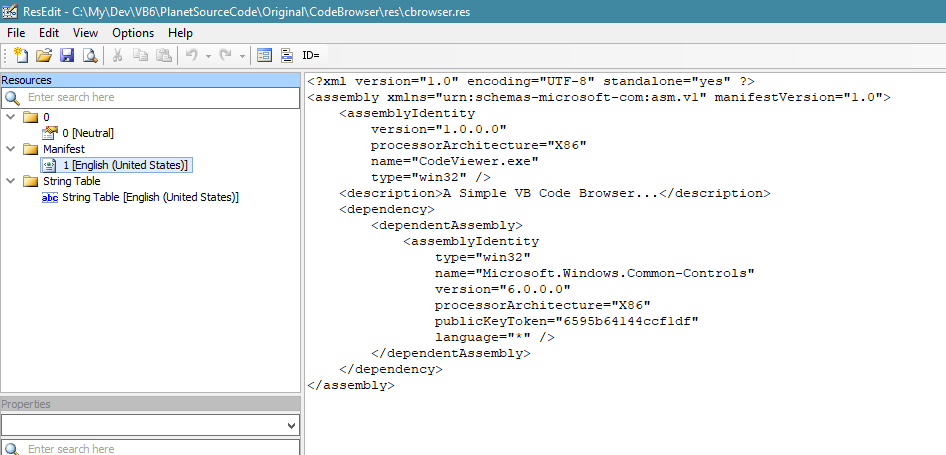
Looks like VB6 .res files are the same as C++ ones (albeit more restrictive wrt dialogs, menus) - just opened a VB6 res file with ResEdit (free but unfortunately not open source):
mansellan
on 13 Feb 2019
Related issues
 DecimalTurn
·
3Comments
retailcoder
·
3Comments
retailcoder
·
4Comments
DecimalTurn
·
3Comments
retailcoder
·
3Comments
retailcoder
·
4Comments
 ghost
·
3Comments
ghost
·
3Comments
 susnick
·
3Comments
susnick
·
3Comments