Rubberduck: All Rubberduck Panes are Black and White (No Content Displayed)
Hi guys. I updated Windows 2010 to the latest version (1803) last week. Since then, I am getting white and black areas on all Rubberduck's panes. VBE works normally, displaying all elements properly, on all panes, as can be seen on the screenshot.
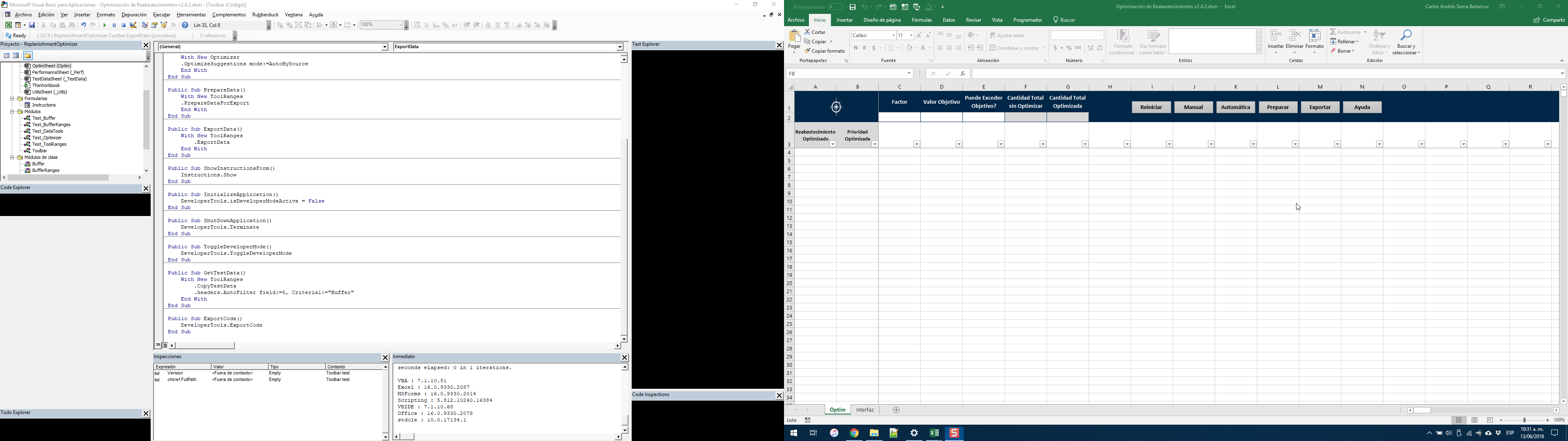
Any ideas of what can be causing this and how to fix it?
Version 2.2.0.3368
OS: Microsoft Windows NT 10.0.17134.1, x64
Host Product: Microsoft Office 2016 x86
Host Version: 16.0.9330.2087
Host Executable: EXCEL.EXE
(I tried to be as accurate as possible while compiling this version information manually, since I couldn't get it from Rubberduck's About dialogue, which is also suffering from the same issue).
ps. sorry for the incomplete initial message. I submitted it by accident when I was just starting to write it.
 carlossierra311
All 5 comments
Hi Carlos, thanks for reaching out - I believe we're going to need more information than that though.
Firstly, which panes specifically? All of them?
Also, what Rubberduck version does the splash form say (the about box will have a different version, see #4052)?
Does the Rubberduck command bar show up? If so, what does the left-most button say? If that's "Pending", you need to click it to trigger a parse - the Code Explorer and Inspection Results toolwindows should have default content saying something like "Rubberduck doesn't see anything yet" in that case... is that not showing up at all?
 retailcoder
on 13 Jun 2018
retailcoder
on 13 Jun 2018
Mathieu, I just edited the initial comment (I sent it incomplete by accident... sorry for that). Please let me know if there's any other information I need to provide. Thanks!
carlossierra311
on 13 Jun 2018
Answering your questions more concretely:
- Yes, all panes (including the About dialogue).
- The command bar is showing correctly. The left-most button says 'Ready' (can be confirmed on the screenshot I posted above).
- Nothing shows up (can also be confirmed in the screenshot).
Thanks...
carlossierra311
on 13 Jun 2018
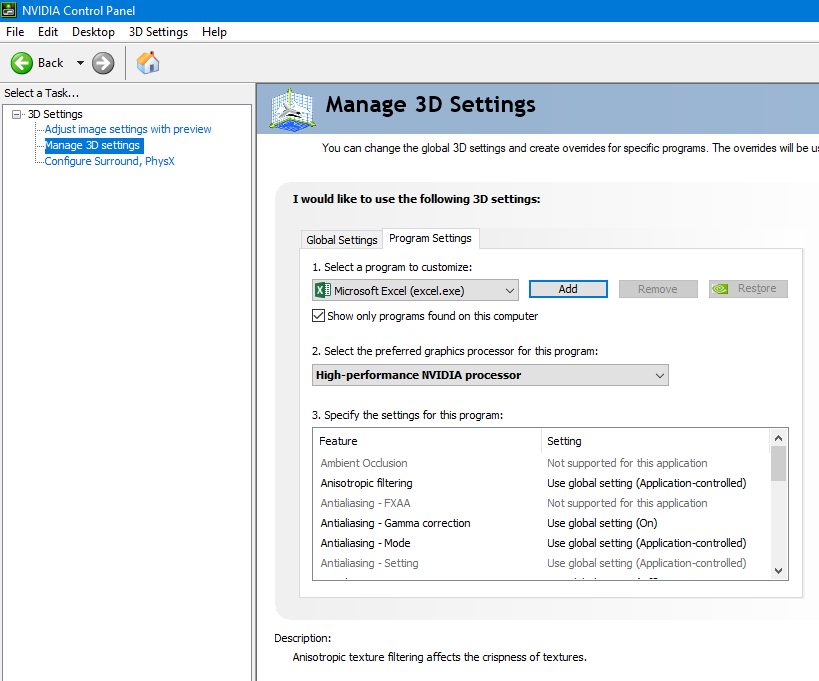
Well, in case anyone comes here looking for a solution to this issue, I managed to make Rubberduck render correctly by following this advice and having Excel run with my Nvidia graphics card (instead of my Intel Integrated graphics card).
carlossierra311
on 14 Jun 2018
Awesome!! For the record I was REALLY scared of what might have been behind this issue - glad it's not in our code!
retailcoder
on 14 Jun 2018
Related issues
 connerk
·
3Comments
connerk
·
3Comments
 bclothier
·
3Comments
retailcoder
·
3Comments
bclothier
·
3Comments
retailcoder
·
3Comments
 ghost
·
3Comments
ghost
·
3Comments
 ChrisBrackett
·
3Comments
ChrisBrackett
·
3Comments
Most helpful comment
Well, in case anyone comes here looking for a solution to this issue, I managed to make Rubberduck render correctly by following this advice and having Excel run with my Nvidia graphics card (instead of my Intel Integrated graphics card).