Rubberduck: Excel crashes with RubberDuck when closing an Excel workbook
The whole of Excel crashes when closing down a workbook when RubberDuck is loaded. Using latest version (v2.1.0.2289-pre)
Is there a log stored anywhere? And if so where?
 Troubadoure
All 15 comments
in the VBE: Rubberduck -> Settings -> General Settings -> Show Log Folder button. You'll probably need to enable logging (don't recall if it's on by default) setting it at Debug or Trace, then cause the crash.
Of note to the Devs: I'm getting no repo on build .2284.
 daFreeMan
on 4 Oct 2017
daFreeMan
on 4 Oct 2017
@tomhumphrey Does it crash when closing a workbook that is not the last workbook open or when closing the last one and thus closing Excel?
We have a persisting problem with sporadic crashes of the host on shutdown. We are working on resolving this, but it turns out to be complicated because the crash happens after we have shut down already. In that case, there will be no log for the crash.
 MDoerner
on 4 Oct 2017
MDoerner
on 4 Oct 2017
It seems to crash when one closes down. Example: I had two workbooks open (both with a lot of vba code in them). Closed one down. The other one just displayed a white screen instead of the workbook and was unusable. Closing that one down then caused Excel to crash
Troubadoure
on 6 Oct 2017
That is strange, I will try to investigate.
Which version of Excel are you using?
MDoerner
on 6 Oct 2017
Closing a host document while it's being processed might need some special handling - I get no hard crash, but a lingering EXCEL.EXE ghost process in task manager if I initiate a parse and immediately x-out of Excel. Was the workbook closed with Rubberduck being in a 'Ready' state?
Also, closing a workbook unloads it from the VBE, and thus triggers a reparse (if the IDE is in design mode; more of a cache update than a reparse though); still, parse tasks run asynchronously and don't lock up the host document, so yeah that's indeed strange.
Error logs should give us a clue.
 retailcoder
on 6 Oct 2017
retailcoder
on 6 Oct 2017
Just happened again. same scenario. I'll turn on logging and try to trigger it again
Troubadoure
on 6 Oct 2017
Looking at the logs. It seems to be unhappy as the VBA project is protected
RubberduckLog.0.txt
RubberduckLog.1.txt
It also seems to have messed up my file I was worked on. I now get a message stating "Error accessing file. Network connection may have been lost"
It also just crashed after closing down only one workbook (which was the only one open)
RubberduckLog.txt
Troubadoure
on 6 Oct 2017
Turning off 'Enable Source Control' and don't get the error message anymore. However, the Source Control toolbar/box still loads up on open (Source Control is disabled in the menu and this was after shutting down Excel and reopening)
Troubadoure
on 6 Oct 2017
Ah, it's possible something in SC is (accidentally) trying to access protected projects - we're explicitly skipping protected projects everywhere, but SC might have these issues still. As for it still being enabled, that's an oversight - toggling it off should also toggle off and disable the option to load the toolwindow at startup. The intent was to outright prevent wiring it up at all...
I'll look at the logs when I get to a computer, hopefully all the crashes originate in the SC panel =)
retailcoder
on 6 Oct 2017
The referenced commit should fix once and for all any code that iterates a project's VBComponents collection without first verifying whether the project is protected. I don't know why addressing that right there at the VBIDE API level didn't occur to me before, given the number of times locked projects have bitten my rear end.
retailcoder
on 6 Oct 2017
Will test it later when I get the chance and will confirm whether fixed
Troubadoure
on 6 Oct 2017
@tomhumphrey no rush, it's not merged yet (soon though) :+1:
retailcoder
on 6 Oct 2017
Merged and released, it's ready when you are! :smiley:
retailcoder
on 6 Oct 2017
Have updated to the latest version but can't test as the menu bar isn't loading. Also, have noticed Source Control is loading up (even though I deactivated it in the previous version)
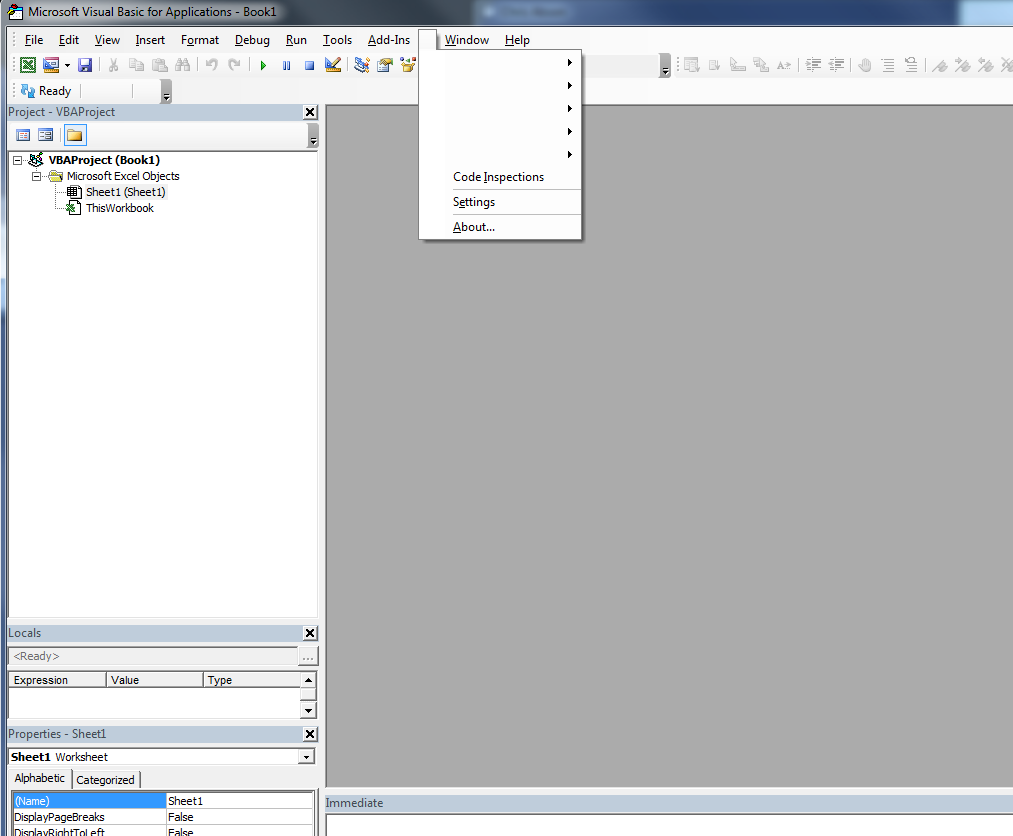
Windows 7, Excel 2013 32-bit
Haven't tried doing a fresh install
Troubadoure
on 9 Oct 2017
Seems to not be crashing now on close (with source control enabled)
Troubadoure
on 9 Oct 2017
Related issues
 bclothier
·
3Comments
bclothier
·
3Comments
 ThunderFrame
·
3Comments
ThunderFrame
·
3Comments
 Hosch250
·
3Comments
Hosch250
·
3Comments
 Gener4tor
·
3Comments
ThunderFrame
·
3Comments
Gener4tor
·
3Comments
ThunderFrame
·
3Comments