Rtorrent: rTorrent reading 4x more data than sending
rTorrent seems to be reading 4-6x more data than it's seeding. In this case I'm seeing 100-160MB/s read from rTorrent while it's only seeding about 20MB/s worth of data.
--- IOTOP
Total DISK READ : 161.06 M/s | Total DISK WRITE : 27.28 M/s
Actual DISK READ: 161.06 M/s | Actual DISK WRITE: 0.00 B/s
TID PRIO USER DISK READ DISK WRITE SWAPIN IO> COMMAND
42685 be/4 debian-d 161.06 M/s 27.28 M/s 0.00 % 70.79 % rtorrent
--- rTorrent
[Throttle off/off KB] [Rate 21780.5/27685.2 KB] [Port: 65300] [U 357/0] [D 141/0] [H 0/4096] [S 21/700/65023] [F 5339/32768]
Thoughts?
 ghost
ghost
All 173 comments
I've tried playing with the preload features to see if that causes it, I've tried disabling preloading and that doesn't help, nor does enabling it or making the memory cache larger. rTorrent doesn't seem to utilize the piece cache anyways even though i have it set to like 16G and have 300 torrents all seeding with active peers.
ghost
on 15 Jun 2016
I see you don't have throttling enabled.
Can you enable throttling for both upload and download, and see if you can replicate it with throttling enabled. Your throttle should be 80% of your total maximum speed from your ISP.
So if your upload speed is 20MB/s then set the upload throttle to around 17MB/s, and if your download speed is 100MB/s then set the download throttle to 80MB/s.
If you are able to replicate it with throttling enabled, then please set the download throttle to something very low and see if the issue still occurs (uploads drop down to 1/4 of your throttled download speed)
 Speeddymon
on 9 Jul 2016
Speeddymon
on 9 Jul 2016
I did try this with throttling too.
It seems to happen with lots of uploading slots and lots of torrents. I think what's happening is a slow client requests a piece, rTorrent loads the entire piece into memory, and attempts to send it but in smaller blocks. In the meantime many many torrents and clients are doing this causing an internal cache thrashing. So a piece is having to be reloaded every time a peer requests the next block because the piece gets kicked out of the cache due to other pieces being loaded. So instead of reading the entire piece from disk, how about just the block the peer requests? I know this is less efficient for most setups but an option to change the behavior on how data gets loaded from disk would be nice.
ghost
on 9 Jul 2016
Hmm..
Preload options might help here.
pieces.preload.min_size.set
pieces.preload.min_rate.set
pieces.preload.type.set
min_size is set to 131072 (or 128kb)
min_rate appears to be set to 5192
Sadly the documentation is lacking and I'm not an expert at reading this code, so I can't tell if that's 5192 bytes or a factor of time or what have you. Looks like valid values for type are 0 and 1, but no idea what either of those means.
Try lowering the min_size in your rtorrent config and see if that helps any.
Speeddymon
on 9 Jul 2016
I've also tried with and without preload, doesn't make a difference.
ghost
on 9 Jul 2016
You confirmed it happens even with just one active torrent and all others stopped?
If you could, please test with just one active torrent, and the rest stopped, assuming you haven't already. ;-)
If it doesn't happen there, then that will probably confirm the theory about slow clients, because you're then only dealing with a small subset of the number of peers you normally are interacting with.
Speeddymon
on 10 Jul 2016
Here's the result of downloading a SINGLE torrent. With 0 upload speed.
It's reading an insane amount of data for only downloading a torrent at 2MB/s. I mean what's the point of the freaking disk process? I'm using the 0.9.6 published build.
TID PRIO USER DISK READ DISK WRITE SWAPIN IO> COMMAND
24180 be/4 rtorrent 8.37 M/s 2.03 M/s 0.00 % 7.69 % rtorrent
24181 be/4 rtorrent 3.29 M/s 0.00 B/s 0.00 % 3.15 % rtorrent [rtorrent disk]
[Throttle 200/2048 KB] [Rate 2.3/2071.4 KB] [Port: 12345]
ghost
on 15 Jul 2016
Using a completely stock rtorrent and stock debian install (no .rtorrent.rc file)... downloading a SINGLE torrent with ZERO UPLOAD.
TID PRIO USER DISK READ DISK WRITE SWAPIN IO> COMMAND
24861 be/4 rtorrent 10.21 M/s 2.99 M/s 0.00 % 7.71 % rtorrent
[Throttle off/off KB] [Rate 3.5/3091.0 KB] [Port: 6944]
This is a huge performance impact for rTorrent. This renders it unusable for me and is likely impacting the entire userbase and they don't even know it.
ghost
on 15 Jul 2016
I can see it reading that much with hashing enabled but you have it off.
Can you try to reproduce this with deluge?
It uses libtorrent also, and will help to narrow down whether its a bug in libtorrent or rtorrent itself.
Speeddymon
on 15 Jul 2016
Deluge uses a different libtorrent actually - libtorrent-rasterbar.
I tried builds all the way back to 0.9.0 and they all are affected. I haven't tried prior versions since they won't compile under newer versions of the C/C++ compilers.
Deluge does _not_ have this same problem. It also performs significantly less write op/s too. I get maybe an average of 30 IOops every few seconds when the write cache is being flushed. When I was using rTorrentI was seeing a constant 300-400 IOops/s with rTorrent.
TID PRIO USER DISK READ DISK WRITE SWAPIN IO> COMMAND
15868 be/4 deluge 0.00 B/s 2.49 M/s 0.00 % 0.99 % python /usr/bin/deluged
ghost
on 15 Jul 2016
I can see it reading that much with hashing enabled but you have it off.
check_hash is on by default (e.g. when you don't use a config file). Although it should mean "Check hash for finished torrents.", but who knows, can you try to disable it at first with:
pieces.hash.on_completion.set = no
This is a huge performance impact for rTorrent. This renders it unusable for me and is likely impacting the entire userbase and they don't even know it.
What OS is this exactly? Is it run on a physical device or in virtual environment?
I have just checked on Ubuntu 14.04 laptop. These are the figures that I'm getting with sudo iotop -ok (interactive mode) checking different times and with this config (using my rtorrent-ps fork, based on 0.9.6, not on master):
[Rate 1697.0/1465.2 KB]
19812 be/4 chros73     990.25 K/s    2.53 M/s  0.00 %  2.06 % rtorrent
19812 be/4 chros73    1668.26 K/s 1144.28 K/s  0.00 %  1.87 % rtorrent
19812 be/4 chros73       2.79 M/s 1509.73 K/s  0.00 %  3.11 % rtorrent

[Rate 1469.0/2372.0 KB]
19812 be/4 chros73    1175.79 K/s    2.93 M/s  0.00 %  2.71 % rtorrent
19812 be/4 chros73       3.14 M/s 1419.14 K/s  0.00 %  4.33 % rtorrent
19812 be/4 chros73       2.18 M/s    2.71 M/s  0.00 %  2.94 % rtorrent
19812 be/4 chros73    1304.04 K/s 1591.24 K/s  0.00 %  1.71 % rtorrent

[Rate 1944.1/4556.1 KB]
19812 be/4 chros73     697.34 K/s    5.38 M/s  0.00 %  3.83 % rtorrent
19812 be/4 chros73    1716.96 K/s    4.05 M/s  0.00 %  0.10 % rtorrent
19812 be/4 chros73    1239.27 K/s    4.83 M/s  0.00 %  3.54 % rtorrent

[Rate 2071.3/  3.8 KB]
19812 be/4 chros73    4846.16 K/s    0.00 K/s  0.00 % 16.97 % rtorrent
19812 be/4 chros73    7732.49 K/s    0.00 K/s  0.00 % 22.20 % rtorrent
19812 be/4 chros73    3456.99 K/s    0.00 K/s  0.00 %  7.55 % rtorrent
19812 be/4 chros73    3328.77 K/s    0.00 K/s  0.00 %  9.09 % rtorrent
19812 be/4 chros73    5752.25 K/s    0.00 K/s  0.00 % 27.22 % rtorrent
As you can see, I don't have that insane fluctuation like you do.
The last readings are interesting , sometimes it can be almost 4x times of data that it reads.
From the config I use these values (that can be interesting to this issue):
# Set the max amount of memory space used to mapping file chunks. This refers to memory mapping, not physical memory allocation. (max_memory_usage) This may also be set using ulimit -m where 3/4 will be allocated to file chunks.
pieces.memory.max.set = 2048M
# Adjust the send and receive buffer size for socket. Disabled by default (0), this means the default is used by OS (you have to modify the system wide settings!!!) (send_buffer_size, receive_buffer_size)
#   Increasing buffer sizes may help reduce disk seeking, connection polling as more data is buffered each time the socket is written to. It will result higher memory usage (not by rtorrent process!).
network.receive_buffer.size.set =  4M
network.send_buffer.size.set    = 12M
# Preloading a piece of a file. (Default: 0) Possible values: 0 (Off) , 1 (Madvise) , 2 (Direct paging). (https://github.com/rakshasa/rtorrent/issues/418)
pieces.preload.type.set = 2
# Check hash for finished torrents. (check_hash)
pieces.hash.on_completion.set = no
I mean what's the point of the freaking disk process?
I don't have rtorrent [rtorrent disk] process at all, just rtorrent. :)
Edit: I have to mention that I'm using modded 3.16.0-pf4-chros02 #4 SMP PREEMPT linux kernel with io tweaks, I don't know whether it matters or not.
 chros73
on 15 Jul 2016
chros73
on 15 Jul 2016
downloading a SINGLE torrent with ZERO UPLOAD.
I've just tried it, just in case (with the above linked config): downloading only 1 with zero upload.
[Rate   4.5/4067.1 KB]
 9094 be/4 chros73       0.00 K/s 3968.74 K/s  0.00 %  0.00 % rtorrent
This part seems to be good on my system.
chros73
on 15 Jul 2016
I made one more test:
- switch off pieces preloading (during runtime):
pieces.preload.type.set = 0 - all other settings are the same as was before (network buffer size is still huge)
- just uploading with around 1130 KB (no download), and using
sudo iotop -aokPaccumulated output to see whats the sum after 20 sec:
[Rate 1125.2/  2.6 KB]
 it should be around: 20x1130 = 22600.00 K
 sum is (reported by iotop) =56868.00 K
It's about 2.5x .
Can you try the similar test with deluge if it has any buffering option? I'm just curious.
chros73
on 15 Jul 2016
And the last test, testing buffer sizes, setting them during runtime:
network.receive_buffer.size.set =  208K
network.send_buffer.size.set    = 208K
pieces.preload.type.set = 0
- all other settings are the same as was before
- just uploading with around 163 KB (no download), and using
sudo iotop -aokPaccumulated output to see what's the sum after 20 sec:
[Rate 162.4/  8.8 KB]
 it should be around: 20x163 = 3260.00 K
 sum is (reported by iotop) = 13292.00 K
It's about 4x .
So, it seems that bigger buffer sizes can help a bit with this but not really.
This is a huge performance impact for rTorrent. ... and is likely impacting the entire userbase and they don't even know it.
I tend to think that you're right :) Now, all we need is somebody who can fix this. :)
Thanks for mentioning this bug as well.
chros73
on 15 Jul 2016
Why does it read ANYTHING during download? Unless you download more chunks in parallel than the system can cache all downloads should stay in memory until they are no longer needed.
Only when doing the final hash check when the download is finished I would expect reads, unless the downloaded file is still in cache (likely for a single download test smaller than the ram)..
So on that single download without upload what was the chunk size and how many chunks where downloaded in parallel? How much memory was there?
 mrvn
on 18 Jul 2016
mrvn
on 18 Jul 2016
The system had 8G of RAM which was way more than the size of the torrent. Also the torrent, I don't remember the chunk size, there were a few dozen seeds the box was connected to. rTorrent was allowed to use 1G of memory for cache. There's no reason it should be reading anyways during downloading.
I'm wondering if rTorrent is trying to be so aggressive with it's caching that it's actually cache thrashing. Deluge does not have any of the same problems.
Debian 8 system, virtualized, all measurements were taken inside the VM.
ghost
on 18 Jul 2016
How does rtorrent caching work at all? If it's just mmap()ing the file and then uses that as buffer to recv() then every page will be read in before being overwritten with the download. That would explain as much read as download at least. I hope this isn't the case.
mrvn
on 19 Jul 2016
@mrvn As I mentioned before:
- I can not reproduce reading during downloading 1 torrent
- I can reproduce the 3x-4x reading issue during seeding
Can you also try it out?
chros73
on 19 Jul 2016
I have not benchmarked it but I have seen a lot more reads than my upload limit would suggest since basically forever.
mrvn
on 21 Jul 2016
Maybe this issue is related in this way: #409
chros73
on 21 Jul 2016
Reproduced downloading only 1 torrent with everything else stopped, on RaspberryPi 2 / 3 (running fresh install Raspbian/Debian Jessie). Tried all above config settings with no change.
Issue seems to be related to non-local disks.
Easy to detect, since downloading is being limited due to 100Mbit/s ethernet limitation of Pi. This really limits the RaspberryPi !
For reference, this is my up/down limit setting:
download_rate = 3400
upload_rate = 2000
When downloading to local disk on RPi, no issue. Hit limit set in .rtorrent.rc config.
iotop - 17:20:16 2877 be/4 rtorrent 0.00 B/s 3.39 M/s 0.00 % 0.00 % rtorrent
ifstat - 17:20:16 28893.09 724.55
When downloading to NFS share, the issue happens. (Also tested with CIFS (samba) and still same issue). Tons of excessive reads when downloading 1 file!
iotop - 17:18:42 2877 be/4 rtorrent 5.01 M/s 1774.55 K/s 0.00 % 77.63 % rtorrent
iotop - 17:18:42 2879 be/4 rtorrent 2.36 M/s 0.00 B/s 0.00 % 37.71 % rtorrent [rtorrent disk]
ifstat - 17:18:42 88057.85 16187.82
FYI, when copying file from local disk to NFS share, file transfer is fast. So not an issue with NFS share. (Hitting max of RPi ethernet).
iotop - 17:57:31 8058 be/4 rtorrent 11.31 M/s 11.49 M/s 0.00 % 78.37 % cp -rp /NFSshare/ISO/ubuntu-16.04.1-desktop-amd64.iso /home/rtorrent
ifstat - 17:57:31 94198.44 4390.52
iotop - 18:04:02 8197 be/4 rtorrent 12.60 M/s 12.37 M/s 0.00 % 86.25 % cp -rp /home/rtorrent/ubuntu-16.04.1-desktop-amd64.iso /NFSshare/ISO
ifstat - 18:04:02 2599.28 97872.17
Note: ifstat is in bit per sec. iotop is in bytes per sec.
Commands and command headers for reference:
$ iotop -botqqq
TIME TID PRIO USER DISK READ DISK WRITE SWAPIN IO COMMAND
17:18:42 2877 be/4 rtorrent 5.01 M/s 1774.55 K/s 0.00 % 77.63 % rtorrent
17:18:42 2879 be/4 rtorrent 2.36 M/s 0.00 B/s 0.00 % 37.71 % rtorrent [rtorrent disk]
$ ifstat -b -t -i eth0 1
Time eth0
HH:MM:SS Kbps in Kbps out
17:18:42 88057.85 16187.82
 ryandaniels
on 24 Jul 2016
ryandaniels
on 24 Jul 2016
Thanks for the detailed report.
Can you also test 3x-4x seeding issue with local disk? That was the one that I could confirm. Thanks
chros73
on 24 Jul 2016
Upload limit 200KB. 1 torrent.
About 2.75x when seeding from NFS disk:
About 1.75x when seeding from local disk.
NFS disk:
HH:MM:SS KB/s in KB/s out
08:50:27 464.41 208.26
08:50:28 628.22 277.58
08:50:29 628.28 214.16
TIME TID PRIO USER DISK READ DISK WRITE SWAPIN IO COMMAND
08:50:27 11070 be/4 rtorrent 403.75 K/s 0.00 B/s 0.00 % 6.65 % rtorrent
08:50:28 11070 be/4 rtorrent 550.84 K/s 0.00 B/s 0.00 % 3.27 % rtorrent
08:50:29 11070 be/4 rtorrent 550.73 K/s 0.00 B/s 0.00 % 3.58 % rtorrent
Local disk:
09:20:25 7.04 229.83
09:20:26 6.51 218.40
09:20:27 4.59 240.26
09:20:25 11070 be/4 rtorrent 352.54 K/s 0.00 B/s 0.00 % 0.63 % rtorrent
09:20:26 11070 be/4 rtorrent 352.40 K/s 0.00 B/s 0.00 % 0.60 % rtorrent
09:20:27 11070 be/4 rtorrent 352.57 K/s 0.00 B/s 0.00 % 0.00 % rtorrent
Note: both iotop and ifstat in bytes
ryandaniels
on 24 Jul 2016
Thanks, that's indeed confirms this seeding bug with a local disk as well.
chros73
on 24 Jul 2016
Can this be related? https://github.com/rakshasa/libtorrent/issues/83
chros73
on 30 Jul 2016
Has anybody tried out this with master branch version?
chros73
on 26 Aug 2016
I made test about the seeding issue again with local disk using 0.9.6: [Rate 2100.5 / 7500.6 KB] ... [U 65/300]
pidstat -p $PID -dl 20 5 (run it 5 times, gives average at every 20 secs, and after the last run)
Note:
- downloading isn't affected
- ratio depends on the used upload slots: the more slot is used the more unnecessary read is made
I. if pieces.preload.type.set=0 or pieces.preload.type.set=2
19:09:31      UID       PID   kB_rd/s   kB_wr/s kB_ccwr/s  Command
19:09:51     1000     23536  11553.82   7841.68      0.00  /opt/rtorrent/bin/rtorrent
19:10:11     1000     23536   9645.20   7442.00      0.00  /opt/rtorrent/bin/rtorrent
19:10:31     1000     23536   9087.00   6860.80      0.00  /opt/rtorrent/bin/rtorrent
19:10:51     1000     23536   9763.00   7477.20      0.00  /opt/rtorrent/bin/rtorrent
19:11:11     1000     23536   9218.80   6956.40      0.00  /opt/rtorrent/bin/rtorrent
Average:     1000     23536   9853.73   7315.67      0.00  /opt/rtorrent/bin/rtorrent
It's 4.6x more then it's needed.
II. if pieces.preload.type.set=1
19:07:31      UID       PID   kB_rd/s   kB_wr/s kB_ccwr/s  Command
19:07:51     1000     23536  14749.60   6930.60      0.00  /opt/rtorrent/bin/rtorrent
19:08:11     1000     23536  15739.80   7864.20      0.00  /opt/rtorrent/bin/rtorrent
19:08:31     1000     23536  16461.80   7450.60      0.00  /opt/rtorrent/bin/rtorrent
19:08:51     1000     23536  15243.00   7157.60      0.00  /opt/rtorrent/bin/rtorrent
19:09:11     1000     23536  15412.80   7462.20      0.00  /opt/rtorrent/bin/rtorrent
Average:     1000     23536  15521.40   7373.04      0.00  /opt/rtorrent/bin/rtorrent
It's 7.4x more then it's needed.
How can we debug this?
chros73
on 26 Aug 2016
Has anybody tried out this with master branch version?
I checked, it suffers from the same issue.
... ratio depends on the used upload slots ...
It doesn't, as it turned out: I checked the same instance at a different time and I got better results: [Rate 2100.5 / 7500.6 KB] ... [U 162/300]
12:31:59      UID       PID   kB_rd/s   kB_wr/s kB_ccwr/s  Command
12:32:19     1000     23536   3342.60   8174.60      0.00  /opt/rtorrent/bin/rtorrent
12:32:39     1000     23536   3854.00   7937.60      0.00  /opt/rtorrent/bin/rtorrent
12:32:59     1000     23536   2982.80   7713.40      0.00  /opt/rtorrent/bin/rtorrent
12:33:19     1000     23536   2559.00   7169.80      0.00  /opt/rtorrent/bin/rtorrent
12:33:39     1000     23536   2736.20   8156.40      0.00  /opt/rtorrent/bin/rtorrent
Average:     1000     23536   3094.92   7830.36      0.00  /opt/rtorrent/bin/rtorrent
What interesting is the output of dstat -ctdD sdb:
----total-cpu-usage---- ----system---- --dsk/sdb--
usr sys idl wai hiq siq|     time     | read  writ
  8   4  63  17   0   8|27-08 12:34:07|2928k   21M
  2   1   5  86   0   6|27-08 12:34:08| 256k   61M
  6   4  43  45   0   3|27-08 12:34:09|1444k   62M
  3   2  46  43   0   6|27-08 12:34:10|1104k   89M
 12   5  55  24   0   3|27-08 12:34:11|7080k   18M
  7   3  78   8   0   4|27-08 12:34:12|2188k  176k
  5   2  83   5   0   5|27-08 12:34:13|2304k    0
  6   1  74  15   0   4|27-08 12:34:14|2816k    0
  6   3  81   6   0   5|27-08 12:34:15|2436k    0
  6   2  83   5   0   5|27-08 12:34:16|2448k    0
As we can see, writing incoming data is buffered but not reading.
Somebody has to take a look at this issue who is smarter than me. :) @rakshasa ? :)
chros73
on 30 Aug 2016
It sounds/looks like rTorrent is reading larger chunks than needed for each piece request from each seed slot. That would suggest the problem is actually in libtorrent.
ghost
on 6 Nov 2016
It could also be kernel read-ahead. Someone with time + interest should look into that with sysdig.
 pyroscope
on 7 Nov 2016
pyroscope
on 7 Nov 2016
I'll take a look into that, I haven't peeked back into this in awhile but I think I can dig into it.
ghost
on 7 Nov 2016
@jmdevince Thank You for this!
chros73
on 7 Nov 2016
Last night I spun up a fresh Debian 8 VM,
Compiled libtorrent and rtorrent from the git repo (using the master branch) and after letting it run overnight with about 30 torrents I'm currently seeding at about 6MB/s and I'm seeing about 6MB/s of disk reading.
My next step is to compile the latest stable release and look for the same behavior.
Here is the .rtorrent.rc file I'm using.
scgi_port = localhost:8050
directory.default.set = ./torrents
session.path.set = ./session
schedule2 = watch_directory,5,5,load.start=./watch/*.torrent
schedule2 = untied_directory,5,5,stop_untied=
network.port_range.set=65300-65300
throttle.max_downloads.global.set = 1000
throttle.max_uploads.global.set   = 1000
throttle.min_peers.normal.set = 500
throttle.max_peers.normal.set = 1000
throttle.min_peers.seed.set = -1
throttle.max_peers.seed.set = -1
throttle.max_downloads.set = 100
throttle.max_uploads.set = 100
trackers.numwant.set = 100
pieces.memory.max.set = 2048M
network.max_open_sockets.set = 2048
network.max_open_files.set = 10240
network.http.max_open.set = 1024
network.receive_buffer.size.set =  4M
network.send_buffer.size.set    = 12M
pieces.preload.type.set = 2
network.http.ssl_verify_host.set = 0
network.http.ssl_verify_peer.set = 0
network.http.dns_cache_timeout.set = 25
network.xmlrpc.size_limit.set = 2M
schedule2 = session_save, 1200, 43200, ((session.save))
schedule2 = prune_file_status, 3600, 86400, ((system.file_status_cache.prune))
pieces.hash.on_completion.set = no
protocol.encryption.set = allow_incoming,enable_retry,prefer_plaintext
I'm also using the recommended sysctl changes
net.core.rmem_max = 16777216
# Maximum Socket Send Buffer. 16MB per socket - which sounds like a lot, but will virtually never consume that much. Default: 212992
net.core.wmem_max = 16777216
# Increase the write-buffer-space allocatable: min 4KB, def 12MB, max 16MB. Default: 4096 16384 4194304
net.ipv4.tcp_wmem = 4096 12582912 16777216
# Increase the read-buffer-space allocatable: min 4KB, def 12MB, max 16MB. Default: 4096 16384 4194304
net.ipv4.tcp_rmem = 4096 12582912 16777216

# Tells the system whether it should start at the default window size only for new TCP connections or also for existing TCP connections that have been idle for too long. Default: 1
net.ipv4.tcp_slow_start_after_idle = 0
# Allow reuse of sockets in TIME_WAIT state for new connections only when it is safe from the network stack’s perspective. Default: 0
net.ipv4.tcp_tw_reuse = 1
# Do not last the complete time_wait cycle. Default: 0
net.ipv4.tcp_tw_recycle = 1
# Minimum time a socket will stay in TIME_WAIT state (unusable after being used once). Default: 60
net.ipv4.tcp_fin_timeout = 30
Oddly enough, now that I've let it run just a little bit longer, the behavior we've seen is now occurring.
I'm seeing about 1.3x data being read as what is being seeded. I'm going to continue to let it run and see if it keeps getting worse as new torrents are added.
ghost
on 8 Nov 2016
I can see this behavior too.
OS: ubuntu 16.04
ext4 fs over LVM2
Latest (at the moment of writing) libtorrent + rtorrent + xmlrpc-c , everything built from git.
I see 2x disk read.
93 torrents, 12 active, ul limited to 5MB/s, actual upload 5MB/s
Linux 4.4.0-45-generic (nas2)   08/11/16    _x86_64_    (4 CPU)

18:08:12      UID       PID   kB_rd/s   kB_wr/s kB_ccwr/s iodelay  Command
18:08:32      116      1194  10539.40      0.00      0.00     462  /opt/builds/rtorrent/bin/rtorrent -n -o import=/etc/rtorrent.d/nas2.rc
18:08:52      116      1194  10124.20      0.00      0.00     435  /opt/builds/rtorrent/bin/rtorrent -n -o import=/etc/rtorrent.d/nas2.rc
18:09:12      116      1194  10362.00      0.00      0.00     424  /opt/builds/rtorrent/bin/rtorrent -n -o import=/etc/rtorrent.d/nas2.rc
18:09:32      116      1194  10036.20      0.00      0.00     442  /opt/builds/rtorrent/bin/rtorrent -n -o import=/etc/rtorrent.d/nas2.rc
^C
Average:      116      1194  10265.45      0.00      0.00     441  /opt/builds/rtorrent/bin/rtorrent -n -o import=/etc/rtorrent.d/nas2.rc
config:
scgi_port = 127.0.0.1:5000
directory = /media/nas/public
session = /media/nas/.rtorrent
network.port_range.set = 51413-51413
network.port_random.set = no
trackers.use_udp.set = yes
dht = auto
dht.port.set = 51414
protocol.pex.set = yes
system.file.allocate.set = yes
encoding_list = UTF-8
download_rate = 5120
upload_rate = 5120

system.umask.set = 0002
system.daemon.set = true

execute = {sh,-c,/usr/bin/php /media/nas/www/local/ruTorrent/php/initplugins.php &}
Note: /media/nas is local lvm mountpoint.
 asavah
on 8 Nov 2016
asavah
on 8 Nov 2016
I am seeing 30-90 MB/s reads non-stop with 500 KB/s upload. Anyone working to fix this?
 devlo
on 12 Dec 2016
devlo
on 12 Dec 2016
@rakshasa
Rtorrent is mmaping ~60 MB/s of files while client is sending 320 KB/s which is highly inefficient. In trace I can see mmaps for ex. sizes 4 MBs, 9 MBs or 12 MBs while those files have 1 KB/s upload speed on them. Maybe check the speed before mmap to determine what kind of size to set in mmap? Or make an option for that? Is this only problem with your custom version of libtorrent? Any plans to fix that?
devlo
on 12 Dec 2016
Are these torrents with very large piece sizes?
On Dec 11, 2016, at 10:44 PM, devlo notifications@github.com wrote:
@rakshasa https://github.com/rakshasa
Rtorrent is mmaping ~60 MB/s of files while client is sending 320 KB/s which is highly inefficient. In trace I can see mmaps for ex. sizes 4 MBs, 9 MBs or 12 MBs while those files have 1 KB/s upload speed on them. Maybe check the speed before mmap to determine what kind of size to set in mmap? Or make an option for that? Is this only problem with your custom version of libtorrent? Any plans to fix that?—
You are receiving this because you were mentioned.
Reply to this email directly, view it on GitHub https://github.com/rakshasa/rtorrent/issues/443#issuecomment-266342228, or mute the thread https://github.com/notifications/unsubscribe-auth/AAkw67psUB7V1Wqn0aInhxudQJ3IXMdjks5rHNEggaJpZM4I10xO.
ghost
on 12 Dec 2016
Then for example rtorrent is sending couple of KBs of this 9.5 MB memory that he just mapped and couple of seconds later he is unmapping it...
devlo
on 12 Dec 2016
@jmdevince
16 MB
devlo
on 12 Dec 2016
Any news about this?
chros73
on 1 Jan 2017
@chros73
As you can see I've asked @rakshasa 3 weeks ago about it, no answer to this day.
devlo
on 1 Jan 2017
In regards to the bug of rtorrent reading from the disk at the same speed you are downloading, I was able to minimize this somewhat by forcing the MAP_POPULATE flag on the mmap call in libtorrent.
Before the change, when downloading many torrents (40-50) at a total rate of 80-100MB/s, rtorrent would be reading from the disk at almost exactly the same speed.
After the change, I can download at the same rate but disk read is at 5-10MB/s instead of the 90-100MB/s that I saw before.
I forced the flag by modifying this line and adding the MAP_POPULATE flag. From what I can see, rtorrent is trying to check every chunk as it is downloaded to confirm that it is not corrupt. I could be wrong but this is what ended up helping me somewhat.
I assume the flag is causing the kernel to put the file in the filesystem cache so future reads and maps will be from memory but I have not tested this thoroughly
 JosiahWhite
on 4 Jan 2017
JosiahWhite
on 4 Jan 2017
... reading from the disk at the same speed you are downloading ...
rtorrent is trying to check every chunk as it is downloaded to confirm that it is not corrupt
As I mentioned it here I don't have this problem if there's no upload.
Does it also help with the seeding issue?
chros73
on 4 Jan 2017
Has @rakshasa abandoned the issues section? I see him committing to this repo and others, but no chiming in on any issues.
ghost
on 4 Jan 2017
@ls-dev749 : I have tried out this patch for libtorrent (based on your idea) on Ubuntu 14.04 , but dstat reported way worse results for seeding about 2MB/s: it reported 40-70 MB/s reading usage constantly (using git master branch version from 2016.10.10).
--- src/data/memory_chunk.cc    2014-05-13 13:40:01.843623816 +0100
+++ src/data/memory_chunk.cc    2017-01-05 18:15:21.843623816 +0100
@@ -65,6 +65,7 @@ const int MemoryChunk::prot_read;
 const int MemoryChunk::prot_write;
 const int MemoryChunk::prot_none;
 const int MemoryChunk::map_shared;
+const int MemoryChunk::map_populate;

 const int MemoryChunk::advice_normal;
 const int MemoryChunk::advice_random;
--- src/data/memory_chunk.h     2011-10-09 07:30:12.843623816 +0100
+++ src/data/memory_chunk.h     2017-01-05 18:16:40.843623816 +0100
@@ -54,6 +54,7 @@ class MemoryChunk {
   static const int prot_write             = PROT_WRITE;
   static const int prot_none              = PROT_NONE;
   static const int map_shared             = MAP_SHARED;
+  static const int map_populate           = MAP_POPULATE;

 #ifdef USE_MADVISE
   static const int advice_normal          = MADV_NORMAL;
--- src/torrent/data/file_list.cc       2015-08-08 16:01:32.000000000 +0100
+++ src/torrent/data/file_list.cc       2017-01-05 18:14:20.843623816 +0100
@@ -596,7 +596,7 @@ FileList::create_chunk_part(FileList::iterator itr, uint64_t offset, uint32_t le
   if (!(*itr)->prepare(prot))
     return MemoryChunk();

-  return SocketFile((*itr)->file_descriptor()).create_chunk(offset, length, prot, MemoryChunk::map_shared);
+  return SocketFile((*itr)->file_descriptor()).create_chunk(offset, length, prot, MemoryChunk::map_shared | MemoryChunk::map_populate);
 }

 Chunk*
It seems like the preloading helps during heavy downloading with a large number of torrents but not for seeding. Will look into the seeding issue and report back.
JosiahWhite
on 5 Jan 2017
@ls-dev749 What OS, filesystem (local, remote, type), amount of RAM do you use?
chros73
on 8 Jan 2017
@devlo Mmaping a file (without MAP_POPULATE) does not cause disk IO. Only when you access the mapped memory does the data get read from disk. So if you map 1GB, read 4k of that and unmap then the kernel will only read 4k (+ read ahead) and not the full 1GB. So this should not be an issue.
@ls-dev749 MAP_POPULATE does force reading in all the data making this problem much worse. What you might see with heavy downloading is that you get a large spike of reads when the file gets mapped and then no reads while downloading. But you still get all the reds.
BUT does rtorrent WRITE to mmaped memory? That is a verry bad idea. Every time you write to a new page the page gets first load into memory and then overwritten. So you do get as much reads as writes. To make this realy bad and FS errors turn into segfaults. Rtorrent should really no write to mmaped files but write to the FD directly and use the mmaped memory only for reads.
mrvn
on 10 Jan 2017
@mrvn
As I wrote before, I did strace and the only IO syscalls were mmaps which means that rtorrent access a lot more than it should because I am getting reads from disk in magnitude of ~150-300x more (300 KB/s upload speed and 90 MB/s reads from disk).
devlo
on 10 Jan 2017
@mrvn:
So you do get as much reads as writes.
Yes, it uses mmap for writes as well, and there's only 1 place for this: here
As I mentioned above I couldn't replicate the reading issue when downloading only 1 (!) torrent without any upload, using local ext4 filesystem on Ubuntu 14.04. You can also try it out.
Maybe the problem arises for writes when lot of torrents are involved.
I think the issue with the 4x reading must be something like:
- rtorrent reads the same piece more than once
- rtorrent reads non requested pieces
But how and where? :)
chros73
on 10 Jan 2017
I played with this again a bit:
- this bug also exists in 0.8.6 and 0.8.9, so it's not new at all
I also created a minimal config with empty data and tried to add downloads to it:
- the max_memory_usage is 1GB by default
- I added 2 "small" torrents to it, 300MB and 600MB: all is good with these
- but if I add an another one (500MB) with which exceeds the 1GB limit then the problem kicks in straight away!
- if I remove any of those with which we get below this threshold the problem disappears
What can this mean?
chros73
on 25 Feb 2017
All it means is you're exceeding the disk read cache that's in RAM.
Which confirms to me it's an issue with how rTorrent loads the pieces or chunks. Looking through the source code the behavior seems to be to load the entire chunk the peer is requesting even if the peer is only requesting a part of the chunk. So if peer $a is slow, and wants piece #1 starting at offset 0 and 2048 bytes in length. RTorrent will load the entire chunk, say it's 1M because it's a very large torrent. Some time goes by and the chunk is kicked out of memory due to other activity, the peer $a wants piece #1 starting at offset 2048 and a length of 2048, rTorrent now reloads the entire 1M chunk again.
So in this instance our peer has wanted only 4K of data but we've read 2MB from disk. This is an extreme example but it shows how big of a problem it can be.
Sent from my iPhone
On Feb 25, 2017, at 4:42 AM, chros73 notifications@github.com wrote:
I played with this again a bit:
this bug also exists in 0.8.6 and 0.8.9, so it's not new at all
I also created a minimal config with empty data and tried to add downloads to it:the max_memory_usage is 1GB by default
I added 2 "small" torrents to it, 300MB and 600MB: all is good with these
but if I add an another one (500MB) with which exceeds the 1GB limit then the problem kicks in straight away!
if I remove any of those with which we get below this threshold the problem disappears
What can this mean?—
You are receiving this because you were mentioned.
Reply to this email directly, view it on GitHub, or mute the thread.
ghost
on 25 Feb 2017
Thanks, then we find the cause of this at least :)
Any proposal how to fix it, where?
If you're willing to work on it then I'll try to help you if I can.
(I uploaded the build-patch for 0.8.9/0.12.9 here if somebody wants to try it out (for 0.8.6 even more things had to be added, but I can't find my source for it :) ))
chros73
on 25 Feb 2017
It would require a fairly significant rewrite of the entire storage handling. More than I want to take on.
On Feb 25, 2017, at 5:18 AM, chros73 notifications@github.com wrote:
Thanks, then we find the cause of this at least :)
Any proposal how to fix it, where?
If you're willing to work on it then I'll try to help you if I can.(I uploaded the build-patch for 0.8.9/0.12.9 here https://github.com/chros73/rtorrent-ps/commit/9cdff98e98521f4d8674a20a7441a6b2302a68d2 if somebody wants to try it out (for 0.8.6 even more things had to be added, but I can't find my source for it :) ))
—
You are receiving this because you were mentioned.
Reply to this email directly, view it on GitHub https://github.com/rakshasa/rtorrent/issues/443#issuecomment-282474764, or mute the thread https://github.com/notifications/unsubscribe-auth/AAkw6-h5n29z-7HF-bk7VLVeP4INn966ks5rf__ygaJpZM4I10xO.
ghost
on 26 Feb 2017
It would require a fairly significant rewrite of the entire storage handling. More than I want to take on.
Yep, I figured.
@rakshasa ?
chros73
on 26 Feb 2017
could the excessive read be due to the read cache in libtorrent?
see
http://forum.deluge-torrent.org/viewtopic.php?t=49067
"After some playing with libtorrent settings i mostly fixed this problem by setting use_read_cache to false. Deluge still reads at 2-3x upload speed, but at least not at 30x. Apparently something is terrible wrong with libtorrent read caching algorithm."
Deluge seems to have a similar problem.
 Ondjultomte
on 1 Mar 2017
Ondjultomte
on 1 Mar 2017
@Ondjultomte deluge and rtorrent use very different libtorrent libraries.
rtorrent - https://github.com/rakshasa/libtorrent
deluge - https://github.com/arvidn/libtorrent AKA libtorrent-rasterbar
asavah
on 1 Mar 2017
@rakshasa can you chime in on this?
There's something fundamentally flawed in how rtorrent reads data from disks that is causing it to read way more data than it ever actually sends. The only thing I can come up with is peers are not asking for entire chunks but when the memory cache begins to get thrashed it causes problems.
Realistically the sendfile() system call should be used when writing chunks to a socket (it's zerocopy) and the entire caching system should be scrapped. There's literally no reason this day in age for an application to try and cache data the operating system will already cache using unused RAM (this is called disk cache)
ghost
on 18 Mar 2017
Any news on this issue? It is still a "big" problem that effects the whole user base.
Ondjultomte
on 21 Apr 2017
@Ondjultomte - @rakshasa doesn't seem interested in commenting on this so I would consider the issue abandoned by maintainer.
ghost
on 21 Apr 2017
I haven't looked at this since I've used my spare time on the IPv6 implementation, e.g. feature-bind.
RTorrent can request aggressive read-ahead on chunks newly mapped to memory, and the kernel _always_ does some read-ahead. So very slow peers, or clients that request pieces for a chunk from multiple peers or picking a few pieces here and there, then there's bound to be IO issues.
There are things that can be done to optimize BT clients for reducing IO waste on the peer they are downloading from, and my client does that to some extent by trying to download sequentially from each peer.
While there are things that can be done to reduce some of these issues and edge cases, do note that there is also a compromise between being fast and being efficient with IO. I'll look through this thread properly later when the other stuff is done.
 rakshasa
on 22 Apr 2017
rakshasa
on 22 Apr 2017
Understandable but wasting upwards of 75% of I/O is insane.
Sent from my iPhone
On Apr 22, 2017, at 2:24 PM, Jari Sundell notifications@github.com wrote:
I haven't looked at this since I've used my spare time on the IPv6 implementation, e.g. feature-bind.
RTorrent can request aggressive read-ahead on chunks newly mapped to memory, and the kernel always does some read-ahead. So very slow peers, or clients that request pieces for a chunk from multiple peers or picking a few pieces here and there, then there's bound to be IO issues.
There are things that can be done to optimize BT clients for reducing IO waste on the peer they are downloading from, and my client does that to some extent by trying to download sequentially from each peer.
While there are things that can be done to reduce some of these issues and edge cases, do note that there is also a compromise between being fast and being efficient with IO. I'll look through this thread properly later when the other stuff is done.
—
You are receiving this because you were mentioned.
Reply to this email directly, view it on GitHub, or mute the thread.
ghost
on 22 Apr 2017
@rakshasa
But majority of other clients are not downloading pieces sequentially so you are still wasting IO in rtorrent if you "aggressively read-ahead". In some cases you are reading 100x more than it's needed and this is not some corner case, this is something I am seeing very often. There is no "compromise between being fast and being efficient" here, this is just a bad design that is leading to wasting of IO.
EDIT: nvm..
devlo
on 22 Apr 2017
75% more read is something that looks 'reasonable' depending on what kind of peers your are sharing with. If it is two clients, both rtorrent, then it is not.
The 100x thing? That sounds like a pathological case that I should look into.
I know I've been neglecting other areas besides the ipv6 thing, which is also slowly progressing, however there is only so much mental bandwidth I can dedicate to this. And atm it goes into finishing feature-bind and properly testing all the kinds of configurations of ipv4 and ipv6 using rtorrent-vagrant.
rakshasa
on 23 Apr 2017
There's two things I don't see rTorrent doing that could drastically improve it's performance... using sendfile() and ditching it's caching system. This day in age applications don't need built-in caches anymore for file caching. Trying to duplicate a filesystem cache is (as evidenced) largely inefficient.
I get significantly better throughput using other torrent clients now due to the simple fact that rTorrent is wasting insane amounts of I/O. Keep in mind rTorrent is wasting massive amounts of random i/o, not sequential, which compounds the issue as far as increasing overall disk I/O latency goes.
ghost
on 23 Apr 2017
I know I've been neglecting other areas besides the ipv6 thing, which is also slowly progressing, however there is only so much mental bandwidth I can dedicate to this. And atm it goes into finishing feature-bind and properly testing all the kinds of configurations of ipv4 and ipv6 using rtorrent-vagrant.
First of all, thanks for replying to this issue!
No worries, take your time with it. Time doesn't matter but having a well tested, bug free feature does! :)
(You don't have to reply to my comments for now, I'm just writing it for future reference.)
75% more read is something that looks 'reasonable'
It's not 75% more read (which is 175%) but 300-400% (the double of it) if you use 0 or 2 for pieces.preload.type (there's no major difference between the 2 values). If you use 1 then this value is even higher, ~600%. This is really insane.
Imagine having a home connection with 500Mbps up speed (that isn't uncommon nowdays), let's say the up speed is 30 MB/s, so rtorrent reads 90-120 MB/s all the time!!! (And this is using a simple PC with ext4 local disk, not any special setup.)
- that's a huge disk performance issue
- if only encrypted connection is used then it's even a CPU hog
So far everybody thought that rtorrent is a lightweight client but this isn't the case.
This is the biggest issue/bug that rtorrent has "today".
If it is two clients, both rtorrent, then it is not.
It's client independent.
I'll post a simple test case later.
@devlo
EDIT: nvm..
And yes, it will probably take a lot of time, so if you feel it's not usable in this way (which I understand) then use a different client for now.
chros73
on 23 Apr 2017
@devlo : I just read back and I'm curious about what system, rtorrent config you have that you see those 100x reads.
chros73
on 23 Apr 2017
A. Here's the minimal config that I'll use with current master and used earlier (obviously the names of config entries were changed), OS is Ubunut 14.04 with local ext4 fs disk, you need to create the 4 directories:
throttle.global_down.max_rate.set_kb = 4000
throttle.global_up.max_rate.set_kb   = 200
throttle.min_peers.normal.set        = 39
throttle.max_peers.normal.set        = 40
throttle.min_peers.seed.set          = -1
throttle.min_peers.seed.set          = -1
throttle.max_downloads.set           = 50
throttle.max_uploads.set             = 50

directory.default.set = /mnt/rtorrent-old/downloads/
session.path.set      = /mnt/rtorrent-old/session/
schedule              = watch_directory,10,10,load.start=/mnt/rtorrent-old/watch/*.torrent

pieces.memory.max.set = 1024M

pieces.preload.type.set       = 0
network.max_open_sockets.set  = 100
network.max_open_files.set    = 100
network.http.max_open.set     = 32
pieces.preload.type.set       = 0
system.file.allocate.set      = 0
pieces.hash.on_completion.set = 0
network.port_range.set        = 62820-62820
protocol.encryption.set       = allow_incoming,prefer_plaintext,enable_retry
I still use pidstat -p $PID -dl 5 20 command to check the result.
B. I tried to set the followings to larger/smaller values without any effect:
network.max_open_socketsnetwork.max_open_filespieces.memory.max
C. If we change:
schedule = watch_directory,10,10,load.start=/mnt/rtorrent-old/watch/*.torrent
to
directory.watch.added = /mnt/rtorrent-old/watch/ , load.start
then we have to wait a bit more (add 1/2 more torrents) before the problem will kick in.
D. Used 4 torrents this time (measured data is when all of them are seeded):
- 1 size: 215MB, chunks: 216 / 216 * 1048576
- 2 size: 1GB, chunks: 4106 / 4106 * 262144
- 3 size: 250MB, chunks: 250 / 250 * 1048576
- 4 size: 1.3GB, chunks: 5440 / 5440 * 262144
Average read I/O is about this, which is ~325% of the allowed upload speed:
18:31:22      UID       PID   kB_rd/s   kB_wr/s kB_ccwr/s
Average:     1000      5889    656.01      0.00      0.00
E. As we can see chunk sizes are 1MB and 256KB.
I thought initially that maybe the unchoked number of peers exceeds the max_memory limit due to the different chunk sizes, but that's not the case:
- we only allow 50 upload slots, so it won't be ever above 1GB
F. If I remove (2x ctrl+d):
- the 2nd download (1GB): nothing major is changed
- (after couple of minutes) also the 4th download (1.3GB) to be able to go below the set 1GB max_memory limit: remained 2 downloads (475MB data):
- problem is still here ! but only ~200%:
Average: 1000 5889 388.04 0.36 0.00
- problem is still here ! but only ~200%:
- (after couple of minutes) also the 1st download (215MB), only the 3rd remains (250MB):
- we can say that the problem is gone, ~100%:
Average: 1000 5889 200.86 0.00 0.00
- we can say that the problem is gone, ~100%:
- (after couple of minutes) also the 3rd download but add back the 4th one (1.3GB):
- after couple of minutes the problem is back, ~250%:
Average: 1000 5889 500.72 0.00 0.00
- after couple of minutes the problem is back, ~250%:
Interesting.
G. There wasn't rtorrent client in any peer lists.
H. Summary of the test? :)
Good question. I'd say that rtorrent only works fine with 1 download which is smaller than the max of max_memory and the memory allowed by OS. :)
chros73
on 23 Apr 2017
Since 64bit is pretty much standard it might be time to detect it and just set the pieces.memory.max ridiculously high. The x86_64 cpu is limited to 128TB on linux.
rakshasa
on 24 Apr 2017
To update on this issue, I've been starting to have the same problems now I switched to SSD:
Under pressure of downloading (1) torrent with 4MB/s
nethogs:
      ? root     192.168.1.238:935-192.168.1.206:2049                                    3641.443   90858.406 KB/sec
  24731 exile    /usr/bin/rtorrent                                               ens160   258.207    3329.521 KB/sec
iotop:
Total DISK READ :      93.74 M/s | Total DISK WRITE :       7.75 M/s
Actual DISK READ:       0.00 B/s | Actual DISK WRITE:      15.37 K/s
  TID  PRIO  USER     DISK READ  DISK WRITE  SWAPIN     IO>    COMMAND
24731 be/4 exile      86.43 M/s    7.75 M/s  0.00 % 99.99 % rtorrent
When pressure is off
Total DISK READ :       0.00 B/s | Total DISK WRITE :      68.63 K/s
Actual DISK READ:       0.00 B/s | Actual DISK WRITE:       0.00 B/s
  TID  PRIO  USER     DISK READ  DISK WRITE  SWAPIN     IO>    COMMAND
20166 be/4 root        0.00 B/s    0.00 B/s  0.00 %  0.01 % [kworker/u16:2]
NFS mount receives 90MB/s even though it only has to send 3.5MB/s. Any reason why it has to receive anything when throwing a file towards the server?
Stats when just copying with the cp command instead of downloading with rTorrent:
? root 192.168.1.238:935-192.168.1.206:2049 65778.992 230.379 KB/sec
This means copying a file through NFS gives normal feedback, but directly downloading through NFS with rTorrent I get strange i/o readings.
This means rTorrent is killing my drives on long term and it's pressuring my CPU for no reason.
 Tailchakra
on 28 Apr 2017
Tailchakra
on 28 Apr 2017
@rakshasa :
just set the pieces.memory.max ridiculously high.
I don't think that it will help at all, more than that:
I tried it out about a year ago (when I wrote the Performance Tuning article on WIKI) to set it high, because I wasn't sure that it does anything at all (on the same physical system that I use today, 2 local ext4 HDD (no SSD), 4GB RAM, separate swap partition, Ubuntu 14.04 with a laptop).
There wasn't any change regarding to our reading problem, but there was a side effect: when you wanted to do anything with other applications (e.g. Firefox, Audacious, GUI login/logout) you had to wait way-way more time than with a normal setting.
That means: this setting works fine, but since the system ran out of RAM everything goes to SWAP (HDD) that makes the situation even worse, since it's way slower.
@chrisvdgeld:
Your problem is different than this issue, I already linked similar issues as yours above: you use Network drives and not Local drives!
That's why I asked above @devlo, what kind of system he runs, because the 100x read can only happen with network drives.
Let me quote @jmdevince's comment, probably that is the problem with dealing with network drives (as the 2nd linked issue (cifs share) suggests):
rTorrent is wasting insane amounts of I/O. Keep in mind rTorrent is wasting massive amounts of random i/o, not sequential, which compounds the issue as far as increasing overall disk I/O latency goes.
chros73
on 29 Apr 2017
Just FYI, all of my I/O problems are on local drives.
ghost
on 29 Apr 2017
@chros73
I'll have to look into that closer, it might be that it doesn't unmap pieces with no active peers in that case.
rakshasa
on 29 Apr 2017
@rakshasa: Thank you, no rush, take your time with the other feature, we're just gathering data for you :)
(Unfortunately I can't help you with this otherwise, since I never worked with mmap-ped files.)
Just 1 more thing, the 2nd test case is interesting, it means that we have enough RAM at this point:
- (after couple of minutes) also the 4th download (1.3GB) to be able to go below the set 1GB max_memory limit: remained 2 downloads (475MB data):
- problem is still here ! but only ~200%:
Average: 1000 5889 388.04 0.36 0.00
chros73
on 29 Apr 2017
That's why I asked above @devlo, what kind of system he runs, because the 100x read can only happen with network drives
I am not using rtorrent on my desktop. I am using rtorrent on 1/10 gigabit production servers and I am not using network drives for this servers (btw network drive is such a broad term, only home solutions are slow, I can show you low latency solutions that will work almost as fast as your local drives, in some cases even faster if you compare to rotating drives). It was on 80 GB torrent with ~10k files, 16 MB pieces.
devlo
on 29 Apr 2017
@chros73 Since caches use mmap there should be no swap used to clear them when you run out of ram. They should should write to the mapped file if they are dirty. And they should not be dirty. I sure hope rtorrent does an msync() before the hash check to make sure the data is actually comited to disk. Any clean mmaped data should simply get dropped when ram is needed.
On the other hand if you have thinks like firefox running then they do get swapped out if you do a lot of IO. When you later switch back to firefox then swapping it in takes all the time. If you see this then it is a problem of rtorrents IO displacing firefox memory because the kernel thinks cache would benefit more than keeping other things in memory.
mrvn
on 4 May 2017
Yes, rtorrent does use async msync before unmapping. There is an option to force sync msync if the kernel has issues with properly handling mmap'ed files, and the final hash check on torrent completion and the way in which the client deals with incomplete/unverified torrents after a crash or sigkill seems to be working properly.
There is an issue with how to tell the kernel what mmap'ed file parts should be kept in memory, and which can be discarded.
The api doesn't provide any way to say that we're going to be reading from a certain piece in order to upload to a peer, and until it is done we need to keep the parts yet not uploaded in memory. That and other issues is why there are performance degradation.
To resolve these kinds of issues it would help if we could replicate them in rtorrent-vagrant, which is what I'm now using to verify ipv4/6 issues.
rakshasa
on 4 May 2017
The api doesn't provide any way to say that we're going to be reading from a certain piece in order to upload to a peer, and until it is done we need to keep the parts yet not uploaded in memory.
With current solution you have additional unneeded copying and context switches. Why even bother with mmap for completed pieces instead of using sendfile and rely on filesystem cache?
devlo
on 4 May 2017
There is no unneeded copying with mmap.
rakshasa
on 5 May 2017
Aren't you copying it to the user space buffer (your caching solution) before writing to the socket? which would mean there is a copy.
devlo
on 5 May 2017
No, there is no user-space cache, it is all done using mmap'ed file pages.
Only time there's ever any copying to a user-space buffer is when we deal with encrypted peer connections.
rakshasa
on 6 May 2017
I though you use mmap because of copying into user space. Then why you are using mmap instead of sendfile for uploading completed pieces? If you do not touch the data in user space (unless dealing with encrypted peer connections) then what's the point?
devlo
on 6 May 2017
Because bittorrent sends maximum 16kb per piece message, and using mmap'ed files with sockets is not really that different from what sendfile ends up doing.
rakshasa
on 6 May 2017
I've swept through the source code and based on that and many straces we did, you are making three times more syscalls and three times more context switches with current design. I don't see any reason or advantage for using mmap in this case, only disadvantage. If you are doing 3 torrents on 1 mbit connection with 5 peers then sure you are right, difference is not noticeable but we are not in that category. For us it's a difference and for many people here for many months some other design choices were an issue and still are. For us it's not "reasonable" what you wrote couple of comments ago, wasting so much hardware without any clear benefit is a long way from reasonable on our scale. It seems we are not alone seeing other comments in this issue. Based on what you wrote it doesn't seem like my use case and needs will be satisfied by rtorrent anytime soon. But of course it's not your fault, we do not pay you for what you do, we can't demand anything from you and you can design rtorrent as you please. In the end it's my own fault, I just poorly choose bittorrent client. I thought rtorrent was the right tool for the job but I was wrong, it just doesn't scale. I just need to research alternatives and change the client on all our servers or even better just get some additional people from the team and tailor something that will satisfy our needs. Don't get me wrong, it doesn't make rtorrent a bad client, it's a good software, a lot of people are using it and it works for them, it just doesn't work for us anymore. Anyway, thanks for your time, I will not bother you anymore.
devlo
on 6 May 2017
BitTorrent is a protocol created for the generic purpose of file sharing in a non-homogeneous swarm of untrusted peers, and it seems like you want a solution optimized for a controlled environment with clear top-down transfer of data.
rakshasa
on 6 May 2017
If you are doing ... on 1 mbit connection with ... peers then sure you are right, difference is not noticeable
Today's connection speed (even home connections) is not like it was 15 years ago: 100-500-1000 Mb/s. That makes this issue a problem.
chros73
on 6 May 2017
BitTorrent is a protocol created for the generic purpose of file sharing in a non-homogeneous swarm of untrusted peers, and it seems like you want a solution optimized for a controlled environment with clear top-down transfer of data.
Protocol specification doesn't require anything that would make it inefficient for high traffic/high performance environments. It's all about implementation, that's all.
Today's connection speed (even home connections) is not like it was 15 years ago: 100-500-1000 Mb/s. That makes this issue a problem.
Indeed. On boxes with 2x10 gbe cards you can see it even more clearly. In future linux kernel itself will be the bottleneck in current shape if you stick 40 or even 100 gbe cards. With one 10 gbe you have around 1 us (microsecond) between 1538 byte packets, for 40 gbe it's around 300 ns and for 100 gbe it's around 120 ns. From around kernel 4.8 you get eXpress Data Path that is used for example by facebook for packet processing before they go into the kernel, but it's a solution more oriented around firewalls/ddos filtering etc. It gives you direct access to Tx/Rx buffers. You also can get IRQ storms so it's better to do polling directly on DMA buffers instead of relying on interrupts if you have steady flow of traffic that will not starve your loop. What I see promising are ideas about making layer-7 protocols proxying inside the kernel. At the moment if you want to get 40/100 gbe line rate with non trivial data processing then you probably need to use some kind of kernel bypass like netmap kernel module that cloudflare is using or user space network stack like DPDK that only needs around 80 cycles per packet. Anyway, future looks promising for linux kernel network stack. You could build new bittorrent client around one of those solutions, depending on needs.
devlo
on 7 May 2017
Protocol specification doesn't require anything that would make it inefficient for high traffic/high performance environments. It's all about implementation, that's all.
It is not the protocol itself that is the major issue, it is the non-homogeneous swarm.
In most cases there is no way to predict what piece chunk the peer is going to request next, and while it is (mostly) going to work through a whole piece requesting chunks sequentially, that is not a guarantee. And once finished with a whole piece most clients randomize the next piece index to request.
The stuff you talk about above is a separate issue, one that can be approached if there are cases of the rtorrent process maxing out cpu usage rather than io.
rakshasa
on 8 May 2017
In most cases there is no way to predict what piece chunk the peer is going to request next, and while it is (mostly) going to work through a whole piece requesting chunks sequentially, that is not a guarantee. And once finished with a whole piece most clients randomize the next piece index to request.
I've wrote it in my comment 16 days ago in this issue.
The stuff you talk about above is a separate issue, one that can be approached if there are cases of the rtorrent process maxing out cpu usage rather than io
Yes, and this issue will arise if you switch to 40/100 gbe cards today.
I don't know yet (as bittorrent usage is declining year after year making it minority of our business), but we had one early stage of designing/planning new internal client that would fit our needs, linux only (4.9 kernel minimum), multi threaded with share nothing design, NUMA aware, future proof (scaling up to 2x40 gbe cards with minimum overhead).
Main point to all this is not to waste resources unnecessary, which rtorrent does and this issue confirms that.
devlo
on 9 May 2017
More data showing extreme exessive reads from rtorrent
I have one host running rtorrent writing to a fileserver via nfs. (10 Gbit network)
I tried a torrent with 1k seeders no leechers so the rtorrent didnt do much ul only dl.
I have rtorrent dl a torrent and writing to a nfs share. This is the internet/WAN from the router
[img]https://www.dropbox.com/s/6s9ru1cpzc7qns5/rtorrentWAN.PNG?dl=0 [/img]
https://www.dropbox.com/s/6s9ru1cpzc7qns5/rtorrentWAN.PNG?dl=0
This is the LAN traffic on the host that runs rtorrent
Normal traffic is the incomming 400Mbit from the swarm and the writing that data to the NFS share at also 400Mbit. But we are seeing 5Gbit reads from the NFS ! even tho there is no real seeding going on!
[img]https://www.dropbox.com/s/no3zvzvgjf4p4jv/rtorrent.PNG?dl=0 [/img]
https://www.dropbox.com/s/no3zvzvgjf4p4jv/rtorrent.PNG?dl=0
Ondjultomte
on 27 May 2017
Have the same problem(local raid0 disk, 200torrents~, ul at 20MiB/s, but read at 80-120MiB/s), hope it will be fixed soon.
 colinhd8
on 31 May 2017
colinhd8
on 31 May 2017
Have the same problem
2Tx2 soft raid0 disk, 30torrents, ul at 30MiB/s, but read at 70-110MiB/s, hope it will be fixed soon.
I have 16G memory and the memry useage is low.
PID USER PR NI VIRT RES SHR S %CPU %MEM TIME+ COMMAND
27563 xxxx+ 20 0 4256808 816736 694652 D 11.3 5.0 341:44.81 rtorrent main
pieces.memory.max.set = 12000M
pieces.preload.type.set = 1
network.receive_buffer.size.set = 64M
network.send_buffer.size.set = 64M
debian 8
 plutohiyo
on 4 Jun 2017
plutohiyo
on 4 Jun 2017
I have 16G memory and the memry useage is low.
That's normal, that's the reason why.
chros73
on 4 Jun 2017
@chros73 Thanks, I understand now.
plutohiyo
on 4 Jun 2017
Any news here?
Ondjultomte
on 24 Jun 2017
I eventually found a workaround regarding this issue for my use of rtorrent. Hopefully others might find this useful too! :)
I run rtorrent on servers having 12x4TB in raid6 (mdadm / 512K chunk) with dozens of running rtorrent per server. Before the workaround a typical day was an average >500MB/s read from disks for less 35MB/s of actual seed. IOwait was at over 30-40% easily.
Now for 40-50MB/s read from disks the seed is at 25-30MB/s with IOwait <10%.
Magic numbers are:
pieces.preload.type.set = 1
pieces.preload.min_size.set = 1
pieces.preload.min_rate.set = 1
I'm not really sure about the reason why it's working (didn't dig into the code...) but the numbers are working for me.
 ghartz
on 5 Aug 2017
ghartz
on 5 Aug 2017
a typical day was an average >500MB/s read from disks for less 35MB/s of actual seed
:D
With the above settings you force libtorrent to almost always use madvise (and here) type of preloading.
The real question is why it works for you, and why not pieces.preload.type.set = 2 :)
a. How much RAM do you have in those boxes?
b. Have you modified the following settings?
pieces.memory.max
network.receive_buffer.size
network.send_buffer.size
c. Which version of rtorrent/libtorrent?
chros73
on 5 Aug 2017
During my testing, I noticed that pieces.preload.type.set = 0 and pieces.preload.type.set = 2 ended up with more iops than pieces.preload.type.set = 1 (with defaults pieces.preload.min_size.set pieces.preload.min_rate.set) but still a lot of iops. It's only the below settings that worked:
pieces.preload.type.set = 1
pieces.preload.min_size.set = 1
pieces.preload.min_rate.set = 1
Note that I didn't test:
pieces.preload.type.set = 2
pieces.preload.min_size.set = 1
pieces.preload.min_rate.set = 1
I'll try this setting sometime in next upcoming days to test it and maybe lower a little more the iops :)
By the way, you look surprised that madvise provides better values than direct pagging. Could you elaborate on it? Why direct pagging is expected to be better?
Regarding your questions:
a. 64GB memory with <20GB used with all rtorrent clients running ( having php-fpm/nginx each)
b. "Slightly" modified:
network.receive_buffer.size.set = 64M
network.send_buffer.size.set = 64M
pieces.memory.max.set = 5120M
I'm not quite sure regarding the benefits of such huge buffer to be honest.
c. latest version from feature-bind branch: rtorrent/3ab1c69 and libtorrent/c38ec6f
ghartz
on 5 Aug 2017
I noticed that pieces.preload.type.set = 0 and pieces.preload.type.set = 2 ended up with more iops than pieces.preload.type.set = 1 (with defaults pieces.preload.min_size.set pieces.preload.min_rate.set)
Could you elaborate ... ?
I posted above that it was completely the opposite for me: madvise gave the worst result of all (note that I only used the default values for min_size and min_rate).
4GB RAM, (local pc, 1 hdd, ext4)
pieces.memory.max.set = 2048M
network.receive_buffer.size.set = 4M
network.send_buffer.size.set = 12M
Why direct pagging is expected to be better?
What rakshasa mentioned in the above linked comment, but we are not sure anymore :)
chros73
on 7 Aug 2017
Regarding IO efficiency and speed, when 35 MBps upload requires 500 MBps disc reads we have long passed sane speed optimizations.
It seems to me that the disc readahead cache is optimized for very slow broadband links ie first generations of dsl and docsis. Not for todays FE and GE connections, with FTTH and with colo/vPC
Ondjultomte
on 10 Aug 2017
when 35 MBps upload requires 500 MBps ...
It probably happened due to the multiple rtorrent instances. If it's the case then it makes sence why the madvise type of caching helped and not the other 2: it uses the OS caching.
chros73
on 11 Aug 2017
I'm seem this too, just if any random person drops here...this issue has probably not been fixed. Don't try to use rutorrent...it will be a waste of time :(
I have rutorrent downloading to a mergerfs pool of cifs drives...
 Nottt
on 26 Oct 2017
Nottt
on 26 Oct 2017
Possibly in regards to both read amplification and reading when writing, I wonder if there is a block-size mismatch.
eg Reading when writing issue:
If the FS has 8KiB blocks, but you only write 4KiB of data, then the FS has to read the 8KiB block from the HD, change 4KiB of the block, then write it back out. This would also have the unhealthy side-effect of write amplification for SSDs.
eg Read amplification
Reading a subset of a FS block requires reading the entire block and then discarding the rest. Seeing that torrent's IO pattern tends to be fairly random, disk caches could be thrashing.
Could be something as simple as tuning filestream buffer sizes.
 bcronce
on 14 Jan 2018
bcronce
on 14 Jan 2018
Is this fixed in 0.9.7? I suppose not as this would be closed...
 phxn
on 28 Sep 2018
phxn
on 28 Sep 2018
No, it isn't yet.
chros73
on 28 Sep 2018
Any update?
 amlopin
on 29 Jan 2019
amlopin
on 29 Jan 2019
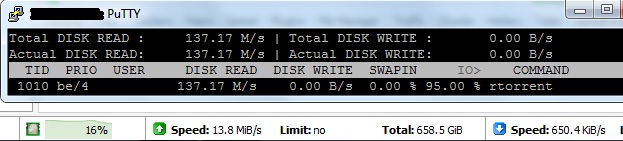
It is getting worse, reading 10x
amlopin
on 10 Feb 2019
does anyone have any time to look at this issue?
Ondjultomte
on 19 Feb 2019
Absolutely ridiculous issue but no one knows how to fix it? Is this project dead already?
ghost
on 13 May 2019
Given the unique use of mmap and the existing code base, it's not an easy problem to solve. Any insight you or anyone else can shed would be appreciated.
 kannibalox
on 15 May 2019
kannibalox
on 15 May 2019
Weeeeeeeeeeee
rTorrent is dead.
 lps-rocks
on 29 May 2019
lps-rocks
on 29 May 2019
rTorrent is dead
Far from it ... :)
chros73
on 29 May 2019
Switched over to Deluge as this was causing a huge I/O bottleneck. I get constant 20-40 MB/s upload which results in a constant 70-100 MB/s read. That's a lot of unnecessary random reads for HDDs to handle.
This issue may have some long term effect on the longevity and performance of the hardware too.
ghost
on 2 Aug 2019
Any update? can't improve ul speed due to the heavy disk read io.
colinhd8
on 23 Sep 2019
Hopefully rakshasa will take a look at this one if he finishes the other tasks.
chros73
on 23 Sep 2019
Hope that, but i think this is the highest priority for the moment, as the network speed become more and more fast.
colinhd8
on 24 Sep 2019
I'll look into adding some tests next, either with the current rtorrent-vagrant or docker version.
Are you using SSD?
rakshasa
on 24 Sep 2019
Good news.
No, i'm not using SSD. If need my help, please let me know. Thanks.
colinhd8
on 24 Sep 2019
i think this is the highest priority for the moment, as the network speed become more and more fast.
Agreed.
I'll look into adding some tests next
Thanks!
chros73
on 24 Sep 2019
Any update? Thanks!
amlopin
on 1 Nov 2019
I'm still working on a new test environment, not much work on the client itself will happen until that is done.
rakshasa
on 2 Nov 2019
@ghost @chros73 @rakshasa I at least seem to have found a solution. Here's seeding (no leeching ATM) with global upload throttle set to 1024 KB/s (8 Mbps) and it's currently seeding at that EXACT speed from 4 torrents. If someone wants help chime in. Note that rtorrent's code has NOT been changed. Some, but not many, "Linux stuff changes" and an .rtorrent.rc that seems to be ideal, but none of them involve changing sending and receiving Megabytes settings etc (those that might require global system network settings changes).
EDIT: Some additional information and typos.
By running sudo iotop -bkoqqq -n 20 -p $(pidof -s rtorrent-latest), with the default interval as ncurses UI, 1 second, I get this, most of them LOWER reads than 1024 K/s, and some logically over that then, but in total well, you don't even have to do the math:
1181.64 K/s    0.00 K/s  0.00 %  0.86 % rtorrent-latest -b 10.x
843.59 K/s    0.00 K/s  0.00 %  0.91 % rtorrent-latest -b 10.x
1036.13 K/s    0.00 K/s  0.00 %  1.41 % rtorrent-latest -b 10.x
653.82 K/s    0.00 K/s  0.00 %  0.98 % rtorrent-latest -b 10.x
673.43 K/s    0.00 K/s  0.00 %  0.73 % rtorrent-latest -b 10.x
801.16 K/s    0.00 K/s  0.00 %  1.10 % rtorrent-latest -b 10.x
1243.52 K/s    0.00 K/s  0.00 %  1.63 % rtorrent-latest -b 10.x
1179.70 K/s    0.00 K/s  0.00 %  1.36 % rtorrent-latest -b 10.x
912.45 K/s    0.00 K/s  0.00 %  1.13 % rtorrent-latest -b 10.x
936.64 K/s    0.00 K/s  0.00 %  1.34 % rtorrent-latest -b 10.x
728.87 K/s    0.00 K/s  0.00 %  0.80 % rtorrent-latest -b 10.x
1048.61 K/s    0.00 K/s  0.00 %  0.54 % rtorrent-latest -b 10.x
1726.09 K/s    0.00 K/s  0.00 %  1.77 % rtorrent-latest -b 10.x
948.37 K/s    0.00 K/s  0.00 %  1.49 % rtorrent-latest -b 10.x
857.90 K/s    0.00 K/s  0.00 %  1.07 % rtorrent-latest -b 10.x
1063.98 K/s    0.00 K/s  0.00 %  1.48 % rtorrent-latest -b 10.x
638.37 K/s    0.00 K/s  0.00 %  0.36 % rtorrent-latest -b 10.x
546.13 K/s    0.00 K/s  0.00 %  0.75 % rtorrent-latest -b 10.x
518.26 K/s    0.00 K/s  0.00 %  0.91 % rtorrent-latest -b 10.x
NOTES:
- I only copied in 19 from the 20 runs as the first always shows 0 K/s
- You can see I'm running a process called
rtorrent-latest. I built libtorrent statically and then rtorrent against that which only results in 1 file of 2.5 MB, smaller than the binary +.sofor 0.9.6 from the official Ubuntu repo at 2.6 MB together, the binary running, which makes the total size actually smaller than if building libtorrent as a shared library (which builds and installs*.sofile) rtorrent needs if libtorrent is not built statically and rtorrent against that. Of course I also runstrip --strip-unneeded <binary file>, BUT that must also be done on the.sofile if building libtorrent shared to NOT get error (not just a warning) when runninglintian <deb file>, an official Debian deb packager tool which checks everything about your generated deb package and one should at least avoid errors, although it'll install anyway for many errors, just that they're considered very bad practice (actually people report bugs on Launchpad if they find it outputs "something wrong" for a package in the repos, like a warning, and Ubuntu developers fix it, either the problem, or add an override if it's just a warning and no way to fix it anyway). Warnings can be added to the "overrides", for example if the package has no manfile because it's not needed, a.sofile is executable which they shouldn't be, file permissions not standard 644 and 755 depending on type/directory, a shared library is included but also a runnable binary and those 2 names don't match, and things like that - This package installs just
rtorrent-latestinto/usr/bin, as it was configured with--program-suffix=-latestand that makes it possible to have both the stable and the latest version installed without problems. And no, deb packages should not install into/usr/local/bin. That gives a warning. Also goes for/opt, but many packages put everything there as they often include their own libraries and such to make sure it works no matter what, like Google Chrome. Of course such warnings can just be added to "overrides" forlintian, then it'll just show for instance1 ignored (warning). No big deal. But not/usr/local. It simply isn't for packages. And since we're only talking 1 file here with a name (rtorrent-latest) that CAN'T possibly clash with any other packages in repos, it definitely should be in/usr/bin, just like the stable rtorrent package in the repo already.
* So this is rtorrent 0.9.8 and libtorrent 0.13.8, BUT that is not the reason the disk read speeds are normal. They are also just having fine readings running rtorrent instead (which runs 0.9.6 which is also installed from the official universe repo)
* Running and compiled on a Ubuntu 18.04 VM (Libvirt+KVM+QEMU in CPU passthrough mode, but only 1 VCPU/thread given to it, as it's enough, and host PC has a bridge configured and the VM uses it and OpenVPN + UFW rules to only let it communicate with the Internet through the VPN tunnel but it can connect and be connected to to/from servers/clients on the main LAN subnet, but no routing out through there, so the VM appears just as any Ethernet (cabled) device on the same subnet as the LAN, shows in the router hosts list for instance), with as minimal as possible install (Ubuntu network installer, "mini.iso" just above 40 MB, which has a very good console UI for the initial setup, all the typical as found in the graphical installer, but installs all the latest packages to install the system from the repos, so you'll see no updates available after install, and with a fast line it's much faster than first installing from a huge server ISO with old packages instead of this 40 MB ISO, then updating tons of packages), installing the LTS HWE stack afterwards as a minimal install is considered a server and therefore sticks to the GA kernel even though the HWE documentation page recommends the HWE stack for servers as well. After that removing unnecessary packages (always some even on a minimal install one will never use if it's for say rtorrent only and most won't anyway, and several use some resources), and after that installing the useful packages I always use, adding BASH aliases etc. To run this test I actually didn't run the above command but just iott
- Of course the package has in it's
controlfile all the dependencies (not build dependencies as it's already built) libtorrent and rtorrent need (gotten fromapt show <package names>) I'm thinking of signing this package and adding it to my personal deb repository, which has NO packages that can overlap with any repo or overwrite any files other packages owns, kind of the point! Or create a new repo just for this, not really necessary. Then you can run both rtorrent stable and latest just with 2 different commands. For testing which works best, use the new XMLRPC daemon mode that doesn't exist in 0.9.6, or whatever. What do you think?
* NOTE: My package has 0 (zero)
lintianwarnings, so it's built perfectly according to that tool which really catches everything "wrong"For me 0.9.8 is as stable as 0.9.6, and just as stable compiling it statically as having the shared library separately as a
.soin/usr/lib/x86_64-linux-gnu. Actually only benefits! Smaller deb size, smaller total install size, 1 file only (also mandatory control file, changelog file, copyright file, optional but warning if not manfile)* Here I've just added the manfile from 0.9.6, but, although it's no rush, I'm gonna fix it so that it doesn't show the deprecated configuration options anymore, simply replacing them with the new syntax (should've been done a long time ago), and also adding links to the wiki and the relevant pages and that it's really much better to read up there. Maybe just keep the basic info about the program, keyboard shortcuts in the manfile, and link how to configure to the wiki?. Would make it less work
Note that latest stable (added as a release on its GitHub page) of
ruTorrent(web front-end) doesn't fully work with 0.9.8/0.13.8. Well the only thing that doesn't work for me is opening the settings (gear icon). Otherwise fine. BUT clone the repository and it should work as a fix has been added (can be seen in a code commit). The developer probably won't add an official release called stable for rtorrent that isn't considered the stable one (0.9.6)* Transdroid Android app works fine however, NOT the Google Play version, sideload the latest APK, full featured version from https://www.transdroid.org/download/ . It uses XMLRPC as other clients
PS 1: Note that if I'm seeding at a very low speed that is also fluctuating a lot, reads can be much higher than the seeding should need, but then again that's a low read speed that shouldn't wear out a HDD or a modern SSD/NVMe anyways in years (and backups folks, use LUKSv2 encryption on the backup of course). For leeching/seeding >=1024 KB/s it's at least much much better. Also lower stable speeds (enough seeders and using throttling so the speed is stable) seem much better. But if basically always leeching/seeding below 1024 KB/s (on a slow line, seeding torrents with few peers interested, or whatever), a few Linux values I've used might be necessary to change. Gotta investigate that more.
PS 2: I know there's no link to my deb package here, it's just of anyone's interested in a repo for "latest" for Ubuntu and new enough Debian PCs/VMs. Just explained. If someone wants it I can as said add it to repo and you add it or simply upload the deb to my domain with a fixed URL folder, and always keep the latest version there, which then must be checked manually if a new one is available, possible fixes/additions like a better manpage or whatever, example docs etc, even though using the same compiled rtorrent/libtorrent. And of course in the event of a new rtorrent/libtorrent version it'll be rebuilt. Using the repo solution would just update it as any package. Depends what one prefers. All previous can be found anyway.
 olejon
on 3 Dec 2019
olejon
on 3 Dec 2019
EDIT: Some additional information and typos.
Also I just seeded at 768 KB/s and read speeds from the command above were between 200-500 K/s, so lower for that speed as well. Sometimes it may raise for a while to above seed speed, must serve enough of course, catching up from cache etc. In total over a long period it should be around total seeded Megabytes with this behavior. Haven't run a really long test and calculated though. But seems so.
Usually the first minute(s), when doing scraping, DHT, PEX, hashing etc. And between some (pretty long) intervals, which I believe can sometimes be as said because of fluctuating speeds like down to 50 KB/s up then pretty rapidly 500+ KB/s again. And suppose rtorrent does some stuff once in a while (know it by default saves the session every 20 minutes).
Anyways goes back down to this reasonble low disk read behavior pretty quickly again!
Non-responding trackers may contribute to this (haven't tested it yet as I always disable them), at least to performance in general. They should respond and show their swarm in less than 10 seconds in my experience (300 Mbps line but we're talking a few UDP requests here so). You quickly notice those who've been taken offline. If the first one is one of those, disable it immediately, because why not...
DHT, PEX and UDP trackers being on has nothing to do with this. Tried without. Got same issue as the OP without my tweaks.
olejon
on 3 Dec 2019
Even with a throttle of 16 KB/s for 4 torrents, running the "above-above" iotop command only shows the disk is being read from 7 out of 19 times/seconds. So 12 of the seconds it runs there's zero output meaning zero K/s reads, meaning zero reading from the disk. The 7 ones are higher than they should be (but hey with a modern disk c'mon).
But seeding stable at 128-256 KB/s it's usually always reasonable and certainly >= 512 KB/s.
One thing I noticed is that when a torrent is doing DHT, reading goes up, usually more the less seeding speeds. Makes some sense I guess as the dht cache file in the session directory is then usually a "victim" for I/O.
Pretty satisfied here now. Was a "disaster" before as many have written/shown - not that my infrastructure and hardware can't deal with it - it's just unnecessary when one can avoid it.
olejon
on 4 Dec 2019
@olejon - I think a lot of your scenario is just as unacceptable considering you're seeing exactly what we're describing just under very low speeds and controlled scenarios causing you to deem the effects negligible. At higher speeds..say.. 10MB/s seeding to many slow peers (common in the real world) the 4x to 10x multiplier can cause issues. It's wasting clock cycles, memory space, power, and disk throughput.
This is also an issue limited to rTorrent/libtorrent - other torrent clients Transmission/Deluge etc don't exhibit this behavior which suggests it's something within the way rTorrent/libtorrent reads data from disk. That further suggests an underlying design issue with rTorrent's internal caching mechanisms which realistically are obsolete and are instead causing performance degradations.
I've generally tracked this down to having many slow peers connected. rTorrent reads WAY more data than necessary at a time (almost like it's re-reading entire chunks when the client only requests part of a chunk in an attempt to cache).
The internal cache mechanisms of rTorrent/libtorrent were significantly more important when single drive rotational media was at the heart of seeding torrents but with the rapid deployment of SATA SSDs and NVMe SSDs - We're now seeing the internal caching mechanisms cause degradation.
I think this needs to be tracked down and resolved to ensure that rTorrent maintains it's status as one of the fastest torrent clients out there. In my personal testing, Transmission is far lighter weight and just as fast. While it doesn't have the same internal features as rTorrent it's written in pure C and lets the operating system handle most of the caching of file data.
lps-rocks
on 4 Dec 2019
@lps-rocks Just added a comment above. I'm talking global seeding throttle. Doesn't seem to matter if the peers are seeding slow or fast at all. It's the total disk read KB/s vs seeding KB/s and it is fine for me.
I'll try a much higher seeding speed as you suggest to more peers, see if many of them leech slowly and see, but here it seems above 256-512 it's reasonable now, and below shouldn't degradade a modern disk for years. Basically "reads what it seeds". How many torrents are you talking then?
Yes, I know there's a problem for sure, and the developer has basically acknowledged that in his comment above. Now he's a single developer and everyone can help.
Regarding Deluge, Transmission etc, well not 2.5 MB in total and certainly not something I'll put on a minimal VM for many torrents. On my Linux desktops I use Transmission for the occasional download where BitTorrent is an alternative, as my line is often faster than the web server link so never had any reason to check I/O there (as Transmission is good and basic, but nowhere the flexibility of rtorrent).
BTW: Just trying to help(!). Issue is there. Can be overcome. More tests need to be done, so give me more examples if you have.
Little off topic: My files go to pretty new LUKSv2 (very little overhead, very secure with a good password) Western Digital 5400 RPM HDDs. Modern such HDDs from a good brand like WD actually perform almost as good as even SSDs sold today on write, and almost as good as popular SATA3 SSDs from 2014 (I have two) for constant read/write (not for OS, IDEs etc with lots of I/O on thousands of files).
My SSDs are 2 x 1 TB (2 TB total) M.2 NVMes running PCI Express v 4 (only X570/Zen2 Ryzen 3 for now), but they're not the ones storing the files. WAY too expensive for that when 4TB HDDs that does the job (even fully encrypted before any partition table is even there) cost nothing!
The NVMes has a rating of 4 GB/s both R/W but I've gotten 4.9 GB/s R/W on Linux using a typical SSD test parameter tested several times (although shifting between them, as they heat up hard under such a test but has a heatsink on them so cools down quickly in a chassis with good air flow, and just test the other, and then back to the first) after the first 2 BIOS updates from AMD + firmware update for the NVMes, which slowed them actually, but the HWE stack for the kernel got updated shortly after and made it outperform their specs. Although system booted in 2 seconds to full desktop after BIOS POST before on an Intel PCIe3 4x slower, you don't notice that, well a little as it goes so fast the "monitors almost doesn't know what to show" (splash screen set to off in GRUB config of course, wouldn't see it anyway). Noticable in programs that load at lot of stuff like an IDE like Android Studio.
The manufacturer warranty is basically almost as long as what we have here in Norway for all consumer goods that should last at least 5 years, namely 5 years (if manufacturer's is shorter it's superseded by our consumer law), including PC parts or sofas for that matter (search "reklamasjonsrett" and it translates good with Google Translate).
If one would become really slow, and only if it can't be proved it's my fault, I'll get a new or similar/better using the "reklamasjonsrett", sending to the shop it was bought from. If damaged on the outside and that an OS can recognize it would be the only check probably, not speed degradation, hard to prove it's my fault, because the proving requires, depending on the thing, photos/videos/diagnostics++ and you can always complain if you don't agree. Using manufacturer warranty they might check that and find it has had more than what many call "consumed", here because of I/O.
TLDR; Issue exists and I don't deny that. My system is fine now for my use but test cases are welcome!
olejon
on 4 Dec 2019
A lot of the examples above are mine.
The engineering complexities of libtorrent/rtorrent take a LONG time to get up to speed on - I've tried and submitted a few patches here and there - specifically fixing the duplicate peer-id problem due to a time-seeded RNG.
I continue to have the problem to this day. Right now im seeding a little over 1,000 torrents. at this current time im seeding ~ 330KiB/s to 4 active peers but rtorrent is reading anywhere from 3-8MB/s - a factor of 10-20x.
I'm on rTorrent 0.9.8 - running in an alpine linux docker container.
execute = {sh,-c,/usr/bin/php7 /usr/share/webapps/rutorrent/php/initplugins.php abc &}

# Instance layout (base paths)
method.insert = cfg.basedir, private|const|string, (cat,"/config/rtorrent/")
method.insert = cfg.watch,   private|const|string, (cat,"/downloads/watch/")
method.insert = cfg.logs,    private|const|string, (cat,"/config/log/rtorrent/")
method.insert = cfg.logfile, private|const|string, (cat,(cfg.logs),"rtorrent.log")

# Directory Management
session.path.set = (cat, (cfg.basedir), "rtorrent_sess")
directory.default.set = (cat,"/downloads/")

# Logging:
#   Levels = critical error warn notice info debug
#   Groups = connection_* dht_* peer_* rpc_* storage_* thread_* tracker_* torrent_*
log.execute = (cat, (cfg.logs), "execute.log")
print = (cat, "Logging to ", (cfg.logfile))
log.open_file = "log", (cfg.logfile)
log.add_output = "info", "log"
#log.add_output = "tracker_debug", "log"

# Prepare rtorrent communication socket
execute.nothrow = rm,/run/php/.rtorrent.sock
network.scgi.open_local = /run/php/.rtorrent.sock
schedule = socket_chmod,0,0,"execute=chmod,0660,/run/php/.rtorrent.sock"
schedule = socket_chgrp,0,0,"execute=chgrp,abc,/run/php/.rtorrent.sock"


# Other operational settings (check & adapt)
system.cwd.set = (directory.default)
network.http.dns_cache_timeout.set = 25
#network.http.capath.set = "/etc/ssl/certs"
#network.http.ssl_verify_peer.set = 0
#network.http.ssl_verify_host.set = 0
#keys.layout.set = qwerty

# Maximum and minimum number of peers to connect to per torrent
throttle.min_peers.normal.set = 50
throttle.max_peers.normal.set = 100

# Same as above but for seeding completed torrents (-1 = same as downloading)
throttle.min_peers.seed.set = -1
throttle.max_peers.seed.set = -1

# Maximum number of simultanious uploads per torrent
throttle.max_uploads.set = 250

# Global upload and download rate in KiB. "0" for unlimited
throttle.global_down.max_rate.set_kb = 0
throttle.global_up.max_rate.set_kb = 0

# Maximum number of simultaneous downloads and uploads slots (global slots!) (`max_downloads_global`, `max_uploads_global`)
throttle.max_downloads.global.set = 0
throttle.max_uploads.global.set   = 0

# Enable DHT support for trackerless torrents or when all trackers are down
# May be set to "disable" (completely disable DHT), "off" (do not start DHT),
# "auto" (start and stop DHT as needed), or "on" (start DHT immediately)
dht.mode.set = off

# Enable peer exchange (for torrents not marked private)
protocol.pex.set = no

# Check hash for finished torrents. Might be usefull until the bug is
# fixed that causes lack of diskspace not to be properly reported
pieces.hash.on_completion.set = no

# Set whether the client should try to connect to UDP trackers
trackers.use_udp.set = no

# Whether to allocate disk space for a new torrent. Default: `0`
system.file.allocate.set = 1

# Preloading a piece of a file. Default: `0` Possible values: `0` (Off) , `1` (Madvise) , `2` (Direct paging).
pieces.preload.type.set = 0
#pieces.preload.min_size.set = 262144
#pieces.preload.min_rate.set = 5120

# Memory resource usage (increase if you have a large number of items loaded,
# and/or the available resources to spend)
pieces.memory.max.set = 4G
network.xmlrpc.size_limit.set = 4M

# Encryption options, set to none (default) or any combination of the following:
# allow_incoming, try_outgoing, require, require_RC4, enable_retry, prefer_plaintext
protocol.encryption.set = allow_incoming,try_outgoing,enable_retry

# Set the umask for this process, which is applied to all files created by the program
system.umask.set = 0022

# Add a preferred filename encoding to the list
encoding.add = utf8

# Watch a directory for new torrents, and stop those that have been deleted
schedule2 = watch_directory_99,10,10,(cat,"load.start=",(cfg.watch),"*.torrent")
#schedule2 = untied_directory, 5, 5, (cat,"stop_untied=",(cfg.watch),"*.torrent")

# Close torrents when diskspace is low
schedule2 = monitor_diskspace, 15, 60, ((close_low_diskspace,1000M))

# Finished Command
method.set_key = event.download.finished,auto_extract,"execute={/usr/bin/python3,/config/autoextract/autoextract.py,-vvvvv,-c,/config/autoextract/autoextract.yml,-i,$d.hash=,-s,main}"

# Commit session data
schedule2 = session_save,1200,3600,session.save=

# Maximum number of connections rtorrent can accept/make (`sockets`)
network.max_open_sockets.set = 16384

# Maximum number of open files rtorrent can keep open (you have to modify the system wide settings with ulimit!) (`set_max_open_files`)
network.max_open_files.set = 8192

# Maximum number of simultaneous HTTP request (used by announce or scrape requests) Default: `32` (`set_max_open_http`)
network.http.max_open.set = 1024

# Send and receive buffer size for socket. Disabled by default (`0`), this means the default is used by OS
#  (you have to modify the system wide settings!) (`send_buffer_size`, `receive_buffer_size`)
# Increasing buffer sizes may help reduce disk seeking, connection polling as more data is buffered each time
#  the socket is written to. It will result higher memory usage (not visible in rtorrent process!).
network.receive_buffer.size.set =  4M
network.send_buffer.size.set    = 12M

# Networking
network.bind_address.set = 0.0.0.0
network.port_range.set = 9000-9000
network.port_random.set = no

# PyroScope SETTINGS
#

# `system.has` polyfill (the "false=" silences the `catch` command, in rTorrent-PS)
catch = {"false=", "method.redirect=system.has,false"}

# Set "pyro.extended" to 1 to activate rTorrent-PS features!
# (the automatic way used here only works with rTorrent-PS builds after 2018-05-30)
method.insert = pyro.extended, const|value, 0

# Set "pyro.bin_dir" to the "bin" directory where you installed the pyrocore tools!
# Make sure you end it with a "/"; if this is left empty, then the shell's path is searched.
method.insert = pyro.bin_dir, string|const,"/config/bin/"

# Remove the ".default" if you want to change something (else your changes
# get over-written on update, when you put them into ``*.default`` files).
import = /config/.pyroscope/rtorrent-pyro.rc.default

# TORQUE: Daemon watchdog schedule
# Must be activated by touching the "~/.pyroscope/run/pyrotorque" file!
# Set the second argument to "-v" or "-q" to change log verbosity.
schedule = pyro_watchdog,30,300,"pyro.watchdog=~/.pyroscope,"
@lps-rocks Over 1,000 torrents but just ~330 KB/s in total to 4 peers in total or per torrent?
Can't add that many before getting the RAM update kit for the host of the VM. Probably not even then. An Intel NUC from 2014 with an i3 CPU that supports max 16 GB RAM SODIMM, so if your torrents have many files in them probably impossible to test on that one (how many files in total?). But bare metal on my workstation however, should be fine to test. A hassle to get 1,000 torrents though that people are actually seeding to and from. Unless you have the collection from your session directory? :-)
EDIT: Nice you're trying to contribute to rtorrent itself!
olejon
on 4 Dec 2019
@lps-rocks Over 1,000 torrents but just ~330 KB/s in _total to 4 peers in total or per torrent?_
4 in total (but now 13). rTorrent is consuming ~ 1GB of RAM. A total of 7757 file descriptors (file and network) combined (retrieved that statistic from /proc/[pid]/fd/. Seeding at 550KiB/s and reading ~ 4-8MB/s.
The docker container is tuned to allow 262144 file handles per process (soft and hard limits). Currently seeding 7420 files total from 1048 torrents. rTorrent has a configured limit of 8192 file handles allowed (it will rotate out file handles based on LRU if it needs a new file handle for an actively used file).
I do use the session directory - it's set to save once an hour as evidenced by the config above. I can't give out the session data or the torrents in it.
lps-rocks
on 4 Dec 2019
EDIT typos etc.
94 peers, 6 torrents, ~2 MB/s total upload (no throttle), 0.5x - 2.0x multiplier mostly. Seems reasonable. Half and double. Of the 2 torrents with 39 and 40 peers respectively, of those listed actually downloading (suppose more would maybe if more slots but again need the ordered RAM first, or just install my deb on my workstation, not for now), the vast majority is downloading below 50 KB/s for the first and many below 25 KB/s. A few in all 6 make up the 2 MB/s total.
olejon
on 4 Dec 2019
Good news, thanks for your hard work. @olejon
colinhd8
on 5 Dec 2019
Seeding 9 torrents at ~1,600 KB/s (no throttle, no leeching), sudo iotop -bkoqqq -n 20 -p $(pidof -s rtorrent-latest gives 9 above, 9 below and 1 basically at that speed in K/s. As always 19 valid results in total, although 20 asked for, as first is always 0 K/s from that command.
I have probable evidence, 2 big ones shown by tests, that this isn't real disk reading, but more like false readings from iotop/htop/atop.
It basically shows internal process(es) network activity as disk readings, at least with my setup. I need to check 1 more thing first to verify that.
If so, no need to panic about HW degradation because of rtorrent. Must read what it uploads and write what it downloads of course. With as above 1,000 torrents+ that's a lot of R/W and hard on any drive anyway.
Anyone actually gotten HW failure, disk corruption and/or more and more problems from disk S.M.A.R.T reports, or significant speed degradation, by using rtorrent vs another client?
If NFS for files, remember async must be used. SMB (cifs module on Linux) and SFTP also use async. For instance rsync-ing directories with many files (doesn't have to be that many really) or many files on an NFS sync export is horrible the way rsync works, but a very popular tool worldwide to automatically sync mirrors, like Linux distro repos, and safe backups, if over the Internet then usually SFTP with key-pairs I assume, to have it secure, avoid data corruption happening as rsync hash checks all pieces, and be able to pause an rsync with Ctrl+z etc, start over if connection failed but not all over, just from where rsync lost connection (it checks all files in pieces, so one can abort and resume a partially backed up file for instance, a big movie or whatever).
Like large backups/syncs between servers of many directories/files not necessarily big in size, like just even /etc, as many files, is terrible with any network mount using sync or an option that does basically what NFS sync does. E.g. CIFS can do sync instead of default async. Using rsync with sync set in protocol is of course possible but super slowv for directories with many files, but if files only change rarely or new/deleted/renamed rarely, e.g. /etc for many, then a sync first via any async connection (or just USB drive with an archive preserving the permissions, timestamps etc, if something internal) as first backup to make it go blazingly fast, makes the coming backups with sync instead of async totally OK.
Seen guides that in .rtorrent.rc uses rsync to copy over files from one directory to another using a scheduler or whatever (either from an SSD to and HDD, often then to another machine over whatever protocol used), and later delete them from the machine running rtorrent when reached a certain ratio, and that would be terrible with a sync'ed network mount. Using mv or cp seems more used in guides though, and that's much faster than rsync then since they don't hash check the pieces == possible data corruption when transferred. But any moving or copying of a lot of files will be slow with sync network mount.
Better to not store the session directory on a mounted network connection. It's so small anyway, even with a ton of torrents, just causes more true R/W and unnecessary network traffic, although I've tried and it's not that much with 10 torrents but with 1,000+ it's probably significant.
Depends on your infrastructure, switch, AP, HW on client/server, traffic on physical and virtual interfaces, switching ports which can have many on one for e.g. VMs, bridge mode or not, or worse Wi-Fi 802.11g/n (2.4 GHz) of course, even more packages in the air. Maybe not a problem for you as you've probably checked the speed, but for nearby people on other APs it might be, or it might be you depending on their usage, if a lot of APs nearby are on overlapping channels (not just 2 APs except yours - say those are on channel 1 and 11 and you use channel 6 - in that case no overlapping/interference with the neighbors or whatever, but gotta live pretty rural for that nowadays).
rtorrent uses async, but can be forced to sync with an rtorrent command that'll override any async connection. It's in rtorrent's full list of configuration options (well that page lacks some new options from 0.9.7 like compact mode for Download view in ncurses UI, and can only be found outside the wiki and in the source code).
Can be useful to activate (pieces.sync.always_safe.set = yes) to see if it worsens Read K/s, as it SHOULD do that. If it doesn't worsens Read K/s, there's definitely tweaking to be done!
Using CIFS to mount Samba/Windows shares without tweaking mount/fstab parameters is guaranteed to cause enormous read multiplier BTW, just as NFS without server export async and mount/fstab tweaks on client side. Not that it necessarily matters if it's false readings as said, but it does cause network traffic that is very undesirable if for some reason client to server is Wi-Fi or not >= 1 Gbps Ethernet (if it's 100 Mbps in other words).
And for CIFS always use a kernel that supports vers=3.1.1 (Windows 10/Server 2016+) as it's more secure and previous versions will be deprecated as Windows 8 and server 2012 (== vers 3.0, or actually 3.02 is the latest of 3.0 and can be set, but still to old), those Windows versions will be deprecated and 3.0 phased out like 2.0 should never be used no more (Windows 7).
For Ubuntu 18.04 that means if you it's a server install or a desktop install that wasn't the first point release, one must update to the LTS HWE stack as CIFS in GA kernel doesn't support vers=3.1.1. Always a good idea anyways and just 1 command and reboot.
Basically to check uname -r should say >= 5.0.0-x and not 4.15.x which is the GA kernel (really most recent 5.0.0-37 is actually 5.0.21 now as one can see by various commands, as package name differs from actual kernel version and uname uses the package version not the real kernel version running).
olejon
on 5 Dec 2019
That's a lot of good information, but the system calls used for network i/o and disk i/o are different. If you use strace you can see network traffic uses sendto/recvfrom whereas disk uses open/read/write/close.
iotop utilizes kernel per-process I/O accounting. You can see this in action by using cat /proc/[pid]/io. Watching these counters manually shows that when seeding the write counter is not incrementing which shows that those counters do not include network traffic.
This I/O accounting is at the file level. So any filesystem overhead would also not be reflected in those statistics. That's handled elsewhere in the kernel.
Edit: in all of my examples I'm using local storage as well.
lps-rocks
on 5 Dec 2019
@lps-rocks I know it sounds weird. I'll get back after I can see if it seems true what I see. I'm not sure how iotop shows traffic inside a process that's really network traffic for that process itself internally, sockets etc, and not disk. Haven't dug very much into that part of Linux since never needed before. I'll post a point list after 2 more tests actually. 1 of them is just a suggestion it's not real disk I/O, but the other is. My current VM Host doesn't support the latter, gotta do it on my workstation anyway. When bwm-ng and iotop don't correspond at all for client/server, for instance.
olejon
on 5 Dec 2019
@olejon - Here's the relevant source code for iotop - It's actually just a python program that reads those counters and displays the deltas - https://github.com/kahing/iotop/blob/master/iotop/data.py
Hopefully that helps point you in the direction. Yeah tracking down io issues can be a pretty deep rabbit hole to go down.
lps-rocks
on 5 Dec 2019
@lps-rocks Just edited a little above again. One big clue is what iotop shows on the Host of the VM when doing ACTUAL heavy reading. Not rtorrent but a command that uses a speed that can be seen in the output from the command itself when running as well... AND it matches iotop - using iotop on Host or VM.
While ncurses UI speeds shown in rtorrent does NOT match iotop here at all for many. Including me but at least it calculates more or less to the same reading in KB/s when using my setup, never more than 10 torrents but that's because of HW limitations (where my workstation comes in for more tests as it got real horsepowers) and, well, I usually don't have more than 4-6 torrents, now is an exception for checking in once in a while - so I'm a pretty typical BitTorrent user more or less I think - but torrent amount doesn't seem to matter, more does the seeding speed. Above a certain seeding speed point letting rtorrent get too much "liberty" (not tuned global and per torrent slots, and max/min peers and tracker numwant, for instance), I get a multiplier but not as grave as many has posted.
A common command from a well known project that reads a lot from many files but practically no writing - when run on some certain directories - I see the VM reads about the same KB/s according to iotop as when seeding with rtorrent at say 2048 KB/s and getting the "4x multiplier" the OP experience according to iotop for the rtorrent process, meaning it shows ~8192 KB/s for both, and that's a good and easy test then for checking on the Host, the Hypervisor disk activity (only) according to same tool, iotop, on the Host.
And a network bridged mount and I/O there vs bwm-ng and similar tools (various other tools show the same stats there, so I use it, as it's a typical example of GNU/UNIX "one command that does one thing and does it well").
olejon
on 5 Dec 2019
Ugh edits. Please don't respond using email if subscribed. Wait a few minutes. I always think of something more to add or write it better. Sorry and rock'on @lps-rocks !
When someone says 1,000+ torrents, but only seeding at a little above 300 KB/s, well that really sounds like a seedbox service where people simply download their finished torrents and let them seed for eternity even though obviously there seem to be little interest in 99 % of them. Or if not running a seedbox service, maybe cheaper to use one? A proper provider has it all tuned, maybe not using rtorrent or code changed and not shared with the world, the HW for it and scalable, and probably RAIDs (0 and 1) of HDDs and hot swapping of disks if they fail.
I mean the HW for 1,000 torrents and the consumption of the content can't possibly be for 1 household (say 4-5 people) or a similar amount of friends using it. And UDP trackers, DHT and PEX off in the rtorrent config suggests very much private trackers AFAIK. IDK. My first thought.
If not, guys with that amount of seeding are the heroes that let me get old documentaries and documentary-dramas (so old there's no copyright anymore, at least not in my country, just like music copyright expires and cover bands make covers and teens think they're geniuses!) which I find and I'm SO happy to see that there's 1 seeder at least, often just 1. Those I seed for a long time, but seldom any interest so deleted like if after weeks only having a ratio of 0.12 or something (for some reason). I do always go for at least 2-8 ratio, depending on others pending.
olejon
on 5 Dec 2019
Comments since Nov 2 are off-topic _at best_.
https://help.github.com/en/github/building-a-strong-community/managing-disruptive-comments
 petarb
on 8 Dec 2019
petarb
on 8 Dec 2019
Comments since Nov 2 are off-topic _at best_.
https://help.github.com/en/github/building-a-strong-community/managing-disruptive-comments
@petarb - Are you an author or contributor to this project? I'm trying to determine if you're being serious.
There is some good discussion in there about if its possible the tools being used to measure I/O are possibly flawed. Examining all angles of a potential problem including how the information is being gathered is quite on topic.
Please do not arm-chair moderate projects you have not contributed to or authored.
@olejon - Your last reply though does start getting into topics that are not related and not important. We're here to discuss the fact that there is either a problem with code. Where the problem is remains to be seen.
lps-rocks
on 8 Dec 2019
At some point I'm going to have a test environment ready to test this and having people's experiences related to this isn't a bad thing.
rakshasa
on 9 Dec 2019
At some point I'm going to have a test environment ready to test this and having people's experiences related to this isn't a bad thing.
It'll be nice to finally get this one nailed down, I think I have an idea of what may be causing it - I did dig into the code but i can't remember if its set up to read the entire chunk/piece or just the requested part from disk when a peer requests only a small portion of that piece.
lps-rocks
on 9 Dec 2019
I've made some extensive experimenting. Hopefully in the holidays I'll be able to write a guide with:
- Commands to reproduce how to boost the multiplier to the max (oh no! ... don't worry it's only temporary, no process restarts or reboots necessary) - then lower it to get the desired result as seen in the screenshots below, or a 30-60 seconds average R/W of actual seeding and/or leeching speeds (Cron or a Systemd timer - depending how fine-tuned you need it - can be used to free up resources for rTorrent's actual active data if it doesn't do it itself)
- How it's possible to seed without any I/O. And when I/O is unavoidable, how to make the
average disk read == seeding speed. When I/O is unavoidable, which goes for heavy use cases but might also for typical BT use cases, as it depends on the HW situation - As per point 2 and unavoidable I/O, how to best handle that the way rTorrent handles data, without worrying about disk degradation. HW probably already in possession. Likely if one doesn't throw away anything one doesn't use anymore. If not it's very cheap and should last for years and years, and even with some degradation, more years, maybe except very fast Internet links, actually fully utilized for torrents (and other heavy file downloads/uploads)...
- Why there's a multiplier when downloading
- How to eliminate, more or less, any write multiplier during download (an average write-to-disk over some 30-60 seconds during the download gives a total of the actual download speed), and also make total read-write I/O to an average of leeching speed + seeding speed during the download (as we also usually seed when leeching if peers are interested)
- For those storing files on a file server, how to tweak it correctly. Through mount options tweaks on the client, but also the server side share config, some optional global server config options that doesn't hurt and may improve client <> server connection
- The relevant rTorrent config options (just a few, none of the fancy stuff)
8. Show that iotop falsely interpret process and network to mem/buff/cache as disk I/O... Because it does
SORRY for basic screenshots editing, but I did it on my phone (SSH > Screenshot > Google Photos edit > Upload) and the rTorrent ncurses UI isn't totally precise...
Throttle temporarily set to 2048 KB/s to seed at full speed guaranteed

Monitoring only rTorrent I/O, but there's no other either apart from the occasional system services etc R/W

olejon
on 23 Dec 2019
I'll be curious, thanks!
chros73
on 23 Dec 2019
I'm having the same issue. Was getting 100-150MB/s reading on an HDD.
Seems the issue mostly goes away when using a downloads dir from within a mergerfs merge. I'm now seeing about 5-15MB/s on rtorrent uploading about 500-800KB/s
My mergerfs settings for anyone interested:
/files/downloads:/files/another_dir /home/user/merged   fuse.mergerfs   nofail,rw,async_read=false,use_ino,allow_other,func.getattr=newest,category.action=all,category.create=ff,cache.files=partial,dropcacheonclose=true

mergerfs version: 2.28.3
FUSE library version: 2.9.7-mergerfs_2.29.0
fusermount3 version: 3.4.1
using FUSE kernel interface version 7.29
Will keep my fingers crossed for a proper fix soon, as mergerfs does slow down my max download/upload speed a bit.
 runaroundhome
on 7 Feb 2020
runaroundhome
on 7 Feb 2020
Any updates here?
Ondjultomte
on 18 Feb 2020
Well, I came across this issue because it "just" happened to me and maybe my even not so exact answer may help someone troubleshooting, this is my story:
My rutorrent and underlying services run in Docker Containers and some day it started that I wasn't able to get right onto the rutorrent WebGui behind a reverse-proxy which is mandatory to me. Since that happened after I added just a few TB-big Torrents I directly thought of tweaking the rtorrent config to be able to handle the load... I currently have almost 500 Torrents in seed with a size of almost 30TB.
So my initial config I used, which was mainly shipped from the container, looked like that:
# Rutorrent plugins
execute = {sh,-c,/usr/bin/php7 /app/rutorrent/php/initplugins.php abc &}
execute.nothrow = rm,/run/php/.rtorrent.sock
# SGCI
network.scgi.open_local = /run/php/.rtorrent.sock
#network.scgi.open_port = 0.0.0.0:5000

# Logging
log.open_file = "rtorrent", /config/log/rtorrent/rtorrent.log
log.add_output = "info", "rtorrent"
log.add_output = "torrent_warn", "rtorrent"
log.add_output = "tracker_warn", "rtorrent"
log.add_output = "storage_warn", "rtorrent"

# Maximum number of simultanious downloads/uploads globaly.
throttle.max_downloads.global.set = 256
throttle.max_uploads.global.set = 128
# Maximum number of simultanious downloads/uploads per torrent.
throttle.max_downloads.set = 256
throttle.max_uploads.set = 64
# Maximum and minimum number of peers to connect to per torrent.
throttle.min_peers.normal.set = 64
throttle.max_peers.normal.set = 256
# Same as above but for seeding completed torrents (-1 = same as downloading)
throttle.min_peers.seed.set = 32
throttle.max_peers.seed.set = -1

# Set the numwant field sent to the tracker, which indicates how many peers we want.
# A negative value disables this feature. Default: `-1` (`tracker_numwant`)
trackers.numwant.set = 64

# Download/Upload rates
throttle.global_down.max_rate.set_kb = 0
throttle.global_up.max_rate.set_kb   = 0
network.tos.set = throughput

# Session
session.path.set = /config/rtorrent/rtorrent_sess
session.use_lock.set = yes
session.on_completion.set = yes

# Schedules
schedule = socket_chmod,0,0,"execute=chmod,0660,/run/php/.rtorrent.sock"
schedule = socket_chgrp,0,0,"execute=chgrp,abc,/run/php/.rtorrent.sock"
schedule = low_diskspace,5,60,close_low_diskspace=100M
#schedule = watch_directory_1,5,5,"load.start=/downloads/watched/*.torrent"

# Default directory
directory.default.set = /downloads/incoming

# Bind
network.bind_address.set = 0.0.0.0

# Port
network.port_range.set = 51413-51413
#network.port_random.set = no

# Hash on finish
pieces.hash.on_completion.set = no

# UDP trackers
trackers.use_udp.set = no

# Prefer encryption
protocol.encryption.set = allow_incoming,try_outgoing,enable_retry

# DHT and peer exchange
dht.mode.set = disable
dht.port.set = 6881
protocol.pex.set = no

# Encoding
encoding_list = UTF-8

# Umask
system.umask.set = 002

# Allocate disk space
system.file.allocate.set = 1
I did not have IO issues, definitely not, just my GUI wouldn't load frequently.
I then tuned it in a single go to this:
# Rutorrent plugins
execute = {sh,-c,/usr/bin/php7 /app/rutorrent/php/initplugins.php abc &}
execute.nothrow = rm,/run/php/.rtorrent.sock
# SGCI
network.scgi.open_local = /run/php/.rtorrent.sock
#network.scgi.open_port = 0.0.0.0:5000

# Logging
log.open_file = "rtorrent", /config/log/rtorrent/rtorrent.log
log.add_output = "info", "rtorrent"
log.add_output = "torrent_warn", "rtorrent"
log.add_output = "tracker_warn", "rtorrent"
log.add_output = "storage_warn", "rtorrent"

# Maximum number of simultanious downloads/uploads globaly.
throttle.max_downloads.global.set = 1024
throttle.max_uploads.global.set = 1024

# Maximum number of simultanious downloads/uploads per torrent.
throttle.max_downloads.set = 1024
throttle.max_uploads.set = 1024

# Maximum and minimum number of peers to connect to per torrent.
throttle.min_peers.normal.set = 99
throttle.max_peers.normal.set = 100

# Same as above but for seeding completed torrents (-1 = same as downloading)
throttle.min_peers.seed.set = -1
throttle.max_peers.seed.set = -1

# Set the numwant field sent to the tracker, which indicates how many peers we want.
# A negative value disables this feature. Default: `-1` (`tracker_numwant`)
trackers.numwant.set = 100

# Download/Upload rates
throttle.global_down.max_rate.set_kb = 0
throttle.global_up.max_rate.set_kb   = 0

network.tos.set = throughput

# Session
session.path.set = /config/rtorrent/rtorrent_sess
session.use_lock.set = yes
session.on_completion.set = yes

# Default directory
directory.default.set = /downloads

# Bind
network.bind_address.set = 0.0.0.0

# Port
network.port_range.set = 51412-51412
network.port_random.set = no

# Hash on finish
pieces.hash.on_completion.set = no

# UDP trackers
trackers.use_udp.set = no

# Prefer encryption
protocol.encryption.set = allow_incoming,try_outgoing,enable_retry

# DHT and peer exchange
dht.mode.set = disable
dht.port.set = 6881
protocol.pex.set = no

# Encoding
encoding_list = UTF-8

# Umask
system.umask.set = 002

# Allocate disk space
system.file.allocate.set = 1

# Schedules
schedule = socket_chmod,0,0,"execute=chmod,0660,/run/php/.rtorrent.sock"
schedule = socket_chgrp,0,0,"execute=chgrp,abc,/run/php/.rtorrent.sock"
# Periodically save session data
schedule = session_save,240,300,session_save=
schedule2 = session_save, 1200, 3600, ((session.save))
# schedule = watch_directory_1,5,5,"load.start=/downloads/watched/*.torrent"
schedule = low_diskspace,5,60,close_low_diskspace=100M
ip = 1.2.3.4

## Memory resource usage (increase if you have a large number of items loaded,
## and/or the available resources to spend)
pieces.memory.max.set = 8000M
network.xmlrpc.size_limit.set = 32M

# CURL options to add support for nonofficial SSL trackers and peers
network.http.ssl_verify_host.set = 0
network.http.ssl_verify_peer.set = 0

# CURL option to lower DNS timeout. Default: `60`.
network.http.dns_cache_timeout.set = 25

# Increasing buffer sizes may help reduce disk seeking, connection polling as more data is buffered each time
#  the socket is written to. It will result higher memory usage (not visible in rtorrent process!).
network.receive_buffer.size.set =  4M
network.send_buffer.size.set    = 12M

# Preloading a piece of a file. Default: `0` Possible values: `0` (Off) , `1` (Madvise) , `2` (Direct paging).
pieces.preload.type.set = 2

## Limits for file handle resources, this is optimized for
## an `ulimit` of 1024 (a common default). You MUST leave
## a ceiling of handles reserved for rTorrent's internal needs!
network.http.max_open.set = 500
network.max_open_files.set = 6000
network.max_open_sockets.set = 3000
I then instantly recognized kinda unresponsiveness from server, applications seemed to be much slower, Shell was lagging, Netdata was showing constant IO and high RAM usage which also lead to a Mount to more frequently to crash due to a option I wasn't using on the others but still, it used to work before.
Now after I've seen this issue I first reverted back to the old config and started from scratch there, I only took over some rtorrent.rc lines and edited some. My config looks like the following now (AND ALL IO IS GONE):
# Rutorrent plugins
execute = {sh,-c,/usr/bin/php7 /app/rutorrent/php/initplugins.php abc &}
execute.nothrow = rm,/run/php/.rtorrent.sock
# SGCI
network.scgi.open_local = /run/php/.rtorrent.sock
#network.scgi.open_port = 0.0.0.0:5000

# Logging
log.open_file = "rtorrent", /config/log/rtorrent/rtorrent.log
log.add_output = "info", "rtorrent"
log.add_output = "torrent_warn", "rtorrent"
log.add_output = "tracker_warn", "rtorrent"
log.add_output = "storage_warn", "rtorrent"

# Maximum number of simultanious downloads/uploads globaly.
throttle.max_downloads.global.set = 1024
throttle.max_uploads.global.set = 1024

# Maximum number of simultanious downloads/uploads per torrent.
throttle.max_downloads.set = 1024
throttle.max_uploads.set = 1024
# Maximum and minimum number of peers to connect to per torrent.
throttle.min_peers.normal.set = 99
throttle.max_peers.normal.set = 100
# Same as above but for seeding completed torrents (-1 = same as downloading)
throttle.min_peers.seed.set = -1
throttle.max_peers.seed.set = -1

# Set the numwant field sent to the tracker, which indicates how many peers we want.
# A negative value disables this feature. Default: `-1` (`tracker_numwant`)
trackers.numwant.set = 100

# Download/Upload rates
throttle.global_down.max_rate.set_kb = 0
throttle.global_up.max_rate.set_kb   = 0
network.tos.set = throughput

# Session
session.path.set = /config/rtorrent/rtorrent_sess
session.use_lock.set = yes
session.on_completion.set = yes

# Schedules
schedule = socket_chmod,0,0,"execute=chmod,0660,/run/php/.rtorrent.sock"
schedule = socket_chgrp,0,0,"execute=chgrp,abc,/run/php/.rtorrent.sock"
schedule = low_diskspace,5,60,close_low_diskspace=100M
#schedule = watch_directory_1,5,5,"load.start=/downloads/watched/*.torrent"
# Periodically save session data
schedule = session_save, 240, 300, ((session.save))

# Default directory
directory.default.set = /downloads

# Bind
network.bind_address.set = 0.0.0.0
ip = 1.2.3.4

# Port
network.port_range.set = 51412-51412
#network.port_random.set = no

# Hash on finish
pieces.hash.on_completion.set = no

# UDP trackers
trackers.use_udp.set = no

# Prefer encryption
protocol.encryption.set = allow_incoming,try_outgoing,enable_retry

# DHT and peer exchange
dht.mode.set = disable
dht.port.set = 6881
protocol.pex.set = no

# Encoding
encoding_list = UTF-8

# Umask
system.umask.set = 002

# Allocate disk space
system.file.allocate.set = 1

## Memory resource usage (increase if you have a large number of items loaded,
## and/or the available resources to spend)
pieces.memory.max.set = 8000M
network.xmlrpc.size_limit.set = 32M

# CURL options to add support for nonofficial SSL trackers and peers
network.http.ssl_verify_host.set = 0
network.http.ssl_verify_peer.set = 0

# CURL option to lower DNS timeout. Default: `60`.
network.http.dns_cache_timeout.set = 25
I have to mention, that IO was caused even with no currently uploading torrents, it just was there. I worthwhile even upgraded the server to i7 3930 and 64GB Ram, still with the same speed of disks and I found the server to constantly have 5-15% CPU as IO load in Netdata.
It now looks like that:

And downloading:
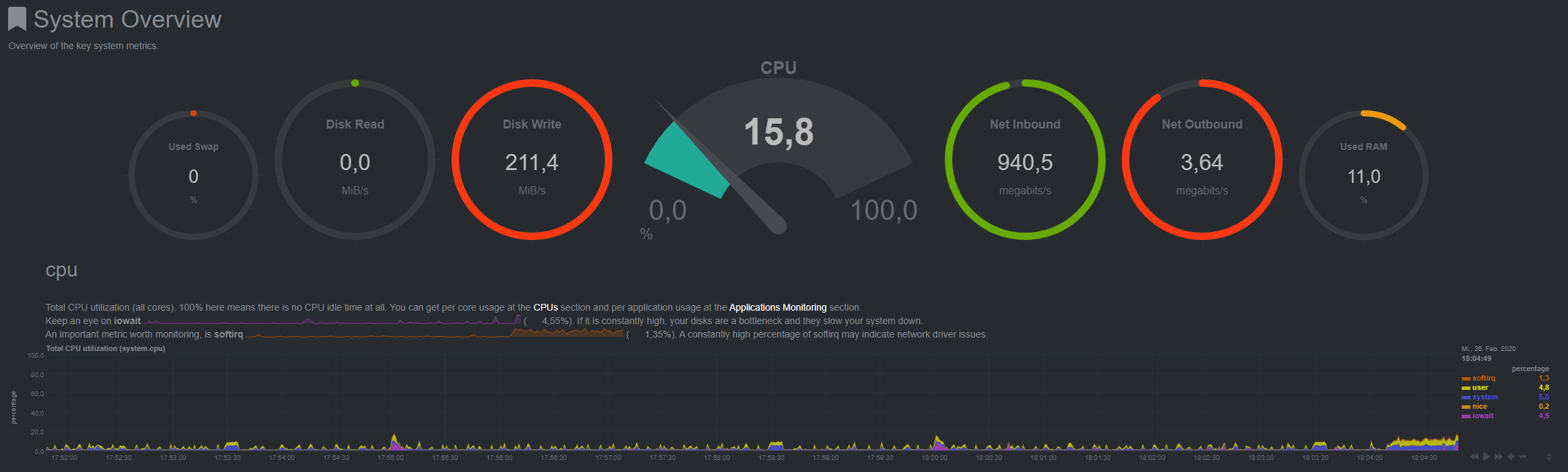
So if this is a tip for anyone on leaving off some options and it turns out working it may help someone to specifically find the cause. Or it may be that issues between users here are slightly different.
Cheers
EDIT: Just 2 hours after the first download my server has a constant IO again...
 Anon0511
on 26 Feb 2020
Anon0511
on 26 Feb 2020
My rTorrent is reading at ~20MB/s while seeding at 1-2MB/s. I am not sure if this has been happening for so long or it just started to happen recently. But I noticed ruTorrent sometimes take a lot of time to fully loaded. Sometimes it just timed out.
 dausruddin
on 2 Apr 2020
dausruddin
on 2 Apr 2020
Regarding ruTorrent, if you have all plugins or many enabled, and just say 4-8 torrents (meaning many peers if your rtorrent.rc config allows it), it makes sense it can time out, especially if in combination with some or one of these factors: slow HW, low bandwidth capacity, bad web server configuration (say using a plugin for RPC instead of XMLRPC per SCGI or socket), modified web server configuration without really knowing what you're doing, using crappy web server software or say just using Windows for the server could be it, slow hard drive where ruTorrent/rTorrrent live, if they live on different servers, slow connection between them, WiFi in general, saving to network share with bad configuration considering how rTorrent works, using a VPN or VPS and accessing ruTorrent through port forwarding in to it (use HTTPS easy peasy then now with Let's Encrypt and Certbot!) + more.
- Try moving ALL the folders for ALL the plugins temporarily out of the plugin folder, easiest way to disable them completely and with one command, and see if it does a difference, and move in only those you need again, and if it fixes it and then starts to happen again when moving back in, you know which does it. Plugin data/settings are not lost
- Clone the latest code from the ruTorrent GitHub repo if you don't use it already, the "stable release" is quite old, generally most of ruTorrent's code is old if you look at the library versions for JavaScript essentials like jQuery, still v1, but well it works well and as long as it isn't one of the versions that have had security holes (I haven't checked but really should've, as it's easy to migrate using the migration plugin which gives the developer plenty of information in the developer console when something doesn't work, and with v1 migrating to latest it'll for sure show a blank page, but also why. Problem there is if one or more of the ruTorrent jQuery JavaScript plugins are deprecated and don't work with later versions, like dragging, right clicking all those "desktop software like" features it has. And also the plugins, some of them aren't written by the author, but most overtaken it seems, for good reasons. A useful plugin contributed that doesn't work anymore because of an update to core ruTorrent code, the author must fix it if the developer of the plugin hasn't already, as by default ruTorrent (for some reason) ships with all plugins enabled/in the folder (wasn't like that before when it was on Google Code, was two separate packages)
Sorry I promised data on my findings regarding the read issue. I have observered more but for personal reasons haven't had the time to document it, meaning writing a proper structured explanation with the possible workarounds and/or fixes using ruTorrent stable or latest. And well, now I am at another house, so... Not where my workstation is, nor my rTorrrent server (although of course I have SSH access to all my servers) and I don't do more than server maintenance.
olejon
on 2 Apr 2020
So no solution in sight yet?
Have the issue been identified?
Ondjultomte
on 2 Apr 2020
Hi,
I was using transmission-daemon on Debian7 from years, no trouble. I've upgraded everything to Debian10 and transmission-daemon started to give the same bug described here. I've switched to rtorrent: same bug, same I/O wait issue.
The transmission's trouble is related to the use of GnuTLS by CURL:
https://github.com/transmission/transmission/issues/313
https://github.com/curl/curl/issues/5102
I don't know if this can help to identify the same issue with rtorrent, but I see a pattern here 😅
 eagle1maledetto
on 6 Apr 2020
eagle1maledetto
on 6 Apr 2020
This is likely not the same issue. This bug is not about encountering
memory leaks (which the transmission one seems to be about) but IO
inflation. I did have some weird issues when I had curl initially building
with gnuTLS and c-ares (intermittent crashes) which led me to believe that
there was probably some memory corruption involved. I since built libcurl
with openssl and haven't had those issues. I do, however, still have the
weird inflated IO problem, and it's especially noticeable when writing to
NFS volumes.
On Mon, Apr 6, 2020 at 11:42 AM eagle1maledetto notifications@github.com
wrote:
Hi,
I was using transmission-daemon on Debian7 from years, no trouble. I've
upgraded everything to Debian10 and transmission-daemon started to give the
same bug described here. I've switched to rtorrent: same bug, same I/O wait
issue.The transmission's trouble is related to the use of GnuTLS by CURL:
transmission/transmission#313
https://github.com/transmission/transmission/issues/313
curl/curl#5102 https://github.com/curl/curl/issues/5102I don't know if this can help to identify the same issue with rtorrent,
but I see a pattern here 😅—
You are receiving this because you are subscribed to this thread.
Reply to this email directly, view it on GitHub
https://github.com/rakshasa/rtorrent/issues/443#issuecomment-609872761,
or unsubscribe
https://github.com/notifications/unsubscribe-auth/AA3T3NONNGDAC3EYCOTXTGDRLHZ7LANCNFSM4CGXJRHA
.
 KungFuJesus
on 6 Apr 2020
KungFuJesus
on 6 Apr 2020
Thanks for the response.
I didn't investigate a lot, but just looking at the disk munin stats of that server gaved me the impression of the same problem. I'm start wondering if there's a good torrent daemon for Linux that do not suffer from some kind of IO issues.
eagle1maledetto
on 6 Apr 2020
@Ondjultomte I wouldn't "bother" the author hence expecting the issue to be fixed now in this situation. Probably other things more important.
@KungFuJesus NFS (v4) mounts is where I have had definitely most success getting reads which running say iotop with the right arguments, say 51 times (since first gives always 0), with either 1 or 2 seconds apart for each run, and calculating the average and it's the same as the download/upload speed (checked both, both just downloading, just uploading and together), and the fluctuations are small per run of iotop (which is of course set with speed limits so they download/upload then at exactly that speed, hence can be calculated).
Mostly because I used it anyway and tweaked the server (nothing that affects other exports) but especially the mount on the rTorrrent VM (bridge to its host) the NFS server (so same LAN, no NAT between, NFS isn't exactly ideal with NAT either, one should really read up, adjust and check the difference to make it work like a direct LAN connection, and well all my VMs are bridged anyway, because why not in my network).
For personal reasons, medical, but not what might come to people's mind, can't really elaborate more without checking things, double test again etc, which is just not an option now. Sorry.
Many core low-level updates has been done to host and VM and NFS server since last time, doubt it has changed anything, maybe just the new X570 Ryzen server build but it just keep performing better and better for each core updates, significant since first various benchs tests, much great Linux patching going on and beats Windows 10 latest insider program build from day one using same cross platform bench and idle systems, but just Linux keeps performing better vs Windows still.
FYI: My NFS mounts from rTorrent goes to pretty new high quality spinning HDDs, as much cheaper per TB, and Luks v2 encrypted, which handle the speeds just fine. In fact just 5400 RPM cheap Western Digital disk are almost as fast as pretty OK 2012-2013 SSDs now...
Also my 2 x 1 TB, PCIe4 NVMes totally crush their own specifications, after a few BIOS updates (generally for all OS') and one firmware update to the NVMes. But what made most effect was a Linux kernel patch, without even being a newer package version (just last last number) nor kernel version, as after BIOS and firmware update it actually they got somewhat slower, but more stable. Then came patches just days afterwards which got them up to around 4.9 GB/s both R/W! Specs promise around 4. As long as they don't heat up, which basically just benchmarks do, they perform like that every time. Running a new right after gives lower speed and I can feel the included heat sink is pretty darn warm. But nothing critical. Test the other and then back to the first and it has cooled down.
Windows users complaining all over Corsair for them not getting the performance (didn't bother to register and chime in, I'm sure they have fixed it now, the firmware update didn't seem to help much but some, so could be more a Ryzen 3 on Windows problem, or saying Microsoft + AMD, though the latter has been really quick with BIOS updates which has made stuff better, as long as you have recognized MB like ASUS you get them in like 2 days afterwards, IDK Windows update, chipset drivers there etc might be the problem they really have/had, first time like Windows users on a mass scale got PCIe4 storage...). I don't have an NTFS partition on either of them and all Windows SSD benchmarks require one (Windows lives alone on a SATA SSD). Linux can test even without a partition table yet. So that was the first thing I did when I put in the first as I had a new M.2 slot available with the new MB. Before migrating my system from the Intel PCIe3 NVMe to the other new one.
olejon
on 6 Apr 2020
Just want to chime in here, I was looking into this myself I disabled the preloading feature, and it barely had an impact, but I then noticed data was been read in 32k chunks by the daemon, but of course the default read_ahead in the scheduler is 128k, as soon as I dropped that down to 32k on the data drives I now have no read amplification. I hope this helps.
 chrcoluk
on 25 Aug 2020
chrcoluk
on 25 Aug 2020
@chrcoluk can you please explain what needs to be changed, what scheduler do you mean?
 Anakros
on 2 Sep 2020
Anakros
on 2 Sep 2020
@chrcoluk can you please explain what needs to be changed, what scheduler do you mean?
+1
colinhd8
on 6 Sep 2020
On the OS kernel scheduler.
check the value here /sys/block/sdb/queue/read_ahead_kb
substitute sdb for the drive label on your system.
chrcoluk
on 6 Sep 2020
On the OS kernel scheduler.
check the value here /sys/block/sdb/queue/read_ahead_kb
substitute sdb for the drive label on your system.
Has anybody checked this? Does it work? Thanks
amlopin
on 11 Sep 2020
Has anybody checked this? Does it work? Thanks
Yep, tested and not worked for me. Same read-amplification, crazy load average and a ton of I/O Wait
eagle1maledetto
on 11 Sep 2020
Has anybody checked this? Does it work? Thanks
Yep, tested and not worked for me. Same read-amplification, crazy load average and a ton of I/O Wait
Same here. Or, the load average isn't bad, but reading from the disk being uploaded from is ruined for other programs.
 ellidi
on 7 Oct 2020
ellidi
on 7 Oct 2020
It could be my way of measuring is bad, I measured the amplification via proxmox (as my machine is a VM), and I had observed after decreasing the i/o read level, on the host machine dropped to about a 1.1 multiplier instead of around 4.6.
Or it also could be you guys have different causes, I will try and do more monitoring and testing and get back after.
chrcoluk
on 14 Oct 2020
My DL drive is unusable while rtorrent is uploading faster than 1MB/s.
Is it time to abandon ship?
ellidi
on 1 Nov 2020
I can confirm @chrcoluk's finding's that lowering the readahead to match rtorrent's chunk size normalizes disk read.
Tho i am using a network storage (over SMB3) instead of a local disk on a 10GBit link as the backend so change rsize in /etc/fstab to 32k (rsize=32768) on the client.
I did notice this after limiting the bandwidth on the rtorrent attached switch port which rendered the rtorrent server sluggish and unresponsive after running into the burst limit will uploading.
Why ever this only affects uploads i have no idea.
Metrics were taken directly from the storage NIC so the measurement is fairly accurate.
 defkev
on 6 Nov 2020
defkev
on 6 Nov 2020
Anyone know how to make the read_ahead_kb changes on a RAID system?
Because the RAID drive, of which rtorrent reads/writes from is md2, which has a very high number compared to the RAID drives.

runaroundhome
on 23 Nov 2020
@runaroundhome
Did you manage to get rid of the problem?
 sedago
on 11 Dec 2020
sedago
on 11 Dec 2020
@sedago, nope, still got the issue. I switched over to qbittorrent, but it is much less aggressive at seeding/downloading compared to rtorrent. So I'm now running both about 20/80, with a total of ~600 torrents (20 being rtorrent). It seems to work kinda ok.
I feel like we are missing something, because allot of the big seedboxs around are still offering rtorrent, and they'll have 100s if not 1000s of torrents running at the same time, can't say they're just chucking SSDs at the issue.
Or maybe they've just managed to implement the read_ahead_kb workaround mentioned here. Or have fixed the issue in rtorrents code, but don't share it.
runaroundhome
on 11 Dec 2020
@runaroundhome
It really does not make sense, I think many seedboxes dedicated individual HDDs to users. Thanks for the update though!
sedago
on 12 Dec 2020
Hello!
Set read_ahead_kb to 32 doesn't help for me. Is there some other options to change and test?
 IvanShift
on 4 Mar 2021
IvanShift
on 4 Mar 2021
10Gbe up-link, i7-8700, XPEnology DSM 6.2.3, Btrfs RAID5 8x Ent. 6tb HDD 7200rpm with RAID0 3x1Tb SSD read cache, various popular docker containers with rtorrent+rutorrent gui. Maximum download and upload speed that I saw - 35-45Mb/s.
qBittorrent in a nearby docker container on the same server is capable of 250Mb/s+
PS: change read_ahead_kb didn't help me.
 sun1ight
on 23 Mar 2021
sun1ight
on 23 Mar 2021
The documentation send me here as it says:
Reduce disk usage
In theory, we can reduce disk i/o :) See this issue why: #443
I read through this issue.. but don't really see the solution. My goal: I have 32GB RAM, only 8-9GB is used in total, sometimes 12GB, excluding torrent client.
I would like rTorrent to use 8-10GB of RAM for all active downloads in total, before writing data to disk. Is this possible?
I use Ubuntu 20.10 and run everything in Docker.
WIth Transmission, setting disk cache to 8GB, I monitor via Netdata and notice it never uses more than 2GB. After little over 2GB, it writes to disk. Tested with a single 26GB torrent file (downloading) and everything else (downloads&seeds) on hold.
The documentation provides a few clues by explaining settings, but I don't see a clear path to get rTorrent to use that much RAM before writing to disk. Hope someone can be helpful here as I don't like Transmission and would like to switch.
I am a bit afraid to change network.receive_buffer.size.set to 8GB for example and network.send_buffer.size.set to 4GB as I do not see anyone writing about such high buffer sizes..
My internet speed is 500/500 but I am limiting my torrent client to 160/84 megabit (20/12MB).
 zilexa
on 24 Mar 2021
zilexa
on 24 Mar 2021
@zilexa If you are under linux, you can play with the following options with sysctl
vm.dirty_background_ratio = 5 # you start to write to disk as soon as 5% of dirty cache
vm.dirty_ratio = 90 # you stop to accepting new writes until dirty cache is below of 90% of dirty cache
 ghz-gehtz
on 24 Mar 2021
ghz-gehtz
on 24 Mar 2021
@zilexa
I set max_memory_usage to 8GB but it doesn't help. No changes in disc usage.
IvanShift
on 24 Mar 2021
Related issues
 nikil
·
5Comments
nikil
·
5Comments
 rezad1393
·
6Comments
rezad1393
·
6Comments
 mhertz
·
6Comments
mrvn
·
3Comments
mhertz
·
6Comments
mrvn
·
3Comments
 lzbk
·
6Comments
lzbk
·
6Comments
Most helpful comment
I'll look into adding some tests next, either with the current rtorrent-vagrant or docker version.
Are you using SSD?