Rtl8812au: AWUS036ACH increasing TXPower doesn't increase speed or signal strength on ap

OS: Kali
I'm running an AP with NetworkManager, and wanted to increase the signal strength.
But increasing TXPower from 15 to 30 then 32 has made no difference.
Am I missing something?
Thanks
 ShotTard
All 20 comments
which branch are you using?
 kimocoder
on 26 Sep 2017
kimocoder
on 26 Sep 2017
v4.3.21
ShotTard
on 26 Sep 2017
the v4.3.21 branch should work fine, haven't got any other reports on that issue.
further testing/debug information would also be appreciated.
kimocoder
on 26 Sep 2017
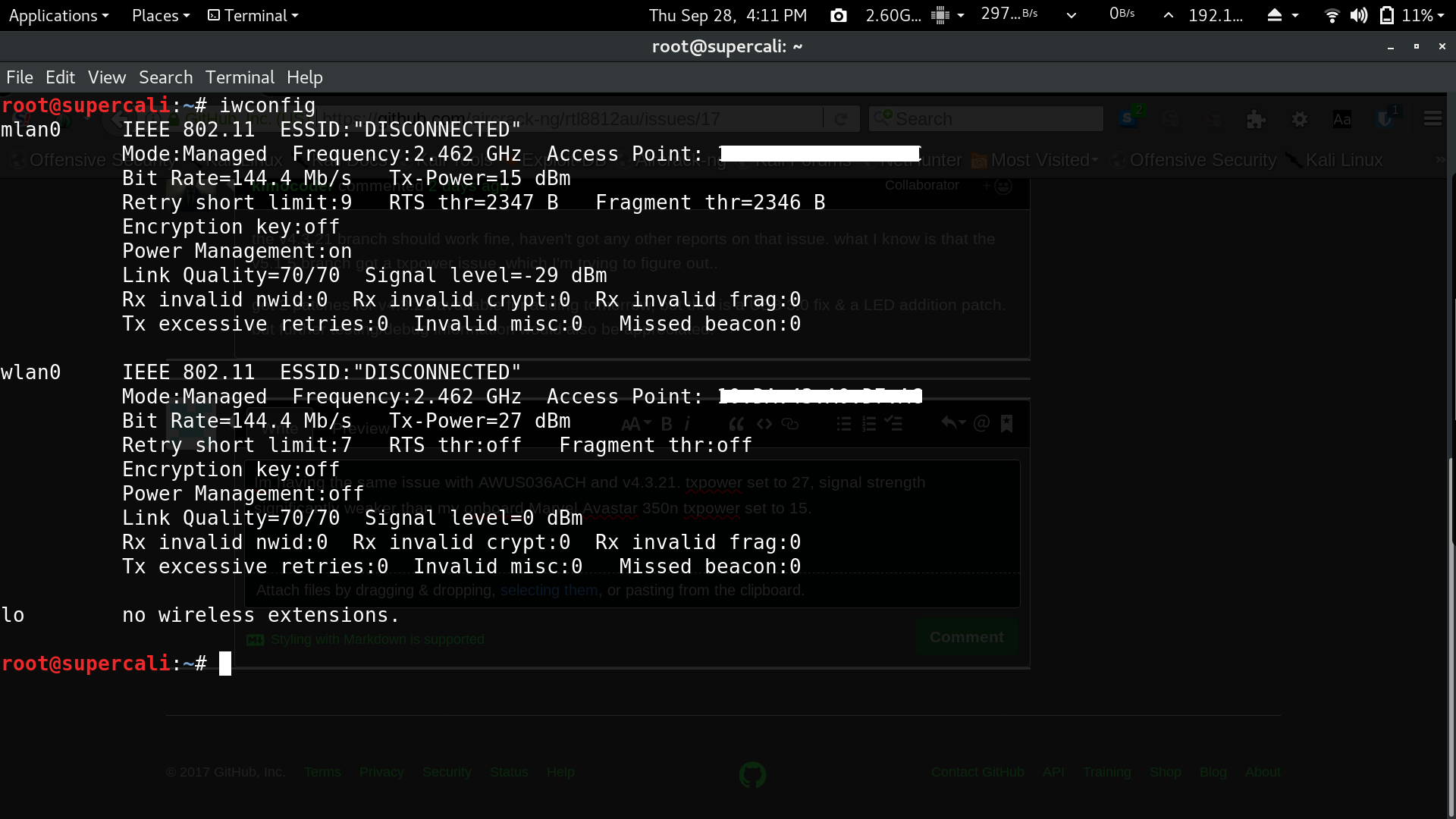
Im having the same issue with 4.3.21 + AWUS036ACH. My onboard Marvel Avastar 350n set to 15dbm has a better signal. Txpower doesnt seem to do anything & signal level states 0dbm 10 ft from AP.
 rawkahn
on 29 Sep 2017
rawkahn
on 29 Sep 2017
Issue noted. Thanks for reporting
kimocoder
on 29 Sep 2017
@ShotTard When using network manager to create an AP I noticed that some devices not just realtek 8812/8814 do not respond to txpower changes. I'm experimenting with create_ap on github , you may want to give that a try.
@rawkahn On Managed mode or client mode, the signal level seems off compared to v5.1.5. The changes to txpower however can be seen on the host AP. This issue has been there since the astsam fork.
https://github.com/ulli-kroll/rtl8814au. When setting txpower for his version, You get Error "Set Tx Power" ; Operation not permitted. It seems to be hardcoded to around 18-20 dbm.
 qwikwit
on 3 Oct 2017
qwikwit
on 3 Oct 2017
Feel free to push changes to this repo if you got any changes that may fix those issues.
Been working on the v4.3.21 the past days, but all branches is maintained.
kimocoder
on 3 Oct 2017
this is also interesting reading on the AP issue
kimocoder
on 3 Oct 2017
I have this issue too with alfa AWUS036ACH bought from Taiwan.
When I got and configured the device using nm in debian stretch, I was once got an -5dBm signal strength on my phone. But after a while, the signal begin to fail. And it's never back.
By the way, I've plugged it on a windows 10. Maybe the official driver in windows updated the firmware? It's just my guess.
Now the issue is, does every one using this driver got this problem? I believe many people just forget to check the actual signal strength, because this card is really powerful even with default settings.
 ghostindex
on 28 Oct 2017
ghostindex
on 28 Oct 2017
Another thing. Is there any one who tried the unlocked driver in windows? If the txpower cannot be changed in windows, the problem might due to hardware limit, and unfortunately, maybe we should modify the hardware.
Anyway, I would like to give it a try.
ghostindex
on 8 Nov 2017
I don't know to be honest but you can not change the txpower at all. Which also means you can not set it lower. Does not make a lot of sense to me as this is part of some energy saving mechanisms. Nonetheless, if you find something of interest please share :)
 evilphish
on 8 Nov 2017
evilphish
on 8 Nov 2017
Energy savings was turned off in Makefile, also regdomain settings have been checked/tested, but the driver supports 30dBm as "iw phy# info" shows.. this issue is propably the most important at the moment but could not find a solution for it on all these months. Help is highly appreciated. @evilphish has also spent some time on it, implementing the txpower control and stuff, but the txpower is still stuck in a position we want to increase.
kimocoder
on 8 Nov 2017
Bad news. I've tested it in windows and managed to set it on so-called 33dBm, but I only got 10dBm higher than the default 13dBm. I guess the hardware limit is at 24dBm.
And I found this:
https://forums.kali.org/showthread.php?28874-ALFA-AWUS036NHA-hacking-EEPROM-via-UART-JTAG&s=bd933ee3a7ff1c94d6a0703990e5962f
It seems the ALFA Inc has kept fooling us for a long time? My AWUS036ACH is from Taiwan, and maybe it's locked.
ghostindex
on 10 Nov 2017
@ghostindex I do not seem to have this problem. My regulatory domain is not locked but I can freely change it. Also I do not just have a problem of the card not going over 20 dBm (or whatever it is set to) but it also makes no difference whether I set it to for example 3 dBm. So the power seems to always be the exact same value.
evilphish
on 12 Nov 2017
After I started the v5.2.9 code porting, I've seen code that may be related to it. "pHalData" strings all over the places. Also seen lots of other interesting things, so getting this to work would fix lots of issues it seems.
kimocoder
on 12 Nov 2017
I would like to clarify the question.
Is it normal to have such error message with my Edimax ew-7811dac based on 8811au with 5.1.5?
root@debian:/lib/modules/4.13.0-1-amd64/updates/dkms# iwconfig wlx74da3867a2c1 txpower auto
Error for wireless request "Set Tx Power" (8B26) :
SET failed on device wlx74da3867a2c1 ; Operation not supported.
iwlist wlx74da3867a2c1 scanning essid Keenetic-71
wlx74da3867a2c1 Interface doesn't support scanning : Operation not permitted
For the following commands I don't have a errors
iwlist wlx74da3867a2c1 scanning
wlx74da3867a2c1 No scan results
this is my biggest issue - I couldn't find any wifi channels during scan.
iwlist wlx74da3867a2c1 txpower
wlx74da3867a2c1 unknown transmit-power information.
Current Tx-Power=18 dBm (63 mW)
iwconfig wlx74da3867a2c1 txpower 15
root@debian:/lib/modules/4.13.0-1-amd64/updates/dkms# iwlist wlx74da3867a2c1 txpower
wlx74da3867a2c1 unknown transmit-power information.
Current Tx-Power=15 dBm (31 mW)
iwconfig wlx74da3867a2c1 txpower 45
root@debian:/lib/modules/4.13.0-1-amd64/updates/dkms# iwlist wlx74da3867a2c1 txpower
wlx74da3867a2c1 unknown transmit-power information.
Current Tx-Power=40 dBm (10000 mW)
 Goga777
on 18 Nov 2017
Goga777
on 18 Nov 2017
This is probably related to #77 - closing this one for now
kimocoder
on 24 Jul 2018
i dont even have tx power :D
wlan1: flags=4163<UP,BROADCAST,RUNNING,MULTICAST>  mtu 1500
        inet 192.168.43.39  netmask 255.255.255.0  broadcast 192.168.43.255
        inet6 fe80::9a28:e492:ac4:3f1f  prefixlen 64  scopeid 0x20<link>
        ether 0c:dd:24:2a:ff:76  txqueuelen 1000  (Ethernet)
        RX packets 2340  bytes 1517602 (1.4 MiB)
        RX errors 0  dropped 0  overruns 0  frame 0
        TX packets 1953  bytes 367377 (358.7 KiB)
        TX errors 0  dropped 0 overruns 0  carrier 0  collisions 0
 azamet90
on 14 Nov 2019
azamet90
on 14 Nov 2019
Yes you have, i haven't added output for it yet. "iw
kimocoder
on 14 Nov 2019
Yes you have, i haven't added output for it yet. "iw info"
But still I cannot change my txpower thank you for fast reply first I did tried to change manually the txpower after I use the better bettercap and bettercap saying me unable to change txpower and like I said I tried manually too with set txpower fixed command but the txpower is not changing
azamet90
on 14 Nov 2019
Related issues
 eliterunics
·
10Comments
kimocoder
·
9Comments
eliterunics
·
10Comments
kimocoder
·
9Comments
 svpcom
·
14Comments
svpcom
·
14Comments
 manofftoday
·
8Comments
manofftoday
·
8Comments
 satmandu
·
18Comments
satmandu
·
18Comments