Rswag: How to mark required fields in a nested param object
I'm using rswag to document my API-only Rails app that uses Strong Parameters.
model:
class Call < ApplicationRecord
  belongs_to :interview

  validates :to, :from, :sid, presence: true, allow_blank: false
end
controller:
 # POST /calls
  def create
    @call = Call.create!(call_params)
    json_response(@call, :created)
  end

  private

    def call_params
      # whitelist params
      params.require(:call).permit(
        :duration, :from, :sid, { statuses: [] }, :to, :interview_id
      )
    end
spec:
  path "/v1/calls" do
    post "Creates a call" do
      tags "Calls"
      consumes "application/json"
      produces "application/json"
      parameter name: :call, in: :body, schema: {
        type: :object,
        properties: {
          interview_id: { type: :integer },
          duration: { type: :number, format: :float },
          from: { type: :string },
          sid: { type: :string },
          statuses: { type: :array, items: { type: :string } },
          to: { type: :string }
        },
        required: %w[interview_id from sid to]
      }
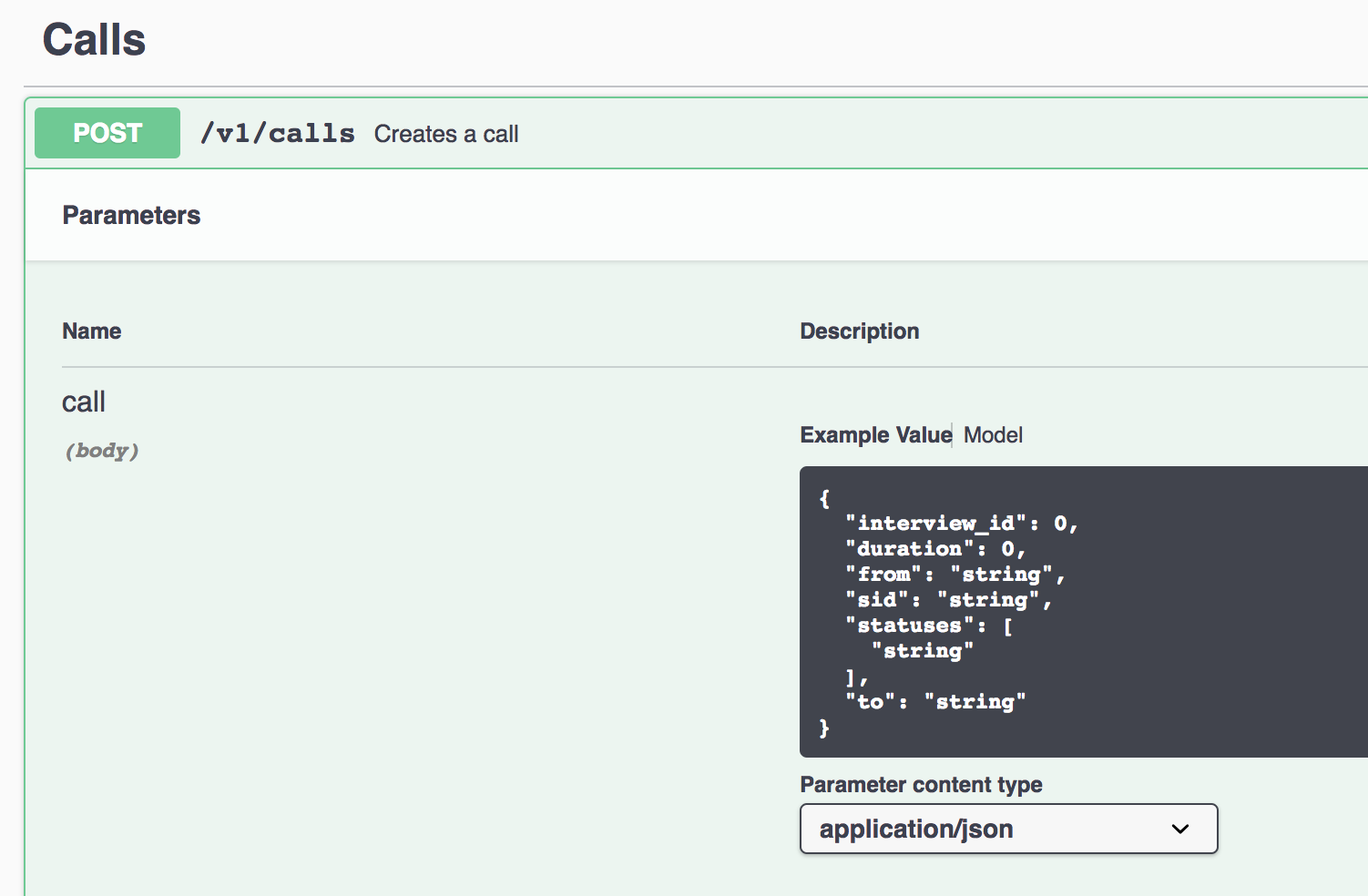
When I swaggerize it, though, there's no indication which fields are required (I'd expect something like an asterisk or comment in the model example). Am I missing something?
 katelovescode
All 2 comments
See above the JSON example, there's a tab bar that allows you to toggle between "Example Value" and "Model". If you click on the model tab, you'll see a full description of the object (as opposed to example JSON) and that should indicate which fields are required.
It's also worth noting that, if you're using a recent version, you can default to the "model" view instead of the "example" by setting the defaultModelRendering config value in the rswag-ui.rb:
Rswag::Ui.configure do |c|
  c.swagger_endpoint '/api-docs/v1/swagger.json', 'API V1 Docs'
  c.config_object[:defaultModelRendering] = 'model'
end
 domaindrivendev
on 27 Jul 2018
domaindrivendev
on 27 Jul 2018
Fantastic, thanks. In case anyone follows me in here on this issue; if you add "required: true" to the parameter definition as below:
parameter name: :call, in: :body, required: true, schema: {...}
you will also be able to see the parent param indicated as required. Thanks @domaindrivendev !
katelovescode
on 27 Jul 2018
Related issues
 Kutomore
·
3Comments
Kutomore
·
3Comments
 douglasrlee
·
4Comments
douglasrlee
·
4Comments
 vittoriabitton
·
5Comments
vittoriabitton
·
5Comments
 mcoms
·
4Comments
mcoms
·
4Comments
 hannesstruss
·
6Comments
hannesstruss
·
6Comments
Most helpful comment
See above the JSON example, there's a tab bar that allows you to toggle between "Example Value" and "Model". If you click on the model tab, you'll see a full description of the object (as opposed to example JSON) and that should indicate which fields are required.
It's also worth noting that, if you're using a recent version, you can default to the "model" view instead of the "example" by setting the
defaultModelRenderingconfig value in therswag-ui.rb: