Rpcs3: Madden 17 Freezing Issue (BLUS31589)
Quick summary
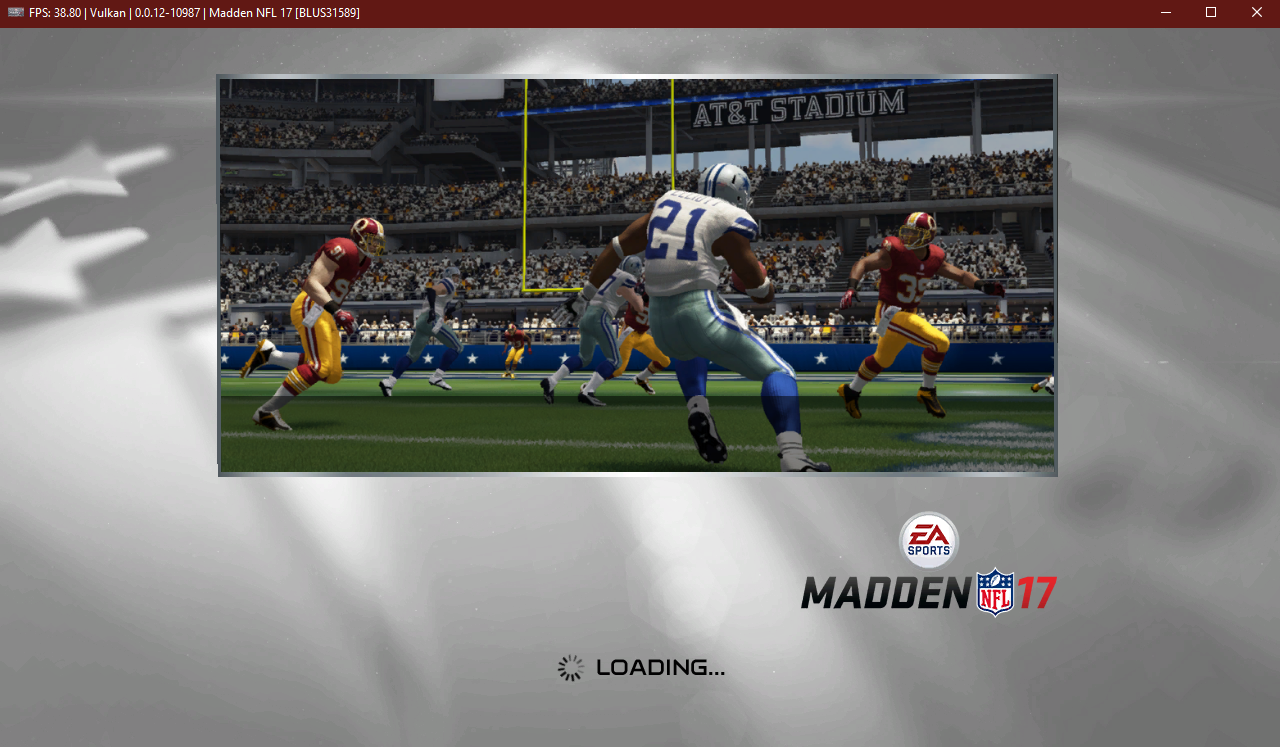
Upon loading into a match, the game freezes.
Error Code
F {PPU[0x1000018] Thread (FGGameCore) [0x01399ea8]} SIG: Thread terminated due to fatal error: Verification failed (0000000000000000):
(in file D:\a\1\s\rpcs3\Emu\RSX\VK\VKRenderTargets.h:602)
This is the screen it freezes at and and throws the error that I posted above.

5. Please provide your system configuration:
- Windows 10 x64
- Ryzen 7 3700x
- RTX 2070 Super
- 456.71
 munchnbeaver
All 16 comments
So some notes on this one
- It only affects madden 15-17 (i only have 25 and 16 to test, but someone on the discord said this occurs on 15 as well)
- If you start the Skills Trainer first, then try any of the other modes, it works
 jacob1218
on 8 Oct 2020
jacob1218
on 8 Oct 2020
So some notes on this one
- It only affects madden 15-17 (i only have 25 and 16 to test, but someone on the discord said this occurs on 15 as well)
- If you start the Skills Trainer first, then try any of the other modes, it works
Even going to skills trainer, I still freeze. What settings are you using for madden 17?
Also, on the maddens that you have tested (12, 13, etc), what are the exact settings that you changed (from default), to get it working properly? I have issues still on the other maddens; I figured my settings are wrong.
munchnbeaver
on 8 Oct 2020
I thought the issues were fixed, but you may still need Write Color Buffers enabled. Games should work fine (with some minor texture issues on the sidelines)
jacob1218
on 9 Oct 2020
I thought the issues were fixed, but you may still need Write Color Buffers enabled. Games should work fine (with some minor texture issues on the sidelines)
I cleared all Caches, and changed only 2 settings, the resolution to 300% and enabled Write Color Buffers, and left the rest at default. I'm getting crashes upon loading into skill trainer (this one first as you mentioned), not to mention the other game modes.
May I see what your settings are? Maybe I got something messed up. But like I said, everything is at default except those 2 settings I edited.
-Edit-
I'm getting this error:
(FGGameRender) [0x003d5fac]} SIG: Thread terminated due to fatal error: Verification failed (e=0x57) (0000000000000000):
(in file D:\a\1\s\rpcs3\Emu\RSX\VK\VKRenderTargets.h:602)
munchnbeaver
on 9 Oct 2020
I tested it today and it appears the workaround no longer works, I thought it did still.
jacob1218
on 9 Oct 2020
Try the game with builds 10501 and 10502, if 10502 crashes and 10501 doesn't it's a duplicate of #8901
 xddxd
on 9 Oct 2020
xddxd
on 9 Oct 2020
I just tested build 10501 and I'm still crashing:
·W 0:03:19.382758 {RSX [0x01bee6c]} RSX: Cached object for address 0x303E0740 was found, but it does not match stored parameters (width=512 vs 1024; height=64 vs 32; depth=1 vs 1; mipmaps=0 vs 1)
·W 0:03:19.388161 {PPU[0x100000d] Thread (OnLoad) [0x00912690]} sys_semaphore: sys_semaphore_destroy(sem_id=0x96080c00)
·W 0:03:19.388363 {PPU[0x100000c] Thread (OnLoad) [0x00912690]} sys_semaphore: sys_semaphore_destroy(sem_id=0x96080a00)
·W 0:03:19.390286 {PPU[0x1000018] Thread (FGGameSim) [0x00912668]} sys_semaphore: sys_semaphore_create(sem_id=0x30237070, attr=0xd0153df0, initial_val=0, max_val=100000)
·W 0:03:19.390328 {PPU[0x1000018] Thread (FGGameSim) [0x00912668]} sys_semaphore: sys_semaphore_create(sem_id=0x2775a998, attr=0xd0153470, initial_val=0, max_val=100000)
·W 0:03:19.429044 {PPU[0x100000d] Thread (OnLoad) [0x00912690]} sys_semaphore: sys_semaphore_destroy(sem_id=0x96080e00)
·W 0:03:19.429894 {PPU[0x100000d] Thread (OnLoad) [0x00912690]} sys_semaphore: sys_semaphore_destroy(sem_id=0x96081400)
·W 0:03:19.430186 {PPU[0x1000019] Thread (FGGameRender) [0x003d814c]} RSX: Cache miss at address 0xC7388000. This is gonna hurt...
·W 0:03:19.431819 {PPU[0x1000019] Thread (FGGameRender) [0x003d814c]} RSX: Cache miss at address 0xC71F4400. This is gonna hurt...
·F 0:03:19.431826 {PPU[0x1000019] Thread (FGGameRender) [0x003d814c]} SIG: Thread terminated due to fatal error: Verification failed (e=0x57) (0000000000000000):
(in file d:\a\1\s\rpcs3\Emu\RSX\VK\VKRenderTargets.h:553)
munchnbeaver
on 9 Oct 2020
From my testing the regression is most likely caused by #5675.
xddxd
on 15 Oct 2020
This regression is much newer, as it started happening in june/july of this year.
jacob1218
on 15 Oct 2020
10435, which I asked you to test on discord is a late May build and it was already broken?
xddxd
on 15 Oct 2020
i'll try and find what broke it this weekend, then, since apparently, i don't know when some of these builds are from
jacob1218
on 15 Oct 2020

I cannot reproduce this issue. Provide definite step by step instructions on how to reproduce this crash effectively.
 kd-11
on 18 Oct 2020
kd-11
on 18 Oct 2020
There's a couple of ways that you can try to reproduce the crash.
Start the game and go straight to practice mode (skipping skills trainer). On loading into practice it will crash.
If for some reason that doesn't crash and if practice mode works, exit practice mode and go to the play now mode. Start a match in play now. It should crash, and one more time if it does not, exit play now and go to connected franchise mode. start a new franchise using a created coach. Go to the first week, play the 1st week matchup, and upon loading into the match, it should crash.
-Edit-
So I know for a fact "Write Color Buffers" is what causes it to crash. I'm able to play the game without crashes with it disabled, however Write color buffers is needed in order to fix the field graphics issues as you see in the screenshot below

-Edit-
I created a little video to show you exactly what I'm doing for it to crash. I will also attach the log at the bottom of the video.
Recreating the crash
RPCS3.log
Hopefully that helps.
munchnbeaver
on 19 Oct 2020
I was able to reproduce. I thought this was a typical use after free issue but nope - the dynamic cast is failing on a valid object pointer. There is likely some kind of memory corruption going on that I need to look into.
kd-11
on 19 Oct 2020
This turned out to be a bit more interesting than I anticipated. I figured out what's causing the crash, but I want to fix it properly, which requires more time. A proper fix should be ready in the next day or so. Hopefully other titles with WCB problems (flickering and corruption) are improved by the fix as well.
kd-11
on 19 Oct 2020
Should be fixed by https://github.com/RPCS3/rpcs3/pull/9107. Retest with that PR build.
kd-11
on 20 Oct 2020
Related issues
 Luffykun007
·
3Comments
Luffykun007
·
3Comments
 Xcedf
·
3Comments
Xcedf
·
3Comments
 Nezarn
·
3Comments
Nezarn
·
3Comments
 iBlackS0ul
·
3Comments
iBlackS0ul
·
3Comments
 Emulator-Team-2
·
3Comments
Emulator-Team-2
·
3Comments