Rpcs3: Main window does not appear or freezes when too many games are installed and freezes when grid view is used on Linux
Quick summary
It appears that if too many games are installed in RPCS3 on Linux, the main window does not appear when running RPCS3, and when I install certain new games the GUI will freeze.
Details
I have the following games installed/set up in RPCS3:
- NPEB02021
- NPEB02026
- NPEB00777
- NPEB01083
- BLES02070
- NEPA00241
- NPEA00324
- NPEA00291
- BCES00052
- NPEA00088
- NPEB00879
- NPEA00057
- NPJB00785
This is how this list appears:
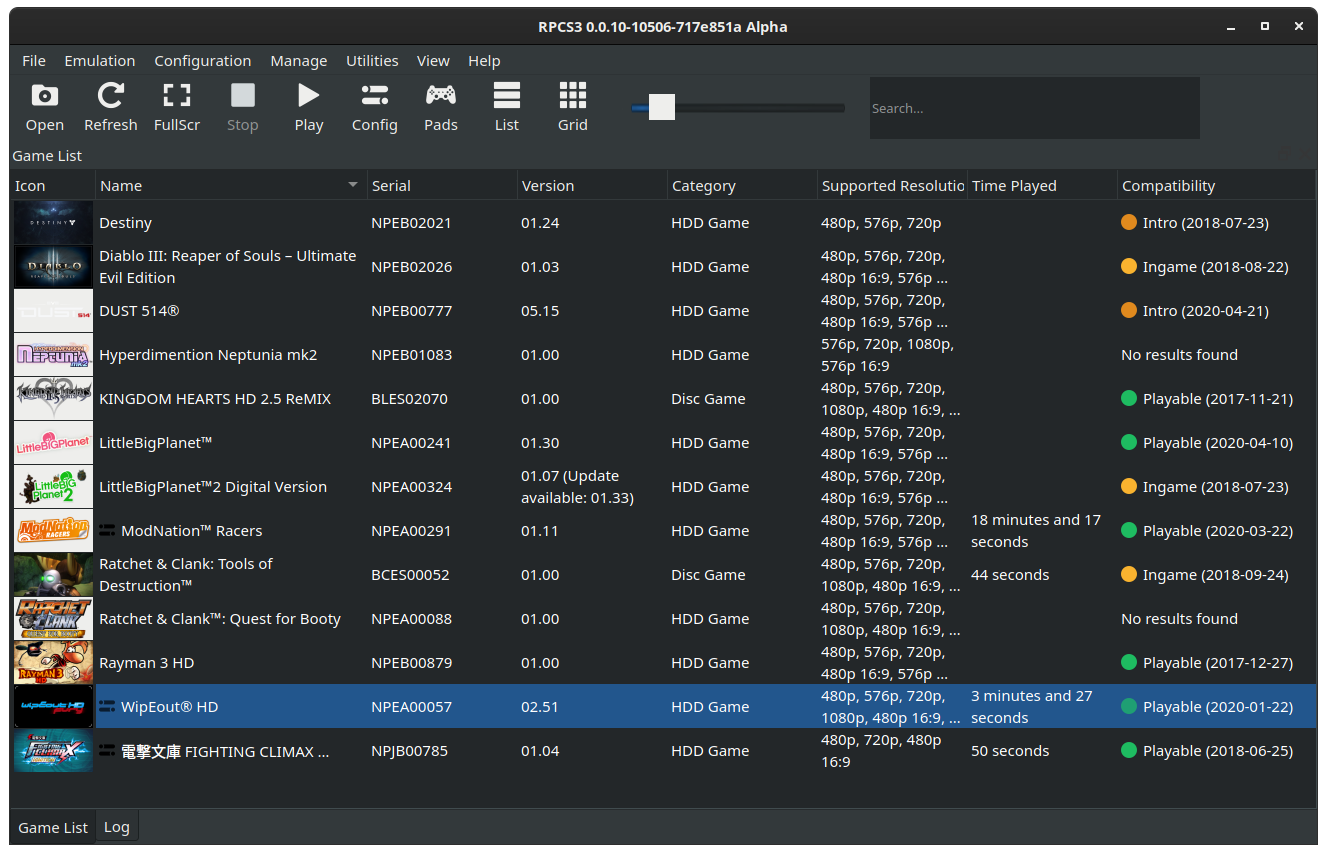
From here, if I click the grid button, the main window freezes, and nothing else happens other than the terminal being spammed with libpng warning: iCCP: known incorrect sRGB profile messages (I'm pretty sure this is unrelated though).
If I then try installing Bejeweled 2 (NPEA00124), it successfully installs and the windows remains responsive. If I then remove that game, reload RPCS3, and try installing Bejeweled 3 (NPUB30773), the window becomes unresponsive after the game installs. I can see the game's folder in dev_hdd0, but if I try running RPCS3 after this happens, the main window never appears but the process remains running.
I've tried using a brand new RPCS3 config folder and the more games I install into this new config folder, this issue crops up again.
I'm running version 0.0.10-10506-717e851a9 but I've also tried 0.0.10-10468-dcf5c06d6 and the same issue appears.
If I remove the ICON0.PNG file from the game's folder that causes the issue with the RPCS3 window not showing up when running , the issue actually disappears, so I believe it has something to do with that file. Heck if I swap out the icon for another game's ICON0.PNG, like the one from NPEB02026 it correctly shows up and the window appears.
EDIT: If I remove the alpha channel from the icon of a game that causes this issue (which have a transparent icon), then save it, this is enough to make this issue go away, however I have other games installed with transparent icons that don't show this issue...
RPCS3 v0.0.10-10506-717e851a Alpha | master | Firmware version: 4.82
AMD Ryzen 7 1700 Eight-Core Processor | 16 Threads | 15.64 GiB RAM | TSC: 2.994GHz | AVX+ | FMA3
Operating system: POSIX, Name: Linux, Release: 5.7.0-3-MANJARO, Version: #1 SMP PREEMPT Wed Jun 3 03:15:33 UTC 2020
Using qt version 5.15.0.
Built using rpcs3-git from the AUR.
Terminal output from when the window doesn't appear after installing a game that causes this issue:
➜  ~ rpcs3
Debugger: 0
qt5ct: using qt5ct plugin
qt5ct: D-Bus global menu: no
libpng warning: iCCP: known incorrect sRGB profile
libpng warning: iCCP: known incorrect sRGB profile
libpng warning: iCCP: known incorrect sRGB profile
libpng warning: iCCP: known incorrect sRGB profile
libpng warning: iCCP: known incorrect sRGB profile
libpng warning: iCCP: known incorrect sRGB profile
libpng warning: iCCP: known incorrect sRGB profile
libpng warning: iCCP: known incorrect sRGB profile
libpng warning: iCCP: known incorrect sRGB profile
libpng warning: iCCP: known incorrect sRGB profile
libpng warning: iCCP: known incorrect sRGB profile
libpng warning: iCCP: known incorrect sRGB profile
libpng warning: iCCP: known incorrect sRGB profile
libpng warning: iCCP: known incorrect sRGB profile
libpng warning: iCCP: known incorrect sRGB profile
libpng warning: iCCP: known incorrect sRGB profile
libpng warning: iCCP: known incorrect sRGB profile
libpng warning: iCCP: known incorrect sRGB profile
libpng warning: iCCP: known incorrect sRGB profile
 Sonickyle27
All 11 comments
Logs provided nothing, needs gdb backtrace
 illusion0001
on 16 Jun 2020
illusion0001
on 16 Jun 2020
Hopefully this is enough. I am completely unfamiliar with how gdb works. This is from me loading up RPCS3 while a game that causes the window to not appear is installed.
Sonickyle27
on 16 Jun 2020
Does it happen with pre built appimage from CI?
illusion0001
on 16 Jun 2020
From lib warning it seems it fails to decode proper color space for those transparency icons
illusion0001
on 16 Jun 2020
I've never used any of the appimage builds before. I will give the latest the try when I am next at my computer.
If it's worth mentioning I upgraded my qt packages to version 5.15.0 a few days ago. Before then I wasn't seeing this issue so I think that may be related, so I'll see if I can downgrade that too.
Sonickyle27
on 16 Jun 2020
Qt 5.15 seems to have issues with RPCS3
https://github.com/RPCS3/rpcs3/issues/8409#issuecomment-642977074
 RainbowCookie32
on 16 Jun 2020
RainbowCookie32
on 16 Jun 2020
The AppImage version opens without issue and the grid view does not freeze the window either! I can see it uses Qt 5.14.2.
There is also no libpng warning: iCCP: known incorrect sRGB profile spam in the terminal.
Sonickyle27
on 16 Jun 2020
Closing. Qt 5.15 is not supported by rpcs3.
 Megamouse
on 16 Jun 2020
Megamouse
on 16 Jun 2020
Is there plans for support for it in the future? I tend to avoid AppImages whenever I can and this is the only issue I'm getting with running RPCS3 with that version of Qt installed.
Sonickyle27
on 16 Jun 2020
Yes. But for that I'd either have to write a workaround for the nonworking versions or we'll have to hope that a Future version of Qt fixes their code.
Megamouse
on 16 Jun 2020
Okay, good news.
Apparently the issue was already fixed in Qt and is scheduled for version 5.15.1
Megamouse
on 19 Jun 2020
Related issues
 On1ko
·
3Comments
On1ko
·
3Comments
 Xcedf
·
3Comments
Xcedf
·
3Comments
 xddxd
·
3Comments
xddxd
·
3Comments
 Emulator-Team-2
·
3Comments
Emulator-Team-2
·
3Comments
 AniLeo
·
3Comments
AniLeo
·
3Comments
Most helpful comment
Qt 5.15 seems to have issues with RPCS3
https://github.com/RPCS3/rpcs3/issues/8409#issuecomment-642977074