Rpcs3: Games running way better with their windows' unfocused
To my absolute surprise there was no ticket about this (despite being known for years now), so here we are. The issue is as in the title, so let's dive into the details we know so far!
Preconditions:
- the OS needs to be Windows
- the CPU needs to be narrow (have low core / thread count)
- you need to have some very bad luck
Results:

I'm running a Windows 8.1 Pro install with an i5 4440 as my CPU, and the frametimes probably speak for themselves. With the game window in focus, the frametimes become wildly erratic, and the framerate generally drops to at least its half. After unfocusing it however, everything smoothens out like a charm.
However, I am "lucky" to say that I can repro this issue with perfect reliability, so confirming a fix shouldn't be a nightmare (hopefully).
Clues:
During a brief troubleshooting session with kd yesterday, we found that the issue is:
- not related to the SPU backend used,
- not related to the RSX backend used (it even persists with null renderer!),
- not related to the window handler facility used (Qt),
- not a driver issue.
Current clues seem to point to a thread prioritization issue. This is somewhat confirmed by setting realtime priority for RPCS3, as that also alleviates the frametime and framerate issues, just like unfocusing. Hopefully this will be less of a nightmare to fix than the title makes it sound. :crossed_fingers:
 dio-gh
All 38 comments
So this issue still happens nowadays huh, i reported the same thing in november of 2019 here #7007
 Lenox548
on 8 Jun 2020
Lenox548
on 8 Jun 2020
Yup, started using RPCS3 2 days ago and I get the same thing (you can see and heard clearly the difference when I have 7zip window in focus vs. RPCS3): https://youtu.be/yd82ziVAa7Y
edit: A video I made a bit before, showing in movements (I didn't turn graphs ON yet however): https://youtu.be/5k08BAVT-lg
The SPU utilization goes from ~30-40% to ~60-70%.
Pretty much unplayable with it on the foreground :( I could post a log file a bit later if it can help.
Windows 10
i5 4670K @3.4GHz
GTX 970
 bslenul
on 8 Jun 2020
bslenul
on 8 Jun 2020
@bslenul As a workaround, I should probably mention that controller input is still registered, even when the games aren't in focus. This enables you to play with a maximized and unfocused window, until this issue gets properly resolved.
@Lenox548 Oh, that's interesting. I searched high and low for a ticket that describes this behaviour but I couldn't find anything, sorry that I've missed it.
This isn't really a regression however, as I'm more or less sure I observed this issue prior to the PRs mentioned in your ticket. The underlying issue was always there, just didn't surface this reliably. I'll keep this ticket open, and so if a fix arrives and it fixes the issue for you as well, both will be closed.
dio-gh
on 8 Jun 2020
@dio-gh Yup, I'm aware, but thanks! I think I'll either play unfocused like you said, or I'll just wait for a fix.
@Lenox548 I just tried the version you mentioned in your issue (0.0.7-8677, no graphs for stats in this version it seems): https://youtu.be/tFlGluyDKlo
It is indeed much better, I can't really see any difference with Preferred SPU Threads set to "4" (I lose ~5fps when focused if I let it on "Auto" however). But the game doesn't perform as good as on current version (unfocused :p) with my specs unfortunately.
Both videos were made with the exact same settings btw:
- SPU Decoder: recompiler (ASMJIT)
- Preferred SPU Threads: 4 (that setting doesn't seem to help in my case with current version, when focused I can't see any difference between 1, 2, 4 or 6)
- Renderer: Vulkan
- Additional Settings: Write Color Buffers
The other options are defaults. Not sure it will be of any help, but here's the logs just in case:
bslenul
on 9 Jun 2020
I'm facing the same issue, which is quite frustrating cuz I can't "unfocus" on my hyperspin cade...
I tried switching every type of settings and the result is always the same. Slow game while focusing, and smooth game while running in background...
 TheBloodstomper
on 13 Jul 2020
TheBloodstomper
on 13 Jul 2020
I personally gave up, I still update from time to time, then I cross my fingers and launch the game, but nope... It's soooooooo frustrating because you know RPCS3 capable of running your games in a decent way since you can see them running fine unfocused, and then as soon as you select the game window it becomes a stutter fest...
Don't get me wrong, I still think it's an impressive emulator, and I still love following/watching progress being made to it, I just can't enjoy it by myself :(
bslenul
on 20 Jul 2020
This issue is going to be looked into a bit later, kd is crunching through other tickets right now. Be patient.
dio-gh
on 20 Jul 2020
That's great news (well, not for kd I guess... :p ), thanks for letting us know! 👍
bslenul
on 20 Jul 2020
I'd like to add that setting the process priority of RPCS3 _lower_ actually helps in this case (at least for me), but even at lowest priority the performance is far worse than when unfocused.
(This is on Win 7)
EDIT: And I can confirm that the problem doesn't happen on 0.0.6, but does on 0.0.7.
 MIC132
on 18 Aug 2020
MIC132
on 18 Aug 2020
Still happening in rpcs3-v0.0.11-10808-af9e217f_win64. There is sound chopping too because of the FPS drops.
Tried the following, but no dice:
Setting low priority for RPCS3 in the Task Manager.
Altering the SPURS threads.
Altering the "Preferred SPU Threads".
Removing focus from the game window seems to fix the FPS, but then how do you play the game using a keyboard?
This issue doesn't happen in an older build, rpcs3-v0.0.5-6815-c9669818_win64. But that build has its own issues, like the DLC not loading often times.
System Configuration:
OS - Win 7 x64
CPU - Intel Core i5 3570K @3.4GHz
GPU - GTX 960
RAM - 8GB DDR3
 Rex000
on 31 Aug 2020
Rex000
on 31 Aug 2020
A recent PR fixed Goldeneye 007's graphics and while testing it I found out that for me the frame rate will halve if I have the window focused. This happens even when something untaxing like the intro videos are playing:
- window focused or maximised = ~30fps
- window unfocused = ~60fps
- In game it really varies depending on the scene but the average is still roughly a 50% downgrade in performance
I have tried just about every single option and combination I can think of to get around this but no dice. I also tested all my other games and found that only Killzone 2 has a similar issue but instead of an across the board FPS drop I just get bursts of dropped frames and audio drop outs every few seconds when the window is focused.
I also agree that it might be a threading issue - I'm thinking that if you have more than four cores this doesn't happen even on demanding games. I saw a report on the forum from someone with a Ryzen 9 4900hs getting a steady 60fps in Goldeneye, for example.
My Specs:
Intel i5 6600k oc'd to 4.5ghz
16gb RAM
GTX 970
 davewuk
on 9 Sep 2020
davewuk
on 9 Sep 2020
Just so we're on the same page - this only happens with 4 threads or less, right?
 kd-11
on 9 Sep 2020
kd-11
on 9 Sep 2020
^ I was about to comment that every single person in this thread has a 4C4T(which is horrible for rpcs3 in general).
 RipleyTom
on 9 Sep 2020
RipleyTom
on 9 Sep 2020
It used to happen to me when i had a 4 thread processor yes, but now even with a six thread one, there is still being a slight difference in performance when the game is unfocused
Lenox548
on 9 Sep 2020
Just so we're on the same page - this only happens with 4 threads or less, right?
I can't say for sure but it is starting to look that way
davewuk
on 9 Sep 2020
Some screenshots that illustrate the issue for me:
davewuk
on 9 Sep 2020
Is that a game specific problem
I tried few games but there is no difference at all between focused and unfocused...the speed is the same(30 or 60 depending on the game and there is no stuttering)
The only difference that I probably have is that I am not using the latest nvidia drivers
i7-6700HQ with GTX1060 and 442.74 drivers
RPCS3 0.0.12-10848
 vsub
on 9 Sep 2020
vsub
on 9 Sep 2020
Is that a game specific problem
For me yes - I tested six games but only two were affected. Of the two that were affected one suffered far more than the other (see the screenshots in my post above).
davewuk
on 9 Sep 2020
I don't know if it's because of the recent Windows update I had or if there was some work made on this issue in a recent RPCS3 update, but it's much better for me now: https://youtu.be/RJYMPMJbSHI
So let me explain what happens in the video:
- If I launch the game and don't move the RPCS3 window the game runs fine! Not perfect of course, I still only have a i5 😅
- If I move the RPCS3 window however the massive drops are back.
- But I can simply unfocus and re-focus the RPCS3 window and it'll run fine again (until I move the RPCS3 window again).
- I can even do fullscreen now!
So basically, as long as I don't move the RPCS3 window, it's fine!
bslenul
on 17 Sep 2020
OK so I tried going back to 0.0.10-10477 (same version I used in a few posts above) to see how it behaves now, and same thing as my post from yesterday, so I'd guess it's thanks to the Windows update? 🤔 Or maybe something else, but it doesn't seem related to recent RPCS3 versions.
Also, idk if that's an interesting find or not but I was doing some tests on a fresh RPCS3 version and while waiting for the PPUs to compile before the 1st launch of the game I started a twitch stream in the background and to my surprise it had the exact same issue!
I move the little "Compiling PPU modules..." window in a corner and the stream started to stutter like crazy, then I unfocused and re-focused the "Compiling PPU modules..." window and the stream was fine again. So basically the bug also happens during the PPUs compilation and not only while a game is running.
edit: Here's an example with a YT video: https://youtu.be/Pizwtq40BkY
bslenul
on 18 Sep 2020
I can imagine that the Qt main thread (GUI thread) is a prioritized thread, which would mean that when focused, it tries to handle events like mouse input, window movement and so on, taking away recources from the OS or the emulation.
So if your system doesn't have enough cores then you will most likely experience a difference between focused and unfocused windows.
But that's just me doing some brainstorming.
 Megamouse
on 18 Sep 2020
Megamouse
on 18 Sep 2020
According to kd, it's the RSX thread being pinned causing it, but he didn't have the time to investigate yet.
dio-gh
on 18 Sep 2020
I have tried everything I can think of to reproduce the issue locally, and still nothing. I even tried running my PC with downcore to 1C/2T 2C/4T 4C/4T and all behave just fine. Options like lower SPU detection, SPU loop detection, etc are not doing anything. I'm even running the setup on my 1050Ti running in PCI-e gen2 with x4 lanes just to make performance as awful as possible.
As such, it is likely some other system setting or component setup is causing this issue. From a quick look, it doesn't seem to be CPU generation because I can see some reports on ivy bridge and some on skylake. Therefore, I would like to gather some more information.
- Is anyone with an AMD CPU affected? If so, which model is it?
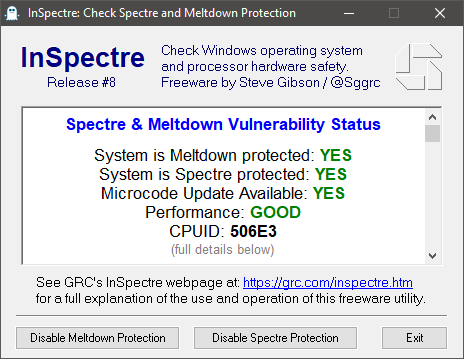
- If running on intel, do you have security mitigations enabled/disabled?
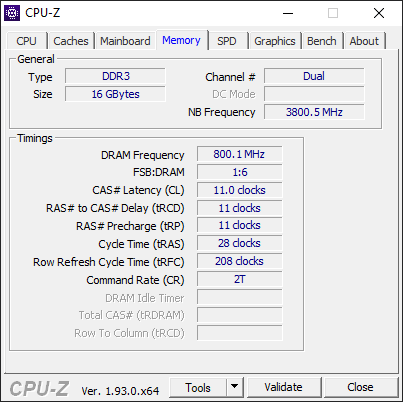
- What is your current memory setup (speed, CL timing and secondary timings if modified)
- Is anyone with an AMD GPU affected? If so which model is it?
- If on NVIDIA hardware, share your 3D configuration settings. If you have a specific "rpcs3.exe" config, show its settings, otherwise show the global settings that would be used by rpcs3. I am interested in the performance critical settings, so just share two screenshots as the options cannot fit in one pic from top to bottom due to nvcpl being so awful. Example config from nvcpl:

kd-11
on 22 Sep 2020
No, Intel CPU
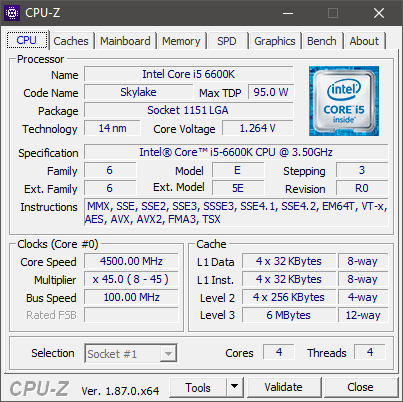
Yes all mitigations are on
RAM (using an XMP profile)

No, Nvidia GPU

Nvidia settings

davewuk
on 22 Sep 2020

has anyone tried this?
 xddxd
on 22 Sep 2020
xddxd
on 22 Sep 2020
has anyone tried this?
Makes no difference at all for me
davewuk
on 22 Sep 2020
I should have mentioned this, the juicy nvidia settings are from power management mode to VR prerendered frames. That's where all the performance critical information is contained. I will update the comment.
@davewuk
kd-11
on 22 Sep 2020
Actually, looking through the options, I guess I'll need both the top options and the bottom options, maybe let's just have two screenshots for the control panel.
kd-11
on 22 Sep 2020
- Nope, i5 4670K here.
- Not sure what this is, but following davewuk reply above by using InSpectre, I get the same results (YES - YES - YES - GOOD).
- Nope, Nvidia GTX 970.
- No profile for RPCS3, I'm using global settings:
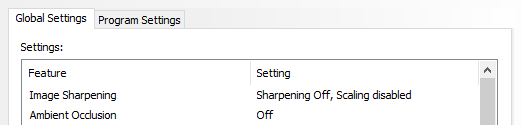
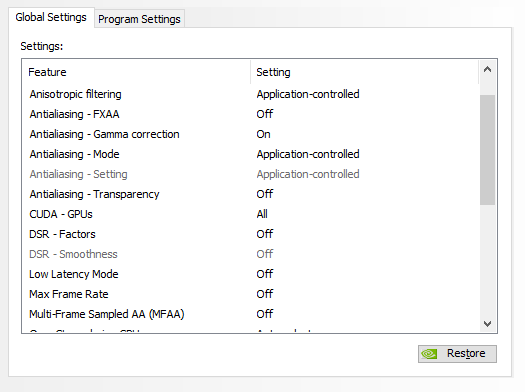

bslenul
on 23 Sep 2020
Actually, looking through the options, I guess I'll need both the top options and the bottom options, maybe let's just have two screenshots for the control panel.
kd-11 to be honest none of those Nvidia settings change a thing for me. FWIW I have triple buffering enabled (for when I'm using OpenGL obviously) but other than that they're all default. Pre-rendered frames isn't a thing any more in newer drivers, it's called low latency mode now.
davewuk
on 23 Sep 2020
Just want to point out that the system I'm experiencing the issue on has an AMD gpu (HD7770), so it's not going to be gpu vendor specific. I'm also on Windows 8.1, so I can't test that option Jo mentioned above.
dio-gh
on 23 Sep 2020
@davewuk @bslenul @MIC132 @Rex000 @TheBloodstomper Could you guys retest with #9117 current master? This PR resolves the issue for me for the utmost part.
In case you guys aren't familiar with downloading PR builds, here's an easy link that takes you to the download.
The PR has been merged into master since, so just update RPCS3 to test.
dio-gh
on 24 Oct 2020
Thanks for the link to the build, but unfortunately no change for me.
FPS on Goldeneye 007 still nearly half and very uneven with window focused even just in the opening videos.
No noticeable change in the Killzone 2 campaign, still get huge frame time spikes drops every few seconds up to 130ms (in the scene I tested).
davewuk
on 24 Oct 2020
I'll do more testings later, but I booted Demon's Souls, loaded my save and played just a bit and it seems to have fixed the issue for me as well! 🎉
bslenul
on 24 Oct 2020
I can confirm that the problem has been fixed here for me, I can't believe it because it has plagued me for years and now it's perfect, this is wonderful. thank you very much for resolving this issue RPCS3 Team.
 EmulationPsycho
on 25 Oct 2020
EmulationPsycho
on 25 Oct 2020
No change for me with the latest build. What was broken before is still broken:


davewuk
on 25 Oct 2020
Still the same issue on my end.
Rex000
on 30 Oct 2020
Unassigning, this issue has been shown to not be caused by RSX routines which was the first hypothesis. Seems to be caused by windows thread waking behavior which is dependent heavily on windows version and some undocumented windows kernel behavior.
kd-11
on 21 Nov 2020
Related issues
 uaqlover
·
3Comments
uaqlover
·
3Comments
 Luffykun007
·
3Comments
Luffykun007
·
3Comments
 Birch-san
·
3Comments
Birch-san
·
3Comments
 JohnGodgames
·
3Comments
JohnGodgames
·
3Comments
 On1ko
·
3Comments
On1ko
·
3Comments
Most helpful comment
I'll do more testings later, but I booted Demon's Souls, loaded my save and played just a bit and it seems to have fixed the issue for me as well! 🎉