Rpcs3: RPCS3 runs slow-mo with jittery audio and missing graphics using --no-gui
Quick summary
RPCS3 via command line is running in slow-motion and with missing graphics if launched with --no-gui
Details
if i launch via the emulator itself. all is well. if i launch the same game via command line, all is well.
if i launch the same game via command line using --no-gui, its in slow-mo with jittery audio and the start screen is missing graphics.
this is from NNK

 klepp0906
All 49 comments
Provide log without and with nogui
 Megamouse
on 17 May 2020
Megamouse
on 17 May 2020
on it. about to test with a few more games to ensures its not game specific then ill upload logs with and without
klepp0906
on 17 May 2020
klepp0906
on 17 May 2020
here is the log without --no-gui
klepp0906
on 17 May 2020
It seems like the only real difference in initialization is this piece of code.
m_emu_settings.reset(new emu_settings());
m_gui_settings.reset(new gui_settings());
m_persistent_settings.reset(new persistent_settings());
So I think it's something about settings reset.
 sampletext32
on 17 May 2020
sampletext32
on 17 May 2020
assume theres nothing to be done on my end as a workaround outside of launching without --no-gui for now?
i tried with openGL as well as vulkan and it happens with both unfortunately.
klepp0906
on 17 May 2020
tested every single setting available. nothing client side to circumvent it seems.
klepp0906
on 19 May 2020
I apologize if this comes across as pushy, it's not my intent. I realize based on the number of issue reports alone, never mind active development on rpcs3 itself - you guys have more than enough to keep you busy.
I waited quite some time for this to be implemented, and its functioning is really important to me. I noticed this is tagged with "need information" and I just wanted to be sure that you guys have all that you need from me information wise?
I'd hate to be sitting here trying to be the prince of patience when a developer was waiting on me all along ;p
enjoy your memorial day :)
klepp0906
on 25 May 2020
I already tried but I couldn't see any difference in performance 🤷
Megamouse
on 26 May 2020
It’s not the performance in so much as the fact the textures at the startup screen don’t even load, music doesn’t even play. The only reason I know the sound is jittery is due to the single sound effect played on an advertisement screen prior to the starting/theme screen.
Launched through the GUI - normal as can be.
Any suggestions on what it could be if it were on my end?
Thanks again <3
klepp0906
on 26 May 2020
just eradicated my display drivers with DDU and reinstalled a different version. Same issue.
Without some hand holding I have no idea. I use a half a dozen other emulators and their equivalent of direct launch/no-gui all work without fail. Certainly not pointing the finger, as the behavior could very well be rooted on my end. I'll just need some developer expertise to uncover why it would launch perfectly fine without that flag, and that flag causes speed/graphical/audio anomalies.
I tried from an admin command prompt and non admin fwiw. No idea what else to do as a process of elimination.
a more robust form of logging i can enable/submit perhaps?
klepp0906
on 26 May 2020
Are trying to play a game that have custom setting?
Are you starting rpcs3 with the command like from something like a launcher or a desktop shortcut
 vsub
on 26 May 2020
vsub
on 26 May 2020
I'm having the same issue. I'm using Steam ROM Manager to make links within Steam. I noticed this issue in Kingdom Hearts 1.5. When launching with --no-gui from the Steam shortcut, there was a small hitch every second or so. It seems to be an issue with frame pacing or frame limiting.
Then I tested using a separately created Windows shortcut with the same command line as the Steam shortcut, and got the same results. I'm attaching the logs of both with and without the flag.
 ZombiJambi
on 26 May 2020
ZombiJambi
on 26 May 2020
Are trying to play a game that have custom setting?
Yes, I'm assuming you're implying that the --no-gui option is just loading the game without the custom configuration, so I tried renaming the custom config file so it would load with default settings, and same results. Without the flag, no hitching; smooth frame pacing. With the flag, hitching.
Are you starting rpcs3 with the command like from something like a launcher or a desktop shortcut
Tried with Steam shortcut, and with desktop shortcut; same thing. Also tried from an admin Command prompt, and same thing.
ZombiJambi
on 26 May 2020
I don't know if it will help but
Right click on the exe=>properties=>compatibility=>enable "Disable fullscreen optimizations"
vsub
on 26 May 2020
I already (unknowingly) had that option checked on the rpcs3.exe, but I enabled it on the shortcut I created, and I get the same hitching.
ZombiJambi
on 26 May 2020
I compared both logs, and found an extra line here about my GPU when using the flag (I bolded the extra line). It's the only line here starting with an E, which I assume is an Error. This line doesn't appear when I run with GUI.
·! 0:00:00.745248 RSX: Found vulkan-compatible GPU: 'AMD Radeon (TM) R9 390 Series' running on driver 2.0.137
·E 0:00:00.767565 RSX: Your GPU does not support alpha-to-one for multisampling. Graphics may be inaccurate when MSAA is enabled.
·! 0:00:00.767581 RSX: GPU/driver lacks support for float16 data types. All float16_t arithmetic will be emulated with float32_t.
·! 0:00:00.790254 RSX: Vulkan: Renderer initialized on device 'AMD Radeon (TM) R9 390 Series'
·! 0:00:00.790278 RSX: Swapchain: present mode 2 in use.
ZombiJambi
on 26 May 2020
Are trying to play a game that have custom setting?
Are you starting rpcs3 with the command like from something like a launcher or a desktop shortcut
no custom settings on any of the games i tried
i tried launching through launchbox. i tried through command prompt at desktop. tried through command prompt at desktop as admin.
also purged all cache's and tried.
sorry was outside doing yard work all day, just now getting caught up on this.
klepp0906
on 26 May 2020
ah, just noticed your on amd and im on nvidia. not vendor specific then. not api specific.
klepp0906
on 27 May 2020
Sorry but I cannot reproduce this in any way. The game works as expected no matter how I start it.
What's the exact command that you use?
Megamouse
on 27 May 2020
Sorry but I cannot reproduce this in any way. The game works as expected no matter how I start it.
What's the exact command that you use?
I'm using rpcs3.exe --no-gui "G:\Games\Consoles\Sony - PlayStation 3\BLUS30947\PS3_GAME\USRDIR\EBOOT.BIN"
No way as a developer to guess what could cause the different behavior based on launching via a double click within rpcs3 vs omitting that portion?
youre testing on windows (unsure if rpcs3 has osx or linux builds?)
using 19041/2004 build or? Unsure if that would have relevance but i know microsoft released wddm 2.7 with it so maybe?
appreciate your time looking into it either way.
klepp0906
on 27 May 2020
I really don't have a clue. Maybe test on another PC to see if it is some strange windows configuration issue on your machine.
Megamouse
on 27 May 2020
yea thats the last ditch effort, moving everything over. Even though unsure where that would get me, it would at least point to it being config related. (though ive just dumped my entire drivers and tried with a fresh version at default settings with the same result)
just wasnt sure if there was something obvious in the way it initializes from the GUI vs without the GUI. Or some step that is skipped when using the GUI vs otherwise.
weiiiiird.
Will certainly post back once i dig up something relevant. Thank you again.
klepp0906
on 27 May 2020
just as an update (havent had time to test much) to eliminate it being related to fullscreen i immediately windowed it after launching via cmd.
the difference is doing so via cmd line results in the fps bouncing between 25-27 and launching via the gui results in it being locked at 30fps.
so whatever is causing the different behavior between the modes, is effecting frame rate which obviously would affect audio, and apparently somehow stymies proper rendering as well.
wondering if somehow a different form of buffering or something is being used between the two for some reason.
klepp0906
on 28 May 2020
well. back from the gym. transferred my rpcs3 to another pc. entirely different platform amd instead of intel etc.
identical behavior.
one last thing to test which is going to be a separate rpcs3 install. If that passes, its something inside the current rpcs3 config/folder.
if it fails - balls back in your court :(
klepp0906
on 28 May 2020
Well, i was really hoping it wasn't the case but even with a brand new fresh RPCS3 it happens. Two separate machines i'd say thats enough evidence pointing towards it being not config related and something under the hood.
An additional bit of information that will hopefully be helpful.
Lets say I have the game running. I change it from fullscreen to windowed so i can see the FPS in the titlebar etc.
if i click the X in the top right corner (i didnt notice this on the non-fresh install as i have the confirm dialog disabled) but when the confirm box pops up for closing, it speeds up/stops hitching/audio goes normal for a few seconds. then it retreats back to its previous behavior.
klepp0906
on 28 May 2020
final test.
did a full clean boot/disabled all non microsoft services through msconfig. ran through a brand spanking new/clean rpcs3.
same result.
unless theres something else im overlooking.
taking all suggestions but im going to venture that something in the code surrounding what i noted prior (about how the pop up window returns it to full speed temporarily) has to be it.
I was even willing to entertain it was something with dual monitors, yet the other pc i tried on only has 1 display.
not sure what else to try at this point.
klepp0906
on 28 May 2020
going through the logs without knowing what im looking for, this pops up only in the no-gui variant. same game. same everything. only difference is the launch method. relevant?
·W 0:00:09.317665 {cellAudio Thread} cellAudio: Audio backend stopped unexpectedly, likely due to a buffer underrun
·W 0:00:09.528116 {cellAudio Thread} cellAudio: Audio backend stopped unexpectedly, likely due to a buffer underrun
I checked this on my setup which is this, latest release as of 05/28/2020:
RPCS3 v0.0.10-10435-3df83e03 Alpha | HEAD | Firmware version: 4.84
Intel(R) Core(TM) i7-7700K CPU @ 4.20GHz | 8 Threads | 63.96 GiB RAM | TSC: 4.200GHz | AVX+ | FMA3 | TSX
I tested the following from command line and by creating a shortcut.
e:\Games\Emulation\rpcs3\rpcs3.exe "N:\PS3\Ni_No_Kuni_Wrath_Of_The_White_Witch\BLUS30947\PS3_GAME\USRDIR\EBOOT.BIN"
e:\Games\Emulation\rpcs3\rpcs3.exe --no-gui "N:\PS3\Ni_No_Kuni_Wrath_Of_The_White_Witch\BLUS30947\PS3_GAME\USRDIR\EBOOT.BIN"
The _only_ difference I noticed was a ~0.5fps reduction with the --no-gui option. Without that option the game ran at a solid 29.99fps. With that option the fps dropped down to 29.56.
No difference in graphics, music, or sounds.
This was without a custom game configuration.
 toratora
on 29 May 2020
toratora
on 29 May 2020
yea, i dont really know what else to even do. It happens on both my machines. both with fresh default rpcs3. I tried a half a dozen nvidia drivers going back months.
i tried admin and without. ogl and vulkan.
i tried every single option within rpcs3 toggled this way and that.
I tried a completely clean boot with nothing but M$ services running.
Are you guys using the new spring/may/2004 windows update? could that be the difference? the whole dx12 ultimate/wddm 2.7 thing? Thats the only similarity between my 2 pc's. every single piece of hardware in both of them is unique relative to one another.
also tried all nvcp options, forcing triple buffering, forcing vsync on/off.
I can take a vid if it'd be helpful. Post more logs. Whatever is needed.
The one thing i hoped would point towards a potential cause is when i try to close the game window and the "Exit Game? Yes/No" box pops up it instantly speeds up to how it should be, locked at 30fps, audio goes normal - lasts about 5 seconds then fps drops back to bouncing between 25-27 with the audio skipping.
If i leave the exit game window up, and give something else focus aka click on my browser, then click back on the exit game window - it speeds back up to normal again for a few seconds.
repeatable over and over. Of course being a user I have no idea what that means outside of some kinda focus issue or something. Or like a priority issue.
About to look into if its possible to post a bounty for someone to debug this somehow or something lol. As i mentioned in the OP i waited a good while for this to go in, and its central to my set-up as i play remotely. Or had hoped to anyhow : P
thank you for testing though <3
klepp0906
on 29 May 2020
Ok, so I made a couple videos, using Ni no Kuni.
Ignore the exploding vertices, I'm not sure how to fix them, but the frame pacing issue is still visible.
Pay attention to the street light.
Video using --no-gui, and getting suttering; uneven frame pacing.
https://youtu.be/SUjruUWFpkE
Video not using --no-gui, and you can see it has even frame pacing:
https://youtu.be/t1kLCxubhD4
ZombiJambi
on 29 May 2020
seems like i simply get some kind of on-steroids version of the above as i cant even get the games startup screens to show properly. for example white knight chronicles is just black. NNK is mostly black as in the OP.
I never thought to even try advancing beyond that point, but your post motivated me to. I took a few vids as well. Is that what this is a frame pacing thing?
Here is the --no-gui version, you can see the fps in the window is stuck in that 25-27 span and you can hear the ghastly audio. https://www.dropbox.com/s/smhxpm6mxzz0tcp/--no-gui.mkv?dl=0
Here is launched conventionally. locked at 30fps and runs exactly as youd expect. https://www.dropbox.com/s/tpvabln78nfvozz/gui.mkv?dl=0
this is with a 8700k and 2080ti too. Same business on my other amd pc though.
klepp0906
on 29 May 2020
Yeah that's way worse than anything I've had to deal with.
I have an AMD Ryzen 5 1600 and R9 390.
I think this makes it obvious that this is a RPCS3 issue, that just presents itself differently on different hardware.
I would think the next step is to look at all the things RPCS3 does when it starts up its UI.
ZombiJambi
on 29 May 2020
the only thing shared between my 2 pc's are the type of monitor, and the make of the gpu. (and the windows version)
I strongly believe its an rpcs3 issue as well. I've eliminated every single variable I can as a user. Of course i'm willing to do whatever I can to narrow that down to being a certainty if thats what it takes to get it addressed. I just need to know what i missed. having --no-gui is very very important to me lol.
As for the differences between launching the GUI and not, thats sort of what I was hinting at earlier in the thread. Unfortunately my development experience begins and ends with rudimentary ahk so i tried smooshing my face against things like resource monitor and procmon but nothing stood out to the layman.
klepp0906
on 29 May 2020
Well. I could reproduce it now and (with opengl) I'm getting like 29.5 fps with --no-gui.
Although I still don't know why this happens.
The only real difference is that the debugger and the log are NOT created. I'll probably have to test what happens if I never create them with the GUI
Megamouse
on 29 May 2020
Well. I could reproduce it now and (with opengl) I'm getting like 29.5 fps with --no-gui.
Although I still don't know why this happens.
The only real difference is that the debugger and the log are NOT created. I'll probably have to test what happens if I never create them with the GUI
Thats great news you can reproduce it. Odd that it effects me to a more severe degree by several orders of magnitude.
If it were worse on my older pc, id understand. But my newer/higher end pc still gets the behavior so go figure.
If you'd like more up to date logs to peruse from a clean/fresh/default rcps3 install - or anything like that, just let me know. (or anything else i can help with testing/debugging wise)
klepp0906
on 29 May 2020
Well. I could reproduce it now and (with opengl) I'm getting like 29.5 fps with --no-gui.
Although I still don't know why this happens.
The only real difference is that the debugger and the log are NOT created. I'll probably have to test what happens if I never create them with the GUI
or test what happens if you have it still create the log etc with --no-gui unless you mean the log tied TO the gui, as it obviously still creates the RPCS3.log lest it wouldnt have been available to submit during the early stages of this saga.
whichever is the path of least resistance of course :) fwiw just tried with a new nvidia driver, latest rpcs3/clean install, and games ran from the disc folder instead of their own.
result was the same.
klepp0906
on 10 Jun 2020
ever end up with the time to look into this a bit yet?
please dont take this as impatience, as i sincerely appreciate all you guys do. After all, rpcs3 command line or no command line wouldnt exist without you :)
I just want to stay on top of it and i figured since its been about a month, i'd feel marginally less douche'y "bumping the post" so to speak.
klepp0906
on 29 Jun 2020
@klepp0906, I unknowingly made a duplicate issue report about the same symptoms. Very odd indeed. Clean Windows, clean drivers, same issue. Hopefully a resolution of this issue comes at some point.
 SuperOkazaki
on 17 Aug 2020
SuperOkazaki
on 17 Aug 2020
I have the same problem.
Processor Intel(R) Core(TM) i5-9300H CPU @ 2.40GHz, 2400 Mhz, (can go up to 4.1GHz) 4 Core(s), 8 Logical Processor(s)
Nvidia GTEForce GTX 1650 16GB RAM
I was running the script perfectly fine then tried --no-gui and it stutters and skips music. Removed it again and it's back to normal. So it only happens with --no-gui in the script. Tried with 3 different games. My uneducated thought about it is it skips the SPU Cache and goes straight into the game so maybe that's why?
 Jayinem
on 5 Sep 2020
Jayinem
on 5 Sep 2020
yea ive been updating religiously and re-trying over time hoping it would get inadvertently fixed. No such luck.
The label on the issue is "Need Information" which might be deterring people from looking at it? Would be great if someone with the ability to do so could remove that label, unless of course more information IS needed?
klepp0906
on 7 Sep 2020
Agreed, I fail to see what more information is needed. About a month ago, I posted an issue outlining the same thing, with images, logs, and system specs. It was closed and I was redirected to this thread.
https://github.com/RPCS3/rpcs3/issues/8744
I would be chuffed to find out what information, exactly, is needed. Perhaps a contributor can enlighten us?
SuperOkazaki
on 7 Sep 2020
Agreed, I fail to see what more information is needed. About a month ago, I posted an issue outlining the same thing, with images, logs, and system specs. It was closed and I was redirected to this thread.
8744
I would be chuffed to find out what information, exactly, is needed. Perhaps a contributor can enlighten us?
They probably don't see it as very important, because it's not a necessity to run the game without the GUI. Especially when over half the games for PS3 still don't even work.
Jayinem
on 8 Sep 2020
Does anyone have this issue on a linux system?
Megamouse
on 22 Sep 2020
Results on archlinux show no difference between no-gui and normal CLI operation under both Vulkan and OpenGL. Performance is smooth and all visuals are working fine, making this likely another windows-only issue.
 kd-11
on 22 Sep 2020
kd-11
on 22 Sep 2020
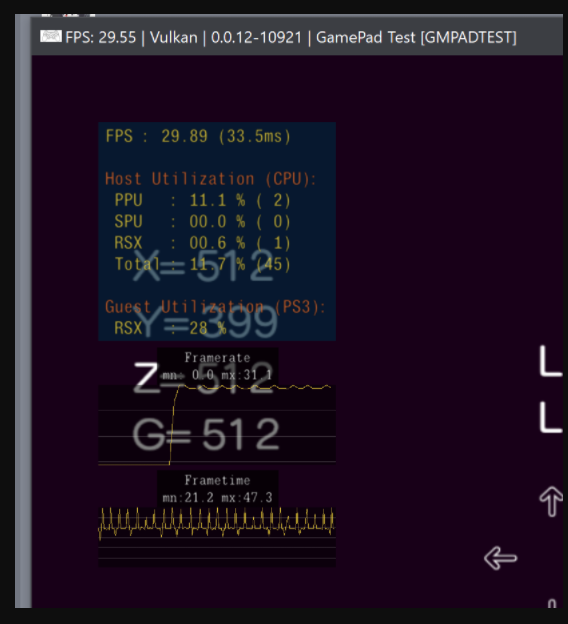
For the record:
RPCS3 v0.0.12-10921-97e26f9d Alpha | HEAD | Firmware version: 4.85
Intel(R) Core(TM) i7-7700K CPU @ 4.20GHz | 8 Threads | 31.94 GiB RAM | TSC: 4.200GHz | AVX+ | FMA3 | TSX-FA
With GUI:
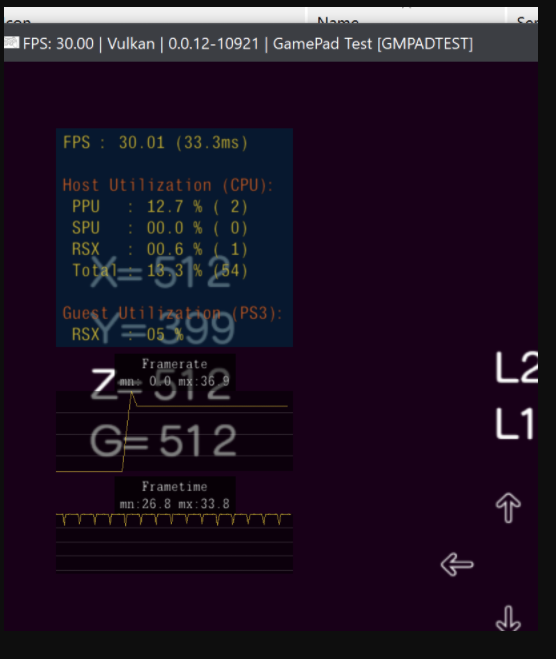
Without:
Megamouse
on 22 Sep 2020
looks to be related to frametime eh? wonder why im effected so much more severely than you are. you dip to 29.55 i dip to like 25-27fps and it causes all kinds of anomalies as per the OP.
gonna have to try and find out what/where i can get that gamepad test thing to do some comparisons of my own.
klepp0906
on 24 Sep 2020
Yep, it's super severe for me too. My framerate basically _halves_ when running a game with the --no-gui flag. If there is any additional testing I can do to help nail down the problem, let me know and I can help.
SuperOkazaki
on 24 Sep 2020
any changes on this guy? anyone have any luck with a workaround or anything? Since its a windows only issue i tried mucking around with hardware gpu scheduling but that was a wash :(
klepp0906
on 27 Oct 2020
Related issues
 AniLeo
·
3Comments
AniLeo
·
3Comments
 Xcedf
·
3Comments
Xcedf
·
3Comments
 Luffykun007
·
3Comments
Luffykun007
·
3Comments
 Emulator-Team-2
·
3Comments
AniLeo
·
3Comments
Emulator-Team-2
·
3Comments
AniLeo
·
3Comments
Most helpful comment
Ok, so I made a couple videos, using Ni no Kuni.
Ignore the exploding vertices, I'm not sure how to fix them, but the frame pacing issue is still visible.
Pay attention to the street light.
Video using --no-gui, and getting suttering; uneven frame pacing.
https://youtu.be/SUjruUWFpkE
Video not using --no-gui, and you can see it has even frame pacing:
https://youtu.be/t1kLCxubhD4