Rpcs3: Gran Turismo 5 [BCUS98114] Locks up without any error in the console ( desynchronisation of the emulator )
OLD PC:
Operation System: Windows 10 1903
I7 5930K, 16GB Ram, GTX 1080 Ti
23.11.2020 (dd/mm/yy)
The game locks up when starting a race or a few seconds in the race.
NEW PC:
AMD Ryzen 5 5600x, 16GB Ram ( same as before ), GTX 1080 Ti
No desyncs anymore! There are some issues with scaling up the resolution but nothing else worth noting because there are just minor bugs with lighting and flickering picture. The game will still desync on the old system so nothing changed from the emulator side.
First i'll explain what happens to the game. When I start a race I can drive normally but then after 15 seconds or 1 minute and more it will lock up. Sometimes I can finish a race but this is very rare. Also as I mentioned there is no error in the console it's usually compiling something and then nothing happens anymore. It's like someone pushed the pause button. The spectators of the race are still moving but the cars stopped, the sound stopped and nothing is reacting.
(And btw I want to mention that while first loading up the game it will crash on certain points like the start menu and loading a race but restarting the emulator and loading it the second time fixes it. If you want the logs for this issue too I can provide them but first I have to reproduce the issue)
Here is the log file of the game freezing while in a race. Maybe there is something in there indicating what the problem is.
I want this game to be playable so bad. It's very close just some minor graphic glitches, the game freezing and the loading thing ( i can life with restarting the game ) but when this is fixed it's 100% playable!
 SKYMEE1
All 121 comments
I've been having the same issues post the MGS build. Also, GT6 is almost unplayable with fatal errors and varied lock-ups regardless of the build.
Windows 10, [email protected], 16Gb DDR3, AMD Rx580.
 aka2k
on 2 Sep 2019
aka2k
on 2 Sep 2019
Yes, in Gran Turismo 6 I also experienced the same lock up issue as in Gran Turismo 5 but I didn't wanted to mention it because GT 6 has way more problems than GT 5.
SKYMEE1
on 2 Sep 2019
Yes, in Gran Turismo 6 I also experienced the same lock up issue as in Gran Turismo 5 but I didn't wanted to mention it because GT 6 has way more problems than GT 5.
Weirdly enough, GT6 for me ran with very little issues until that July build that broke compatibility. Now it's a complete mess, even without sound and fatal errors all the time.
aka2k
on 3 Sep 2019
Well to their credit, most games were so glitched like gt5 an so on it was a pain to play them and now they look good an run smoother. Fps were so low I couldn't even race properly. It's not like they won't fix these issues and when they do they created the one and only ps3 Emulator in the world.
(Btw help them out on patreon like I do with only one dollar a month. 1 dollar is not much but when a lot of people support them like this they can afford what they need to get this Emulator up and running properly)
SKYMEE1
on 3 Sep 2019
Well to their credit, most games were so glitched like gt5 an so on it was a pain to play them and now they look good an run smoother. Fps were so low I couldn't even race properly. It's not like they won't fix these issues and when they do they created the one and only ps3 Emulator in the world.
(Btw help them out on patreon like I do with only one dollar a month. 1 dollar is not much but when a lot of people support them like this they can afford what they need to get this Emulator up and running properly)
I'm not complaining at all about the state of GT series or even demanding anything. The RPCS3 team is very generous to share their work for free with us. I just thought to give them a heads up. Either way, I'm finding this issue a little weird, because now I'm having the same problem with older builds. I'll investigate my stuff a bit more thoroughly.
aka2k
on 3 Sep 2019
Then I think that you just took the folder hhd0 and put it in the folder from another version... What you have to do is just put the games from the disc folder in every updated version of the Emulator. Save games, updates etc are gone this way but you have to do this so you don't have old data from the previous builds that the Emulator will load. When you try out gt 5 in an old build like that you will see the bugs from those builds.
SKYMEE1
on 3 Sep 2019
GT6 Freezes in the Intro race for me, nothing in the Log or anything. Just Locks up,
 Eeveelution
on 3 Sep 2019
Eeveelution
on 3 Sep 2019
I've tried to reinstall a fresh copy of an old RPCS3 build. Patched GT6 to 1.05, lock up the same way as the newer builds do. Tried to run on Linux with a proper build, same lock up. It's puzzling me now.
aka2k
on 4 Sep 2019
My friend has a ryzen 3600 and could play gt 6 with the build: 0.0.6-8413. With my i7 5930k the GUI of the race loaded but it was all black and bugged out.
SKYMEE1
on 4 Sep 2019
I have same problem too! GT5 just locks up i see creating RSX shaders and screen is frozen without any of errors.
 Wizzy2018
on 16 Sep 2019
Wizzy2018
on 16 Sep 2019
Just found it frezzes when i get this RSX: BRK opcode found outside of a loop so idk what is happening game runs in menu 60fps and in race from 30-60 fps.
Wizzy2018
on 16 Sep 2019
As I said in the other issue, that usually means the emulator desynchronized (already dead) but RSX does not know this and tries to keep running. Same thing with the '406e semaphore timed out' error.
 kd-11
on 16 Sep 2019
kd-11
on 16 Sep 2019
Is there any kind of solution for desynchronized?
Wizzy2018
on 16 Sep 2019
The solution is to locate the code which causes desynchronization and synchronize it with f.ex a synchronization lock. Preferably in a way which doesn't degrade performance.
 MSuih
on 16 Sep 2019
MSuih
on 16 Sep 2019
Right now I can't even get into a race. It's always crashing. I am not at home but later I can tell what it says. Maybe my PC hardware is causing the issue because of a feature that's not enabled on haswell based CPUs maybe not. It's called TSX. I'm questioning myself if this would cause any issues like crashing etc.
SKYMEE1
on 16 Sep 2019
I have a same issue @skymee1 it's not a hardware. It crashes all the time it's very anoying.Even i can't go in garage to select a car it gives me Error every time Mem:Acess violation reading location 0x0
Wizzy2018
on 16 Sep 2019
Yes it's something like that but also another crash. I will post it when I get home.
SKYMEE1
on 16 Sep 2019
When i boot the game and the emulator wants to load the menu then there is this error showing up:
U {PPU[0x100002d] Thread (libpace-comm) [0x01a55d28]} sceNp TODO: sceNpManagerGetStatus(status=*0xd017dc00) x19
The number stacks up infinite and at this point it was at x19. After another boot everthing loads normal but the error still appears but nothing is hanging up in the menu.
Then when I load a race this error comes up and all stops:
F {RSX [0x1275d58]} RSX: class std::runtime_error thrown: Assertion Failed! Vulkan API call failed with unrecoverable error: Device lost (Driver crashed with unspecified error or stopped responding and recovered) (VK_ERROR_DEVICE_LOST)
(in file C:projectsrpcs3rpcs3EmuRSXVKVKHelpers.h:1052)
Maybe it will help.
SKYMEE1
on 16 Sep 2019
Try turning off RSX Multithread on the GPU tab. Should fix GT5 errors. Also, GT6 needs the SPU block set to Safe in addition of the Multithread option. Performance hit is noticeable in GT6, but not extreme. GT5 doesn't seem to have any significant performance drop with this setting.
aka2k
on 16 Sep 2019
Okay I will try that tomorrow but in the end it will still lock up... Sad story for the little child in me that just wants to play GT 5 in 1440p..
SKYMEE1
on 16 Sep 2019
It will lock up believe me i try it today 10 hours every settings and it always locks up :/ I feel you man i have that little child too inside me :( We need to believe and have hope KD-11 fix it cuz he is like a Super hero for all of us <3
Wizzy2018
on 16 Sep 2019
Okay I will try that tomorrow but in the end it will still lock up... Sad story for the little child in me that just wants to play GT 5 in 1440p..
Btw, try to run the BCES00569 version of the game. This BCUS98114 is incredibly unstable for me as well, crashing all the time regardless of what settings I use.
aka2k
on 17 Sep 2019
I can't get my hand's on BCES00569 and what I saw it's the Academy edition so not the right one I guess.
SKYMEE1
on 17 Sep 2019
Academy edition for me crashes on intro everytime.Now i have same issue on GT5 and GT6 with Brk opcode happens everytime
Wizzy2018
on 17 Sep 2019
Idk is it helps but before a game crashes i see error E {SPU[0x2000002] Thread (PDICellSpursKernel2) [0x127ac]} SPU: Trampoline simplified at ??? (level=1) and than a game frezzes that happens like 80% of time
Wizzy2018
on 18 Sep 2019
I've used this build and, somehow, GT6 felt a little more stable. It crashed eventually, but it took quite a while. Managed to do 6 laps on Tsukuba w/o any problems. Crashed only when trying to load Le Mans. I've enabled the RSX Multithread, tried again and it crashed right away when entering a time trial session at Tsukuba, no soft lock tho.
aka2k
on 19 Sep 2019
The multithreaded RSX lockup was fixed, please retry. Things may have improved somewhat.
kd-11
on 21 Sep 2019
@Wizzy2018 "BRK instruction" means you cached corrupted shaders. Delete your shaders cache.
kd-11
on 21 Sep 2019
@kd-11 I do it everytime and same result .Sorry i didnt read a message you text before i test it out and report back thx
Wizzy2018
on 21 Sep 2019
@kd-11 i test it and i can say it's more stable but every 2nd race a frezze happens with no error.Only displays creating shaders and frezzes.
And a performance is well to^^ It goes in heavy areas 35-40 FPS and 80% of track 60 FPS.
@kd-11 Very nice job just a little more stabilization and it will be perfect. @kd-11 <3 Love you <3
Wizzy2018
on 21 Sep 2019
@kd-11 Tanks for working on it!
SKYMEE1
on 21 Sep 2019
GT6 crashes immediately now with a fatal error when trying to load a car.
aka2k
on 21 Sep 2019
Yes GT 6 crashes immediately at me too.
Now GT 5 started to freezes again after few races worked well now again frezzes.
Wizzy2018
on 22 Sep 2019
FPS_ 20.57 _ Vulkan _ 0.0.7-8754 _ Gran Turismo 5 [BCUS98114] 2019-09-22 13-48-35.zip
Here it is how it looks when frezzes with no errors in console at all :/
Wizzy2018
on 22 Sep 2019
I can't get gran turismo 5 to work at all right now...
SKYMEE1
on 23 Sep 2019
Same here we need to wait for a fix
Wizzy2018
on 23 Sep 2019
Try with a build from https://github.com/RPCS3/rpcs3/pull/6584 which aims to fix some regressions in sys_cond.
kd-11
on 26 Sep 2019
@kd-11 So no changes at all still locks up.I upload few videos from my pc how it happens maybe you find something helpful
FPS_ 35.64 _ Vulkan _ 0.0.7-8777 _ Gran Turismo 5 [BCUS98114] 2019-09-26 16-26-31.zip
RPCS3 0.0.7-8777-5ac631e0 Alpha 2019-09-26 16-26-09.zip
Wizzy2018
on 26 Sep 2019
I got Gran Turismo running in a race. Turn off Anti-Aliasing and it won't crash at least. On my pc it still lock's up . There are many steps to do to get the game running at least in the menu.
In the beginning it won't even start at all so I had to turn on multithreaded rsx. Then it will load to the menu where it'll crash and close without any error. After that it will load into the menu. Then, when loading a race it'll crash with a known error, this one to be exact:
F {RSX [0x1275d58]} RSX: class std::runtime_error thrown: Assertion Failed! Vulkan API call failed with unrecoverable error: Device lost (Driver crashed with unspecified error or stopped responding and recovered) (VK_ERROR_DEVICE_LOST)
(in file C:projectsrpcs3rpcs3EmuRSXVKVKHelpers.h:1052)
Then disabling Anti-Aliasing got me in to a race but it still lock's up and the fps are still fluctuating.
SKYMEE1
on 26 Sep 2019
@AniLeo pls don't kill me, could you please close or review these two issues, @SKYMEE1 has the same issue as #6748
Emulator Desyncs at the same point as #6748, per log
When log is set to warning, this is the last event before the log spam.
W {PPU[0x100001c] Thread (9ZWAM) [0x01c75a30]} sys_lwcond: _sys_lwcond_create(lwcond_id=*0xd00ded8c, lwmutex_id=0x95037700, control=*0xd00ded88, name=0x0, arg5=0x0)
·E 0:06:03.342731 {PPU[0x1000000] Thread (main_thread) [0x01a56cc8]} 'sys_lwcond_wait' failed with 0x00000000 : 0 [2]
·E 0:06:03.342734 {PPU[0x1000001] Thread (MpAnk) [0x00c060a4]} 'sys_event_queue_receive' failed with 0x00000000 : 0 [1]
·E 0:06:03.342735 {PPU[0x1000005] Thread (kFeqP) [0x01a56cc8]} 'sys_lwcond_wait' failed with 0x00000000 : 0 [1]
·E 0:06:03.342738 {PPU[0x1000006] Thread (kFeqg) [0x01a56cc8]} 'sys_lwcond_wait' failed with 0x00000000 : 0 [1]
·E 0:06:03.342740 {PPU[0x1000005] Thread (kFeqP) [0x01a56cc8]} 'sys_lwcond_wait' failed with 0x00000000 : 0 [2]
·E 0:06:03.342742 {PPU[0x1000006] Thread (kFeqg) [0x01a56cc8]} 'sys_lwcond_wait' failed with 0x00000000 : 0 [2]
·E 0:06:03.342743 {PPU[0x100000a] Thread (ksF3) [0x01a56cc8]} 'sys_lwcond_wait' failed with 0x00000000 : 0 [1]
·E 0:06:03.342747 {PPU[0x100000a] Thread (ksF3) [0x01a56cc8]} 'sys_lwcond_wait' failed with 0x00000000 : 0 [2]
·E 0:06:03.342745 {PPU[0x1000004] Thread (ZBm9Y) [0x00bf0df8]} 'sys_timer_usleep' failed with 0x00000000 : 0 [1]
·E 0:06:03.342751 {PPU[0x1000009] Thread (ksF3) [0x01a56cc8]} 'sys_lwcond_wait' failed with 0x00000000 : 0 [1]
·E 0:06:03.342756 {PPU[0x1000009] Thread (ksF3) [0x01a56cc8]} 'sys_lwcond_wait' failed with 0x00000000 : 0 [2]
·E 0:06:03.342768 {PPU[0x100000c] Thread (ksF3) [0x01a56cc8]} 'sys_lwcond_wait' failed with 0x00000000 : 0 [1]
·E 0:06:03.342768 {PPU[0x1000007] Thread (ksF3) [0x01a56cc8]} 'sys_lwcond_wait' failed with 0x00000000 : 0 [1]
·E 0:06:03.342771 {PPU[0x100000c] Thread (ksF3) [0x01a56cc8]} 'sys_lwcond_wait' failed with 0x00000000 : 0 [2]
·E 0:06:03.342770 {PPU[0x100000b] Thread (ksF3) [0x01a56cc8]} 'sys_lwcond_wait' failed with 0x00000000 : 0 [1]
·E 0:06:03.342773 {PPU[0x100000b] Thread (ksF3) [0x01a56cc8]} 'sys_lwcond_wait' failed with 0x00000000 : 0 [2]
·E 0:06:03.342774 {PPU[0x1000007] Thread (ksF3) [0x01a56cc8]} 'sys_lwcond_wait' failed with 0x00000000 : 0 [2]
·E 0:06:03.342773 {PPU[0x1000011] Thread (_gcm_intr_thread) [0x01af833c]} 'sys_event_queue_receive' failed with 0x00000000 : 0 [1]
·E 0:06:03.342773 {PPU[0x1000002] Thread (PDISpursHdlr1) [0x01b1b604]} 'sys_event_queue_receive' failed with 0x00000000 : 0 [1]
·E 0:06:03.342776 {PPU[0x1000010] Thread (ksF3) [0x01a56cc8]} 'sys_lwcond_wait' failed with 0x00000000 : 0 [1]
·E 0:06:03.342775 {PPU[0x100000f] Thread (ksF3) [0x01a56cc8]} 'sys_lwcond_wait' failed with 0x00000000 : 0 [1]
·E 0:06:03.342780 {PPU[0x1000010] Thread (ksF3) [0x01a56cc8]} 'sys_lwcond_wait' failed with 0x00000000 : 0 [2]
·E 0:06:03.342781 {PPU[0x100000f] Thread (ksF3) [0x01a56cc8]} 'sys_lwcond_wait' failed with 0x00000000 : 0 [2]
·E 0:06:03.342780 {PPU[0x1000008] Thread (ksF3) [0x01a56cc8]} 'sys_lwcond_wait' failed with 0x00000000 : 0 [1]
·E 0:06:03.342784 {PPU[0x1000012] Thread (8mBKi) [0x00ce8e1c]} 'sys_cond_wait' failed with 0x00000000 : 0 [1]
·E 0:06:03.342787 {PPU[0x1000008] Thread (ksF3) [0x01a56cc8]} 'sys_lwcond_wait' failed with 0x00000000 : 0 [2]
·E 0:06:03.342796 {PPU[0x1000014] Thread (sgx-spurs-SpursHdlr1) [0x01b1b604]} 'sys_event_queue_receive' failed with 0x00000000 : 0 [1]
·E 0:06:03.342803 {PPU[0x1000013] Thread (lwCH) [0x00ce8e1c]} 'sys_cond_wait' failed with 0x00000000 : 0 [1]
·E 0:06:03.342804 {PPU[0x1000018] Thread (prsIy) [0x00c0e3a0]} 'sys_event_queue_receive' failed with 0x00000000 : 0 [1]
·E 0:06:03.342806 {PPU[0x1000017] Thread (sgx-audio-thr) [0x008fe588]} 'sys_event_queue_receive' failed with 0x00000000 : 0 [1]
·E 0:06:03.342811 {PPU[0x100001c] Thread (9ZWAM) [0x00bf0df8]} 'sys_timer_usleep' failed with 0x00000000 : 0 [1]
·E 0:06:03.342812 {PPU[0x100001d] Thread (vyENO) [0x01a56cc8]} 'sys_lwcond_wait' failed with 0x00000000 : 0 [1]
·E 0:06:03.342815 {PPU[0x100001d] Thread (vyENO) [0x01a56cc8]} 'sys_lwcond_wait' failed with 0x00000000 : 0 [2]
·E 0:06:03.342813 {PPU[0x100000e] Thread (ksF3) [0x01a56cc8]} 'sys_lwcond_wait' failed with 0x00000000 : 0 [1]
·E 0:06:03.342819 {PPU[0x100000e] Thread (ksF3) [0x01a56cc8]} 'sys_lwcond_wait' failed with 0x00000000 : 0 [2]
·E 0:06:03.342820 {PPU[0x1000015] Thread (sgx-spurs-SpursHdlr0) [0x01a56cc8]} 'sys_lwcond_wait' failed with 0x00000000 : 0 [1]
·E 0:06:03.342821 {PPU[0x100001e] Thread (8mBKi) [0x00ce8e1c]} 'sys_cond_wait' failed with 0x00000000 : 0 [1]
·E 0:06:03.342825 {PPU[0x1000015] Thread (sgx-spurs-SpursHdlr0) [0x01a56cc8]} 'sys_lwcond_wait' failed with 0x00000000 : 0 [2]
·E 0:06:03.342830 {PPU[0x1000025] Thread (n3FKY) [0x01a56cc8]} 'sys_lwcond_wait' failed with 0x00000000 : 0 [1]
·E 0:06:03.342832 {PPU[0x100001b] Thread (lgFF) [0x00c20e08]} 'sys_event_queue_receive' failed with 0x00000000 : 0 [1]
·E 0:06:03.342829 {PPU[0x100000d] Thread (ksF3) [0x01a56cc8]} 'sys_lwcond_wait' failed with 0x00000000 : 0 [1]
·E 0:06:03.342833 {PPU[0x1000025] Thread (n3FKY) [0x01a56cc8]} 'sys_lwcond_wait' failed with 0x00000000 : 0 [2]
·E 0:06:03.342832 {PPU[0x1000021] Thread (MEfYS) [0x008cfd14]} 'sys_event_queue_receive' failed with 0x00000000 : 0 [1]
·E 0:06:03.342834 {PPU[0x1000023] Thread (ZYWAP) [0x01a56cc8]} 'sys_lwcond_wait' failed with 0x00000000 : 0 [1]
 HHCHunter
on 20 Oct 2019
HHCHunter
on 20 Oct 2019
I opened this issue 2 month ago and EATYOURVITAMIN5 opened his 9 days ago but close the one you want to not overcomplicate things. :)
SKYMEE1
on 20 Oct 2019
Rsx wakeup delay was added which would solve most of these issues. The other hang like gt6 can be theoretically fixed by using rsx reservation option on advanced tab.
kd-11
on 1 Mar 2020
@kd-11 I tried to test gran turismo 5 but I can't get into a race.
F {Network Thread} VM: Access violation writing location 0x60ff26a2 (unmapped memory)
This happens everytime when loading a race or the emulator will just stop do anything.
But when I enable "Disable Async Shader Compiler" this error will disappear sometimes and when this happens some other errors will appear. The emulator is able to load but when pressing the button to start the race the sound will go on until the scripted scene is over in the beginning of the race but nothing is on screen.
So the conclusion is, I can't test it. Maybe some else can...
SKYMEE1
on 1 Mar 2020
I test it with Rsx wake updelay nothing changed at all game still frozes audio goes that's all.Unmapped errors whole log
Wizzy2018
on 1 Mar 2020
I got into a race with the previous update. 0.0.9-9878
Locks up immediately.
SKYMEE1
on 9 Mar 2020
It kind of feels like the desynchronisation get's better. Sometimes I can finish a race ( Freezes while getting the trophy ). The game won't freeze for the whole race but after the first freeze ( when getting the tophy ) the freezes will occur 5-10 seconds into the race. So some changes have improved this issue. Keep on going! :)
SKYMEE1
on 15 Mar 2020
Looks like it's regressed again. Can barely make it through one license test before it crashes on me.
R9 3900X/1080ti/32GB RAM/0.0.9-10088
 shoey9998
on 2 Apr 2020
shoey9998
on 2 Apr 2020
I'm having the same problem.
It's very frustrating cause the performance is very nice but it locks up.
I tried many settings. Also with Delay 800ms, No change.
GT5 [BCES00569]
Rig: Ryzen 3700X, GTX 1080, 32GB RAM
Version: v0.0.10-10325-9a4c26dc (but also any other of approx. 10 versions)
 Sly12346
on 2 May 2020
Sly12346
on 2 May 2020
Waiting solution kkkk
[BCUS98114]
I5 9th gen/16GB/1060 OC/
lastest build
 Billgaits66
on 10 May 2020
Billgaits66
on 10 May 2020
Both BCES00569 (2.1.7) and BCUS98114 (2.0.1) have this issue. 98114 works a tiny bit better for me as I can occasionally get around five license times done before lockup.
Consistent errors I get are
SYS: '_sys_lwcond_queue_wait' failed with 0x00000000 : 0 [1]
U {PPU[0x1000028] Thread (n3FKY) [0x01e31038]} sys_prx TODO: _sys_prx_unload_module(id=0x2302(c,d,e,f, etc.)200, flags=0x0, pOpt=*0x0)
Log file attached below
shoey9998
on 10 May 2020
Still nothing changed at all.
I have to stop my Patreon Support sadly but I don't want to support such a delayed bug fixing.
Sly12346
on 24 May 2020
I'm sure there aren't hundreds of tickets opened before this one
 AniLeo
on 24 May 2020
AniLeo
on 24 May 2020
@Sly12346 There are a lot of bugs and a limited amount of people able to fix them. Have patience and one day the fix arrives.
SKYMEE1
on 24 May 2020
It's just my opinion.
”In my opinion” the priorities were or are wrong.
I hope that the dislike don't only come from Intel users who don't suffer from that bug.
Sly12346
on 24 May 2020
In my opinion, _in my opinion_, in my opinion the games I want to play should also be prioritized, but I guess it makes sense to prioritize a seemingly random, hard to debug desync issue on a very complex and hard to debug AAA game on top of easier, objective bugs on simpler games that when fixed will help solving more complex issues afterwards.
This is also an issue on Intel, I've seen more people getting these on Intel than on AMD, so you're clearly very confused
AniLeo
on 24 May 2020
@Sly12346 If you could read, you might have noticed that I have an Intel CPU and opened this issue. So, please read and think before writing something that makes no sense. If you knew how difficult it is to code you would never say anything you Said.
SKYMEE1
on 24 May 2020
This won't fix the bug but I found a workaround that works fine for me on a Ryzen 3900X; use "Interpreter (fast)" for PPU and "Recompiler (ASMJIT)" for SPU, then edit the config file and change "PPU Threads" to 8. This makes it run almost perfectly on my system with very rare sky flickering (only seen it happen once or twice, maybe solvable with "Write Color Buffers"?) and minimal slowdowns. It will also very clearly drop frames on large tracks but in a racing game that's preferable compared to uneven time progression, judging the brake zone in the one stuttering corner is not a pleasant experience.
With "PPU Threads" left at 2 the game is stable but slow, no frames appear to be skipped.
Either way the experience is close enough to my real PS3 for me to have enjoyed almost 32 hours of gameplay in RPCS3 already. I've completed the entire Beginner Series and the only lockups I've had as described in the bug was from testing anything involving LLVM (clearing all caches when changing settings). So to me this definitely sounds like a LLVM bug.
Started out with rpcs3-v0.0.10-10346-79e2a87b_linux64.AppImage and I've let it update to r10423 through the built in updater seemingly without any changes to stability.
 Djhg2000
on 27 May 2020
Djhg2000
on 27 May 2020
Thank you. I'll try that.
You obviously put a lot of effort for testing.👍
Sly12346
on 27 May 2020
@Djhg2000 This Sounds awesome. Is the 3900x an 8 core processor? Because you set the ppu Threads to 8 or did you just "pick a number" and see if it works.
SKYMEE1
on 27 May 2020
@SKYMEE1 It's a 12 core processor, but I tried a few numbers divisible by 2 and 8 seemed to work best for me on the one track I used for eyeballing the performance. I had other things running at the time as well so there's more optimization to be done.
Try a few numbers and see what works best for you; if in-game time slows down you increase the number of threads and if skipped frames go up you decrease the number of threads. I tried it on Tsukuba Circuit and the first corner is absolutely brutal with a full grid, never got it to render all frames in real time there.
@Sly12346 Well it's my favorite PS3 game so I couldn't just leave it at randomly freezing. :)
Djhg2000
on 27 May 2020
@Djhg2000 Okay thanks, I will try this out and hope for the best.
SKYMEE1
on 27 May 2020
@Djhg2000
I've tried your solution now but it's much too slow.
Not playable for me. I'll continue GT4 for a longer while now. :)
Thx anyway.
Sly12346
on 28 May 2020
I found the solution you need YES or Yes TSX and you have to go to the rpcs3 folder and open with notepad config.yml and change PPU Threads from 2 to 6 and get a full stability :) one thing, don't minimize the game this can cause crash and even the probability of desync Version: 0.0.10-10446 (most newest) don't try it with no-tsx I tried it myself and get desync
 alexloxldlol
on 2 Jun 2020
alexloxldlol
on 2 Jun 2020
glad it works for you, but I tried and got the same results, desync in the 2nd lap of the first race I tried. there is no magical setting that fixes desyncs, that's something that will take more time and effort to fix, but i'm sure that one day i'll finish the 24h of le mans on rpcs3. I also have TSX and didn't minimize the game once
 Satan86
on 2 Jun 2020
Satan86
on 2 Jun 2020
TSX isn't possible on AMD afaik.
This is not the solution.
Sly12346
on 2 Jun 2020
TSX is Intel only, true
Satan86
on 2 Jun 2020
My haswell i7 isn't capable of TSX. Or in fact, it is but Intel disabled it because of security reasons. I knew that TSX would Help with this Problem but the developers denied that...
SKYMEE1
on 2 Jun 2020
TSX does help, I have it on my i7 4770 and without it performance and stability is even worse
Satan86
on 2 Jun 2020
The 4770 is a haswell processor. How did you enable it? With my 5930k there is no way of enabling it.
SKYMEE1
on 2 Jun 2020
I've had racing sessions lasting hours on my Ryzen 3900X, which does not support TSX. I guess all of you reporting instability without TSX are using Intel processors?
Please react with thumbs up (needs TSX on my Intel) or thumbs down (doesn't need TSX on my Intel) to avoid spamming messages.
Edit: Sorry for the edits, I think I finally got it right this time.
Edit 2: Not more edits on this post now, will make a separate post for AMD so that everyone can vote.
Djhg2000
on 2 Jun 2020
@SKYMEE1 all I did was renaming a file, mcupdate_GenuineIntel.dll. most times tho, you may need to roll back your bios and I have no idea how
Satan86
on 2 Jun 2020
This is the AMD compatibility post. Please react with thumbs up (stable on my AMD) or thumbs down (unstable on my AMD).
Djhg2000
on 2 Jun 2020
It's unstable on both Intel and AMD CPUs. TSX makes it better on Intel, but it still has issues.
It's very random. Some days I might be able to play a few races, but then but others it dies as soon as the race start or before even getting to that.
Some settings (like Driver wake-up delay and Accurate RSX Reservations) seem to help with stability without having to get to PPU Fast, but again, since it's so random it's hard to measure the results.
 RainbowCookie32
on 2 Jun 2020
RainbowCookie32
on 2 Jun 2020
The 5930K never supported TSX in the first place, removing the microcode update will do nothing.
 xddxd
on 2 Jun 2020
xddxd
on 2 Jun 2020
I had a version of rpcs3 which supportet TSX on my cpu ( few years old) ! They disabled it and they can enable it, but i think they won't do that.
SKYMEE1
on 2 Jun 2020
You are wrong. Forced TSX is available for CPUs that had it disabled from Intel's patches (and re-enabled by users). RPCS3 isn't locking it from you, you just don't have it. Check your microcode
RainbowCookie32
on 2 Jun 2020
If that's the case, then a microcode update did disable it, RPCS3 can't disable the TSX instructions on a cpu.
xddxd
on 2 Jun 2020
https://github.com/RPCS3/rpcs3/pull/4486/files/4d2b818a89b46ce85276fad990ca1db0f4a54e4d
Here is the prove that someone forced TSX on haswell/broadwell cpus. Someone said it's not safe and I think they removed it for that reason. It's not safe for industry purposes like a exposed server but for me/us it's safe just for rpcs3.
SKYMEE1
on 2 Jun 2020
The idea of that setting is to Force enable it, since it was disabled by Intel. Not force disable it.
RainbowCookie32
on 2 Jun 2020
rpcs3/Json/tooltips.json
LINE 40
"enableTSX": "Force usage of TSX instructions on Haswell/Broadwell CPUs.nOn older hardware this can lead to system instability, use it with caution.",

Last TSX haswell capable version was 0.0.5-6676
SKYMEE1
on 2 Jun 2020
The setting is still there, but it was moved into the TSX Instructions dropdown, which has the 3 options: Disabled, Enabled, Forced. I don't think you know what you are talking about.
https://github.com/RPCS3/rpcs3/blob/master/rpcs3/rpcs3qt/tooltips.h#L70
RainbowCookie32
on 2 Jun 2020
So is there a way to enable it? If yes, why don't you ( the one that apparently forced it to "disabled" ) let the user decide if I wan't it on or off? And months ago I talked about this subject and everbody said, TSX won't help and since I don't have a cpu that is TSX capable ( or it is??) I could't test it.
SKYMEE1
on 2 Jun 2020
I didn't decide anything. I'm just trying to get you to maybe look around before pointing fingers and spilling misinformation all over the thread.
On the CPU tab you have a dropdown for TSX Instructions. If your CPU has the appropriate microcode (you can check with something like CPU-Z if you have TSX support), you can set it to Forced and enjoy TSX.
RainbowCookie32
on 2 Jun 2020
I know that you didn't decide this. ( the one that apparently forced it to "disabled" ) Not you. Maybe I did look around and read everything about that topic I could find. It is working in this version so what misinformation am I spreading?
SKYMEE1
on 2 Jun 2020
What are you on about? There's nothing forced there. It's defaulted to Disabled on Haswell because it's safer. Intel disabled it with a microcode update for a reason.
If you want to, you just click on the damn dropdown and selected Forced (read: forced enabled). The misinformation part in what you're saying is this not being possible (= claiming that TSX is "forced" to disabled in the emulator).
 dio-gh
on 2 Jun 2020
dio-gh
on 2 Jun 2020
An easy way of checking if you have TSX or not is firing up CPU-Z and checking if its enabled/supported by your cpu like in the screenshot below:
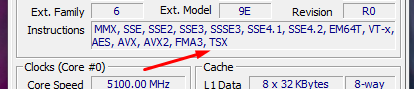
If TSX doesn't show up there then there's nothing that ill make RPCS3 work with it cause its not supported/enabled. Please stop spamming and bloating this thread.
 Yahfz
on 2 Jun 2020
Yahfz
on 2 Jun 2020
They disabled it and they can enable it, but i think they won't do that.
and
Someone said it's not safe and I think they removed it for that reason.
No one disabled or removed TSX on pre-Skylake CPUs from RPCS3's side. You seem fixed on that, when I see people using those CPUs and TSX on current master all the time. You mention files and old commits like they mean something. You are just proving my point, RPCS3 has a special setting for Haswell, and has had it for a while now.
If you can't use it on current master, then it's likely an issue on your side caused by using newer microcode. As I said before, you can check if you have TSX support enabled on your CPU with apps like CPU-Z
RainbowCookie32
on 2 Jun 2020
I know it it has been disabled by Intel. I can not Enable it.

But how is it possible that TSX is enabled in the version 0.0.5-6676???

There is no microcode with enabled tsx for my cpu because they removed it before release.
SKYMEE1
on 2 Jun 2020
Can you please check with CPU-Z if you CPU actually has TSX support? Yahfz posted a picture above. The check on old versions may just be different to what's now, giving you the option to enable TSX when you don't actually have it
RainbowCookie32
on 2 Jun 2020
It is not supported as I said. But i proved the point that it can work but i can't enable it now in the newer builds. I didn't wanted to say more in first place.

TSX is build in my Cpu but just, OFF.
That's why it's working in this old build.
SKYMEE1
on 2 Jun 2020
Your microcode is wrong then, and you just posted a screenshot proving it. The old check worked differently, I'm pretty sure that while you can enable TSX on the old build, you don't actually get it used. Current builds have better checks. Downgrade your microcode to one that actually has TSX enabled and you'll be able to use it.
You just spammed the thread complaining about not being able to use TSX when you don't even have it enabled on a CPU level to begin with.
RainbowCookie32
on 2 Jun 2020
So it is indeed not supported and/or enabled. RPCS3 may have shown it in the log in the past, but it obviously did nothing cause the instruction set wasn't there. It was NOT using the TSX-PATH, it was NOT enabled in the past, maybe it was just hardcoded to show TSX in the log even if the cpu didn't support it.
Yahfz
on 2 Jun 2020
That's why it's working in this old build.
It is not working in the old build either. TSX detection behaviour was altered ~2 years ago during the 0.0.6 milestone (of which the build you're showing is clearly older).
The commit that changed it: https://github.com/RPCS3/rpcs3/commit/af71cf09220d0783e78ce1692ea02a1c6edbec15
If TSX was available for use, CPU-Z would show it. It clearly doesn't. RPCS3 cannot and won't magically be able to use an extension that isn't available, just because the old detection method is not up to snuff.
dio-gh
on 2 Jun 2020
Ok if it is like that, I take all that back.
As I mentioned there is no microcode with tsx enabled because the release date of the 5930k was after they discovered the tsx issue and had to disable it. My cpu can physically support it and i don't know how cut out it is out of the microcode to just say it doesnt work at all. Maybe someone with an amd cpu can look into the old build to see if it also says that tsx is enabled. If show's tsx on a amd cpu it was clearly my fault thinking it's working on my cpu.
SKYMEE1
on 2 Jun 2020
TSX is an Intel-specific extension, AMD didn't ever support it, nor did the emulator ever say so.
dio-gh
on 2 Jun 2020
@dio-gh I know it's not supported on AMD. I thought maybe it just shows it by default or something like that.
Ok then no way of checking if it's just displaying tsx for me. Then I must reverse my statements at this point. It really looked like it.
SKYMEE1
on 2 Jun 2020
No, showing TSX as available is not the default (nor has it ever been). The only way to check the faulty TSX detection I think would be if someone with a Haswell CPU replaced their microcode with the freshest one (that has TSX disabled by Intel) and checked that given older build.
If someone is willing to go out of their way like that, cool, if not, there's nothing I can personally help you with about this.
dio-gh
on 2 Jun 2020
Even if i replace my microcode with the first ever microcode for this cpu, it is still disabled.
Q3'14 release of the 5930k. (Haswell-E)
I think in april '14 (+- a month) the first mircocode updates released with removed tsx for 4xxx.
SKYMEE1
on 2 Jun 2020
Not all Intel SKUs ship with TSX, even today. For example, the i5 8400 also misses TSX, while the i5 8500 has it. There's little point in checking the timelines alone.
On Techpowerup's CPU database I can see your CPU supporting TSX, but a specification update from Intel does cover the errata, although it is from February 2020.
I'm not entirely sure what to make of this information, and there are many possibilities about what could have went wrong. Regardless, if you cannot restore TSX no matter the method, that is not an RPCS3 issue. The emulator can only use what is exposed to it, old build or current.
dio-gh
on 2 Jun 2020
To those who replied it isn't stable with AMD, are you sure you disabled LLVM for both PPU and SPU?
My config
Core:
  PPU Decoder: Interpreter (fast)
  PPU Threads: 8
  PPU Debug: false
  Save LLVM logs: false
  Use LLVM CPU: ""
  Max LLVM Compile Threads: 0
  Enable thread scheduler: false
  Set DAZ and FTZ: false
  SPU Decoder: Recompiler (ASMJIT)
  Lower SPU thread priority: false
  SPU Debug: false
  Preferred SPU Threads: 0
  SPU delay penalty: 3
  SPU loop detection: true
  Max SPURS Threads: 6
  SPU Block Size: Safe
  Accurate GETLLAR: false
  Accurate PUTLLUC: false
  Accurate RSX reservation access: false
  SPU Verification: true
  SPU Cache: true
  SPU Profiler: false
  Enable TSX: Disabled
  Accurate xfloat: false
  Approximate xfloat: true
  LLVM Accurate DFMA: true
  PPU LLVM Accurate Vector NaN values: false
  Debug Console Mode: false
  Lib Loader: Load liblv2.sprx only
  Hook static functions: false
  Load libraries:
    []
  HLE lwmutex: false
  SPU LLVM Lower Bound: 0
  SPU LLVM Upper Bound: 18446744073709551615
  Clocks scale: 100
  Sleep Timers Accuracy: All Timers
VFS:
  $(EmulatorDir): ""
  /dev_hdd0/: $(EmulatorDir)dev_hdd0/
  /dev_hdd1/: $(EmulatorDir)dev_hdd1/
  /dev_flash/: $(EmulatorDir)dev_flash/
  /dev_usb000/: $(EmulatorDir)dev_usb000/
  /dev_bdvd/: ""
  /app_home/: ""
  Enable /host_root/: false
  Initialize Directories: true
  Limit disk cache size: false
  Disk cache maximum size (MB): 5120
Video:
  Renderer: Vulkan
  Resolution: 1920x1080
  Aspect ratio: 16:9
  Frame limit: Off
  MSAA: Auto
  Shader Mode: Async Shader Recompiler
  Write Color Buffers: false
  Write Depth Buffer: false
  Read Color Buffers: false
  Read Depth Buffer: false
  Log shader programs: false
  VSync: false
  Debug output: false
  Debug overlay: false
  Use Legacy OpenGL Buffers: false
  Use GPU texture scaling: false
  Stretch To Display Area: false
  Force High Precision Z buffer: false
  Strict Rendering Mode: false
  Disable ZCull Occlusion Queries: false
  Disable Vertex Cache: false
  Disable FIFO Reordering: false
  Enable Frame Skip: false
  Force CPU Blit: false
  Disable On-Disk Shader Cache: false
  Disable Vulkan Memory Allocator: false
  Use full RGB output range: true
  Strict Texture Flushing: false
  Disable native float16 support: false
  Multithreaded RSX: false
  Relaxed ZCULL Sync: false
  Enable 3D: false
  Debug Program Analyser: false
  Consecutive Frames To Draw: 1
  Consecutive Frames To Skip: 1
  Resolution Scale: 100
  Anisotropic Filter Override: 0
  Minimum Scalable Dimension: 16
  Driver Recovery Timeout: 1000000
  Driver Wake-Up Delay: 1
  Vblank Rate: 60
  DECR memory layout: false
  Vulkan:
    Adapter: AMD RADV NAVI14 (LLVM 10.0.0)
    Force FIFO present mode: false
    Force primitive restart flag: false
  Performance Overlay:
    Enabled: false
    Enable Framerate Graph: false
    Enable Frametime Graph: false
    Detail level: Medium
    Metrics update interval (ms): 500
    Font size (px): 8
    Position: Top Left
    Font: n023055ms.ttf
    Horizontal Margin (px): 50
    Vertical Margin (px): 50
    Center Horizontally: false
    Center Vertically: false
    Opacity (%): 70
    Body Color (hex): "#FFE138FF"
    Body Background (hex): "#002339FF"
    Title Color (hex): "#F26C24FF"
    Title Background (hex): "#00000000"
  Shader Compilation Hint:
    Position X (px): 20
    Position Y (px): 690
  Shader Loading Dialog:
    Allow custom background: true
    Darkening effect strength: 30
    Blur effect strength: 0
Audio:
  Renderer: OpenAL
  Dump to file: false
  Convert to 16 bit: false
  Downmix to Stereo: true
  Start Threshold: 1
  Master Volume: 100
  Enable Buffering: true
  Desired Audio Buffer Duration: 100
  Sampling Period Multiplier: 100
  Enable Time Stretching: true
  Time Stretching Threshold: 50
  Microphone Type: "Null"
  Microphone Devices: "@@@@@@@@@@@@"
Input/Output:
  Keyboard: Basic
  Mouse: Basic
  Camera: "Null"
  Camera type: Unknown
  Move: "Null"
System:
  Language: English (US)
  Keyboard Type: Swedish keyboard
  Enter button assignment: Enter with cross
Net:
  Internet enabled: Disconnected
  IP address: 0.0.0.0
  DNS address: 8.8.8.8
  IP swap list: ""
  PSN status: Disconnected
  NPID: ""
Miscellaneous:
  Automatically start games after boot: true
  Exit RPCS3 when process finishes: false
  Start games in fullscreen mode: false
  Prevent display sleep while running games: true
  Show trophy popups: true
  Show shader compilation hint: true
  Use native user interface: true
  GDB Server: 127.0.0.1:2345
  Silence All Logs: false
  Window Title Format: "FPS: %F | %R | %V | %T [%t]"
Log: {}
Djhg2000
on 5 Jun 2020
To those who replied it isn't stable with AMD, are you sure you disabled LLVM for both PPU and SPU?
My config
@Djhg2000
I'm running a R5 2600 with Vega 56
Tried your config directly but got a crash right away and emulator close.
Then I tried tweaking it: PPU threads set to 4 and Preferred SPU set to 1 and Anti-Aliasing off.
This has made the game much more stable, taking upwards of 10 minutes before desyncing, albeit at the cost of much higher load times.
Any other sugestion what items I could tweak to maybe get rid of the desync?
Thanks!
 tetsuzankou
on 13 Jun 2020
tetsuzankou
on 13 Jun 2020
@tetsuzankou That's very interesting, I don't get any desync at all with that config. Literally stable for hours.
This is making me consider it's a Linux vs Windows issue. I'm using Debian Sid so it might just be that Windows does something under the feet of RPCS3 which causes it to desync?
Djhg2000
on 13 Jun 2020
People have tested GT5 on Linux before and it desyncs the same way, it's not an OS issue. I'm not saying that it can't be _more_ stable on Linux, but it sure isn't the desync fix either.
Satan86
on 14 Jun 2020
@Satan86 Then I'm out of ideas. There must be a difference somewhere since I don't get any crashes. Are you absolutely sure those Linux tests were recent?
Djhg2000
on 14 Jun 2020
I run rpcs3 on Linux, the game has the same stability issues.
The game is unstable, there's no universal set of settings and tweaks that'll make it run better for everyone.
RainbowCookie32
on 14 Jun 2020
@Djhg2000 I had it running like you did and had no desyncs but the performance was unplayable and somehow with cut audio and some sounds were missing. It was working but sadly my cpu isn't strong enough to deliver decent enough performance. So most of us have to wait on a fix. The desynchronisation is known longer than this issue exists so it could take a while or will be fixed in 2 hours. Nobody knows it.
SKYMEE1
on 14 Jun 2020
Please.
Stop shitposting in this thread with misleading information or off-topic posts.
A GitHub issue is not a place for discussion. I cannot emphasize this enough.
This issue is clearly not Hardware specific and will need a fix from KD-11, Neko or Elad.
Please wait until then before posting about some random hardware config or emulator setting you have changed. Truly, nobody could care less.
t. thread subscribed user.
HHCHunter
on 14 Jun 2020
@HHCHunter So trying to find clues on where to look for the cause of crashing for some people is shitposting now? This GitHub issue is about tracking down the desyncronization issue in GT5, I'd expect there to be posts with test data surrounding it, particularly if the bug occurs with some configurations but not with others. Until we can track it down to code snippets it's what we've got.
Anyway I've contributed with my config, hardware and test results. Since I'm not one of the three people you listed I'll just take my leave then.
(Yes, I'm aware this particular post doesn't contribute to tracking down the bug.)
Djhg2000
on 14 Jun 2020
There's no tracking down to code. The issue has likely always been there, but timing differences in some areas of the emulator made it more noticeable as time passed.
I've first noticed a desync on 0.0.6-8421 (which didn't cause them), and it probably goes even further back.
As I've said before, looking for a specific build that caused it, or a specific combination of settings that fixes the desyncs for everyone is a waste of time, and a useless notification for everyone that's still subscribed to the thread. Feel free to keep doing it, but please don't flood the thread with it
RainbowCookie32
on 14 Jun 2020
I don't know if this is useful information or not, but on the second latest build as of this comment (0.0.11-10664), the game doesn't deadlock or desync anymore for me, even after many many license tests and races with multiple cars.
Settings are default except for output resolution at 1920x1080p, Driver Wake Up Delay 200us and SPU Threads 2.
System specs are i7-7700 (non K version), GTX 1070ti on Windows 7 x64.
Game version is 2.17.
 solarmystic
on 19 Jul 2020
solarmystic
on 19 Jul 2020
I will test this to see if this works for the Zen architecture.
That said, what PPU/SPU/GPU settings did you use?
shoey9998
on 20 Jul 2020
On Ryzen platform still frezzes and performance is poor 18-25fps
Wizzy2018
on 20 Jul 2020
I've managed to get this working on the latest build (0.0.11-10743-685033b) with 'Accurate RSX reservation access' enabled. I do have an older CPU though (FX-6300) so it may be more stable due to the emulation just not running at full speed. Log attached for full specs and config.
 Aurexolf
on 12 Aug 2020
Aurexolf
on 12 Aug 2020
No change for me. Still desyncing even with 'Accurate RSX reservation access' enabled. Fps are around 40-60 fps.
SKYMEE1
on 13 Aug 2020
When desyncing this code is spamming:
·E 0:06:51.997798 {PPU[0x1000020] Thread (gFKsE) [0x0094f204]} PPU: LDARX took too long: 130
·E 0:06:51.997838 {PPU[0x1000020] Thread (gFKsE) [0x0094f204]} PPU: LDARX took too long: 300
·E 0:06:51.997889 {PPU[0x1000020] Thread (gFKsE) [0x0094f204]} PPU: LDARX took too long: 123
·E 0:06:51.998095 {PPU[0x1000020] Thread (gFKsE) [0x0094f204]} PPU: LDARX took too long: 132
·E 0:06:51.998125 {PPU[0x1000020] Thread (gFKsE) [0x0094f204]} PPU: LDARX took too long: 93
·E 0:06:51.998166 {PPU[0x1000020] Thread (gFKsE) [0x009729e4]} PPU: LDARX took too long: 14
·E 0:06:51.998189 {PPU[0x1000020] Thread (gFKsE) [0x0094f204]} PPU: LDARX took too long: 198
·E 0:06:51.998250 {PPU[0x1000020] Thread (gFKsE) [0x0094f204]} PPU: LDARX took too long: 614
·E 0:06:51.998322 {PPU[0x1000020] Thread (gFKsE) [0x0091a558]} PPU: LDARX took too long: 19
·E 0:06:51.998592 {PPU[0x1000020] Thread (gFKsE) [0x00ce6018]} PPU: LDARX took too long: 19
The numbers at the end change I think.
SKYMEE1
on 8 Sep 2020
Not an error.
 elad335
on 8 Sep 2020
elad335
on 8 Sep 2020
I can confirm that one the ryzen 5 3600 and the ryzen 5 5600x the game wont desync. If it happens it is a rare occurrence. So it's playable for there cpus. On my old i7 5930k the desync happens immediately or some seconds in any race.
SKYMEE1
on 3 Dec 2020
the game still desyncs on those CPUs, and can happen pretty often too on the 3600. I'll get a 5600x very soon as well, so I will be able to test on that CPU, but I doubt it's going to be any different. i'm sure that either CPU will be more stable than your 5930k though.
Satan86
on 3 Dec 2020
Yes it will happen too but there are worlds between the 5930k and the 5600x.
SKYMEE1
on 3 Dec 2020
I raced 4 races in a row 3 of them in a championchip and no desync or bug. I turned on some things that maybe every ryzen owner should turn on:
Advanced Tab: Accurate RSX reservation access, ON
Debug: Force CPU blit emulation, ON
I don't know if Force cpu blit emulation help or not but it's on and it does not desnc so i don't care 👍
SKYMEE1
on 3 Dec 2020
No change here.
Desync after second race on Stage 5.
Sly12346
on 3 Dec 2020
Related issues
elad335
·
3Comments
 LokiGrants
·
3Comments
LokiGrants
·
3Comments
 Xcedf
·
3Comments
Xcedf
·
3Comments
 Asinin3
·
3Comments
Asinin3
·
3Comments
 Birch-san
·
3Comments
Birch-san
·
3Comments
Most helpful comment
In my opinion, _in my opinion_, in my opinion the games I want to play should also be prioritized, but I guess it makes sense to prioritize a seemingly random, hard to debug desync issue on a very complex and hard to debug AAA game on top of easier, objective bugs on simpler games that when fixed will help solving more complex issues afterwards.
This is also an issue on Intel, I've seen more people getting these on Intel than on AMD, so you're clearly very confused