Rpcs3: Newer Windows 10 versions perfomance regression
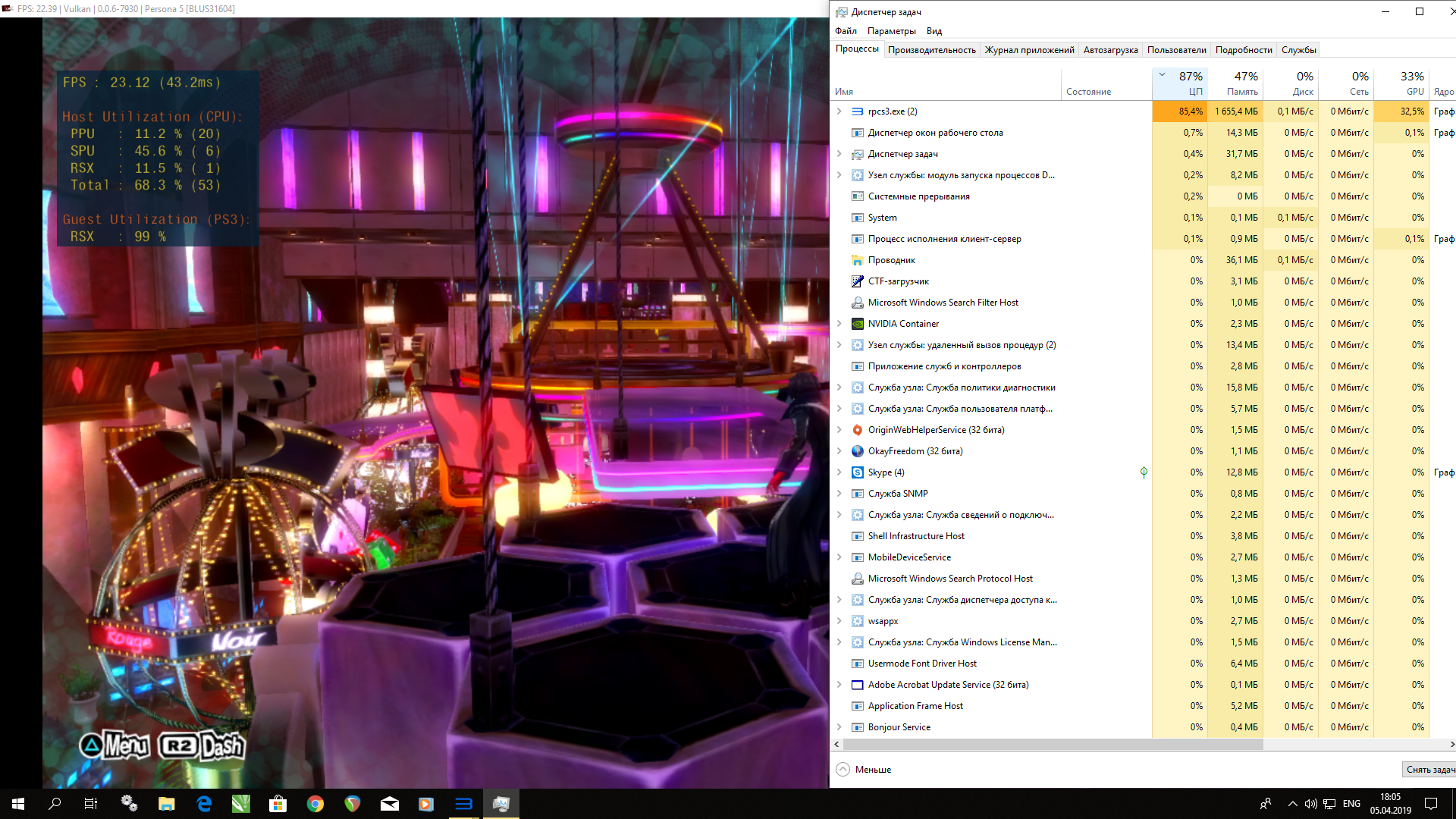
I found that 18xx Windows 10 builds provide worse perfomance than 16xx. For example I've tried to run Persona 5 on Win10 1809 and Windows 1607. Difference is on screens below.
Win 10 1607:

Win 10 1809:

 Tahei
Tahei
All 21 comments
As I asked you on Discord, do you use Windows Defender? And if so, is disabling Real-time protection restores the performance?
 13xforever
on 1 Apr 2019
13xforever
on 1 Apr 2019
As I asked you on Discord, do you use Windows Defender? And if so, is disabling Real-time protection restores the performance?
No it is permanent disabled.
Also i did clean windows instalation for both builds. No changes.
Tahei
on 1 Apr 2019
Intel vulnerability mitigations maybe?
 kd-11
on 2 Apr 2019
kd-11
on 2 Apr 2019
or windows game mode enabled/disabled?
 CrabLugo
on 2 Apr 2019
CrabLugo
on 2 Apr 2019
There is no game mode in 1607 and in 1809 it made no impact.
Tahei
on 2 Apr 2019
There's a difference of 3 threads between screenshots too, weird
 AniLeo
on 2 Apr 2019
AniLeo
on 2 Apr 2019
Possible to take a screenshot with the taskmanager open? (for both version of windows 10?)
 cloud1250x4
on 2 Apr 2019
cloud1250x4
on 2 Apr 2019
Possible to take a screenshot with the taskmanager open? (for both version of windows 10?)
like this?
Tahei
on 5 Apr 2019
On 1809 you are using newer nvidia drivers(maybe it's coming from them)
Win10 1607 - 372.280
Win10 1809 - 419.67.0
 vsub
on 5 Apr 2019
vsub
on 5 Apr 2019
On 1809 you are using newer nvidia drivers(maybe it's coming from them)
Win10 1607 - 372.280
Win10 1809 - 419.67.0
No, drivers does not affect a perfomance.
Tahei
on 5 Apr 2019
I am not so sure about that...I think I notest some speed drop while I was playing Atelier Shallie and I update my drivers at one point(actually windows did that without asking)
vsub
on 5 Apr 2019
On 1809 you are using newer nvidia drivers(maybe it's coming from them)
Win10 1607 - 372.280
Win10 1809 - 419.67.0No, drivers does not affect a perfomance.
There's a big difference in driver versions in this case, you should make the tests as similar as possible to discard possible differences that could influence the results
 RainbowCookie32
on 5 Apr 2019
RainbowCookie32
on 5 Apr 2019
I am not so sure about that...I think I notest some speed drop while I was playing Atelier Shallie and I update my drivers at one point(actually windows did that without asking)
I am sure, because i tried it.
Tahei
on 5 Apr 2019
On 1809 you are using newer nvidia drivers(maybe it's coming from them)
Win10 1607 - 372.280
Win10 1809 - 419.67.0No, drivers does not affect a perfomance.
There's a big difference in driver versions in this case, you should make the tests as similar as possible to discard possible differences that could influence the results
Only difference i noticed that old drivers has glitchy textures in GoW 3.
The problem is somewhere in Windows, because i did clean instalation of it and it give me nothing.
Tahei
on 5 Apr 2019
I am not so sure about that...I think I notest some speed drop while I was playing Atelier Shallie and I update my drivers at one point(actually windows did that without asking)
I was a bit wrong guys. Newest drivers installed on older system gave me 3 fps drop. But 372.28 on newer Windows build gave me 1 - 2 fps boost. So newer drivers really degrade perfomance.
But unfortunately this doesn't change this situation in general.
It's somwhere in hyper threading and windows comunication i think. Because when i disable hyperthreading its starts to work the same on both versions.
On 4c4t Persona 5 shows more fps than 4c8t everywhere in the game (but 4c4t also gives u a little amount of micro freezes)
Tahei
on 6 Apr 2019
Run this script and post output from both versions of windows.
13xforever
on 6 Apr 2019
Run this script and post output from both versions of windows.
Windows 10 1809
Speculation control settings for CVE-2017-5715 [branch target injection]
Hardware support for branch target injection mitigation is present: True
Windows OS support for branch target injection mitigation is present: True
Windows OS support for branch target injection mitigation is enabled: True
Speculation control settings for CVE-2017-5754 [rogue data cache load]
Hardware requires kernel VA shadowing: True
Windows OS support for kernel VA shadow is present: True
Windows OS support for kernel VA shadow is enabled: True
Windows OS support for PCID performance optimization is enabled: False [not required for security]
Speculation control settings for CVE-2018-3639 [speculative store bypass]
Hardware is vulnerable to speculative store bypass: True
Hardware support for speculative store bypass disable is present: False
Windows OS support for speculative store bypass disable is present: True
Windows OS support for speculative store bypass disable is enabled system-wide: False
Speculation control settings for CVE-2018-3620 [L1 terminal fault]
Hardware is vulnerable to L1 terminal fault: True
Windows OS support for L1 terminal fault mitigation is present: True
Windows OS support for L1 terminal fault mitigation is enabled: True
BTIHardwarePresent : True
BTIWindowsSupportPresent : True
BTIWindowsSupportEnabled : True
BTIDisabledBySystemPolicy : False
BTIDisabledByNoHardwareSupport : False
BTIKernelRetpolineEnabled : False
BTIKernelImportOptimizationEnabled : False
KVAShadowRequired : True
KVAShadowWindowsSupportPresent : True
KVAShadowWindowsSupportEnabled : True
KVAShadowPcidEnabled : False
SSBDWindowsSupportPresent : True
SSBDHardwareVulnerable : True
SSBDHardwarePresent : False
SSBDWindowsSupportEnabledSystemWide : False
L1TFHardwareVulnerable : True
L1TFWindowsSupportPresent : True
L1TFWindowsSupportEnabled : True
L1TFInvalidPteBit : 45
L1DFlushSupported : False
Tahei
on 6 Apr 2019
Windows 10 1607

Tahei
on 6 Apr 2019
Well, there's your answer. nVidia also added some spectre mitigations in several driver releases around 39x series.
You see the noticeable performance hit only because your xeon is very old and there's no effective speed mitigations could be applied like on skylake and newer cpus. Especially with HT enabled.
You'll either have to live with the reality, or manually disable all protections and leave your system exposed to speculative attacks to gain a couple of fps back.
13xforever
on 6 Apr 2019
Guys, if u need to disable Spectre/Meltdown mitigations, use this video for help:
https://www.youtube.com/watch?v=W-AHuwfyLoo
Tahei
on 8 Apr 2019
Please do not encourage or promote bad security practices. Every user who wants to do this must learn and understand the implications of every change. Do not blindly follow some youtube guide :-/
13xforever
on 8 Apr 2019
Related issues
 xiangzhai
·
3Comments
xiangzhai
·
3Comments
 elad335
·
3Comments
elad335
·
3Comments
 XeClutch
·
3Comments
XeClutch
·
3Comments
 JohnGodgames
·
3Comments
JohnGodgames
·
3Comments
 LokiGrants
·
3Comments
LokiGrants
·
3Comments
Most helpful comment
Well, there's your answer. nVidia also added some spectre mitigations in several driver releases around 39x series.
You see the noticeable performance hit only because your xeon is very old and there's no effective speed mitigations could be applied like on skylake and newer cpus. Especially with HT enabled.
You'll either have to live with the reality, or manually disable all protections and leave your system exposed to speculative attacks to gain a couple of fps back.