Rpcs3: Vulkan: Running games on Fullscreen causes a crash after a while
With the Vulkan backend games keep on crashing using Fullscreen (OpenGL is not affected at all).
The crash/freeze doesn't happen when you enter/switch to Fullscreen but random after some minutes of play...strangely playing in a window (extended or not) is fine (no crashes), so it makes me think that rpcs3 uses an exclusive Fullscreen mode that is actually broken on Vulkan (having a borderless Fullscreen option could fix the problem?)
I still don't know if every game is affected, for now Tales of Xillia and Catherine both have this issue.
My spec:
Win10
Intel i5 7400
Gtx1060 3gb
 psennermann
All 255 comments
I experience this freeze playing p5. I'm too lazy to look for regression, because it takes several minutes with every build to get that freeze. I ended up using few months old builds. There is something wrong about full screen vulcan.
 CrabLugo
on 17 Nov 2018
CrabLugo
on 17 Nov 2018
I am already 37 hours into Persona 5(6 June)and the game is working fine,no crashes\freezes at all
Also I am playing it right now for the last 3 hours and still nothings wrong.
0.0.5-7499(I started the game while using 7490 for few days)
LLVM,ASMJIT(SPU LLVM gives me less speed on this game and it just works worse than ASMJIT)
Vulkan,59.54 fps limit,16:9 Aspect,16X AF,Resolution Scaling at 100%.
From Additional Setttings only VSYNC and Streatch are enabled
From my nVidia control panel,vsync is set to force on and the performance mode is set to "Prefer Maximum Performance"
I have notest this from a very long time...rpcs3 don't work very well if the performance mode is not set to "Prefer Maximum Performance",it just randomly slows down and then speeds up or freeze for a second when you go from less performance requirement place to higher
I am also using the 60fps patch on Persona 5
I have the same gpu(gtx1060)but i7-6700HQ for a cpu
And yes,I play full screen only and randomly exit=>enter it to check something
And btw just as extra info,I don't know if this is expected behaviour but I see almost no gain from using the shaders cache while using ASMJIT.
Also I don't know if this is related but I am not using the latest gpu drivers(399.01)
You just wait for ages the shaders to be compiled while starting the game and then still notest some stuttering.
When I set the "Disable On-Disk Shader Cache" to true,while the gpu is set to "Prefer Maximum Performance",the shaders are created almost instantly and it just works better.
 vsub
on 17 Nov 2018
vsub
on 17 Nov 2018
Unfortunately #5359 doesn't fix this issue (at least for me) :-(
psennermann
on 22 Nov 2018
Does minimize and restore work for you?
 kd-11
on 22 Nov 2018
kd-11
on 22 Nov 2018
Sorry, but for "minimize and restore" what do you mean?
psennermann
on 22 Nov 2018
Pretty sure it means turning fullscreen mode off, and then back on, or minimizing the game window and then restoring it back to visible.
 jpmac26
on 23 Nov 2018
jpmac26
on 23 Nov 2018
Similar issue on Windows 10 with Nvidia CPU. On tested on v7506 with Tekken games and full screen mode.
 tabnk
on 23 Nov 2018
tabnk
on 23 Nov 2018
Normally "minimize and restore" works, except with NiNoKuni that has problems switching between window and fullscreen (see #5218), but when the game crashes you can't do anything except hard close rpcs3.
It's intresting to notice that setting in the Nvidia control panel the power management to "prefer maximum performance" instead of "optimal power" fixes the Vulkan fullscreen crashes for Tales of Xiilia (but not for Catherine)
psennermann
on 23 Nov 2018
iv done a clean install of this emulator to make sure now that iv a rtx 2080 but playing uncharted 1 i only ever get 5 mins then screen just freezes when im on vulkan and fullscreen
win10 pro 1809, 8700k, 16gb ram 3466mhz, rtx 2080
 JOHN30011887
on 2 Dec 2018
JOHN30011887
on 2 Dec 2018
Tested again on Windows 10 with Nvidia CPU. v7562 with Tekken 6 games and full screen mode. After one round in game fight, rpcs3 will just hang and requires to force exit by Task Manager.
tabnk
on 6 Dec 2018
sonic unleashed has this issue, around half the stage it will freeze if its fullscreen.
 SadMan991
on 7 Dec 2018
SadMan991
on 7 Dec 2018
Until the problem get fixed, I think a borderless fullscreen option would be useful...
psennermann
on 8 Dec 2018
Ive been reporting this issue for awhile and have given over several logs to both KD-11 and Galciv on the issue. The only information I was able to get about it was from KD-11 who stated that the RSX thread randomly dies in each log. If RPCS3 would like. I can do a log dump of what I got for you guys. This issue also effects project diva games as well.
 whymsical210
on 8 Dec 2018
whymsical210
on 8 Dec 2018
Fixed crash/hang issue by Disable full screen optimizations for rpcs3.exe.
On Windows 10 with Nvidia GPU.
Tested Tekken 6 without any issue. :)
tabnk
on 10 Dec 2018
Fixed crash/hang issue by Disable full screen optimizations for rpcs3.exe.
On Windows 10 with Nvidia GPU.
Tested Tekken 6 without any issue. :)
This doesn't seem to work for me. I tested with Tekken Tag Tournament 2. Still crashes after a couple of minutes.
 Dime333
on 10 Dec 2018
Dime333
on 10 Dec 2018
Doesn't work for me too
psennermann
on 10 Dec 2018
Am I just lucky or I don't get this problem because:
A).It's specific to certain games
B).I have some option enabled\disabled that no one else is using\not using
C).It is because of some external program running(which I don't use)which cases rpcs3 to crash
D).It is not crashing because I am using older nvidia drivers
I can't see anyone posting this,but does anyone have this problem on amd gpu?
The game window sometimes(rarely)freezes but that after at least 5-6 hours of gameplay
vsub
on 10 Dec 2018
Afaik all reported cases are on nvidia but I'm having issues reproducing. Will keep trying, maybe newer drivers trigger this easier. Its very likely an nvidia-only issue.
kd-11
on 11 Dec 2018
Fixed crash/hang issue by Disable full screen optimizations for rpcs3.exe.
On Windows 10 with Nvidia GPU.
Tested Tekken 6 without any issue. :)This doesn't seem to work for me. I tested with Tekken Tag Tournament 2. Still crashes after a couple of minutes.
Tested Tekken Tag Tournament 2 (Europe) and no hang/crash here when Disable full screen optimizations.
tabnk
on 11 Dec 2018
RPCS3 v0.0.5-7576-76f94940. Windows 10 with Nvidia GPU.
Still hang/crash after longer game-play. Image just don't move but can hear some game sounds.
·W 0:10:10.145684 {rsx::thread} RSX: Format incompatibility detected, reporting failure to force data copy (VK_FORMAT=0x2C, GCM_FORMAT=0x9E)
·W 0:10:10.145696 {rsx::thread} RSX: Format incompatibility detected, reporting failure to force data copy (VK_FORMAT=0x2C, GCM_FORMAT=0x9E)
·W 0:10:10.145706 {rsx::thread} RSX: Format incompatibility detected, reporting failure to force data copy (VK_FORMAT=0x2C, GCM_FORMAT=0x9E)
·W 0:10:10.145716 {rsx::thread} RSX: Format incompatibility detected, reporting failure to force data copy (VK_FORMAT=0x2C, GCM_FORMAT=0x9E)
·W 0:10:10.145726 {rsx::thread} RSX: Format incompatibility detected, reporting failure to force data copy (VK_FORMAT=0x2C, GCM_FORMAT=0x9E)
·W 0:10:10.145738 {rsx::thread} RSX: Format incompatibility detected, reporting failure to force data copy (VK_FORMAT=0x2C, GCM_FORMAT=0x9E)
·W 0:10:10.145752 {rsx::thread} RSX: Format incompatibility detected, reporting failure to force data copy (VK_FORMAT=0x2C, GCM_FORMAT=0x9E)
Attached the log file.
RPCS3.zip
tabnk
on 12 Dec 2018
I also get this issue with Ninja Gaiden Sigma win10 with gtx1070 on NV 417.21 WHQL, it crash pretty fast, before 10min of gameplay.
Windows 10 here is fully updated, ver.1809, but it seems it doesn't crash with NV 391.01 WHQL, but that was with a old ver. of win10, or if I play on Window mode.
Edit: I can confirm that going back from 417.21 WHQL to NV 391.01 WHQL fix this issue here.
 hyperspeedgx
on 13 Dec 2018
hyperspeedgx
on 13 Dec 2018
For anyone who want full screen while still waiting for the developers to fix this bug. You can use Fullscreenizer http://runtimeterror.com/rep/fullscreenizer/index. It enable rpcs3 to run In Full Screen Borderless Windowed Mode
tabnk
on 14 Dec 2018
While still waiting for fix, I’m decided to download rpcs3 source code and complie it with some SIMPLE modification of qt full screen code. Unexpectedly it works. Tested Tekken 6, Soul Calibur 4/5, Tekken Tag Tournament HD and Tekken Tag Tournament 2. Will continue do more testing and monitoring any hang/crash.
In addition, my effort paid off and gain more consistent framerate too, Thank to GCC.
tabnk
on 15 Dec 2018
@tabnk Can you explain what modifications you made? and please try to submit that as a pull request.
 Nilot352
on 18 Dec 2018
Nilot352
on 18 Dec 2018
Users affected can try this commit which tries to detect if the driver is going to stall. Have only been able to trigger this bug once so I'm not sure how much it will help, or if its even the same bug or not. If it works a timeout message will be reported after about a second and also the emulator should be responsive and can be closed with the UI as usual.
kd-11
on 20 Dec 2018
Unfortunately, it still crashed. It did provide a timeout message like you stated, but the emu also went non responsive.

whymsical210
on 23 Dec 2018
After testing a few days on my modification but still hang, although GCC does help to improve the framerate. I’m will just use Fullscreenizer for now.
tabnk
on 27 Dec 2018
I tried that program but if you ask me,OnTopReplica is better
I just clone the game window and move it to another virtual desktop and then do whatever I want with the OnTopRelica window....resize,enter exit fullscreen,no problems at all
You can even make it semi transparent or clone only part of any window
Did you trid using older drivers because I just find out that the latest drivers are causing problems in pcsx2
vsub
on 27 Dec 2018
Can we gather some stats for how easy this thing is to trigger? Maybe some games trigger it faster than others which could help with reproducing. I know that the hw seemingly stalls for whatever reason and fences are never signaled afterward, but I need to isolate the trigger and notify nvidia or fix rpcs3 if possible instead of adding another workaround.
kd-11
on 27 Dec 2018
I had some fullscreen deadlock on Ni no kuni in Fullscreen with my 1050 Ti.
Same experience: Enter/switch to Fullscreen is good but deadlock after somes minutes. That being said, it's quite random, unfortunately. :(
In Windowed and/or OGL, no problem.
 Illynir
on 27 Dec 2018
Illynir
on 27 Dec 2018
Only two games I’m played were Tekken 6 and Tekken Tag Tournament 2. However, TTT2 happens more often and especially when graphics/actions are more demanding.
Btw, although the SCREEN hang but in game sound still playing.
tabnk
on 27 Dec 2018
I've tried running Des for around 4h and no crash. I don't have many games that I can engage in for more than a few minutes which may be why I cannot reproduce this issue. There must be a game that can trigger this in less than five minutes, we just need to find it.
kd-11
on 27 Dec 2018
This build should fix the hard lockup but won't actually fix the underlying crash. It will however hopefully allow us to inspect the log for example as it should be possible to leave fullscreen with alt+enter or double-click now and see what was logged. If you can easily reproduce this, retest.
EDIT: Link updated.
kd-11
on 27 Dec 2018
If you want a game that triggers the problem after 5 or less minutes, Tales of Xiilia is that one...in case I can provide a save file where the problem always occurs after some minutes of play.
I tried the build of the link above and rpcs3 still crashed without permitting to exit fullscreen, anyway I attach the log file…
psennermann
on 29 Dec 2018
Seems system dependent, some users will run Xilia fine for hours with no issues, same as how I'm seemingly not affected by this bug with it only showing up on very rare occasion (around once in 8 or so hours). I have tried other people's suggestions and games that crash for them consistently in seconds do nothing for me.
kd-11
on 29 Dec 2018
Also notice that users having "prefer maximum power" set in Nvidia Control panel shouldn't trigger Tales of Xillia crash, because that setting fixes the problem for me...
psennermann
on 30 Dec 2018
Persona 5 seems to trigger it fairly consistently for me on my 1050ti, given that one a try?
 Captainpewd
on 30 Dec 2018
Captainpewd
on 30 Dec 2018
I have close to 200 hours on p5(only long playing sessions)and the game window freeze like that only 2 or 3 times when the vram usage gets really high after 6+ hours (above 2gb)of gameplay
vsub
on 30 Dec 2018
P5, at least with 60fps patch triggers it easily for me. Just running around on the street next to leblanc cafe, visiting tae takemi, triggering different actions with locations/ncps on the street. Takes few minutes. W10 1709, gtx 1070ti
CrabLugo
on 31 Dec 2018
This is exactly what I am using,the 60fps patch but without the mod menu(if you know about it)
The only difference is probably that I am using older drivers and the gpu is set to always run at maximum performance when rpcs3 is running(which actually makes rpcs3 actually run A LOT better...more powerful gpu will probably work even worse is that is not enabled)
I have other rpcs3 enabled/disbled but I am not sure they have anything to do with why p5 works perfectly fine here
vsub
on 31 Dec 2018
Changing RPCS3 to max performance like you did removed my microstuttering that plagued this game for me in current master. I didn't have this issue in much older builds and when i played and finished my p5 playthrough. And game didn't freeze in short period of time now.
CrabLugo
on 31 Dec 2018
Well rpcs3 evolved since then and it doesn't need so much power to get the speed you want now so the gpu don't work that hard which means the clock is lowered even more.
It's like the less intensive the game is(with occasional increase in performance)the worse the stuttering is.
If you use some tool that shows you the gpu core\vram\shaders speed,you will see that windows\the drivers keep underclocking the gpu which results in stuttering when windows\the drivers increase the core\vram\shaders clock because the game requires more)
This is especially bad in Ar Tonelico 3\Ar noSurge\Atelier games,the short freeze is really annoying....the audio also stutters
Believe it or not but I play P5 with shaders cache disabled(Disable On-Disk Shader Cache: true)and I barely notest when they are created during gameplay when the gpu is set to maximum performance(there is almost no difference between having shaders cache and recreating them again and again on every game launch)
You just want 2+ minutes to compile the shaders(with shaders cache)but the result is almost the same as with no cache,it's that fast
Also I don't know if this has anything to do with it but vsync is forced in the nvidia control panel
vsub
on 31 Dec 2018
I can confirm this problem also happens for me. I also have an nvidia GPU (GTX970) w/ latest drivers on Win10.
Affected games for me:
King of Fighters XII
Street Fighter IV
Super Street Fighter IV
Ultra Street Fighter IV
As someone suggested, playing on windowed magically fixes the problem. So now I have to decide if playing onm windows with any borderless fullscreen app or going back to those old nvidia drivers (391.01) someone suggested that don't have this problem.
Edit: On these games the bug is easy to reproduce, it will always happen on the first match, sometimes during the second match.
Hope someone fixes this problem soon. Greetings.
 cubatilles
on 2 Jan 2019
cubatilles
on 2 Jan 2019
There are a lot of factors to consider since windows 10 is now a clusterfuck.
- If anyone is on the problematic october patch of windows 10, please note this as it is likely important.
- Confirm the driver type you are using if (1) is true. There are now 2 types of graphics drivers - Traditional and DCH drivers. This could be important.
- Windows power option settings. Just set to maximum performance to keep windows from trying to do any wierd power saving things.
- Try renaming rpcs3.exe to other known win64 vulkan applications like DOOMx64vk.exe and see if anything changed.
- List complete system spec (RAM, cpu, mobo, etc) just in case. Most of us are unaffected by this bug despite having nvidia cards so something in the system must be the cause. I suspect its just the new windows patch, but you never know.
For those looking to downgrade drivers, you do not need to go back so far. All pre-400 series drivers seem to work fine.
kd-11
on 3 Jan 2019
Hi kd-11,
Thanks for the advice and for all the work you do on rpcs3.
I already downgraded to 391.01 drivers and now everything works fine, so I cannot do any more testing, but I can give you some information:
-I'm on Windows 10 17.09, not on latest
-I've always used maximum performance profile on power saving options.
-My specs are:
MSI Z170M Mortar mobo
I7 6770k skylake at stock clock
Gskills 16 GB RAM DDR4 2400 (single module)
MSI GTX970 GAMING 4GB GDDR5
Win10 17.09 64bit
My OS is stored on a Samsung 850 evo ssd drive, but rpcs3 is being located on a 10tb hdd. Anyways I tested games on a new rpcs3 install on my ssd and the problem persisted.
I'm using a ds4 controller with ds4windows sinulating an xinput controller.
Greetings.
cubatilles
on 3 Jan 2019
- If anyone is on the problematic october patch of windows 10, please note this as it is likely important.
Windows 10 Home v.1809
- Confirm the driver type you are using if (1) is true. There are now 2 types of graphics drivers - Traditional and DCH drivers. This could be important.
Nvidia 416.94 standard drivers
- Windows power option settings. Just set to maximum performance to keep windows from trying to do any wierd power saving things.
Very strangely, setting GPU to max power (CPU already was) fixes the Vulkan fullscreen crashes for "Tales of Xillia" but not for "Catherine"...
- Try renaming rpcs3.exe to other known win64 vulkan applications like DOOMx64vk.exe and see if anything changed.
Nothing changes
List complete system spec (RAM, cpu, mobo, etc) just in case. Most of us are unaffected by this bug despite having nvidia cards so something in the system must be the cause. I suspect its just the new windows patch, but you never know.
cpu Intel i5 7400 - gpu Nvidia GTX1060 3gb - mobo MSI Mortar B250 - Realtek HD integrated audio - ram 16 gb DDR4 2400
psennermann
on 5 Jan 2019
Should be fixed by https://github.com/RPCS3/rpcs3/pull/5509. Retest and close if fixed.
kd-11
on 5 Jan 2019
Unfortunately on my system it's not fixed
psennermann
on 5 Jan 2019
I have identified the cause for the nvidia freeze, a proper fix will be made available soon.
kd-11
on 6 Jan 2019
Thanks kd-11, I'll be happy to update again my nvidia drivers and test your fix oncve it's ready.
cubatilles
on 6 Jan 2019
kd-11
on 6 Jan 2019
Updated build here https://ci.appveyor.com/project/kd-11/rpcs3/builds/21421824 fixes broken switching to/from fullscreen. May trigger frame context storage corruption if spam alt+enter but the emulator remains responsive afterward.
kd-11
on 6 Jan 2019
Updated build here https://ci.appveyor.com/project/kd-11/rpcs3/builds/21421824 fixes broken switching to/from fullscreen. May trigger frame context storage corruption if spam alt+enter but the emulator remains responsive afterward.
Sorry, but this didn't fix the issue for me. I left Tekken Tag Tournament 2 running for a few minutes and after a while the game froze. I could still hear the game sounds but the PC appeared to be completely frozen. Couldn't even use ctrl-alt-delete. I had to do a hard reset.
Dime333
on 7 Jan 2019
Updated build here https://ci.appveyor.com/project/kd-11/rpcs3/builds/21421824 fixes broken switching to/from fullscreen. May trigger frame context storage corruption if spam alt+enter but the emulator remains responsive afterward.
Sorry, but this didn't fix the issue for me. I left Tekken Tag Tournament 2 running for a few minutes and after a while the game froze. I could still hear the game sounds but the PC appeared to be completely frozen. Couldn't even use ctrl-alt-delete. I had to do a hard reset.
Same here. Tried with Tales of Xillia, almost instant hard freeze.
 metspo
on 7 Jan 2019
metspo
on 7 Jan 2019
I have varying results. I updated my nvidia drivers again to the latest ones (417). Then updated rpcs3 with your latest binary from https://ci.appveyor.com/project/kd-11/rpcs3/builds/21421824.
-Ultra Street Fighter IV: Deleted the shader cache+ppu cache + spu cache and tested. In about 20 or 30 minutes of gameplay I didn't have any freeze.
-King of Fighters XII: WITHOUT deleting shader cache, the game freezes, and I had to hard reset my computer, indeed, not even Ctrl+Alt+Del worked. Then I retested deleting shader cache+ppu+spu cache and run again, this time everything worked fine, I could complete several fights without any freeze.
-Street Fighter IV: This time I only deleted shader cache (didn't delete the ppu+spu cache). The game worked fine until my third fight, where it froze again and I had to hard reset my computer.
I'll keep doing more testing. I'm not sure if deletion of ppu+spu cache is relevant.
Please, @metspo and @Dime333 can you retest again deleting all these caches (shader+ppu+spu)?
cubatilles
on 7 Jan 2019
Hi, Just made some more testing. Now I tested these games again deleting ppu+spu+shader caches, to make sure it's not somethjing caused by the caches. Unfortunately, this time I could reproduce the freezes on all 3 games.
So, sadly, this fix doesn't work for me either.
cubatilles
on 7 Jan 2019
The original problem is fixed, now the windows hang seems to not be caused by rpcs3 itself, but a third party component, likely the driver dlls. I disabled all the events code and it still froze. The fact that windows does not even work (its not rpcs3 thats frozen, its windows 10) means something much worse lurks in the shadows. Even syscalls seem to not do anything, network stack dies as well, but curiously the audio stack remains in working condition (playing a media file in vlc in the background keeps playing, but streaming audio freezes). I'm trying to devise a way to inspect the running instance which is proving to be a challenge as windows is completely dead at the time of the freezing. Might need to get a second PC or something.
kd-11
on 7 Jan 2019
@kd-11: I encountered frozen windows after playing Persona 5 for half an hour, had to manually force stop. I used my custom build which include your commits: https://github.com/cronaldo9999/rpcs3/commits/integration
When playing I kept toggle fullscreen on and off multiple times, I'll test it later with no fullscreen at all. Here is the end part of log file from the last freeze, hope this will help.
·W 1:57:33.026612 {RSX [0x00c3594]} RSX: Format incompatibility detected, reporting failure to force data copy (VK_FORMAT=0x2C, GCM_FORMAT=0x9F)
·W 1:57:33.042699 {PPU[0x100000e] Thread (CRI Server Manager) [0x00a75c00]} cellAudio: cellAudioGetPortConfig(portNum=0, portConfig=0xd00989a0)
·W 1:57:33.043531 {PPU[0x100000e] Thread (CRI Server Manager) [0x00acf590]} cellAudio: cellAudioGetPortConfig(portNum=0, portConfig=0xd00989a0)
·W 1:57:33.044979 {PPU[0x100000e] Thread (CRI Server Manager) [0x00a87ad0]} cellAudio: cellAudioGetPortConfig(portNum=0, portConfig=0xd00989a0)
·W 1:57:33.046432 {PPU[0x100000e] Thread (CRI Server Manager) [0x00a87ad0]} cellAudio: cellAudioGetPortConfig(portNum=0, portConfig=0xd00989a0)
·W 1:57:33.047059 {PPU[0x100000e] Thread (CRI Server Manager) [0x00acf4a8]} cellAudio: cellAudioGetPortConfig(portNum=0, portConfig=0xd00989a0)
·W 1:57:33.047816 {PPU[0x100000e] Thread (CRI Server Manager) [0x01393334]} cellAudio: cellAudioGetPortConfig(portNum=0, portConfig=0xd00989a0)
·W 1:57:33.048453 {PPU[0x100000e] Thread (CRI Server Manager) [0x00a87db8]} cellAudio: cellAudioGetPortConfig(portNum=0, portConfig=0xd00989a0)
·W 1:57:33.052482 {RSX [0x001b5f8]} RSX: Format incompatibility detected, reporting failure to force data copy (VK_FORMAT=0x2C, GCM_FORMAT=0x9F)
·W 1:57:33.076554 {PPU[0x100000e] Thread (CRI Server Manager) [0x00acf528]} cellAudio: cellAudioGetPortConfig(portNum=0, portConfig=0xd00989a0)
·W 1:57:33.076967 {PPU[0x100000e] Thread (CRI Server Manager) [0x0126512c]} cellAudio: cellAudioGetPortConfig(portNum=0, portConfig=0xd00989a0)
·W 1:57:33.077397 {PPU[0x100000e] Thread (CRI Server Manager) [0x00a75978]} cellAudio: cellAudioGetPortConfig(portNum=0, portConfig=0xd00989a0)
·W 1:57:33.077873 {PPU[0x100000e] Thread (CRI Server Manager) [0x00a758d8]} cellAudio: cellAudioGetPortConfig(portNum=0, portConfig=0xd00989a0)
·W 1:57:33.078292 {PPU[0x100000e] Thread (CRI Server Manager) [0x00a75978]} cellAudio: cellAudioGetPortConfig(portNum=0, portConfig=0xd00989a0)
·W 1:57:33.078728 {PPU[0x100000e] Thread (CRI Server Manager) [0x00acf528]} cellAudio: cellAudioGetPortConfig(portNum=0, portConfig=0xd00989a0)
·W 1:57:33.078739 {PPU[0x100000e] Thread (CRI Server Manager) [0x00aa2728]} cellAudio: cellAudioGetPortConfig(portNum=0, portConfig=0xd00989a0)
·W 1:57:33.080490 {RSX [0x006b640]} RSX: Format incompatibility detected, reporting failure to force data copy (VK_FORMAT=0x2C, GCM_FORMAT=0x9F)
 aeros281
on 7 Jan 2019
aeros281
on 7 Jan 2019
New build https://ci.appveyor.com/project/kd-11/rpcs3/builds/21443270
This works around an nvidia sync bug in the drivers using WndProc hooks and offloading the fullscreen toggle to the backend instead of Qt event handler. Should be somewhat stable.
kd-11
on 7 Jan 2019
Had to give up on this one as its a lost cause. External report here https://devtalk.nvidia.com/default/topic/1045980/vulkan/-windows-possible-vulkan-driver-bug-with-recent-driver-versions-likely-related-to-swapchain/
kd-11
on 7 Jan 2019
Thanks for the effort kd-11. I'll stay with nvidia 398 drivers for now.
cubatilles
on 7 Jan 2019
ok rpcs3. after extensive testing. Those of you who have the nvidia full screen crash. Unfortunately, a fix is not in sight. Nvidia needs to fix it on their end. There are however, some things you can do to help lessen your chances of getting it(based on personal experience. nothing is guaranteed. but so far these have provided results for me)
These methods were performed using this build: https://ci.appveyor.com/project/kd-11/rpcs3/builds/21443270
If you have issues on current master, try with this build and see if your results are any better.
Method 1: Play on a secondary monitor or Windowed mode. (Both of these options do not use the full screen optimizations that Nvidia has released with its drivers.
Method 2: If still wanting to use primary monitor/full screen optimizations.
-Start the game in fullscreen. Do not start in windowed and then bump up to full screen.
-Don't alt tab or exit full screen often if you can help it or let rpcs3's gswindow lose focus. This helps trigger the bug hard.
-This has not been proven to be a cure all for this. However thus far it has yet to crash for me.
Method 3: Roll back nvidia drivers to pre 388.71(According to KD-11 398 drivers also work)
(Edited to add link to build)
whymsical210
on 7 Jan 2019
Can confirm. rpcs didn't freeze freeze for me because i was using secondary monitor.
Staying on old drivers makes a lot of sense, but in 7 days NVIDIA will release drivers with adaptive sync support so... Just change 1 monitor to 2, 2 to 1 and forget about this bug for now.
CrabLugo
on 8 Jan 2019
ok rpcs3. after extensive testing. Those of you who have the nvidia full screen crash. Unfortunately, a fix is not in sight. Nvidia needs to fix it on their end. There are however, some things you can do to help lessen your chances of getting it(based on personal experience. nothing is guaranteed. but so far these have provided results for me)
Method 1: Play on a secondary monitor or Windowed mode. (Both of these options do not use the full screen optimizations that Nvidia has released with its drivers.
Method 2: If still wanting to use primary monitor/full screen optimizations.
-Start the game in fullscreen. Do not start in windowed and then bump up to full screen.
-Don't alt tab or exit full screen often if you can help it or let rpcs3's gswindow lose focus. This helps trigger the bug hard.
-This has not been proven to be a cure all for this. However thus far it has yet to crash for me.Method 3: Roll back nvidia drivers to pre 388.71(According to KD-11 398 drivers also work)
Method 1 doest work, i'm playing on my second monitor :P
Method 2 also doesnt work, the crashes are very random, i crashed instantly while launched as fullscreen on my main monitor and secondary.
Seems like it's time for a rollback if you want fullscreen.
Thanks for the effort and time KD-11!
metspo
on 8 Jan 2019
Method 1 doest work, i'm playing on my second monitor :P
Method 2 also doesnt work, the crashes are very random, i crashed instantly while launched as fullscreen on my main monitor and secondary.
Seems like it's time for a rollback if you want fullscreen.
Thanks for the effort and time KD-11!
For the dual monitor thing. I find, even myself didnt realize this, that what I thought was primary was actually secondary to windows and vise versa. Might wanna check that.
For the start in full screen thing. Are you sure you are starting in full screen or are you starting in window and then bumping up to full screen. Ive found several people that have confused that process. For more information regarding the bug and how it works, you can check out the nvidia post KD-11 posted above. Its a bit technical but it shouldn't be too hard to understand whats occuring. Long story short however, when you enter full screen from a windowed mode. It creates a hang in the driver which eventually will crash the game. Sometimes thats right away, other times its a few minutes down the road. Something on your system is triggering it which is making your fullscreen crash or you have started in window mode and bumped up. Since you are on dual montiors. I can also assume you have other applications running on the other monitor at the time you are using rpcs3. mousing out to say, discord and chatting and then clicking back on the other monitor to re-access rpcs3 can also trigger the issue as that is a loss of focus on the main rpcs3 window.
On a side note. if you have programs in the background that are creating notifications or other windows/pops ups (things like steam can cause this), it can trigger the bug from what KD-11 explained to me yesterday.
whymsical210
on 8 Jan 2019
I don't know what's happening, but I'm not able to avoid the freeze anymore. I tried downgrading drivers to 398, 391.01, and various pre-388.72 versions. It will eventually always freeze.
I've also tried playing on a maximized window, it will freeze.
Using these old drivers really helps making the freeze to happen less frequently, but it will always happen.
Are we sure the freeze should never happen with these old drivers or in windowed? Or maybe people has not played long enough gameplay to make it happen?
cubatilles
on 8 Jan 2019
I don't know what's happening, but I'm not able to avoid the freeze anymore. I tried downgrading drivers to 398, 391.01, and various pre-388.72 versions. It will eventually always freeze.
I've also tried playing on a maximized window, it will freeze.
Using these old drivers really helps making the freeze to happen less frequently, but it will always happen.
Are we sure the freeze should never happen with these old drivers or in windowed? Or maybe people has not played long enough gameplay to make it happen?
https://ci.appveyor.com/project/kd-11/rpcs3/builds/21443270 try with this build and just outright delete your data directory and try again. If not, then theres something on your system triggering it and not much more can be done other than to wait for nvidia to fix it on their end or its not this exact bug you are experiencing. Please explain your symptoms. Is the video freezing while the audio keeps going?
You can find me in discord if you have any further questions and I'll try to assist the best of knowledge. I see you in discord already so I know you are there.
whymsical210
on 8 Jan 2019
https://ci.appveyor.com/project/kd-11/rpcs3/builds/21443270 try with this build and just outright delete your data directory and try again. If not, then theres something on your system triggering it and not much more can be done other than to wait for nvidia to fix it on their end or its not this exact bug you are experiencing. Please explain your symptoms. Is the video freezing while the audio keeps going?
You can find me in discord if you have any further questions and I'll try to assist the best of knowledge. I see you in discord already so I know you are there.
Hey, what's with the commit message from kd-11?
aeros281
on 10 Jan 2019
I confirm that having a second monitor connected and set to extended or duplicated completely fixes this issue…
I don't know if it is possible, but maybe making believe rpcs3 that there's a fake monitor attached when there isn't could fix the problem for those who don't have a real second monitor to connect?
psennermann
on 17 Jan 2019
Can confirm. rpcs didn't freeze freeze for me because i was using secondary monitor.
Staying on old drivers makes a lot of sense, but in 7 days NVIDIA will release drivers with adaptive sync support so... Just change 1 monitor to 2, 2 to 1 and forget about this bug for now.
I tried the new drivers 417.71, the issue is still there.
 mchtt
on 19 Jan 2019
mchtt
on 19 Jan 2019
First of all, to all those having the freezes: I feel your pain; and thanks to KD-11 for trying so hard. I only signed up to report that for me, switching back to 398 nVidia driver fixed the issue in my case. I did not try any newer drivers, just switched from current 417 to 398. I'm posting this to provide another data point. I tried a lot of other things and all failed. I was able to replicate the error every single time I tried until I rolled back the drivers.
I plan to stay with this driver until this is somehow resolved on nVidia's end. Thanks for the info shared here by all.
PS:
I should add an observation here that may nor may not be relevant. Many months ago, RPCS3 would freeze for me on Soul Calibur IV after playing for a while, although less frequently than with the current issue, but enough that I did not really play the game. Other games like Street Fighter HD played well and never froze. I had assumed this was simply an emulator compatibility issue.
After SPU LLVM and async shader compilation was implemented, I started testing SCIV again and it stopped freezing for me, and played great. I assumed at the time that the freezes going away were due to emulator updates but now I wonder if a previous nVidia driver corrected the issue, and now it's back again.
I hope I don't muddy the investigation with this comment, as the elimination of the freezes may indeed have been related to emulator updates, but I'm putting it out there in case it helps.
 TheManuel2
on 25 Jan 2019
TheManuel2
on 25 Jan 2019
Driver Version 399.24 is the last one which works for me.
 tet666
on 25 Jan 2019
tet666
on 25 Jan 2019
I am completely clueless about programming but in the nVidia GameWorks forum where KD-11 posted about this issue, there is another thread reporting a bug that seems like it could be related.
An nVidia rep confirmed that the problem described there was indeed a driver bug that would be fixed on the next release. This was posted on Jan 19, 2019.
Can anybody confirm if that bug is related to this one?
TheManuel2
on 25 Jan 2019
Its likely related. On every windowing 'event' the swapchain is destroyed and a new one created, so if there is a bug in that routine, this could very well be the case. The events fire e.g if a notification shows up in the background - you don't even have to actually resize the window yourself. Could explain the crash/hang in newer drivers.
kd-11
on 25 Jan 2019
Great! Then there is hope that the next driver release will resolve this problem. Thank you for all your time and effort on this.
TheManuel2
on 25 Jan 2019
I am completely clueless about programming but in the nVidia GameWorks forum where KD-11 posted about this issue, there is another thread reporting a bug that seems like it could be related.
An nVidia rep confirmed that the problem described there was indeed a driver bug that would be fixed on the next release. This was posted on Jan 19, 2019.Can anybody confirm if that bug is related to this one?
Maybe for Linux user but not sure Window user will get the fix.
tabnk
on 29 Jan 2019
Maybe for Linux user but not sure Window user will get the fix.
Good point. I really hope that the fix is a fundamental one that will be seen across OS's.
TheManuel2
on 29 Jan 2019
Please retest with https://ci.appveyor.com/project/rpcs3/rpcs3/builds/21975880
EDIT: Nvm, that build has been confirmed to be affected as well.
kd-11
on 29 Jan 2019
With https://github.com/RPCS3/rpcs3/pull/5612, users report that rpcs3 no longer freezes if vsync is enabled either in control panel or in rpcs3 config options. Need more tests from those most affected (Control panel has to be set to 'use application settings' for the config option to work).
kd-11
on 29 Jan 2019
Thanks! I'll be glad to update my nVidia Windows 10 driver and try this build tonight.
Not being too familiar with Github, it took me a while to find my way to the build files, so for anybody else in my situation who wants to try this build, I believe this link takes you to the download area.
TheManuel2
on 29 Jan 2019
[ 3bf061e7 ]
Tested with #5612 and GTX 650Ti.
I can confirm that fullscreen freeze is fixed with vsync enabled in rpcs3 and vsync set to use application settings in the nvidia control panel.
 Emulator-Team-2
on 29 Jan 2019
Emulator-Team-2
on 29 Jan 2019
I was finally able to run some tests with:
- Latest nVidia driver 417.71
- Windows 10
- i3-8350K, GTX 1060
- 5612 test build
Unfortunately for me, I found that Soul Calibur IV and V still freeze unless vsync is turned off. I also tried forcing vsync through nVidia CP, while disabling it in RPCS3, but the results were the same. I also checked if frame limiter off or 59Hz made a difference but it didn't.
The good news is that RPCS3's vsync implementation now does work and prevents screen tear.
TheManuel2
on 30 Jan 2019
Tested with nvidia 417.71 and GTX 960 on Windows 10. PR #5612 V-Sync Enabled on RPCS3
Tekken 6. Almost Immediately hang during arcade stage 1.
tabnk
on 30 Jan 2019
For me Vsync with this PR fixes the problem
psennermann
on 30 Jan 2019
Got a few hangs in Ni no kuni when going back from full screen to windowed after playing a while using 417.71 on a GTX 1060 apart from that it works fine for me played Persona, Ni no kuni and Nier.
tet666
on 30 Jan 2019
I was finally able to run some tests with:
* Latest nVidia driver 417.71

* Windows 10

* i3-8350K, GTX 1060

* 5612 test build
Unfortunately for me, I found that Soul Calibur IV and V still freeze unless vsync is turned off. I also tried forcing vsync through nVidia CP, while disabling it in RPCS3, but the results were the same. I also checked if frame limiter off or 59Hz made a difference but it didn't.
The good news is that RPCS3's vsync implementation now does work and prevents screen tear.
Yup, vsync now indeed works without forcing it through the driver or setting "Force FIFO present mode" to true, but I'm experimenting the same crashes on my 1060.
 RaulDJ
on 30 Jan 2019
RaulDJ
on 30 Jan 2019
So far this new fixes have worked wonders, in God of war 1 hd, a game where it always froze after 20 mins or so for me over the past few months has been perfect at a solid 60fps for past 4 hours.
i got to close it when i was done instead of it freezing, i was replaying the levels where it always froze just to make sure and it was perfect
I always have v sync forced on in the nvidia control panel for everything
its also ticked on rpcs3 aswell and set to go fullscreen as soon as game loads
i also use my own exe launchers so its just click and run, for example
rpcs3.exe "dev_hdd0\game\NPUA80490\USRDIR\EBOOT.BIN"
downloaded the newest version 0.0.6-7775
Using win10 v1809, 8700k @4.7ghz, 16gb ram 3466mhz and rtx 2080
latest drivers/updates as always
JOHN30011887
on 1 Feb 2019
Lucky you. I'm holding out for a driver fix from nVidia soon. Kudos and thanks to kd-11 for his tenacity trying to resolve this on RPCS3's side.
TheManuel2
on 1 Feb 2019
Tested with 5631. Nvidia Drivers 418.81. GTX 1060. Tekken Tag Tournament 2 still crashes when using vsync. Does not crash when disabling it. I never tried without vsync before so I can't tell if has been working all along without it.
Dime333
on 5 Feb 2019
Seen like Bandai Namco games are more prone Vulkan full screen error. Other games seen to resolved.
tabnk
on 5 Feb 2019
Same here. SCIV still freezes for me and with the same alacrity as before. I tried with versions of RPCS3 before and after kd-11’s changes, and with native vsync and through nVidia CP.
My hopes for a driver solution are dashed. It’s back to screen tearing for me.
TheManuel2
on 5 Feb 2019
Tested with build 7788. Nvidia 418.81 with GTX 960. Windows 10. Vulkan at 250% resolution. Vsync-On.
Tekken 6 hang at stage 1
Ni no Kuni: Wrath of the White Witch hang at stage 1 after moving around for few seconds.
tabnk
on 5 Feb 2019
Dunno about Tekken but Ni no Kuni is still prone to hangs if your fps are not a stable 30 even shader or spu cache fps spikes can often trigger it so it might be that and not the fullscreen hang see https://github.com/RPCS3/rpcs3/issues/3973
tet666
on 5 Feb 2019
So NVIDIA didn't fix jackshit after all: https://devtalk.nvidia.com/default/topic/1046392/vulkan/vkdestroyswapchainkhr-crash-with-direct-display-on-415-18-on-linux-with-fedora/
On v0.0.6-7788 with 418.81driver on my 1060, Ar noSurge lasted for about an hour until it eventually locked. Additionally, and this happened to me at least once before, with previous drivers, RPCS3 got in some strange state where, even when I actually killed the process through the Task Manager after the game froze, it was impossible to really "terminate" it, so it said "Access denied" when trying to kill it again and all the CMD commands to kill processes didn't work with it either. It didn't consume CPU time but it did still take its last amount of used RAM and it wouldn't free it. The only solution was rebooting the OS.
RaulDJ
on 5 Feb 2019
Well, keep in mind that the issue in that thread, may or may not be the same that is causing trouble for us. That last post was just me probing; I don't really know anything about coding :-)
But yeah, the problem is still there with the latest driver. I'm just hoping that if that thread is related and there is a fix in the works, that it may show up in a future driver update, since certainly the last one did not help.
TheManuel2
on 5 Feb 2019
Rpcs3 doesn't get stuck, the nvidia hook gets stuck. That or win32k has a callback to nvoglv which I find unlikely. The driver enters an event loop with no exit or timeout (which is very dumb I might add) and hijacks even the process shutdown, likely because its inside some kind of critical section and has an ob reference. You have to restart to recover the system. I have the backtraces for all of these, I'll post some of the screenshots on their site but I'm not interested in reverse engineering their driver for them when they have the source code and choose to do nothing about it.
kd-11
on 6 Feb 2019
the nvidia hook gets stuck
So that strange process state was not RPCS3 fault after all, was it? It never happened to me with any application before, so at least I assumed there was some kind of really "serious shit" going on, and it seems that's the case. I seriously hope they listen to the users' comments and actually fix their damn software, as it is a very infuriating problem that happens all the time with a big part of all graphic cards.
RaulDJ
on 6 Feb 2019
So NVIDIA didn't fix jackshit after all: https://devtalk.nvidia.com/default/topic/1046392/vulkan/vkdestroyswapchainkhr-crash-with-direct-display-on-415-18-on-linux-with-fedora/
On v0.0.6-7788 with 418.81driver on my 1060, Ar noSurge lasted for about an hour until it eventually locked. Additionally, and this happened to me at least once before, with previous drivers, RPCS3 got in some strange state where, even when I actually killed the process through the Task Manager after the game froze, it was impossible to really "terminate" it, so it said "Access denied" when trying to kill it again and all the CMD commands to kill processes didn't work with it either. It didn't consume CPU time but it did still take its last amount of used RAM and it wouldn't free it. The only solution was rebooting the OS.
Exact thing happened to my now as well 4 times in a row also with 418.81 driver on a 1060 emulator version is 7790. Happened in Skate 3,Persona 5 and Lollipop Chainsaw i didn't try any other games but i guess it will happen in every game but still it takes a while to happen now while it crashed in the first few minutes before, rolled back to driver version 399.24 again which is fine.
tet666
on 7 Feb 2019
Somebody from nVidia replied to my question about that issue and confirmed that they did fix that particular issue, and also reminded me that this was reported and fixed for Linux. This may or may not be related to the issue here, and may or may not have been present in Windows, for all we know.
TheManuel2
on 7 Feb 2019
if you want to bump the complaint from kd-11 then its this one
https://devtalk.nvidia.com/default/topic/1045980/vulkan/-windows-possible-vulkan-driver-bug-with-recent-driver-versions-likely-related-to-swapchain/
maybe they will reply to you on that one aswell
JOHN30011887
on 8 Feb 2019
I'll throw in an comment there if it will help keep it alive. However, I hold no currency in that forum, since I'm not even a programmer, just an agitator. :-)
TheManuel2
on 8 Feb 2019
Update: I checked the new nVidia driver last night but no changes, regarding our issue.
TheManuel2
on 14 Feb 2019
419.17: not fixed.
Are there any real posibilities of them actually fixing their shit or does anyone knows if it's normal for them to leave "small" developers at their own luck and circumvent driver issues by themselves?
RaulDJ
on 23 Feb 2019
Realitstically, they won't do anything about it. Rpcs3 is not big enough to get collaboration for debugging the issue (they did not even reply to my report). Even if the issue lies with rpcs3, its hanging inside an nvidia hook, and only nvidia devs can tell us what the hell it's doing. Eventually if I have some more time I can keep removing code and trying to make the driver crash until I have a completely isolated trigger and wrap it in an "if (nvidia) do_something_else" workaround/hack.
kd-11
on 25 Feb 2019
So basically we're fucked. We definitely are not worthy of people with such patience as yourself, thank you very much as always for your hard work and hopefully you'll be able to hack something to get around it sometime. Either that or NVIDIA fixes their shit as a side effect of fixing another thing.
RaulDJ
on 25 Feb 2019
It sounds like a work-around on the emulator would be the way forward. Let's hope for one in the future. I have some spare anti-screentear glasses that I can wear while playing for now :-)
By the way, another remote possibility of potentially working around this would be on the Windows side. It used to be that running borderless windowed fullscreen in Dolphin on Windows 10 would provide "free vsync", even when disabling the native vsync in the emulator and nVidia CP. However, this trick has not worked since a recent Windows 10 update, thus screen tear now happens in Dolphin with borderless window if vsync is disabled.
If a: RPCS3 had borderless window FS, and b: Windows 10 had not change this behavior, this might have had a chance of eliminating screen tear and the freeze condition for nVidia users in RPCS3.
That is a lot of ifs.
TheManuel2
on 25 Feb 2019
Rpcs3 is borderless fullscreen. Nvidia drivers somehow detect this and change it. We literally just set the window style to borderless and set the position to the top-left corner - that's it. Once you do this, nvidia driver does something wierd and the window seems to "stick". Likely a performance optimization. Unless maybe I'm doing borderless fullscreen wrong.
kd-11
on 25 Feb 2019
Fullscreen mode is real fullscreen for me though, or so it seems, as no Windows-side shitty notifications or volume change popups show on screen when fullscreen is activated. Or does this behaviour can happen when on windowed fullscreen too?
RaulDJ
on 25 Feb 2019
Exactly. This is done by the nvidia driver. Vulkan has no concept of fullscreen/windowed, you just attach to a window. Notice how it doesn't behave the same way with Null renderer or other GPU driver vendors. Its a driver hack to increase performance I think.
kd-11
on 25 Feb 2019
Volume change popup shows on top of vulkan fullscreen on AMD, this is Nvidia-specific thing.
 MSuih
on 25 Feb 2019
MSuih
on 25 Feb 2019
Vulkan has no concept of fullscreen/windowed
Wew lad, I guess I can't go comparing this to random DX11 games or other things. Is there no way to get real fullscreen (this is killing or pausing or whatever the DWM) with Vulkan, then? Is this behaviour just some "hack" that the NVIDIA driver does?
RaulDJ
on 25 Feb 2019
No, vulkan does not do that. You just ask the driver for swapchain images associated with a window and thats it. You cannot tell from pure vulkan if something is running fullscreen or windowed, probably why nvidia added this fullscreen detection optimization for vulkan to prevent games from running in windowed all the time.
kd-11
on 25 Feb 2019
Thanks for the details. It may be then, that a future Windows update might help this situation. I vaguely remember using RPCS3 in the past with older hardware with vsync off to help performance, and I would have no screen tear, just like the Dolphin situation.
Let's see if WDDM 2.6 might help, when it comes.
TheManuel2
on 25 Feb 2019
Have you guys tried contacting hrydgard yet or inolen ? (both are involved with emu development)
I don't know if the former still works at Nvidia anymore and the latter only works on the linux graphics stack but they both might have contacts at Nvidia's windows graphics stack ...
 Degerz
on 26 Feb 2019
Degerz
on 26 Feb 2019
I have a question: if rpcs3 uses a "simple" borderless fullscreen, then why Fullscreenizer http://runtimeterror.com/rep/fullscreenizer/index doesn't crash as well?
psennermann
on 26 Feb 2019
Does it tear?
TheManuel2
on 26 Feb 2019
I am not sure if this will be of any help but it seems Fullscreenizer is applying different style to the window after resizing it to the screen size
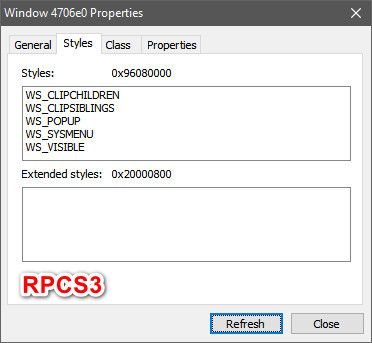
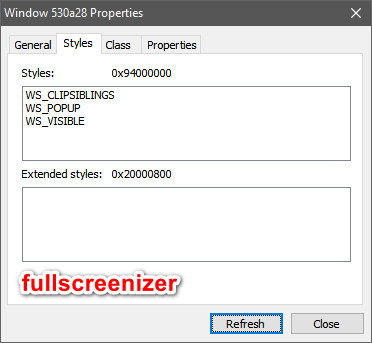
If the style have something to do with it...anyone want to try this AutoHotKey script?
SetTitleMatchMode,2
IfWinActive,Vulkan AHK_class Qt5QWindowIcon
~LButton::
Keywait,LButton
MouseGetPos,,,Win,,2
WinGetTitle,Win,ahk_id %win%
If Win not contains Vulkan
Return
If A_TimeSincePriorHotkey > 500
Return
IfWinActive,ahk_exe rpcs3.exe
{
If Set = 1
{
WinSet,Style,% Style,ahk_id %ID%
WinSet,ExStyle,% ExStyle,ahk_id %ID%
WinMove,ahk_id %ID%,,% X,% Y,% W,% H
Set =
Return
}
Else
{
WinGet,ID,ID,A
WinGet,Style,Style,A
WinGet,ExStyle,ExStyle,A
WinGetPos,X,Y,W,H,A
WinSet, Style,0x94000000,A
WinSet, ExStyle,0x20000800,A
WinMove,A,,0,0,% A_ScreenWidth,% A_ScreenHeight
Set = 1
}
}
Return
Just run it and enable "Ignore doubleclicks for fullscreen" in the Settings=>Emulator=>Viewpoint
If you are using the latest beta,ViewPoint is only visible in the global settings(not in per game custom settings)
You will be going full screen by double clicking but the actual "going fullscreen" will be done by AutoHotKey,not by rpcs3
vsub
on 26 Feb 2019
I will try that when I get home but the key question is, does that allow RPCS3 to run without screen tear in Windows 10, when turning vsyc off in the emulator's settings?
If it doesn't, then we are back to square one.
TheManuel2
on 26 Feb 2019
Vsync has to be enabled from somewhere,I always keep the nvidia control panel vsync for rpcs3 to "On\Forced On" and there is no screen tearing even if the rpcs3 vsync is off
Btw just as info,if rpcs3 is running(even without running a game)while changing settings in the nvidia control panel,they will take effect when you restart rpcs3
vsub
on 26 Feb 2019
Well sadly, that is the point of this whole thread: being able to run RPCS3 with vsync, whether native or nVidia's, without having freezes.
We (the affected ones) can all run without crashes with vsync disabled but we get screen tear. If we enable vsync in RPCS3 or nVidia CP, the game will no longer tear but eventually freezes.
TheManuel2
on 26 Feb 2019
Does it also freezes while using Fullscreenizer....I thought @psennermann meant that rpcs3 works fine with that program even with vsync enabled
vsub
on 26 Feb 2019
I am not sure if this will be of any help but it seems Fullscreenizer is applying different style to the window after resizing it to the screen size
If the style have something to do with it...anyone want to try this AutoHotKey script?
SetTitleMatchMode,2
IfWinActive,Vulkan AHK_class Qt5QWindowIcon
~LButton::
Keywait,LButton
MouseGetPos,,,Win,,2
WinGetTitle,Win,ahk_id %win%
If Win not contains Vulkan
Return
If A_TimeSincePriorHotkey > 500
Return
IfWinActive,ahk_exe rpcs3.exe
{
If Set = 1
{
WinSet,Style,% Style,ahk_id %ID%
WinSet,ExStyle,% ExStyle,ahk_id %ID%
WinMove,ahk_id %ID%,,% X,% Y,% W,% H
Set =
Return
}
Else
{
WinGet,ID,ID,A
WinGet,Style,Style,A
WinGet,ExStyle,ExStyle,A
WinGetPos,X,Y,W,H,A
WinSet, Style,0x94000000,A
WinSet, ExStyle,0x20000800,A
WinMove,A,,0,0,% A_ScreenWidth,% A_ScreenHeight
Set = 1
}
}
ReturnJust run it and enable "Ignore doubleclicks for fullscreen" in the Settings=>Emulator=>Viewpoint
If you are using the latest beta,ViewPoint is only visible in the global settings(not in per game custom settings)You will be going full screen by double clicking but the actual "going fullscreen" will be done by AutoHotKey,not by rpcs3
Going try this. Hopefully it work
tabnk
on 27 Feb 2019
Just adding to this - I experience the same crash even with G-Sync.
My Spec: Ryzen R5 2600X | nVdia GeForce 980ti | 16gb DDR4-3200 Mhz
 sidspaceawlker
on 27 Feb 2019
sidspaceawlker
on 27 Feb 2019
Does it also freezes while using Fullscreenizer....I thought @psennermann meant that rpcs3 works fine with that program even with vsync enabled
OK. I got my head out of my ass and understood what you were trying to do. I tried your script and, although it does an excellent job of replacing RPCS3's double-click fullscreen functionality, the game nevertheless still freezes, whether with native vsync or through NCP. It seems that the driver still interprets the condition as fullscreen and applies whatever horrors it does with normal fullscreen.
I appreciate you trying with that code. You did a nice job of it but the gods of screen tearing are lined up against us.
TheManuel2
on 27 Feb 2019
Hmm ok but my question still stays(I just want a clear answer because I can imitate fullscreen in other ways with autohotkey)...does rpcs3 also freezes with vsync while using Fullscreenizer?
vsub
on 27 Feb 2019
Yes for me it always crashed whether I use fullscreenizer or double click to full screen.
sidspaceawlker
on 27 Feb 2019
@TheManuel2 AFAIK the problem on this issue affects any fullscreen situation for nvidia users, being vsync enabled or disabled. The crash will occur even with vsync off. That's what other users and me posted here some months ago. Only workarounds were staying on old nvidia drivers or using windowed mode.
Unless something has happened in the last weeks that changes the equation.
Greetings.
If di
cubatilles
on 27 Feb 2019
@TheManuel2 AFAIK the problem on this issue affects any fullscreen situation for nvidia users, being vsync enabled or disabled. The crash will occur even with vsync off. That's what other users and me posted here some months ago. Only workarounds were staying on old nvidia drivers or using windowed mode.
Unless something has happened in the last weeks that changes the equation.Greetings.
Thanks for clarifying. It seems like I have a milder issue, then:
- Fullscreen and vsync: RPCS3 crashes
- Windowed and vsync: RPCS3 does not crash
- Fullscreen and no vsync: RPCS3 does not crash (but screen tears, of course)
Hmm ok but my question still stays(I just want a clear answer because I can imitate fullscreen in other ways with autohotkey)...does rpcs3 also freezes with vsync while using Fullscreenizer?
In my case
Based on the above, it seems like for some folks the crashes are there whether they use vsync or not. They should try your script. Your script my solve my problem with a different type of fullscreen arrangement but I have no clue how.
TheManuel2
on 27 Feb 2019
@tabnk I literally tried changing fullscreen flags to only WS_POPUP when I first investigated this issue and it still froze. Honestly I do not know what fullscreenizer is doing differently, probably the hook they install is changing something about how the window processes messages. Its certainly possible that they developed this with reverse-engineering to make it work.
kd-11
on 27 Feb 2019
Tested on yet another latest Driver 419.35. No fix either. :)
tabnk
on 7 Mar 2019
@kd-11 fullscreenizer doesn't really make the RPCS3 run full screen. I'm think it capture the RPCS3 (Windows Screen only) than fullscreenizer generate full screen separately (Independent from RPCS3).
tabnk
on 7 Mar 2019
No,it doesn't create extra windows,it just applies a style and resize the window....and add alwaysontop status if the option is enabled
I was thinking maybe settng the window always on top makes the driver think you are running in window mode
Or if someone want to try my script again with something else...add - 1(minus 1) after the width and height,that way you are not in 100% fullscreen window size and maybe the drver will think you are in window mode
vsub
on 7 Mar 2019
Or if someone want to try my script again with something else...add - 1(minus 1) after the width and height,that way you are not in 100% fullscreen window size and maybe the drver will think you are in window mode
Sounds like a good idea. I'll try it tonight. Thanks.
TheManuel2
on 7 Mar 2019
Just making sure,replace
WinMove,A,,0,0,% A_ScreenWidth,% A_ScreenHeight
with
WinMove,A,,0,0,% A_ScreenWidth - 1,% A_ScreenHeight - 1
vsub
on 7 Mar 2019
Thanks. That is what I understood. I monkey around with AHK a bit.
TheManuel2
on 7 Mar 2019
You may also try with +1 because with -1 the taskbar is visible unless you also add AlwaysOnTop status
The point is to see if the window size has anything to do with how the driver tells if you are running rpcs3 in window or fullscreen mode
vsub
on 7 Mar 2019
10-4
TheManuel2
on 7 Mar 2019
Good news:
vsub's script with either +1 or -1 added to the screen dimensions, allows me to play fullscreen with no tearing, when I disable vsync in RPCS3. This suggests that the driver is failing to recognize that the application is running fullscreen.
I have to do some more testing because it seemed to me that RPCS3 was running less smoothly than with its own vsync, or perhaps this display mode was hurting its performance, causing the roughness. I need to go back and do more careful back-to-back tests with the performance overlay enabled to be sure but I can't at the moment.
What this means to people with the original problem of not being able to run fullscreen at all is that this script might allow them to run without freezing, so please give it a try.
vsub: assuming performance doesn't suffer much, I can certainly live with this until the problem is actually resolved. Thanks a lot for the idea and the script. I'll probably modify it to launch with each game and maximize the screen for me automatically, then shut itself down. I'll have to stumble through it as I usually do.
Better life through AHK!
TheManuel2
on 8 Mar 2019
After a few more tests, it looks like performance is not an issue. What I did find is that somehow, I am now in the same boat as the OP. I can no longer have RPCS3 switch my games to fullscreen upon loading, whether vsync is enabled or not. I don't know what the hell changed in my system, but it looks like I need this now more than ever.
At any rate, if perhaps RPCS3 could implement a workaround where the size of the fullscreen window is set to a couple of pixels larger than the display, perhaps it will solve this issue for us.
TheManuel2
on 8 Mar 2019
I'll pitch in one more thing and then I'll stop spamming the thread. I think I found something that might be relevant. I am now back to my half-baked situation where I only get the freezes in fullscreen mode if I use vsync.
To those who can't even run fullscreen at all, try this simple exercise:
In the nVidia CP:
"Adjust desktop size and position"
"Select a scaling mode" <- set this to "Aspect ratio"
"Perform scaling on" <- set this to "Display"
This got me back to RPCS3 freezing only with vsycn.
TheManuel2
on 8 Mar 2019
In WIn10 triple buffering is force enabled for all programs running in window mode so vsync is not needed to be enabled
"Adjust desktop size and position" is not available to everyone....probably depends on the screen size or if it's a laptop or not(that option don't exist here on my 17inch laptop)
Does rpcs3 freezes immediately when you go fullscreen with vsync enabled without using my script?
Try this to see if the window size is really the only thing that tells the driver that rpcs3 is running in fullscreen
1.Enable vsync from ncp(you can try with vsync off too)
2.Run rpcs3 and go fullscreen
3.Press F1 while running this script
F1::
Keywait,F1
WinMove,A,,0,0,% A_ScreenWidth + 1,% A_ScreenHeight + 1
Return
There is no changes to the style while just resizing the window while rpcs3 is already in fullscreen
vsub
on 8 Mar 2019
Comparing fullscreenizer with AutoHotKey script. fullscreenizer look more blurry while script look as sharp as normal rpcs3 full screen.
Script based seem to be best option now till NVIDIA fix it.
tabnk
on 8 Mar 2019
At any rate, if perhaps RPCS3 could implement a workaround where the size of the fullscreen window is set to a couple of pixels larger than the display, perhaps it will solve this issue for us.
There will be loss of sharpness due to pixel-grid alignment, and working around this with separate swapchain size vs window size is going to take some time to implement. It is doable though especially since its a windows+vulkan only situation. I'll take a look after the current PR in progress.
kd-11
on 8 Mar 2019
Is there any difference under a Nvidia driver installation in the Custom installation with the NVIDIA GeForce Experience option disabled? I mean, how many hooks and alterations could that thing be throwing in between the OS and application client?
 greentop
on 8 Mar 2019
greentop
on 8 Mar 2019
@vsub
In WIn10 triple buffering is force enabled for all programs running in window mode so vsync is not needed to be enabled
Agreed; I enabled and disabled it for testing purposes.
"Adjust desktop size and position" is not available to everyone....probably depends on the screen size or if it's a laptop or not(that option don't exist here on my 17inch laptop)
I have a 1080p monitor (primary) and a 4K TV (secondary) connected but only use one at a time. Perhaps this is why I get that option.
Does rpcs3 freezes immediately when you go fullscreen with vsync enabled without using my script?
With desktop scaling set to GPU RPCS3 freezes immediately on the 1080p monitor, whether I'm using vsync or not. This does not happen on the 4K TV.
With scaling set to Display, it only freezes during gameplay at some point, usually very early on both, monitor and TV.
Try this to see if the window size is really the only thing that tells the driver that rpcs3 is running in fullscreen
1.Enable vsync from ncp(you can try with vsync off too)
2.Run rpcs3 and go fullscreen
3.Press F1 while running this scriptF1::
Keywait,F1
WinMove,A,,0,0,% A_ScreenWidth + 1,% A_ScreenHeight + 1
ReturnThere is no changes to the style while just resizing the window while rpcs3 is already in fullscreen
I can give it a try for testing purposes but only on the monitor with desktop scaling set to "GPU", which is the only condition that causes an immediate freeze upon going fullsreen.
@kd-11
There will be loss of sharpness due to pixel-grid alignment, and working around this with separate swapchain size vs window size is going to take some time to implement. It is doable though especially since its a windows+vulkan only situation. I'll take a look after the current PR in progress.
Thanks a lot. It would only be worthwhile if it helps others instead of just me, of course, and might be best as an alternative fullscreen option if the regular one is sharper for users without the issue.
To help with the scaling, perhaps a black border could be created around the image and then just center the image so that the black borders go off-screen, while still preventing the driver from assuming RPCS3 is fullscreen.
@greentop
Is there any difference under a Nvidia driver installation in the Custom installation with the NVIDIA GeForce Experience option disabled? I mean, how many hooks and alterations could that thing be throwing in between the OS and application client?
I doubt GeForce Experience is interfering but it's certainly worth a try.
TheManuel2
on 8 Mar 2019
@greentop
Uninstalling GeForce Experience did not fix the issue.
TheManuel2
on 9 Mar 2019
I have one stupid question.
I finally decided to install the latest drivers so I thought I should check this problem out but...what exactly I must do,is it just random or there is a way to trigger the problem.
VSync is enabled from the nvidia control panel and the gpu is set to maximum performance.
I entered all possible locations(end game save) and fight few battles in Persona 5(took me 20 minutes)but the game works fine.
Anyone who knows how to trigger this problem can try setting the fps limit to 59.94
I always see some weird behavior on any game it the fps limit is set to off\auto or 60 so I keep it to 59.94 or 30 for games that runs at 30 no matter what.
There is something that I do notest tho but that's not because of the latest drivers...there is always a 2 seconds freeze(the game keeps running but the frame freezes)every time I try to enter\exit fullscreen but if I use my script,there is no freeze at all.
vsub
on 11 Mar 2019
There are reports of the problem going away with the latest nvidia driver. I'm cautiously optimistic.
The 2-second freeze only happens on nvidia btw. I think dwm is usually 'dead' when the window is fullscreen and it needs a moment to restore it to working condition, but thats just a hunch. I say this because for those two seconds if you spam enough you can see the window contents are very outdated (like the window manager did not see any changes since you went fullscreen or something).
kd-11
on 11 Mar 2019
@vsub
- I don't know if the problem affects absolutely every nVidia user or just some of us
- Two levels of the problem:
a. Freezes as soon RPCS3 goes into fullscreen after shader compilation (me lately)
b. Freezes in fullscreen at some point during gameplay if using vsync (me until a few days ago) - I have this happen faithfully with Soul Calibur IV but never happens with Street Fighter 2 bla, bla HD
- Your scripts successfully circumvents these issues when setting a viewport size different from the display resolution
Maybe you are not in the "affected" group.
@kd-11
Unfortunately, the problem is still there with the latest 419.35 drivers that got released on March 05. I haven't experienced a 2-second freeze, at least not recently. Mine is more of a permanent freeze :-)
Curiously, most times when it freezes, the process cannot be killed by task manager, even from the services tab (kill process tree) and the computer must be restarted to run RPCS3 again.
TheManuel2
on 11 Mar 2019
Oh well, thats unfortunate. I was working on a workaround for it, unfortunately it makes it so that fullscreen on multiple monitors might not work. Process is unkillable because of the driver being stuck in an infinite loop and also having hooked the main process thread. I attempted to cheat the system by modifying registers on the fly to exit the infinite loop but it still re-entered it the next driver call.
kd-11
on 11 Mar 2019
I appreciate your efforts. If you do get on with it, perhaps you could offer the work-around as an alternative to the regular fullscreen method that works fine for others.
TheManuel2
on 11 Mar 2019
I just left Project Diva F to run(Intro=>Title Screen=>Demo song=>Intro=>...)for the last one hour(vsync enabled from ncp,fps and fps limited 30fps(the game is running at 30fps anyway and went fullscreen by Alt+Enter after the shaders compilation))and when I come back to the laptop,the game was still working fine.
@TheManuel2 try limiting the speed to 59.54 or lower and see what happens
vsub
on 11 Mar 2019
@vsub
Maybe you don't have the issue. If you happen to have SCIV or Tekken or even any other Namco game, try with that. Some people have found those are more likely to freeze.
I have tried limiting the speed to the various choices in the drop down menu, among the many things I've tried, but I can sure try again.
TheManuel2
on 11 Mar 2019
Namco....for example Tales of Graces F and Tales of Vesperia
I just play them for around 10 minutes and nothing happens
I also have Tales of Xillia 1 and 2 but the last time I tried those games,they were often crashing with fatal errors while using Vulkan
vsub
on 11 Mar 2019
Then, fortunately, you don't have the problem some of us are having. Perhaps it is hardware configuration related.
TheManuel2
on 11 Mar 2019
fullscreenirizer doesn't work for me, it actually makes the problem even worse! usually when using vulkan in fullscreen it freezes after about 5 minutes, but using fullscreenirizer it freezes in a couple of seconds. am I doing something wrong?
 baaskaas123
on 11 Mar 2019
baaskaas123
on 11 Mar 2019
So Vulkan will now have exclusive fullscreen, or so I understand: https://www.phoronix.com/scan.php?page=news_item&px=Vulkan-1.1.104-Released
Will that may help us with NVIDIA's deficient drivers?
RaulDJ
on 18 Mar 2019
It seems that way. We need to wait for it to be supported in drivers but this is a good sign.
kd-11
on 18 Mar 2019
@kd-11 Awesome. I'm starting to see the light, guys!
RaulDJ
on 18 Mar 2019
yea, just found this due to days worth of pulling my hair out :)
assumed it was the new shieldtv i was trying to stream to ala the steamlink app (as opposed to the steam link hardware I used to stream to)
of course now i know i was barking up the wrong tree so to speak. Depending on combination of settings I either freeze immediately after loading shaders or get some seconds into a game and hang/freeze.
Windowed as ascertained is fine.
In awe of what you guys do, and will be exceptionally grateful when its back to normal. Leave it to nvidia to always break something and stuff their hands in their pockets.
 klepp0906
on 1 Apr 2019
klepp0906
on 1 Apr 2019
What is vulkan version supported by latest nvidia drivers? The SDK tools are still on version 101 (we need 104 for explicit borderless fullscreen support), but maybe we can get around that with code if the driver meets the requirements.
kd-11
on 5 Apr 2019
I'm not home so I can't check but according to the screenshot here, the latest Windows 10 nVidia driver, version 419.67 supports Vulkan API release 1.1.95.
You can see a list of Vulkan extensions supported by recently released nVidia drivers here (obviously, exclusive fullscreen isn't listed yet).
TheManuel2
on 5 Apr 2019
The exclusive fullscreen extension is part of vulkan 1.1.104 so that is expected. I guess we have to wait a bit longer for support to catch on.
kd-11
on 5 Apr 2019
Yeah, hopefully the catch up soon. I check on every release :-)
TheManuel2
on 5 Apr 2019
Drivers were updated yesterday but no Vulkan exclusive fullscreen yet.
New features added (from here):
VK_EXT_pipeline_creation_feedback
VK_KHR_surface_protected_capabilities
TheManuel2
on 12 Apr 2019
Ran in to this issue on KH 2.5 as well which led me here.
Trying out the new drivers shortly so i'm at least a little hopeful.
Subbing
 cbrherms
on 13 Apr 2019
cbrherms
on 13 Apr 2019
Nvidia released a new Vulkan dev driver 425.42:
New:
VK_PRESENT_MODE_IMMEDIATE_KHR present mode is now available for Windows
VK_NV_ray_tracing is now available on the following non-RTX GPUs:
Pascal: TITAN Xp, TITAN X, GeForce GTX 1080 Ti, GeForce GTX 1080, GeForce GTX 1070 Ti, GeForce GTX 1070, GeForce GTX 1060 6GB
Volta: TITAN V
Turing: GeForce GTX 1660 Ti, GeForce GTX 1660
VK_NV_coverage_reduction_mode
Extension specification will be available soon.
Fixes:
Fix bug in vkCmdCopyImage with compressed images and some non-zero mipmap level dimensions
Fix bug with OpPhi and relaxed precision
Some minor performance improvements
https://developer.nvidia.com/vulkan-driver
 Artins90
on 20 Apr 2019
Artins90
on 20 Apr 2019
Latest nVidia general release was issued yesterday:
- Windows release: 430.39
- Supports Vulkan 1.1.99 and WDDM 2.6 per this website
- Presumably supports the Vulkan features in dev driver 425.54 listed above by Artins90
We are still waiting for Vulkan 1.1.104 for exclusive fullscreen support. I don't know if the WDDM update affects the vsync or fullscreen crashes but I can check tonight.
TheManuel2
on 24 Apr 2019
No effect on the freeze issues with the new drivers. The wait for Vulkan 1.1.104 with XF continues...
TheManuel2
on 25 Apr 2019
Ugh.
thank you for testing :)
klepp0906
on 25 Apr 2019
NV drivers are notorious for consuming ridiculous amounts of system memory (up to dozens of gigabytes for several thousand shaders). Nothing we can do about that.
kd-11
on 7 May 2019
Hi there.
nvidia 425.31, rpcs 0.0.6-8066
Interesting things happen in my environment.
One monitor is connected by HDMI and the other is connected by DVI
using the multi-monitor extension function.
HDMI can run fullscreen mode and it have never frozen.
But rps3 freezes quickly when I set fullscreen mode with DVI.
Windos mode can run with DVI.
Any ideas?
 pikachuuuuuuuuuu
on 8 May 2019
pikachuuuuuuuuuu
on 8 May 2019
The freeze doesn't seem to happen if you use a secondary monitor (or any monitor that isn't the main one, the one marked as "1" by Windows). Might be that @pikachuuuuuuuuuu
 RainbowCookie32
on 8 May 2019
RainbowCookie32
on 8 May 2019
@RainbowCookie32
Yes, HDMI is one DVI is two and checked main monitor.
Then 'Second screen only' freezes too.
pikachuuuuuuuuuu
on 8 May 2019
Tested on Windows 10 with new RTX 2060 on Samsung 4K HDR TV. Nvidia 430.64 (latest)
RPCS3 0.0.6-8086 with full screen Vulkan and V-sync enabled.
Games
TEKKEN 6 (run till stage 7) - No crash.
Tekken Tag 2 (run till stage 6) - No crash.
Ni no Kuni: Wrath of the White Witch - No crash.
Usually rpcs3 will crash/hang at stage 1 or 2 but it didn’t happen.
Btw, I’m was previously using LG FHD TV with GTX 960 and it crashes a lot of time but after upgraded to RTX 2060 with SAMSUNG 4K TV issues seem solved.
So I’m don’t know whether hardware or software that cause the crashing.
tabnk
on 10 May 2019
@tabnk 430.64 was release today, maybe the driver fixed the problem.
 kotori2
on 10 May 2019
kotori2
on 10 May 2019
I'm my particular case, nothing changed for me with the latest release; I got a crash faster than ever. I can't get past the logos and into the game proper with this driver unless I launch the game in window.
This must be very hardware specific.
TheManuel2
on 10 May 2019
I tested with latest driver 430.64 and latest RPCS3 with RTX 2080Ti, nothing changed.
kotori2
on 10 May 2019
By the way, I don't know of a way to determine what version of Vulkan is supported in this release, so I don't know if exclusive fullscreen is a possibility now, or if we are still waiting for 1.1.104 support.
TheManuel2
on 10 May 2019
@TheManuel2 Try to execute vulkaninfo in cmd and scroll up you will find something like this
Device Properties and Extensions :
==================================
GPU0
VkPhysicalDeviceProperties:
===========================
        apiVersion     = 0x401063  (1.1.99)
        driverVersion  = 1804599296 (0x6b900000)
        vendorID       = 0x10de
        deviceID       = 0x1e07
        deviceType     = DISCRETE_GPU
@TheManuel2 Try to execute
vulkaninfoin cmd and scroll up you will find something like thisDevice Properties and Extensions : ================================== GPU0 VkPhysicalDeviceProperties: =========================== apiVersion = 0x401063 (1.1.99) driverVersion = 1804599296 (0x6b900000) vendorID = 0x10de deviceID = 0x1e07 deviceType = DISCRETE_GPU
Oh, nice. I had no clue. Thanks for sharing that. I'm not home now but if you did that with the latest drivers, it looks like we're not at the coveted 1.1.104 yet.
TheManuel2
on 10 May 2019
Retest again with my new system.
RPCS3 0.0.6-8086 with full screen Vulkan and V-sync enabled. Even at 450% upscaled.
Few more games
Virtua Fighter 5 Final Showdown - No crash
TEKKEN 5 Dark Resurrection - No crash
Tekken Tag 2 - No crash.
Tekken 6 - No crash.
Ridge Racer 7 - No crash.
Seem like Samsung 4K HDR TV indirectly solved my problem with Vulkan (Full screen) and V-sync. :D
I'm can finally play PS3 game on PC with buttery smooth game-play.
tabnk
on 11 May 2019
Retest again with my new system.
RPCS3 0.0.6-8086 with full screen Vulkan and V-sync enabled. Even at 450% upscaled.Few more games
Virtua Fighter 5 Final Showdown - No crash
TEKKEN 5 Dark Resurrection - No crash
Tekken Tag 2 - No crash.
Tekken 6 - No crash.
Ridge Racer 7 - No crash.Seem like Samsung 4K HDR TV indirectly solved my problem with Vulkan (Full screen) and V-sync. :D
I'm can finally play PS3 game on PC with buttery smooth game-play.
Awesome! Lucky you. Enjoy.
TheManuel2
on 11 May 2019
Crash today with Persona 5 @400% Upscale fullscreen. Cannot end rpcs3 with task manager and have to restart.
Specs:
Win 10
RPCS3 - 0.0.6-8094
i7-7700k
RTX 2070 - 430.64 Driver
 knguyen0125
on 16 May 2019
knguyen0125
on 16 May 2019
Same here. Random crashes in all games in fullscreen.
Specs:
rpcs3-v0.0.6-8133-cb785226_win64
Win 10
i7-7700k
1060 6gb - 430.64 Driver
I wait for looooooooong time when its fixes. I want play in full screen ((((((
 masaki1988
on 17 May 2019
masaki1988
on 17 May 2019
@masaki1988 check out the conversation above. we are still waiting new driver release))))))
kotori2
on 17 May 2019
@masaki1988 check out the conversation above. we are still waiting new driver release))))))
I wait too. I hope new driver can fix its looooooooooong time problem/
masaki1988
on 17 May 2019
Patience is a virtue.
TheManuel2
on 17 May 2019
I installed the latest nVidia development driver and vulkaninfo reports 1.1.108 as shown below.
The website doesn't explicitly mention exclusive fullscreen but that version level supports it. It may be that this is a partial implementation of 1.1.108, including only the features mentioned on the site.
At any rate, I can test any new code when available.
Device Properties and Extensions :
GPU0
VkPhysicalDeviceProperties:
    apiVersion     = 0x40106c  (1.1.108)
    driverVersion  = 1783529472 (0x6a4e8000)
Can you attach the vulkaninfo dump? Extensions are optional so its likely the driver does not support the extension even with a higher API version. I'm sure this will be implemented eventually as it is needed by wrappers such as DXVK. You can also use the Vulkan Caps Viewer from this link.
kd-11
on 23 May 2019
Hi guys. Yesterday i started playing Persona 5 on RPCS3 latest build, and i'm getting freezes like every half hour. I tried full screen and windows mode and it happens in both. Picture just freeze and i hear sound in background, but can't do anything. I've read that windows mode shouldn't have freeze problem only full screen, but for me it freezes in both. Can any1 give me some advice? I'm using 300% scale resolution and Vulkan, V Sync On. My spec: Ryzen 2600, 16GB ram, RTX 2080 drivers 430(latest one) Thanks.
 VedranBileski
on 23 May 2019
VedranBileski
on 23 May 2019
I had the same problem it's not the emulators fault . I reset the
resolution to normal , frame limit off, and it helps to have the fastest
recompiler
On Thu, 23 May 2019, 11:49 VedranBileski, notifications@github.com wrote:
Hi guys. Yesterday i started playing Persona 5 on RPCS3 latest build, and
i'm getting freezes like every half hour. I tried full screen and windows
mode and it happens in both. Picture just freeze and i hear sound in
background, but can't do anything. I've read that windows mode shouldn't
have freeze problem only full screen, but for me it freezes in both. Can
any1 give me some advice? I'm using 300% scale resolution and Vulkan, V
Sync On. My spec: Ryzen 2600, 16GB ram, RTX 2080 drivers 430(latest one)
Thanks.—
You are receiving this because you are subscribed to this thread.
Reply to this email directly, view it on GitHub
https://github.com/RPCS3/rpcs3/issues/5351?email_source=notifications&email_token=AMAITNB67KU6LDQQ4YL4T23PWZLA7A5CNFSM4GE5RBAKYY3PNVWWK3TUL52HS4DFVREXG43VMVBW63LNMVXHJKTDN5WW2ZLOORPWSZGODWBQPWQ#issuecomment-495126490,
or mute the thread
https://github.com/notifications/unsubscribe-auth/AMAITNEX3BW27AHDG5HTXS3PWZLA7ANCNFSM4GE5RBAA
.
 VisageChris
on 23 May 2019
VisageChris
on 23 May 2019
Soo....the only way to play Persona 5 without freezes is if i play on default 720p resolution?
VedranBileski
on 23 May 2019
Can you attach the vulkaninfo dump? Extensions are optional so its likely the driver does not support the extension even with a higher API version. I'm sure this will be implemented eventually as it is needed by wrappers such as DXVK. You can also use the Vulkan Caps Viewer from this link.
It definitely looks like the extension is not there yet. It is not mentioned in vulkaninfo or the caps viewer report (attached). I will continue to monitor newer drivers. Thanks!
TheManuel2
on 23 May 2019
Join discord and go to help channel. There are several workarounds. Older driver, secondary monitor, sometimes even vsync can help
CrabLugo
on 23 May 2019
new driver 430.86 any news?.
masaki1988
on 29 May 2019
@masaki1988 vulkan still in 1.1.99, no luck atm
kotori2
on 29 May 2019
New 435.27 Nvidia Windows 10 driver released.
https://forums.guru3d.com/threads/geforce-435-27.426931/
It supports vulkan 1.1.107
Download it here.
https://www.mediafire.com/file/pb67ea28aadwnf7/Nvidia+435.27.rar
Now I'll setup and try it on latest RPCS3 version.
 PantaRei1983
on 30 May 2019
PantaRei1983
on 30 May 2019
RPCS3 doesn't yet support newer SDK functionality, it's still built against old SDK
 AniLeo
on 30 May 2019
AniLeo
on 30 May 2019
Good news. They should be including that in their standard driver release soon, then. However, you will not see a difference until kd-11 is able to add an exclusive fullscreen option.
TheManuel2
on 30 May 2019
I'll add in the hotfix as soon as the driver is publicly available. As for the driver itself - does it actually support the extension? Extensions are optional afterall, driver vendors are free to ignore them.
kd-11
on 30 May 2019
Somebody who obtained this driver should visit https://vulkan.gpuinfo.org/ and upload driver info via tool.
It will list all extensions.
 Leopard1907
on 30 May 2019
Leopard1907
on 30 May 2019
When I get a chance this weekend I’ll try to install that new driver and check the Vulkan capacities.
PS: Meh, I'll wait for a public release. I would rather not download some suspect driver package from Mediafire and the Windows Insider Program Fast Track seems like a pain.
TheManuel2
on 31 May 2019
the driver is aleardy here , did you do anything to fix the fullscreen problem , and there is another problem , when RPCS3 crash , i cant kill the process with CMD , it's like a ghost process
 Polizario
on 31 May 2019
Polizario
on 31 May 2019
i cant kill the process with CMD , it's like a ghost process
Because there is a problem with the nvidia driver. Its not getting stuck in our code or the OS would terminate it without issue.
the driver is aleardy here
Run the application from https://vulkan.gpuinfo.org/ and attach the output here so we can tell if it supports what we need.
kd-11
on 31 May 2019
I'll add in the hotfix as soon as the driver is publicly available. As for the driver itself - does it actually support the extension? Extensions are optional afterall, driver vendors are free to ignore them.
If problem is fix in driver (if that realy true) why not fix in emulator anyway?. People who want play in fullscreen will be install beta version anyway.
masaki1988
on 31 May 2019
I'll wait for a public release too and no we don't all install beta versions
JOHN30011887
on 31 May 2019
kd-11 , how i can run from https://vulkan.gpuinfo.org/ i dont understand
Polizario
on 1 Jun 2019
kd-11 , how i can run from https://vulkan.gpuinfo.org/ i dont understand
You need to download and run this https://vulkan.gpuinfo.org/downloads/vulkancapsviewer_1_92_win64.zip
Artins90
on 1 Jun 2019
Looks like someone uploaded it ( 435.27 report ) and that driver doesn't have VK_EXT_full_screen_exclusive at all.
http://vulkan.gpuinfo.org/displayreport.php?id=5985#extensions
Leopard1907
on 1 Jun 2019
Yep! No full screen exclusive extension in this driver, and obviously RPCS3 crashes after some minutes in fullscreen mode.
PantaRei1983
on 1 Jun 2019
This is getting really annoying why can't they just finally fix this the emulator is almost unusable for me atm and i can't downgrade my drivers to 399 every time i want to play something on it.
tet666
on 3 Jun 2019
Seem like this issue only happen for some people and not the general users. Otherwise, here will flooded with thousands of reports. So I’m doubt VK_EXT_full_screen_exclusive can fix this issue.
tabnk
on 3 Jun 2019
Seem like this issue only happen for some people and not the general users. Otherwise, here will flooded with thousands of reports. So I’m doubt VK_EXT_full_screen_exclusive can fix this issue.
No it's a general nvidia issue for sure, it just seems to happen more often in some games then in others for some reason, it also doesn't happen windowed or if you use a multi monitor setup.
tet666
on 3 Jun 2019
I think people not report because they play in windows mode and not use fullscreen. Maybe im wrong.
masaki1988
on 3 Jun 2019
The new driver has a present mode fix, could this be the answer to our issue?
June 1st, 2019 - Windows 425.62, Linux 418.52.10
New:
VK_EXT_fragment_shader_interlock
VK_EXT_calibrated_timestamps (Windows)
VK_NV_shader_sm_builtins
Fixes:
Fixes crash when changing presentMode between swapchain
Artins90
on 3 Jun 2019
The moment I stop looking at the Developer Beta Drivers, a new release comes along. It sounds promising, so I'll give it a try tonight. You can try it too and let us know if it helps.
TheManuel2
on 4 Jun 2019
@tabnk and @masaki1988,
I could be wrong, but afaik, it only happens for nvidia users, and it does not seem to affect all nvidia users (we cannot be sure about this). And I'm sure this is affecting a lot more people than users subscribed to this issue, lot of people could be experiencing this problem while thinking it's only a rpcs3s tability issue, general bug or a specific game bug. It's hard to identify unless you do know about this issue.
Greetings.
cubatilles
on 4 Jun 2019
Well, it was a good idea anyway. The answer was not long in coming after launching SCIV. It froze at the usual place. I shall continue to wait.
TheManuel2
on 5 Jun 2019
I test all games which i have and there always froze in fullscnreen. But i try test more today and make report here.
masaki1988
on 5 Jun 2019
Well i test games (two which i have) and its froze in fullscreen at random moment. I can t atach log file because wheh i close emulator log file was corrupted and can t open.
So here my report
Which games
Fist of the North Star: Ken's Rage BLES01062
Ryu_ga_Gotoku_Kenzan BLJM60064
Emulator version
rpcs3-v0.0.6-8180-f90f68d1_win64
Emulator settings
PPU Decoder: Recompiler (LLVM)
SPU Decoder: Recompiler i try both (LLVM) and (ASMJIT)
Renderer: Vulkan
Resolution: 1280x720
Resolution Scale: 300
My pc config
Intel Core i7 7700k
Nvidia Geforce 1060 6gb driver 430.86
8gb ram ddr4
Windows 10 Home 1809 x64
masaki1988
on 5 Jun 2019
Yeah, it's the same old problem. Again, we just have to wait.
TheManuel2
on 5 Jun 2019
There's no need to test individual games. As far as I know, as far as you are using Vulkan, fullscreen and 400 series drivers, the issue will trigger sooner or later.
RainbowCookie32
on 5 Jun 2019
I have a few more ideas on working around this issue that I will try and implement over the weekend to make rpcs3 behave more like other applications and hopefully this will work around the bug. Requires quite a bit of rewriting but hopefully the bug may get hidden successfully.
kd-11
on 7 Jun 2019
Thank you. I appreciate your efforts to fix this. It is probably obvious to you but it might be worthwhile understanding why this doesn't happen in Dolphin, which also has a Vulkan back-end.
TheManuel2
on 7 Jun 2019
Fixed in this build https://ci.appveyor.com/project/kd-11/rpcs3/builds/25148269
kd-11
on 9 Jun 2019
Can confirm. I played for 30 min in fullscreen and all good. Before it crashed after like 3 min.
 SeppNel
on 9 Jun 2019
SeppNel
on 9 Jun 2019
Wow! This seems to have fixed it for me. I could only test for a few minutes but it usually did not take long to crash with the regular builds. Frame rate seems more stable too. Amazing.
Thanks!
TheManuel2
on 9 Jun 2019
Fixed in this build https://ci.appveyor.com/project/kd-11/rpcs3/builds/25148269
I tried it, not working for me. Game still crashes after some minutes, now also in window mode!!
My specs:
i7-8700K OC @ 4.9 GHz - 16 GB RAM DDR4-3200 - Nvidia RTX 2080 with latest Win 10 435.27 driver, Windows 10 v1903.
PantaRei1983
on 9 Jun 2019
Crash in the windowed mode indicates that it is unrelated to the original problem. You’re using alpha drivers which is a much more likely issue, so it is not very useful as a report.
 13xforever
on 9 Jun 2019
13xforever
on 9 Jun 2019
I've played Ar noSurge for about and hour on fullscreen until I got an "{PPU[0x1000000] Thread (main_thread) [0x003a908c]} MEM: Access violation reading location 0x18" (which I didn't even know this game had problems with, so I guess that's another one to the list), so... I guess it's finally fixed...?
RaulDJ
on 9 Jun 2019
It's a regular game crash that can happen on any KT game that runs on the same engine, it is unrelated to the fullscreen driver issue.
13xforever
on 9 Jun 2019
Yep, not work for me too. Still crash in fullscreen but now, can close emulator without kill process.
My pc config
Intel Core i7 7700k
Nvidia Geforce 1060 6gb driver 430.86
8gb ram ddr4
Windows 10 Home 1809 x64
Game yakuza kenzan.
masaki1988
on 9 Jun 2019
Hi,
The fix works flawlessly for me. Heavily tested various games which were crashing early with previous versions, and now they all worked perfectly with fullscreen.
@AizerMortenort and @masaki1988 are you sure your crashes are related to this issue? Freezes are gone when in windowed mode?
@kd-11 , Thanks for the work. I hope the fix will soon be merged to the master branch.
Greetings.
cubatilles
on 9 Jun 2019
@AizerMortenort
In the last comment from kd-11, click the link, then click artifacts and download the 17 MB file.
SeppNel
on 9 Jun 2019
Thank you all. So far works. I was testing official builds... lol
 AizerMortenort
on 9 Jun 2019
AizerMortenort
on 9 Jun 2019
Removing off-topic / spam
AniLeo
on 9 Jun 2019
Hi,
The fix works flawlessly for me. Heavily tested various games which were crashing early with previous versions, and now they all worked perfectly with fullscreen.
@AizerMortenort and @masaki1988 are you sure your crashes are related to this issue? Freezes are gone when in windowed mode?
@kd-11 , Thanks for the work. I hope the fix will soon be merged to the master branch.
Greetings.
Well im sure of it. But i test more games today for make sure that is old bug.
masaki1988
on 10 Jun 2019
Completely unrelated problem if it hangs in windowed mode. Test with gs_gcm_cube or gs_gcm_basic_triangle samples if it's actually this problem reported here.
EDIT: For any further testing, use the build from the pull request, not the older experimental build I linked earlier.
kd-11
on 10 Jun 2019
posting logs with pirated content won't help anyone
13xforever
on 10 Jun 2019
posting logs with pirated content won't help anyone
But games contain same code as if i dump it from bd discs. But if you say so.
Anyway its fix from kd not work for my 1060. Still crash in fullscreen.
masaki1988
on 10 Jun 2019
No, they don't many of the times for a lot of games.
If your game is clearly pirated, the test results are invalidated.
Dump your actual disc before proceeding.
Also, it's very unlikely it's still this same issue, since tests from several people show this is fixed, test with other games too.
AniLeo
on 10 Jun 2019
I made some more testing. I have two partition in my SSD, one with latest Win10 1903, other with Win10 old 1803 version. Running latest RPCS3 version on Win10 1803 partition with no problem. It's perfect, flawless with solid framerate and no fullscreen crash, tested with Ridge Racer 7 and Virtua Fighter 5 Shodown. If I running RPCS3 on Win10 1903 partition it crashes randomly, so I think it's a OS issue (maybe I'll try a clean setup of latest Win10 on my first partition to see if it'll be fix the issue). I used the same Nvidia driver version on the two different partition (430.86 after uninstall beta 435 win10 insider version in 1903 partition) so it isn't a driver or emulator issue, maybe personal OS issue. Sorry!
PantaRei1983
on 10 Jun 2019
The fix works perfectly here too. Thank you very much, kd-11. It's finally time to add PS3 games to my gaming frontend :)
Dime333
on 10 Jun 2019
I tested 4 games which i download from psn servers and test on kd build RPCS3 v0.0.6-8204-d361eedb.
Tested games
Yakuza 4. Crash at first screen
Persona 5. Run great in fullscreen without any crash
Tekken tag tournament 2. Run great in fullscreen without any crash
Virtua Fighter 5 Shodown. Run great in fullscreen without any crash.
So my idea is. fullscreen crash issues happen not for all games but only on specific. For example yakuza games. So, i think windows 10 version does matter, its depend on games only. I atach log file here and maybe its can be help fixed crash in those games.
My pc config
Intel Core i7 7700k
Nvidia Geforce 1060 6gb driver 430.86
8gb ram ddr4
Windows 10 Home 1809 x64
masaki1988
on 11 Jun 2019
If you're having crashes in Yakuza, then its not THIS specific bug. This bug has been resolved; you may open a separate issue for Yakuza freezing. You also mentioned it freezes in windowed mode which means we don't even know that in your situation its the graphics that crashed/hang. It could be PPU/SPU freeze. unstable OC, etc for all we know. Don't add more comments to this issue, there are already ~250 comments here.
kd-11
on 11 Jun 2019
It fixed fullscreen crashes in NIER on my 1060/3GB, thanks a lot.
 zatycz
on 11 Jun 2019
zatycz
on 11 Jun 2019
If you're having crashes in Yakuza, then its not THIS specific bug. This bug has been resolved; you may open a separate issue for Yakuza freezing. You also mentioned it freezes in windowed mode which means we don't even know that in your situation its the graphics that crashed/hang. It could be PPU/SPU freeze. unstable OC, etc for all we know. Don't add more comments to this issue, there are already ~250 comments here.
Ok i understand. But have a look my log file ok? which i upload on previous post.
masaki1988
on 11 Jun 2019
Lots of crashes with LLVM recompiler, not crashing with ASMJIT. need to do more testing.
metspo
on 11 Jun 2019
Lots of crashes with LLVM recompiler, not crashing with ASMJIT. need to do more testing.
Which seems completely unrelated to this :thinking:
RainbowCookie32
on 11 Jun 2019
@AniLeo Lock this thread, please.
 dio-gh
on 11 Jun 2019
dio-gh
on 11 Jun 2019
Lots of crashes with LLVM recompiler, not crashing with ASMJIT. need to do more testing.
Which seems completely unrelated to this 🤔
Not really, had crashes before the "vulkan" driver updates with fullscreen with both compilers, now it seems to crash with llvm only, might be fixed for me or not :P
EDIT:
Soul Calibur 5 worked without crashing with asmjit, instantly crashed with LLVM
Ni No Kuni crashes with LLVM after the first cutscenes, can proceed with asmjit.
Shove Knight crashes randomly, not with asmjit.
metspo
on 11 Jun 2019
@metspo How would a presentation algo rework (fully gfx backend changes) affect your game compatibility with different SPU recompilers? Come on man.
If you have weird crashes, try pinpointing it down further and open a separate issue. Your issue is 100% unrelated to the nvidia fullscreen crash bug.
dio-gh
on 11 Jun 2019
Ok, It was definitely personal OS issue, probably caused by upgraded 1809 to 1903. Now I reinstalled Win 10 1903 with latest official drivers and update completely clean, and yes, RPCS3 now working like a charm! Thank you very much kd-11 and sorry for misunderstanding!
PantaRei1983
on 11 Jun 2019
I know this is a moot point by now but I just installed the latest nVidia drivers and the exclusive fullscreen extension was added to Vulkan. Of course, kd's fix from a few months ago had already fixed the issue.
TheManuel2
on 24 Aug 2019
Related issues
 uaqlover
·
3Comments
uaqlover
·
3Comments
 Luffykun007
·
3Comments
Luffykun007
·
3Comments
 xiangzhai
·
3Comments
AniLeo
·
3Comments
xiangzhai
·
3Comments
AniLeo
·
3Comments
 XeClutch
·
3Comments
XeClutch
·
3Comments
Most helpful comment
Fixed in this build https://ci.appveyor.com/project/kd-11/rpcs3/builds/25148269