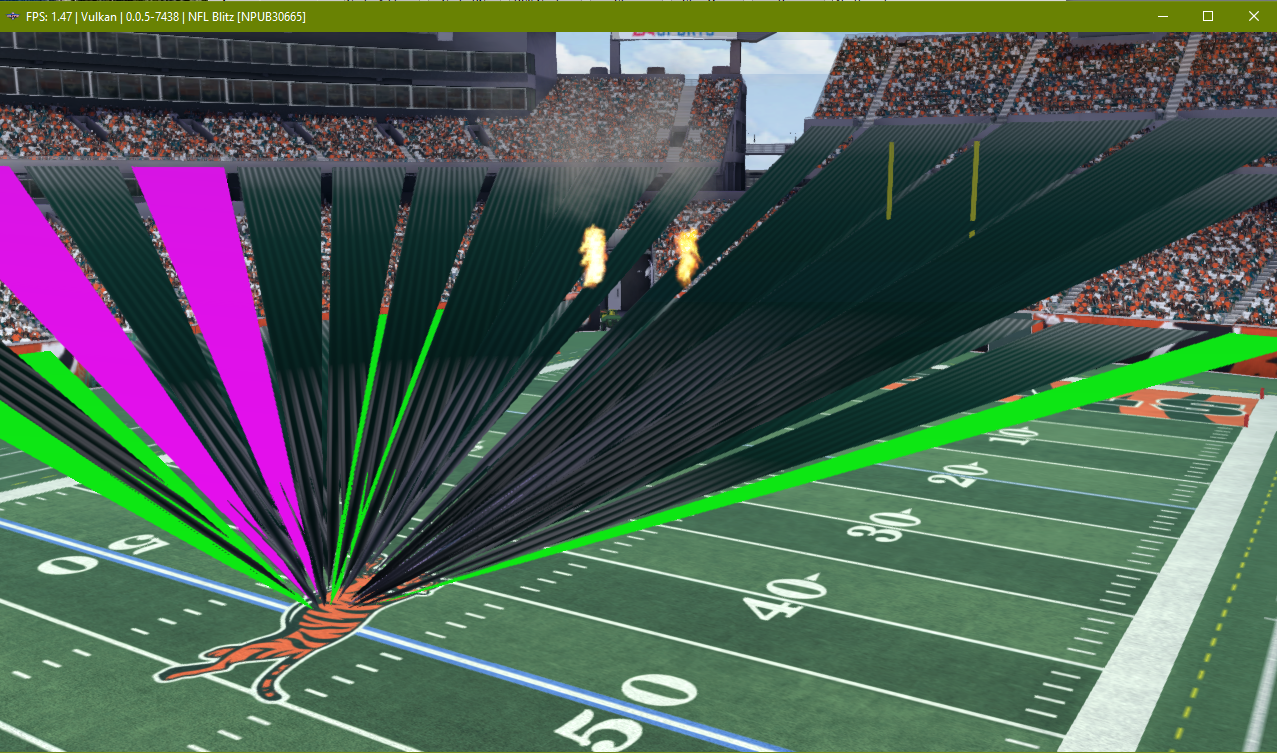
Rpcs3: NFL Blitz [NPUB30665] Field gfx have exploding vertices


RSX Capture:
NPUB30665_20180915144902_capture.zip
Config:
Windows 10 64-bit
GeForce GTX 1080
i7-6700k @ 4GHZ
16GB RAM
 legend800
All 9 comments
Please base your reports on master (and not rsx-volatile).
 HenningJW
on 15 Sep 2018
HenningJW
on 15 Sep 2018
Sure, but for this, it has been an issue for years. Disregard the actual build (which is actually in Master anyway as of today).
legend800
on 15 Sep 2018
Also for graphical issues you should probably provide a render doc capture https://renderdoc.org/ of the issue. And maybe even a capture using RPCS3's inbuilt tool but renderdoc should be enough.
 Asinin3
on 15 Sep 2018
Asinin3
on 15 Sep 2018
Added a RSX capture. I'll do that for all future gfx issues.
legend800
on 15 Sep 2018
Reupload capture, rsx capture replay system was changed since then.
 elad335
on 13 Oct 2018
elad335
on 13 Oct 2018
@elad335 Sure thing, but the button doesn't seem to be working. Don't I just need to use this button? Capture folder is empty though. Maybe I'm missing something...

legend800
on 14 Oct 2018
Use strict rendering mode while capturing. then it will appear in rpcs3/capture.rrc .
elad335
on 14 Oct 2018
Works with Strict Mode. We should let users know that somehow in the UI, else others will come asking. ;)
It also just goes to root, not the Capture folder (for me at least).
New capture attached with the pic of the capture spot. Let me know if you need anything else!
legend800
on 14 Oct 2018
Closing as fixed by https://github.com/RPCS3/rpcs3/pull/5565
 kd-11
on 25 Jan 2019
kd-11
on 25 Jan 2019
Related issues
 xiangzhai
·
3Comments
xiangzhai
·
3Comments
 xddxd
·
3Comments
xddxd
·
3Comments
 Nezarn
·
3Comments
Nezarn
·
3Comments
 uaqlover
·
3Comments
uaqlover
·
3Comments
 AniLeo
·
3Comments
AniLeo
·
3Comments
Most helpful comment
Closing as fixed by https://github.com/RPCS3/rpcs3/pull/5565