In Persona 5 The Game open normally but after skipping the intro movie the emulator crash
OS: Windows 7 x64 SP1
CPU: Ryzen 1600x @3.8GHZ
Rams: 16GB @3200mhz
GPU: Radeon HD 7730 1GB i know its sort of old but it supports Vulkan.
all drivers and bios are updated
i know this isn't for support but i believe its an issue since other games on my PC such as doom run normally with Vulkan
Thanks for your Great Efforts

RPCS3.log
 Wheel-Of-Fate
All 64 comments
There is nothing in the log related to the crash. You need Thread Scheduler On for better performance, not that it should matter for that crash.
Issue needs more information though, with what error does it die, or does it just freeze?
 AniLeo
on 14 Jun 2018
AniLeo
on 14 Jun 2018
it stays on the black screen with no sign of anything and the window title info just freeze but the application seem to be responsive. is there any other logs i can provide?
enabling Thread Scheduler make the game audio stutter a little bit
Wheel-Of-Fate
on 14 Jun 2018
Could it be related to my amdvlk64.dll crash issue. I cant really pinpoint it either for now but im willing to do testing.
System:
Ryzen 1700
GPU RX 580
RPCS3 Build: 6940
Error Replication:
Enter Persona Skill menu. Crash 100% of the time.
Only when using Vulkan

Can also happen in other parts of the game. Complete crash it just shows that error and then closes both game and rpcs3 menu
Fixed by using Farseer(unoffical build).
- Error seems to not exist here yet.
other noted errors. a certain area in the game also crashes farseer and current builds.
Edit:
steps already done.
- previous builds. 4.0 seems to work. not fully tested.
- Complete Driver Reinstall.
- System Reformat.
- Usage of Interpreters
Edit2: Insider and 1709 both replicates
 Buzing
on 15 Jun 2018
Buzing
on 15 Jun 2018
The issue reported by OP might have nothing to do with vulkan. Does OGL work? Does it work with interpreters? If the renderer actually freezes without throwing a fatal error the emulator cannot be closed, you have to end the process via task manager. Is this what happens?
@Buzing I can investigate your issue in a bit, hopefully it also affects older gcn. I am curious if you are using custom config, there are some AMD driver bugs that have workarounds that can be disabled in config.yml and will result in such a crash.
 kd-11
on 15 Jun 2018
kd-11
on 15 Jun 2018
@kd-11 ah no not really using a custom config. Ogl works nicely for me so I've been using it for now
As for my testing i've reset the config before reswitching back to vulkan. I might have forgotten to reset the actual emulator config and only the game. I shall try to clean all configs tomorrow.
Edit: Tested with clean configs and only setting swapped is vulkan
Edit 2: replaced image with debug images.

Force crashed
Buzing
on 15 Jun 2018
I am unable to reproduce that crash on my RX 480. Tested on 6953 as well as KD's PR.
 MSuih
on 15 Jun 2018
MSuih
on 15 Jun 2018
@MSuih interesting hmmm are you using an Intel cpu and what version is your game. Us or eu ?
Buzing
on 15 Jun 2018
Ryzen 5 1600 and NPEB02436
MSuih
on 15 Jun 2018
Same. I'll try recinding my bios to default. Other than that I'm using the latest windows insider hmm.. maybe that's why . I'll go download the non insider asap.
Buzing
on 15 Jun 2018
@kd-11 yea exactly it just stay black and when i try to close it .it freezes and i have to end it by task manager i don't use DLC OR Any types of mods so is there anyway around to fix it? like manipulating config.yml?
Wheel-Of-Fate
on 15 Jun 2018
@amateur-tester can you answer the rest of the questions though like does other modes work
Update: Windows 10 Insider' latest' and 1709 replicates the crash. Under driver of 18.6.1
If it doesn't happen to older gens I wonder what's wrong with the 580 hmmm
Update 2: Changes in 6638 is causing the crashes. Builds before 'seem' to not have the same immidiate crash.
Buzing
on 15 Jun 2018
@Buzing other modes are working everything works fine except Vulkan that's the only problem i face i want Vulkan for a good reason OGL FPS drop real badly in some scenes which contain many details and as i mentioned above Vulkan is working perfectly when i play doom. tried many options but nothing worked with Vulkan do you recommend me a combination of options? maybe i missed something
Wheel-Of-Fate
on 16 Jun 2018
@amateur-tester trythe farseer build just in case. and or clearing the shader cache if you havent. it might just be a conflict.
farseer unoffical build: (backup your save file if you have one)
https://ci.appveyor.com/project/rpcs3/rpcs3/build/0.0.4-7799/artifacts
Buzing
on 16 Jun 2018
There is a sligtly newer version of Farseer's build on the RPCS3 Discord, in a pinned message on #help channel.
Edit: Or at least I think it is newer, can't remember which version was which anymore.
MSuih
on 16 Jun 2018
@Buzing farseer build seem to be working flawlessly but i have question when the fix is going to be implemented in the official build of RPCS3?
thank you all for the big help
Wheel-Of-Fate
on 16 Jun 2018
Tried with 7870/R9 270 card with the build from my latest work (https://github.com/RPCS3/rpcs3/pull/4752) and everything works just fine with these settings:

Due to technical reasons I was forced to make rpcs3 use some very unsafe methods recently. Its probably why there are crashes on some cards/drivers and not others. I'll add correct path for it if it crashes things, only trade-off will be loss of performance.
kd-11
on 16 Jun 2018
Ah. Thanks for the update! Take your time :)
Buzing
on 16 Jun 2018
@kd-11 i tried your latest build (0.0.0.6-6958) still the game doesn't go past the intro movie
while the old farseer build worked fine
Wheel-Of-Fate
on 16 Jun 2018
I'm having the same issue in both the latest master and the farseer build with an R9 390. It only happens when using Vulkan as the renderer. I've tried the settings above and it still crashes, with the same error as both screenshots above. I've tried reinstalling the drivers twice. I'm using driver version 18.6.1
RPCS3.log
Edit: It happens when:
A) Using the Persona menu
B) Switching scenes through a loading screen
C) Exiting a cutscene
CPU: i5 4690K
RAM: 16 GB
GPU: R9 390
 KMGuertena
on 17 Jun 2018
KMGuertena
on 17 Jun 2018
@KMGuertena did you clear the shade cache Everytime you switched builds(when you tried farseer) ? And yeah agreed it crashes on those parts.
Buzing
on 17 Jun 2018
@Buzing Yup, it would usually just delay the crashing for a bit.
KMGuertena
on 17 Jun 2018
Can confirm Persona 5 100% crash with Vulkan on latest master build (6956) right after loading the first save. Shader cache is cleared. All settings is set by default.
GPU: RX Vega 64, driver 18.6.1


RPCS3.log
 Yukonz
on 17 Jun 2018
Yukonz
on 17 Jun 2018

 TristisOris
on 17 Jun 2018
TristisOris
on 17 Jun 2018
After sifting through 20 builds I have concluded that Build 0.0.5 6590
https://github.com/RPCS3/rpcs3/pull/4312
is possibly related to the crash. as build 6579 works ok (further testing needed)
@MSuih can you test it with build 6579
Buzing
on 18 Jun 2018
I have 18.5.1, maybe thats why it doesn't crash for me?
kd-11
on 18 Jun 2018
@Buzing Tested, 6590 works fine on 6.1
@kd-11 You're correct, I downgraded to that version and crashes are gone.
MSuih
on 18 Jun 2018
I have a feeling 18.5.2 is also affected since that was the driver I first tested with
@MSuih thanks for the discovery
Buzing
on 18 Jun 2018
I can confirm it's gone for me as well (at least so far) with 18.5.1.
I did figure it had something to do with the driver version. I guess I was just kinda lazy and decided not to downgrade.
KMGuertena
on 18 Jun 2018
Thank you for confirming. I'll try to isolate the bug and devise a workaround since AMD doesn't seem to care about bug reports.
kd-11
on 18 Jun 2018
Turns out its worse than I thought. On my card even the official cube sample crashes immediately on launch with a nullptr dereference. There exists an alternative swapchain implementation that will work around this issue if enabled (usually only kicks in if you run rpcs3 without an active display) but its very slow and not a real solution, so I will not add a config option to forcefully enable it. AMD will have to fix this one.
kd-11
on 19 Jun 2018
kd-11
on 19 Jun 2018
@amateur-tester Install lunarG SDK from https://vulkan.lunarg.com/ and run the cube sample from C:VulkanSDK1.1.73.0BinCube.exe and see if it crashes immediately for you as well.
For a bit of extra info, there is nothing that precedes the crash, just swapchain creation and image clearing followed by an attempted present with no drawing in between. I'm surprised this driver shipped in this state.
kd-11
on 19 Jun 2018
oh i forgot to tell you i never install optional drivers i only install recommended drivers and my current driver is 18.5.1. cube.exe was crashing with error message "failed to load textures" but it was fixed after installing runtime files but persona 5 still can't go past intro movie

Wheel-Of-Fate
on 20 Jun 2018
@amateur-tester Meaning we have two separate problems ? is your crash still "amdvlk63" or something else? and the other being the one with 18.6.1
can you check your vulkan version in radeon panel

Buzing
on 20 Jun 2018
18.5.2 driver - Unnamed 5 crashes during save loading (or exactly after? - when it starts compiling shaders) https://i.imgur.com/kUKIxY9.png - crash error; https://i.imgur.com/LUfYxwa.png - AMD Settings panel shot. OpenGL renderer is working fine AND Cube.exe is working fine (or at least without crashing) (both 32bit and 64bit). RPCS3-crashvulkan.log.gz
18.5.1 driver works as expected; Cube.exe too of course. - https://i.imgur.com/ZQCaWBi.png - AMD settings panel shot;
i5-4670K 4.5GHz, 16GB 2133MHz RAM, R7 260X 2GB GPU, Windows 10 1607 x64.
 TheRibbit
on 20 Jun 2018
TheRibbit
on 20 Jun 2018
How can we all have different issues? For me all vulkan applications crash instantly upon starting if they try to use the AMD card. I do have an nvidia card also installed, but then again 18.5.1 works flawlessly and only 18.6.1 crashes.
kd-11
on 20 Jun 2018
@kd-11 it seems amateur tester is the only one experiencing vulkan crash on 18.5.1 . Everyone else agrees it works well on 18.5.1 including me
Buzing
on 20 Jun 2018
I have identified another bug in the driver and updated the issue report which fixes my problem (AMD card is not usable unless display is attached to it directly). There is indeed another crash in vkCreateGraphicsPipelines, hopefully its not something we cannot work around.
kd-11
on 20 Jun 2018
Looks like someone else already reported something similar https://community.amd.com/thread/229446
kd-11
on 20 Jun 2018
Reported here https://community.amd.com/message/2866456
It is not something fixable on our end without AMD intervening. Therefore use driver 18.5.1 until we get feedback on what about the spirv is making their driver unhappy.
kd-11
on 20 Jun 2018
@Buzing as i mentioned before any Vulkan app/game works just fine on my PC except RPCS3 emulator in Persona 5 after skipping the intro movie there is just blackscreen no error messages that's all this is the problem from the start i have strong believe that the issue related to RPCS3 because the old farseer version worked flawlessly and the newest version can't even go past the intro movie
Wheel-Of-Fate
on 20 Jun 2018
@amateur-tester if you have read it has been mainly determined that the issue lies with drivers 18.5.2 and above.
I'm not trying to invalidate your responses but rather you told us that 18.5.1 crashes on the latest build which is a separate/another issue by it's self.
I know farseer works since it's the exact version I used to use. But I rolled back my driver to 18.5.1 and the game works on the latest builds.
Buzing
on 20 Jun 2018
@kd-11 Update: after alot of digging i figured that the problem is related to the official source code.
this is the build which broke Vulkan render for Persona 5:
https://github.com/RPCS3/rpcs3/pull/4265 or newer gives a black screen

The last Working build but it freeze when it start compiling shaders when the mission starts:
from build https://github.com/RPCS3/rpcs3/pull/4011 to https://github.com/RPCS3/rpcs3/pull/4026 working but freeze the whole PC during compiling shaders and i have to restart by reset

https://github.com/RPCS3/rpcs3/pull/4061 is The Last Fully Working Build

i hope this is helps in fixing the issue if you want any more info i will be glad to help
Wheel-Of-Fate
on 22 Jun 2018
Your issue is unique which is unfortunate, its not possible to debug if we cannot recreate it. This happens even on 18.5.1? Maybe the amd compiler issues go back further for the 7730, but my 270 which is a rebranded 7870 should be the same in theory but it works fine. Usually driver issues will manifest like that, after some new feature is added, but I'm yet to encounter someone else with this specific issue. You said the renderer freezes ans doesnt actually segfault, which could point to a timing problem, but to debug any further you would need to set up a development environment and build rpcs3 from source on your machine.
kd-11
on 22 Jun 2018
yea my driver is 18.5.1 and for the other issue yea there is no segfault or any error messages
so there is no hope for sending reports or logs right?
i didn't really understand the last part which you mentioned. about setting up development environment this is sounds too advanced to me but i guess i can try if that is going to help
Wheel-Of-Fate
on 22 Jun 2018
I'm having issues as well.
Looks like some shaders make rpcs3 crash with a segfault in amdvlk64.dll
The emulator crashes immediately after boot when using OpenGL with a segfault in atio6axx.dll
This happens when using the latest AMD driver (Adrenalin 18.6.1; Vulkan Driver version 2.0.33; Vulkan API 1.1.73)
I'm using:
Windows 10 Pro Build 17134
Intel i5 3570k Ivy Bridge
AMD HD 7870 Pitcairn
LunarG _cube.exe_ test works fine for me.
I'm also experiencing a crash outside rpcs3, in the PC game "_A Way Out_" when loading a different map. Really looks like this driver version doesn't like loading some kind of shaders.
PS: Downgrading to _AMD Adrenalin 18.5.1_ fixes the shader compiling problem. Both _Unnamed 5_ on rpcs3 and _A Way Out_ on Origin are playable again. atio6axx.dll still segfaults when booting _Unnamed 5_ using OpenGL:

 SgtSteel
on 22 Jun 2018
SgtSteel
on 22 Jun 2018
@amateur-tester You mentioned the emulator was responsive, something I failed to spot before. Does this mean the emulator can be closed normally? If thats the case, then it has nothing to do with graphics settings. If the renderer crashes, you get a crashbox or a VK_ERROR_DEVICE_LOST fatal error or the emulator truly freezes (cannot be closed unless you use task manager). Try removing all the cpu options (no loop detection for example, you dont need it on ryzen, auto spu threads to start with and then set to 2) and also remember to try using Null renderer. Vulkan runs faster than OpenGL internally, and this can mess up timings somewhat.
kd-11
on 23 Jun 2018
@kd-11 for Vulkan Render still the same result in the newer builds gives a black screen and the older builds which i mentioned above it freeze my whole PC as soon as the mission starts so i had to press on the reset button the null render gives a white screen but it's totally responsive. such information is useless right?
Wheel-Of-Fate
on 23 Jun 2018
 Andreyogld3d
on 28 Jun 2018
Andreyogld3d
on 28 Jun 2018
@Andreyogld3d i still believe it's not the driver because i got v18.5.1 and still can't get it to work with Persona 5 and RPCS3 besides all other Vulkan Apps are working on my PC here is a proof this is PPSSPP with Vulkan enabled

i just added more info to my previous comment https://github.com/RPCS3/rpcs3/issues/4756#issuecomment-399311251
Wheel-Of-Fate
on 28 Jun 2018
Given the time I have spent on the game the crash is relatively rare, but there is this weird crash i encounter quite a few times at random points of the game.
P5 actually froze and blackscreen during gameplay, and then it will stop working, then windows terminate the entire thing due to some error(?)
(sorry no screenshot, rpcs3 crashes before i could do that)
the log file is massive (163MB) so I had to zip it
RPCS3.zip
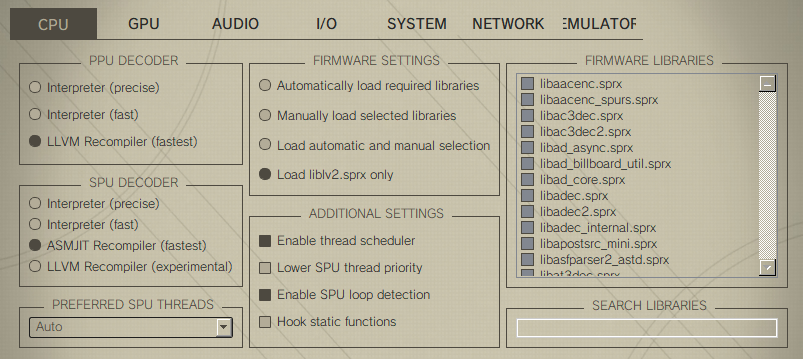
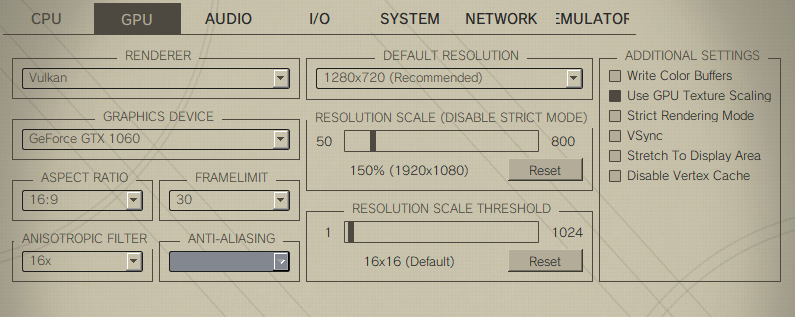
specs:
Intel i7-7700HQ 2.8GHz
16GB RAM
NVIDIA GeForce GTX 1060
Game settings:
 Noir5536
on 30 Jun 2018
Noir5536
on 30 Jun 2018
try without framelimit, I notice crash are more frequent when its active
 jobs-git
on 30 Jun 2018
jobs-git
on 30 Jun 2018
Makes no sense to use frame limit on games that already cap themselves
AniLeo
on 1 Jul 2018
Just an update. A few days ago we found the issue here, the driver was hanging when asked for query results with the WAIT flag set. Looks to be a driver thing since the validation layer did not complain and it is restricted to only one model of GPU. Issue was worked around by disabling occlusion tests in debug tab.
kd-11
on 2 Jul 2018
Yea as kd-11 said there is a temporary fix you can use and this is how
1 - Go to X:rpcs3-v0.0.5-xxxx-xxxxxxxxx_win64GuiConfigs"
2 - Open currentsettings.ini and find this line "showDebugTab=false"
3 - Change false to true.
4 - Open RPCS3 Options a new tab will appear called "Debug"
5 - Press on Debug you will find an option there called "Disable ZCull Occlusion Queries" check the box and you are done no more crashes or blackscreens with Vulkan that fixed my problem
Wheel-Of-Fate
on 3 Jul 2018
I just tried the method by Disabling "ZCull Occlusion Queries" on Dantes Inferno Game with latest RPCS3 Version. It still crashes with "Fatal Error" Message once you begin fighting the First Boss, but no longer Freezes
 Web1017
on 3 Jul 2018
Web1017
on 3 Jul 2018
@Web1017 if you think that the previous solution fixed your issue partly then you better open a new issue and upload log file
Wheel-Of-Fate
on 4 Jul 2018
Occlusion query bug seems limited to some GCN1 cards, not all of them.
As for the 18.6.1 driver crashing bug, AMD team has replied and promised a driver update to resolve the issue soon. You can see the discussion thread here https://community.amd.com/thread/229579
kd-11
on 5 Jul 2018
Tested in driver version 18.7.1, still happens. Seems a bit... better, though? It doesn't immediately freeze and crash, the error just pops up, stays there for a bit, and then it closes.
RPCS3.log
KMGuertena
on 22 Jul 2018
It's known, drivers are still bugged
AniLeo
on 22 Jul 2018
They said August, so maybe 18.8.1 or even later.
kd-11
on 23 Jul 2018
I wasn't able to trigger this crash with 18.8.1 and RX 480, so it seems to be fixed now. KD can give his seal of approval if he wants to but otherwise this issue can probably be closed.
MSuih
on 6 Aug 2018
Confirming both issues are resolved with driver version 18.8.1. Closing.
kd-11
on 7 Aug 2018
Disable ZCull Occlusion Queries Issue Fixed in https://github.com/RPCS3/rpcs3/pull/4973
Thank You So Much
Wheel-Of-Fate
on 18 Aug 2018
Related issues
 elad335
·
3Comments
elad335
·
3Comments
 XeClutch
·
3Comments
XeClutch
·
3Comments
 Luffykun007
·
3Comments
Luffykun007
·
3Comments
 JohnGodgames
·
3Comments
JohnGodgames
·
3Comments
 LokiGrants
·
3Comments
LokiGrants
·
3Comments
Most helpful comment
Reported here https://community.amd.com/message/2866456
It is not something fixable on our end without AMD intervening. Therefore use driver 18.5.1 until we get feedback on what about the spirv is making their driver unhappy.