v0.0.8-9494-c4a01875
I'll be leaving here all the problems I have encountered in the Yakuza Games.
The system used for the following will be:
i7-8700k + RTX 3080 + 48 GB RAM
Yakuza 3, 4, 5, Dead Souls, Ishin, 0 and Kiwami
- #### Random Freezing/Crash ####
These games tend to crash without any log output.
On my system enabling accurate getllar seems to fix this issue except for Yakuza 3 and 4.
For Yakuza 3 and 4, I kept Accurate Getllar and only allowed RPCS3 to use 6 of my cores, leaving the hyperthreaded ones unutilized.
Whenever Accurate Getllar and/or changing Affinity helps, may vary with the CPU, I don't have enough stats to tell much about this. Its required people to do extensive runs of the game(s) (up to 3hrs)
Uploading logs is very useless, sorry.
Yakuza 5, Ishin, 0 and Kiwami
- #### Incorrect Shadows ####
v0.0.8-9518-0bba04ef
The shadows in these games are incorrectly rendered, its a bit hard to see when at 100% but it becomes very obvious when upscaling the game. You can see some sort of grid-looking, the images speak for themselves.
Image Examples
Yakuza 5 at 100%
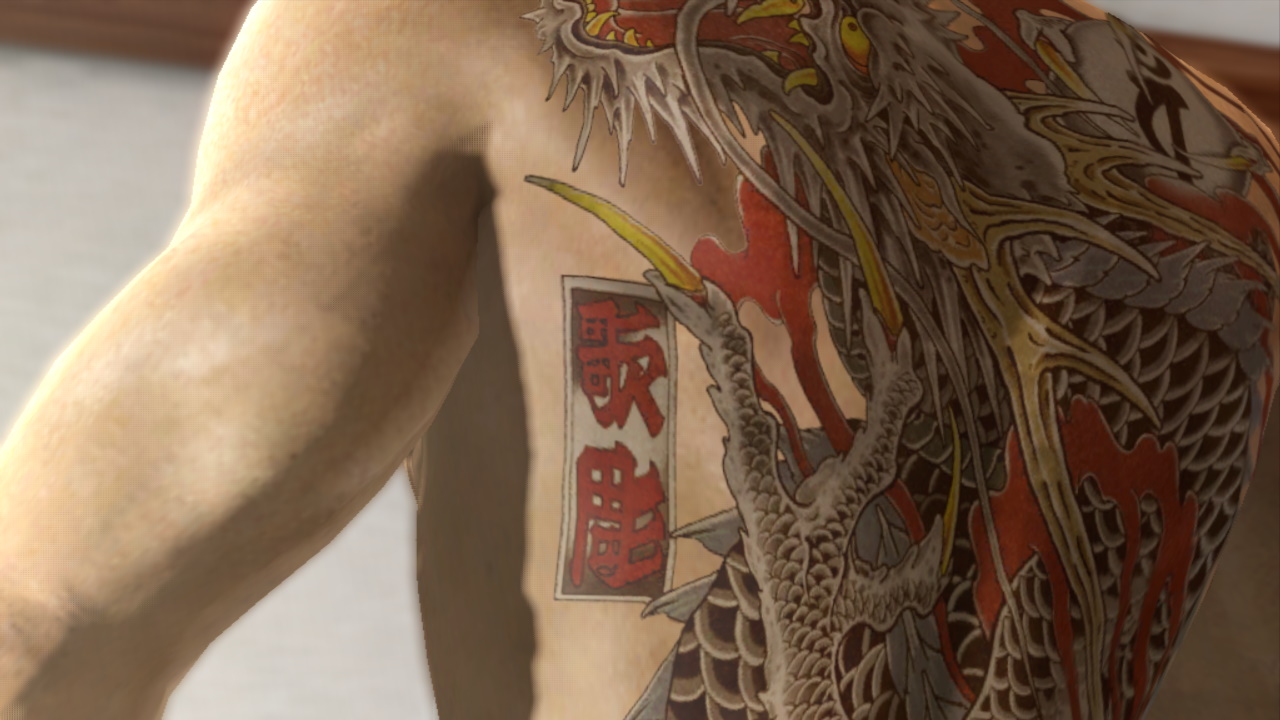
Yakuza 5 at 300%

Yakuza 5 at 600%
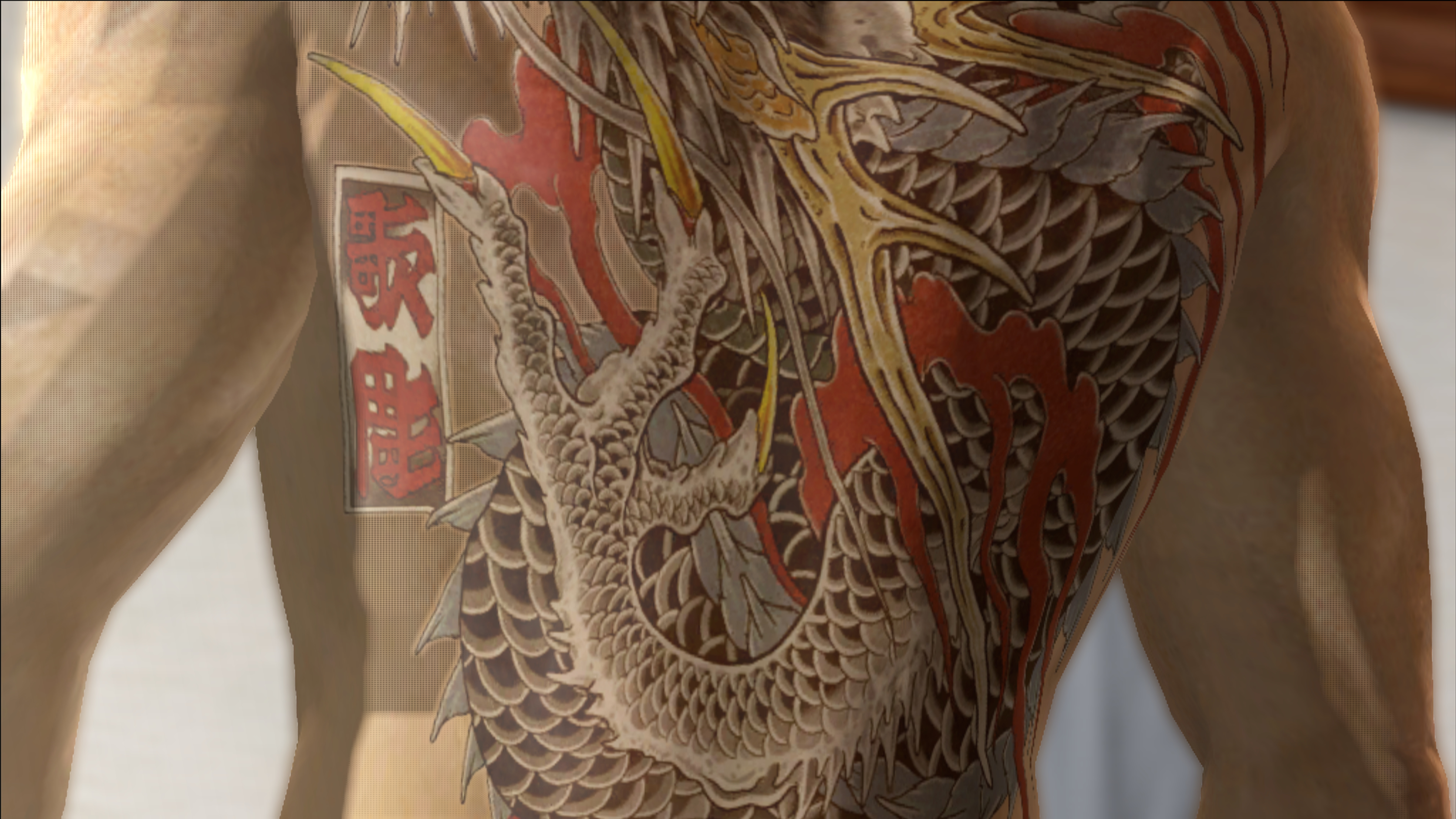
Useless Log:
RSX Capture: https://drive.google.com/open?id=1ZLcC8SNG6CQA5CnskyWnQRdTthHK7e18
Renderdocc Capture: https://drive.google.com/open?id=1iUmp0qIfIrwpSJzFXBcIRaxada7RfO8V
Yakuza Ishin
- #### Sun / Lens Flare goes through objects ####
The sun shines through objects, its a bit distracting (not game breaking).
Happens on both renderers
Image Example

Log: RPCS3 Sun.log.gz
RSX Capture Vulkan: https://drive.google.com/file/d/1upqtWTIfqpnnw2_0wb6rUlEg9aqcnr-_/view?usp=sharing
(lil' outdated) Renderdoc Vulkan: https://drive.google.com/open?id=11RedRM2gDzkwFsgUQtdl7mdWIojsTBXq
- #### Room with wrong colors ####
The room is lit like we are in a cartoon world (not game breaking).
Happens on both renderers
Image Example
Legacy, Async Only, Async w/ Shader Interpreter

Interpreter Only

Log: YakuzaIshinSunFlareAndWrongColors.log.gz
RSX Capture Vulkan: https://drive.google.com/open?id=1n17YB4Tc9MSsYu1zW6pDeF5WXmnb_mU1
Renderdoc Vulkan: https://drive.google.com/open?id=1cmHkv1RDhBdO1ts6uLP7oyKDjoOizQ-M
Yakuza 0 and Kiwami
- #### Broke Exposure effect ####
It just so happens the "exposure effect" is either always at maximum or minimum, the gif should clear the explanation.
Its almost as if RPCS3 only knows "0 and 1"
Happens on both renderers
Image (GIFs) Example
RPCS3

How its supposed to be

Log: Yakuza0Exposure.gz
RSX Captures (looking up and down) Vulkan: https://drive.google.com/file/d/1NIyDgra3VHOe5hLe4NNyFOOCF0v5IKDE/view?usp=sharing
Renderdoc Vulkan: Will add when requested
Yakuza 5
- #### Incorrect Snow Visuals on Characters ####
v0.0.9-9812-8d847d6f
Like written in the title, the snow on the characters is incorrectly displayed
Happens on both renderers
Image Example
RPCS3

Real HW

Log: Yakuza5Snow.log.gz
RSX Capture Vulkan: https://drive.google.com/open?id=1qV8mdoW015PSQg7URD73qGnb20T3VUuY
Renderdoc Vulkan: https://drive.google.com/open?id=1cZMaD3iSW1xOL71eA5RplXRLnzccDya6
- ### Yakuza 1 & 2 HD Edition Fixed Issue ###
Click to Expand
Blurry Visuals (OpenGL)
On Vulkan this issue no longer exists but on OpenGL it still persists.
None of the options help solve the issue.
Image Examples
Vulkan

OpenGL

Useless Logs:
Yakuza1&2OpenGL.log.gz
Yakuza1&2Vulkan.log.gz
RSX Captures
OpenGL - https://drive.google.com/open?id=1RtkmhNh5GQJdgTtgIFsdSi4C1IRUM2Jw
Vulkan - https://drive.google.com/open?id=1450TqChPdzZDGOHAyr1iAoMAe8ZqbRd9
Renderdocc
OpenGL - https://drive.google.com/open?id=1FLHdNNQ3Qkyi-pyA3xjThL5QcZNomXqH
Vulkan - https://drive.google.com/open?id=1dwQ8f5Q4lyEw9R0htEZuo3VxKmxCmrsd
- ### Yakuza Kenzan, 3 and 4 Fixed Issues: ###
Click to Expand
Exploding Vertices and Missing Visuals
Early in the game you'll find trees with broken LOD and exploding Vertices.
Images: https://imgur.com/a/kjPkCQ7
Log: [Yakuza 3 Exploding Vertices and Missing Rendering.log.gz] (https://github.com/RPCS3/rpcs3/files/1952240/Yakuza.3.Exploding.Vertices.and.Missing.Rendering.log.gz)
Pre-rendered cutscenes have stutters (All Yakuza games)
The cutscenes are pretty stuttery even if you have constant 30 FPS.
Log: Yakuza 3 Pre Rendered Cutscenes.log.gz
- ### Yakuza Kenzan! fixed issues: ###
Click to Expand
Incorrect Shadows
Certain areas of the game the shadows are incorrectly (not game breaking).
Funny how one side is wrong but the other side is rendered correctly.
Image Examples
On one side its good

On the other side tho...

Useless Log:
RSX Capture: https://drive.google.com/open?id=1YzvH_HC2DVUL9ZHm9a4YQd0tBokSnd9I
Renderdocc Capture: https://drive.google.com/open?id=1jRJsITrn06fzz3lreYEdtC85SolnhARg
- ### Yakuza 4 Fixed Issues ###
Click to Expand
Missing light
v0.0.9-9815-f1f5c913
While doing comparisons, I found out in this cutscene (very likely to be in others) to be missing a light, in this scenario blue. Use the images for better understanding
Happens on both renderers
Using Interpreter Only fixes the issue but the performance takes a massive hit, not recommended.
Image Example
RPCS3 (Legacy, Async Only, Async w/ Shader Interpreter)

Real HW

Interpreter Only

Log: Yakuza4MissingLight.log.gz
RSX Capture Vulkan: https://drive.google.com/open?id=1OE8SM5mC-6ZAE5v_6NK5AZNJLtc-1s4l
Renderdoc Vulkan: https://drive.google.com/open?id=1xZn1rrU1P5EAfQbOpCvZdLLqPrkOy7_8
- ### Yakuza Dead Souls, 5, Ishin, 0 and Kiwami Fixed Issues: ###
Click to Expand
Crashes after some time (Driver Crash) (Yakuza 0)
This one is certain, as soon as I go ingame and play for a little while the game will crash, and if I try to shut it down it freezes RPCS3, leaving me the only option to terminate RPCS3 through the task manager.
Error: _F {rsx::thread} class std::runtime_error thrown: Assertion Failed! Vulkan API call failed with unrecoverable error: Device lost (Driver crashed with unspecified error or stopped responding and recovered) (VK_ERROR_DEVICE_LOST)
(in file c:\projects\rpcs3\rpcs3\emu\rsx\vk\VKHelpers.h:937)_
Image: https://i.imgur.com/kMxjKcX.png
Log: Yakuza 0 Crash.zip
Possibly fixed! Doesn't seem to occur anymore in the recent builds.
Gameplay Video: https://youtu.be/U4ahYjgDCHA
All characters go black (Also at: #4141 ) (5, Dead Souls, Ishin, 0 and Kiwami)
This one is pretty bizarre, whenever I launch the game sometimes all the characters go black and sometimes they look completely normal.
Upscaling the game and tweaking the AF seem to make this occur almost 100% of the time.
Images: https://imgur.com/a/By0aOrc
Log Normal: Yakuza 0 Color Normal.log.gz
Log Black: Yakuza 0 Color Black.log.gz
The blood in combat has a T-Pose Model (Ishin, 0 and Kiwami)
This one is self-explanatory with the pictures
Images: https://imgur.com/a/v3AkwyH
Log: Yakuza 0 Blood T-Pose.log.gz
- ## Low Core Count Issues: ##
For the following issues, I can't confirm if they happen or not since I no longer own a slow low core count CPU (i5-7300HQ). These issues may not be necessary for this issue.
Click to Expand
- #### Pre-rendered cutscenes have stutters (All Yakuza games) ####
The cutscenes are pretty stuttery even if you have constant 30 FPS.
Log: Yakuza 0 Pre-Rendered Cutscenes and LogSpam.log.gz
- ### 1 FPS Lock (Temporary fix) ###
The default settings in RPCS3 lock the game to 1FPS, there is a temporary solution that fixes it.
Go to game's config.yml and change Driver Recovery Timeout to a lower ammount.
The lower the value, the higher the framerate, setting around between 1 to 10000 is good
Log Value 1: Yakuza 0 No 1 FPS Lock.log.gz
Log Value Default: Yakuza 0 1 FPS Lock.log.gz
- ### Log spam: ###
_E {rsx::thread} RSX: nv406e::semaphore_acquire has timed out. semaphore_address=0x40300FE0_
This simply shows up whenever something is being displayed on the screen, the more frames, the more spam!
Use the log from Pre-rendered cutscenes have stutters. (You'll find this in every log)
Image: https://i.imgur.com/JY26hEH.jpg
I look forward in providing info, logs, renderdocs or anything, whenever necessary.
Discord: MsLow#2316
 MsDarkLow
All 21 comments
I figure if we're compiling all the bugs and crashes we've seen I should add what I know
Desktop: i7 7700k + GTX 980 Ti + 16GB RAM
Yakuza 4 [NPEB02036] is more or less the same as 3. The cutscenes stutter, the vertices explode and the game freezes.
- Screenshot of exploded vertices: https://i.imgur.com/Cx70gQT.jpg
- Video showing crash, note that there is no error message of any kind: https://www.youtube.com/watch?v=PEGdqJCLYdo&feature=youtu.be (let's hope sega don't copyright this like they did with my dead souls video)
- I've got my log file here: RPCS3.log.gz
Speaking of Dead Souls [BLUS30826}, it's suffering the same errors as all the yakuza games from 5 to kiwami.
- The game runs at 1 FPS and generates a semaphore timeout error at a rate of about 1 per second.
Changing the driver recovery timeout in the config.yml to a value of 10 alleviates the 1 FPS problem, but obviously that's a temporary solution.
Dead Souls 1 FPS: RPCS3.log.gz
Dead Souls config edit: RPCS3.log.gz - Dead Souls also suffers the black model issue that 5-kiwami have, but it manifests in a slightly different way. While the other games have entirely black models, Dead Souls only randomly affects the models.
Screenshot here: https://i.imgur.com/kKRTOqr.jpg
Log here: RPCS3.log.gz
- Dead Souls can outright entirely crash in the pre-rendered cutscenes. There's no error message, but it's crashed at the exact same moment on multiple tests.
Log: RPCS3.log.gz
- Dead Souls can outright entirely crash in the pre-rendered cutscenes. There's no error message, but it's crashed at the exact same moment on multiple tests.
Every error that is applicable to Ryu Ga Gotoku 0 can be applied to 5/Ishin/Kiwami so I won't go through those
Ryu Ga Gotoku Kenzan! [BLJM60064] still won't even reach a loading screen on the master build, but by removing the pxd_shader_ps3.ppu.sprx file from the game's module folder, the game can reach up to the end of the first few pre-rendered cutscenes.
Log without removing the sprx file: RPCS3.log.gz
Log with the sprx file removed: RPCS3.log.gz
There might be more to add to this, but I'm not going to be able to do any more for a couple days.
 Neucomac3
on 28 Apr 2018
Neucomac3
on 28 Apr 2018
Retest and update. A lot has changed since april.
 kd-11
on 7 Jul 2018
kd-11
on 7 Jul 2018
A lot sure has changed since April.
Instead of testing on my laptop, I switched to my upgraded Desktop, this made testing a lot faster.
i7-8700K @ 4.5GHz | GTX 1070 | 16GB RAM
Note: I kept the Driver Recovery Timeout at default (3300)
Build: rpcs3-v0.0.5-7077-f0a9799b_win64
PPU LLVM | SPU ASMJIT | SPU Thread: 6
Found a few different results. I have to say that SPU Threads are slightly important on this.
Tested both SPU Thread 2 and 6 in a particular situation.
6 or Auto offers the best performance for this CPU. 1 Offers the best for 4 core CPUs.
Yakuza 0 (Ryu Ga Gotoku 0) [BLJM61249]
Pre-rendered cutscenes have stutters
Completely Flawless on this system. Needs testing on slower systems tho.
Example: https://youtu.be/HCEiRJWgn94All characters go black
Click to Expand (Issue solved!)
Something changed here, its no longer random.
When there are no shaders created, the game will have all the models correctly rendered but once the game is restarted all the models will be rendered black.
Note: When certain cutscenes are played, the models are rendered properly.
Example of me Starting with no shaders, restarting and delete&restart: https://youtu.be/Vlorxn9lDrQ
Also noticed the FPS are much lower when compared to playing with black models.
Example of FPS difference: https://youtu.be/HuO8VqFfzlw
Apparently something else is triggering the fps difference, I have no clue what it is.
Its possible to be related w/ the log spam
Log Blacc: 0 Extended Gameplay Blacc.log.gz
Log White: 0 Extended Gameplay White.log.gz
(These should contain all moments)
- #### The blood in combat has a T-Pose Model ####
Click to Expand (Issue solved!)
Remains the same
Video examples
Fighting Blacc: https://youtu.be/7jdNhdUi6M8
Fighting White: https://youtu.be/hIyDWsb6-d0
Log Fighting Blacc: 0 Fighting Blacc.log.gz
Log Fighting White: 0 Fighting White.log.gz
- ### Log spam: ###
_E {rsx::thread} RSX: nv406e::semaphore_acquire has timed out. semaphore_address=0x40300FE0_
_(Use the Extended gameplay logs!)_
__Images__
Blacc models have no log spam: https://i.imgur.com/mA3njBS.png
Normal models have log spam: https://i.imgur.com/eaZSlG7.png
Freezes randomly, no output from the log (All Yakuza games)
It simply crashes whenever it wants.
Log: 0 froze with no log output.log.gzFlickering w/ bad SPU Theads
When using the wrong SPU Thread like 1 or 2 on this system, the cutscenes will have flickering and explosive vertices.
Video Example: https://youtu.be/GOEGy15MAdI
Log SPU Thread 2: 0 Karaoke SPU Thread 2.log.gz
Log SPU Thread 6: 0 Karaoke SPU Thread 6.log.gz
Yakuza 3 [BLES00834]
Click to Expand (Issue solved!)
- ### Exploding Vertices and Missing Visuals ###
Still broken.
Images: https://imgur.com/a/Rbn7fGW
Log: 3 Missing Visuals and broken.log.gz
(Freezing/Softlock randomly still happens, just scroll up to the original post)
MsDarkLow
on 7 Jul 2018
I found something to add to Yakuza 3 [BLUS30494]
I haven't checked the rest of the games yet, but Yakuza 3 is spamming a message saying SPU: GETLLAR took too long. It's constantly spamming these messages similar to the semaphore error. On top of that, it's still crashing randomly with no error message in the output log.
Here's the log file for one of these random crashes.
RPCS3.log.gz
Neucomac3
on 20 Aug 2018
Yakuza 3 is also still randomly freezing.
 Timo654
on 24 Aug 2018
Timo654
on 24 Aug 2018
Update: Black Models fixed at #5144
Should take effect on the following games: Yakuza Dead Souls, Yakuza Ishin!, Yakuza 0, Yakuza Kiwami, Yakuza 5
MsDarkLow
on 22 Sep 2018
Update: Black Models fixed at #5144
Should take effect on the following games: Yakuza Dead Souls, Yakuza Ishin!, Yakuza 0, Yakuza Kiwami, Yakuza 5
Another small bonus update, on the same games. "The blood in combat has a T-Pose Model" seems to no longer show up either.
MsDarkLow
on 23 Sep 2018
Update: Exploding Vertices fixed at #5229
Should take effect on every Yakuza Game (not counting 1&2HD).
Remaining major problems:
♦ Common crashes with no log output;
♦ Slow Performance (Micro-stuttering? 1% and 0.1% being at half the fps).
MsDarkLow
on 8 Oct 2018
Some news related to the crashes.
A month or less ago, I figured out there was a log spam (seen in Trace mode), this was most likely the cause of the random crashes, I tried to disable every bit of log spam along with using Accurate GETLLAR (I haven't tested without it).
I only tested this on Yakuza Kiwami, Ishin, Dead Souls and 5 on an i7-8700k but hopefully it should apply to every single Yakuza game. (Maybe that explains why Kenzan! never crashed!)
I have set this in the bottom of the config.yml:
Log: {sys_semaphore: Fatal, sys_fs: Fatal, sys_vm: Fatal, sys_memory: Fatal, RSX: Fatal, sys_lwmutex: Fatal, sys_spu: Fatal, sys_event: Fatal, sys_rsx: Fatal}
This is not written in the issue but there was an issue with Yakuza Ishin where it would crash if the user didn't have option Disable ZCull Occlusion Queries, enabled. This was fixed in #5697
MsDarkLow
on 8 Mar 2019
Small update. Most of the issues still remain up to today.
Merged fixed stuff into a small section (Fixed Issues).
The (Y3) Pre-rendered Cutscene stuttering has been moved to Fixed Issues for performing so much better! Although Yakuza 0 is still very stuttery and is most likely due to the CPU (i5-7300HQ) being quite weak, it rarely happens with an i7-8700k.
Added a quick manual temporary fix for the random crashes (all yakuza games).
1 FPS Lock issue seems to be happening less often? Need further testings. May be due to my temporary fix shenanigans.
Other 1: Yakuza Dead Souls, 5, Ishin, 0 and Kiwami have horrible upscaling, this can be somewhat fixed using CPU Blit in the debug tab / game's config.yml. Ishin, 0 and Kiwami will contain visual glitches.
Other 2: So far all these games seem to be completable if we fix the crashes. I have completed Yakuza Kenzan, Ishin, Dead Souls and 3 w/ i7-8700k. Performance strays far from getting them to the playable section tho, being mostly RSX bottlenecked. (Except Kenzan ofc)
MsDarkLow
on 11 Jun 2019
Updated the whole issue. This time only featuring the possible issues found with a 8700k paired with a GTX 1070.
Made it more clean and added more issues not mentioned before.
Also some errors were only on my 7300HQ and I no longer have it so, I'll find those issues irrelevant also because the CPU does not meet the Recommended Requirements anyways.
MsDarkLow
on 3 Feb 2020
Added another issue, incorrect shadows on Yakuza 5, 0 Ishin and Kiwami. Used 5 as an example.
This issue is mainly noticed when doing upscaling but it exists at 100% if you zoom in closely. The shadows kinda look like in a grid or something, the image examples speak for themselves.
MsDarkLow
on 6 Feb 2020
Added another issue, incorrect snow visuals on yakuza 5 characters during a specific scene (and also happens ingame).
MsDarkLow
on 3 Mar 2020
Added another issue, missing light on yakuza 4 spotted on a cutscene, when comparing it to the PS3 and PS4 versions, it has a blue tone to it, where RPCS3 doesn't.
MsDarkLow
on 4 Mar 2020
8106 Adds Shader Interpreter Only, and this option seems to solve the Yakuza 4 Light issue, or at least makes it much closer to real hardware.
Added the Interpreter Only picture example. (In this comment, two of them)
Image Examples
Legacy, Async Only, Async w/ Shader Interpreter


Interpreter Only


Also Yakuza Ishin Room with wrong colors
Image Examples
Legacy, Async Only, Async w/ Shader Interpreter

Interpreter Only

MsDarkLow
on 1 May 2020
I've played through 3, 4, and 5 with minimal issues. I had to set Accurate GETLLAR in the debug tab, I followed the advice on the wiki pages with rec'd settings and turning off log spam. I also noticed that, at least for me, turning on Multithreaded RSX in the options seemed to stop all crashes (along with Accurate GETLLAR). Y3 was definitely the sketchiest game, If i played for more than 3 hours or so straight it would sometimes freeze and I'd have to exit out. 4 and 5 had no problems. for Y3 I had set it to 3x res, 2x for the other 2 games as the framerates would dip under 30 occassionally. Y4 ran almost entirely stable at 30fps, 3 same, 5 was the outlier, it had relatively low dips in Shinada's town which could get down to 23-25 fps and drop a few frames here and there in Kamurocho. Nothing too bad but Shinada's town was the worst by far. I would put it down to all kinds of crazy shit going on in the background/distance in the town.
edit: i should add that the incorrect snow overlays on the characters was the only real graphical bug that I ran into. Obviously whenever you start a game you mihgt have some black textures until it compiles w/e but only the snow textures were a problem and it was only a few scenes.
my specs:
i9-9900k
1070ti
32gb ram
13mb sexy women folder
I hope this helps.
 Marthgun
on 5 May 2020
Marthgun
on 5 May 2020
Yakuza 4 color fixed by KD in #8243
MsDarkLow
on 17 May 2020
Little update on "Sun / Lens Flare goes through objects". This issue is only present in Yakuza Ishin not in 0 and Kiwami. Upon further inspection they seem totally different issues. They have been seperated respectively.
MsDarkLow
on 28 May 2020
Yakuza Kenzan shadows fixed in #8367
MsDarkLow
on 7 Jun 2020
Just to keep the issue status updated, all currently mentioned bugs still exist.
Yakuza 1&2HD on Vulkan regressed on the cutscenes some long time ago (months), it's just as blurry as OpenGL, I forgot to mention it on the page because I was simply lazy, I'll find the regression pr and update the page at a later date.
I've also changed my 1070 to a 3080, no new bugs were introduced.
MsDarkLow
on 2 Nov 2020
Yakuza 1&2HD no longer has Blurry Scenes, both on OpenGL and Vulkan!
Fixed by KD in #9354
MsDarkLow
on 30 Nov 2020
Related issues
 On1ko
·
3Comments
On1ko
·
3Comments
 Luffykun007
·
3Comments
Luffykun007
·
3Comments
 Nezarn
·
3Comments
Nezarn
·
3Comments
 AniLeo
·
3Comments
AniLeo
·
3Comments
 uaqlover
·
3Comments
uaqlover
·
3Comments
Most helpful comment
I figure if we're compiling all the bugs and crashes we've seen I should add what I know
Desktop: i7 7700k + GTX 980 Ti + 16GB RAM
Yakuza 4 [NPEB02036] is more or less the same as 3. The cutscenes stutter, the vertices explode and the game freezes.
Speaking of Dead Souls [BLUS30826}, it's suffering the same errors as all the yakuza games from 5 to kiwami.
Changing the driver recovery timeout in the config.yml to a value of 10 alleviates the 1 FPS problem, but obviously that's a temporary solution.
Dead Souls 1 FPS: RPCS3.log.gz
Dead Souls config edit: RPCS3.log.gz
Screenshot here: https://i.imgur.com/kKRTOqr.jpg
Log here: RPCS3.log.gz
Log: RPCS3.log.gz
Every error that is applicable to Ryu Ga Gotoku 0 can be applied to 5/Ishin/Kiwami so I won't go through those
Ryu Ga Gotoku Kenzan! [BLJM60064] still won't even reach a loading screen on the master build, but by removing the pxd_shader_ps3.ppu.sprx file from the game's module folder, the game can reach up to the end of the first few pre-rendered cutscenes.
Log without removing the sprx file: RPCS3.log.gz
Log with the sprx file removed: RPCS3.log.gz
There might be more to add to this, but I'm not going to be able to do any more for a couple days.