Rpcs3: Persona 5: Random font/texture swapping
Hello RPCS3 Team!
First off, let me just say a million thanks to the dev team. I wouldn't have been able to play this if it weren't for you guys.
I'd like to report an issue regarding Persona 5. This usually happens after playing the game for a period of time. It's the worst when my status bar isn't displayed correctly. I'm not sure if this is a normal thing but it never did this before.
Here are my specs:
CPU: i5-7600K
GPU: GTX 1060 6GB
OS: Windows 10
RPCS3: 0.0.4-6439-ee88e7f94
Sorry, totally new to this. I'm attaching censored screenshots of the issue and as well as the log file. I censored some details to mostly keep it spoiler-free:


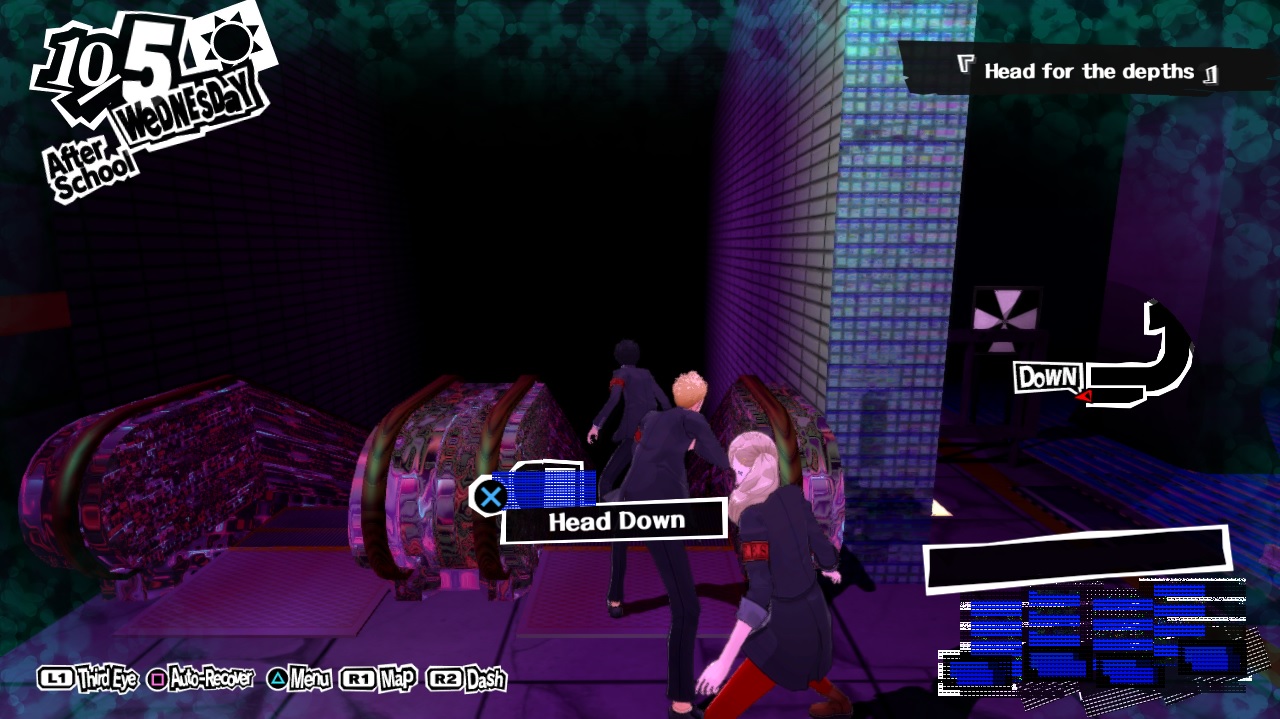
Log link: http://www.mediafire.com/file/23u46l5p1qewoxa/RPCS3.log.gz
 UnaKaya
All 99 comments
It's a pain to find out which version broke the game that much since the bug happen randomly and I haven't found a way to reproduce it yet, unless playing for extended periods of time. There is an old build i was using where i'm 100% sure the bug doesn't happen which is the 0.0.4-6307-5959411ae if someone feels like bisecting which build introduced the regression.
 Drayano
on 17 Mar 2018
Drayano
on 17 Mar 2018
I found that exploring the Metaverse triggers the graphic glitches much faster than when going through Palaces.
UnaKaya
on 17 Mar 2018
BTW, this was the build I used initially.
UnaKaya
on 17 Mar 2018
Finally, I noticed that the glitches occur (or WILL occur) after a “semaphore_timeout” error appears during the log.
UnaKaya
on 17 Mar 2018
That makes this not an error then. That means another thread (usually spu/mfc) has stalled and we have to make rsx "unstuck". Of course the once that happens its in an undefined state. The current stall detection timeout is 1 second (1000000 microseconds) after which the renderer will be forced to attempt to rescue the emulator state. You can make it infinite if you like in the config file under rsx hang detection timeout variable. Of course this means the whole emulator will hang instead of just aborting the lock wait.
 kd-11
on 17 Mar 2018
kd-11
on 17 Mar 2018
What do you advise kd-11?
UnaKaya
on 17 Mar 2018
I’m not so sure about the “semaphore_timeout” thing since it might just be a coincidence. What i’m sure of is that this happened when I downloaded later builds.
UnaKaya
on 17 Mar 2018
Its very unlikely to be just a coincidence - its is a fairly serious issue whenever a cell core stalls and takes down the graphics chip. Try setting a much higher timeout (in older builds the waiting was infinite) like 30 seconds (30000000) in the yml configuration. Generally once you see an error like that, or the other fatal errors about a spurs kernel crashing, expect very bad things to start happening. I'd say, find the next save spot and restart the emulator. There are a few games with very broken emulation where the renderer ignoring the stalling in cell is not a big deal but those are few and its just a lucky coincidence.
kd-11
on 17 Mar 2018
Alright, thanks for the support kd-11. I’m glad I reported this, hope it gets fixed!
Thanks a million!
UnaKaya
on 18 Mar 2018
I see this exact same issue. Upping the timeout to 30 seconds simply causes 30-second-long freezes every 5-10 minutes, and still gives us corrupted textures (although fewer). I tried disabling all SPU tweaks to see if any could have been the cause of the stall but nothing helped.
Reverting to rpcs3-v0.0.4-2018-02-12-95c6ac69 fixes the issue completely even with the default timeout and SPU tweaks enabled. This build does not have an unlimited timeout so that's not the reason. I've been using that older build to play through the game, but sadly it has lower performance than the more recent builds.
As such, I'm not sure whether this should be closed? This looks to me like a RPCS3 regression causing one of the threads to stall, and not a bug in the game.
 ruipin
on 2 May 2018
ruipin
on 2 May 2018
@kd-11
That makes this not an error then.
I don't understand how you come to this conclusion - it is something that does not happen when running the game on an original PS3, and does not happen on 2-months-old builds. Could you explain in more detail why this is not a bug in RPCS3?
Do not take this wrong, I'm actually curious why you think this is not a RPCS3 bug. Is there any documentation on this part of the PS3 architecture?
I actually do CPU design/architecture as a profession, but even though I've considered it in the past, I have never delved into an emulator before so was wondering how to best approach debugging something like this (assuming it is a RPCS3 bug). The performance difference between the February build and the most recent build on my machine while playing P5 is significant, so I was definitely considering taking a look... (the most recent build achieves stable 30FPS basically everywhere, while the February build gets drops/stutter to the 15FPS range quite often).
ruipin
on 2 May 2018
it is something that does not happen when running the game on an original PS3
IIRC this graphical glitch can actually occur on real PS3 as well, it's incredibly rare though because real hardware doesn't stall like RPCS3 does. It is not a bug with emulator but rather an unusual situation that occurs more frequently on rpcs3 and which the developers haven't prepared the game for.
The actual bug behind it is the other threads stalling and taking down rsx with it, and as KD said it affects many other games and not just Persona 5. The grapical glitches caused by it is a bug in the game code.
 MSuih
on 2 May 2018
MSuih
on 2 May 2018
@MSuih
Thanks for the reply. I can understand that this issue (stalling bringing down rsx) could happen in the real console, but something must have changed to cause it to occur once every 5-10 minutes compared to a 2-months-old build where I haven't had it occur once in 8 hours of gameplay... (I've been playing with a 30-second timeout and it's not triggered even once) As you say, even assuming different stalling behavior, I would expect it to be a rare event, not something that occurs this often.
In other words the RPCS3 bug/regression I'm talking about is that the stall occurs this often, the textures becoming corrupted is only a side-effect.
PS: Is there any documentation around this part of the PS3 architecture? As a CPU designer I'm curious and would like to read more into this.
ruipin
on 2 May 2018
Just for further information, considering that rpcs3-v0.0.4-2018-02-12-95c6ac69 (according to my testing) does not have the stall issues every 5-10 minutes when running P5 (it didn't occur once in +/- 8h of gameplay), but 0.0.4-6439-ee88e7f94 does (according to the first post in this thread), we can easily conclude that whatever is causing stalls to occur often was caused by the merged pull request https://github.com/RPCS3/rpcs3/pull/4162.
That pull request touched among other things the RSX. You can see the diff here
I might try to roll back some of that pull request's changes and see if I figure out the exact commit/changes that caused the change in behaviour, just need to get RPCS3 to build on my system...
ruipin
on 2 May 2018
I managed to build RPCS3 in my system, and started bisecting the pull request to try and find the exact commit that caused this issue.
First, I checked out ee88e7f94 and tested how reliably I could reproduce this bug:
Turns out that entering rooms in the first palace triggers this issue very often. Every time I tried, entering and leaving a single room reproduced this issue very quickly, never took longer than 1 minute.
With this easy way to reproduce the issue, I tried the following commits:
- 3406cc9 - Could reproduce in under 60s
- b67f28e - Could reproduce in under 60s
- 02e571a - Could not reproduce even after 10 minutes of constantly entering rooms
- 89c548b - Could reproduce in under 60s
As such, I can conclude that 89c548b is at fault. I believe this issue should be re-opened and we should investigate what caused this change in behaviour.
EDIT: I've spent a few hours trying unsuccessfully to figure out what in 89c548b caused the change in behavior, randomly reverting changes. However, I can always reproduce the issue no matter what I do. Only fully reverting back to 02e571a resolves the issue. I can reproduce this both on Vulkan and OpenGL too, so it looks likely to be one of the changes in texture_cache.h, but nothing stands out... Though it is definitely suspicious that a commit that touched the texture cache causes an issue that includes texture corruption. Could it be that something is getting stuck while handling the texture cache, and that's why when RPCS3 restarts the RSX thread there are corrupted textures?
I did go back to 02e571a to double-check that the issue does not occur when using it. To this end I wrote a quick script that simply moves back the thumbstick and spams X (meaning it will enter a room and exit it repeatedly). I then left it running for about 1 hour while I cooked dinner and RPCS3 never triggered the semaphore timeout, so I am sure that 89c548b caused the issue, I just don't understand why.
ruipin
on 2 May 2018
My autohotkey script has been entering and leaving rooms for the last two hours without experiencing a single deadlock. The longest I've had to wait to get a deadlock on 89c548b before was about 10 minutes. As such, I'm confident to say that the diff below (applied to 89c548b) works around this issue when using OpenGL:
```diff --git a/rpcs3/Emu/RSX/GL/GLTextureCache.h b/rpcs3/Emu/RSX/GL/GLTextureCache.h
index e35dc30e0..8cc70a3f9 100644
--- a/rpcs3/Emu/RSX/GL/GLTextureCache.h
+++ b/rpcs3/Emu/RSX/GL/GLTextureCache.h
@@ -812,28 +812,9 @@ namespace gl
if (context != rsx::texture_upload_context::blit_engine_dst)
{
cached.protect(utils::protection::ro);
- }
- else
- {
- //TODO: More tests on byte order
- //ARGB8+native+unswizzled is confirmed with Dark Souls II character preview
- if (gcm_format == CELL_GCM_TEXTURE_A8R8G8B8)
- {
- bool bgra = (flags == rsx::texture_create_flags::native_component_order);
- cached.set_format(bgra? gl::texture::format::bgra : gl::texture::format::rgba, gl::texture::type::uint_8_8_8_8, false);
- }
- else
- {
- cached.set_format(gl::texture::format::rgb, gl::texture::type::ushort_5_6_5, true);
- }
- - cached.make_flushable();
- cached.set_dimensions(width, height, depth, (rsx_size / height));
- cached.protect(utils::protection::no);
- no_access_range = cached.get_min_max(no_access_range);
- update_cache_tag();
}
- update_cache_tag();
return &cached;
}
```
An equivalent (untested) workaround for Vulkan would be:
```diff --git a/rpcs3/Emu/RSX/VK/VKTextureCache.h b/rpcs3/Emu/RSX/VK/VKTextureCache.h
index 50a42e094..337be3400 100644
--- a/rpcs3/Emu/RSX/VK/VKTextureCache.h
+++ b/rpcs3/Emu/RSX/VK/VKTextureCache.h
@@ -748,17 +748,9 @@ namespace vk
if (context != rsx::texture_upload_context::blit_engine_dst)
{
region.protect(utils::protection::ro);
- read_only_range = region.get_min_max(read_only_range);
- }
- else
- {
- //TODO: Confirm byte swap patterns
- region.protect(utils::protection::no);
- region.set_unpack_swap_bytes(true);
- no_access_range = region.get_min_max(no_access_range);
- update_cache_tag();
}
- update_cache_tag();
return ®ion;
}
```
I'm not sure what the underlying issue is, the changes above I believe simply disable blit texture caching completely (something that was added by 89c548b). However, it is certain that the above works around the issue and stops Persona 5 from deadlocking the RSX every 5-10 minutes of gameplay.
I'll try porting this workaround to master and seeing if it also works there.
@kd-11 I am not familiar enough with the way RPCS3 does texture caching to understand what the cause could be. Hopefully since this was your commit you might have an idea.
@UnaKaya Could you re-open the issue?
ruipin
on 4 May 2018
@ruipgpinheiro Done and done. Appreciate what you guys are doing! I've been reading your comments through e-mail notifications and honestly forgot that I haven't reopened the issue.
Tagging @kd-11
UnaKaya
on 4 May 2018
Just as a further update, I ported this workaround to the latest master (i.e. removed the whole "else" statement like the above diffs) and can confirm that I am unable to reproduce the issue even after 20 minutes of opening doors (using OpenGL. at least).
Would be interesting to understand what the underlying issue might be, but sadly I'm too unfamiliar with the code to take a guess.
ruipin
on 4 May 2018
Thanks for finding the trigger @ruipgpinheiro
Unfortunately its not so simple as just disabling blit engine cache, and does affect the flow of cell memory read/write instructions indirectly. In fact for that blit engine resources exist but are not guarded so their contents are undefined. I'll look into it later, its kinda really hard to debug something that happens every 10 minutes or so since you never really know if its fixed...
kd-11
on 4 May 2018
@kd-11 No problem, thanks for your work!
I've been playing through Persona 5 so this issue was bothering me quite a bit. Downgrading to the old version fixed it, but I noticed that I lost some performance and there were missing effects so I wanted to figure out a workaround that gets me playing on master again. Obviously, it makes no sense to simply disable the blit engine cache for every single game, but for my purposes running a custom build with it disabled for playing Persona 5 is acceptable until the underlying issue is fixed.
As for reproducing the bug, it seems to be able to occur at any point, but loading screens will trigger it most often. The easiest way I've found is to use AutoHotKey to hold down "S" (mapped to thumbstick down) and spam "X" (mapped to the X button). Then just go to the first in-game palace, place your back against a door, and activate the script. The game will then constantly open the same door (entering and leaving the room, which triggers loading screens that take 2-3 seconds on my system) multiple times per minute. 90% of the time, the deadlock occurs in under a minute, although I've had at least one instance where it took around 10 minutes.
Stressing your computer with other stuff seems to trigger it more often as well - I would usually activate the script, wait a few minutes without anything occuring, and then when I open Youtube on another screen and start watching something suddenly I got the deadlock. I also have the impression that OpenGL makes this deadlock occur more often, but I am not completely sure - I might just be imagining things.
As for debugging this, I would be willing to look into it further, but I have no idea where to even start. The texture cache code is "strange" (and I have no graphics background, I'm a computer architecture guy). If you have any tips on how to approach this I can take a deeper look next week.
ruipin
on 4 May 2018
I have now had time to test the workaround more. I sadly could not get the Vulkan version of the "fix" to work, disabling the blit engine cache is not enough, apparently.
As for OpenGL, I think i have been able to narrow the workaround further. On the latest master, this diff seems to be enough to avoid the issue from occurring (1h of opening doors with no issues):
```diff --git a/rpcs3/Emu/RSX/GL/GLTextureCache.h b/rpcs3/Emu/RSX/GL/GLTextureCache.h
index 41a487188..70fd0da89 100644
--- a/rpcs3/Emu/RSX/GL/GLTextureCache.h
+++ b/rpcs3/Emu/RSX/GL/GLTextureCache.h
@@ -992,7 +992,7 @@ namespace gl
fmt::throw_exception("Unexpected gcm format 0x%X" HERE, gcm_format);
}
- cached.make_flushable();
- //cached.make_flushable();
cached.set_dimensions(width, height, depth, (rsx_size / height));
cached.protect(utils::protection::no);
no_access_range = cached.get_min_max(no_access_range);
```
Why this is, i'm not sure, but this diff makes me think it has to do with the texture flushing behavior. Could it be that flushing blit_dst textures is causing a deadlock in certain situations?
I'll see if i can figure out a way to stop the issue from occurring on Vulkan.
ruipin
on 4 May 2018
In order to confirm the above suspicion that blit_engine_dst texture flushing is related to this deadlock, I tried the following code using Vulkan:
```diff --git a/rpcs3/Emu/RSX/VK/VKTextureCache.h b/rpcs3/Emu/RSX/VK/VKTextureCache.h
index e01d3756a..28b98e9f6 100644
--- a/rpcs3/Emu/RSX/VK/VKTextureCache.h
+++ b/rpcs3/Emu/RSX/VK/VKTextureCache.h
@@ -132,7 +132,7 @@ namespace vk
bool is_flushable() const
{
//This section is active and can be flushed to cpu
- return (protection == utils::protection::no);
+ return (protection == utils::protection::no && context != rsx::texture_upload_context::blit_engine_dst);
}
bool is_flushed() const
```
I can confirm that with the above diff applied to the latest master, I have experienced no deadlocks on Vulkan in over 30 minutes of opening doors.
ruipin
on 4 May 2018
Well, that just disables flushing on blit engine derived sections.
The problem itself isn't graphical- its deeper than that. Protected memory sections are protected as their data exists on the host GPU and not the cpu where Cell is being emulated. When the game decides it want to read something that does not exist on the cpu, an access violation is raised - this is the tricky part. If the data does not exist, its forcefully copied back, a process that is fairly quick as there is a cheap prediction algorithm to anticipate this. However, it takes enough cycles to memcpy large memory areas (framebuffers and texture regions can easily consume upto 16M) to desynchronize threads. Due to lack of memory mirrors, there is also a brief moment where the memory is unprotected, but has invalid contents. i.e Picture 6 racing spu threads running some task in parallel modifying data existing on the GPU. One thread reaches the violation handler before the others and acquires the cache mutex. It unprotects the memory range to write the gpu-resident data on the cpu side. However, another thread reaches this section late due to host scheduling and finds the memory unprotected, so it proceeds to consume what is now undefined garbage since the first thread is still writing the data. Its an architectural flaw with no simple solution and it affects many other games in subtle ways that often seem to resolve themselves. An easy way to test this it to run something with interpreters only and then surround memory flush with a system pause/resume to block everything until the transfer is completed (terrible for performance and causes microstutter). Another title affected by obvious corruption is demons souls, but minimizing the undefined transfer window greatly reduced the number of occurrences.
kd-11
on 5 May 2018
I should also mention - blit engine is really just a DMA engine, it does not necessarily transfer images/textures. Its often used to move program code around as well which is why any data its holding needs to be synchronized tightly. The dma transfer has no context around it making it impossible to determine what is being transfered.
kd-11
on 5 May 2018
Thank you for the explanation. So if I understand you correctly, you're saying that the semaphore freezes are likely due to one of the threads consuming an area of memory that another thread is still writing, causing it to lock up? That could certainly explain why the freeze occurs only with the blit engine (e.g. if it starts executing incomplete code in a DMA region while another thread is busy writing it).
However, I'm not sure I understood the whole issue. The emulator seems to be aware of the on-going flush, so it could acquire a per-region mutex and prevent any further accesses to that region while the flush is incomplete, to explictly prevent accesses to the invalid contents. This obviously would sacrifice some performance due to acquiring extra locks, but at least a whole system pause wouldn't be needed and the corruption would be avoided. Since this seems like a simple solution, my assumption is that I misunderstood something.
Additonally, I'm not sure I understand then what happens when I disable flushing of blit engine sections, and how that stops the deadlock from occurring. Wouldn't it simply make the data impossible to read from the CPU? As such, wouldn't any attempt by the emulated CPUs to access a GPU memory region owned by the blit engine fail? Does the emulator simply duplicate those memory regions without synchronizing?
(For now, I'll be playing Persona with the above diff applied. It does not seem to harm the game at all, and prevents the deadlock + texture corruption issue from occurring.)
ruipin
on 5 May 2018
The access does fail! This is by design. Rpcs3 implements its own segfault handlers for this reason, access->segfault->flush and make pages available->proceed. There is no way to know what a 'region' consists of, pages can be shared between many things for example but the page will still be marked no-access if its data is not present. The memory protection is the region lock and it is not manageable with mutexes outside of guaranteed execution paths (the violation handler is mutex handled in the cache, but that means nothing if the thread does not hit the violation). We need memory mirrors, but for obvious security reasons no OS will let you do this easily.
As for p5, the fact that it is indeed reading memory that doesn't exist means there is something wrong with it disabled (it will read something as all 0) but its likely too subtle to notice. The same was true before some memory respecification code was made available - most users only noticed the difference when it was working properly. There is also the possibility that the fault is not caused by reading garbage but rather a partial page with shared blit resource memory and some other code getting corrupted by the flush. Hopefully its the second simpler case as the first one is really hard to fix properly without performance loss. I have also noticed the issue has seemingly gotten worse recently - no timeouts I think, just textures getting randomly garbled so it is something to look into soon.
kd-11
on 5 May 2018
My post did little to answer your questions so I should maybe clarify a bit:
- No, the emulator hangs because a cell thread does not follow the intended path and either another thread commands it to abort what its doing or it writes wrong data to the destination. Thats how nvidia GPUs are synchronized with 'semaphores'.
- As for how disabling blit engine flush fixes the problem - the access violation has no writes just unprotect and proceed. Its much much faster because of this so the thread will keep running. I can write a simple test case to prove what is the cause of the situation. Just add a busy loop or sleep when flushing a blit engine resource, after unprotect but before violation handler returns.
- As for synchronizing between gpu and cpu sections, thats what the access violation handler is for! Disabling flush disables this synchronization.
Since all we get rsx-side is the hardware view of the application, there isn't much you can control for. There is no context to any actions the game is doing, just random commands telling the hardware units to do stuff.
kd-11
on 5 May 2018
Ran a few tests and got interesting results.
- Disable the actual flushing (the memcpy, but keep the general flow the same which is still very fast) - all good
- Enable flushing but intentionally write trash - broken
- Repeat 2 but guard the flush code with a full emulated system pause then resume after memory has been flushed/synchronized - All good despite intentionally writing trash (intentional corruption)
- Use your workaround but make the unprotect for blit engine slow if violation is caused by a write - Always hangs on loading screen.
I also checked a few things and discovered the following:
- The game uses some allocation algo so memory isnt always used for the same thing every time
- The corruption indeed happens because of racing SPU threads reaching the violation handler at different times. Likely some decompression handled in parallel (its a spurs job thread). This game is known for using all available spurs jobs to concurrently operate on one task.
- Wrapping flush with a system pause/resume fixes the flaw but its not perfect (I'm using recompilers so they will run ahead and stop 'at a bad time' since a block is executed in its entirety before checking emu status. This shows that its indeed the writeback race condition that causes this.
Unfortunately, other than rewriting the whole virtual memory management, the only way around this is to just 'Force CPU blit emulation' (without WCB). This game does not need it - it blits over compressed textures and the result is rejected later anyway because no current graphics API allows typecasting arbitrary RGBA data into DXT/BC.
Each run was done 5 minutes at a time with load screen spamming and some code changes to increase frequency. When using OGL its easy to make the emu deadlock without actually spewing the semaphore timeout if you know where to poke.
kd-11
on 5 May 2018
Thank you very much for your time and explanation, it all makes much more sense now. I've actually had a few instances of full-on deadlocks when using OpenGL without the semaphore timing out, but I just assumed I had broken something while testing, I guess it wasn't a coincidence.
I'm not sure if there's anything else I can do at this point to help - I'm a computer architecture / hardware engineer guy, not a software engineer, so while I understand what the issue is, it's a bit out of my league to fix! Let me know if there's anything else I can do.
I guess I'll just force CPU blit (with WCB disabled) while playing this game. I'll have to test what kind of impact that has on performance - worst case, I'll just use my workaround above instead!
You mentioned before that other games have corruption because of similar reasons. Am I incorrect that these games also have no easy way to fix the issue without rewriting the whole virtual memory management system? Because from what you say, if the emulator wants full compatibility then that will be necessary at some point, right?
ruipin
on 5 May 2018
Yes, these other titles also are not fixable until we can map one physical page to more than one virtual address from user space. There are ways to make it work on windows but you're basically fighting the OS by doing so. Its not a simple task but something has to be done to ensure the operation is completely hidden from the application. Do note that using cpu blit without wcb will likely remove some stuff like the semitransparent backgrounds during pause menu and the transition between loading screens so you can use your patch in the meantime.
kd-11
on 5 May 2018
PS: You've probably already thought of this, so I'm probably wrong, but wouldn't it be possible to do "double-buffering" on the memory pages? For example, do not unprotect the old page, just allocate a new page, flush the data to it, and then remap the new page to the old page's virtual address. Once that is done, deallocate the old page. (or just allocate two pages from the start and simply switch which one is mapped where).
ruipin
on 5 May 2018
That has the same problem as the other solution - you cannot freely manipulate the paging tables from userspace. No OS will just give you that kind of access.
kd-11
on 5 May 2018
Hmm, off the top of my head, doesn't windows support multiple memory views of the same physical address by requesting a file mapping with an invalid handle? CreateFileMapping seems to explictly state this supported:
If hFile is INVALID_HANDLE_VALUE, the calling process must also specify a size for the file mapping object in the dwMaximumSizeHigh and dwMaximumSizeLow parameters. In this scenario, CreateFileMapping creates a file mapping object of a specified size that is backed by the system paging file instead of by a file in the file system.
Then you can map that page somewhere else using MapViewOfFileEx, no? I thought mmap on linux had something similar as well.
Anyway, I digress. I trust that you know what you are doing, so my suggestions are probably just due to my lack of domain knowledge, and are a waste of your time. Thank you very much for your help, I'll use my workaround patch above to keep playing. Let me know if there's anything I can do to help.
ruipin
on 5 May 2018
Thats what I meant when I said the current memory management code would need to be written wholly to only work with file mappings. I'm also unsure if *nix OSes support this kind of feature in a straightforward manner. We currently use VirtualAlloc/VirtualFree/VirtualProtect to manage the virtual memory for the emulated ps3 system.
kd-11
on 5 May 2018
This article seems to discuss the above approach on Windows and a similar approach on POSIX systems (although the latter seems to be semi-hackish).
ruipin
on 6 May 2018
I remember having a long conversation about this very issue with other developers when I first figured it out. I cannot remember the counter-points to it, but I do remember all these options were on the table back then. Maybe the emulator has come a long way enough that this is now easier to do.
kd-11
on 6 May 2018
So, I've spent some time actually playing the game with the above workaround on the latest master using Vulkan, and have some updates to this bug:
- While the semaphore timeout didn't occur during loading screens anymore, there is one location in-game where it occurs all the time. If I travel to the "Station Square" location, either manually of because of cutscenes, I get a dealock every 5-10 seconds even without loading screens.
I'm not sure what could be causing it. I guess there's something in Station Square that triggers the deadlock issue, so I've just started avoiding Station Square as much as possible.
- Compared to 95c6ac69, there is a lot of "new" texture corruption on scene transitions. For example, when the loading screen shows up with people walking, the black background will sometimes be colored randomly (i.e. they'll contain uninitialized memory). These "random textures" will show up very often, mainly in scene transition animations, but also in the menu and anywhere where there is UI drawn on top of a static image of the normal graphics.
I bet that these animations/UI use the blit engine, and all that's happening is the workaround is making it show uninitialized memory. I'm curious as to why 95c6ac69 did not have these issues, since as far as I understand blit engine textures were not even synchronized at all.
Nevertheless, the performance increased and graphics improvements (extra effects) from the current master are important enough to me that I'll continue playing with the workaround. Just thought I should update this bug with this new information.
ruipin
on 8 May 2018
Virtual memory mirrors are being implemented by Nekotekina, so the root cause will be resolved soon. Its not hard to see why not synchronizing blit engine magically fixes everything; the flush overwrites new data in memory as it is being written when flush is enabled. Without flush but with protection active (your workaround), you still have the problem of the access violation 'detour' which is not fully transparent to the application as the faulting thread will cause a task to take too long. This is also why you will still get deadlocks without timeout message.
The main cause of problems will be resolved once memory mirrors are properly integrated (all threads will access the protected region at the same time with correct data being guaranteed). Whatever is left may take a bit more time, but will likely not be as difficult to deal with.
kd-11
on 8 May 2018
@kd-11 It is great to hear a fix is actively being worked on now! Thanks for your work, can't wait to have these issues resolved correctly without need for a workaround.
ruipin
on 8 May 2018
I wanted to play some more and noticed that Nekotekina added support for memory mirrors in https://github.com/Nekotekina/rpcs3/commit/5d15d64ec8e5c37eb1308ce1a139f31bd074d426 but has not yet modified the texture cache to use these.
I decided to try and build rpcs3 with the texture cache using the memory mirror functionality added by the above build. Due to my lack of knowledge of code base, this is very hackish, but basically I checked out the above commit and modified vk::cached_texture_section::flush() to use vm::get_super_ptr when calculating pixels_dst. I then modified texture_cache.h to avoid any unprotect()/remove_one() call when the memory would be reprotected after the flush and disabled deferred_flush in invalidate_range_impl_base (I probably broke something in the cache while doing these changes, but haven't noticed crashes / memory leaks yet, so I don't mind).
With those changes (which I wasn't expecting to work), I have been able to play (on Windows+Vulkan) for over one hour without a single deadlock and only two corrupted textures in total (I suspect caused by me breaking something in cache; still it is much better than with the previous workaround). I have also spammed loading screens for 30 minutes with no issues. This seems to confirm that the issues were completely related to the unprotect/reprotect race condition during flush.
Diff for those interested (Remember, this is hackish and probably has many issues... Use at your own risk.)
ruipin
on 9 May 2018
Thanks for confirming. Will add a proper fix before merging the wip pr.
kd-11
on 10 May 2018
I am using a customized version based on 0.0.5-6675(The only edit is enabled TSX for Haswell CPUs). And I found something interesting, it seems as long as I press 'triangle' button which opens the menu in game, the texture glitch could be triggered very likely. Or not, no matter how many locations I teleport, how long I have played, the graphic is still good. Seems there is a connection between them, right? I think this might be helpful. So I decided to post here. Sorry for interrupting your dialogues.
 Seafra01
on 11 May 2018
Seafra01
on 11 May 2018
@Seafra01 I have also noticed that recently. Repeatedly opening/closing the menu triggers the issue very quickly. I believe it's because doing anything that involves the blit engine can trigger the issue, and P5 seems to use it a lot for the UI transitions (loading screen start/stop, opening/closing menus, entering/exiting submenus, etc).
Nevertheless, the memory mirror fix seems to resolve all of them. Now that memory mirrors have been merged to master in 5d15d64ec8e5c37eb1308ce1a139f31bd074d426 we just need to wait for the texture cache to be updated to use them.
ruipin
on 11 May 2018
https://github.com/RPCS3/rpcs3/pull/4505 should fix this issue. Note that memory mirrors have a quirk that is making it possible to reach a deadlock in some race conditions, but it does not seem to be hit by this game.
kd-11
on 12 May 2018
Thank you very much for your work. Next time I play I'll let you know if I see any texture corruption at all.
From reading that pull request, am I right that memory mirrors seem to have caused a bunch of regressions? People seem to be reporting that the blit engine is now broken in many games. I'm curious why that is.
ruipin
on 12 May 2018
Its resolved. Remaining issue would need a very lengthy explanation regarding how vm locks work in rpcs3 and how violation detours can lead to deadlock. Most games are now unlikely to trigger this deadlock though.
kd-11
on 12 May 2018
@kd-11 I just tested 6f1c67ed3b619e2060c35b1bfd76ecb2542204a2 and got a deadlock in the first 20 seconds of opening/closing the menu... This did not happen with my very hackish fix above (I played over 4 hours using it with no deadlocks).
EDIT: Strange, I can't seem to cause a deadlock to happen again on the same rpcs3 instance by simply opening/closing menus. Huh.
EDIT2: It happened again shortly after I caused some loading screens and started opening/closing the menu again. Also had a loading screen cause it immediately afterwards.
EDIT3: texture_cache.h changed enough that I have not been able to "hackishly fix it" like before... I've tried reinstating my changes above but everything ends up in my save game not loading or deadlocks continue occurring.
(This is with Vulkan on Windows 10, SPU threads on Auto)
ruipin
on 12 May 2018
Hello everyone! I'm no computer expert so I'm afraid I can't contribute more to the code...but I really appreciate what you guys are doing. Please do let me know if I could be of help somehow. I feel like Mishima right now haha
Anyways, gonna support @ruipgpinheiro on this one. Tried #4505 but the graphic glitch still happened

UnaKaya
on 12 May 2018
@UnaKaya that is a different glitch. The glitch in question isnt the menu one, its the 3d objects in the world getting corrupted. Things like the personas themselves or random objects in the game world. This error is partially related but its not going away soon (requires memory merge support which is nontrivial and waay too much effort right now for minimal gains).
kd-11
on 12 May 2018
Ohh, I see. But if we're talking about 3D objects getting corrupted, yep it still happens. I battled a certain boss and Ann's head was a blue mess from the Matrix, Sandalphon's wings were fuzzy, etc.
I'll take a screenshot when it happens again. Quit playing P5 for a moment since it hanged haha!
UnaKaya
on 12 May 2018
With my hackish fix above, I still saw one or two corrupted textures on 3D objects, but they were quite rare (and probably by me breaking the texture cache due to not really knowing what I was doing). The deadlocks were completely gone. I've been unable to get rid of deadlocks on #4505 even after breaking half the texture cache, though.
Opening/closing menus seems to trigger a deadlock quite quickly, even faster than spamming loading screens. I've been using this AHK script to automate pressing "v" which (in the default keyboard mapping) opens/closes the menu. (Double-press F2 to activate it after launching, and it will open/close menus as fast as the game lets you, the rpcs3 window doesn't even need to be in focus) In my experience, the game will deadlock in under a minute.
ruipin
on 12 May 2018
1 hour of opening menus later, I can confirm this diff seems to stop the deadlocks (applied to 6f1c67e).
I basically reset parts of the trampled_set loop in the invalidate_range_impl_base function to before your PR, and then disabled deferred_flush (simply disabling deferred_flush on 6f1c67e without the remaining changes did not work).
I have no idea what the underlying cause might be, though. I simply spent some time trying to apply the changes of my previous "hackish fix" to your PR one-by-one until Persona 5 stopped dead-locking.
Hopefully you have some idea of what the real issue might be...
ruipin
on 12 May 2018
I've now played about 5h with 6f1c67e and the diff linked in my comment above, and can confirm it is perfect. I did not encounter a single deadlock or corrupted texture in all that time.
The game is not yet perfect; there's the menu texture glitches (is there an issue open for that?) and the distortion shader not being masked (#4086) still left to fix, but the deadlock/corrupted 3D textures bug we've been discussing is gone.
I'm still unsure as to why the deadlock only goes away with my patch above, but that patch seems to work with no side-effects.
ruipin
on 13 May 2018
That patch disables blit engine sync completely (its what deferred flush is). Inline flush is rarely used and is only usually relevant if wcb is enabled.
kd-11
on 13 May 2018
Mobile interface mistake, reopened.
That patch disables blit engine sync completely (its what deferred flush is). Inline flush is rarely used and is only usually relevant if wcb is enabled. I suspect the long delay caused by memory manipulation also plays a role. Unfortunately its not possible to completely freeze the emulator when synchronizing vm contents so it might persist for the near future. I'll keep checking but I'm having a really hard time reproducing the corruption making it hard to test. Ofc I can't run tests for more than a few minutes at a time.
kd-11
on 13 May 2018
On second thought, I know why corruption is still happening lol. Should be fixed soon but no ETA. I'll just post here when testers are needed.
kd-11
on 13 May 2018
With regards to reproducing, it should be enough to test against RSX deadlocks (at least until those are fixed), since the corrupted textures seem to be a symptom of those. And testing against deadlocks is relatively simple, just open and close the menu +/- 100 times (I've never had to wait more than 5 minutes for a deadlock while doing that). Use the AHK script above and you don't even need to have RPCS3 in focus (although you won't be able to use your Shift/Ctrl keys in other programs while the script is running due to AHK limitations).
ruipin
on 13 May 2018
They really arent the same bug but they are related. I know exactly how both happen and the lockup is not the same as the color issue but they are closely related. I just need simple way to reproduce so I can properly test and fix the issue. I guess I'll just have to fix it theoretically and hope it works.
kd-11
on 13 May 2018
(PS: Seems Persona 5 is broken on the latest master #4556, I get the same issue)
ruipin
on 13 May 2018
I removed the new protection code as it is still very unstable. It will take some time before it is ready.
kd-11
on 13 May 2018
The new failure does not seem to be related to the protection code, it seems to have been caused by #4553 (which your PR was rebased on top of). I've had to remove be5c18c to get Persona 5 to work, and then I see no issues at all with deferred_flush (I guess I should say blit engine sync) disabled on your rsx_volatile branch, exactly as before.
ruipin
on 13 May 2018
So, taking your last message into account with regards to the previous diff disabling blit engine sync, I played around with the workaround a bit. It seems the issue is also resolved if instead of directly disabling deferred flush, I simply force an inline flush (by doing allow_flush = !discard_only;, which indirectly disables deferred flushes). This reduces the workaround to a 2-line change.
This probably has side-effects I'm not aware of, but P5 seems to work with no deadlocks/texture corruption so it results in a cleaner workaround.
Diff for https://github.com/kd-11/rpcs3/commit/e189da3fc28c4d12a1ef645605c6d50523e8b157
ruipin
on 13 May 2018
@kd-11 I've been playing with https://github.com/kd-11/rpcs3/commit/04fff860bcffb5e00f6678a7b58ee61e704a80e9 (fresh checkout, no workaround applied) as we discussed in another thread, and it is very playable with a driver timeout of 1sec. The dead-lock still occurs once in a while (the short timeout makes it bearable).
However, the UI textures are very buggy in that commit. I am not just talking about the "rare slightly corrupted menus" and such, on that commit the frequency of corrupted UI textures is the highest I've seen yet by a factor of two at least. This includes corrupted UI backgrounds, corrupted mini-map, corrupted character faces, corrupted loading screens, etc.
I've also seen at least twice the "talking character face" be either the incorrect character, or have bits and pieces (e.g. the "moving mouth") of the incorrect character, something which I had not experienced before. Could the cache in certain situations be picking the wrong texture?
While playing, I've seen a few corrupted textures as well, so the 3D texture corruption bug is not fixed yet as far as I can see. Seemed to happen much less often to 3D textures than before, though. I haven't been able to find a trigger yet, though it seems to happen more often in palaces? I might just be imagining things.
Anyway, I'll go back to my previous hackish workaround, as that one was perfect as far as Persona 5 is concerned (did not see a single corrupted texture in 5 hours of play).
ruipin
on 15 May 2018
I think I have discovered a quicker way to reproduce the 3D texture corruption: Simply go into the Velvet Room, choose the Dyad Guillotine, and start randomly opening persona information using Square. It seems opening persona info while in the Velvet room makes texture corruption on the persona model quite likely, and (in my limited testing) I've always been able to get the persona model texture to become corrupted in under two minutes of going through my personas.
Note: It seems necessary to actually open/close the Persona information UI using Square, instead of simply scrolling through Personas using R1/L1.
ruipin
on 16 May 2018
@ruipgpinheiro dude,could you share your latest workaround ,the no side-effect version,please? I am
very interested.
Seafra01
on 16 May 2018
@Seafra01 I've pushed the current "best" workaround to ruipgpinheiro/rpcs3/p5_workaround. You'll need to build it yourself, and I've only tested Vulkan on Windows.
Note that the workaround is hackish, I simply disable deferred flush on top of @kd-11's memory mirror changes (and I have to revert some changes to get this "disabled deferred flush" to work), which breaks a lot of low-level RPCS3 stuff.
I haven't experienced issues in Persona 5 yet (other than the corrupted menu textures and very rarely a single corrupted 3D texture) but I cannot guarantee anything. I also assume it will not work with any game other than P5.
(I've also included https://github.com/RPCS3/rpcs3/pull/4579 because it increases RPCS3's Persona 5 performance significantly for me)
Anyway, @kd-11 is working on a real fix, so it might simply be better to wait.
ruipin
on 16 May 2018
@kd-11 For reference, https://github.com/kd-11/rpcs3/commit/6d785ab057c703d59a7b44032ab22e093be65a5e still presents memory corruption.
In fact, I am able to reproduce it in a minute or two by using the Dyad Guillotine as explained above. I've also noticed that (at least on the commit above) many times the corruption is simply the wrong texture, see:
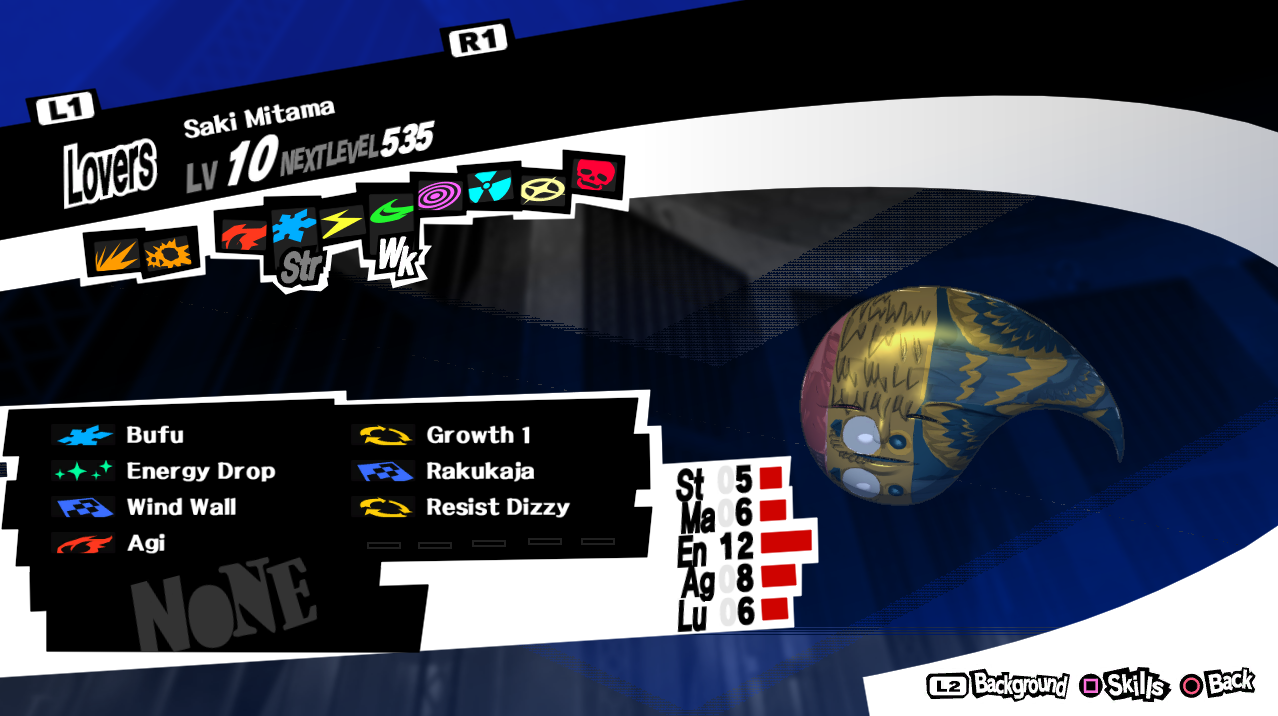
This is not just "corrupted memory", it's another persona's texture (in fact, it's the Andras persona I had loaded just before this and which had a "normal" corrupted texture).
Note that I had not seen something similar happen before https://github.com/kd-11/rpcs3/commit/71d19ed74877471273a93770f0aa50d65c98b5d5 (only "normal" corrupted textures) so there is a possibility you might have introduced the above issue recently. Or it might have always existed and be triggered by something Dyad Guillotine does, who knows.
ruipin
on 16 May 2018
@kd-11 I spent some time trying to figure out what was going on. I first added an error message that fires when test_cpu_range_start/end fail, and noticed that this error message would show up extremely often when opening/closing the persona information dialogs (and almost immediately after a texture would become corrupted). It would typically also fire at other "random" moments, such as when entering the Velvet Room.
While trying to track down what was to blame, I ended up doing various changes, these are some that come to mind:
- Added some sanity checks in
vk::cached_texture_section::flush()regarding thewritablevariable. - Added a
has_confirmed_rangemethod that returns true ifconfirmed_range != {0,0} - If
!has_confirmed_range(),range_confirmis taken directly in theprotectmethod. Otherwise,confirmed_range.firstandconfirmed_range.secondare set to the minimum and maximum (respectively) ofconfirmed_rangeandrange_confirm. This looked like a bug in the original commit. - Refactorted/merged
test_cpu_range_start/end()intotest_memory_tags() - Refactored calculating the
memory_tagspair into a separate methodsample_memory_tags()(used by bothsample_cpu_range()andtest_memory_tags()). sample_memory_tags()will takeconfirmed_rangeinto account (instead of always usinglocked_base_ptrwith sizecpu_address_range)- Added an error message to the log anytime the
test_memory_tags()checks fail ininvalidate_range_impl_base. - Forced the protection policy in Vulkan to be
protect_policy_full_range
(Note: I did not touch OpenGL)
My current work can be found in https://github.com/ruipgpinheiro/rpcs3/commit/a1d2e5599e24f00d4d818ab2bdf163ed104446a5
I'm not sure if any of the above changes is actually necessary and due to my lack of knowledge of the code-base I wouldn't be surprised if some of these were actually wrong (a lot of them were done to aid my understanding of the code and/or to more easily debug it).
Anyway, number 8 (the full-range protection policy) was the key, without it the texture corruption happens constantly. With it enabled, however, I have yet to see a single corrupt texture. The test_memory_tags checks have also stopped failing regularly (I actually wasn't able to get it to fail even once).
Do note that as we previously discussed I still encounter dead-locks since those are caused by a different issue, but they seem to be side-effect free and barely noticeable with a low timeout (<= 1 second).
I'll play some more time with the above build and keep you posted whether I see any issues.
ruipin
on 17 May 2018
@ruipgpinheiro I've been following this discussion for a while, from what I've seen this issue is very specific to P5, so wouldn't it be possible to add a separate option in RPCS3 to toggle your "hackish fix" on/off? At least this would allow people to play on master build without texture corruption and just turn it off when they play something else. This could be a nice workaround while we wait for a definitive fix. Unless kd-11 is already working on it, that is.
 Metalcape
on 17 May 2018
Metalcape
on 17 May 2018
@ruipgpinheiro Using https://github.com/kd-11/rpcs3/commit/7bf4722d7004c194f80892fe500a440a6cb296e1 I cannot trigger the bug you have shown in your screenshot. Note that the changes added in that commit are minimal (range fixup should not affect the selected textures) and therefore it should be that the previous commit should also have been fine. Could you test without your hack? I get the feeling it may be interfering somehow with the expected flow. I have tried dyad guillotine (select + square, exit, select next then press square...) and it works fine. Maybe only happens on some personas?
P.S - Don't assume memory should not change, it certainly should and will change without warning unless you use full range protection (you will lose a huge chunk of performance in most other titles, same as using strict mode). Start/end tags are separated intentionally, don't merge them. Same goes for sampling memory tags and the structure of confirmed range tag with the exception of the start value that you notified me about. Overall these commits are only there for testing and are very incomplete which is why I'm yet to even think about submitting anything in its current form.
kd-11
on 17 May 2018
After about 2 hours of testing I have been able to get corrupted texture (not wrong texture, just corrupted) to show up on a persona. Switching selection R1/L1 cleared it up immediately though. I have also seen one corrupted UI texture which also reverted itself after exiting/re-entering the menu so I would say it is now a very rare occurrence. There are other titles with more serious issues though with the changeset.
kd-11
on 17 May 2018
@Metalcape As far as I know, RPCS3 has a policy against game-specific hacks, which I agree with. The Persona 5 workaround is very hackish, it breaks a ton of internal stuff and IMO it is merely coincidence that Persona 5 doesn't simply crash. If we start adding these hackish game-specific fixes to the master branch, soon there will be more hackish fixes than real code, and it will just cause an even bigger headache. If you really want to keep playing, either grab rpcs3-v0.0.4-2018-02-12-95c6ac69 (which does not have this issue), or build the workaround.
ruipin
on 17 May 2018
@ruipgpinheiro Oh OK, I didn't know that. It's perfectly understandable. It's not really a problem for me anyway as on my old CPU the Farseer build still has better performance than master, it was just a suggestion for people who play on master.
Metalcape
on 17 May 2018
@kd-11 Sorry, I was busy with other stuff so only had time to write a more complete answer now.
I'll double-check once I have some time with https://github.com/kd-11/rpcs3/commit/7bf4722d7004c194f80892fe500a440a6cb296e1, but AFAIR I was using a fresh (unmodified) checkout of https://github.com/kd-11/rpcs3/commit/6d785ab057c703d59a7b44032ab22e093be65a5e when I was reproducing the issues.
The easiest way I've found to reproduce the issues is quite specific:
- Go to the Dyad Guillotine "Normal Fusion" menu where you can select your personas to fuse.
- Select a random persona
- Repeatedly (and very quickly) press Square followed by Circle ("z" followed by "c" in the default keyboard mapping) to open and close the persona information dialogue. Repeat +/- 10 times very quickly to spam the UI transition (which is what seems to cause the bug).
- Switch to a different (random) Persona, press Square. Repeat 3-5 times.
- Was one of the textures corrupted? Bug triggered! Otherwise, repeat starting from step 2 (with a different persona).
With the above, I was usually able to reproduce the bug very quickly, in one or two tries. If we add the LOG_ERROR regarding the test_cpu_range checks failing, they will usually fire on step 4, and the next persona you open will have a corrupted texture (or the wrong texture, typically from the Persona you picked in step 2). I can record a video of this if you want.
Corruption still happened in normal gameplay, but since it seems to be linked to UI transitions (which use the blit engine) it takes longer to occur. Loading screens usually fix it (I assume they cause the textures to be reloaded), however this bug makes long gameplay sessions basically impossible. For example, while fighting the boss of the second palace (a 30-minute long battle with lots of UI transitions, cut-scenes and no loading screens) it got to a point where half the textures in the scene were corrupted.
ruipin
on 17 May 2018
I was using your dyad method and could not reproduce, although about 30 mins of gameplay can trigger it. I'm moving on to the timing hypothesis since the flush does not seem to actually do anything (corruption / wrong data is still present even if I do memset(0) instead of writing gpu memory). As for range check failing - yea, thats expected. It means the game 'freed' the memory used by blit engine and tried to load a texture there using memcpy() where the memory occupied by the texture happens to be in the middle. The 'head' becomes overwritten which is detected by the range check and invalidates the section via unprotection since memcpy is an advancing operation. I guess I should also mark as dirty but it doesnt matter since unprotected sections are ignored.
kd-11
on 17 May 2018
Did you specifically do the "Square -> Circle" spam and then switch to a different Persona as I explained just now? Simply opening random personas doesn't seem to trigger it as often, I suspect the timing of UI transitions is the trigger, so spamming UI transitions makes it happen very quickly.
ruipin
on 17 May 2018
Yes I did square-circle for every persona, likely just hardware differences. You should really join our discord as it makes communicating test results easier without sending out email notifications to the entire team.
kd-11
on 17 May 2018
It is not "for every persona", but instead very quickly for a single persona some 10+ times, and only then do you switch to a different persona. The repeated extremely quick UI transitions are what seems to trigger the bug very often. But yes, I wouldn't discount hardware differences (since this seems to be a timing-related bug).
Oh, I did not see there was a RPCS3 Discord. I'll join it later once I get home and have some more time to look into this.
ruipin
on 17 May 2018
Practically fixed by https://github.com/kd-11/rpcs3/commit/c73addd58abf82b5ced444c1de0472d3ddb30002 (build here https://ci.appveyor.com/project/kd-11/rpcs3/build/0.0.0.6-6798). If able to reproduce, let me know before the code is cleaned up for a PR.
kd-11
on 18 May 2018
I tested https://github.com/kd-11/rpcs3/commit/618d6d205bbd170406f3ab694416654d2fa04b2a and can confirm I was unable to reproduce the texture corruption/swap using the Dyad Guillotine method. I played for a while with no noticeable issues as well, so it looks like that indeed worked!
(The deadlock and menu corruption still occur, but we know that those are different issues)
ruipin
on 18 May 2018
I'm using kd-11/rpcs3@618d6d2, not getting model texture corruption anymore, but I encountered this weird map texture corruption: https://imgur.com/icxtDGD
My log file: https://drive.google.com/file/d/1Iasfa_y9IklQan0QwFHFLf4f8a-wMoQI/view?usp=sharing
I think it should go here so I didn't create a new issue.
 kungfulon
on 19 May 2018
kungfulon
on 19 May 2018
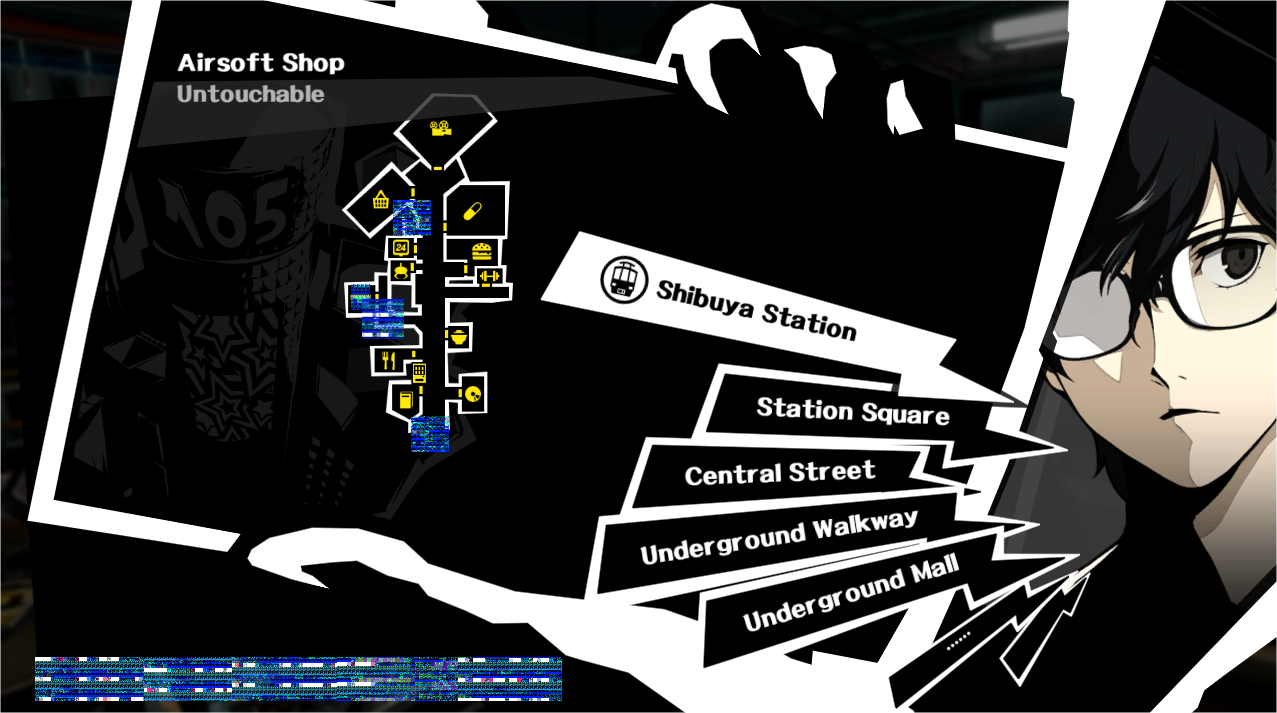
I am using the kd-11/rpcs3@618d6d2 and I haven't gotten the texture corription on the models themselves, but I still get it on the UI
 Tymec
on 27 May 2018
Tymec
on 27 May 2018
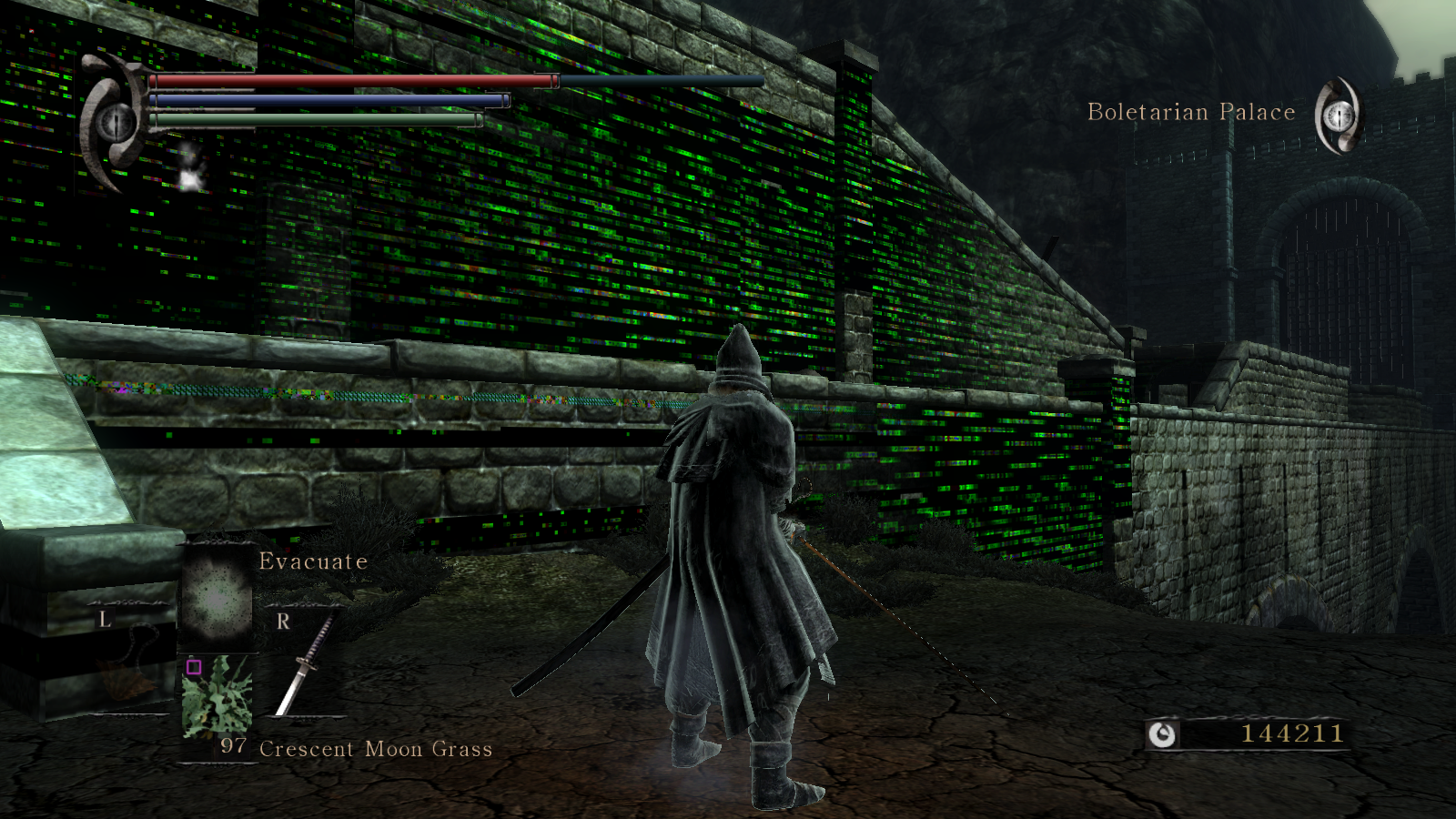
Those texture corruptions are very similar to what i got playing DeS.
 isshininu
on 27 May 2018
isshininu
on 27 May 2018
- Des issue is related, but should now be solved as memory mirrors were implemented recently
- Thanks to @ruipin testing hacks in texture cache, deadlock is likely fixed in https://ci.appveyor.com/project/kd-11/rpcs3/build/1518
kd-11
on 29 May 2018
I'll test the new fix once I get home. Glad I could help with something (even if my final guess at the real issue was actually wrong), thanks for your work!
Also am curious whether this fixes the huge number of semaphore timeouts some other games used to see...
ruipin
on 29 May 2018
I've played an hour or two in Persona 5 and haven't noticed neither models corruption nor UI corruption on the latest build. I think the bug is fixed now. Thank you!
 nocturnedence
on 31 May 2018
nocturnedence
on 31 May 2018
For some reason Persona 5 is unplayable on the latest build for me. I got around 30fps in most places and sometimes even 60fps on kd-11/rpcs3@618d6d2
CPU: i5 6600k 4.5GHz
GPU GTX 770
Tymec
on 2 Jun 2018
That's unrelated to this issue. If this issue is fixed, then it can be closed.
 AniLeo
on 2 Jun 2018
AniLeo
on 2 Jun 2018
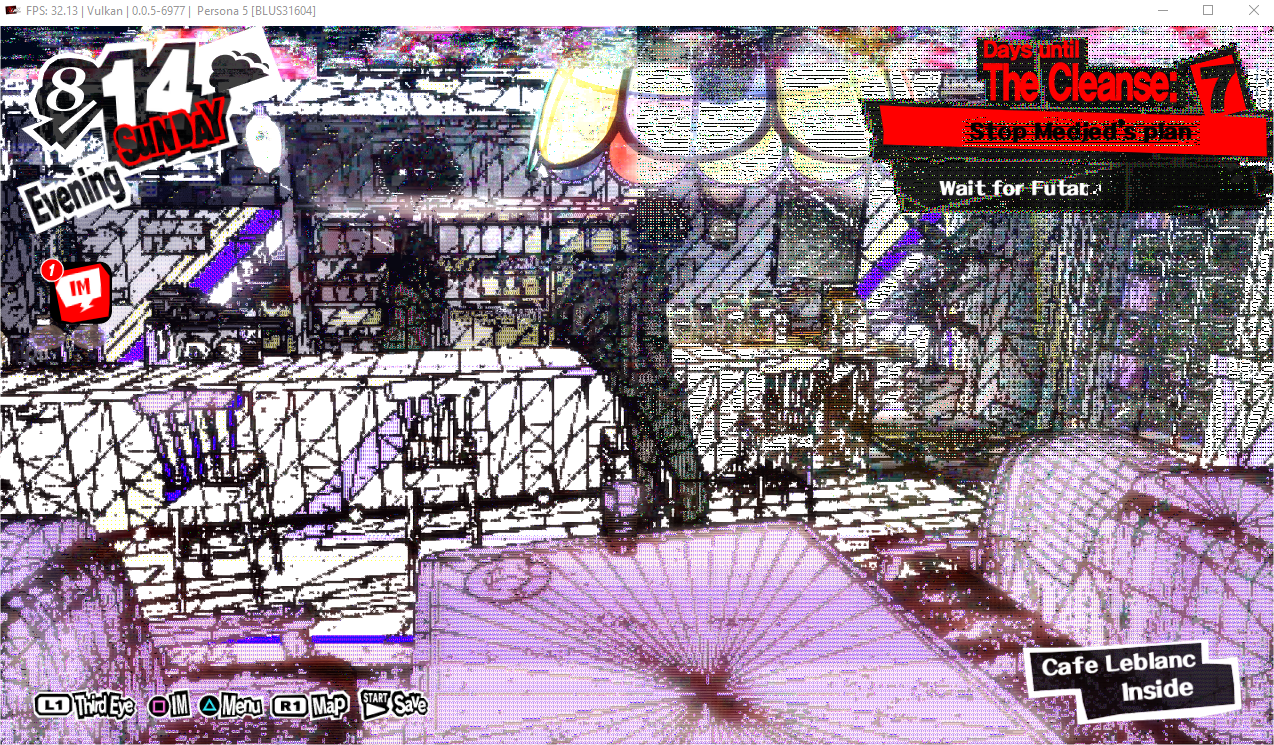
Umm... It looks like this glitch is still relevant. I've been playing for about 2 hours and the glitch randomly appeared when I entered Leblanc, unless it's unrelated to this issue.
Tymec
on 5 Jul 2018
You're not on latest master. Update, then post RPCS3.log alongside the screenshot.
I see diagonal line. You're on AMD or Intel drivers?
AniLeo
on 5 Jul 2018
I'm actually on NVIDIA drivers.
Tymec
on 5 Jul 2018
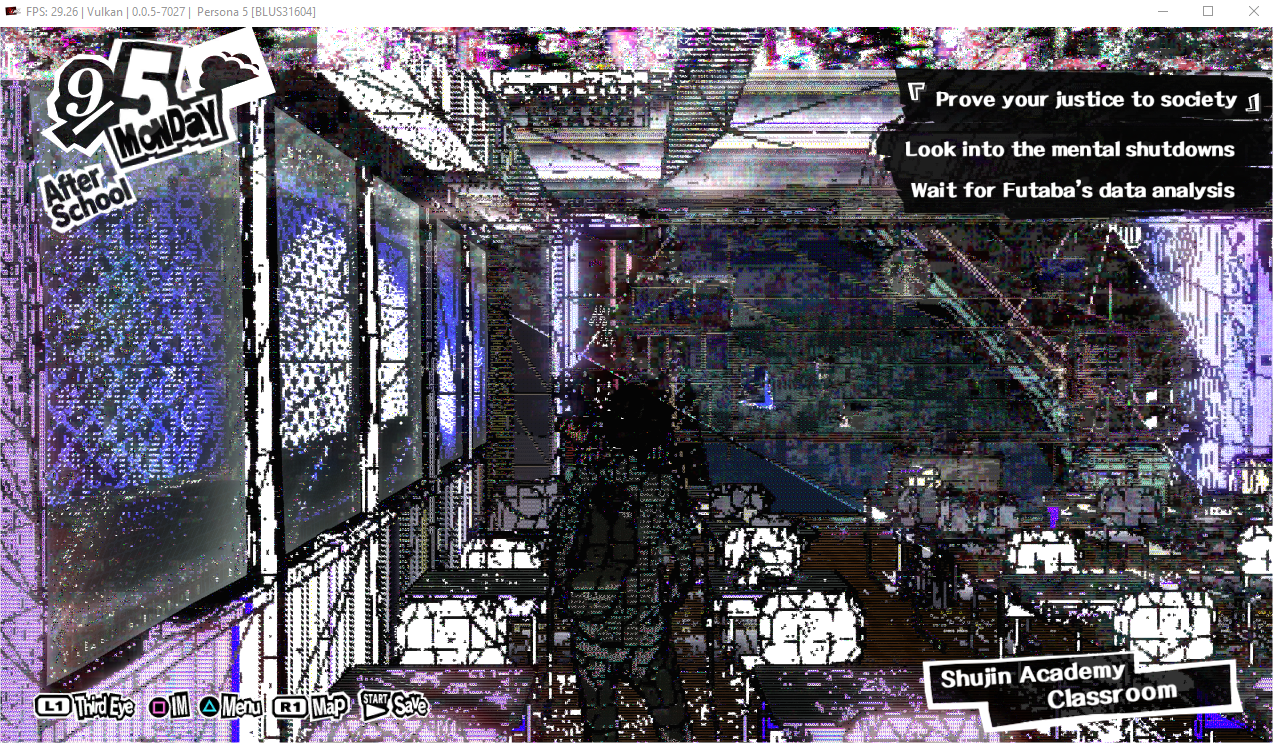
Happened again after about 2 hours of playing the game on the latest master.

RPCS3.log.gz
Tymec
on 6 Jul 2018
Thought I should document my investigation into the remaining issues that I am personally aware of and fall within this github issue. Maybe someone else might find this useful or gets an idea for an actual fix by reading this.
Issue
For reference, the issues discussed in this ticket number that were not resolved by the semaphore timeout fix are the texture swaps. There are currently two types of these issues I am aware of, although they are very likely related:
Randomly, game textures (often UI textures, sometimes characters, personas or even the environment objects) will "swap" with other objects and display an incorrect texture. The most common instances of this issue I've seen are the character portraits in dialogue showing parts of the wrong person, or persona textures being broken in the velvet room. Usually, reproducing these issues can be done in around 10-15 minutes of gameplay if you repeatedly trigger dialogue or the persona details UI inside the velvet room.
In addition, there is a bug that has been present apparently since years ago which has to do with the Persona 5 fonts. Sometimes (but very rarely), the letter displayed will be incorrect. E.g., "Rakukaja" (a persona skill) becomes "Rmkukmjm". Closing and re-opening the UI is usually enough to make it become correct again.
Workaround 1
A workaround for (1) as I have mentioned multiple times in the past is to enable full-range protection policy for the texture cache. This can be done e.g. in Vulkan by building from source and forcing protect_policy_full_range in https://github.com/RPCS3/rpcs3/blob/745ed8331cfc3fc4791984af1e9b07a472128261/rpcs3/Emu/RSX/VK/VKTextureCache.h#L35
This workaround resolves 99% of the issues I have seen of (1) outside the Velvet room, and seems to make (2) even more rare. However, it is not a complete "fix" since I can still reproduce (1) in the Velvet room, and sometimes (2) still occurs.
A hypothesis as to why this workaround works is that the default protection policy (conservative) for performance reasons does not protect all the pages that contain a specific texture. For example, if we have a texture A, if | is a page boundary, and (XYZ) denotes a protected page, we might have AAA|(AAAA). Depending on what the game does, it might be able to overwrite the beginning portion of the texture without RPCS3 realizing it happened, e.g. BBA|(AAAA) where B is a new texture, as long as the first word of A and B match. Full range protection will guarantee that there are no unprotected pages containing a texture, i.e. we'd have (AAA)|(AAAA).
However, this cannot be the whole story since as stated above the issues are only partially fixed by this workaround.
Breaking things
While I was originally assisting kd-11 with investigating the semaphore deadlock issue, at some point I managed to break my version causing (2) to occur ridiculously often. At the time I was not aware (2) was an issue, so I just thought I might have done something bad and quickly reverted my changes.
Suspecting that I might actually have stumbled onto the issue back then (by accidentally making it worse), and that breaking it might give me some clues as to what might be causing the actual bug, I thought I should try and break it the same way again. After some time looking into this, I realized that breaking this is extremely easy.
With https://github.com/ruipin/rpcs3/commit/d04954bbe84fce2ca7eea3c47c813a636fa052f4, I see that fonts almost immediately become messed up with swapped letters, e.g.:

Workaround 2
With the new suspicion that the texture swap issue might be related to some bug in get_intersecting_set (since breaking that method causes texture swaps to happen very often), I started analyzing this code in detail and came up with a second work-around that seems to eliminate all texture swap issues from my testing. I've tried playing with this for a few hours and have yet to see any texture swap.
https://github.com/ruipin/rpcs3/commit/99e52da838d1f075cfff7e7c4b810f2024533d91
Now, this is not a proper fix - although I do believe I might have found two separate bugs in master (see commit description, it would be nice if others could double-check).
However, even with those possible bugs fixed, the only thing that seems to resolve the actual problem (in multiple hours of gameplay) is to force RPCS3 to use full-range bounds checking inside get_intersecting_set, instead of using the protected range only.
Workaround 3
After running out of ideas, I started randomly breaking code again (favorite way to debug code you don't fully understand - take a sledgehammer to it and see what breaks). This is when I remembered I had long ago noticed an inconsistency between the way invalidate_range_impl_base unprotects sections_to_unprotect when deferred_flush==false and the way flush_all does it.
To be exact, flush_all makes sure to call tex.set_dirty(true); on all such sections before unprotecting them, however invalidate_range_impl_base does not. Just for the heck of it, I reverted get_intersecting_set to use only the protected range, and added the set_dirty call to invalidate_range_impl_base.
https://github.com/ruipin/rpcs3/commit/9406c875c4c5747093091e40dc9c655763e17755
From my testing so far this indeed seems to resolve the texture swaps. More testing is required to make sure that it wasn't simply luck (but I managed to have no texture swaps in multiple hours of gameplay).
Even assuming that this resolves the issue, I'm not sure if this inconsistency is actually a bug (or whether it is simply working around a bug somewhere else), so I am not going to call it a "fix".
ruipin
on 11 Aug 2018
Speaking for the people silently subscribed to this issue: thank you @ruipin for your determination and continued work on fixing this and related stuff! (feel free to delete if too offtopic)
 dkambersky
on 11 Aug 2018
dkambersky
on 11 Aug 2018
I believe I have finally tracked down the bug causing the texture swaps. It was related to the set_dirty(true) call in "Workaround 3" after all. Thanks to @kd-11 for all his help 👍
The latest commit in https://github.com/RPCS3/rpcs3/pull/4970 should fix it, but I need more testers to make sure this is indeed the last we see of this issue.
(Note that it is theoretically possible that texture swaps might happen on any game even assuming no bugs exist as long as strict mode is not enabled, but they should be extremely rare, or the game extremely poorly coded.)
ruipin
on 13 Aug 2018
As a further update, I have tested my PR #4970 for 5-10 hours. The texture swap bug is indeed fixed at least during normal gameplay (UI and 3D objects), and I never saw a font swap (although that one used to be rarer so more testing is needed).
However, I managed to reproduce the texture swap inside the Velvet room. In fact, this matches the behaviour I saw when I was using the old "full-range protection + "set_dirty(true)" workaround mentioned long ago in https://github.com/RPCS3/rpcs3/issues/4786#issuecomment-398827289. With that workaround, I could only reproduce texture swaps in the velvet room. I suspect there might be a fourth bug in the tecture cache (or something related) that is only triggered inside the Velvet room.
Note that I was playing with the default "conservative protection", so it might be that this is a known limitation of that mode and forcing "full-range protection" (or strict mode) would resolve it. However, that was not the case with my previous work-around so more testing will be needed.
If I manage to reproduce the issue in full-range mode I'll go back to slowly reviewing the code for anything else that looks suspicious. Anyway, the Velvet room textures don't matter too much - the big issue was the regular texture swaps during gameplay, especially in the UI, and those have been finally fixed! 🥂
ruipin
on 16 Aug 2018
I believe I have finally found the cause for the Velvet Room texture swaps after many hours of testing! 🥂
First things first, the workaround is quite simple, and requires a single line of code to be commented: https://github.com/ruipin/rpcs3/commit/b130f33d6e416e7938a290f85c7f5d40f7922782
It seems that there is one single code path through upload_texture -> invalidate_range_impl_base which can cause sections which are read-only (RO) to be unprotected without being marked dirty. This is because that code path calls invalidate_range_impl_base with is_writing==false, meaning that RO sections will be deemed collateral and ignored as an optimization. However, it is possible that the RO section actually shares a page with a no-access (NA) section which supersedes the RO protection, and will be taken into account by the algorithm. As such, once this NA section gets unprotected, the RO section is also unprotected without being marked as dirty (since it was deemed collateral), leading to the texture swap.
For debugging purposes, I added a check in invalidate_range_impl_base and flush_all that confirms that all sections that believe they are RO or NA are still protected at the end of the access violation handler, including pages that had been deemed collateral. This check quickly failed, which I easily tracked down to the condition above. I then tested my hypothesis and discovered that any time a RO page becomes incorrectly unprotected, a texture swap occurs immediately after.
The workaround just makes it so that RO sections are never considered collateral, which has a slight performance cost. A proper fix will follow after discussion with @kd-11
ruipin
on 20 Aug 2018
5013 has now been merged, meaning all remaining texture swaps should now be fixed on master.
The fix has some semi-experimental changes, so let us know if you still see any texture swaps.
Otherwise (if nobody complains for a while), I think this bug can be closed.
ruipin
on 22 Aug 2018
Closing as fixed via https://github.com/RPCS3/rpcs3/pull/5013
kd-11
on 29 Aug 2018
Related issues
 Emulator-Team-2
·
3Comments
Emulator-Team-2
·
3Comments
 Xcedf
·
3Comments
Xcedf
·
3Comments
 elad335
·
3Comments
elad335
·
3Comments
 legend800
·
3Comments
legend800
·
3Comments
 Nezarn
·
3Comments
Nezarn
·
3Comments
Most helpful comment
I believe I have finally found the cause for the Velvet Room texture swaps after many hours of testing! 🥂
First things first, the workaround is quite simple, and requires a single line of code to be commented: https://github.com/ruipin/rpcs3/commit/b130f33d6e416e7938a290f85c7f5d40f7922782
It seems that there is one single code path through
upload_texture->invalidate_range_impl_basewhich can cause sections which are read-only (RO) to be unprotected without being marked dirty. This is because that code path callsinvalidate_range_impl_basewithis_writing==false, meaning that RO sections will be deemed collateral and ignored as an optimization. However, it is possible that the RO section actually shares a page with a no-access (NA) section which supersedes the RO protection, and will be taken into account by the algorithm. As such, once this NA section gets unprotected, the RO section is also unprotected without being marked as dirty (since it was deemed collateral), leading to the texture swap.For debugging purposes, I added a check in
invalidate_range_impl_baseandflush_allthat confirms that all sections that believe they are RO or NA are still protected at the end of the access violation handler, including pages that had been deemed collateral. This check quickly failed, which I easily tracked down to the condition above. I then tested my hypothesis and discovered that any time a RO page becomes incorrectly unprotected, a texture swap occurs immediately after.The workaround just makes it so that RO sections are never considered collateral, which has a slight performance cost. A proper fix will follow after discussion with @kd-11