Rpcs3: Drakengard 3 BLJM61043 and BLUS31197 - PPU Access Violation
Drakengard 3
When press the L3 + R3 for Intoner Mode, the game crash immediately
with this
F {PPU[0x1000000] Thread (main_thread) [0x01b4c09c]} MEM: Access violation reading location 0x3b4
Tested : with DS4 Controller
PPU : Recompiler (LLVM)
RPCS3.log.gz
And other Access violation during gameplay the game crash randomly with
F {PPU[0x1000019] Thread (RenderingThread) [0x01394128]} MEM: Access violation reading location 0x0
if someone wants to complete with something else
 Kojikun1
All 24 comments
Regression since when? Because I remember this being an issue recently.
 AniLeo
on 13 Dec 2017
AniLeo
on 13 Dec 2017
I did not say it was regression , issues it just for regressions or point problems in emulator ?
Kojikun1
on 13 Dec 2017
I was just asking, since it has been brought up recently as well and no one found if it was a regression or not
AniLeo
on 13 Dec 2017
It is not a regression this problem already had, only that no one had opened a issue
Kojikun1
on 13 Dec 2017
Yes, no regression here. Problem has always been here. It's not the only crash with access violation memory on this game by the way. Even without press L3+R3, the game crash further.
 Illynir
on 13 Dec 2017
Illynir
on 13 Dec 2017
@Illynir Yes the game crashes with access violation memory but i dont know but problably it not the same error its PPU but ...
F {PPU[0x1000019] Thread (RenderingThread) [0x01394128]} MEM: Access violation reading location 0x0
"RenderingThread" crash randomly in gameplay and "Thread (main_thread)" for press the L3 + R3
@AniLeo I should open another issue for this other or just modify this one ?
Kojikun1
on 13 Dec 2017
Regroup all the problems no ? Graphic also. The game is too white, shadow are missing, menu corruption, etc.. + the crashes.
With screenshot, RPCS3 log, shaderlog, etc..
Illynir
on 13 Dec 2017
yesterday launched, yes crashes when trying to switch to the mode of intoner (L3 + R3)
I'll get to the laptop and collect the necessary information. I'll add an additional screenshot with CPU and GPU loading
 ZeratuLx
on 13 Dec 2017
ZeratuLx
on 13 Dec 2017
@Illynir I do not know if you're being ironic. But one problem at a time do not you think?
Menu corruption ?
Kojikun1
on 13 Dec 2017
Not really, It's better to have a issue for all the problems on one game than several in my opinion.
Illynir
on 13 Dec 2017

The menu corruption. :)
Illynir
on 13 Dec 2017
I don't think this is a big stuff, ok the game have some graphics issues but not related with PPU and not does not affect much the gameplay.
and this is menu i tested in last master now

Kojikun1
on 13 Dec 2017
Oh, I am on the PR RSX Fixes, i will test on master to see if there is a regression on that.
Illynir
on 13 Dec 2017
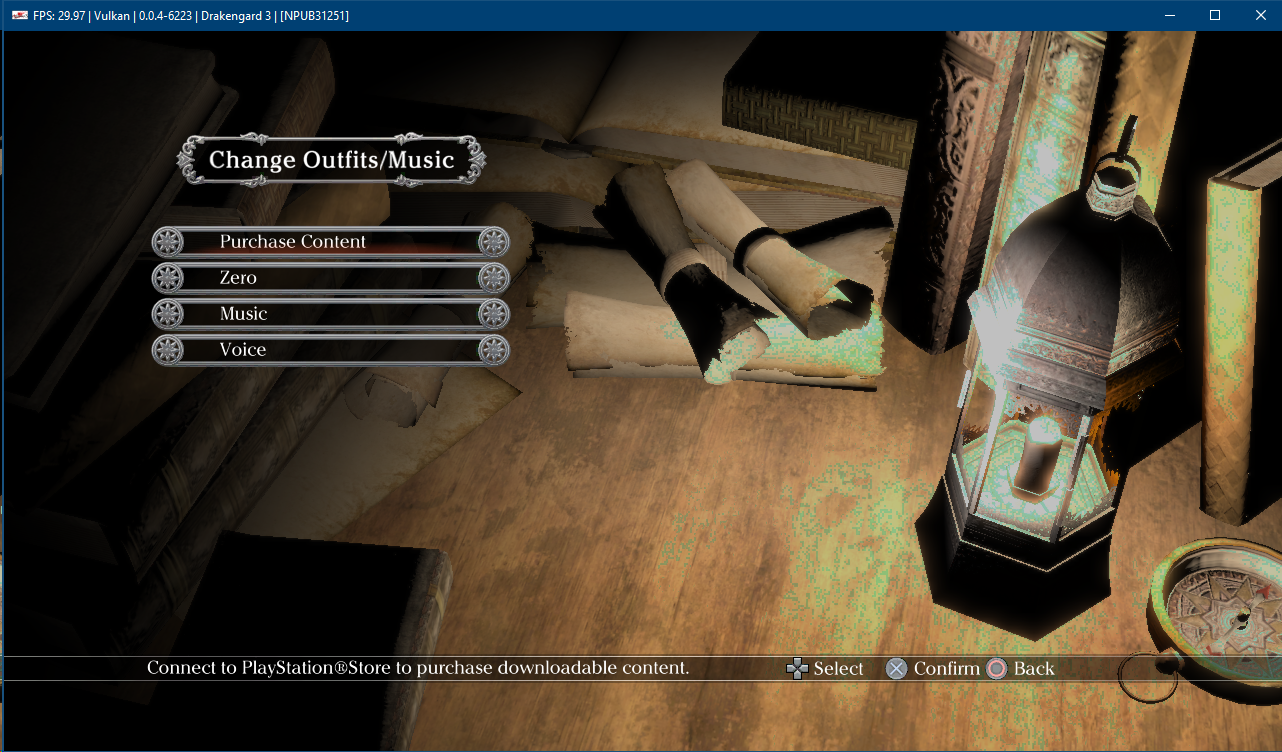
Hmm, I also have everything ok with the menu, the version of the game is 1.01, but in the game itself there are problems with sound and drawdowns FPS + the game hangs when I try to press L3 + P3

I also drop my logs with the folder "shaderlog" and "shaders_cache. On the screen, the last two kernels are loaded after that error.
RCPS3.zip
" (RPCS3 0.0.4-6223-a1fa10ac alpha)
At the first start sometimes an error occurs: F {PPU[0x100000d] Thread (TrophyInfo) [0x01beb2c4]} class std::runtime_error thrown: Unknown Win32 error: 1168
Restarting the game solves the problem.
ZeratuLx
on 13 Dec 2017
On Master it's the same for me:
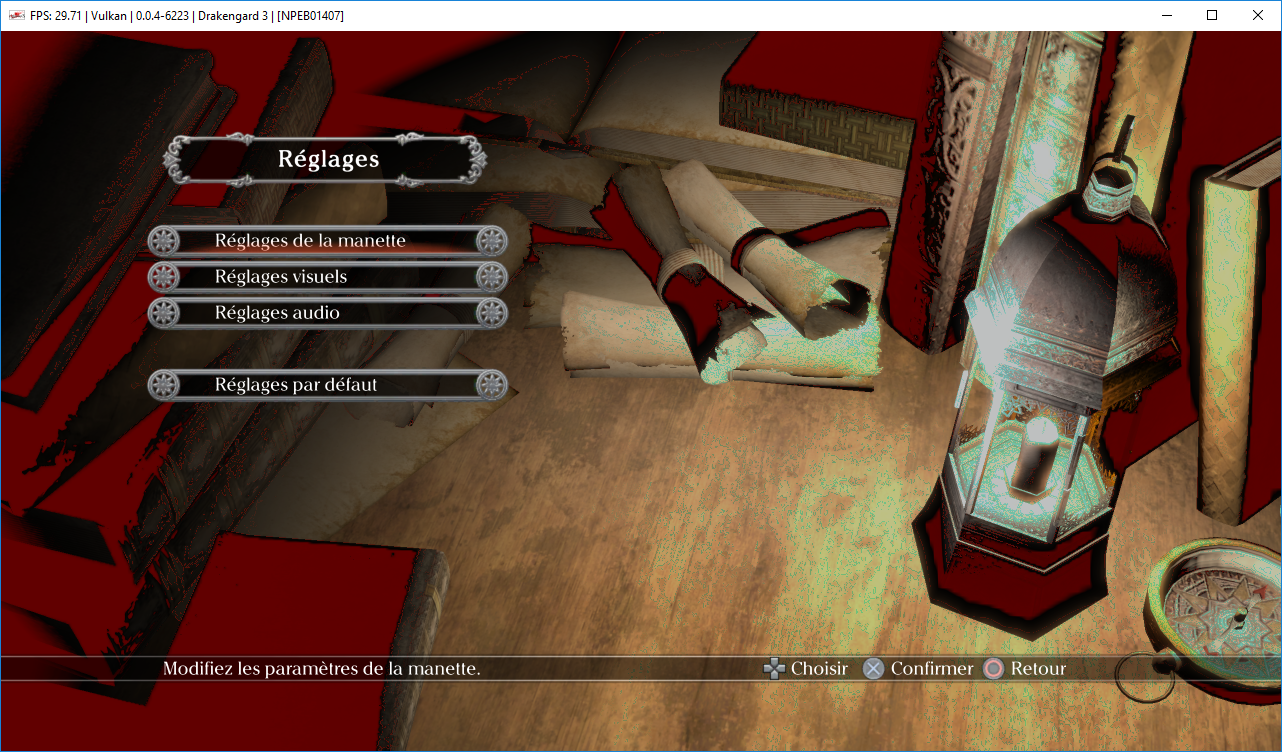
I don't understand, maybe à specific problem for this version ? Oo
Illynir
on 13 Dec 2017
Illynir, my gpu settings:

ZeratuLx
on 13 Dec 2017
I use the default settings of the emulator I just changed the Renderer for Vulkan
Kojikun1
on 13 Dec 2017
Probably a problem with specific version of game (PSN Version) or with Nvidia GPU i guess.
Illynir
on 13 Dec 2017
@ZeratuLx Jesus man delete this comment we dont suport piracy
Kojikun1
on 13 Dec 2017
Genius... Will issue a ban on future pirate discussions
AniLeo
on 13 Dec 2017
@Kojikun1 @AniLeo personal messages have not been canceled yet). it's clear that piracy is not welcome. Sometimes there is no choice, when in my country this game is not on sale, and there is also no possibility to remove the rip disk.
It's just that there is a patch and Japanese voice acting in that torrent. I can pull them out and put on a Goggle disk or onedrive.
But I will definitely buy the game, but it's necessary to order from abroad, of course, in the disk version.
ZeratuLx
on 13 Dec 2017
@Zerotulx
Yeah, you completely right
PS3 Games is not in sell in my country And our currency Can't convert to Dollar so i can't buy PS3 Games with a game store too so all my hope ( and everyone else that not that their don't want , but can't buy this games ) is to see one day , RPCS3 can emulate PS3 Games With ease...
 M220
on 13 Dec 2017
M220
on 13 Dec 2017
@Illynir maybe you have to delete your shader cache so new shaders can be generated?
M220
on 13 Dec 2017
for those who will find this issue in future - seems that as of version v0.0.5-6626-717f2b0ac it's fixed
 Artboomy
on 1 Apr 2018
Artboomy
on 1 Apr 2018
Related issues
 iBlackS0ul
·
3Comments
iBlackS0ul
·
3Comments
 XeClutch
·
3Comments
XeClutch
·
3Comments
 Birch-san
·
3Comments
Birch-san
·
3Comments
 Xcedf
·
3Comments
Xcedf
·
3Comments
 Luffykun007
·
3Comments
Luffykun007
·
3Comments
Most helpful comment
Genius... Will issue a ban on future pirate discussions