3200 is now merged and this is an issue tracker for any tickets arising from that.
Known issues and workarounds
- [x] Increased first time stutter - try openGL and roll back if all else fails while the shader pipeline is replaced with new code. It will be improved soon.
- [ ] Missing graphics using intel drivers on windows. This isn't really new, but warrants investigation
- [X] Broken immediate indexed render - A fix has already been submitted #3241
- [x] Sometimes the shader cache may be corrupted if the emulator crashes when writing shaders to disk. Will be resolved soon with validity checks. Delete the shader cache if the emulator crashes when loading the shaders from disk.
- [x] Increased emulator startup time due to shaders loading. - Will be optimized in the near future. For now, you may delete the cache if loading is taking too long, or use openGL which has much faster loading times.
- [x] Toggling fullscreen may result in a crash or hang
 kd-11
kd-11
All 45 comments
My screen blanks for a second and the game goes white when I try to play After Burner Neo Climax
(Win10 x64, R9 290). Happens after the stage is loaded in the "take off from the carrier" cut-scene.
This is then outputted to the log:
F {rsx::thread} class std::runtime_error thrown: Assertion failed! Result is FFFFFFFCh
(in file Emu\RSX\VK\VKGSRender.cpp:1523)
Here is the full log attached:
RPCS3.zip
Was fine before merge.
Here is the log with shader cache deleted (i.e. clean run):
RPCS3.zip
 danilaml
on 17 Aug 2017
danilaml
on 17 Aug 2017
That error means the driver encountered an error it could not recover from and was reset. What gpu is it You can run the game with strict mode and debug output enabled to see if the validation layer catches anything before the crash. If it does it will be helpful.
kd-11
on 17 Aug 2017
@kd-11 I've listed my GPU in the original comment. It's AMD R9 290 4GB.
Also, I've already run it using Strict Rendering Mode (and GPU texture scaling, though it shouldn't matter for Vulkan). Before the merge I had no problems with this game. I've completed a few levels just before compiling the new rpcs3 version.
Tested the OpenGL renderer: works OK, although slower.
Changed back to Vulkan and it didn't crash. Not sure what happened there, but the crash was reliably reproducible earlier.
Welp, I retried after that and sure got the crash again:
F {rsx::thread} class std::runtime_error thrown: Assertion failed! Result is FFFFFFFCh
(in file Emu\RSX\VK\VKGSRender.cpp:1523)
I suggested strict to keep the khronos validation layers 'debug output' option from generating too much spam. Its the debug output I was asking for. The reason is that if I have to contact amd about it they will ask for it. I do have that game somewhere but I cant test it myself at the moment.
kd-11
on 17 Aug 2017
@kd-11 I can't seem to find the option to enable debug output in the settings. Was it removed in Qt GUI rework?
danilaml
on 17 Aug 2017
config.yml, it's hidden on Debug tab
You can enable debug tab on GuiSettings
 AniLeo
on 17 Aug 2017
AniLeo
on 17 Aug 2017
The debug tab is hidden by default. Edit the config file in GuiConfigs to enable it.
kd-11
on 17 Aug 2017
@kd-11 here is the log with Debug Outputted enabled (edited config manually):
RPCS3.zip
danilaml
on 17 Aug 2017
Yakuza Ishin (BLJM61149 and NPJB90690 for the demo version) has flickering in main menu right now (almost every second) - before vertex rewrite it wasn't happening.

@kd-11
Yes, OpenGL flickers too, exactly the same issue.
My specs:
Windows 10 Pro x64
AMD FX 6200 3.8GHz
AMD Radeon HD 7970 GHz edition 3GB VRAM (latest drivers - 17.7.2)
16GB RAM DDR3 @ 1600MHz
am I missing something..?
edit2: well, tested again with different settings and now it's working flawlessly... unchecking Bind SPU threads to secondary cores, Lower SPU thread priority and changing Preferred SPU Threads from 1 to Auto fixed the flickering in main menu... I will try to find out what cause the problem, sorry, it looks like it was my fault.
Preferred SPU Threads: 1 - that seems to be the issue here.
 Mhmmm
on 17 Aug 2017
Mhmmm
on 17 Aug 2017
@danilaml I have tested the NPUB version of the game with crimson 17.7.2 and wasnt able to make it crash. I've tried all the 3 starting fighters and it works fine. However, it did freeze when I resized to fullscreen and then windowed again. Does the crash happen when you resize the window? From the log, the validation layer did not catch anything making it difficult to track down the issue.
kd-11
on 17 Aug 2017
@Renusek Is it also broken with openGL? Also, need some more info on your hardware setup.
kd-11
on 17 Aug 2017
BLJS10053 - Tales of Vesperia JPN - Vulkan only regression - The game freezes during main intro (this was caused already by pull #3083 , but after pull #3200 the game freezes after skipping intro as well, which was not the case before.
In OpenGL game works with same problems as reported in game compatibility thread, but is faster for me as before.
Logs fof Vulkan, OpenGL (both strict rendering) and OpenGL without strict rendering as well:
RPCS3_0.0.3_5743_Vulkan.zip
RPCS3_0.0.3_5743_OGL.zip
RPCS3_0.0.3_5743_OGL_NoStrict.zip
 mamoulianfh
on 17 Aug 2017
mamoulianfh
on 17 Aug 2017
Tales of Graces f (BLES01617) requires to delete the cache before starting the game, otherwise it will only show a black screen.
This game and Tales of Vesperia tend also to freeze.
 GeniusMage
on 17 Aug 2017
GeniusMage
on 17 Aug 2017
@kd-11 it happens about 50% of the time for me. If I open Radeon settings at the same time/just after the driver crash, they crash too. I'm currently on 17.1.1, I'll update my drivers and see if it helps (doubt it). Btw, I have a bunch of LiveKernelEvent's and atidxx64.dll crash reports in windows event log. EDIT: i didn't resize the window in the process. It always stayed at windowed 720p.
danilaml
on 17 Aug 2017
There's a pretty serious possible bug I've discovered in the AMD driver actually when investigating the fullscreen crash. I have a fix for that but yea, try updating the driver for now.
EDIT: After looking over the spec again, the driver could block swap acquisition in some cases, although the spec is kinda vague about it.
Let n be the total number of images in the swapchain, m be the value of VkSurfaceCapabilitiesKHR::minImageCount, and a be the number of presentable images that the application has currently acquired (i.e. images acquired with vkAcquireNextImageKHR, but not yet presented with vkQueuePresentKHR). vkAcquireNextImageKHR can always succeed if a ≤ n - m at the time vkAcquireNextImageKHR is called. vkAcquireNextImageKHR should not be called if a > n - m with a timeout of UINT64_MAX; in such a case, vkAcquireNextImageKHR may block indefinitely.
In AMD's driver, it seems in windowed mode, 2 surfaces can always guarantee parallel acquisition, but this is not true in fullscreen. whilst (1 <= 2-1) passes, vkAcquireNextImageKHR hangs the system, probably because of lack of a presentKHR call prior. I have remedied the issue in the 'bug fixes' pull request
kd-11
on 17 Aug 2017
@GeniusMage Same problem here on Tales of Graces F.
 Illynir
on 17 Aug 2017
Illynir
on 17 Aug 2017
There are post in the other thread, certainly not sure where the issues are supposed to go. Sorry about that.
 Blacksama
on 18 Aug 2017
Blacksama
on 18 Aug 2017
@Blacksama
What graphic driver version you have installed ?
 SakataGintokiYT
on 18 Aug 2017
SakataGintokiYT
on 18 Aug 2017
I tested it myself and saw nothing of the sort. Might be a driver issue as it only affects one user
kd-11
on 18 Aug 2017
@kd-11
Gtx 650 ti driver 378.66
With Vulkan i have texture flickering in every game.
But works good on 382.53 and on newest driver.
SakataGintokiYT
on 18 Aug 2017
Yea. I suspected that since I didn't see other complaints on discord.
kd-11
on 18 Aug 2017
Yea I am on 376.xx OK last time I updated my graphic driver to the latest release, I started getting black screens in every game like a screen saver had activated and had to reboot my machine for it to work again, I will l try a 380.xx again tonight (shivers). Thanks for your answer.
Edit: You guys were completely correct, this was my fault with the drivers and I am happily at the latest build again, the new driver brought again the black screen saver effect but I think I found a fix for that as well, anyway sorry and thanks again.
Blacksama
on 18 Aug 2017
Silent Hill: Downpour now cause RPCS3 to crash immediately.
RPCS3.zip
 isshininu
on 19 Aug 2017
isshininu
on 19 Aug 2017
@kd-11
Sometimes the shader cache may be corrupted if the emulator crashes when writing shaders to disk. Will be resolved soon with validity checks. Delete the shader cache if the emulator crashes when loading the shaders from disk.
Can this possibly be the cause of this?
 C0rn3j
on 19 Aug 2017
C0rn3j
on 19 Aug 2017
Rayman 3 HD now displays a black screen after the opening movie plays. Sound and inputs still work, Tested both OpenGL and Vulkan
 Wehavecookies56
on 20 Aug 2017
Wehavecookies56
on 20 Aug 2017
In NieR - Replicant turning on/off "Write color buffer" does't give effect like it used to (game only works for few seconds like it used to before this commit)
before (gamplay recorded by Arkru)
 Kubokoo
on 20 Aug 2017
Kubokoo
on 20 Aug 2017
@danilaml I have managed to recreate the amd crash reliably after reinstalling my drivers. No idea why it didn't crash before. Updating the khronos validation layers also now shows some parts of the spec have changed and the emulator needs to adapt.
kd-11
on 21 Aug 2017
@kd-11 thanks! So it's an emulator issue then (I was waiting on updating my drivers until 17.8.1 goes out of beta, since the installer for the current latest driver apparently lacks the fonts for my language and I'm not sure what I'm selecting xD)?
danilaml
on 21 Aug 2017
unreal engine 3 games crash the emulator (program stopped working message) on vulkan
Tony hawk's Pro Skater 5 -- on loading screen before ingame
Tony hawk's Pro Skater HD -- crash on blackscreen
i have only these 2 with UE3
 kamer1337
on 24 Aug 2017
kamer1337
on 24 Aug 2017
@kamer1337 Program stopped working crash box is important so try and copy the text. I can confirm it doesn't happen on every UE3 title.
kd-11
on 26 Aug 2017
well i meant this error it doesnt contains any info
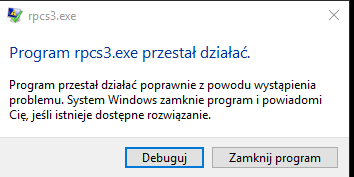
after pressing Debug in visual studio:
Unhandled exception at 0x000000005735EE68 (nvoglv64.dll) in rpcs3.exe: Fatal program exit requested.
EDIT: it stops here
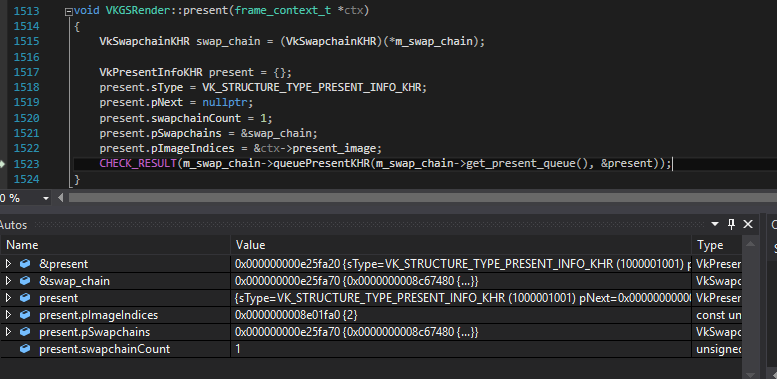
kamer1337
on 26 Aug 2017
Thats 'as expected' - Nvidia's present engine doesnt like the asynchronous submit method used. It'll hopefully be fixed without impacting performance too much. I am curious as to what the max and min number of swapchain images are - dump vulkaninfo output vulkaninfo > vulkaninfo.txt and I'll take a look.
kd-11
on 26 Aug 2017
kamer1337
on 26 Aug 2017
Looks like vulkaninfo only captures basic info about the swapchain - however, the dump does highlight something different about the nv driver here - The present engine is bound by the vblank window (only FIFO and FIFO_RELAXED are available). I'll try and recreate the condition since I only have FIFO and IMMEDIATE. Might help cleanly resolve all the pending issues with presentKHR dying on us.
kd-11
on 26 Aug 2017
looks like disabling strict rendering mode resolves the issue but now strings are not visible
kamer1337
on 28 Aug 2017
Interesting. I know why UE3 crashes nvidia then.
kd-11
on 28 Aug 2017
KD after this PR this error pops up at random during Persona 5 animated Movies, in most cases the Movie can be skipped but in the ending Movie which is damn long by the way it always crash.
The error is not present in the revision right before 3200 (3235), also tried the very last revision (3381) and is the same error. This error is repeatable it always crash at the ending Movie. Hopefully you can help me again thank you.

Blacksama
on 4 Sep 2017
After the PR there is a crash in some UE3 games in the intro section. It crashes on a null pointer exception on the line m_fence.destroy(); in gl::texture_cache::cached_texture_section::destroy() (actually glDeleteSync crashes because it is called with a 0 value). I guess there should be a check to m_fence.is_empty() before calling destroy() - at least this fixes the crash - but I am not sure, it might go wrong somwhere else.
This happens with
- Singularity after the first intro screen
- Bioshock 2 after the Intro movies
- Batman Arkham Asylum Demo after the intro logos
- Alien Breed Impact Demo before showing anything
Edit: Weird, calling glDeleteSync with 0 happens all the time but it only sometimes crashes. Driver issue?
Unhandled exception at 0x0000000077FA5579 (atio6axx.dll) in rpcs3.exe: 0xC0000005: Access violation reading location 0x00000000000014B8.
 jjsat
on 7 Sep 2017
jjsat
on 7 Sep 2017
https://www.khronos.org/registry/OpenGL-Refpages/gl4/html/glDeleteSync.xhtml
glDeleteSync will silently ignore a sync value of zero. so, yes, thats a driver bug
Some of the other issues listed here are fixed in current master
- AfterBurner Climax no longer crashes on start using AMD (Crimson 17.9.1)
- Nvidia flickering was fixed by a driver update although changes to memory management should also fix this from the emulator itself as well
- UE3 nvidia issues - Needs retesting by affected users
kd-11
on 21 Sep 2017
i have still crashes in ue3 games with strict rendering mode
kamer1337
on 22 Sep 2017
@kd-11
The crash is still there in ABC starting air carrier scene for me on the latest master (though I haven't tried the latest drivers yet, I'll report the result later with them).
F {rsx::thread} class std::runtime_error thrown: Assertion failed! Result is FFFFFFFCh
(in file Emu\RSX\VK\VKGSRender.cpp:1589)
BUT, one thing I've noticed: it happens exclusively when I enable strict rendering. If I disable it, there is no crash (or so it seems out of 10 runs).
Btw, not sure if it's a regression of new PRs and if it's fixed by the strict rendering (since obviously I can't test this now) but I've noticed that now there is some graphics "duplication" glitch (i.e. see the right part of the plane):

P.S. is there a chance for fonts rendering to be fixed under non-strict rendering, since it's the only thing that "breaks" it for me right now?
danilaml
on 24 Sep 2017
KD using last revision 3488 Persona 5 no longer crashes on the long ending sequence, on top of that there is a noticeable increase in performance in the animated scenes much less stuttering. Impressive work as usual.
Blacksama
on 26 Sep 2017
https://github.com/RPCS3/rpcs3/pull/3651 Fixes some rare issues introduced by this PR, relating to broken graphics. I suspect the wierd floaty trail bug in afterburner might also be fixed but I havent tested.
kd-11
on 25 Oct 2017
@kd-11 ABC graphics glitch is still there:
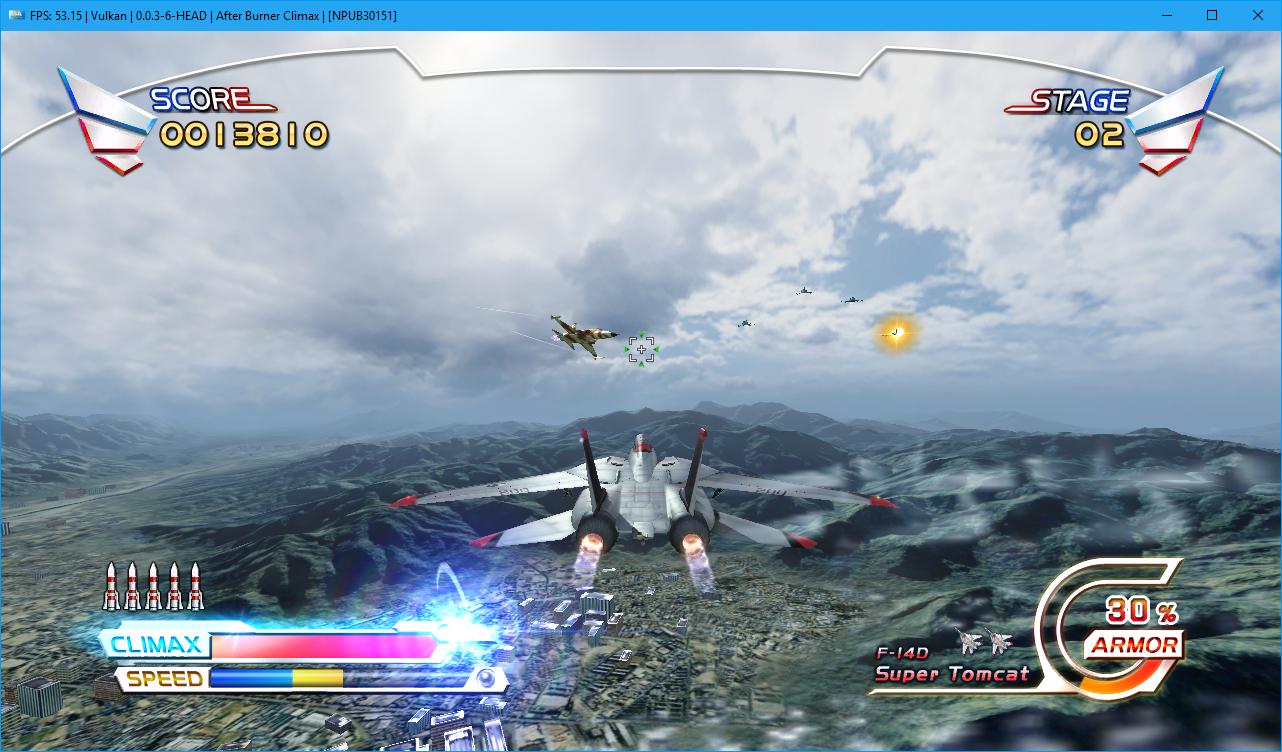
Happens with strict mode enabled too:
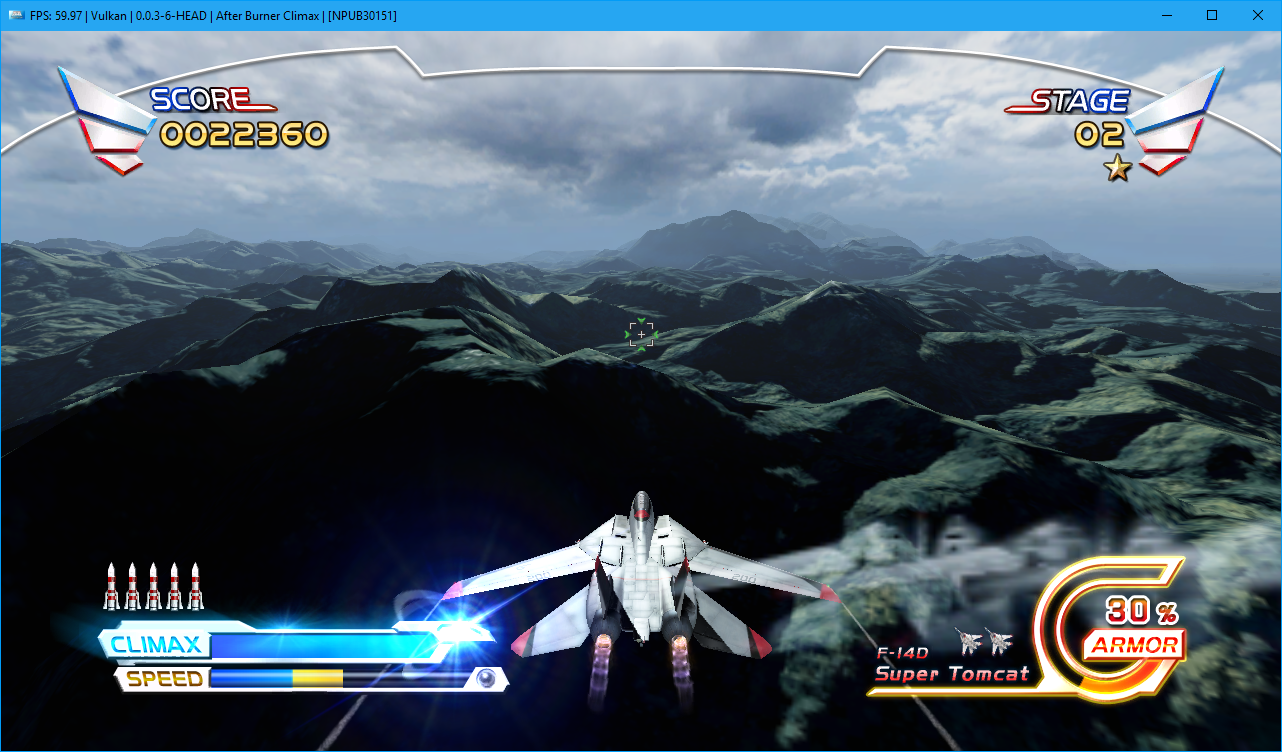
Though the frequent driver crashes during lift off cut scene appear to be gone now.
danilaml
on 25 Oct 2017
The glitches reported in here are all either fixed or reasonably improved in current master.
kd-11
on 5 Dec 2017
Related issues
 Xcedf
·
3Comments
Xcedf
·
3Comments
 legend800
·
3Comments
legend800
·
3Comments
 iBlackS0ul
·
3Comments
iBlackS0ul
·
3Comments
 uaqlover
·
3Comments
uaqlover
·
3Comments
 xiangzhai
·
3Comments
xiangzhai
·
3Comments
Most helpful comment
Interesting. I know why UE3 crashes nvidia then.