Rpcs3: Cannot launch games on Linux build (F LDR: St11range_error thrown: Narrow error
Have seen this with the two games that I successfully tested on Windows 10 -- Catherine and Hatsune Miku: Project DIVA F. On Linux, they both resulted in the following error in the log:
F LDR: St11range_error thrown: Narrow error (0x56295a14cf60)
I'm running the current latest RPCS3 build, b70a1edb. Linux OS info is 4.9.0-2-amd64 #1 SMP Debian 4.9.13-1 (2017-02-27) x86_64 GNU/Linux.
Dependency info:
/opt/rpcs3/bin/ sudo dpkg -l | egrep "(gcc-5)|(clang)"
ii  clang                                          1:3.8-34+b1                          amd64        C, C++ and Objective-C compiler (LLVM based)
ii  clang-3.8                                      1:3.8.1-17                           amd64        C, C++ and Objective-C compiler (LLVM based)
ii  gcc-5                                          5.4.1-8                              amd64        GNU C compiler
ii  gcc-5-base:amd64                               5.4.1-8                              amd64        GCC, the GNU Compiler Collection (base package)
ii  libclang-common-3.8-dev                        1:3.8.1-17                           amd64        clang library - Common development package
ii  libclang1-3.8:amd64                            1:3.8.1-17                           amd64        C interface to the clang library
ii  libgcc-5-dev:amd64                             5.4.1-8                              amd64        GCC support library (development files)
 thecityofguanyu
All 155 comments
Confirmed the same behavior on Demon's Souls. And to clarify, the game IDs used are:
- BLUS30443 (Demon's Souls)
- NPUB31241 (Hatsune Miku: Project DIVA F)
- BLUS30428 (Catherine)
And the "Narrow error" code is always (0x56295a14cf60).
thecityofguanyu
on 12 Mar 2017
Does this affect all games? I've tried a bunch including the Sonic CD demo and they all fail with the exact same "F LDR: St11range_error thrown: Narrow error (0x55a42471cf40)" error message.
Literally not a single game will launch in RPCS3 right now.
 Enverex
on 23 Mar 2017
Enverex
on 23 Mar 2017
@Enverex
Literally not a single game will launch in RPCS3 right now.
I don't have an incredibly large sample size, but in my case it has indeed failed to launch on every single game tried.
thecityofguanyu
on 23 Mar 2017
@thecityofguanyu Try PR https://github.com/RPCS3/rpcs3/pull/2632 it fixed my Linux issues.
 hcorion
on 4 Apr 2017
hcorion
on 4 Apr 2017
@hcorion
No luck, unfortunately. The same error is immediately thrown after attempting to launch any game.
RPCS3 v0.0.2-5085-c726cc20 Alpha
F LDR: St11range_error thrown: Narrow error (0x562a63228f70)
F LDR: St11range_error thrown: Narrow error (0x562a63228f70)
FWIW, it appears to be compiling without LLVM support.
/opt/rpcs3# cmake CMakeLists.txt && make GitVersion && make
-- No build type selected, default to Release
CMake Warning (dev) at 3rdparty/libpng/CMakeLists.txt:317 (get_target_property):
  Policy CMP0026 is not set: Disallow use of the LOCATION target property.
  Run "cmake --help-policy CMP0026" for policy details.  Use the cmake_policy
  command to set the policy and suppress this warning.

  The LOCATION property should not be read from target "png16_static".  Use
  the target name directly with add_custom_command, or use the generator
  expression $<TARGET_FILE>, as appropriate.

This warning is for project developers.  Use -Wno-dev to suppress it.

-- cotire 1.7.3 loaded.
-- Initializing RPCS3_SRC_DIR=/opt/rpcs3/rpcs3
CMake Warning at rpcs3/CMakeLists.txt:94 (find_package):
  Could not find a configuration file for package "LLVM" that is compatible
  with requested version "4.0".

  The following configuration files were considered but not accepted:

    /usr/share/llvm-3.8/cmake/LLVMConfig.cmake, version: 3.8.1


-- RPCS3: using builtin libpng
-- RPCS3: using builtin ffmpeg
LLVM not found! LLVM 4.0 is required. RPCS3 will be compiled without LLVM support.
-- dir='/usr/lib/x86_64-linux-gnu/wx/include/gtk2-unicode-3.0'
-- dir='/usr/include/wx-3.0'
-- dir='/opt/rpcs3/rpcs3/../3rdparty/libpng'
-- dir='/opt/rpcs3/rpcs3/../3rdparty/ffmpeg/linux/x86_64/include'
-- dir='/usr/lib/x86_64-linux-gnu/wx/include/gtk2-unicode-3.0'
-- dir='/usr/include/wx-3.0'
-- dir='/usr/include'
-- dir='/usr/include/AL'
-- dir='/opt/rpcs3/rpcs3/../3rdparty/pugixml/src'
-- dir='/opt/rpcs3/rpcs3'
-- dir='/opt/rpcs3/rpcs3/Loader'
-- dir='/opt/rpcs3/rpcs3/Crypto'
-- dir='/opt/rpcs3/rpcs3/..'
-- dir='/opt/rpcs3/rpcs3/../Utilities/yaml-cpp/include'
-- dir='/opt/rpcs3/rpcs3/../asmjit/src/asmjit'
-- dir='/opt/rpcs3/rpcs3/../3rdparty/GSL/include'
-- dir='/opt/rpcs3/rpcs3/../rsx_program_decompiler/rsx_decompiler'
-- dir='/opt/rpcs3/rpcs3/../rsx_program_decompiler/shader_code'
-- dir='/opt/rpcs3/rpcs3/../Vulkan/Vulkan-LoaderAndValidationLayers/include'
-- dir='/opt/rpcs3/rpcs3/../Vulkan/glslang/glslang/Public'
-- dir='/opt/rpcs3/rpcs3/../3rdparty/GL'
-- dir='/opt/rpcs3/rpcs3/../3rdparty/stblib'
-- dir='/opt/rpcs3/rpcs3/../rsx_program_decompiler/rsx_decompiler'
-- dir='/opt/rpcs3/rpcs3/../rsx_program_decompiler/shader_code'
-- dir='/opt/rpcs3/rpcs3/../3rdparty/cereal/include'
-- Initializing SOURCE_DIR=/opt/rpcs3/rsx_program_decompiler/shader_code
-- Initializing SOURCE_DIR=/opt/rpcs3/rsx_program_decompiler/rsx_decompiler
-- Configuring done
-- Generating done
-- Build files have been written to: /opt/rpcs3
Generating something_that_never_exists
-- Found Git: /usr/bin/git (found version "2.11.0")
-- GIT_VERSION: 5085-c726cc20
Built target GitVersion
[  4%] Built target png16_static
[  6%] Built target rsx_decompiler
[  7%] Built target shader_code
[100%] Built target rpcs3
[100%] Generating something_that_never_exists
-- Found Git: /usr/bin/git (found version "2.11.0")
-- GIT_VERSION: 5085-c726cc20
[100%] Built target GitVersion
And my local LLVM version:
/opt/rpcs3# dpkg -l | grep '^.i' | grep llvm
ii  libllvm3.8:amd64                               1:3.8.1-17                           amd64        Modular compiler and toolchain technologies, runtime library
ii  libllvm3.9:amd64                               1:3.9.1-4                            amd64        Modular compiler and toolchain technologies, runtime library
ii  libllvm3.9:i386                                1:3.9.1-4                            i386         Modular compiler and toolchain technologies, runtime library
ii  llvm                                           1:3.8-34+nmu1                        amd64        Low-Level Virtual Machine (LLVM)
ii  llvm-3.8                                       1:3.8.1-17                           amd64        Modular compiler and toolchain technologies
ii  llvm-3.8-dev                                   1:3.8.1-17                           amd64        Modular compiler and toolchain technologies, libraries and headers
ii  llvm-3.8-runtime                               1:3.8.1-17                           amd64        Modular compiler and toolchain technologies, IR interpreter
ii  llvm-runtime
Yeah, because RPCS3 only supports llvm 4.0, most distros that I know of haven't upgraded to 4.0 yet.
hcorion
on 4 Apr 2017
Could you try a simpler homebrew ROM like scoggerHD? See if that works?
hcorion
on 4 Apr 2017
@hcorion
Same outcome with scoggerHD.
RPCS3 v0.0.2-5085-c726cc20 Alpha
S {PKG Installer} LDR: Package successfully installed to /home/user/.config/rpcs3/dev_hdd0/game/SCOG00001/
F LDR: St11range_error thrown: Narrow error (0x558724d03f70)
F LDR: St11range_error thrown: Narrow error (0x558724d03f70)
/opt/rpcs3/ md5sum /tmp/scogger-hd.pkg
2dfcd40eb3fea89c2354eb02e0e5e0cb  /tmp/scogger-hd.pkg
What debian version are you running?
EDIT: Also, what hardware do you have?
hcorion
on 4 Apr 2017
@hcorion Unstable repos.
/opt/rpcs3/ uname -a
Linux desktop 4.9.0-2-amd64 #1 SMP Debian 4.9.13-1 (2017-02-27) x86_64 GNU/Linux

/opt/rpcs3/ lsb_release -da
No LSB modules are available.
Distributor ID: Debian
Description:    Debian GNU/Linux 9.0 (stretch)
Release:    9.0
Codename:   stretch
@hcorion Just saw your hardware question edit.
- B250 PC MATE motherboard,
- Core i5-7600K 3.8GHz,
- GeForce GTX 950 2GB SSC,
- Ripjaws V Series 16GB DDR4 288-Pin.
All works fine in Windows partition.
thecityofguanyu
on 4 Apr 2017
Same behaviour here too @hcorion - regardless of commercial game or Scogger HD.
·! 0:14:21.905237 LDR: Elf path: /host_root//home/arcade/.config/rpcs3/dev_hdd0/game/SCOG00001/USRDIR/EBOOT.BIN
·! 0:14:21.905244 LDR: ** Segment: p_type=0x1, p_vaddr=0x10000, p_filesz=0x1d053c, p_memsz=0x1d053c, flags=0x5
·F 0:14:21.905776 LDR: St11range_error thrown: Narrow error (0x559746777f40)
·! 0:14:21.905781 Stopping emulator...
This machine is running Arch. i7-5775c, Nvidia GTX 1060 6GB, 8GB RAM. Kernel 4.10.6, GCC 6.3.1.
Enverex
on 4 Apr 2017
@Enverex are you using the PKGBUILD?
hcorion
on 4 Apr 2017
I wasn't originally. I tried it just in case and got the same result.
Enverex
on 4 Apr 2017
@thecityofguanyu
I was able to reproduce the issue in a fresh Virtual Box installation of Debian 9.
I fixed it by adding llvm 4 and forcing the build to use clang 4.0.
here are the commands I used:
(assuming sudo is installed and setup properly)
wget -O - http://apt.llvm.org/llvm-snapshot.gpg.key|sudo apt-key add -
sudo apt-get install software-properties-common
sudo apt-add-repository "deb http://apt.llvm.org/unstable/ llvm-toolchain-4.0 main"
sudo apt-get update
sudo apt-get upgrade
sudo apt-get install clang-4.0 lldb-4.0 lld-4.0
Now that clang and llvm 4.0 have been setup, we can use them for building rpcs3.
I used the following cmake command:
cmake ./location/of/rpcs3 -G "Unix Makefiles" -DCMAKE_BUILD_TYPE=RELEASE -DCMAKE_C_COMPILER="clang-4.0" -DCMAKE_CXX_COMPILER="clang++-4.0"
So are you saying GCC 6 and CLang 3 don't work, but Clang 4 explicitly does?
Enverex
on 4 Apr 2017
@Enverex GCC 6.3.1 and clang 3.9.1 work fine for me on Arch Linux. I have no idea what's causing this problem. It's just using clang 4.0 seemed to fix the problem on Debian when I tried.
hcorion
on 4 Apr 2017
@hcorion We discussed in #development on Discord, but recording here for visibility:
Installing clang-4.0 lldb-4.0 lld-4.0 and compiling with your specified cmake flags does stop the St11range_error output; however, attempting to start any game now immediately crashes rpcs3. This is independent of any PPU/SPU setting.
/opt/rpcs3# ./bin/rpcs3
18:23:34: Warning: Mismatch between the program and library build versions detected.
The library used 3.0 (wchar_t,compiler with C++ ABI 1010,wx containers,compatible with 2.8),
and your program used 3.0 (wchar_t,compiler with C++ ABI 1002,wx containers,compatible with 2.8).
: CommandLine Error: Option 'help-list' registered more than once!
LLVM ERROR: inconsistency in registered CommandLine options
Ok, so for some reason sometimes gcc 6.3.1 on certain systems fails to compile a working rpcs3 properly, so we need to use clang.
However, it seems either clang and llvm doesn't seem to link properly or something as well. It possibly has something to do with multiple versions of llvm, but I'm not sure.
@thecityofguanyu
Try using the previous cmake flags, but this time, we need to disable llvm. To do this we need to edit the file rpcs3/rpcs3/CMakeLists.txt, on line 94 change
find_package(LLVM 4.0 CONFIG)
to
find_package(LLVM 3.0 CONFIG)
now rpcs3 should work.
hcorion
on 5 Apr 2017
@hcorion
Grep from CMakeLists.txt after making LLVM change:
/opt/rpcs3# cat rpcs3/CMakeLists.txt | grep LLVM
find_package(LLVM 3.0 CONFIG)
${LLVM_INCLUDE_DIRS}
if(NOT LLVM_FOUND)
    Message("LLVM not found! LLVM 4.0 is required. RPCS3 will be compiled without LLVM support.")
    add_definitions(${LLVM_DEFINITIONS})
    add_definitions(-DLLVM_AVAILABLE)
        llvm_map_components_to_libnames(LLVM_LIBS mcjit vectorize ipo x86codegen x86disassembler)
        llvm_map_components_to_libnames(LLVM_LIBS mcjit vectorize ipo x86codegen x86disassembler mcdisassembler)
if(LLVM_FOUND)
    target_link_libraries(rpcs3  ${LLVM_LIBS})
Compilation now fails
/opt/rpcs3# cmake -DCMAKE_BUILD_TYPE=RELEASE -DCMAKE_C_COMPILER="clang-4.0" -DCMAKE_CXX_COMPILER="clang++-4.0" CMakeLists.txt && make GitVersion && make VERBOSE=1 | tee /tmp/rpcs3-5085-1ae334e5-llvm3.0_compile.log.1
CMake Warning (dev) at 3rdparty/libpng/CMakeLists.txt:317 (get_target_property):
  Policy CMP0026 is not set: Disallow use of the LOCATION target property.
  Run "cmake --help-policy CMP0026" for policy details.  Use the cmake_policy
  command to set the policy and suppress this warning.

  The LOCATION property should not be read from target "png16_static".  Use
  the target name directly with add_custom_command, or use the generator
  expression $<TARGET_FILE>, as appropriate.

This warning is for project developers.  Use -Wno-dev to suppress it.

-- cotire 1.7.3 loaded.
-- Initializing RPCS3_SRC_DIR=/opt/rpcs3/rpcs3
CMake Warning at rpcs3/CMakeLists.txt:94 (find_package):
  Could not find a configuration file for package "LLVM" that is compatible
  with requested version "3.0".

  The following configuration files were considered but not accepted:

    /usr/lib/llvm-4.0/cmake/LLVMConfig.cmake, version: 4.0.0
    /usr/share/llvm-3.8/cmake/LLVMConfig.cmake, version: 3.8.1


-- RPCS3: using builtin libpng
-- RPCS3: using builtin ffmpeg
LLVM not found! LLVM 4.0 is required. RPCS3 will be compiled without LLVM support.
-- dir='/usr/lib/x86_64-linux-gnu/wx/include/gtk2-unicode-3.0'
-- dir='/usr/include/wx-3.0'
-- dir='/opt/rpcs3/rpcs3/../3rdparty/libpng'
-- dir='/opt/rpcs3/rpcs3/../3rdparty/ffmpeg/linux/x86_64/include'
-- dir='/usr/lib/x86_64-linux-gnu/wx/include/gtk2-unicode-3.0'
-- dir='/usr/include/wx-3.0'
-- dir='/usr/include'
-- dir='/usr/include/AL'
-- dir='/opt/rpcs3/rpcs3/../3rdparty/pugixml/src'
-- dir='/opt/rpcs3/rpcs3'
-- dir='/opt/rpcs3/rpcs3/Loader'
-- dir='/opt/rpcs3/rpcs3/Crypto'
-- dir='/opt/rpcs3/rpcs3/..'
-- dir='/opt/rpcs3/rpcs3/../Utilities/yaml-cpp/include'
-- dir='/opt/rpcs3/rpcs3/../asmjit/src/asmjit'
-- dir='/opt/rpcs3/rpcs3/../3rdparty/GSL/include'
-- dir='/opt/rpcs3/rpcs3/../rsx_program_decompiler/rsx_decompiler'
-- dir='/opt/rpcs3/rpcs3/../rsx_program_decompiler/shader_code'
-- dir='/opt/rpcs3/rpcs3/../Vulkan/Vulkan-LoaderAndValidationLayers/include'
-- dir='/opt/rpcs3/rpcs3/../Vulkan/glslang/glslang/Public'
-- dir='/opt/rpcs3/rpcs3/../3rdparty/GL'
-- dir='/opt/rpcs3/rpcs3/../3rdparty/stblib'
-- dir='/opt/rpcs3/rpcs3/../rsx_program_decompiler/rsx_decompiler'
-- dir='/opt/rpcs3/rpcs3/../rsx_program_decompiler/shader_code'
-- dir='/opt/rpcs3/rpcs3/../3rdparty/cereal/include'
-- Initializing SOURCE_DIR=/opt/rpcs3/rsx_program_decompiler/shader_code
-- Initializing SOURCE_DIR=/opt/rpcs3/rsx_program_decompiler/rsx_decompiler
-- Configuring done
-- Generating done
-- Build files have been written to: /opt/rpcs3
Generating something_that_never_exists
-- Found Git: /usr/bin/git (found version "2.11.0")
-- GIT_VERSION: 5085-1ae334e5
Built target GitVersion
/usr/bin/cmake -H/opt/rpcs3 -B/opt/rpcs3 --check-build-system CMakeFiles/Makefile.cmake 0
/usr/bin/cmake -E cmake_progress_start /opt/rpcs3/CMakeFiles /opt/rpcs3/CMakeFiles/progress.marks
make -f CMakeFiles/Makefile2 all
make[1]: Entering directory '/opt/rpcs3'
make -f 3rdparty/libpng/CMakeFiles/png16_static.dir/build.make 3rdparty/libpng/CMakeFiles/png16_static.dir/depend
make[2]: Entering directory '/opt/rpcs3'
cd /opt/rpcs3 && /usr/bin/cmake -E cmake_depends "Unix Makefiles" /opt/rpcs3 /opt/rpcs3/3rdparty/libpng /opt/rpcs3 /opt/rpcs3/3rdparty/libpng /opt/rpcs3/3rdparty/libpng/CMakeFiles/png16_static.dir/DependInfo.cmake --color=
make[2]: Leaving directory '/opt/rpcs3'
make -f 3rdparty/libpng/CMakeFiles/png16_static.dir/build.make 3rdparty/libpng/CMakeFiles/png16_static.dir/build
make[2]: Entering directory '/opt/rpcs3'
make[2]: Nothing to be done for '3rdparty/libpng/CMakeFiles/png16_static.dir/build'.
make[2]: Leaving directory '/opt/rpcs3'
[  4%] Built target png16_static
make -f rsx_program_decompiler/shader_code/CMakeFiles/shader_code.dir/build.make rsx_program_decompiler/shader_code/CMakeFiles/shader_code.dir/depend
make[2]: Entering directory '/opt/rpcs3'
cd /opt/rpcs3 && /usr/bin/cmake -E cmake_depends "Unix Makefiles" /opt/rpcs3 /opt/rpcs3/rsx_program_decompiler/shader_code /opt/rpcs3 /opt/rpcs3/rsx_program_decompiler/shader_code /opt/rpcs3/rsx_program_decompiler/shader_code/CMakeFiles/shader_code.dir/DependInfo.cmake --color=
make[2]: Leaving directory '/opt/rpcs3'
make -f rsx_program_decompiler/shader_code/CMakeFiles/shader_code.dir/build.make rsx_program_decompiler/shader_code/CMakeFiles/shader_code.dir/build
make[2]: Entering directory '/opt/rpcs3'
make[2]: Nothing to be done for 'rsx_program_decompiler/shader_code/CMakeFiles/shader_code.dir/build'.
make[2]: Leaving directory '/opt/rpcs3'
[  5%] Built target shader_code
make -f rsx_program_decompiler/rsx_decompiler/CMakeFiles/rsx_decompiler.dir/build.make rsx_program_decompiler/rsx_decompiler/CMakeFiles/rsx_decompiler.dir/depend
make[2]: Entering directory '/opt/rpcs3'
cd /opt/rpcs3 && /usr/bin/cmake -E cmake_depends "Unix Makefiles" /opt/rpcs3 /opt/rpcs3/rsx_program_decompiler/rsx_decompiler /opt/rpcs3 /opt/rpcs3/rsx_program_decompiler/rsx_decompiler /opt/rpcs3/rsx_program_decompiler/rsx_decompiler/CMakeFiles/rsx_decompiler.dir/DependInfo.cmake --color=
make[2]: Leaving directory '/opt/rpcs3'
make -f rsx_program_decompiler/rsx_decompiler/CMakeFiles/rsx_decompiler.dir/build.make rsx_program_decompiler/rsx_decompiler/CMakeFiles/rsx_decompiler.dir/build
make[2]: Entering directory '/opt/rpcs3'
make[2]: Nothing to be done for 'rsx_program_decompiler/rsx_decompiler/CMakeFiles/rsx_decompiler.dir/build'.
make[2]: Leaving directory '/opt/rpcs3'
[  7%] Built target rsx_decompiler
make -f rpcs3/CMakeFiles/rpcs3.dir/build.make rpcs3/CMakeFiles/rpcs3.dir/depend
make[2]: Entering directory '/opt/rpcs3'
cd /opt/rpcs3 && /usr/bin/cmake -E cmake_depends "Unix Makefiles" /opt/rpcs3 /opt/rpcs3/rpcs3 /opt/rpcs3 /opt/rpcs3/rpcs3 /opt/rpcs3/rpcs3/CMakeFiles/rpcs3.dir/DependInfo.cmake --color=
make[2]: Leaving directory '/opt/rpcs3'
make -f rpcs3/CMakeFiles/rpcs3.dir/build.make rpcs3/CMakeFiles/rpcs3.dir/build
make[2]: Entering directory '/opt/rpcs3'
[  7%] Building CXX object rpcs3/CMakeFiles/rpcs3.dir/Emu/Cell/PPUThread.cpp.o
cd /opt/rpcs3/rpcs3 && ccache /usr/bin/clang++-4.0   -DCMAKE_BUILD -DGLX_GLXEXT_PROTOTYPES -DGL_GLEXT_PROTOTYPES -DWXUSINGDLL -D_FILE_OFFSET_BITS=64 -D__WXGTK__ -DwxGUI -isystem /usr/lib/x86_64-linux-gnu/wx/include/gtk2-unicode-3.0 -isystem /usr/include/wx-3.0 -I/opt/rpcs3/rpcs3/../3rdparty/libpng -I/opt/rpcs3/rpcs3/../3rdparty/ffmpeg/linux/x86_64/include -I/usr/include/AL -I/opt/rpcs3/rpcs3/../3rdparty/pugixml/src -I/opt/rpcs3/rpcs3 -I/opt/rpcs3/rpcs3/Loader -I/opt/rpcs3/rpcs3/Crypto -I/opt/rpcs3/rpcs3/.. -I/opt/rpcs3/rpcs3/../Utilities/yaml-cpp/include -I/opt/rpcs3/rpcs3/../asmjit/src/asmjit -I/opt/rpcs3/rpcs3/../3rdparty/GSL/include -I/opt/rpcs3/rpcs3/../rsx_program_decompiler/rsx_decompiler -I/opt/rpcs3/rpcs3/../rsx_program_decompiler/shader_code -I/opt/rpcs3/rpcs3/../Vulkan/Vulkan-LoaderAndValidationLayers/include -I/opt/rpcs3/rpcs3/../Vulkan/glslang/glslang/Public -I/opt/rpcs3/rpcs3/../3rdparty/GL -I/opt/rpcs3/rpcs3/../3rdparty/stblib -I/opt/rpcs3/rpcs3/../3rdparty/cereal/include  -std=c++14 -fexceptions -pthread -O3 -DNDEBUG   -ftemplate-depth=1024 -msse -msse2 -mcx16 -mssse3 -Qunused-arguments -include /opt/rpcs3/rpcs3/cotire/rpcs3_CXX_prefix.hxx -o CMakeFiles/rpcs3.dir/Emu/Cell/PPUThread.cpp.o -c /opt/rpcs3/rpcs3/Emu/Cell/PPUThread.cpp
/opt/rpcs3/rpcs3/Emu/Cell/PPUThread.cpp:21:10: fatal error: 'llvm/Support/FormattedStream.h' file not found
#include "llvm/Support/FormattedStream.h"
         ^~~~~~~~~~~~~~~~~~~~~~~~~~~~~~~~
1 error generated.
make[2]: *** [rpcs3/CMakeFiles/rpcs3.dir/Emu/Cell/PPUThread.cpp.o] Error 1
rpcs3/CMakeFiles/rpcs3.dir/build.make:3501: recipe for target 'rpcs3/CMakeFiles/rpcs3.dir/Emu/Cell/PPUThread.cpp.o' failed
make[2]: Leaving directory '/opt/rpcs3'
CMakeFiles/Makefile2:233: recipe for target 'rpcs3/CMakeFiles/rpcs3.dir/all' failed
make[1]: *** [rpcs3/CMakeFiles/rpcs3.dir/all] Error 2
make[1]: Leaving directory '/opt/rpcs3'
Makefile:127: recipe for target 'all' failed
make: *** [all] Error 2
Try running make clean?
hcorion
on 5 Apr 2017
@hcorion Compiles fine now! Will attempt to launch a game, and a window comes up, but that's it. Set to interpreter/interpreter.
F {rsx::thread} St13runtime_error thrown: Verification failed (e=11):
(in file /opt/rpcs3/rpcs3/Emu/RSX/GL/GLHelpers.h:715)
Seems to be that same error on Catherine/DeS/Scogger HD.
thecityofguanyu
on 5 Apr 2017
@thecityofguanyu What GPU driver are you using? Is it the default open source nouveau drivers or NVIDIA binary drivers? If your on nouveau, switch to the binary drivers.
hcorion
on 5 Apr 2017
@hcorion NVIDIA binary v375.26.
thecityofguanyu
on 5 Apr 2017
Do other modern opengl games/programs (like openg 4.5 minimum) run on your computer (under debian)?
hcorion
on 5 Apr 2017
You could also try commenting out line 715 in rpcs3/rpcs3/Emu/RSX/GL/GLHelpers.h
hcorion
on 5 Apr 2017
Do other modern opengl games/programs (like openg 4.5 minimum) run on your computer (under debian)
I guess I don't know enough about the OpenGL versions of each particular game, but I haven't had a probably running anything before -- Steam games (Civ 5/Shadow of Mordor/ETS2/L4D2/Bioshock Infinite) and Dolphin-emu have all worked fine under Debian.
You could also try commenting out line 715 in rpcs3/rpcs3/Emu/RSX/GL/GLHelpers.h
I'll give that a try.
thecityofguanyu
on 5 Apr 2017
Not sure if it's worth noting but I got the same Narrow error when compiling with CLang 3.9 / LLVM 3.9.
4.0 hasn't safely dropped onto Arch yet so I can't really test that.
Enverex
on 5 Apr 2017
Can I have a backtrace for the exception throw? Need to use "catch throw" in gdb or something.
 Nekotekina
on 6 Apr 2017
Nekotekina
on 6 Apr 2017
Here you go.
Starting program: /usr/bin/rpcs3
[Thread debugging using libthread_db enabled]
Using host libthread_db library "/usr/lib/libthread_db.so.1".

Catchpoint 1 (exception thrown), __cxxabiv1::__cxa_throw (obj=<optimized out>, tinfo=<optimized out>, dest=<optimized out>) at /build/gcc-multilib/src/gcc/libstdc++-v3/libsupc++/eh_throw.cc:62
62      /build/gcc-multilib/src/gcc/libstdc++-v3/libsupc++/eh_throw.cc: No such file or directory.
(gdb) bt
#0  0x00007ffff2b664a0 in __cxxabiv1::__cxa_throw(void*, std::type_info*, void (*)(void*)) (obj=<optimized out>, tinfo=<optimized out>, dest=<optimized out>) at /build/gcc-multilib/src/gcc/libstdc++-v3/libsupc++/eh_throw.cc:62
#1  0x0000555555d617be in fmt::raw_narrow_error(char const*, fmt_type_info const*, unsigned long) ()
#2  0x0000555555a6b9ce in  ()
#3  0x0000555555a63632 in ppu_load_exec(elf_object<elf_be, unsigned long, (elf_machine)21, (elf_os)0, (elf_type)2> const&) ()
#4  0x0000555555c86992 in Emulator::Load() ()
#5  0x0000555555c87953 in Emulator::BootGame(std::__cxx11::basic_string<char, std::char_traits<char>, std::allocator<char> > const&, bool) ()
#6  0x0000555555cbff15 in GameViewer::DClick(wxListEvent&) ()
#7  0x00007ffff6caf74e in wxAppConsoleBase::CallEventHandler(wxEvtHandler*, wxEventFunctor&, wxEvent&) const () at /usr/lib/libwx_baseu-3.0.so.0
#8  0x00007ffff6e32c35 in wxEvtHandler::ProcessEventIfMatchesId(wxEventTableEntryBase const&, wxEvtHandler*, wxEvent&) () at /usr/lib/libwx_baseu-3.0.so.0
#9  0x00007ffff6e3302d in wxEvtHandler::SearchDynamicEventTable(wxEvent&) () at /usr/lib/libwx_baseu-3.0.so.0
#10 0x00007ffff6e330af in wxEvtHandler::TryHereOnly(wxEvent&) () at /usr/lib/libwx_baseu-3.0.so.0
#11 0x00007ffff6e33163 in wxEvtHandler::ProcessEventLocally(wxEvent&) () at /usr/lib/libwx_baseu-3.0.so.0
#12 0x00007ffff6e331c5 in wxEvtHandler::ProcessEvent(wxEvent&) () at /usr/lib/libwx_baseu-3.0.so.0
#13 0x00007ffff75cca6b in wxScrollHelperEvtHandler::ProcessEvent(wxEvent&) () at /usr/lib/libwx_gtk2u_core-3.0.so.0
#14 0x00007ffff73a58b4 in  () at /usr/lib/libwx_gtk2u_core-3.0.so.0
#15 0x00007ffff73a9999 in  () at /usr/lib/libwx_gtk2u_core-3.0.so.0
#16 0x00007ffff6caf74e in wxAppConsoleBase::CallEventHandler(wxEvtHandler*, wxEventFunctor&, wxEvent&) const () at /usr/lib/libwx_baseu-3.0.so.0
#17 0x00007ffff6e32c35 in wxEvtHandler::ProcessEventIfMatchesId(wxEventTableEntryBase const&, wxEvtHandler*, wxEvent&) () at /usr/lib/libwx_baseu-3.0.so.0
#18 0x00007ffff6e32d2b in wxEventHashTable::HandleEvent(wxEvent&, wxEvtHandler*) () at /usr/lib/libwx_baseu-3.0.so.0
#19 0x00007ffff6e330db in wxEvtHandler::TryHereOnly(wxEvent&) () at /usr/lib/libwx_baseu-3.0.so.0
#20 0x00007ffff6e33163 in wxEvtHandler::ProcessEventLocally(wxEvent&) () at /usr/lib/libwx_baseu-3.0.so.0
#21 0x00007ffff6e331c5 in wxEvtHandler::ProcessEvent(wxEvent&) () at /usr/lib/libwx_baseu-3.0.so.0
#22 0x00007ffff6e32f37 in wxEvtHandler::SafelyProcessEvent(wxEvent&) () at /usr/lib/libwx_baseu-3.0.so.0
#23 0x00007ffff737a60d in  () at /usr/lib/libwx_gtk2u_core-3.0.so.0
#24 0x00007ffff1adb7ac in  () at /usr/lib/libgtk-x11-2.0.so.0
#25 0x00007ffff0b05f75 in g_closure_invoke () at /usr/lib/libgobject-2.0.so.0
#26 0x00007ffff0b17f82 in  () at /usr/lib/libgobject-2.0.so.0
#27 0x00007ffff0b2066f in g_signal_emit_valist () at /usr/lib/libgobject-2.0.so.0
#28 0x00007ffff0b20faf in g_signal_emit () at /usr/lib/libgobject-2.0.so.0
#29 0x00007ffff1bf38cc in  () at /usr/lib/libgtk-x11-2.0.so.0
#30 0x00007ffff1ad9f74 in gtk_propagate_event () at /usr/lib/libgtk-x11-2.0.so.0
#31 0x00007ffff1ada32b in gtk_main_do_event () at /usr/lib/libgtk-x11-2.0.so.0
#32 0x00007ffff175146c in  () at /usr/lib/libgdk-x11-2.0.so.0
#33 0x00007ffff082d5a7 in g_main_context_dispatch () at /usr/lib/libglib-2.0.so.0
#34 0x00007ffff082d810 in  () at /usr/lib/libglib-2.0.so.0
#35 0x00007ffff082db32 in g_main_loop_run () at /usr/lib/libglib-2.0.so.0
#36 0x00007ffff1ad93a7 in gtk_main () at /usr/lib/libgtk-x11-2.0.so.0
#37 0x00007ffff734c265 in wxGUIEventLoop::DoRun() () at /usr/lib/libwx_gtk2u_core-3.0.so.0
#38 0x00007ffff6cf0c3b in wxEventLoopBase::Run() () at /usr/lib/libwx_baseu-3.0.so.0
#39 0x00007ffff6cb6386 in wxAppConsoleBase::MainLoop() () at /usr/lib/libwx_baseu-3.0.so.0
#40 0x00007ffff6d41c20 in wxEntry(int&, wchar_t**) () at /usr/lib/libwx_baseu-3.0.so.0
#41 0x000055555585c1c7 in main ()
@Enverex You have a pretty funny setup there, why is libstdc++-v3 in the /build/gcc-multilib/src folder? Do you have a custom version of GCC installed?
hcorion
on 6 Apr 2017
No, I assume that's just how it looks due to Arch using a chroot to build it in the first place.
Enverex
on 6 Apr 2017
Can you run ldd on the rpcs3 binary and then show the output?
hcorion
on 6 Apr 2017
linux-vdso.so.1 (0x00007fff881b4000)
libdl.so.2 => /usr/lib/libdl.so.2 (0x00007fa7454b0000)
libyaml-cpp.so.0.5 => /usr/lib/libyaml-cpp.so.0.5 (0x00007fa74522f000)
libwx_gtk2u_core-3.0.so.0 => /usr/lib/libwx_gtk2u_core-3.0.so.0 (0x00007fa7449b4000)
libwx_baseu-3.0.so.0 => /usr/lib/libwx_baseu-3.0.so.0 (0x00007fa74451e000)
libwx_baseu_net-3.0.so.0 => /usr/lib/libwx_baseu_net-3.0.so.0 (0x00007fa7442d1000)
libwx_gtk2u_aui-3.0.so.0 => /usr/lib/libwx_gtk2u_aui-3.0.so.0 (0x00007fa744034000)
libwx_gtk2u_gl-3.0.so.0 => /usr/lib/libwx_gtk2u_gl-3.0.so.0 (0x00007fa743e1e000)
libwx_baseu_xml-3.0.so.0 => /usr/lib/libwx_baseu_xml-3.0.so.0 (0x00007fa743c0e000)
libopenal.so.1 => /usr/lib/libopenal.so.1 (0x00007fa743958000)
libGLEW.so.2.0 => /usr/lib/libGLEW.so.2.0 (0x00007fa7436c3000)
libGLU.so.1 => /usr/lib/libGLU.so.1 (0x00007fa743443000)
libGL.so.1 => /usr/lib/libGL.so.1 (0x00007fa7431b8000)
libz.so.1 => /usr/lib/libz.so.1 (0x00007fa742fa1000)
librt.so.1 => /usr/lib/librt.so.1 (0x00007fa742d99000)
libX11.so.6 => /usr/lib/libX11.so.6 (0x00007fa742a5a000)
libavformat.so.57 => /usr/lib/libavformat.so.57 (0x00007fa742627000)
libavcodec.so.57 => /usr/lib/libavcodec.so.57 (0x00007fa741096000)
libavutil.so.55 => /usr/lib/libavutil.so.55 (0x00007fa740e16000)
libswresample.so.2 => /usr/lib/libswresample.so.2 (0x00007fa740bf9000)
libswscale.so.4 => /usr/lib/libswscale.so.4 (0x00007fa74096f000)
libpng16.so.16 => /usr/lib/libpng16.so.16 (0x00007fa740739000)
libstdc++.so.6 => /usr/lib/libstdc++.so.6 (0x00007fa7403b1000)
libm.so.6 => /usr/lib/libm.so.6 (0x00007fa74009e000)
libgcc_s.so.1 => /usr/lib/libgcc_s.so.1 (0x00007fa73fe87000)
libpthread.so.0 => /usr/lib/libpthread.so.0 (0x00007fa73fc69000)
libc.so.6 => /usr/lib/libc.so.6 (0x00007fa73f8c5000)
/lib64/ld-linux-x86-64.so.2 (0x00007fa7456b4000)
libgtk-x11-2.0.so.0 => /usr/lib/libgtk-x11-2.0.so.0 (0x00007fa73f285000)
libgdk-x11-2.0.so.0 => /usr/lib/libgdk-x11-2.0.so.0 (0x00007fa73efd0000)
libpangocairo-1.0.so.0 => /usr/lib/libpangocairo-1.0.so.0 (0x00007fa73edc3000)
libcairo.so.2 => /usr/lib/libcairo.so.2 (0x00007fa73ea95000)
libgdk_pixbuf-2.0.so.0 => /usr/lib/libgdk_pixbuf-2.0.so.0 (0x00007fa73e86e000)
libpango-1.0.so.0 => /usr/lib/libpango-1.0.so.0 (0x00007fa73e622000)
libgobject-2.0.so.0 => /usr/lib/libgobject-2.0.so.0 (0x00007fa73e3d0000)
libglib-2.0.so.0 => /usr/lib/libglib-2.0.so.0 (0x00007fa73e0bd000)
libXxf86vm.so.1 => /usr/lib/libXxf86vm.so.1 (0x00007fa73deb7000)
libSM.so.6 => /usr/lib/libSM.so.6 (0x00007fa73dcaf000)
libjpeg.so.8 => /usr/lib/libjpeg.so.8 (0x00007fa73da45000)
libtiff.so.5 => /usr/lib/libtiff.so.5 (0x00007fa73d7c1000)
libexpat.so.1 => /usr/lib/libexpat.so.1 (0x00007fa73d597000)
libGLX.so.0 => /usr/lib/libGLX.so.0 (0x00007fa73d365000)
libXext.so.6 => /usr/lib/libXext.so.6 (0x00007fa73d153000)
libGLdispatch.so.0 => /usr/lib/libGLdispatch.so.0 (0x00007fa73ce9d000)
libxcb.so.1 => /usr/lib/libxcb.so.1 (0x00007fa73cc74000)
libssh.so.4 => /usr/lib/libssh.so.4 (0x00007fa73c9f9000)
libmodplug.so.1 => /usr/lib/libmodplug.so.1 (0x00007fa73c66c000)
libbluray.so.1 => /usr/lib/libbluray.so.1 (0x00007fa73c421000)
libgnutls.so.30 => /usr/lib/libgnutls.so.30 (0x00007fa73c0b5000)
libgmp.so.10 => /usr/lib/libgmp.so.10 (0x00007fa73be22000)
libbz2.so.1.0 => /usr/lib/libbz2.so.1.0 (0x00007fa73bc12000)
libva.so.1 => /usr/lib/libva.so.1 (0x00007fa73b9f2000)
libxvidcore.so.4 => /usr/lib/libxvidcore.so.4 (0x00007fa73b6e0000)
libx265.so.102 => /usr/lib/libx265.so.102 (0x00007fa73a670000)
libx264.so.148 => /usr/lib/libx264.so.148 (0x00007fa73a2fa000)
libwebpmux.so.2 => /usr/lib/libwebpmux.so.2 (0x00007fa73a0f0000)
libwebp.so.6 => /usr/lib/libwebp.so.6 (0x00007fa739e8e000)
libvpx.so.4 => /usr/lib/libvpx.so.4 (0x00007fa73993d000)
libvorbisenc.so.2 => /usr/lib/libvorbisenc.so.2 (0x00007fa73968a000)
libvorbis.so.0 => /usr/lib/libvorbis.so.0 (0x00007fa73945d000)
libtheoraenc.so.1 => /usr/lib/libtheoraenc.so.1 (0x00007fa73921c000)
libtheoradec.so.1 => /usr/lib/libtheoradec.so.1 (0x00007fa739003000)
libspeex.so.1 => /usr/lib/libspeex.so.1 (0x00007fa738dea000)
libschroedinger-1.0.so.0 => /usr/lib/libschroedinger-1.0.so.0 (0x00007fa738b0e000)
libopus.so.0 => /usr/lib/libopus.so.0 (0x00007fa7388bd000)
libopenjp2.so.7 => /usr/lib/libopenjp2.so.7 (0x00007fa73867d000)
libopencore-amrwb.so.0 => /usr/lib/libopencore-amrwb.so.0 (0x00007fa738469000)
libopencore-amrnb.so.0 => /usr/lib/libopencore-amrnb.so.0 (0x00007fa73823f000)
libmp3lame.so.0 => /usr/lib/libmp3lame.so.0 (0x00007fa737fc8000)
libgsm.so.1 => /usr/lib/libgsm.so.1 (0x00007fa737dbc000)
liblzma.so.5 => /usr/lib/liblzma.so.5 (0x00007fa737b96000)
libvdpau.so.1 => /usr/lib/libvdpau.so.1 (0x00007fa737992000)
libva-drm.so.1 => /usr/lib/libva-drm.so.1 (0x00007fa73778f000)
libva-x11.so.1 => /usr/lib/libva-x11.so.1 (0x00007fa737589000)
libsoxr.so.0 => /usr/lib/libsoxr.so.0 (0x00007fa737312000)
libgmodule-2.0.so.0 => /usr/lib/libgmodule-2.0.so.0 (0x00007fa73710e000)
libXfixes.so.3 => /usr/lib/libXfixes.so.3 (0x00007fa736f08000)
libatk-1.0.so.0 => /usr/lib/libatk-1.0.so.0 (0x00007fa736ce2000)
libgio-2.0.so.0 => /usr/lib/libgio-2.0.so.0 (0x00007fa73694e000)
libpangoft2-1.0.so.0 => /usr/lib/libpangoft2-1.0.so.0 (0x00007fa736739000)
libfontconfig.so.1 => /usr/lib/libfontconfig.so.1 (0x00007fa7364f5000)
libXrender.so.1 => /usr/lib/libXrender.so.1 (0x00007fa7362ea000)
libXinerama.so.1 => /usr/lib/libXinerama.so.1 (0x00007fa7360e7000)
libXi.so.6 => /usr/lib/libXi.so.6 (0x00007fa735ed6000)
libXrandr.so.2 => /usr/lib/libXrandr.so.2 (0x00007fa735ccb000)
libXcursor.so.1 => /usr/lib/libXcursor.so.1 (0x00007fa735ac0000)
libXcomposite.so.1 => /usr/lib/libXcomposite.so.1 (0x00007fa7358bd000)
libXdamage.so.1 => /usr/lib/libXdamage.so.1 (0x00007fa7356ba000)
libfreetype.so.6 => /usr/lib/libfreetype.so.6 (0x00007fa7353f9000)
libpixman-1.so.0 => /usr/lib/libpixman-1.so.0 (0x00007fa735151000)
libEGL.so.1 => /usr/lib/libEGL.so.1 (0x00007fa734f3e000)
libxcb-shm.so.0 => /usr/lib/libxcb-shm.so.0 (0x00007fa734d3a000)
libxcb-render.so.0 => /usr/lib/libxcb-render.so.0 (0x00007fa734b2c000)
libthai.so.0 => /usr/lib/libthai.so.0 (0x00007fa734922000)
libffi.so.6 => /usr/lib/libffi.so.6 (0x00007fa734719000)
libpcre.so.1 => /usr/lib/libpcre.so.1 (0x00007fa7344a6000)
libICE.so.6 => /usr/lib/libICE.so.6 (0x00007fa734289000)
libuuid.so.1 => /usr/lib/libuuid.so.1 (0x00007fa734084000)
libXau.so.6 => /usr/lib/libXau.so.6 (0x00007fa733e80000)
libXdmcp.so.6 => /usr/lib/libXdmcp.so.6 (0x00007fa733c7a000)
libgcrypt.so.20 => /usr/lib/libgcrypt.so.20 (0x00007fa73396b000)
libxml2.so.2 => /usr/lib/libxml2.so.2 (0x00007fa733603000)
libp11-kit.so.0 => /usr/lib/libp11-kit.so.0 (0x00007fa7332d4000)
libunistring.so.2 => /usr/lib/libunistring.so.2 (0x00007fa732f63000)
libtasn1.so.6 => /usr/lib/libtasn1.so.6 (0x00007fa732d50000)
libnettle.so.6 => /usr/lib/libnettle.so.6 (0x00007fa732b18000)
libhogweed.so.4 => /usr/lib/libhogweed.so.4 (0x00007fa7328e3000)
libogg.so.0 => /usr/lib/libogg.so.0 (0x00007fa7326dc000)
liborc-0.4.so.0 => /usr/lib/liborc-0.4.so.0 (0x00007fa73245e000)
libdrm.so.2 => /usr/lib/libdrm.so.2 (0x00007fa73224d000)
libgomp.so.1 => /usr/lib/libgomp.so.1 (0x00007fa73201f000)
libresolv.so.2 => /usr/lib/libresolv.so.2 (0x00007fa731e09000)
libmount.so.1 => /usr/lib/libmount.so.1 (0x00007fa731bbb000)
libharfbuzz.so.0 => /usr/lib/libharfbuzz.so.0 (0x00007fa73192b000)
libdatrie.so.1 => /usr/lib/libdatrie.so.1 (0x00007fa731723000)
libgpg-error.so.0 => /usr/lib/libgpg-error.so.0 (0x00007fa73150e000)
libblkid.so.1 => /usr/lib/libblkid.so.1 (0x00007fa7312c8000)
libgraphite2.so.3 => /usr/lib/libgraphite2.so.3 (0x00007fa73109c000)
Alright, last ditch attempt. @thecityofguanyu If possible could you uninstall all previous version of clang/llvm that are on your system, keeping only 4.0, undo the changes to CmakeLists.txt, and then do a full rebuild using clang? If that doesn't work I don't have any other ideas.
hcorion
on 6 Apr 2017
@hcorion
I updated my proprietary NVIDIA drivers to 375.39 and bounced X server. Recompiling after that, it launches and doesn't immediately crash on every game like it was before. There is some funky behavior with audio -- it breaks my PulseAudio when I start a game. I've just set audio to null for now and ignored it.
Games
- Scogger HD works completely
- Project DIVA F starts and is likely playable, but the graphics are extremely distorted
- Catherine starts, but hangs on a black screen before getting to title screen
- Demon's Souls starts, but hangs on a black screen before getting to title screen
But definitely progress! I don't know if it was actually the driver upgraded that made a difference or if it was just bouncing X. I hadn't rebooted at all in troubleshooting efforts.
If possible could you uninstall all previous version of clang/llvm that are on your system, keeping only 4.0, undo the changes to CmakeLists.txt, and then do a full rebuild using clang?
I also did this and the results are the same as the top of this comment.
thecityofguanyu
on 7 Apr 2017

hcorion
on 7 Apr 2017
@thecityofguanyu For demon's souls press start at the black screen; video playback hangs if the mixer thread dies.
Also, you might need manual LLE for some games as some libs dont load when using auto select modules; seems to be a linux-only bug.
 kd-11
on 9 Apr 2017
kd-11
on 9 Apr 2017
I'm on Arch Linux and have the same issue as in the OP. I just tried building with clang instead (but 5.0-dev, not 4.0) and it was the same. I'm curious what else to try.
 John-Gee
on 11 Apr 2017
John-Gee
on 11 Apr 2017
Let's see if this works. Try this flatpak
Install flatpak if you don't have it already
Install RPCS3 flatpak:
flatpak remote-add --if-not-exists gnome https://sdk.gnome.org/gnome.flatpakrepo
flatpak install net.rpc3.RPCS3.flatpak
flatpak run net.rpc3.RPCS3
Setup RPCS3 with PS3 firmware and other settings as in the quickstart guide
Surely it just works now?
 al0xf
on 17 Apr 2017
al0xf
on 17 Apr 2017
I just tried and it crashed with:
: CommandLine Error: Option 'pass-remarks' registered more than once!
LLVM ERROR: inconsistency in registered CommandLine options
Also attach the log file rpcs3.log found in .config/rpcs3/ in your home dir.
al0xf
on 17 Apr 2017
John-Gee
on 17 Apr 2017
gdb that crash. "catch throw" or something.
al0xf
on 17 Apr 2017
I think I'm missing something there.
warning: Error disabling address space randomization: Operation not permitted
warning: File "/usr/lib/libthread_db-1.0.so" auto-loading has been declined by your `auto-load safe-path' set to "$debugdir:$datadir/auto-load".
To enable execution of this file add
        add-auto-load-safe-path /usr/lib/libthread_db-1.0.so
line to your configuration file "/home/gee/.gdbinit".
To completely disable this security protection add
        set auto-load safe-path /
line to your configuration file "/home/gee/.gdbinit".
For more information about this security protection see the
"Auto-loading safe path" section in the GDB manual.  E.g., run from the shell:
        info "(gdb)Auto-loading safe path"
warning: Unable to find libthread_db matching inferior's thread library, thread debugging will not be available.
[New LWP 10]
[New LWP 11]
: CommandLine Error: Option 'pass-remarks' registered more than once!
LLVM ERROR: inconsistency in registered CommandLine options
[LWP 11 exited]
[LWP 6 exited]
[Inferior 1 (process 6) exited with code 01]
I also encountered this launch error about LLVM commandline args and was unable to fix it. Ended up compiling without LLVM support to work around the issue.
kd-11
on 17 Apr 2017
This is the flatpak we were asked to use though (because compiling it results in the "St11range_error thrown: Narrow error" issue).
I'm getting the same "inconsistency in registered CommandLine options" error with the Flatpak version.
Enverex
on 17 Apr 2017
We must get LLVM to work on the official binary. With this flatpak LLVM works for me on Ubuntu 16.04 but not for other people... Needs more investigation.
al0xf
on 17 Apr 2017
Did you bundle llvm in the flatpak?
John-Gee
on 17 Apr 2017
What drivers are you guys using with the Flatpak?
 TingPing
on 17 Apr 2017
TingPing
on 17 Apr 2017
radeonsi here
John-Gee
on 17 Apr 2017
Same here - OpenGL renderer string: Gallium 0.4 on AMD POLARIS10 (Mesa 17.0.3 / DRM 3.9.0 / 4.10.10-1-ARCH, LLVM 3.9.1)
Enverex
on 17 Apr 2017
So, just to be clear, everyone getting the llvm error is on radeonsi, right?
I'm on radeonsi as well
kd-11
on 17 Apr 2017
I have no problem running rpcs3 on gentoo with radeonsi and compiled from source.
Couldn't get the flatpak running, because I didn't want to recompile my kernel with the features needed for flatpak, however the llvm problem looks familiar (I've had a similar error with radv and mesa).
I'm guessing you are bundling llvm with the flatpak and loading that shared lib. Then it's probably similar to this: https://lists.freedesktop.org/archives/mesa-dev/2016-October/130765.html
This would happen if the radeonsi and rpcs3 both load llvm.
 deepbluev7
on 17 Apr 2017
deepbluev7
on 17 Apr 2017
I'm guessing you are bundling llvm with the flatpak and loading that shared lib. Then it's probably similar to this: https://lists.freedesktop.org/archives/mesa-dev/2016-October/130765.html
This would happen if the radeonsi and rpcs3 both load llvm.
Yes that was my conclusion too.
TingPing
on 17 Apr 2017
So for now I've disabled llvm on the flatpak until we figure it out.
Using a shared llvm I get this error:
[100%] Linking CXX executable ../bin/rpcs3
/usr/lib/gcc/x86_64-unknown-linux/6.2.0/../../../../x86_64-unknown-linux/bin/ld: CMakeFiles/rpcs3.dir/Emu/Cell/PPUTranslator.cpp.o: undefined reference to symbol '_ZN4llvm12ConstantExpr9getSelectEPNS_8ConstantES2_S2_PNS_4TypeE'
//lib/libLLVMCore.so.4: error adding symbols: DSO missing from command line
EDIT: Seems I have figured it out....
TingPing
on 17 Apr 2017
@TingPing check out this article: http://stackoverflow.com/questions/19901934/strange-linking-error-dso-missing-from-command-line
hcorion
on 17 Apr 2017
@TingPing I have a similar error on gentoo, because the llvm libs are build as separate shared objects. Changing the used llvm components in rpcs3/CMakeLists.txt to 'all' fixes the linker error. I couldn't figure out a sane way to fix that, so that's a workaround.
deepbluev7
on 17 Apr 2017
Yup got the linking fixed (this should be fixed upstream) but at runtime I now get this crash:
#0  0x00000032efe3304f in raise () from /lib/libc.so.6
#1  0x00000032efe3447a in abort () from /lib/libc.so.6
#2  0x00007fd264e17e9d in __gnu_cxx::__verbose_terminate_handler() () from /lib/libLLVMDemangle.so.4
#3  0x00007fd264dad226 in __cxxabiv1::__terminate(void (*)()) () from /lib/libLLVMDemangle.so.4
#4  0x00007fd264dad271 in std::terminate() () from /lib/libLLVMDemangle.so.4
#5  0x00007fd264dac2c8 in __cxa_throw () from /lib/libLLVMDemangle.so.4
#6  0x00007fd264da88f2 in std::__throw_bad_cast() () from /lib/libLLVMDemangle.so.4
#7  0x0000000000ab3929 in std::__detail::_Scanner<char>::_Scanner(char const*, char const*, std::regex_constants::syntax_option_type, std::locale) ()
#8  0x0000000000ac1984 in std::__detail::_Compiler<std::__cxx11::regex_traits<char> >::_Compiler(char const*, char const*, std::locale const&, std::regex_constants::syntax_option_type) ()
#9  0x0000000000ac1f75 in std::enable_if<std::__detail::__is_contiguous_normal_iter<char const*>::value, std::shared_ptr<std::__detail::_NFA<std::__cxx11::regex_traits<char> > const> >::type std::__detail::__compile_nfa<char const*, std::__cxx11::regex_traits<char> >(char const*, char const*, std::__cxx11::regex_traits<char>::locale_type const&, std::regex_constants::syntax_option_type) ()
#10 0x0000000000ac20df in std::__cxx11::basic_regex<char, std::__cxx11::regex_traits<char> >::basic_regex(char const*, std::regex_constants::syntax_option_type) ()
#11 0x00000000006eae38 in _GLOBAL__sub_I__ZN3vfs5mountERKNSt7__cxx1112basic_stringIcSt11char_traitsIcESaIcEEES7_ ()
#12 0x0000000000ea084d in __libc_csu_init ()
#13 0x00000032efe20220 in __libc_start_main () from /lib/libc.so.6
#14 0x00000000006f38ca in _start () at ../sysdeps/x86_64/start.S:120
Looks like there is still some mismatch with the linked libs as _libc_csu_init is the initialization routine for global variables and a bad_cast suggests, that it does a dynamic_cast, where the type doesn't match i.e. if the type is different in the lib loaded than in the lib it was compiled with or something like that.
How did you solve your linker errors?
deepbluev7
on 18 Apr 2017
@MonokelPinguin Like you mentioned listing more required components or just using all.
TingPing
on 18 Apr 2017
Do you bundle llvm with the flatpack?
deepbluev7
on 18 Apr 2017
LLVM is part of the base runtime that already exists, here are its build flags for the curious: https://github.com/flatpak/freedesktop-sdk-images/blob/1.6/org.freedesktop.Sdk.json.in#L1052-L1112
So both the driver and the application are built against the same shared library.
TingPing
on 18 Apr 2017
Did you compile with gcc or with clang? Also, does removing the second argument of s_regex_ps3 and s_regex_psv in rpcs3/Emu/VFS.cpp change anything? (remove the std::regex::optimize)
deepbluev7
on 18 Apr 2017
GCC as the build system forced it, just as test bypassing it with clang has the same result.
Also, does removing the second argument of s_regex_ps3 and s_regex_psv in rpcs3/Emu/VFS.cpp change anything?
No change.
TingPing
on 18 Apr 2017
I'm running out of ideas. Kdevelop seems to manage to bundle a newer llvm. Maybe you could try to base your flatpak on that?
deepbluev7
on 18 Apr 2017
I'm running out of ideas. Kdevelop seems to manage to bundle a newer llvm. Maybe you could try to base your flatpak on that?
We already tried static builds of llvm and saw how that went.
TingPing
on 18 Apr 2017
I don't think kdevelop links statically, but it uses it's own bundled llvm that's built as a single lib (that's how it is recommended to build llvm). Also kdevelop needs graphics acceleration and load llvm, so they seem to have solved the problem.
deepbluev7
on 18 Apr 2017
This has gone on for quite a bit, and no longer relates to the original issue, perhaps we could move to a new, seperate issue about AppImages and discuss it there?
hcorion
on 18 Apr 2017
@hcorion opened #2744
 probonopd
on 1 May 2017
probonopd
on 1 May 2017
Well, I just rebuilt RPCS3 and I've been able to play Hatsune Miku Project Diva F.
I think it had been a year or so since I had been able to start it, so good job!
My spec: Arch Linux x64 with radeonsi (git) and llvm (svn, 5.0 trunk), both interpreter fast. asmjit works too but seems slower at a quick glance.
So in my case this bug is solved...
John-Gee
on 1 May 2017
So what are the actual requirements for this to work right now? I built from GIT last night and still encountered the same error (Arch, LLVM4, Nvidia binary drivers). Is LLVM5 the key?
Enverex
on 1 May 2017
Well I cannot use the llvm backend, so I doubt it but I don't know.
I'm on the testing branch by the way.
John-Gee
on 1 May 2017
@Enverex If you're using GCC, try switching to Clang.
 refi64
on 1 May 2017
refi64
on 1 May 2017
No change. Same error (clang version 4.0.0).
Enverex
on 1 May 2017
Yes, use LLVM 4 not LLVM 5.
hcorion
on 1 May 2017
Can someone confirm that the error goes away compiling with LLVM5 and changing nothing else?
al0xf
on 13 May 2017
@al0xf
Perhaps @Enverex could try installing llvm-svn and clang-svn from the Arch Linux AUR, you seem to be the only one still affected by this issue in the thread.
hcorion
on 13 May 2017
I have the SVN version of LLVM/Clang installed now but I assume I need to modify the makefile to like it? As currently it complains...
CMake Warning at rpcs3/CMakeLists.txt:95 (find_package):
  Could not find a configuration file for package "LLVM" that is compatible
  with requested version "4.0".

  The following configuration files were considered but not accepted:

    /usr/lib64/cmake/llvm/LLVMConfig.cmake, version: 5.0.0svn-r302997
    /usr/lib/cmake/llvm/LLVMConfig.cmake, version: 5.0.0svn-r302997
    /lib64/cmake/llvm/LLVMConfig.cmake, version: 5.0.0svn-r302997
    /lib/cmake/llvm/LLVMConfig.cmake, version: 5.0.0svn-r302997
Ok, forced it through by telling it just to look for LLVM rather than LLVM 4.0. Wouldn't build though...
[ 38%] Building CXX object rpcs3/CMakeFiles/rpcs3.dir/Emu/Cell/SPURecompiler.cpp.o
/mnt/store/Build/rpcs3-git/src/rpcs3/rpcs3/Emu/Cell/PPUTranslator.cpp:71:59: error: no member named 'FunctionIndex' in 'llvm::AttributeSet'
        , m_pure_attr(AttributeSet::get(m_context, AttributeSet::FunctionIndex, {Attribute::NoUnwind, Attribute::ReadNone}))
                                                   ~~~~~~~~~~~~~~^
/mnt/store/Build/rpcs3-git/src/rpcs3/rpcs3/Emu/Cell/PPUTranslator.cpp:135:27: error: no member named 'getArgumentList' in 'llvm::Function'
        m_thread = &*m_function->getArgumentList().begin();
                     ~~~~~~~~~~  ^
/mnt/store/Build/rpcs3-git/src/rpcs3/rpcs3/Emu/Cell/PPUTranslator.cpp:154:96: error: no matching constructor for initialization of 'llvm::AllocaInst'
        for (u32 i = 0; i < 32; i++) if (!m_vr[i]) m_vr[i] = m_g_vr[i] ? m_g_vr[i] : m_ir->Insert(new AllocaInst(GetType<u32[4]>(), nullptr, 16, fmt::format(".v%d", i)));
                                                                                                      ^          ~~~~~~~~~~~~~~~~~~~~~~~~~~~~~~~~~~~~~~~~~~~~~~~~~~~~~~
@Enverex Yes, compile RPCS3 without LLVM, make sure it's looking for 4.0, because 5.0 has new changes that RPCS3 hasn't adapted for.
You just need to make sure to compiler rpcs3 with clang rather than gcc.
hcorion
on 14 May 2017
Ah, I was compiling with Clang but hadn't disabled LLVM. Ok, done that. Same error. Are you sure there's nothing else that can cause this error message? That said, I just noticed the error is the same but the number has changed, it's now - F LDR: St11range_error thrown: Narrow error (0x5586ef454f40)
Enverex
on 14 May 2017
@Enverex Nobody really knows what's causing the error message, but for some reason some people get it and some don't, and then all of a sudden it starts working for them, after a restart, or just randomly after a re-build.
@al0xf We have confirmed that switching to LLVM 4 or 5 doesn't fix the issue.
hcorion
on 14 May 2017
So... Just for [some?] records..
I tried to check wherever the heck this St11range_error is placed, and I found out the only place on earth it seems to be is Red Hat's devtoolset-gcc (and compat-sap) libstdc++-compat patch of file stdexcept.cc (which makes sense given we are thrown an exception).
Now, for as much as normally that would be meaningless (I mean, it's simply the function in charge of returning errors + this) my question is: wtf would you even find such a package under arch?
 mirh
on 14 May 2017
mirh
on 14 May 2017
I would like to get an idea o how people are debugging this. Is debugging occurring through the GDB or Strace or something else? I would like to take a crack at figuring this out since I use Linux but wanted to get some leads for where others have looked or started to look.
 maximstewart
on 17 May 2017
maximstewart
on 17 May 2017
@maximstewart Are you having this issue as well?
I've used GDB in the past, I'm not familiar with Strace though, because of the way the emulator is built, you may receive false positives which gdb will catch and try to inform you, but are actually normal operation.
For this issue you could probably use GDB, just compile rpcs3 in debug mode, and then see if GDB stops reports when you run a game.
hcorion
on 17 May 2017
LLVM issues should be resolved with https://github.com/RPCS3/rpcs3/pull/2811
kd-11
on 24 May 2017
Has anyone actually confirmed that this fixes the "St11range_error thrown: Narrow error" issue? I can test it shortly if not.
Enverex
on 24 May 2017
Confirming that this issue is not fixed.

Enverex
on 24 May 2017
We need to gather a list of conditions needed to recreate this bug, so I can recreate it in a VM.
kd-11
on 24 May 2017
I can confirm this to be an issue for me using Arch and just using the rpcs3-git package from AUR. Out of curiosity, I attempted to run the emulator with valgrind. Enabling the llvm recompiler and running Gran Turismo 6 did not yield the error in this case. Of course, the recompiler failed on an unrelated error due to an unsupported syscall.
I then tried with the interpreter* (fast) and that got the game window open, albeit black (mostly because valgrind was slowing everything way down).
I exited out of the program, and then attempted to run the emulator outside of it and launch the same game with both the llvm recompiler selected and the fast interpreter. In both cases I got the narrow error prompt again.
I should note that Arch ships llvm 4.0.0 from its own repositories, and I do not have older versions of llvm or clang installed. I'm not too adept with valgrind but it's doing something to rpcs3 that avoids the precondition for the bug.
 GrueKun
on 3 Jun 2017
GrueKun
on 3 Jun 2017
I built LLVM/Clang 5 from GIT and it still happened there, so it isn't 4.x specific.
Enverex
on 4 Jun 2017
I inserted a bunch of log calls and chased the problem down to this:
https://github.com/RPCS3/rpcs3/blob/f010b5b235a9cda9ad1bcf84ae972c7e6c3de76b/rpcs3/Emu/Cell/PPUThread.cpp#L179
I'm not a C++ expert so I might be making some naive/incorrect assumptions, but I wonder if we are seeing different behavior on one of the casts between platforms and its causing a range error to be thrown when Emulator::Load() is called.
What I see:
Within Load(), ppu_load_exec is called
ppu_load_exec calls ppu_register_range() and exception thrown at point linked above.
Exception is caught in Load(), fatal error is logged, and the game never loads.
GrueKun
on 4 Jun 2017
It seems to be an arch issue only as far as I can tell. That helps since I should be able to recreate it. It was already known that it happens in emu::load but thanks for your assistance tracking the exception down. I'll try to recreate the conditions in an arch vm and fix this once and for all.
kd-11
on 4 Jun 2017
I'm on arch, I had the issue before, but not anymore (well at least when I tried a week or 2 ago) so I'm not convinced that it really is related to Arch. That could be because I'm using mesa and llvm from the mesa-git repository and maybe some recent changes fixed the issue there..
John-Gee
on 4 Jun 2017
I can reproduce this on OpenSUSE Tumbleweed, with this package.
EDIT: Qt 5.9 & gcc 7
 XenonPK
on 19 Jun 2017
XenonPK
on 19 Jun 2017
@XenonPK Ok, here is what I want you to do.
Compile it with clang, but I want you to add this to rpcs3/CMakeLists.txt something like line 105
set(CMAKE_EXE_LINKER_FLAGS "${CMAKE_EXE_LINKER_FLAGS} -image-base=0x10000")
Tried the CMake modification in hcorion's post above and it worked on Arch Linux 64-bit with Clang 4.0 and an AMD RX 460 running the open-source drivers and I got a game running in RPCS3 for the first time. (Version v.0.0.2-5291-9cc52c75 is what it calls itself.)
 gourdcaptain
on 20 Jun 2017
gourdcaptain
on 20 Jun 2017
I tried adding that to line 105 and although it compiles and launches fine, it immediately exits (without error or output on the terminal) when I try and launch a game.
Enverex
on 20 Jun 2017
Got it to open the game's window with those linker changes (shovel knight OGL)
XenonPK
on 20 Jun 2017
@Enverex GDB backtrace output?
hcorion
on 20 Jun 2017
Ah, no, actually it's still the same error, but the option "Exit when process finishes" was enabled which caused it to close immediately after the error was generated.
So in my case, even with that line and LLVM 4.0, I still get the exact same error message.
Enverex
on 20 Jun 2017
and your using clang to compile? GCC doesn't take that compilation flag.
What kernel are you using @Enverex ?
hcorion
on 20 Jun 2017
Yeah, that was with Clang (4.0) as, as you said, GCC doesn't compile with that option. Compiling with GCC 7.1.1 (without that extra line) also still results in the same error.
This is on kernel 4.11.5.
Enverex
on 20 Jun 2017
@Enverex Perhaps try -Tdata 0x10000 instead of -image-base=0x10000 and compiling with gcc.
hcorion
on 20 Jun 2017
That didn't quite work.
[100%] Linking CXX executable ../bin/rpcs3
/usr/bin/ld: section .data LMA [0000000000010000,00000000000148d7] overlaps section .gnu.hash LMA [0000000000000340,000000000002b21b]
/usr/bin/ld: section .dynsym VMA [000000000002b220,00000000000bf26f] overlaps section .bss VMA [00000000000148e0,00000000024b6607]
collect2: error: ld returned 1 exit status
This still happens in Debian Stretch (amd64) when building according to the readme.
R9 280X running on AMDGPU with Linux 4.11.6 built from mainline source, only config change from /boot/config-4.9.0-3-amd64 is SI + CIK support for AMDGPU and default for the new configs. Other than that, synergy-v1.8.8-stable-25a8cb2-Linux-x86_64.deb and libssl1.0.0 from jessie-backports (needed because Synergy 1.8.8 is explicitly linked against libssl1.0.0 and both can coexist with libssl1.0.2), there are no out of repo packages installed.
Also tried in a vanilla Debian Stretch VM with identical results so it's definitely reproducible.
 Djhg2000
on 4 Jul 2017
Djhg2000
on 4 Jul 2017
Compile it with clang @Djhg2000 if the issue still persists, try doing what I mentioned in https://github.com/RPCS3/rpcs3/issues/2516#issuecomment-309528628
hcorion
on 4 Jul 2017
@hcorion Sorry for the late response, my notification settings were broken. Hopefully email notifications will work properly again now.
Replacing
cmake CMakeLists.txt && make GitVersion && make
with
cmake ./ -G "Unix Makefiles" -DCMAKE_BUILD_TYPE=RELEASE -DCMAKE_C_COMPILER="clang-3.8" -DCMAKE_CXX_COMPILER="clang++-3.8" && make GitVersion && make
in step 4 does indeed make RPCS3 successfully boot the homebrew game called "Maze Generator". I don't think the compatibility list is tracking homebrew but for what it's worth it seems to work just fine.
Perhaps the readme should be updated? May I suggest replacing step 4 with these lines:
mkdir build && cd build
RPCS3_CLANG="$(command -v clang-4.0 || command -v clang-3.8 || echo -n clang)"
RPCS3_CLANGPP="$(echo $RPCS3_CLANG | sed s/clang/clang++/)"
cmake ../ -G "Unix Makefiles" -DCMAKE_BUILD_TYPE=RELEASE -DCMAKE_C_COMPILER="$RPCS3_CLANG" -DCMAKE_CXX_COMPILER="$RPCS3_CLANGPP" && make GitVersion && make
In short it tries to use clang-4.0 if it exists, otherwise it tries clang-3.8 and if that also fails then try using the default version of clang. The script is written to hopefully be compatible with Mac OS as well but I have no way of testing that. It works on Debian Stretch without adding external repos and it should work with LLVM 4.0 as well. Just remember to add the clang package to the dependencies.
Djhg2000
on 7 Jul 2017
Just to test, I've recompiled current GIT again with and without LLVM, with either GCC or Clang, still the same result. The only change is that when compiling with GCC, the "narrow error" number is different. Still unable to launch any games.
Error number with GCC:
·! 0:00:00.002059 LDR: Elf path: /dev_hdd0/game/SCOG00001/USRDIR/EBOOT.BIN
·! 0:00:00.002069 LDR: ** Segment: p_type=0x1, p_vaddr=0x10000, p_filesz=0x1d053c, p_memsz=0x1d053c, flags=0x5
·F 0:00:00.002672 LDR: St11range_error thrown: Narrow error (0x555e79809690)
Error number with Clang is still 0x56295a14cf60 as before.
Enverex
on 9 Jul 2017
Compiling via Linux instructions on the git repo
RPCS3 v0.0.2-5456-25fcde95 Alpha
F LDR: St11range_error thrown: Narrow error (0x562e50829940)
S LDR: Boot from gamelist per Boot: done
Using the AUR package on Arch Linux
RPCS3 v0.0.2-5456-25fcde950 Alpha
F LDR: St11range_error thrown: Narrow error (0x55fcdadf4b00)
S LDR: Boot Game: boot done.
Package versions
pacman -Q gcc-multilib qt5-base linux
gcc-multilib 7.1.1-4
qt5-base 5.9.1-3
linux 4.11.9-1
@Djhg2000 your code has 3x ` at the end making it not executable, and even if I remove that, I get the following:
c0rn3j@c0rn3jDesktop ~/rpcs3 master cmake ../ -G "Unix Makefiles" -DCMAKE_BUILD_TYPE=RELEASE -DCMAKE_C_COMPILER="$RPCS3_CLANG" -DCMAKE_CXX_COMPILER="$RPCS3_CLANGPP" && make GitVersion && make
CMake Error: The source directory "/home/c0rn3j" does not appear to contain CMakeLists.txt.
Specify --help for usage, or press the help button on the CMake GUI.
If I try compiling it like so
cmake ./ -G "Unix Makefiles" -DCMAKE_BUILD_TYPE=RELEASE -DCMAKE_C_COMPILER="/usr/bin/clang-4.0" -DCMAKE_CXX_COMPILER="/usr/bin/clang-4.0" && make GitVersion && make -j8
Then I get
[100%] Linking CXX executable ../bin/rpcs3
/usr/bin/ld: CMakeFiles/rpcs3.dir/Emu/VFS.cpp.o: undefined reference to symbol '_ZNKSt9basic_iosIcSt11char_traitsIcEE4failEv@@GLIBCXX_3.4'
/usr/lib/libstdc++.so.6: error adding symbols: DSO missing from command line
clang-4.0: error: linker command failed with exit code 1 (use -v to see invocation)
make[2]: *** [rpcs3/CMakeFiles/rpcs3.dir/build.make:12540: bin/rpcs3] Error 1
make[1]: *** [CMakeFiles/Makefile2:202: rpcs3/CMakeFiles/rpcs3.dir/all] Error 2
make: *** [Makefile:130: all] Error 2
Help welcome.
 C0rn3j
on 14 Jul 2017
C0rn3j
on 14 Jul 2017
I'm having the same issues on arch:
with AUR package on Arch Linux:
rpcs3-git-0.0.2.r402.dda274afb-1-x86_64.pkg is the last working version. After that, I've got the error and I can't launch any game.
So I used to compile from git with:
#!/bin/bash
rm -rf rpcs3
#main:
git clone https://github.com/RPCS3/rpcs3.git
cd rpcs3/
#test with clang
export CC=/usr/bin/clang
export CXX=/usr/bin/clang++
git submodule update --init
cmake CMakeLists.txt && make GitVersion && make
It used to work nicely. But, starting from this morning, not anymore: I can launch any game.
I tried to compile another "old" branch (this one):
git clone https://github.com/kirbyfan64/rpcs3.git -b linux-evdev
which used to work correctly. No luck: same error.
I tried to downgrade my packages (by fetching their old versions from /var/cache/pacman):
llvm-4.0.1-1-x86_64.pkg
llvm-libs-4.0.1-1-x86_64.pkg
with a pacman -U, and then recompile.
Still no luck.
I downgraded clang to clang-4.0.1-1-x86_64.pkg and was able to compile and launch games with this branch:
git clone https://github.com/kirbyfan64/rpcs3.git -b linux-evdev
I'll try on master and will let you know.
 toccata10
on 14 Jul 2017
toccata10
on 14 Jul 2017
I'm trying to narrow down the culprit. On Arch, I have to downgrade 1 package: from clang-4.0.1-4-x86_64.pkg to clang-4.0.1-1-x86_64.pkg.
After that, I'm able to compile the master (rev5457) again and launch it without pb.
If I compile with gcc, I can't launch the games.
toccata10
on 14 Jul 2017
@C0rn3j That is a GitHub formatting error. Let me try again:
mkdir build && cd build
RPCS3_CLANG="$(command -v clang-4.0 || command -v clang-3.8 || echo -n clang)"
RPCS3_CLANGPP="$(echo $RPCS3_CLANG | sed s/clang/clang++/)"
cmake ../ -G "Unix Makefiles" -DCMAKE_BUILD_TYPE=RELEASE -DCMAKE_C_COMPILER="$RPCS3_CLANG" -DCMAKE_CXX_COMPILER="$RPCS3_CLANGPP" && make GitVersion && make
Code blocks on GitHub have given me headaches before, I don't know how I keep messing them up. It also looks like the first line in that block got lost, so I re-added it to the code above.
Using a build directory is not strictly necessary for the compile to succeed but it prevents cmake from polluting the source directory and is pretty much standard practice when using cmake anyway. That said @toccata10 has the right idea on how to set the compiler (for some reason I was convinced that cmake ignored the CC and CXX environment variables) so we're able to simplify it a bit:
mkdir build && cd build
CC="$(command -v clang-4.0 || command -v clang-3.8 || echo -n clang)"
CXX="$(echo $CC | sed s/clang/clang++/)"
cmake ../ -G "Unix Makefiles" -DCMAKE_BUILD_TYPE=RELEASE && make GitVersion && make
Djhg2000
on 14 Jul 2017
@toccata10 This is because Arch now enables PIE and SSP by default, you can fix this by changing line 104 in rpcs3/CmakeLists.txt
from
set(CMAKE_EXE_LINKER_FLAGS "${CMAKE_EXE_LINKER_FLAGS} -image-base=0x10000")
to
set(CMAKE_EXE_LINKER_FLAGS "${CMAKE_EXE_LINKER_FLAGS} -image-base=0x10000 -nopie")
With your modification, I'm able to compile with latest clang and still launch games. Thanks.
toccata10
on 15 Jul 2017
@hcorion Would you add that to the readme.md please?
C0rn3j
on 15 Jul 2017
Why not simply commit this patch until RPCS3 supports PIE?
John-Gee
on 15 Jul 2017
I can't play anygame with the last changes.
the error:
F LDR: St11range_error thrown: Narrow error (0x563bb3c3f4c0)
3 or 2 version ago i played as fine, but in the new.. the rpcs3 binary turn into non executable file, the only way to open this software is using terminal.
I already change the 104 line.
 charmandercha
on 16 Jul 2017
charmandercha
on 16 Jul 2017
Are you building with clang or GCC @gamaghostmagus ? What distro?
hcorion
on 16 Jul 2017
I'm newbe, I'm using the default command of the home of github
cmake CMakeLists.txt && make GitVersion && make
charmandercha
on 16 Jul 2017
What distribution are you using? Arch Linux, Linux Mint, Ubuntu?
hcorion
on 16 Jul 2017
Sorry, i wrote ArchLinux (antergos) but but I must have deleted when I tried to translate.
charmandercha
on 16 Jul 2017
instead, run
cmake -DCMAKE_BUILD_TYPE=RELEASE -DCMAKE_C_COMPILER=clang-4.0 -DCMAKE_CXX_COMPILER=clang++ && make GitVersion && make
returns a error
charmandercha
on 16 Jul 2017
compiled a normal executable with the last code, but, i do not know where can i put my games.
The default folder "dev_hdd0" is not working
charmandercha
on 16 Jul 2017
For those that still have st11range issues, can you please re-test with the latest master?
@gamaghostmagus Can you try moving to our Discord? I'm having a hard time understanding your translated english.
hcorion
on 16 Jul 2017
@hcorion Started with a clean slate and went with the instructions in the README.MD and I have no issues anymore on Arch Linux.
C0rn3j
on 16 Jul 2017
Compiles fine for me, same "narrow" error though.
Enverex
on 16 Jul 2017
Hmm, @Enverex can you run
setarch `uname -m` -R ./rpcs3
on the executable?
Also, what is the output of
cat /proc/sys/kernel/randomize_va_space
hcorion
on 17 Jul 2017
Running with setarch doesn't seem to change the behavior at all.
The output of randomize_va_space is 2,
Enverex
on 17 Jul 2017
I thought your issue might have something to do with ASLR, but it appears not.
hcorion
on 17 Jul 2017
On my part, I'm able to compile without clang, and I can create a pacman package for arch which works on rev5479 (after removing the '-no pie' from pkgbuild). So, fine on my part for now.
toccata10
on 17 Jul 2017
it's installed as well in the last version!
But it's not boot.
S LDR: Boot from gamelist per Boot: done
S Successfully installed PS3 firmware version 4.81.
E /dev_flash/sys/external/ directory does not exist!
You should install the PS3 Firmware (Menu: Tools -> Install Firmware).
Visit https://rpcs3.net/ for Quickstart Guide and more information.
F LDR: St13runtime_error thrown: Failed to load /dev_flash/sys/external/libsysmodule.sprx: Invalid stream or file not found
charmandercha
on 18 Jul 2017
From what I can tell, it seems like only @Enverex is still having the st11range issue?
Does anybody else still have this issue?
@Enverex Is there anything different that you might have done to your setup of Arch Linux ?
hcorion
on 25 Jul 2017
Nope, it's a standard setup. None of the build or base packages are special in any way (e.g. GCC, LLVM, etc). I also don't have issues with anything else on this machine (which runs a lot of emulators among other things).
Enverex
on 26 Jul 2017
@Enverex Have you tried the new AppImages, you can download it from https://rpcs3.net/download
hcorion
on 26 Jul 2017
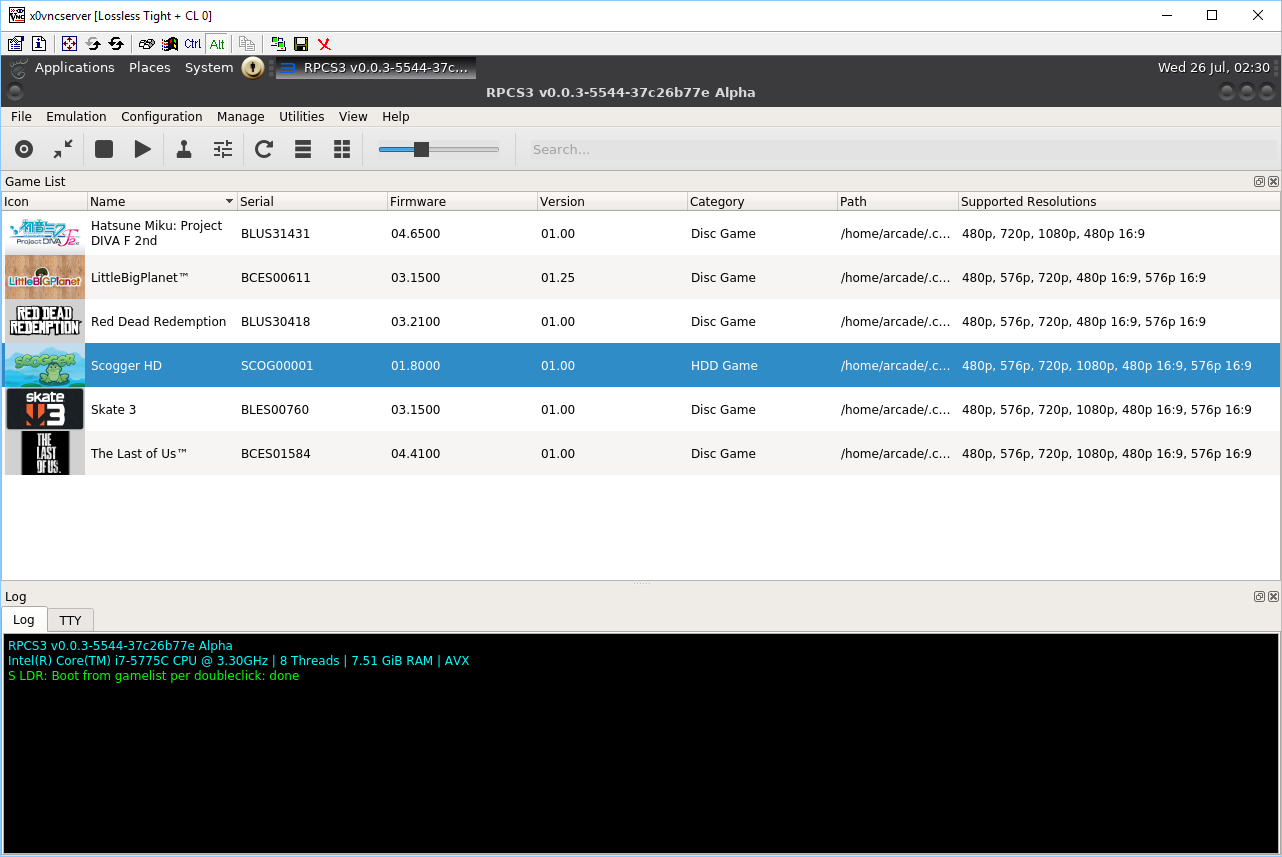
I've just rebuilt to test as I haven't tried since my last comment 9 days ago and it no-longer gives the st11range / narrow error. It doesn't actually start the game, but it's progress I guess? (no errors in console either except for "libpng warning: iCCP: known incorrect sRGB profile" repeatedly).
Enverex
on 26 Jul 2017
Hmm, can you upload RPCS3.log? it's located in ~/.config/rpcs3
hcorion
on 26 Jul 2017
Go on emulation and click start
 AniLeo
on 26 Jul 2017
AniLeo
on 26 Jul 2017
Go on emulation and click start
Ah, forgot about that. That works.
So anyway, it looks like the actual (narrow/strange) error was fixed sometime between now and 9 days ago, for reference.
Enverex
on 26 Jul 2017
So, you no longer have the issue?
hcorion
on 26 Jul 2017
Or go on configuration and look for the option that says always start on boot
AniLeo
on 26 Jul 2017
Correct. Happened when I built 9 days ago, doesn't happen after building from GIT 30 minutes ago.
Enverex
on 26 Jul 2017
Issue is fixed, @AniLeo Can you close it?
Let's break out the champagne.

hcorion
on 26 Jul 2017
Well done guys.
Out of curiosity, what was the root of the problem?
To add to this, it works fine regardless of whether I build with GCC 7 or LLVM 4.
Enverex
on 26 Jul 2017
The issue had to do with PIE (Position Independent Code). RPCS3 doesn't work if you have it enabled, so we had to manually disable it.
Basically it came down to obscure compiler arguments.
hcorion
on 26 Jul 2017
Well that must have been annoying. I've seen PIE issues in the past, but either the compiler choked at compile time complaining about PIE or the program itself threw a PIE related exception. At least it's sorted now!
Enverex
on 26 Jul 2017
Is there a way to lower the requirement of libstdc++.so.6 3.4.20 so that the AppImage could run on Ubuntu trusty?
Reference:
https://travis-ci.org/AppImage/AppImageHub/builds/266067582#L551
probonopd
on 18 Aug 2017
I feel like this would be a bad idea, mainly because RPCS3 is very complex, and has been known to surface bugs in C/C++ compilers.
I also think that nobody in our userbase should be using RPCS3 on Ubuntu 14.04, it's just too old for the experimental and cutting edge things it's doing/using (Vulkan, latest OpenGL etc.).
However, I understand the pains of working with Travis and 14.04 for CI.
Actually, come to think of it, I'm not even sure where the libstdc++ 6 requirement comes from?
It seems we install
      - libstdc++-5-dev
      - lib32stdc++6
but no 64-bit stdc++6?
Perhaps it comes from the Qt libs downloaded from their website?
hcorion
on 18 Aug 2017
Ubuntu 14.04 has an available upgrade path to 16.04.
I'd hate to see this project end up like Mumble where they're digging their own grave because they're trying to support every conceivable version/release of Ubuntu.
C0rn3j
on 18 Aug 2017
Yes, but the issue has to do with Travis CI being awful and not offering ubuntu 16.04 for their CI @C0rn3j
hcorion
on 18 Aug 2017
This means that your users using older distibutions will not be able to use the AppImage. Which is fine, as long as you are aware of it and can live with it.
probonopd
on 18 Aug 2017
Citra folks got around the problem with this
mirh
on 17 Sep 2017
Yes, I attempted to use Docker with the RPCS3 build, but it was becoming a huge nuisance.
Also, probonopd's problem wouldn't be solved by using a newer distro.
We'll just wait until Travis CI updates to 16.04.
"We have a plan to move to 16.04, but at the moment, we do not have ETA for it."
hcorion
on 17 Sep 2017
Related issues
 iBlackS0ul
·
3Comments
iBlackS0ul
·
3Comments
 Birch-san
·
3Comments
Birch-san
·
3Comments
 Nezarn
·
3Comments
AniLeo
·
3Comments
Nezarn
·
3Comments
AniLeo
·
3Comments
 Asinin3
·
3Comments
Asinin3
·
3Comments
Most helpful comment
Issue is fixed, @AniLeo Can you close it?

Let's break out the champagne.